
HPSBT230 - Earphones Sunstech - Free user manual and instructions
Find the device manual for free HPSBT230 Sunstech in PDF.


| Type of product | Wireless Bluetooth Headset |
| Brand | Sunstech |
| Model | HPSBT230 |
| Dimensions (approx.) | 18 x 15 x 8 cm |
| Weight (approx.) | 200 g |
| Power | Rechargeable lithium-ion battery (via USB cable) |
| Battery Life | Approximately 8 hours of playback |
| Charging Time | Approximately 2 hours |
| Connectivity | Bluetooth 5.0 |
| Main Functions | Music playback, hands-free calls, volume control, next/previous track |
| Care and Cleaning | Clean with a soft, dry cloth. Do not use chemical products. |
| Safety | Do not use at maximum volume for extended periods to preserve hearing. |
| Spare Parts | USB charging cable, ear cushions (replaceable) |
| Repairability | The cushions can be replaced. For other repairs, contact customer service. |
| Included Accessories | USB cable, user manual |
| Compatibility | Smartphones, tablets, computers with Bluetooth |
| Warranty | 2 years (according to legislation) |
Frequently Asked Questions - HPSBT230 Sunstech
User questions about HPSBT230 Sunstech
0 question about this device. Answer the ones you know or ask your own.
Ask a new question about this device
Download the instructions for your Earphones in PDF format for free! Find your manual HPSBT230 - Sunstech and take your electronic device back in hand. On this page are published all the documents necessary for the use of your device. HPSBT230 by Sunstech.
USER MANUAL HPSBT230 Sunstech
natural_image
Line drawing of two earless earchairs with adjustable straps and a power connector (no text or symbols)STEREO BT EARPHONES
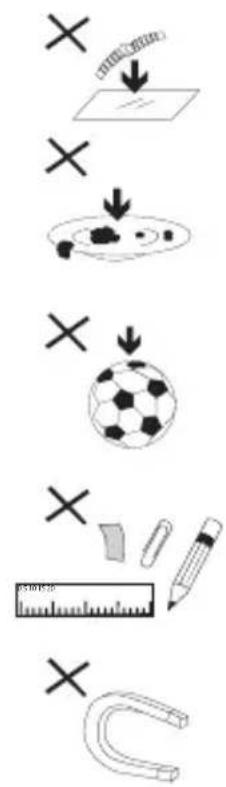
1-DO NOT place objects on top of the device, as objects may scratch the device.
2-DO NOT expose the device to dirty or dusty environments.
3-DO NOT place the device on an uneven or unstable surface.
4-DO NOT insert any foreign objects into the device.
5-DO NOT expose the device to strong magnetic or electrical field.


6-DO NOT expose the device to direct sunlight as it can damage the device. Keep it away from heat sources.
7-DO NOT store your device in temperatures higher than 40^ C(104°F). The internal operating temperature for this device is from 20^ C(68°F) to 60^ C(140°F).
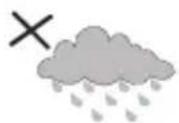
8-DO NOT use the device in the rain.
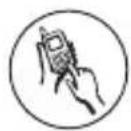
9-Please check with your Local Authority or retailer for proper disposal of electronic products.
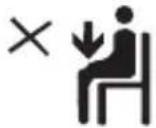
10-The device and adaptor may product some heat during normal operation of charging. To prevent discomfort or injury from heat exposure, DO NOT leave the device on your lap.
11-POWER INPUT RATING: Refer to the rating label on the device and be sure that the power adaptor complies with the rating. Only use accessories specified by the manufacturer.

12-Clean the device with a soft cloth. If needed, dampen the cloth slightly before cleaning. Never use abrasives or cleaning solutions.

- Always power off the device to install or remove external devices that do not support hot-plug.

14-Disconnect the device from an electrical outlet and power off before cleaning the device.
15-DO NOT disassemble the device. Only a certified service technician should perform repair.
16-The device has apertures to disperse heat. DO NOT block the device ventilation, the device may become hot and malfunction as a result.
17-Risk of explosion if battery replaced by an incorrect type. Dispose of used batteries according to the instruction.
18-PLUGGABLE EQUIPMENT: the socket-outlet shall be installed near the equipment and shall be easily accessible.
Thank you for purchasing the stereo bluetooth headset, we hope you will be delighted with its operation. Please read this user guide to get started, and to make the best use of the headset's features.
Box contents:
Bluetooth earphone
USB charging cable
User manual
-3 Pairs of Ear Tips-Small, Medium, Large (one pair already fitted)
-1 Pairs of Secure Fit Fins
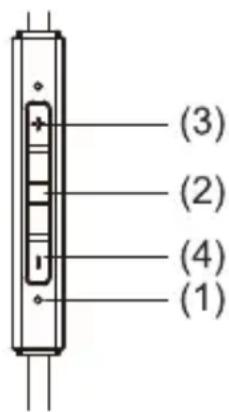
Overview:
(1)Microphone
(2)Multifunction Button
(3)Volume Up/Previous
(4)Volume Down/Next
(5)Micro USB Charging Input
(6)LED Light Indicator

Charging
Please perform one full charge prior to use
With the USB Charging Cable provided, insert the small (micro) USB section into the base of the R (right) earphone.
With the other end of the USB Cable, simply plug it into a PC or a AC USB Power Adaptor (Power Adaptor not included)
When the battery is fully charged, the red indicator will turn off and the blue indicator will turn on.
Pairing | Connecting

Pairing with Bluetooth Device
Please ensure your Bluetooth device has Bluetooth enabled
Start with the earphones in off mode.
Push and hold the multi function button (2) for 6 seconds, until the light flashes red and blue rapidly. The voice prompts will notify you that you have entered pairing mode.
Enter the menu of your phone / music device to pair in the Bluetooth menu.
Select "HPSBT230" from your device list. Some devices may ask for a verifying code which is 0000
Turning On | Off
Turning device on and off
Turn on—Hold multi button (2) for 3 seconds, you will be prompted by a voice saying "power on"
Turn off—Hold multi button (2) for 3 seconds or until you hear a series of beeps prompting you that the power is off.

Language Selection
HPSBT230 supports voice prompts in English, Spanish, French and Chinese. When the headset is ON, short press the volume buttons +/- at the same time and the headset will automatically switch to another language.
Phone Controls
Answer | End Call
When your phone rings, simply press the multi function(2)button to answer
Press the multi function (2) button to hang up
Track Skip Controls
Controlling Audio Tracks
Replaying a Song from the Beginning: While playing a track, you can hold Volume+ button (3) for 3 seconds, and the song will commence from the start.
< Track Back: Hold Volume+ button (3) for 3 seconds and the track will return to the start, then release Volume+ and press and hold again for 3 seconds
Track Forward: Hold Volume– button (4) for 3 seconds
Pausing Track: Press the Multifunction button (2)
Volume Control
Volume Control
Increase volume by rapidly pressing Volume+ button (3)
Decrease volume by rapidly pressing Volume-button (4)
Please note: Holding down the Volume buttons (+/-) will result in the track skipping forward or back
Specifications
| Bluetooth Version | Bluetooth V4.1 (ISSC2020) |
| Profile | A2DP/AVRCP/HSP/HFP |
| Effective Range | Up to 10 meters in working distance(open space) |
| Working time | Up to 6 hours talk time | Up to 5 hoursmusic playback time |
| Standby time | Up to 180 hours standby time |
| Input voltage | Input voltage : 5V |
| Charging time | Around 1.5-2hours |
| Weight | 15g |
Made in China
Important
- Before charging, please check the charger suitable for Bluetooth headset.
- Please use original battery and original USB cable. If you use other charger to charge, it may damage the headset.
- Bluetooth headset's battery is Li-ion polymer type. Don't take it out. Protect the product against spoilage.
- Keep your headset off when you don't use it. You need to charge three times each month in order to longer the lifespan of the battery.
- Don't throw the device into fire.
Note
Please kindly note that the functions or operations stated in this User Manual is only applicable to devices which support Bluetooth. Please carefully read instruction of your Bluetooth devices because the operation might be different.
Warranty conditions
-The warranty of this product is for 2 years since the purchase date.
- The warranty will exclude breakdowns caused by bad use of the product, wrong installation or installation in not desirable places for a proper maintenance of the product, rips, updates of the products that are not the supplied by the brand, pieces wore away for its use or for not domestic or inappropriate use.
Also are excluded breakdowns caused for manipulations of the products by people or companies alien to our company.
- For any request regarding the warranty terms, the purchase receipt must be attached.
Correct disposal of this product
To prevent possible harm to the environment or human health from uncontrolled waste disposal, please separate this from other types of wastes and recycle it responsible to promote the sustainable reuse of material resources. Household user should contact either the retailer where they purchased this product, or their local government office, for details of where and how they can take this item for environmentally safe recycling. Business users should contact their supplier and check the terms and conditions of the purchase contract. This product should not be mixed with other commercial wastes for disposal.

DECLARATIONOFCONFORMITY
Council Directive(s) to which conformity is declared:
Directive(1999/5/EC)-R&TTE Directive(2011/65/EU) - RoHS
Application of the Standards:
EN62479:2010
EN60950-1:2006+A11:2009+A1:2010+A12:2011+A2:2013
EN301489-1V1.9.2(2011-09)
EN301489-17V2.2.1(2012-09)
EN300328v1.8.1(2012-06)
EN50332-1:2013
IEC62321:2013
Manufacturer's name: AFEXSUNS,S.A.
Manufacturer's address: C/Pallars189,08005Barcelona
Type of equipment: BTHeadphone
Trade: SUNSTECH
Model no.: HPSBT230
We, the undersigned, hereby declare under our sole responsibility that the specifiedequipmentisinconformitywiththeaboveDirective(s)and
Standard(s)

Place: Barcelona
(Signature)
Víctor Planas Bas
(Full name)
General Manager
(Position)
Date: 30 - April - 2015
Date: 30 - April - 2015

natural_image
Symbol of a trash bin with crossed lines and a solid rectangle below (no text or labels)
DÉCLARATIONDECONFORMITÉ

- STEREO BT EARPHONES
- Box contents:
- Overview:
- Charging
- Please perform one full charge prior to use
- Pairing | Connecting
- Pairing with Bluetooth Device
- Turning On | Off
- Turning device on and off
- Language Selection
- Phone Controls
- Answer | End Call
- Track Skip Controls
- Controlling Audio Tracks
- Volume Control
- Important
- Note
- Warranty conditions
- Correct disposal of this product
- DECLARATIONOFCONFORMITY
- Directive(1999/5/EC)-R&TTE Directive(2011/65/EU) - RoHS
- EN62479:2010
- Manufacturer's name: AFEXSUNS,S.A.
- Manufacturer's address: C/Pallars189,08005Barcelona
- Type of equipment: BTHeadphone
- Trade: SUNSTECH
- Model no.: HPSBT230
- Standard(s)
- DÉCLARATIONDECONFORMITÉ
Brand : Sunstech
Model : HPSBT230
Category : Earphones