
AE2600W - Radio PHILIPS - Free user manual and instructions
Find the device manual for free AE2600W PHILIPS in PDF.


| Product Type | Portable AM/FM Radio |
| Brand | Philips |
| Model | AE2600W |
| Dimensions (approx.) | 200 x 130 x 80 mm |
| Weight (approx.) | 0.5 kg |
| Power Supply | 3 x AA batteries (not included) or AC adapter (optional) |
| Battery Life (approx.) | Up to 30 hours |
| Tuning Bands | AM (MW) and FM |
| Speaker | Built-in monophonic speaker |
| Headphone Jack | 3.5 mm stereo |
| Antenna | Telescopic FM antenna, built-in AM ferrite bar |
| Controls | Volume, tuning, band selector, power |
| Display | Analog dial with frequency scale |
| Special Features | Carry handle, belt clip |
| Color | White |
| Safety Precautions | Do not expose to rain or moisture. Keep away from heat sources. |
| Cleaning | Wipe with a soft, dry cloth. Do not use solvents. |
| Spare Parts / Accessories | None specified; contact Philips support for any replacements. |
| Repairability | Not user-serviceable. Refer to qualified personnel. |
| Warranty | Standard Philips warranty applies. |
| Manual Language | English (PDF available) |
Frequently Asked Questions - AE2600W PHILIPS
User questions about AE2600W PHILIPS
0 question about this device. Answer the ones you know or ask your own.
Ask a new question about this device
Download the instructions for your Radio in PDF format for free! Find your manual AE2600W - PHILIPS and take your electronic device back in hand. On this page are published all the documents necessary for the use of your device. AE2600W by PHILIPS.
USER MANUAL AE2600W PHILIPS
Always there to help you
Register your product and get support at www.philips.com/support

AE2600
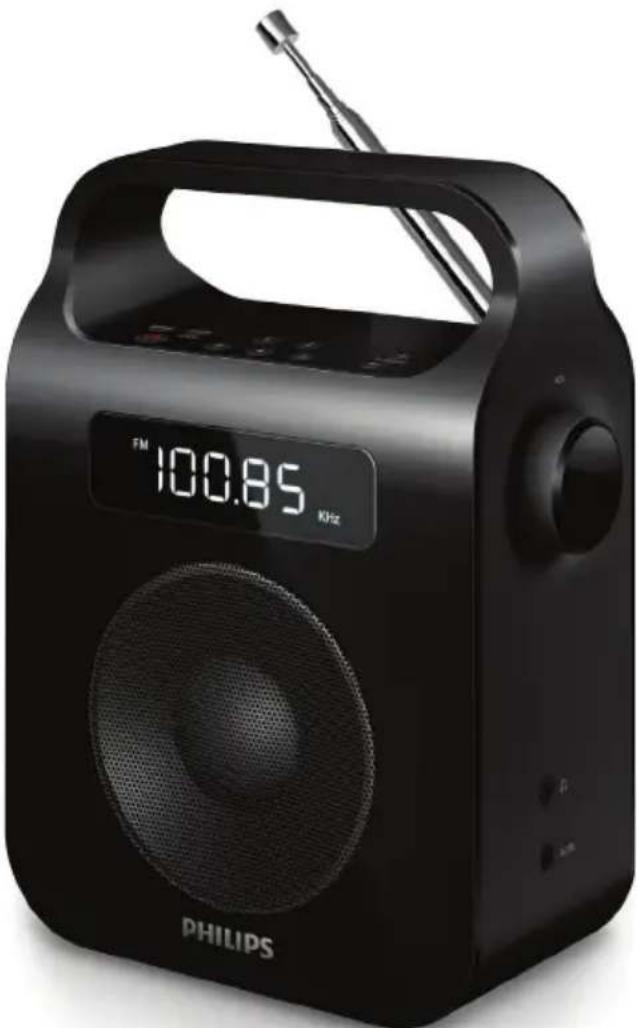
User manual
PHILIPS
Contents
1 Important 2 Safety 2 Notice 3
2 Your Portable Radio 4
What's in the box 4 Introduction 4 Overview of the main unit 5
3 Get started 6
Connect power 6
Set clock 7
Turn on 7
4 Listen to radio 8
Select FM/MW band 8 Tune to a radio station 8 Program radio stations automatically 8 Program radio stations manually 8 Select a preset radio station 8
5 Other features 9
Adjust the volume level 9 Listen through a headphone 9
6 Product information 10
Tuner 10 General information 10
7 Troubleshooting 11
1 Important
Safety
- Make sure that there is enough free space around the product for ventilation.
- Only use attachments or accessories specified by the manufacturer.
- Battery usage CAUTION – To prevent battery leakage which may result in bodily injury, property damage, or damage to the product:
• Install the batteries correctly, + and - as marked on the product. - Do not mix batteries (old and new or carbon and alkaline, etc.). - Remove the batteries when the product is not used for a long time. - The batteries shall not be exposed to excessive heat such as sunshine, fire or the like.
- Use only power supplies listed in the user manual.
- The product shall not be exposed to dripping or splashing.
- Do not place any sources of danger on the product (e.g. liquid filled objects, lighted candles).
- Where the mains plug or an appliance coupler is used as the disconnect device, the disconnect device shall remain readily operable.
Hearing safety
- To prevent possible hearing damage, do not listen at high volume levels for long periods.
The maximum output voltage of the headphone is not greater than 150 mV.
Listen at a moderate volume.
- Using headphones at a high volume can impair your hearing. This product can produce sounds in decibel ranges that may cause hearing loss for a normal person, even for exposure less than a minute. The higher decibel ranges are offered for those that may have already experienced some hearing loss. - Sound can be deceiving. Over time your hearing 'comfort level' adapts to higher volumes of sound. So after prolonged listening, what sounds 'normal' can actually be loud and harmful to your hearing. To guard against this, set your volume to a safe level before your hearing adapts and leave it there.
To establish a safe volume level:
- Set your volume control at a low setting.
- Slowly increase the sound until you can hear it comfortably and clearly, without distortion.
Listen for reasonable periods of time:
- Prolonged exposure to sound, even at normally 'safe' levels, can also cause hearing loss.
- Be sure to use your equipment reasonably and take appropriate breaks.
Be sure to observe the following guidelines when using your headphones.
- Listen at reasonable volumes for reasonable periods of time.
- Be careful not to adjust the volume as your hearing adapts.
- Do not turn up the volume so high that you can't hear what's around you.
- You should use caution or temporarily discontinue use in potentially hazardous situations. Do not use headphones while operating a motorized vehicle, cycling, skateboarding, etc.; it may create a traffic hazard and is illegal in many areas. With a lower priority than speaker output, headphone output is just an additional option.
Notice
Any changes or modifications made to this device that are not expressly approved by Gibson Innovations may void the user's authority to operate the equipment.
Notice for the European Union
Hereby, Gibson Innovations declares that this product is in compliance with the essential requirements and other relevant provisions of Directive 2014/53/EU. You can find the Declaration of Conformity on www.philips.com/support.
Disposal of your old product

Your product is designed and manufactured with high quality materials and components, which can be recycled and reused.

This symbol on a product means that the product is covered by European Directive 2012/19/EU. Inform yourself about the local separate collection system for electrical and electronic products. Follow local rules and never dispose of the product with normal household waste. Correct disposal of old products helps prevent negative consequences for the environment and human health.
Class II equipment symbol

This symbol indicates that the unit has a double insulation system.
Environmental information
All unnecessary packaging has been omitted. We have tried to make the packaging easy to separate into three materials: cardboard (box), polystyrene foam (buffer) and polyethylene (bags, protective foam sheet.)
Your system consists of materials which can be recycled and reused if disassembled by a specialized company. Please observe the local regulations regarding the disposal of packaging materials, exhausted batteries and old equipment.

Note
- The type plate is located on the bottom of the apparatus.
2 Your Portable Radio
Congratulations on your purchase, and welcome to Philips! To fully benefit from the support that Philips offers, register your product at www.philips.com/welcome.
What's in the box
Check and identify the contents of your package:
- Main unit
- Power adapter
- Printed materials
Introduction
With this unit, you can:
- know the time;
- listen to FM/MW radio stations.
Overview of the main unit
① SCAN/PROG
- Enter programming mode.
- Scan and store radio stations automatically.
- Set time in standby mode.
② BAND
- Select a tuner band: FM or MW.
③
- Turn on the radio or switch to standby mode.
④ Display panel
• Display the time/radio information.
⑤ AC IN
- AC power socket.
⑥
- Headphone socket.
⑦ VOLUME +/-knob
- Adjust volume.
⑧ + TUNING -
- Tune to a radio station.
- Adjust hour/minute digits.
⑨ Numeric keys 1 - 5
- Set or select a preset radio station.
⑩ Antenna
- Improve radio reception.
3 Get started

Caution
- Use of controls or adjustments or performance of procedures other than herein may result in hazardous radiation exposure or other unsafe operation.
Always follow the instructions in this chapter in sequence.
Connect power
You can use this radio on either AC power or battery power.
Battery Life (Approx. hours)
R14 (size C) 38
Option 1: AC power

Caution
- Risk of product damage! Ensure that the power supply voltage corresponds to the voltage printed on the back or the underside of the unit.
- Risk of electric shock! When you unplug the AC power cord, always pull the plug from the socket. Never pull the cord.
- Connect the supplied AC power cord to:
- the AC IN socket on the back of the unit.
- the wall outlet.

Install batteries

Caution
- Risk of explosion! Keep batteries away from heat, sunshine or fire. Never discard batteries in fire.
- Risk of product damage! When the apparatus is not used for long periods, remove the battery.
- Batteries contain chemical substances, so they should be disposed of properly.
1 Open the battery compartment. 2 Insert 4 × 1.5 V R14/C CELL/UM2 batteries (not supplied) with correct polarity (+/-) as indicated. 3 Close the battery compartment.


Tip
- When the main unit is powered by batteries, the backlight turns on for 5 seconds after any operation.
Set clock
1 In standby mode, press and hold SCAN/PROG for two seconds. → [24H] or [12H] begins to blink. 2 Press + TUNING - to set the time format, and then press SCAN/PROG to confirm. → The hour digits begin to blink. 3 Press + TUNING - to set the hour, and then press SCAN/PROG to confirm. → The minute digits begin to blink. 4 Press + TUNING - to set the minute, and then press SCAN/PROG to confirm the clock setting.
Turn on
- Press to turn on the radio. → The radio switches to the last selected band.
- Press ⏻ again to switch the radio to standby mode. → The clock (if set) displays on the panel.
4 Listen to radio
Select FM/MW band
1 Press to turn on the radio.
2 Press BAND to select the FM or MW waveband.
Tune to a radio station
To tune to a radio station:
- In FM/MW mode, press and hold + TUNING -. → The radio tunes to a station with strong reception automatically.
To tune to a radio station manually:
- In FM/MW mode, press + TUNING - repeatedly until you find the optimal reception.
Program radio stations automatically

Note
- You can program a maximum of 5 preset FM radio stations, and 5 preset MW radio stations.
1 Press to turn on the radio.
2 In FM/MW mode, press and hold SCAN/PROG for 2 seconds.
All available stations are programmed in the order of waveband reception strength. → The first programmed radio station broadcasts automatically.
Program radio stations manually

Note
- You can program a maximum of 5 preset FM radio stations, and 5 preset MW radio stations.
1 Press to turn on the radio. 2 In FM/MW mode, press + TUNING - repeatedly to tune to a radio station. 3 Press and hold a numeric key (1 -5) to save the radio station to the corresponding number. 4 Repeat steps 2 - 3 to program more stations.
At the above step 3, you can also program radio stations in the following way:
1 Press SCAN/PROG to enter programming mode. 2 Press + TUNING - repeatedly to select a preset number, then press SCAN/PROG to confirm and save the station to the corresponding number. 3 Repeat steps 1 - 2 to program more stations.

Tip
• To overwrite a programmed station, program another station in its place.
Select a preset radio station
1 Press to turn on the radio. 2 In FM/MW mode, press 1 - 5 to select a preset radio station.
5 Other features
Adjust the volume level
- During play, rotate the VOL knob to increase/decrease the volume level.
Listen through a headphone
- Plug a headphone (not supplied) into the socket on the unit.
6 Product information

Note
- Product information is subject to change without prior notice.
| Standby Power Consumption | < 1 W |
| Dimensions | |
| - Main Unit (W × H × D) | 138.5 × 186 × 79 mm |
| Weight (Main unit, without packing) | 0.57 kg |
Tuner
| Tuning Range FM: 87.50 -108.00 MHzMW: 531 - 1602KHz | |
| Tuning grid FM: 50 KHZ;MW: 9 KHZ | |
| Sensitivity: | |
| - Mono, 26dB S/N Ratio | FM: < 22 dBf; MW: 3250uV/m |
| - Stereo, 46dB S/N Ratio | FM: > 43 dBf |
| Search Sensitivity FM: > 28 dBf; MW: 6000uV/m | |
| Total Harmonic Distortion | FM: < 3%; MW: < 3% |
| Signal to Noise Ratio FM: > 55dB;MW: > 40dB | |
General information
| AC power EML412511VD; | |
| IN 220V~240V | |
| 50Hz/60Hz; OUT | |
| AC5V ~ 1A | |
| Battery 6V, 4x1.5V Size "C"/R14/UM2 CELL | |
| Rated Output Power 1.2 W | |
| Operation Power Consumption | <5 W |
7 Troubleshooting

Warning
• Never remove the casing of this apparatus.
To keep the warranty valid, never try to repair the system yourself.
If you encounter problems when using this apparatus, check the following points before requesting service. If the problem remains unsolved, go to the Philips web site (www.philips.com/welcome). When you contact Philips, ensure that the apparatus is nearby and the model number and serial number are available.
No power
• Make sure that the Mains cord is connected securely. • Make sure that there is power at the AC Mains. • Make sure that the batteries are inserted correctly. • Make sure that the batteries are not used up.
No sound
- Adjust the volume.
- Disconnect the headphone.
Clock setting erased
- Replace the batteries. • Power has been interrupted or the power plug has been disconnected.
- Reset the clock.
No response from the unit
- Reinstall the batteries and turn on the unit again.
- Disconnect and reconnect the AC power plug, then turn on the unit again.
Poor radio reception
- Increase the distance between the unit and your TV or other radiation sources. • Fully extend the antenna.
- Adjust the position of the antenna.


- ALWAYS THERE TO HELP YOU
- USER MANUAL
- PHILIPS
- CONTENTS
- IMPORTANT
- SAFETY
- HEARING SAFETY
- THE MAXIMUM OUTPUT VOLTAGE OF THE HEADPHONE IS NOT GREATER THAN 150 MV
- LISTEN AT A MODERATE VOLUME
- TO ESTABLISH A SAFE VOLUME LEVEL
- LISTEN FOR REASONABLE PERIODS OF TIME
- BE SURE TO OBSERVE THE FOLLOWING GUIDELINES WHEN USING YOUR HEADPHONES
- NOTICE
- NOTICE FOR THE EUROPEAN UNION
- DISPOSAL OF YOUR OLD PRODUCT
- CLASS II EQUIPMENT SYMBOL
- ENVIRONMENTAL INFORMATION
- NOTE
- YOUR PORTABLE RADIO
- WHAT'S IN THE BOX
- INTRODUCTION
- ① SCAN/PROG
- ② BAND
- ③
- ④ DISPLAY PANEL
- ⑤ AC IN
- ⑥
- ⑦ VOLUME +/-KNOB
- ⑧ + TUNING
- ⑨ NUMERIC KEYS
- ⑩ ANTENNA
- GET STARTED
- CAUTION
- CONNECT POWER
- OPTION 1: AC POWER
- INSTALL BATTERIES
- TIP
- SET CLOCK
- TURN ON
- LISTEN TO RADIO
- SELECT FM/MW BAND
- TUNE TO A RADIO STATION
- TO TUNE TO A RADIO STATION
- TO TUNE TO A RADIO STATION MANUALLY
- PROGRAM RADIO STATIONS AUTOMATICALLY
- PROGRAM RADIO STATIONS MANUALLY
- AT THE ABOVE STEP 3, YOU CAN ALSO PROGRAM RADIO STATIONS IN THE FOLLOWING WAY
- SELECT A PRESET RADIO STATION
- OTHER FEATURES
- ADJUST THE VOLUME LEVEL
- LISTEN THROUGH A HEADPHONE
- PRODUCT INFORMATION
- TROUBLESHOOTING
- WARNING
- NO POWER
- NO SOUND
- CLOCK SETTING ERASED
- NO RESPONSE FROM THE UNIT
- POOR RADIO RECEPTION
Brand : PHILIPS
Model : AE2600W
Category : Radio