
DHD-131 - Audio/video extension D-LINK - Free user manual and instructions
Find the device manual for free DHD-131 D-LINK in PDF.


| Product Type | Audio/Video Extender |
| Brand | D-Link |
| Model | DHD-131 |
| Dimensions (approx.) | 10 x 6 x 2 cm |
| Weight (approx.) | 200 g |
| Power Supply | DC 5V, 1A via included adapter |
| Wireless Technology | Proprietary RF, 5 GHz band |
| Maximum Range | Up to 50 m (line of sight) |
| Video Resolution Support | Up to 1080p @ 60 Hz |
| Audio Support | Stereo analog, digital optical |
| Connections | HDMI input, HDMI output, IR blaster/extender |
| Plug & Play | Yes, no software required |
| IR Remote Passthrough | Yes, via included IR cables |
| Operating Temperature | 0°C to 45°C |
| Humidity | 10% to 85% non-condensing |
| Certifications | CE, FCC, RoHS |
| Cleaning Instructions | Wipe with a soft, dry cloth |
| Repairability | Parts available through D-Link service centers |
| Package Contents | Main unit (transmitter & receiver pair), power adapters, HDMI cables, IR cables, user manual |
Frequently Asked Questions - DHD-131 D-LINK
User questions about DHD-131 D-LINK
0 question about this device. Answer the ones you know or ask your own.
Ask a new question about this device
Download the instructions for your Audio/video extension in PDF format for free! Find your manual DHD-131 - D-LINK and take your electronic device back in hand. On this page are published all the documents necessary for the use of your device. DHD-131 by D-LINK.
USER MANUAL DHD-131 D-LINK
MainStage™ TV Adapter for Intel® Wireless Display

natural_image
Black rectangular electronic device casing with no visible text or symbolsThank you for purchasing the MainStage™ TV Adapter. Follow the easy steps in this guide to properly set up your device. Please verify that all the package contents listed below are available.
Package Contents

natural_image
Three white cable connectors on a gray background: one rectangular, two coiled wires, and one plug (no text or symbols)DHD-131 MainStage™ TV Adapter for Intel® Wireless Display
HDMI Cable
Power Adapter
If any of the above items are missing, please contact your reseller.
System Requirements
- Laptop featuring Intel® Wireless generation Intel® Core™ processor
• TV with a HDMI or AV Composite input
Hardware Overview

| 1 Reset Button 4 S/PDIF Digital Audio Port | |
| 2 HDMI Port 5 On/Off Button | |
| 3 Composite Audio/Video Ports 6 Power Connector | |
Installation
Step 1
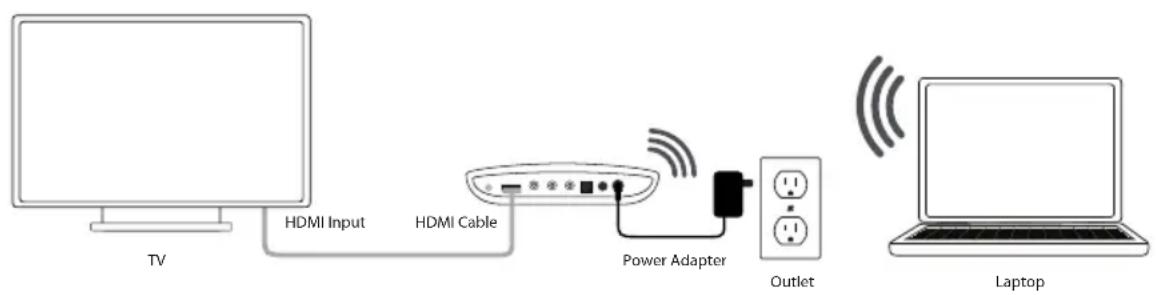
Connect the MainStage™ TV adapter to your TV. Use the HDMI connection for the best quality video.
Step 2
Connect the supplied power adapter to the back of the MainStage™ TV adapter and the other end to a power outlet or surge protector. The MainStage™ TV adapter LED is red when it powers up. Then the LED turns yellow to indicate it is ready, but is not yet connected to your computer.
Step 3
Power on your TV and select the correct TV input source. Please refer to your TV documentation for instructions on how to change your input source.
Step 4
The Startup screen displays on your TV within 30 seconds. If this screen does not appear, make sure your TV is set to the correct video input and all the cables are firmly secured.
Step 5
Launch the Intel® Wireless Display software on your laptop. S laptops may have a button or key, or launch from Windows. Click Start, type Intel® Wireless Display in the search field and then run the Intel® Wireless Display software.
Step 6
Use the Intel® Wireless Display software to scan and find the MainStage™ TV adapter. The screen below shows that the Intel® Wireless Display software has found the wireless adapter.

Step 7
Double-click the MainStage™ TV adapter listed under Detected Adapte to connect to it. The LED on the TV adapter will start flashing green.
If you are connecting the laptop to the MainStage™ TV adapter for the first time, it will display a 4-digit security code on the TV. Enter this 4-digit security code into the Intel® Wireless Display software.
Step 8
The TV screen will display your laptop screen and the LED MainStage™ TV adapter will turn solid green. Your device is now ready to use.
TECHNICAL SUPPORT
You can find software updates and user documentation on the D-Link website.
Tech Support for customers in
Australia:
Tel: 1300-766-868
24/7 Technical Support
Web: http://www.dlink.com.au
E-mail: support@dlink.com.au
India:
Tel: 1800-233-0000 (MTNL & BSNL Toll Free)
+91-832-2885700 (GSM, CDMA & Others)
Web: www.dlink.co.in
E-Mail: helpdesk@dlink.co.in
Singapore, Thailand, Indonesia, Malaysia, Philippines, Vietnam:
Singapore - www.dlink.com.sg
Philippines - www.dlink.com.ph
Vietnam - www.dlink.com.vn
Korea:
Tel: +82-2-2028-1810
Monday to Friday 9:00am to 6:00pm
24/7 Technical Support
Web: http://www.dlink.co.nz
E-mail: support@dlink.co.nz
South Africa and Sub Sahara Region:
Tel: +27-12-665-2165
08600 DLINK (for South Africa only)
Monday to Friday 8:30am to 9:00pm South
Africa Time
Web: http://www.d-link.co.za
E-mail: support@d-link.co.za
Saudi Arabia (KSA):
Tel: +966 01 217 0008
Fax: +966 01 217 0009
Saturday to Wednesday 9.30AM to 6.30PM
Thursdays 9.30AM to 2.00 PM
E-mail: Support.sa@dlink-me.com
D-Link
D-Link Middle East - Dubai, U.A.E.
Plot No. S31102,
Jebel Ali Free Zone South,
P.O.Box 18224, Dubai, U.A.E.
Tel: +971-4-8809022
Fax: +971-4-8809066 / 8809069
Technical Support: +971-4-8809033
General Inquiries: info.me@dlink-me.com
Tech Support: support.me@dlink-me.com
Egypt
1, Makram Ebeid Street - City Lights Building
Nasrcity - Cairo, Egypt
Floor 6, office C2
Tel.: +2 02 26718375 - +2 02 26717280
Technical Support: +2 02 26738470
General Inquiries: info.eg@dlink-me.com
Tech Support: support.eg@dlink-me.com
Kingdom of Saudi Arabia
Office # 84 ,
Al Khaleej Building ( Mujamathu Al-Khaleej)
Opp. King Fahd Road, Olaya
Riyadh - Saudi Arabia
Tel: +966 1 217 0008
Technical Support:
+966 1 2170009 / +966 2 6522951
General Inquiries: info.sa@dlink-me.com
Tech Support: support.sa@dlink-me.com
Pakistan
Islamabad Office:
61-A, Jinnah Avenue, Blue Area,
Suite # 11, EBC, Saudi Pak Tower,
Islamabad - Pakistan
Tel.: +92-51-2800397, 2800398
Fax: +92-51-2800399
Karachi Office:
D-147/1, KDA Scheme # 1,
Opposite Mudassir Park, Karsaz Road,
Karachi – Pakistan
Phone: +92-21-34548158, 34326649
Fax: +92-21-4375727
Technical Support: +92-21-34548310, 34305069
General Inquiries: info.pk@dlink-me.com
Tech Support: support.pk@dlink-me.com
TECHNICAL SUPPORT
Iran
Unit 5, 5th Floor, No. 20, 17th Alley, Bokharest
St., Argentine Sq.,
Tehran IRAN
Postal Code : 1513833817
Tel: +98-21-88880918,19
+98-21-88706653,54
General Inquiries: info.ir@dlink-me.com
Tech Support: support.ir@dlink-me.com
Morocco
M.I.T.C
Web:www.dlink.com.tr
Teknik Destek: support.tr@dlink.com.tr
ISRAEL
בַרְשָׁה
20
49348 n"ɔ, 170n n"ɔ
7060.Т.Л
073-277-11-77 :||970
natural_image
Solid black rectangular object with rounded edges, resembling a button or tray (no text or symbols visible)natural_image
Three white cable connectors on gray background: rectangular, coiled wire, and plug (no text or symbols)DHD-131 – TB адаптер MainStage™ для Intel® Wireless Display
HDMI кабель
Адаптер питания
War 7
natural_image
Black rectangular electronic device casing with smooth surface and no visible text or symbolsnatural_image
Three gray rectangular panels showing white cable and plug symbols, no text or labels present.DHD-131 MainStage™ TV Adaptador para Intel® Wireless
Cable HDMI
Paso 7
natural_image
Black rectangular electronic device with rounded edges and a small mark on the side (no visible text or symbols)Etapa 7
MainStage™ TV Adapter for Intel® Wireless Display

natural_image
Solid black rectangular object with rounded edges, resembling a battery or electronic device (no text or symbols visible)- 筆記型電腦並且支援 Intel® Wireless Display and powered by a 2nd generation Intel® Core™ processor
• 具備HDMI或AV端子的電視機
硬體檢視

步驟七
MainStage™ TV Adapter for Intel® Wireless Display

natural_image
Black rectangular electronic device casing with rounded edges and a small mark on the side (no visible text or symbols)natural_image
Three gray-scale icons showing a battery, a cable with plug connectors, and a plug plug (no text or symbols)DHD-131 MainStage™ TV Adapter for Intel® Wireless Display
Kabel HDMI
Power Adapter
Langkah 7
- Package Contents
- System Requirements
- Installation
- Step 1
- Step 2
- Step 3
- Step 4
- Step 5
- Step 6
- Step 7
- Step 8
- TECHNICAL SUPPORT
- Tech Support for customers in
- Australia:
- India:
- Singapore, Thailand, Indonesia, Malaysia, Philippines, Vietnam:
- Korea:
- South Africa and Sub Sahara Region:
- Saudi Arabia (KSA):
- D-Link
- D-Link Middle East - Dubai, U.A.E.
- Egypt
- Kingdom of Saudi Arabia
- Pakistan
- Iran
- Morocco
- War 7
- Paso 7
- Etapa 7
- 步驟七
- Langkah 7
Brand : D-LINK
Model : DHD-131
Category : Audio/video extension