
47.3003 - Weather Station TFA - Free user manual and instructions
Find the device manual for free 47.3003 TFA in PDF.


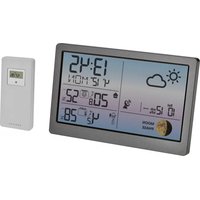
| Product type | Wireless weather station |
| Brand | TFA |
| Model | 47.3003 |
| Dimensions (indoor unit) | 150 x 100 x 30 mm |
| Dimensions (outdoor sensor) | 130 x 80 x 25 mm |
| Weight (indoor unit) | 150 g |
| Weight (outdoor sensor) | 100 g |
| Power supply (indoor unit) | 2 AA 1.5V batteries (not included) |
| Power supply (outdoor sensor) | 2 AA 1.5V batteries (not included) |
| Transmission frequency | 868 MHz |
| Maximum range | 100 m in open field |
| Outdoor sensor | Temperature and humidity |
| Display | Indoor/outdoor temperature, humidity, atmospheric pressure, weather forecast, moon phase, DCF-77 radio-controlled clock |
| Special functions | Alarm, weather trend, min/max values, alarm clock |
| Maintenance | Clean with a soft, dry cloth |
| Safety | Do not expose to moisture, do not open the housing |
| Spare parts | Additional sensors available as optional |
| Repairability | Not user repairable, contact customer service |
| Box contents | Indoor station, outdoor sensor, instruction manual |
Frequently Asked Questions - 47.3003 TFA
User questions about 47.3003 TFA
0 question about this device. Answer the ones you know or ask your own.
Ask a new question about this device
Download the instructions for your Weather Station in PDF format for free! Find your manual 47.3003 - TFA and take your electronic device back in hand. On this page are published all the documents necessary for the use of your device. 47.3003 by TFA.
USER MANUAL 47.3003 TFA
No part of this manual may be reproduced without written consent of TFA Dostmann. The technical data are correct at the time of going to print and may change without prior notice.
The latest technical data and information about this product can be found in our homepage by simply entering the product number in the search box.
EU declaration of conformity
Hereby, TFA Dostmann declares that the radio equipment type 47.3003 is in compliance with Directive 2014/53/EU. The full text of the EU declaration of conformity is available at the following Internet address:
www.tfa-dostmann.de/service/downloads/ce
www.tfa-dostmann.de


Instruction manuals
www.tfa-dostmann.de/en/service/downloads/instruction-manuals
Kat. Nr. 47.3003

MONSUN - Funk-Regenmesser

MONSUN – Wireless rain gauge

Thank you for choosing this instrument from TFA.
1. Before you start using it
- Please make sure to read the instruction manual carefully.
• Following and respecting the instructions in your manual will prevent damage to your instrument and loss of your statutory rights arising from defects due to incorrect use. - We shall not be liable for any damage occurring as a result of not following these instructions. Likewise, we take no responsibility for any incorrect readings and for any consequences which may result from them.
- Please take particular note of the safety advice!
- Please keep this instruction manual for future reference.
2. Delivery contents
• Wireless rain gauge (base station)
• Transmitter (Cat.-Nr. 30.3161)
- Stand
• Batteries 5 x 1.5 V AA
• Instruction manual
3. Field of operation and all of the benefits of your new instrument at a glance
- Wireless transmission of outdoor temperature and rainfall quantity (433 MHz), distance range up to 30 m (free field), with temperature trend indicator
• Rain sensor with alarm - Indication of total rainfall quantity, of the last hour, the last 24 hours and the last rain with time and date of recording
• Bar graph indication and history of the last 7 days, weeks and months - Indoor temperature
• Maximum and minimum temperature - Programmable temperature alarm
- Clock with date
- Base station for wall mounting or table standing
• Very simple installation, no cables required - Ideal for gardening and agricultural purposes and for all those who want to know more about nature
4. For your safety
- This product is exclusively intended for the field of application described above. It should only be used as described within these instructions.
- Unauthorised repairs, modifications or changes to the product are prohibited.

Caution! Risk of injury:
- Keep these instruments and the batteries out of the reach of children.
- Batteries contain harmful acids and may be hazardous if swallowed. If a battery is swallowed, this can lead to serious internal burns and death within two hours. If you suspect a battery could have been swallowed or otherwise caught in the body, seek medical help immediately.
MONSUN - Wireless rain gauge

- Batteries must not be thrown into a fire, short-circuited, taken apart or recharged. Risk of explosion!
- Low batteries should be changed as soon as possible to prevent damage caused by leaking. Never use a combination of old and new batteries together, nor batteries of different types.
- Wear chemical-resistant protective gloves and safety glasses when handling leaking batteries.

Important information on product safety!
- Do not place your product near extreme temperatures, vibrations or shocks.
- Protect the base station from moisture.
5. Elements
5.1 Receiver (Base station) Fig. 1
LCD
A1: Outdoor temperature
A2: Trend indicator
A3: Time
A4: Rain sensor
A5: Bar graph indication rainfall quantity
Buttons
B1: "▲ HISTORY" button
B2: "SET/RAIN" button
B3: "▼ SINCE" button
B4: "IN/OUT TEMPI/SEARCH" button
B5: "ALERT" button
B6: "MAX/MIN" button
B7: "RESET" button
Housing
C1: Wall mounting hole
C2: Battery compartment
C3: Stand (mountable)
5.2 Transmitter Fig. 2
D1: Battery compartment
6. Getting started
6.1 Base station
- Open the battery compartment and remove the battery insulation strip. Close the battery compartment. Pull off the protective foil from the display.
6.2 Setting of the clock and calendar
- After batteries were inserted, or when holding "SET" button for 3 seconds, the 24 h digit begins to flash. Press ▲" or "▼" button to choose 12 HR or 24 HR system. Using "SET" button you can switch to setting hours, minutes, seconds, year, month/day sequence, month, day, mmlinch, °CIF and rain sensor alarm ON or OFF.
MONSUN – Wireless rain gauge

- In "month/day sequence" the two different date displays can be selected: month/date (American version) or date/month (European version).
6.3 Reception of outdoor transmitter
- Open the battery compartment of the outdoor rain sensor with a screw driver and insert the batteries (2 x 1.5 V AA), polarity as illustrated.
- The base station automatically starts scanning the 433 MHz signal to register the rain sensor unit after setting time. The symbol ⚫ashes when the signal is received successfully. If the reception of outdoor values fails, “- -” appears on the display. Check the batteries and try it again. Check if there is any source of interference.
- Manual initialization can be helpful. Hold "SEARCH" button on the base station for 3 seconds.
• After successful installation screw up the battery compartment of the transmitter carefully.
7. How to operate
- Important: Buttons will not function while scanning the outdoor transmitter signal.
- During operation, all successful settings will be confirmed by an acoustical signal.
- The instrument will quit the setting mode, if there is no button used within 15 seconds.
- Holding "▲" or "▼" button, you will enter fast mode.
7.1 Rain gauge
7.1.1 Rain sensor alarm
- When it starts to rain an alarm signal will sound for 2 seconds and the symbol begins to flash. Press any button to stop the alarm. The display stops flashing 30 minutes after the rain has finished.
- Set the acoustic rain sensor alarm on or off during setting mode (see 6.2). "AL ON → AL OF".
- appears on the display when alarm sound is activated.
7.1.2 Indication of date
- Press "SET/RAIN" button to show the date.
7.1.3 Indication of rainfall quantity
- Press "SET/RAIN" button again to show the following information:
- Indication of total rainfall quantity since the last reset. Hold "SET/RAIN" button for 3 seconds to clear the recorded reading.
- Rainfall quantity of the last hour (1H), update every 10 minutes.
- Rainfall quantity of the last 24 hours (24H), update every hour.
- Rainfall quantity of the last rain. The resetting happens with the start of new rain.
7.1.4 Time and date of recording
- You can recall the time, date and year of recording for every value by pressing "SINCE" button repeatedly.
7.1.5 Bar graph indication and history
- Press "HISTORY" button to show the bar graph indication of the rainfall quantities for the last 7 days (DAILY), weeks (WEEKLY) and months (MONTHLY).
MONSUN - Wireless rain gauge

- Hold "HISTORY" button to recall the value of the current time period (current day, week or month = 0). Press "HISTORY" button again to recall all single values (1 to 6).
- Press and hold "HISTORY" button and "SINCE" button for 3 seconds at the same time to reset the memory completely.
7.2 Thermometer
7.2.1 Indoor outdoor temperature
- Press "IN/OUT TEMPISEARCH" button to show indoor (INTEMP) or outdoor (OUTTEMP) temperature.
7.2.2 Trend pointer
- The trend pointer displayed on the LCD indicates if the outdoor temperature is increasing, steady or decreasing.
7.2.3 Maximum/Minimum function
- Press "MAXiMIN" button to show the maximum (MAX) and minimum (MIN) temperature of the indoor and outdoor sensor one after the other.
- Hold "MAX/MIN" button for 3 seconds to clear the recorded maximum and minimum reading.
7.2.4 Temperature alert
- Press "ALERT" button to set the temperature alert function on or off. (appears on the LCD if this function is on).
- Hold "ALERT" button for 3 seconds to enter the Alert setting mode. Indoor temperature flashes. Press "▲" or "▼" button to select indoor or outdoor temperature for the temperature alert. Press "ALERT" button to confirm the settings. Press "▲" or "▼" button to set the upper temperature limit (upwards arrow ≡ is flashing). Press "ALERT" button to confirm the settings. Press "▲" or "▼" button to set the lower temperature limit (downwards arrow ≡ flashing).
- When passing or falling below the selected temperature limit an alarm signal will sound for 5 seconds and the temperature display begins to flash. The alarm signal keeps on beeping every minute as long as the temperature is higher/lower than the preset value (5 times maximum) or the "ALERT" button is pressed.
- Attention: Is the temperature within the preset limits the display stops flashing.
8. Positioning of base station and transmitter
- The outdoor sensor unit should be securely placed on a horizontal surface in an open area. Avoid trees or other coverings where rainfall may be reduced causing inaccurate reading.
- Place the base station at the final position. Avoid the vicinity of any interfering field like computer monitors or TV sets and solid metal objects.
- Check the transmission of the signal from the transmitter to the base station (transmission range 30 m free field), within ferro-concrete rooms, especially with metal parts, the received signal is naturally weakened.
- If necessary choose another position for transmitter and/or base station.
- With the mountable leg the base station can be placed onto any flat surface or wall mounted by the wall mounting hole.
9. Care and maintenance
- Clean the instruments with a soft damp cloth. Do not use solvents or scouring agents
- Remove the batteries if you do not use the products for a long period of time.
MONSUN – Wireless rain gauge

- Please switch off the base station if you do not use it for a long period of time. Press "RAIN" button and "SEARCH" button at the same time.
9.1 Battery replacement
- When the batteries in the outdoor sensor unit are used up, low battery icon appears on the LCD of the base station.
- Open the battery compartment of the transmitter (screwed). Insert two new batteries 1.5 V AA, observing the correct polarity.
• After successful installation tighten the screw of the battery compartment of transmitter carefully. - Please note: When the batteries are changed, the contact between transmitter and receiver must be restored – so always insert new batteries into both units or start a manual transmitter search.
10. Troubleshooting
Problems Solution
No indication → Ensure that the polarity of the batteries is correct
at the base station → Change the batteries
No transmitter reception → Check batteries of external transmitter Display “---” (do not use rechargeable batteries!)
→ Restart the transmitter and the base station according to the manual
→ Start manual search for the transmitter: Hold "SEARCH" button on the base station for 3 seconds
→ Choose another place for the transmitter and/or the base station
→ Reduce the distance between the transmitter and the base station
→ Check if there is any source of interference
Incorrect display
→ Change the batteries
→ Press the RESET button with a pin on the base station
11. Waste disposal
This product has been manufactured using high-grade materials and components which can be recycled and reused.

Never dispose of empty batteries and rechargeable batteries in household waste.
As a consumer, you are legally required to take them to your retail store or to appropriate collection sites depending on national or local regulations in order to protect the environment.
The symbols for the heavy metals contained are:
Cd=cadmium, Hg=mercury, Pb=lead
This instrument is labelled in accordance with the EU Waste Electrical and Electronic Equipment Directive (WEEE).
MONSUN - Wireless rain gauge

Please do not dispose of this instrument in household waste. The user is obligated to take end-of-life devices to a designated collection point for the disposal of electrical and electronic equipment, in order to ensure environmentally-compatible disposal.
12. Specifications
Base station:
Measuring range
Indoor temperature: -10 °C... +50 °C (+14 °F... +122 °F)
Power consumption: 3 x 1.5 V AA (batteries included)
Dimensions: 94 x 25 (48) x 122 (130) mm
Weight: 114 g (only instrument)
Transmitter:
Measuring range
Outdoor temperatur: -50°C...+70°C ( -58°F...+158°F )
Rainfall quantity: 0...9999 mm (0...999.9 inch)
Transmission frequency: 433 MHz
Maximum
radio-frequency power: < 10mW
Transmission range: max. 30 m
Power consumption: 2 x 1,5 V AA (batteries included)
Dimensions: ∅ 132 x 160 mm
Weight: 247 g (instrument only)


- EU DECLARATION OF CONFORMITY
- WWW.TFA-DOSTMANN.DE
- MONSUN - FUNK-REGENMESSER
- MONSUN – WIRELESS RAIN GAUGE
- BEFORE YOU START USING IT
- DELIVERY CONTENTS
- FIELD OF OPERATION AND ALL OF THE BENEFITS OF YOUR NEW INSTRUMENT AT A GLANCE
- FOR YOUR SAFETY
- CAUTION! RISK OF INJURY
- MONSUN - WIRELESS RAIN GAUGE
- IMPORTANT INFORMATION ON PRODUCT SAFETY
- ELEMENTS
- 5.1 RECEIVER (BASE STATION) FIG. 1
- LCD
- BUTTONS
- HOUSING
- 5.2 TRANSMITTER FIG. 2
- GETTING STARTED
- 6.1 BASE STATION
- 6.2 SETTING OF THE CLOCK AND CALENDAR
- 6.3 RECEPTION OF OUTDOOR TRANSMITTER
- HOW TO OPERATE
- 7.1 RAIN GAUGE
- 7.1.1 RAIN SENSOR ALARM
- 7.1.2 INDICATION OF DATE
- 7.1.3 INDICATION OF RAINFALL QUANTITY
- 7.1.4 TIME AND DATE OF RECORDING
- 7.1.5 BAR GRAPH INDICATION AND HISTORY
- 7.2 THERMOMETER
- 7.2.1 INDOOR OUTDOOR TEMPERATURE
- 7.2.2 TREND POINTER
- 7.2.3 MAXIMUM/MINIMUM FUNCTION
- 7.2.4 TEMPERATURE ALERT
- POSITIONING OF BASE STATION AND TRANSMITTER
- CARE AND MAINTENANCE
- 9.1 BATTERY REPLACEMENT
- TROUBLESHOOTING
- PROBLEMS SOLUTION
- WASTE DISPOSAL
- SPECIFICATIONS
- BASE STATION
- TRANSMITTER
Brand : TFA
Model : 47.3003
Category : Weather Station