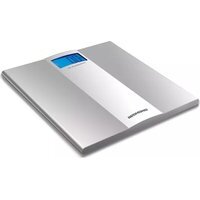
RS-710 - Scale Redmond - Free user manual and instructions
Find the device manual for free RS-710 Redmond in PDF.


| Product Type | Digital Body Scale |
| Brand | Redmond |
| Model | RS-710 |
| Dimensions (W x D x H) | 30 x 30 x 2.5 cm |
| Weight | 2.0 kg |
| Power Source | 2 x AAA batteries (included) |
| Maximum Capacity | 180 kg (396 lbs) |
| Accuracy | 100 g (0.1 kg) increments |
| Display | Large LCD, blue backlight |
| Platform Material | Tempered glass |
| Units | kg / lb / st |
| Auto-Off | Yes, after 10 seconds of inactivity |
| Tare Function | Yes |
| Calibration | Automatic internal calibration |
| Overload Indicator | Yes, “Err” display |
| Low Battery Indicator | Yes |
| Features | Tempered glass platform, step-on auto power |
| Cleaning | Wipe with a damp cloth; do not immerse |
| Storage | Store in a dry place |
| Safety | Non-slip feet, CE compliant |
| Spare Parts | Battery compartment cover |
| Repairability | Contact Redmond service center for repairs |
Frequently Asked Questions - RS-710 Redmond
User questions about RS-710 Redmond
0 question about this device. Answer the ones you know or ask your own.
Ask a new question about this device
Download the instructions for your Scale in PDF format for free! Find your manual RS-710 - Redmond and take your electronic device back in hand. On this page are published all the documents necessary for the use of your device. RS-710 by Redmond.
USER MANUAL RS-710 Redmond
EN RS-710 Electronic scales Instruction for use
natural_image
Exterior view of a modern office building (no signage)EN: For your own safety read these instructions carefully before using the appliances.
Product specification....4
Model arrangement....5
I. BEFORE OPERATING....6
Safety measures....6
Prior to the first use....7
II. OPERATING INSTRUCTIONS....7
III. CLEANING AND MAINTENANCE....8
IV. BEFORE CONSULTING THE SERVICE CENTER....8
V. GUARANTEE....8
Комплектация....4
EN
- Platforms of the scales Liquid-crystal display with illumination2. Weight indication3. Indication of units of measurements4. Compartment for display illumination 5. batteries
- Selector switch of measuring
- Compartment for weighing batteries
RU
Thank you for preferring the domestic appliance manufactured by REDMOND. REDMOND means quality, reliability and thoughtful attitude towards our clients. We hope that in future you will also select products of our company.

REDMOND SCALES ARE HIGHLY ACCURATE DEVICES for those who prefer healthy lifestyle and watch attentively their weight.
ELECTRONIC TECHNOLOGY BASED ON THE USE OF HIGHLY SENSITIVE SENSORS gives confidence in maximum accuracy of measurement results. Measured values are presented on a digital display provided with bright illumination.
REDMOND'S COLLECTION INCLUDES a great variety of designer's solutions – from the classics to high-tech.
FEEL ADVANCED TECHNOLOGY of accurate weighing together with REDMOND.
I. BEFORE OPERATING
SAFETY MEASURES

IN OPERATING THE APPLIANCE, FOLLOW THE INSTRUCTIONS GIVEN BELOW. IF USED PROPERLY, IT WILL SERVE YOU MANY YEARS.
● The appliance is intended for domestic use only. It is not intended for industrial use.
- Do not allow children to use the appliance until they are explained and understand the safety operation instructions. It is not allowed to use the appliance and packing materials as children's playthings.
- Never try to repair or modify the appliance by yourself. All maintenance and repair operations must be performed by an authorized service center. Unprofessional work may lead to a breakdown, injuries or damage to property.
- Use batteries of suitable type only. Battery type can be found in technical data or in the nameplate of the appliance.
- It is prohibited to immerse the appliance in water or any liquids. This may result in damages.

OPERATION OF THE SCALES IS PROHIBITED IN THE FOLLOWING CASES
- In very damp rooms, e.g., in bathrooms There is a danger of a failure of the appliance.
- In the open air. There is a danger of a failure of the appliance due to raining or other weather conditions.
- A mobile phone may create interference, which may lead to inaccurate results of weighing.
- Keep turned-on mobile phone at a distance of at least 2 metres from the scales or turn the mobile phone off.
It is prohibited to use the appliance in case of any faults. ●
- The manufacturer shall not be liable for any damages caused by non-compliance with the safety requirements and operating rules.
PRIOR TO THE FIRST USE
Take out the appliance from the box carefully, remove all packing materials including 1. advertising stickers.
Wipe the appliance body with moist cloth and dry it.2.
Check whether the batteries are connected properly; please refer to the section 3.
"Operation of the scales".
II. OPERATING INSTRUCTIONS
- Before using, make sure that the batteries are installed.
- Remove the covers of the battery compartments (5 and 7) and make sure that the batteries are installed properly.
- If there are no batteries, install them.
NOTE: When installing the battery, your hands and the device must be dry.
- Connect the batteries to the connectors observing the polarity.

- After installation, close the covers of the compartments (5 and 7).
- Using the switch of measuring (6), select the required unit.
- Place the scales on an even, hard horizontal surface.
- Step on the scales platforms (1) with both feet. The display (2) will show your weight.
- On completion of weighing, step off the scales platforms. The scales will turn off automatically.
NOTE! To obtain the accurate value of your weight, a number of conditions must be met:
- Step on the scales platforms smoothly.
- Do not shift the center of gravity from one feet to another.
- During weighing, avoid sharp movements and swaying.
In case of an overload (more than 150 kg) the display will show the message «--»10.
III. CLEANING AND MAINTENANCE
For cleaning the appliance do not use any abrasive detergents, metal brushes, alcohol-1. containing detergents, etc.
It is prohibited to immerse the appliance in water or wash it under water spray.2.
- Clean the scales platforms (1) with moist cloth using, if necessary, a soft detergent, then wipe the platform dry.
Before long storage, remove the batteries from the appliance.4.
IV. BEFORE CONSULTING THE SERVICE CENTER
| Trouble Probable | cause Remedy | |
| The appliance does not work | The appliance is not turned on | Turn on the appliance by stepping on the scales platform (1). |
| The batteries have run down | Replace the batteries in accordance with the section “Operation”. | |
| The appliance is turned off automatically | The automatic system for the appliance turn-off has operated | This is normal. The scales are turned off automatically on completion of work with them. |
V. GUARANTEE
The period of guarantee for the product is 1 year from the selling date. The guarantee covers defects of material and workmanship. Under the present guarantee, the manufacturer undertakes to repair or replace any part recognized as faulty on condition that the product is sent to the seller. The present guarantee shall be valid only in case the product was used in compliance with this instruction, no modifications were made to it, it was not repaired or disassembled by unauthorized persons, or was not damaged due to improper handling. Also, the complete set of the product must be retained.
This guarantee does not cover natural wear of the product as well as brittle objects such as ceramic components, lamps, etc. The guarantee shall not become effective unless the date of purchase is confirmed by the seller's signature and seal on the guarantee coupon.
Any repair under this guarantee shall not extend the period of guarantee and shall not initiate the beginning of a new guarantee.
In accordance with p. 2 of clause 5 of RF Federal law «About protection of consumer rights» the manufacturer assigned the minimum service life for this product, which is not less than 2 years from the date of manufacture, on condition that it is operated in strict correspondence with the present manual and stipulated technical requirements.

Brand : Redmond
Model : RS-710
Category : Scale