
SC07F30WJ - Vacuum Cleaner SAMSUNG - Free user manual and instructions
Find the device manual for free SC07F30WJ SAMSUNG in PDF.


| Product Type | Canister Vacuum Cleaner |
| Model Number | SC07F30WJ |
| Rated Input Power | 650 W |
| Energy Efficiency Class | A |
| Annual Energy Consumption | 28 kWh/year |
| Carpet Cleaning Performance Class | D |
| Hard Floor Cleaning Performance Class | A |
| Dust Re-emission Class | A |
| Sound Power Level | 77 dBA |
| Dust Bag Type | Disposable dust bag |
| Motor Filter | Washable motor protection filter |
| Exhaust Filter | Washable exhaust filter |
| Cyclone Filter | Optional (depending on model) |
| Brush Type | 2-Step brush (standard), optional pet brush and parquet master brush |
| Accessories Included | Crevice tool, dusting brush, upholstery tool, telescopic pipe |
| Cord Rewind | Automatic cord rewind |
| Power Control | Variable power control on body |
| Filter Check Indicator | Yes, turns red when blockage or full dust bag |
| Indoor Use Only | Yes |
| Safety Features | Thermal cut-off, automatic shut-off when overheating |
| Maintenance | Replace dust bag when full; clean motor and exhaust filters regularly; replace exhaust filter 1-2 times per year |
Frequently Asked Questions - SC07F30WJ SAMSUNG
User questions about SC07F30WJ SAMSUNG
0 question about this device. Answer the ones you know or ask your own.
Ask a new question about this device
Download the instructions for your Vacuum Cleaner in PDF format for free! Find your manual SC07F30WJ - SAMSUNG and take your electronic device back in hand. On this page are published all the documents necessary for the use of your device. SC07F30WJ by SAMSUNG.
USER MANUAL SC07F30WJ SAMSUNG
Vacuum Cleaner user manual
* Please read the User Manual thoroughly before operating the vacuum.
* For indoor use only.
English
imagine the possibilities
Thank you for purchasing a Samsung product.
YOUR VACUUM CLEANER
06
BEFORE USING THE VACUUM CLEANER
07 Assembly
08 Using accessory
07
OPERATING CLEANER
10 Power cord
10 ON/OFF
10 Check filter
11 Power control
10
MAINTENANCE
12 Changing the dust bag
13 Cleaning the motor filter
14 Cleaning the exhaust filter
15 Cleaning the cyclone filter (Option)
17 Maintain floor tools
12
TROUBLESHOOTING
19
SAFETY INFORMATION

- Before operating the appliance, please read this manual thoroughly and retain it for your reference.

- Because the following operating instructions cover various models, the characteristics of your vacuum cleaner may differ slightly from those described in this manual.
CAUTION/WARNING SYMBOLS USED
 W. W. | Indicates that a risk of death or serious injury exists. |
 | Indicates that a risk of personal injury or material damage exists. |
OTHER SYMBOLS USED
 | Represents something you must NOT do. |
 | Represents something you must follow. |
 | Indicates that you must disconnect the power plug from the socket. |

This vacuum cleaner is designed for household use only.
Do not use this vacuum cleaner to clean building waste or debris.
Regularly keep the filters in clean conditions to prevent of collecting fine dust in them.
Do not use this vacuum cleaner with any of the filters removed.
Failure to meet these requirements could cause injury, damage the vacuum cleaner and void your warranty.
GENERAL
- Read all instructions carefully. Before switching on, make sure that the voltage of your electricity supply is the same as that indicated on the rating plate on the bottom of the cleaner.
- WARNING : Do not use the vacuum cleaner when rug or floor is wet. Do not use to suck up water.
- Close supervision is necessary when any appliance is used by or near children. Do not allow the vacuum cleaner to be used as a toy. Do not allow the vacuum cleaner to run unattended at any time. Use the vacuum cleaner only for its intended use as described in these instructions.
- Do not use the vacuum cleaner without a dust bag.
Change the dust bag before it is full in order to maintain the best efficiency.
- Do not use the vacuum cleaner to pick up matches, live ashes or cigarette butts. Keep the vacuum cleaner away from stoves and other heat sources. Heat can deform and discolour the plastic parts of the unit.
- Avoid picking up hard, sharp objects with the vacuum cleaner as they may damage the cleaner parts.
Do not stand on the hose assembly. Do not put weight on the hose.
Do not block the suction or the exhaust port.
- Switch the vacuum cleaner off on the body of the machine before unplugging from the electrical outlet. Disconnect the plug from the electrical outlet before emptying the dust bin. To avoid damage, please remove the plug by grasping the plug itself, not by pulling on the cord.
- This appliance can be used by children aged from 8 years and above and people with reduced physical, sensory or mental capabilities or lack of experience and knowledge if they have been given supervision or instruction concerning use of the appliance in a safe way and understand the hazards involved.
Children shall not play with the appliance. Cleaning and user maintenance shall not be done by children without supervision.
- Children should be supervised to ensure that they do not play with the appliance.
- The plug must be removed from the socket outlet before cleaning or maintaining the appliance.
- The use of an extension cord is not recommended.
- If your vacuum cleaner is not operating correctly, switch off the power supply and consult an authorized service agent.
- If the supply cord is damaged, it must be replaced by the manufacturer or its service agent or a similarly qualified person in order to avoid a hazard.
- Don't carry the vacuum cleaner by holding the hose. Use the handle on the vacuum cleaner set.
- Unplug the cleaner when not in use. Turn off the power switch before unplugging.
Your vacuum cleaner

OPTION (Depending on model) \*

2-Step brush *
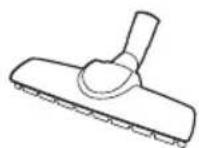
Parquet master brush *

Pet brush * Cyclone filter *


2-Step brush *
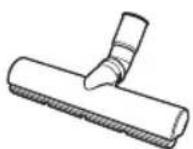
Eco Hard Floor brush *
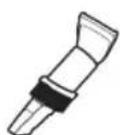
3-in-1 accessory * Pipe *
Before using the vacuum cleaner
ASSEMBLY
Connecting the Hose
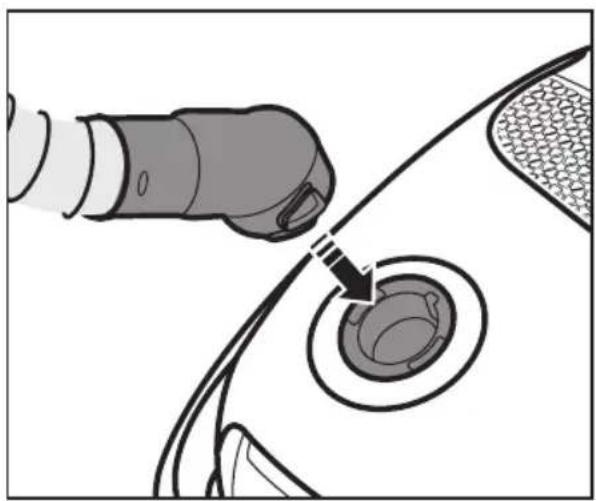
natural_image
Diagram showing a hand inserting a plug into a car body with a circular component inserted (no text or symbols)Connecting the handle and pipe

natural_image
Diagram showing two cylindrical objects with arrows indicating motion or movement, no text or symbols presentConnecting the brush

natural_image
Diagram of a mechanical component with arrows indicating motion or force direction (no text or symbols)Accessory (Option)

natural_image
Diagram showing three stages of a device or tool: before, after, and after, with no visible text or symbols.Crevice tool - For cleaning in folds, crevices and corners.

natural_image
Diagram showing a device transitioning from a tool to a mechanical component, with no visible text or symbols.Dusting brush - For cleaning moldings, carved articles. etc.

natural_image
Diagram showing a device being processed from a tool, with arrows indicating motion (no text or symbols present)Upholstery tool - For cleaning furniture and fabric.
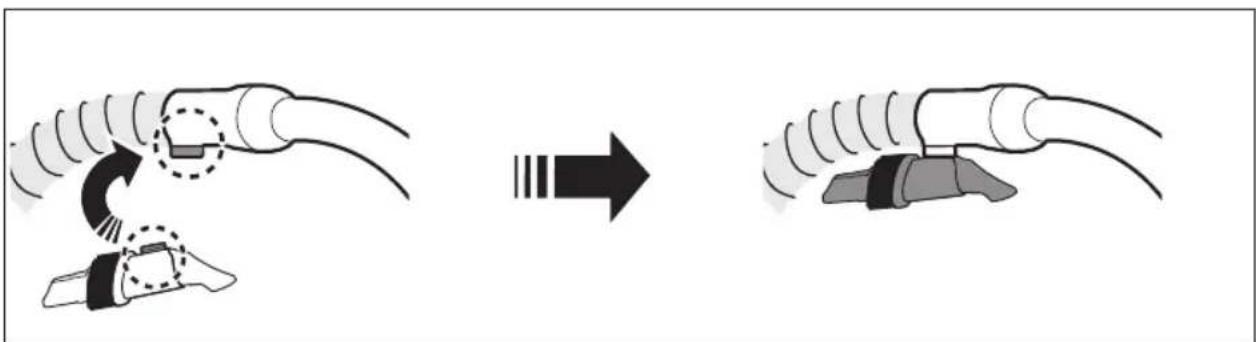
natural_image
Diagram showing a mechanical assembly before and after transformation, with no visible text or symbolsAfter using accessory, make sure to keep it at handle.
Pipe (Option)
Adjust the length of the pipe by sliding the length control button located in the center of the telescopic pipe.

natural_image
Illustration of hands holding a tool with directional arrows indicating motion (no text or symbols)For storage, park the floor nozzle
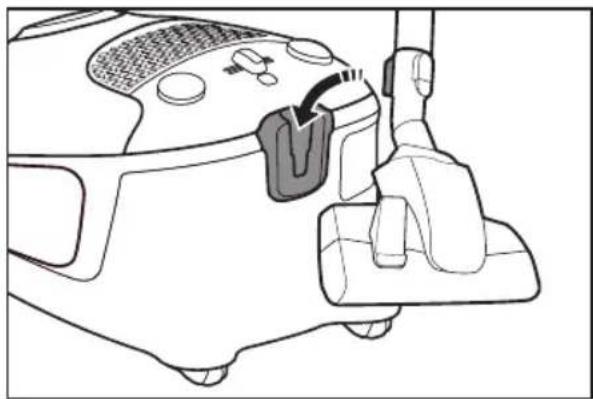
natural_image
Line drawing of a car interior showing seat, dashboard, and hand placement (no text or symbols)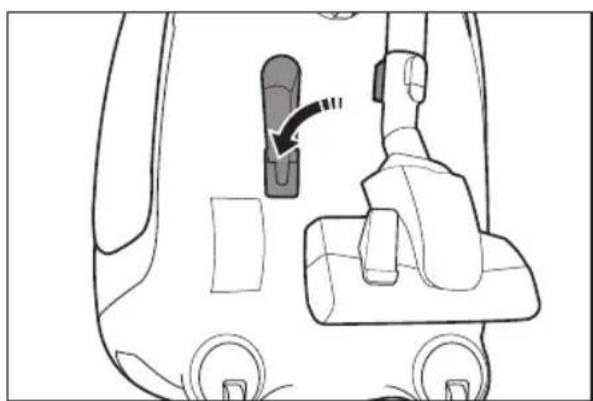
natural_image
Diagram of a car interior showing a seatbelt switch and directional arrow (no text or symbols)Operating cleaner
POWER CORD

natural_image
Line drawing of a handheld device with a cable and arrow indicating direction (no text or symbols)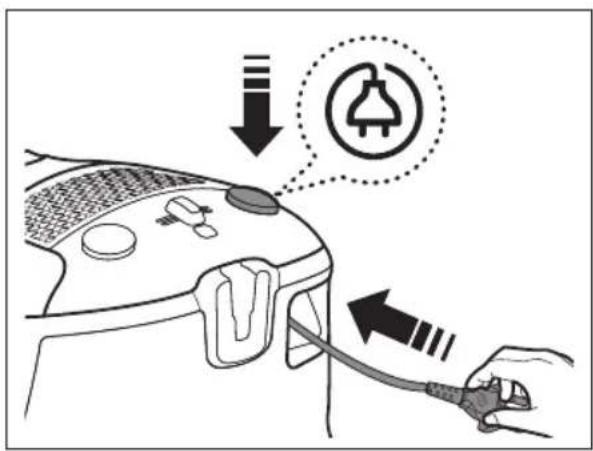

When removing the plug from the electrical outlet, grasp the plug, not the cord.

ON/OFF

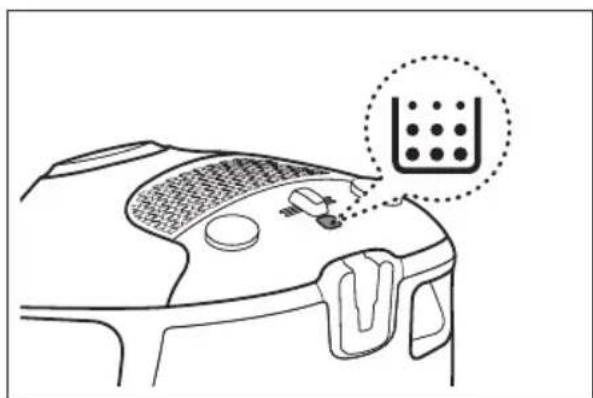
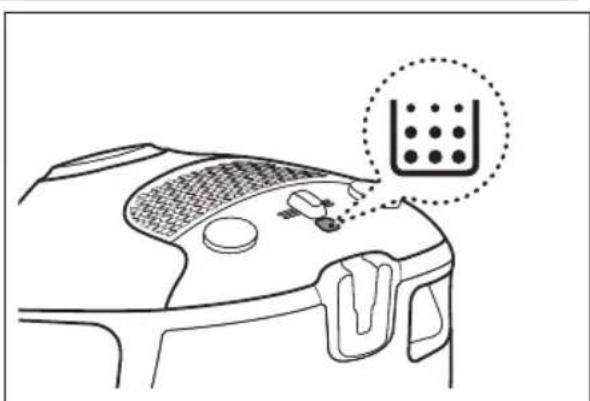
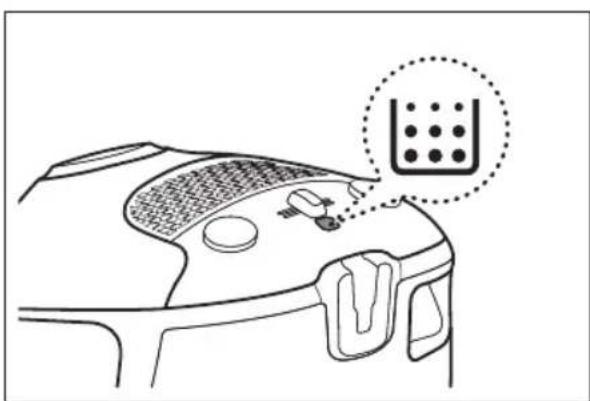
CHECK FILTER
natural_image
Line drawing of a device's top view with a magnified inset showing a grid pattern (no text or symbols)If the filter check indicator turns red, check and eliminate possible blockages in brushes, pipe, hoses, filters and if necessary. Empty and replace dust bag.
POWER CONTROL
Hose
To reduce suction for leaning draperies, small rugs, and other light fabrics, pull the tap air until the hole is open.

natural_image
Diagram of a curved mechanical component with directional arrows indicating motion or force (no text or symbols)Body
To control power level, just slide the power control right and left.
MIN = For delicate fabrics, e.g. net curtains.
MAX = For hard floors and heavily soiled carpets.

natural_image
Top-down schematic of a vehicle's front panel showing mode lights, pressure limit switch, and air vent (no text or labels)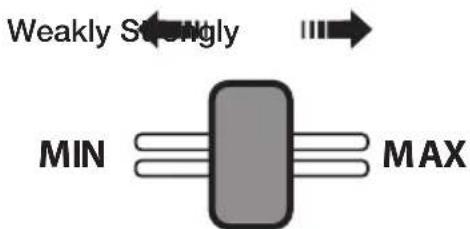
Maintenance
CHANGING THE DUST BAG

Open the lid.

natural_image
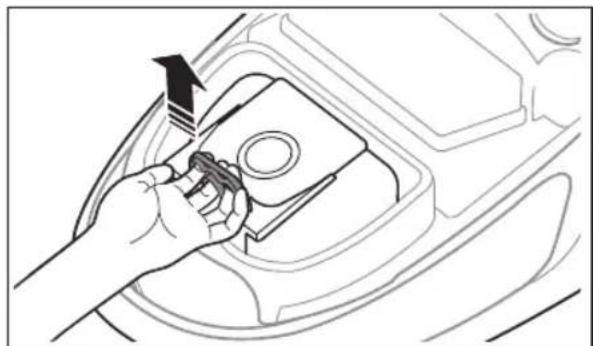
Line drawing of a car interior showing a hand using a tool to adjust the seat area with a circular component and an arrow indicating rotation (no text or symbols)Lift out the bag holder.
natural_image
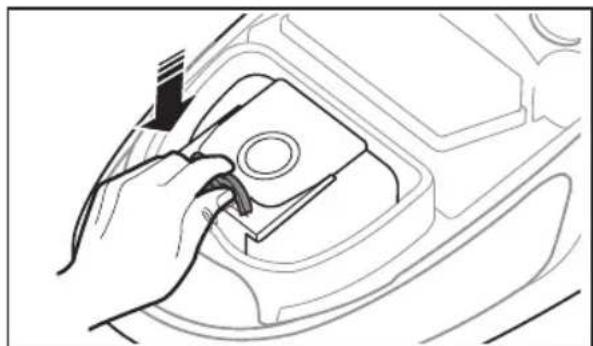
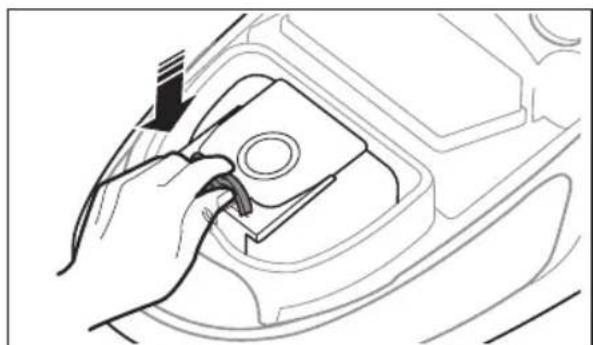
Line drawing of a hand inserting a component into a car engine compartment (no text or symbols)After Lift up the ring to remove the bag from the holder, Insert the cardboard of new bag to the end of the dust bag holder.

Place the dust bag holder back into the dust compartment and close the lid.
natural_image
Line drawing of a hand using a tool to adjust or install a mechanical component (no text or symbols visible)
Please don't place the dust bag out of dust compartment. It will cause low suction.

You can purchase dust bags in the shops where you bought this vacuum cleaner or your local samsung distributor.
CLEANING THE MOTOR FILTER
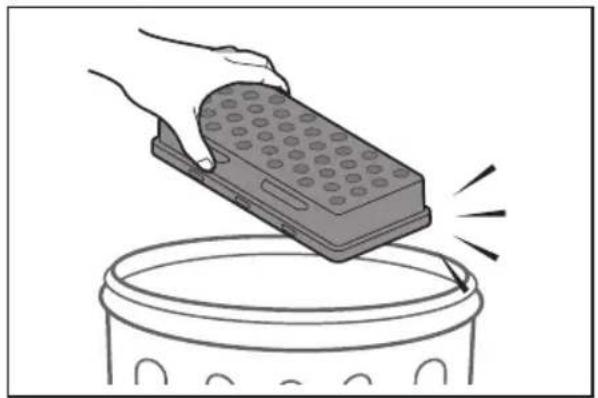
Pull out the motor filter holder.
Remove the filter from the holder.
Shake the filter to clean.
Place the filter into the holder and install holder.
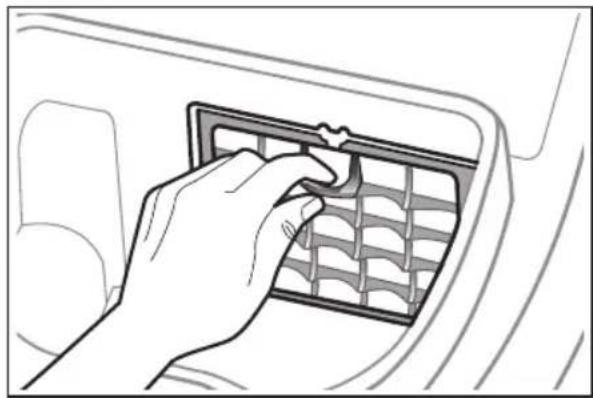
natural_image
Line drawing of a hand inserting a grid into a car air vent (no text or symbols)
natural_image
Illustration of a hand holding a small object over a dark rectangular frame (no text or symbols visible)
natural_image
Illustration of a hand placing a dark rectangular object onto a trash can (no text or symbols)
natural_image
Diagram of a car interior showing airflow direction and fan structure (no text or symbols)CLEANING THE EXHAUST FILTER
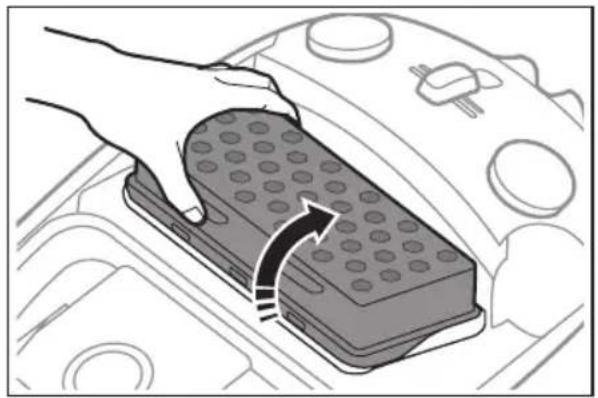
Lift out the exhaust filter.

natural_image
Illustration of a hand placing a rectangular device into a container with a curved arrow indicating motion (no text or symbols)Shake the filter to clean.

natural_image
Illustration of a hand using a handheld device to lift a cylindrical container (no text or symbols)Install the exhaust filter.
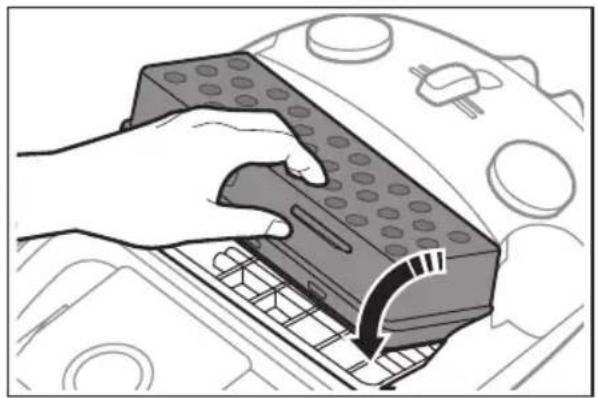
natural_image
Illustration of a hand using a remote control device to press down a car air vent (no text or symbols visible)
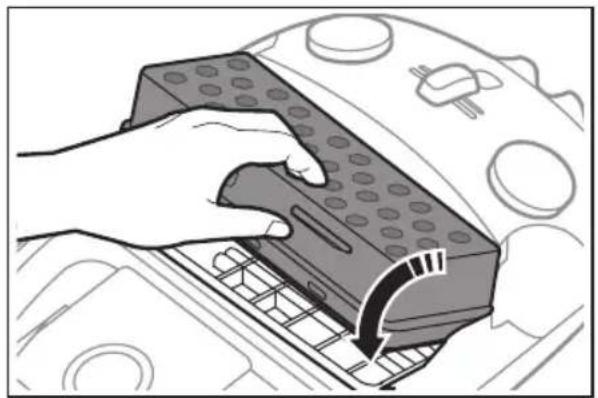
- Please replace the filter 1\~2 times a year.
- When suction is noticeably reduced continuously or vacuum cleaner abnormally overheats, please clean the outlet filter.
If cleaning does not resolve the problem, please replace outlet filter.
- Replacement filters are available at your local Samsung distributor.
- Do not wash filter.

CLEANING THE CYCLONE FILTER (Option)
Release the handle and pipe from cyclone filter.
Rotate dust bin to counterclockwise and pull out.
Turn the grille and take out it.
Clean the cyclone filter body.
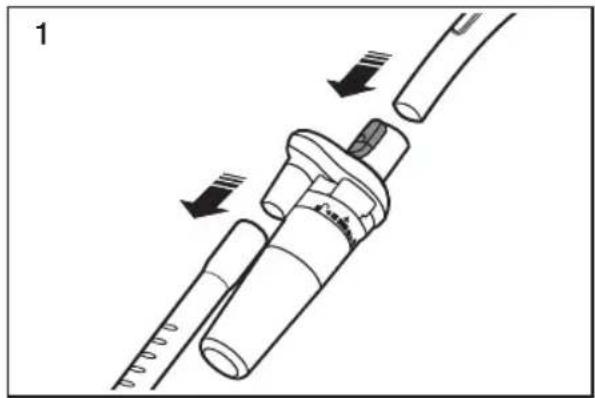
natural_image
Medical catheter device with needle insertion and force arrows indicating movement (no text or symbols)
natural_image
Mechanical component diagram showing a cylindrical assembly with a downward arrow indicating motion (no text or symbols)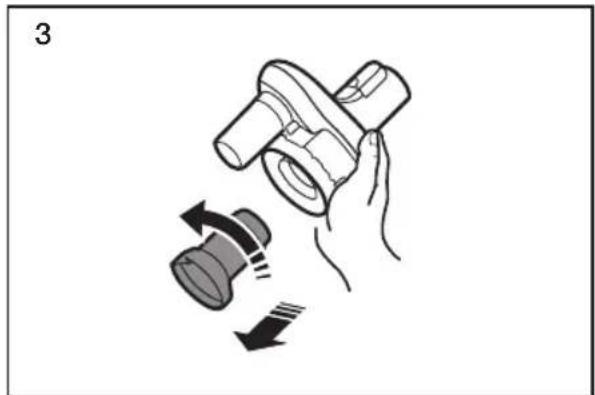
natural_image
Illustration of a hand holding a mechanical component with a speaker icon, showing motion arrows (no text or symbols)
natural_image
Illustration of hands using a tool to adjust or install a mechanical component (no text or symbols visible)Clean the dust bin and grille with water.

natural_image
Illustration of two hands using a syringe to lift water, showing liquid transfer (no text or symbols)Leave the dust bin and body in the shade until completely dry

natural_image
Illustration of two cylindrical objects under a brick wall with a sun symbol above (no text or symbols)Take the dust bin out by lifting the handle.

natural_image
Illustration of two mechanical components with directional arrows indicating motion (no text or symbols)Install the dust bin and turn to clockwise.
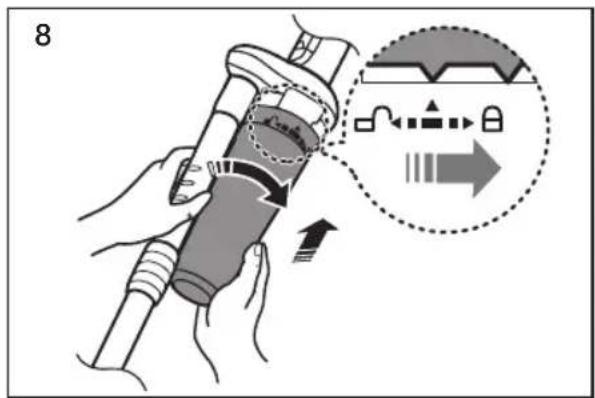

It is necessary to use cyclone filter while cleaning.
2-Step Brush
Adjust the inlet lever according to the floor surface.
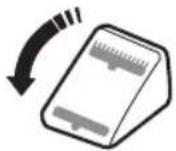
Carpet Cleaning

Floor Cleaning

natural_image
Line drawing of a mechanical device with a handle and base (no text or symbols)Remove waste matter completely if the inlet is blocked.

natural_image
Technical line drawing of a handheld device with a cable and connector (no text or symbols)Pet Brush (Option)
For improved pick-up of pet hair and fibre on carpets.
Frequent vacuuming of hair or pet fur may cause a falling-off of the rotation due to matters tangled around the drum. In this case, clean the drum with care.
Turn the key to withdraw brush roll counterclockwise.

natural_image
Diagram showing a device with a close-up view of its internal components, no text or symbols presentClean the brush roll.

natural_image
Illustration of a hand using scissors to cut a cylindrical object with granular material (no text or symbols)Turn the key clockwise.

natural_image
Diagram showing a device with a close-up view of its internal component (no text or symbols present)Parquet Master Brush (Option)
Vacuum dust in wide area at once.
Remove waste matter completely if the inlet is blocked.

natural_image
Two technical diagrams showing a tool interacting with a mechanical component, one with a circular feature and the other with a pen inserted (no text or symbols present)Troubleshooting
| PROBLEM SOLUTION | |
| Motor does not start. | Check cable, pulg and socket.Leave to cool. |
| Suction force is gradually decreasing. | Check for blockage and remove. |
| Cord does not rewind fully. | Pull the cord out 2-3 m and push down the cord rewind button. |
| Vacuum cleaner does not pick up dirt. | Check hose and replace if required. |
| Low or decreasing suction. | Please check filter and, if required, clean as illustrated in the instructions. if filters are out of condition change them to new ones. |
| Body overheating. | Please check filters, if required clean as illustrated in the instruction. |
| Static electricity discharge. | Please decrease power suction.This can also occur when air in the room is very dry.Please ventilate the room to air humidity become a normal. |
This Vacuum cleaner is approved the following.
EMC Directive : 2004/108/EC
Low Voltage Directive : 2006/95/EC
[English]
According to Commission Regulation (EU) No 665/2013 and No 666/2013
| A Supplier Samsung Electronics., Co. Ltd | ||||||
| B Model | SC15F30WH SC15F30WJ SC15F30WL SC07F30WH SC07F30WJ SC07F30WL | |||||
| C Energy Efficiency Class E E E A A A | ||||||
| D Annual Energy Consumption (kWh/yr) 52 52 52 28 28 28 | ||||||
| E Carpet Cleaning Performance Class C C C D D D | ||||||
| F Hard-floor Cleaning Performance Class C C C A A A | ||||||
| G Dust Re-Emission Class A A A A A A | ||||||
| H Sound Power Level (dBA) 78 78 78 77 77 77 | ||||||
| I Rated Input Power (W) | 1350 | 1350 | 1350 | 650 | 650 | 650 |
| J Type | General purpose vacuum cleaner | |||||
1) Indicative annual energy consumption (kWh per year), based on 50 cleaning tasks. Actual annual energy consumption will depend on how the appliance is used.
2) Measurements for power consumption and performance are based on methods in EN 60312-1 and EN 60704.
Notes on the energy label
- Declared energy efficiency and cleaning performance class on carpet can be met with the enclosed 2-Step Brush.
- When the hard floor has joints and gaps, please use the enclosed "Eco Hard Floor" brush which is designed to meet the energy efficiency and cleaning performance class on hard floor with joints and gaps.
- The values provided on the energy label have been determined according to the prescribed measuring process (in accordance with EN60312 - 1).

Eco Hard Floor
Memo

If you have any questions or comments relating to Samsung products, please contact the SAMSUNG customer care center.
| COUNTRY CONTACT CENTER WEB SITE | |
| LITHUANIA 8-800-77777 www.samsung.com/lt | |
| LATVIA 8000-7267 www.samsung.com/lv | |
| ESTONIA 800-7267 www.samsung.com/ee |
Пылесос
natural_image
Diagram showing a robotic arm connecting a circular component to a textured surface (no text or symbols)natural_image
Diagram showing two cylindrical objects with arrows indicating motion or force direction (no text or symbols)natural_image
Diagram of a mechanical tool interacting with a cylindrical component, showing motion arrows (no text or symbols)natural_image
Diagram showing three stages of a medical or surgical tool: before, after, and after (no text or symbols present)natural_image
Diagram showing a mechanical component before and after assembly, with no visible text or symbolsnatural_image
Diagram showing a mechanical component being processed into a curved tool, with no visible text or symbols.natural_image
Diagram showing a mechanical assembly before and after transformation, with no visible text or symbols.natural_image
Illustration of hands holding a tool with directional arrows indicating motion (no text or symbols)natural_image
Line drawing of a vacuum cleaner's side arm and wheel assembly (no text or symbols)
natural_image
Diagram of a car interior showing seatbelt, dashboard, and wheel (no text or symbols)natural_image
Diagram of a handheld device with a cable being inserted, showing a hand holding the cable (no text or symbols present)

ПРОВЕРКА ФИЛЬТРА

natural_image
Line drawing of a device's top view with a magnified inset showing a grid pattern (no text or symbols)natural_image
Diagram of a curved mechanical component with directional arrows indicating motion or force (no text or symbols)Корпус
natural_image
Top-down line drawing of a car's front panel showing grille, buttons, and ventilation system (no text or symbols)
natural_image
Line drawing of a car interior showing a hand adjusting a tool near the wheel (no text or symbols)natural_image
Line drawing of a hand inserting a component into a car's seat (no text or symbols)natural_image
Line drawing of a hand using a tool to adjust or install a component on a mechanical part (no text or symbols visible)
natural_image
Line drawing of a hand inserting a grid into a car air vent (no text or symbols)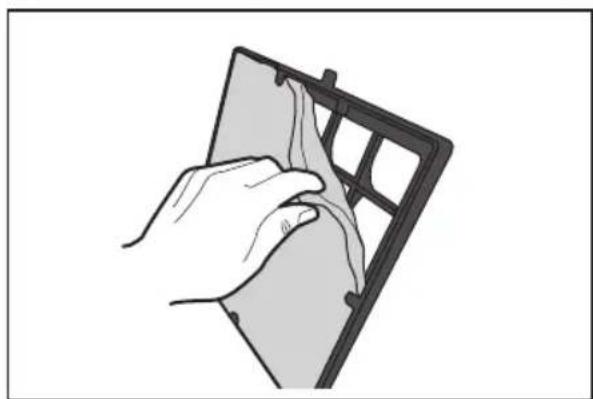
natural_image
Illustration of a hand holding a small object over a dark rectangular panel (no text or symbols visible)
natural_image
Illustration of a hand placing a dark rectangular object onto a trash bin (no text or symbols)
natural_image
Diagram of airflow around a fan inside a vehicle (no text or symbols)natural_image
Illustration of a hand placing a rectangular component with circular holes on top, showing internal structure and motion arrows (no text or symbols)natural_image
Illustration of a hand using a handheld device to lift a cylindrical container (no text or symbols)natural_image
Illustration of a hand using a remote control device to press or install a grid (no text or symbols visible)
natural_image
Diagram of a medical or laboratory device with arrows indicating movement or force (no text or symbols present)
natural_image
Mechanical component diagram showing a cylindrical assembly with a downward arrow indicating motion (no text or symbols)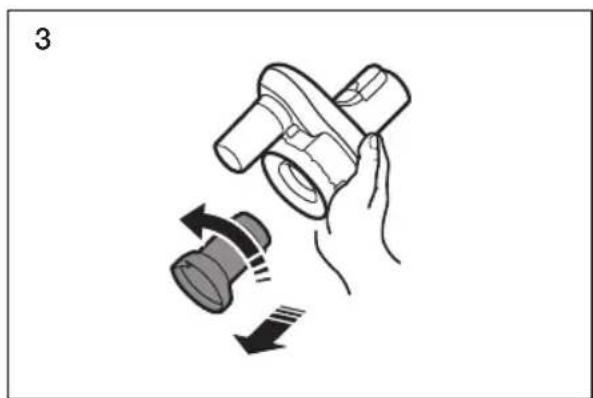
natural_image
Illustration of a hand holding a mechanical component with directional arrows indicating motion (no text or symbols)
natural_image
Illustration of hands using a tool to adjust or install a mechanical component (no text or symbols visible)natural_image
Illustration of two hands using a syringe to lift water, showing liquid transfer and cleaning steps (no text or symbols)natural_image
Illustration of two cylindrical objects on a brick wall under a sun, no text or symbols presentnatural_image
Diagram showing two mechanical components with directional arrows indicating motion (no text or symbols)natural_image
Line drawing of a vacuum cleaner on a base (no text or symbols)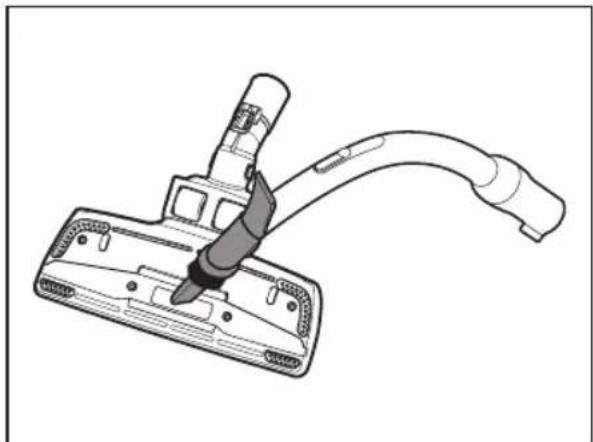
natural_image
Technical line drawing of a handheld vacuum cleaner with a curved cable (no text or symbols)natural_image
Diagram showing a device with a close-up view of its internal components, no text or symbols present.natural_image
Illustration of a hand using scissors to cut a cylindrical object with a coiled spring (no text or symbols)natural_image
Diagram showing a device component with a magnified inset highlighting a circular feature (no text or symbols present)natural_image
Technical illustration showing two steps of a cleaning or repair procedure: one with a tool, the other with a tool inserted into a component (no text or symbols present)natural_image
Diagram showing a robotic arm connecting a circular component to a textured surface (no text or symbols)natural_image
Diagram showing two cylindrical objects with arrows indicating motion or force direction (no text or symbols)Harja ühendamine

natural_image
Diagram of a mechanical component with arrows indicating motion or force direction (no text or symbols)LISATARVIKU KASUTAMINE
Lisatarvik (lisavarustus)

natural_image
Diagram showing three stages of a device or tool: before, after, and after, with no visible text or symbols.natural_image
Diagram showing a mechanical device being processed with arrows indicating motion (no text or symbols)natural_image
Diagram showing a device being processed from a tool, with arrows indicating motion (no text or symbols present)natural_image
Diagram showing a mechanical assembly before and after transformation, with no visible text or symbolsnatural_image
Illustration of hands holding a tool with directional arrows indicating motion (no text or symbols)natural_image
Line drawing of a car interior showing seat, dashboard, and hand placement (no text or symbols)
natural_image
Diagram of a car interior showing seatbelt, dashboard, and steering wheel (no text or labels)natural_image
Line drawing of a handheld device with a cable and directional arrow indicating action (no text or symbols)

KONTROLLIGE FILTRIT
natural_image
Line drawing of a device's top panel with a grid pattern and control buttons, no text or symbols presentnatural_image
Diagram of a curved mechanical component with directional arrows indicating motion or force (no text or symbols)Korpus
natural_image
Top-down line drawing of a car's front panel showing grille, control buttons, and air vent (no text or symbols)
TOLMUKOTI vAHETAMINE
Avage kaas.

natural_image
Line drawing of a car interior showing a hand using a tool to adjust the seat area (no text or symbols present)natural_image
Line drawing of a hand using a tool to adjust or install a component on a vehicle (no text or symbols visible)Paigutage tolmukoti hoidik tagasi tolmukambrisse ja sulgege kaas.
natural_image
Line drawing of a hand using a tool to adjust or install a component on a mechanical part (no text or symbols visible)
natural_image
Line drawing of a hand inserting a grid into a car air vent (no text or symbols)
natural_image
Hand holding a device with a grid pattern, no visible text or symbols
natural_image
Illustration of a hand placing a rectangular object onto a trash bin (no text or symbols)
natural_image
Diagram of a car interior showing airflow or fan behavior inside the window (no text or symbols)vÄLJALASKEFILTRI vAHETAMINE
natural_image
Illustration of a hand placing a rectangular object onto a vehicle chassis with circular components (no text or symbols)Raputage filter puhtaks.
natural_image
Illustration of a hand using a handheld device to lift a cylindrical container (no text or symbols)natural_image
Illustration of a hand using a remote control device to press down a keyboard (no text or symbols visible)
natural_image
Diagram of a medical or laboratory device with arrows indicating movement or force, no visible text or symbols
natural_image
Mechanical component diagram showing a cylindrical assembly with a downward arrow indicating motion (no text or symbols)
natural_image
Illustration of a hand holding a mechanical component with directional arrows indicating motion (no text or symbols)
natural_image
Illustration of hands using a tool to adjust or install a mechanical component (no text or symbols visible)natural_image
Illustration of two hands using a syringe to lift water, showing liquid transfer and suction (no text or symbols)natural_image
Illustration of two cylindrical objects under a brick wall with a sun symbol above (no text or symbols)natural_image
Illustration of two mechanical components with directional arrows indicating motion (no text or symbols)natural_image
Line drawing of a vacuum cleaner with a handle and base (no text or symbols)natural_image
Technical line drawing of a handheld device with a cable and connector (no text or symbols)Loomakarvade hari (lisavarustus)
natural_image
Diagram showing a device with a close-up view of its internal components, no text or symbols presentPuhastage harjarulli.

natural_image
Illustration of a hand using scissors to cut a cylindrical object with internal components (no text or symbols)natural_image
Technical diagram of a mechanical device with a close-up inset showing a circular component (no text or symbols)natural_image
Technical illustration showing two mechanical components: a flat tool and a pen inserted into a clip (no text or symbols)Törkeotsing
natural_image
Diagram showing a robotic arm connecting a circular component to a textured surface (no text or symbols)natural_image
Diagram showing two cylindrical objects with arrows indicating direction of movement or force (no text or symbols)natural_image
Diagram of a mechanical component with arrows indicating motion or force direction (no text or symbols)PIEDERUMU IZMANTOŠANA
natural_image
Diagram showing three stages of a device or tool: before, after, and after, with no visible text or symbols.natural_image
Diagram showing a mechanical device being processed with arrows indicating motion (no text or symbols)natural_image
Diagram showing a device being processed from a tool, with arrows indicating motion (no text or symbols present)natural_image
Diagram showing a mechanical assembly before and after transformation, with no visible text or symbols.natural_image
Illustration of hands holding a tool with directional arrows indicating motion (no text or symbols)natural_image
Line drawing of a vacuum cleaner's side arm and handle (no text or symbols)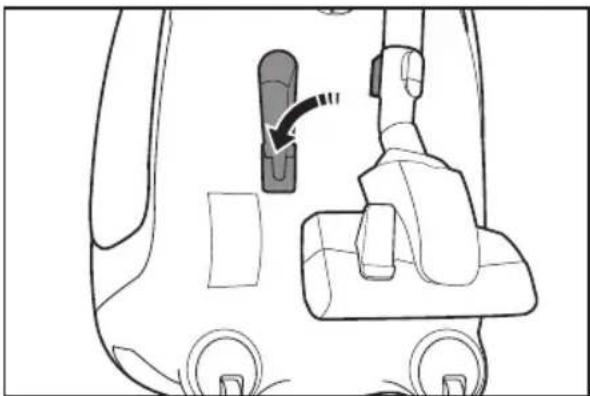
natural_image
Diagram of a car interior showing seatbelt, dashboard, and steering wheel (no text or symbols)natural_image
Line drawing of a handheld device with a cable and directional arrow indicating action (no text or symbols)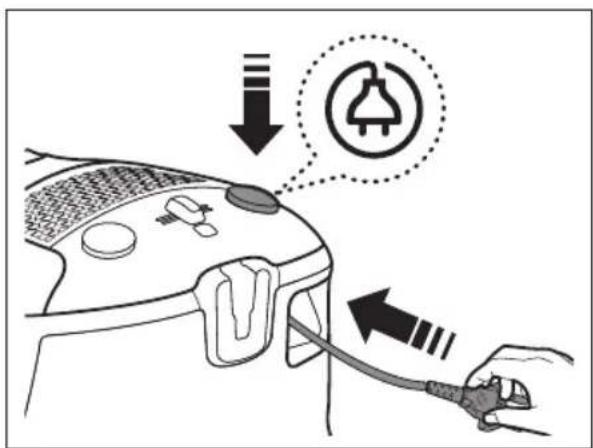

FILTRA PÂRBAUDE
natural_image
Line drawing of a device's top panel with a grid pattern and control buttons, no text or symbols presentnatural_image
Diagram of a curved mechanical component with directional arrows indicating motion or force (no text or symbols)Korpuss
natural_image
Front view of a smart home control panel with indicator lights and buttons (no text or symbols)
natural_image
Line drawing of a car interior showing a hand adjusting a tool near the wheel (no text or symbols)natural_image
Line drawing of a hand using a tool to adjust or install a component on a vehicle (no text or symbols visible)natural_image
Line drawing of a hand using a tool to adjust or install a component on a mechanical part (no text or symbols visible)
natural_image
Line drawing of a hand inserting a grid into a car air vent (no text or symbols)
natural_image
Illustration of a hand holding a device with a grid pattern, no text or symbols present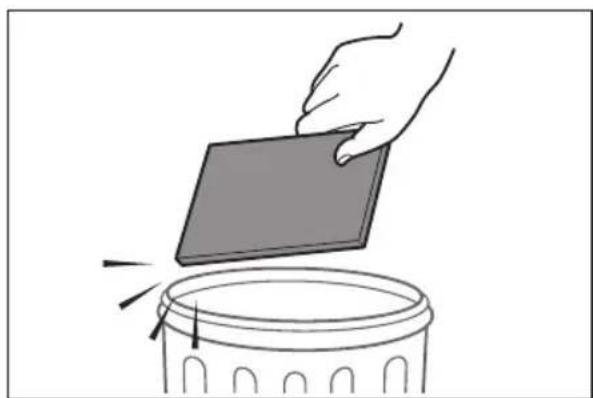
natural_image
Illustration of a hand placing a rectangular object onto a trash bin (no text or symbols)
natural_image
Diagram of a car interior showing airflow around a fan with an arrow indicating direction (no text or symbols)IZPLÜDES FILTRA TİRİŞANA
Iznemiet izplūdes filtru.
natural_image
Illustration of a hand placing a component into a battery pack (no text or symbols visible)natural_image
Illustration of a hand using a handheld device to lift a cylindrical container (no text or symbols)lelieciet atpakal izplüdes filtru.
natural_image
Illustration of a hand using a remote control device to press down a keyboard (no text or symbols visible)
natural_image
Diagram of a medical or laboratory procedure showing a tool interacting with a cylindrical device (no text or symbols present)
natural_image
Mechanical component diagram showing a cylindrical shaft with a downward arrow indicating motion (no text or symbols)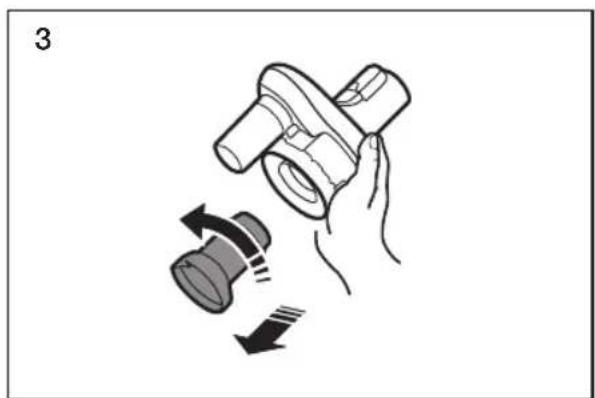
natural_image
Illustration of a hand holding a mechanical component with a rotating knob and directional arrows indicating motion (no text or symbols)
natural_image
Illustration of hands using a tool to adjust or install a mechanical component (no text or symbols visible)Izmazgājiet puteklu tvertni un režgi arūdeni.

natural_image
Illustration of two hands using a syringe to lift water, showing liquid transfer and suction (no text or symbols)natural_image
Illustration of two cylindrical objects under a brick wall with a sun symbol above (no text or symbols)Iznemiet puteklu tvertni, pacejot rokturi.

natural_image
Diagram showing two mechanical components with directional arrows indicating motion (no text or symbols)natural_image
Line drawing of a vacuum cleaner with a handle and base (no text or symbols)natural_image
Technical line drawing of a handheld device with a cable and connector (no text or symbols)natural_image
Diagram showing a device with a magnified inset highlighting the internal structure (no text or symbols present)Notīriet birstes rulli.

natural_image
Illustration of a hand using scissors to cut a cylindrical roller (no text or symbols)natural_image
Technical diagram of a mechanical component with an inset close-up showing a circular feature (no text or symbols)Parketa birste (pieejama atseviški)
Sūciet puteklus ar īpaši platu birsti.
natural_image
Technical illustration showing two views of a cleaning tool: one with a handle and the other with a brush (no text or symbols)natural_image
Diagram showing a robotic arm connecting a circular component to a textured surface (no text or symbols)natural_image
Diagram showing two cylindrical objects with arrows indicating direction of movement or force (no text or symbols)natural_image
Diagram of a mechanical component with arrows indicating motion or force direction (no text or symbols)PRIEDO NAUDOJIMAS
Priedas (papildoma dalis)

natural_image
Diagram showing a device being processed from a left-side tool to a right-side tool, with no visible text or symbols.natural_image
Diagram showing a mechanical device transitioning from a tool to a cable, with no text or symbols present.natural_image
Diagram showing a device being processed from a tool, with arrows indicating motion (no text or symbols present)natural_image
Diagram showing a mechanical assembly before and after transformation, with no visible text or symbolsnatural_image
Illustration of hands holding a tool with directional arrows indicating motion (no text or symbols)natural_image
Line drawing of a vacuum cleaner's internal structure with no text or symbols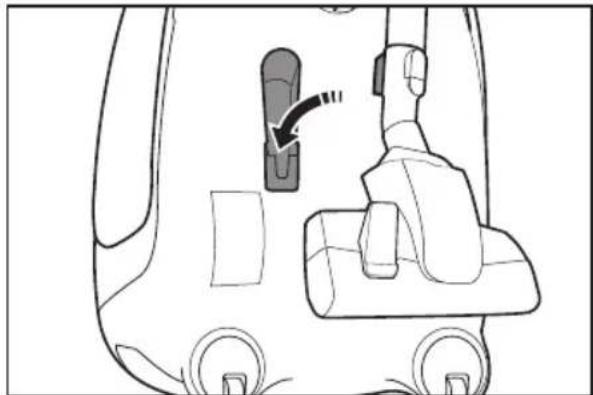
natural_image
Diagram of a car interior showing seatbelt, dashboard, and steering wheel (no text or labels)natural_image
Line drawing of a handheld device with a cable and directional arrow indicating action (no text or symbols)

PATIKRINKITE FILTRA

natural_image
Line drawing of a device's top view with a magnified inset showing a grid pattern (no text or symbols)natural_image
Diagram of a curved mechanical component with directional arrows indicating motion or force (no text or symbols)Korpusas
natural_image
Top-down line drawing of a car's front panel showing grille, control buttons, and air vent (no text or symbols)
Techninė priežiūra
natural_image
Line drawing of a car interior showing a hand holding a tool, with no visible text or symbolsnatural_image
Line drawing of a hand using a tool to adjust or install a component on a vehicle (no text or symbols visible)natural_image
Line drawing of a hand using a tool to adjust or install a component on a mechanical part (no text or symbols visible)
natural_image
Line drawing of a hand inserting a grid into a car air vent (no text or symbols)
natural_image
Illustration of a hand holding a device with a grid pattern, no text or symbols present
natural_image
Illustration of a hand placing a rectangular object onto a trash bin (no text or symbols)
natural_image
Diagram of a car interior showing airflow around a fan blade (no text or symbols)IŠLEIDŽIAMO ORO FILTRO vALYMAS
natural_image
Illustration of a hand placing a rectangular object onto a vehicle chassis with circular components (no text or symbols)natural_image
Illustration of a hand using a handheld device to lift a cylindrical container (no text or symbols)natural_image
Illustration of a hand using a remote control device to press down a keyboard (no text or symbols visible)
natural_image
Diagram of a medical or laboratory device with arrows indicating movement or force, no visible text or symbols
natural_image
Mechanical component diagram showing a cylindrical assembly with a downward arrow indicating motion (no text or symbols)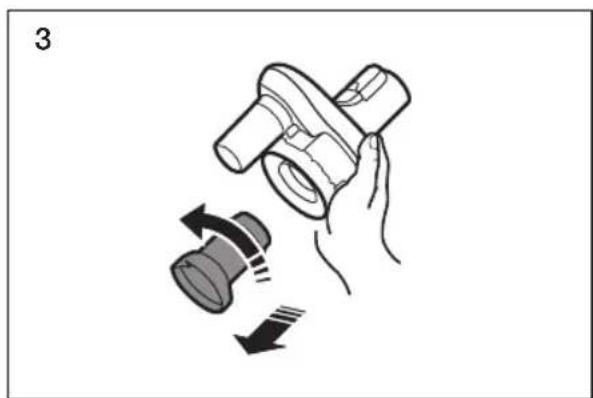
natural_image
Illustration of a hand holding a mechanical component with a speaker icon and directional arrows indicating motion (no text or symbols)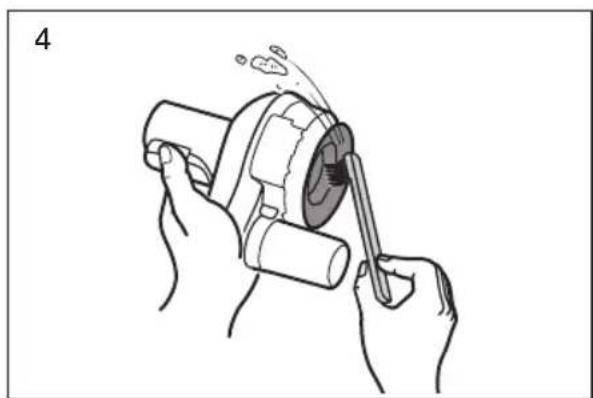
natural_image
Illustration of hands using a tool to adjust or install a mechanical component (no text or symbols visible)natural_image
Illustration of two hands using a syringe to lift water, showing liquid transfer and suction (no text or symbols)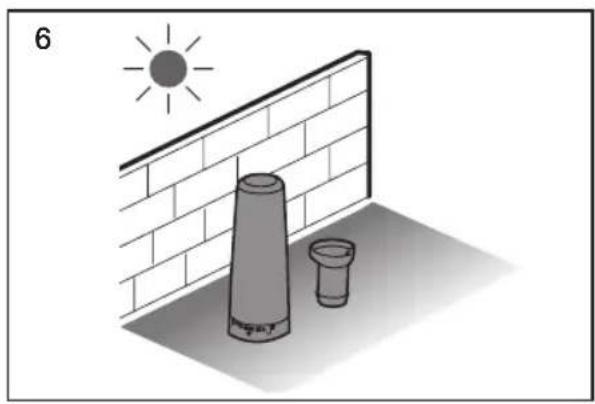
natural_image
Illustration of two cylindrical objects on a brick wall under a sun, no text or symbols present
natural_image
Illustration of two mechanical components with directional arrows indicating motion (no text or symbols)

natural_image
Line drawing of a vacuum cleaner with a handle and base (no text or symbols)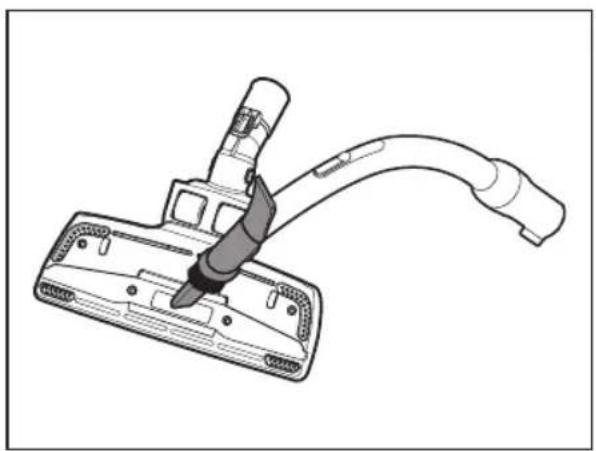
natural_image
Technical line drawing of a handheld device with a cable and connector (no text or symbols)natural_image
Diagram showing a device with a close-up of its internal components, no text or symbols presentnatural_image
Illustration of a hand using scissors to cut a cylindrical object with a grid-like structure (no text or symbols)natural_image
Diagram of a device component with a magnified inset showing a circular arrow pointing to a circular opening (no text or symbols present)natural_image
Two-step diagram showing a cleaning tool: top view with handle and circular component, bottom view with tool tip (no text or symbols)Trikčių šalinimas
- Vacuum Cleaner user manual
- YOUR VACUUM CLEANER
- BEFORE USING THE VACUUM CLEANER
- OPERATING CLEANER
- MAINTENANCE
- TROUBLESHOOTING
- SAFETY INFORMATION
- CAUTION/WARNING SYMBOLS USED
- OTHER SYMBOLS USED
- GENERAL
- OPTION (Depending on model) \*
- ASSEMBLY
- Accessory (Option)
- Pipe (Option)
- POWER CORD
- ON/OFF
- CHECK FILTER
- POWER CONTROL
- Hose
- Body
- CHANGING THE DUST BAG
- CLEANING THE MOTOR FILTER
- CLEANING THE EXHAUST FILTER
- CLEANING THE CYCLONE FILTER (Option)
- 2-Step Brush
- Pet Brush (Option)
- Parquet Master Brush (Option)
- [English]
- Notes on the energy label
- Memo
- Пылесос
- ПРОВЕРКА ФИЛЬТРА
- Корпус
- LISATARVIKU KASUTAMINE
- Lisatarvik (lisavarustus)
- KONTROLLIGE FILTRIT
- Korpus
- TOLMUKOTI vAHETAMINE
- vÄLJALASKEFILTRI vAHETAMINE
- Loomakarvade hari (lisavarustus)
- Törkeotsing
- PIEDERUMU IZMANTOŠANA
- FILTRA PÂRBAUDE
- Korpuss
- IZPLÜDES FILTRA TİRİŞANA
- Parketa birste (pieejama atseviški)
- PRIEDO NAUDOJIMAS
- Priedas (papildoma dalis)
- PATIKRINKITE FILTRA
- Korpusas
- Techninė priežiūra
- IŠLEIDŽIAMO ORO FILTRO vALYMAS
- Trikčių šalinimas
Brand : SAMSUNG
Model : SC07F30WJ
Category : Vacuum Cleaner