
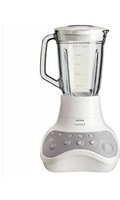
Aluminium Collection HR2094 - Blender PHILIPS - Free user manual and instructions
Find the device manual for free Aluminium Collection HR2094 PHILIPS in PDF.


| Product Type | Blender |
| Model | HR2094 |
| Brand | Philips |
| Series | Aluminium Collection |
| Housing Material | Aluminum |
| Jar Material | Glass |
| Capacity | 1.5 L |
| Power | 600 W |
| Speed Settings | 2 speeds + pulse |
| Dimensions (H x W x D) | 400 mm x 160 mm x 160 mm |
| Weight | 2.5 kg |
| Cord Length | 1.2 m |
| Blade Material | Stainless steel |
| Dishwasher Safe Parts | Jar, lid, measuring cup |
| Safety Features | Locking lid, non-slip feet, overload protection |
| Functions | Blending, crushing ice, smoothies, soups |
| Cleaning | Detachable parts for easy cleaning |
| Spare Parts Available | Jar assembly, blade, lid, sealing ring |
| Warranty | 2 years |
Frequently Asked Questions - Aluminium Collection HR2094 PHILIPS
User questions about Aluminium Collection HR2094 PHILIPS
0 question about this device. Answer the ones you know or ask your own.
Ask a new question about this device
Download the instructions for your Blender in PDF format for free! Find your manual Aluminium Collection HR2094 - PHILIPS and take your electronic device back in hand. On this page are published all the documents necessary for the use of your device. Aluminium Collection HR2094 by PHILIPS.
USER MANUAL Aluminium Collection HR2094 PHILIPS
natural_image
Black-and-white photo of a Philips blender with a side brush and control panel (no visible text or symbols on the main subject)
ENGLISH 6
INDONESIA 15
BAHASA MELAYU 25
ภาษาไทย 35
TIÊNG VIÊT 43
繁體中文 52
Introduction
Congratulations on your purchase and welcome to Philips! To fully benefit from the support that Philips offers, register your product at www.philips.com/welcome.
General description (Fig. 1)
A Motor unit
B Control knob
C Blade unit interface
D Blade unit
E Sealing ring
F Blander jar with level indication
G Lid
H Graduated measuring cup
Filter (Type HR2094 only)
Important
Read this user manual carefully before you use the appliance and save it for future reference.
General
Danger
- Never immerse the motor unit in water or any other liquid, nor rinse it under the tap. Use only a moist cloth to clean the motor unit.
Warning
- Check if the voltage indicated on the appliance corresponds to the local mains voltage before you connect the appliance.
- If the mains cord is damaged, you must have it replaced by Philips, a service centre authorised by Philips or similarly qualified persons in order to avoid a hazard.
- Do not use the appliance if the plug, the mains cord or other parts are damaged.
- Do not lift the appliance by the handle of the blender jar, when the blender jar is fixed to the motor unit. The motor unit may fall to the floor and get damaged.
- Never use the blender jar to switch the appliance on and off.
- Never let the appliance run unattended.
- This appliance is not intended for use by persons (including children) with reduced physical, sensory or metal capabilities, or lack of experience and knowledge, unless they have been given supervision or instruction concerning use of the appliance by a person responsible for their safety.
- Children should be supervised to ensure that they do not play with the appliance.
- Do not touch the blades, especially when the appliance is plugged in. The blades are very sharp.
Caution
- Always unplug the appliance before you assemble, disassemble or make adjustments to any of the parts.
- To prevent failure of the appliance, make sure that no food or liquid enters the connection point of the blender jar on the motor unit.
- Never use any accessories or parts from other manufacturers or that Philips does not specifically recommend. If you use such accessories or parts, your guarantee becomes invalid.
- Do not exceed the maximum level indicated on the accessories.
Blender
Warning
- Never reach into the blender jar with your fingers or an object while the appliance is running.
- Make sure the blade unit is securely fastened to the blender jar before you assemble the blender jar onto the motor unit.
- Do not touch the cutting edges of the blender blade unit when you clean it. They are very sharp and you could easily cut your fingers on them.
- If the blades get stuck, unplug the appliance before you remove the ingredients that block the blades.
Caution
- Never fill the blender jar with ingredients hotter than 80°C.
- To prevent spillage, do not put more than 1.5 litres of liquid in the blender jar, especially when you process at a high speed. Do not put more than 1.25 litres in the blender jar when you process hot liquids or ingredients that tend to foam.
- If food sticks to the wall of the blender jar, switch off the appliance and unplug it. Then use a spatula to remove the food from the wall.
- Never forget to place the sealing ring on the blade unit before you assemble the blender jar, otherwise leakage will occur.
- Always make sure the lid is properly closed/assembled on the jar and the measuring cup is inserted properly in the lid before you switch on the appliance.
Filter
Caution
- Never use the filter to process ingredients hotter than 80^ C.
- Never overload the filter. Do not put more than 135g of dried soy beans or 150g of fruit in the filter at the same time.
- Always make sure the lid is closed/assembled properly and the measuring cup is inserted properly in the lid before you switch on the appliance.
- Cut fruit into smaller pieces before you put it in the filter.
- Soak dried ingredients, such as soy beans, before you put them in the filter.
Electromagnetic fields (EMF)
This Philips appliance complies with all standards regarding electromagnetic fields (EMF). If handled properly and according to the instructions in this user manual, the appliance is safe to use based on scientific evidence available today.
Built-in safety lock
This feature ensures that you can only switch on the appliance if you have properly assembled the blender jar on the motor unit. If the blender jar is correctly assembled, the built-in safety lock will be unlocked.
Before first use
Thoroughly clean the parts that will come in contact with food before you use the appliance for the first time (see chapter 'Cleaning').
Using the appliance
Control knob

Your blender is equipped with a special control knob with an illuminated ring that lights up when the appliance is running.
You can set the control knob to any speed between MIN and MAX or, even easier, use one of the three quick-select buttons: Smoothie, Ice and Pulse.
If you want to use a speed between MIN and MAX, turn the control knob to the desired position.
If you have doubts about the correct speed, always select the highest speed (MAX).
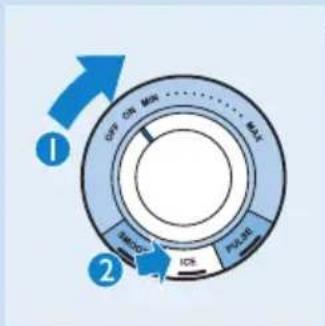
If you want to use one of the quick-select buttons, first turn the control knob to position ON. Then press the desired quick-select button.
When you turn the control knob to position ON, the lights in the buttons start to flash.
Smoothie function
Use this function to prepare delicious smoothies. When you press the SMOOTHIE button, the appliance starts mixing the smoothie according to the appropriate speed profile. To stop the process, press Smoothie button again.
Smoothies are thick drinks made of frozen or fresh fruit and fruit juices mixed together, sometimes with ice, ice cream, milk or yoghurt. See chapter 'Recipes' for a few examples. Add more liquid to make a thinner smoothie and add more frozen or fresh fruit to make a thicker smoothie.
Ice button
The blender is equipped with a special speed profile for crushing ice. When you press the Ice button, the appliance starts crushing the ice according to the appropriate speed profile.To stop the ice-crushing process, press the Ice button again.
The ice will be crushed within a few seconds and the result is tiny, regular pieces of ice. For instance, if you want to get crushed ice out of 5 ice cubes, press the ice button, let the appliance complete 5 crushing cycles and then switch off the appliance. If you want the ice to be crushed into snow, turn the control knob to maximum speed or press the Pulse button for a few seconds. If the result is still too coarse, press the Pulse button again.
Pulse button
Press the Pulse button if you want to process ingredients very briefly. As soon as you press the Pulse button the appliance starts running at the highest speed. When you release the button, the appliance stops running immediately. The Pulse button can also be used while the appliance is running at a speed between MIN and MAX.
Blender
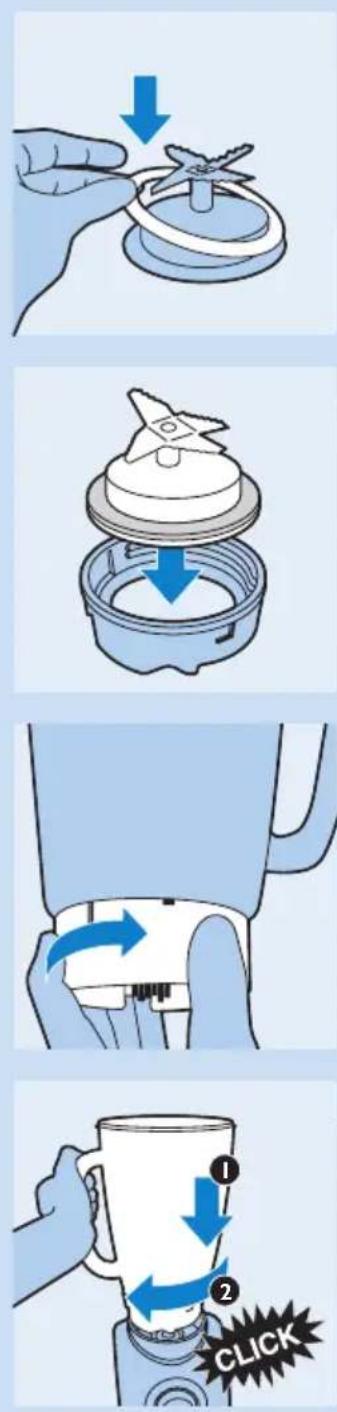
The blender is intended for fine pureeing, chopping and blending. With the blender you can prepare soups, sauces, milk shakes and batters. You can also use the blender to process vegetables, fruit and meat.
Preparing the blender for use
1 Place the sealing ring on the blade unit.
2 Assemble the blade unit onto the blade unit interface.
3 Screw the blade unit interface onto the bottom of the blender jar until it is fixed properly.
4 Place the blender jar with the blade unit interface attached on the motor unit (1) and turn the jar until you hear a 'click' (2). You can place the blender jar on the motor unit in two positions: with the handle pointing to the right or to the left.
5 Put the plug in the wall socket.
Using the blender
1 Put the ingredients in the blender jar.

natural_image
Illustration of a hand holding a cup with a blue arrow pointing to it, no text or symbols present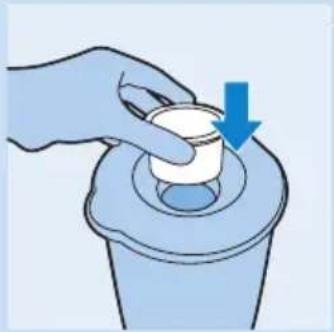
natural_image
Illustration of a hand pressing a small object on a cylindrical container with a blue arrow indicating downward motion (no text or symbols)
natural_image
Illustration of a hand holding a device with a blue arrow indicating rotation (no text or symbols)2 Place the lid on the blender jar. Close the lid by pushing it down firmly.
3 Insert the measuring cup into the opening in the lid.
4 Select a speed by turning the control knob or push one of the quick-select buttons (see section 'Control knob').
Do not let the appliance run for more than 3 minutes at a time. If you have not finished processing after 3 minutes, switch off the appliance and let it cool down to room temperature before you let it run again.
5 Always switch off the appliance by setting the control knob to OFF before you open the lid.
After using the blender
1 Unplug the appliance.
2 Remove the lid with the measuring cup from the blender jar.
3 Remove the blender jar with the unit interface attached from the motor unit.
4 Unscrew the blade unit interface from the bottom of the blander jar.
5 Always clean the removable parts immediately after use.
Tips
- Cut meat or solid ingredients into smaller pieces before putting them in the blender jar.
- Do not process a large quantity of solid ingredients at the same time. Process these ingredients in a series of small batches instead.
- To make tomato juice, cut the tomatoes in four and drop the pieces through the opening in the lid onto the rotating blades.
Measuring cup
You can use the measuring cup to measure ingredients or to prepare mayonnaise.
To prepare mayonnaise, you can punch a hole in the middle of the bottom of the measuring cup with a knife or another sharp implement to use the measuring cup as a funnel for adding oil when preparing mayonnaise. The oil should be added very slowly to obtain the right consistency. Let the blender operate at a low speed when preparing mayonnaise.
Note: Once you have punched a hole in the measuring cup, it cannot be used as a measuring cup anymore.
Filter (Type HR2094 only)
With this filter you can make delicious fresh fruit juices, cocktails or soy milk (see also 'Recipes'). The filter prevents pips and skins from ending up in your drink.
Never overload the filter. Do not put more than 135g of dried soy beans or 150g of fruit in the filter at the same time.
Preparing the filter for use
1 Place the blender jar with the blade unit interface attached on the motor unit (1) and turn the jar until you hear a 'click' (2).
The blender can be placed on the motor unit in two positions.
2 Put the filter in the blender jar.
Make sure that the grooves of the filter fit exactly onto the ribs inside the blender jar.
3 Make sure the appliance is plugged in.
Using the filter
1 Put the lid on the blender jar.
Make sure you place the lid on the blender jar in such a way that the drink can be poured out through the strainer in the lid.
2 Put the ingredients in the filter.
Cut fruits into smaller pieces and soak dried pulses, such as soy beans, before putting them in the filter.
3 Pour water or another liquid (milk, juice, etc.) into the blender jar.
4 Insert the measuring cup into the hole in the lid.
5 Select a speed or push one of the buttons (see section 'Control knob').
Let the appliance run for approx. 60 seconds.
Note: When you are processing a large quantity, we advise you not to put all the ingredients in the filter at the same time. Start processing a small quantity and let the appliance run for a few seconds. Then switch off the appliance and add another small quantity, but do not exceed the top of the sieve mesh. Repeat this procedure until you have processed all the ingredients. Always keep the lid on the blender jar during processing.
After using the filter
1 Switch off the appliance and remove the blender jar from the motor unit.
2 Pour out the drink via the pouring lip of the blender jar. Make sure the lid is placed on the blender jar in such a way that the drink can be poured out through the strainer in the lid.
Do not remove the lid, the measuring cup and the filter.
Make sure that you have assembled the lid in the right position so that the drink is poured out through the filter in the lid.
For optimal results, put the jar with the remaining ingredients back onto the appliance and let it run for a few more seconds.
3 Always clean the filter immediately after use.


natural_image
Diagram of a mechanical component with a downward arrow indicating force or direction (no text or symbols present)
natural_image
Illustration of a hand pouring liquid from a conical container into a bowl, with an inset showing the same container (no text or symbols)Recipe
Soy milk
For this recipe you need the filter.
Do not process more than 1 batch without interruption. Let the appliance cool down to room temperature before you continue processing.
Ingredients:
- 135g dried soy beans
- 1000ml water
Soak the soy beans for 4 hours before processing them.
Put the soaked soy beans in the filter. Pour 1000ml of water into the blender jar and blend for 30 seconds at the highest speed (MAX). If necessary, e.g. to get a finer result, you can switch off and unplug the appliance and give the beans as stir. Then continue to blend at the highest speed (MAX) again.
Pour the soy milk into a pan.
Bring the soy milk to the boil, then add sugar to taste and leave to simmer until all sugar has melted.
Serve hot or cold.
Cleaning
We advise you to clean the removable parts immediately after use.
Avoid touching the blades. The blades are very sharp.

natural_image
Line drawing of a blender with various kitchen utensils and containers (no text or labels)1 Unplug the appliance.
2 Disassemble all removable parts before cleaning them. Do not forget to remove the sealing ring from the blade unit.
3 Clean all removable parts in the dishwasher or in warm water with some washing-up liquid.
All parts except the motor unit are dishwasher proof!
4 Clean the motor unit with a moist cloth.
Do not rinse the motor unit under the tap. Do not use abrasive cleaning agents, scourers, alcohol etc. to clean the motor unit.
Storage
Store the mains cord by winding it round the reel in the bottom of the appliance.
Environment
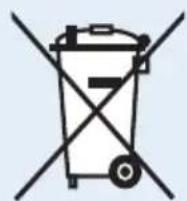
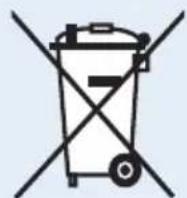
- Do not throw away the appliance with the normal household waste at the end of its life, but hand it in at an official collection point for recycling. By doing this, you help to preserve the environment.
Guarantee & service
If you need service or information or if you have a problem, please visit the Philips website at www.philips.com or contact the Philips Consumer Care Centre in your country (you find its phone number in the worldwide guarantee leaflet). If there is no Consumer Care Centre in your country, go to your local Philips dealer.
Recipes
Kiwi-strawberry smoothie
Ingredients:
- 200g peeled kiwi, cut in pieces of 3x3x3 cm
- 100g banana, cut into 1-cm slices, frozen
- 150ml pineapple juice
- 100g frozen strawberries
The banana and strawberries should be used straight from the freezer. Put the ingredients in the blender jar in the order mentioned above and blend until smooth.
Fruit mix
- 2 nectarines, stoned and cut into pieces
- 125g frozen raspberries
- 125g frozen strawberries
- 125ml orange juice
- 125ml apple juice
- 7 ice cubes
Put the nectarine pieces and all the juice in the blender jar, then add the frozen fruit. Press the Smoothie button and let the appliance run for 40 seconds.
Ice-blended vanilla coffee
Ingredients:
- 150ml warm water
- 1.5 tbsp sugar
- 2 tbsp instant coffee
- 200g vanilla ice cream
- 10 ice cubes
Dissolve the coffee and sugar in water. Pour all ingredients (except the ice cubes) into the blender. Blend until smooth. Drop the ice cubes through the opening in the lid while the motor is running.
Pina Colada cocktail
- 40ml dark Jamaica rum
- 30ml coconut syrup
- 10ml whipping cream
- 80ml pineapple juice
Put all ingredients in the blender jar and add 4 big ice cubes. Blend for about 30 seconds.
Troubleshooting
If the appliance does not work or does not work properly, first check the list below. If the problem is not mentioned in this list, the appliance probably has a defect. In that case we advise you to take the appliance to your dealer or to an authorised Philips service centre.
Question Answer
| Can I clean all removable parts in the dishwasher? | Yes, except the motor unit. |
| The appliance does not work. What should I do? | Please check if you have plugged in the appliance. Also check if the blender jar has been assembled properly. |
| What does ‘pulse’ mean? | When you press the Pulse button, the appliance will run at its highest speed as long as you keep pressing the button. Using the Pulse button is recommended if you want to have more control over the processing job, for instance when you are chopping. |
| Can I pour boiling hot liquids into the blender jar? | No, let the liquids or ingredients cool down to 80 °C/175 °F to avoid damaging the accessories. |
| Why does the motor produce an unpleasant smell during processing? | It is very common for a new appliance to give off an unpleasant smell or emit some smoke the first few times it is used. This phenomenon will stop after you have used the appliance a number of times. The appliance may also give off an unpleasant smell or emit some smoke if it has been used too long. In this case you have to switch the appliance off and let it cool down for 60 minutes. |
| The appliance stopped running because the blade unit is blocked. What should I do? | Switch the appliance off and use a spatula to dislodge the ingredients that are blocking the blade unit. We also recommend processing a smaller quantity. |
| The blender jar leaks. What should I do? | Switch the appliance off and pour out the ingredients. Then remove the blade unit interface. Check if the sealing ring has been assembled correctly. |
| Why does the fruit juice or soy milk contain a lot of pulp or skins? | Pour the drink through a sieve. To prevent pulp and skins from ending up in your drink, leave the measuring cup in the lid, make sure the lid and the filter are in place and the lid is assembled in the correct position (i.e. with the strainer directly in front of the pouring lip). |
Pendahuluan
natural_image
Illustration of a hand holding a small object with a blue arrow pointing downward (no text or symbols)natural_image
Diagram of a mechanical component with a downward arrow indicating a process or assembly (no text or symbols present)2 Pasang unit pisau pada sambungan unit pisau.

natural_image
Illustration of a hand holding a small electronic device with a blue arrow indicating rotation (no text or symbols)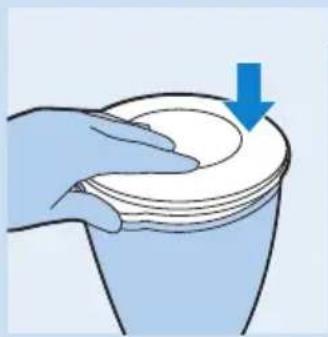
natural_image
Illustration of a hand pressing down on a cup with a blue arrow indicating downward motion (no text or symbols)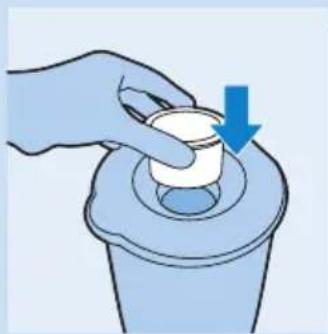
natural_image
Illustration of a hand pressing down on a small container with a blue arrow indicating downward motion (no text or symbols)
natural_image
Illustration of a hand holding a small electronic device with a blue arrow indicating rotation (no text or symbols)
natural_image
Illustration of a kitchen utensil with a blue arrow indicating downward motion (no text or symbols)natural_image
Illustration of a hand pouring liquid from a blender into a bowl, with an inset showing the same container (no text or symbols)natural_image
Exploded view diagram of a blender with various cooking ingredients (no text or labels)Penyimpanan
Smoothie kiwi-strawberry
Bahan-bahan:
- 200 g kiwi yang telah dikupas, dipotong seukuran 3 × 3 × 3 cm
- 100 g pisang, dipotong seukuran 1 cm, beku
- 150 ml jus nanas
- 100 g strawberry beku
natural_image
Illustration of a hand holding a small object with a blue arrow pointing downward (no text or symbols)natural_image
Diagram of a mechanical component with a downward arrow indicating a process or assembly (no text or symbols present)natural_image
Illustration of a hand holding a small electronic device with a blue arrow indicating rotation (no text or symbols)
natural_image
Illustration of a hand pressing down on a cup with a blue arrow indicating downward motion (no text or symbols)
natural_image
Illustration of a hand pressing down on a cylindrical object with a blue arrow indicating downward motion (no text or symbols)
natural_image
Illustration of a hand holding a small electronic device with a blue arrow indicating rotation (no text or symbols)natural_image
Illustration of a hand pouring liquid from a blender into a bowl, with an inset showing the same container (no text or symbols)natural_image
Line drawing of a blender with various cooking ingredients (no text or labels)natural_image
Symbol of a trash bin crossed with no text or numbers, representing waste sorting or disposal (no text present)
natural_image
Illustration of a hand holding a small airplane on a circular base with a downward arrow indicating motion (no text or symbols)natural_image
Diagram of a kitchen appliance showing a lid and base with a blue arrow indicating a component (no text or symbols present)natural_image
Illustration of a hand holding a small electronic device with a blue arrow indicating rotation (no text or symbols)4 วาง Initially present for the purpose of (1) และหมู่ begin into training contracts thatได้ your best performance (2)
natural_image
Illustration of a hand pressing down on a cup with a blue arrow indicating downward motion (no text or symbols)
natural_image
Illustration of a hand pressing down on a cylindrical object with a blue arrow indicating downward motion (no text or symbols)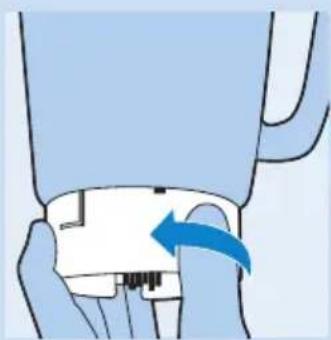
natural_image
Illustration of a hand holding a small electronic device with a blue arrow indicating rotation (no text or symbols)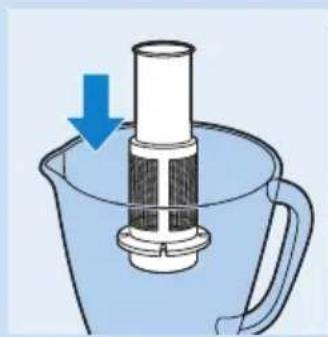
natural_image
Diagram of a mechanical device with a cylindrical component inserted into a blue container, showing a downward arrow (no text or symbols present)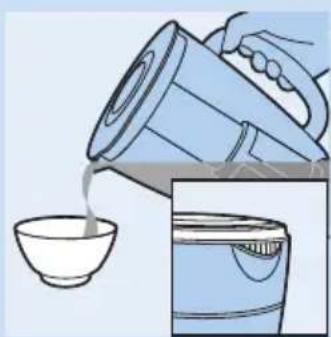
natural_image
Illustration of a hand pouring liquid from a blender into a bowl, with an inset showing the same container (no text or symbols)natural_image
Illustration of a blender with various cooking ingredients including a lid, cup, and spool (no text or labels)natural_image
Symbol of a trash bin with crossed lines indicating no waste or discharge (no text or labels)natural_image
Illustration of a hand holding a small object with a downward arrow indicating motion (no text or symbols)
natural_image
Diagram of a kitchen appliance showing a lid and base with a blue arrow indicating a process (no text or symbols present)
natural_image
Illustration of a hand pressing a button with a blue arrow indicating rotation (no text or symbols)
Nút xung
natural_image
Illustration of a hand pressing down on a cup with a blue arrow indicating downward motion (no text or symbols)
natural_image
Illustration of a hand pressing down on a small object into a container with a blue arrow indicating downward motion (no text or symbols)
natural_image
Illustration of a hand holding a small electronic device with a blue arrow indicating rotation (no text or symbols)
natural_image
Diagram of a kitchen tool with a cylindrical component inserted into a blue container, showing a blue arrow indicating downward motion (no text or symbols present)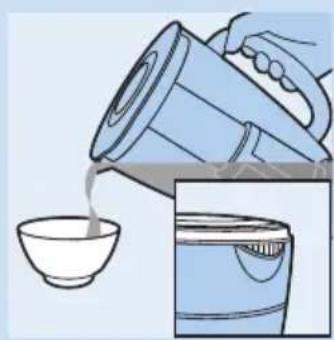
natural_image
Illustration of a hand pouring liquid from a blender into a bowl, with an inset showing the same container (no text or symbols)natural_image
Line drawing of a blender with various cooking ingredients and containers (no text or labels)natural_image
Symbol of a trash bin with crossed lines indicating no waste or restriction, accompanied by a black rectangular block below (no text or symbols)natural_image
Illustration of a hand holding a small object with a blue arrow pointing downward (no text or symbols)natural_image
Diagram of a kitchen appliance showing a lid and base with a blue arrow indicating a process (no text or symbols present)
natural_image
Illustration of a hand holding a small electronic device with a blue arrow indicating rotation (no text or symbols)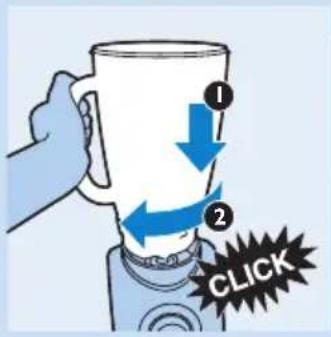

natural_image
Illustration of a hand pressing down on a cup with a blue arrow indicating downward motion (no text or symbols)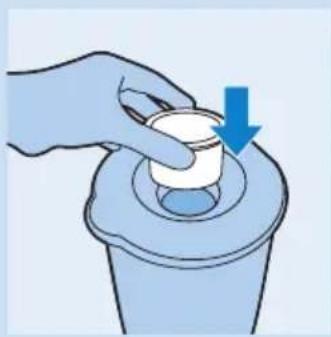
natural_image
Illustration of a hand pressing down on a small container with a blue arrow indicating downward motion (no text or symbols)2 將刀組組裝到刀組接合介面上。
natural_image
Illustration of a hand holding a small electronic device with a blue arrow indicating rotation (no text or symbols)natural_image
Illustration of pouring liquid into a bowl, with a hand pouring from a container (no text or symbols)汁壺的蓋子。
濾網使用後
natural_image
Line drawing of a blender with various cooking ingredients including a lid, cup, and stand mixer (no text or labels)環境保護
- Introduction
- General description (Fig. 1)
- Important
- General
- Danger
- Warning
- Caution
- Blender
- Filter
- Electromagnetic fields (EMF)
- Built-in safety lock
- Before first use
- Using the appliance
- Control knob
- Smoothie function
- Ice button
- Pulse button
- Preparing the blender for use
- Using the blender
- After using the blender
- Tips
- Measuring cup
- Filter (Type HR2094 only)
- Preparing the filter for use
- Using the filter
- After using the filter
- Recipe
- Cleaning
- Storage
- Environment
- Guarantee & service
- Recipes
- Kiwi-strawberry smoothie
- Ingredients:
- Fruit mix
- Ice-blended vanilla coffee
- Pina Colada cocktail
- Troubleshooting
- Pendahuluan
- Penyimpanan
- Smoothie kiwi-strawberry
- Nút xung
- 濾網使用後
- 環境保護
Brand : PHILIPS
Model : Aluminium Collection HR2094
Category : Blender