
Ivvi Pushchair - Stroller Nuna - Free user manual and instructions
Find the device manual for free Ivvi Pushchair Nuna in PDF.


| Product Type | Stroller |
| Brand | Nuna |
| Model | Ivvi Pushchair |
| Dimensions (open) | L 89 x W 52 x H 107 cm |
| Dimensions (folded) | L 34 x W 26 x H 72 cm |
| Weight | 8.5 kg |
| Recommended Age | From birth up to 15 kg |
| Maximum Load Capacity | 15 kg (seat) + 4.5 kg (basket) |
| Power Supply | None (manual) |
| Main Functions | Stroller with reclining, sitting and parent/child facing positions; one-hand compact folding; 5-point harness; foot brake |
| Care and Cleaning | Clean with a damp cloth; fabric can be hand washed at 30°C; no dry cleaning |
| Safety | Anti-folding lock system; parking brake; adjustable 5-point harness; removable safety bar |
| Spare Parts and Repairability | Available on the official Nuna website; repairable by a professional |
| Warranty | 2 years |
| Package Contents | Stroller with canopy, storage basket, hood, safety bar, instruction manual |
Frequently Asked Questions - Ivvi Pushchair Nuna
User questions about Ivvi Pushchair Nuna
0 question about this device. Answer the ones you know or ask your own.
Ask a new question about this device
Download the instructions for your Stroller in PDF format for free! Find your manual Ivvi Pushchair - Nuna and take your electronic device back in hand. On this page are published all the documents necessary for the use of your device. Ivvi Pushchair by Nuna.
USER MANUAL Ivvi Pushchair Nuna
natural_image
Illustration of a yellow and gray baby stroller with a logo (no text or symbols on the device itself)iVvi™
instruction manual
Thanks for choosing Nuna!
Nuna designs distinctive, smart and exciting products.
Illustrations

natural_image
Illustration of a baby car seat with adjustable arms and seatbelt, no text or symbols present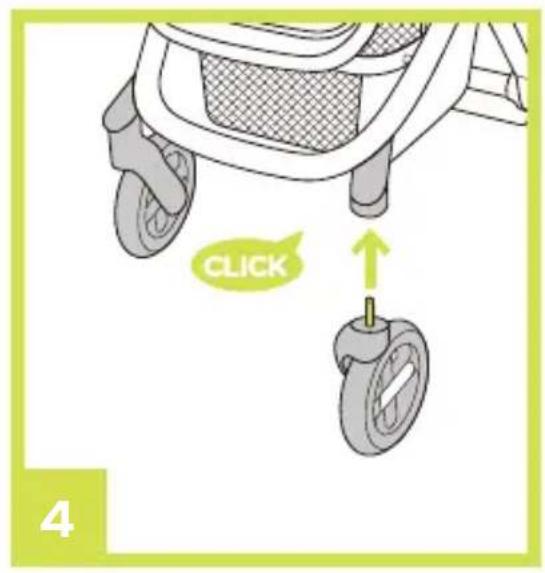

natural_image
Illustration of a hand pump device with a bucket and handle, showing a green downward arrow indicating motion (no text or symbols)


Illustrations


natural_image
Illustration of a person's seatbelt being adjusted for a cable or cable buckle, with no text or symbols present.

natural_image
Illustration of a car seatbelt with a yellow handle and arrow indicating movement (no text or symbols)
natural_image
Illustration of a yellow backpack with a white arrow pointing to the front panel (no text or symbols)

natural_image
Illustration of a green baby stroller with yellow back cover and gray frame (no text or symbols)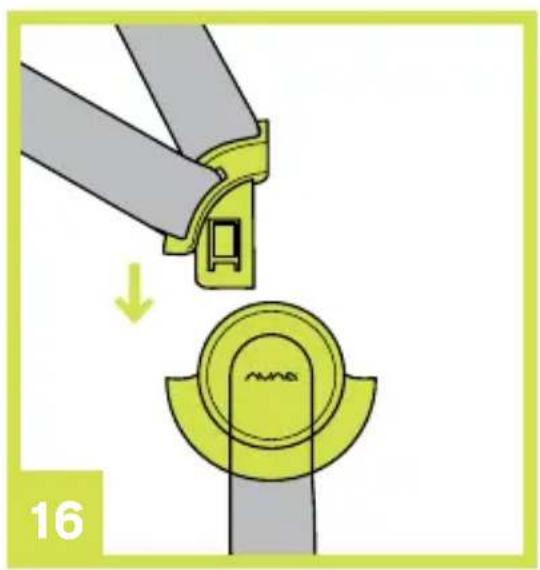
natural_image
Illustration of a mechanical clamp or bracket assembly with a yellow component being inserted, showing a step and label '16' (no text or symbols on the diagram itself)
natural_image
Diagram of a fan or propeller assembly with five blades and a central green component, labeled '14' in the corner (no text or symbols on the diagram itself)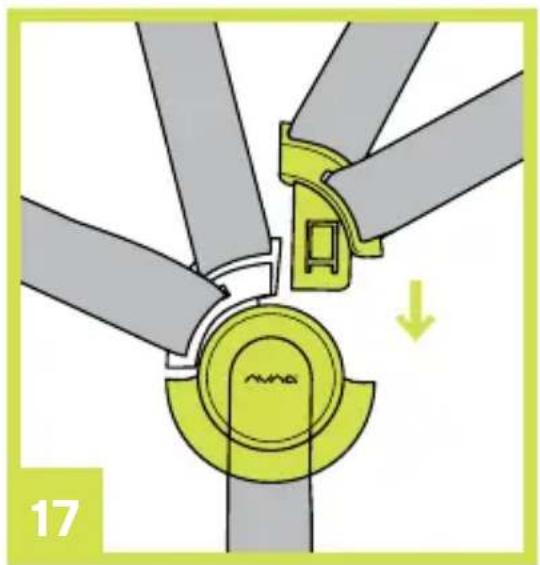
natural_image
Diagram of a wind turbine blade assembly with highlighted components and a downward arrow indicating motion (no text or symbols)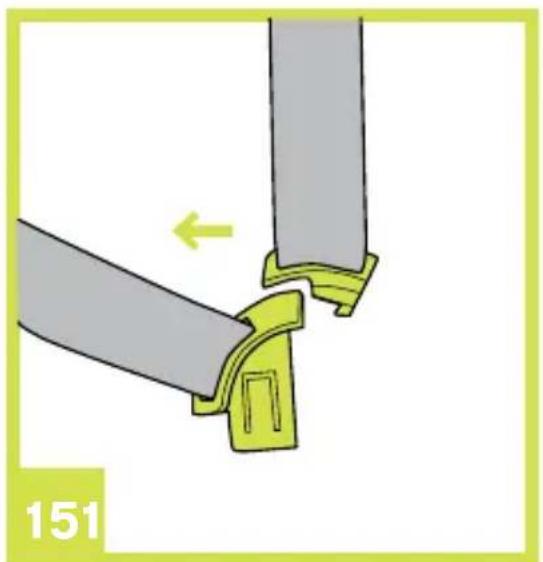
natural_image
Diagram showing two mechanical components with a green arrow indicating direction, labeled '151' (no text or symbols on the diagram itself)
natural_image
Diagram of a belt buckle assembly with a yellow arrow indicating direction (no text or symbols)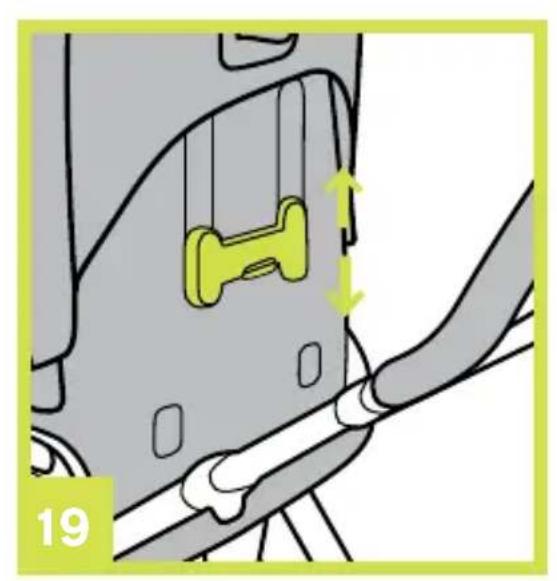
natural_image
Diagram showing a car interior with a yellow object and directional arrows indicating movement or force (no text or symbols)

natural_image
Diagram of a car seatbelt mechanism with a highlighted green component and an arrow indicating direction (no text or symbols)
natural_image
Illustration of a sewing machine needle being cut with a green arrow indicating the needle (no text or symbols)
natural_image
Mechanical assembly diagram showing a clamping mechanism with green arrows indicating movement (no text or symbols)
natural_image
Illustration of a computer mouse with a green roller resting on top, showing a small icon on the front panel (no text or symbols)
natural_image
Illustration of a mechanical component with a green arrow indicating a step, labeled '25' in the corner (no text or symbols on the diagram itself)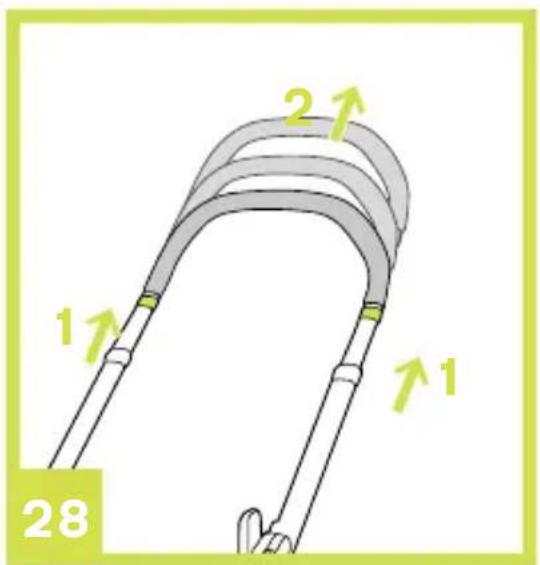
natural_image
Illustration of a bicycle steering wheel with a basket and handle, no text or symbols present
natural_image
Illustration of a baby stroller with labeled parts (1, 2, 29), no text or symbols present.
natural_image
Illustration of a car stroller with a highlighted intake tray and green directional arrows (no text or symbols)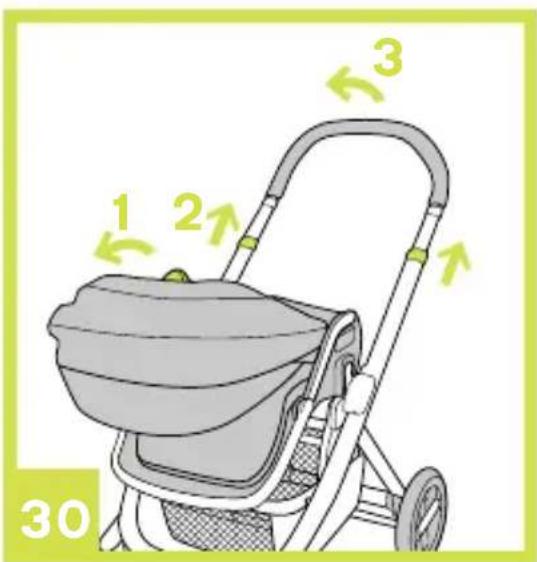

natural_image
Line drawing of a baby stroller with two wheels and a back cover (no text or symbols)
natural_image
Illustration of a baby stroller with a highlighted seat and a 'CLICK' button (no text or symbols on the device itself)
natural_image
Illustration of a baby stroller with green buttons and arrows indicating action (no text or symbols)

natural_image
Illustration of a medical device with green connectors and arrows indicating movement or insertion (no text or symbols)

natural_image
Illustration of a baby stroller with a green arrow indicating motion (no text or symbols)
natural_image
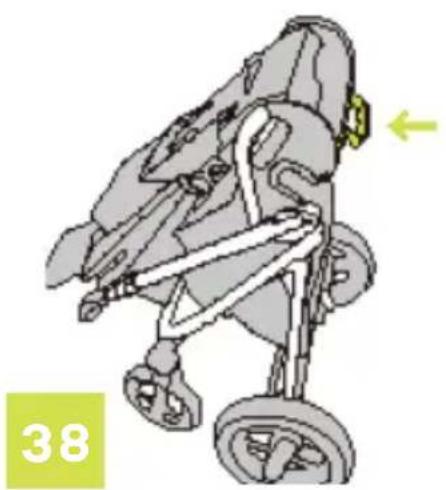
Illustration of a stroller with motion arrows and number 38 (no text or symbols on the diagram itself)
natural_image
Line drawing of a baby stroller with four wheels and a back cover (no text or symbols)Contents
Illustrations 1-9
English (EN) 10
Safety and recommendations 11
Warnings 12
Further Warnings 13-14
Parts list 15
Contents of the box 16
How to set up the Nuna IVVI 16
How to use the Nuna IVVI 18
Accessories 21
Cleaning and maintenance 22
Warranty and service 23
Where to find Nuna products 25
Nederlands (NL) 26
Français (FR) 44
Deutsch (DE) 60
Italiano (IT) 76
Español (ES) 92
Safety and recommendations
Please take note of the following before using the Nuna IVVI.
Safety is very important to us and you can be assured that our products comply with the relevant standards and that they have been tested by a number of independent testing panels and laboratories.
The Nuna IVVI is a patented product and complies with European safety standards EN 1888:2012.
If you have any questions or comments regarding the Nuna IVVI, we will be glad to hear them through our web site nuna.eu
IMPORTANT! KEEP THESE INSTRUCTIONS FOR FUTURE REFERENCE!
Read these instructions carefully before use and keep them for future reference. Your child's safety may be affected if you do not follow these instructions.
This vehicle is intended for children from birth and up to 15 kg maximum.
WARNINGgS
Failure to follow these warnings and instructions could result in serious injury or death.
! WARNING Never leave you child unattended.
! WARNING A child's safety is your responsibility.
! WARNING Ensure that all the locking devices are engaged before use.
! WARNING Use a harness as soon as your child can sit unaided.
WARNING Suitable from birth and designed to accommodate your child from infant to toddler (up to a weight of 15 kg).
! WARNING Never carry more than one child at a time in this vehicle.
! WARNING Any load attached to the handle affects the stability of the stroller/pram/pushchair.
! WARNING Always use the crotch strap in combination with waist belt.
! WARNING This product is not suitable for running or skating.
! WARNING To avoid any danger of suffocation, remove all plastic covers before using this item and destroy or keep away from babies and children!
! WARNING Do not let your child play with this product.
FURTHER WARNINGgS
! WARNING Always use the restraint system.
Children must always be harnessed in at all times and never be left unattended.
The harness must always be correctly fitted and adjusted. The harness is not a substitute for a proper adult supervision.
! Always set the parking brake on the IVVI when you stop.
Never leave a child in the IVVI when ascending or descending stairs or escalators, or when traveling on other forms of transport.
Do not carry additional children, goods, accessories in or on this IVVI except as permitted in this leaflet. They may cause the IVVI to become unstable.
! Do not place any item on the canopy.
Overloading, incorrect folding, and the use of accessories e.g. child seats, bag hooks, rain covers, buggy boards, etc... other than those approved by Nuna may damage or make this IVVI unsafe.
! Any damage caused by the use of accessories not supplied by Nuna will not be covered in terms of warranty.
! Never allow children to stand on the footrest.
! WARNING Do not use the vehicle if any parts are damaged or missing.
! WARNING Use original Nuna parts and accessories only.
! Negotiate curbs and rough ground carefully. Repeated impact will cause damage to the IVVI.
The tires may leave black marks on some surfaces, particularly smooth floors like parquet, laminate and linoleum.
Do not leave the IVVI exposed in the vicinity of a strong source of heat i.e. a radiator or open fire.
Do not store your IVVI in a damp place. Always allow the fabric to dry naturally away from direct heat.
Keep small parts away from children as they pose a choking hazard.
The maximum weight to be placed in the basket is 4.5 kg.
! WARNING Check that the seat unit, the pram body, and car seat attachment devices are correctly engaged before use.
! WARNING To avoid injury ensure that your child is kept away when unfolding and folding this product.
This pushchair has been designed to use from birth. We recommend using the most reclined position for newborn babies.
This vehicle does not replace a cot or a bed. Should your child need to sleep, then it should be placed in cot or bed.
! The parking device should be engaged when placing and remobing child
Parts list
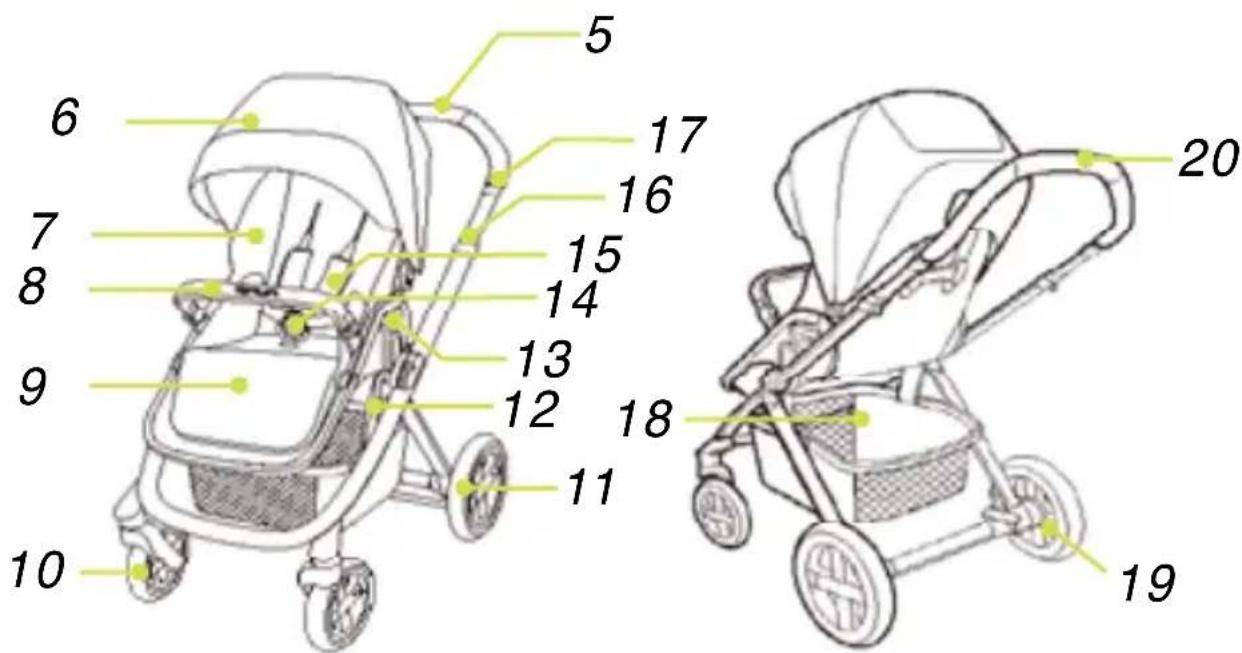
Make sure all parts are available before assembly. If any part is missing, please contact local retailer. No tools are required for assembly.
1 Front Wheel (x2)
Frame
Button
Basket
2 Rear Wheel (x2)
6 Hood
14 Buckle
19 Brake Lever
3 Rain Cover (Stroller Mode)
7 Seat Pad
15 Shoulder
20 Handle
8 Arm Bar
Harness Pads
4 Car seat adapter
9 Calf Support
16 Folding
10 Front Wheel
Button
11 Rear Wheel
17 Handle
12 Seat Mount
Adjustment
13 Seat
Button
5 Stroller
Release
18 Storage
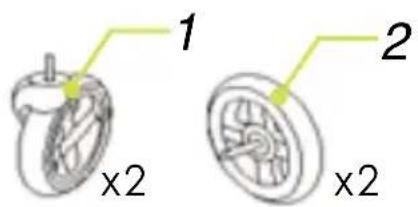

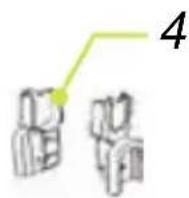
Contents of the Box
Chassis
Seat
Seat rain cover
Car seat adapter
Front wheel
Rear wheel
Tools Needed: None
How to set up the Nuna IVVI
Opening the Nuna IVVI
Check that you have all the parts for this product before using it. The assembly should be performed only by adults.
1 Rotate handle upward. (1) Attach the seat to the frame. (2)
2 Press the recline adjust button and rotate the seat back to the vertical position. (3)
3 Check that the stroller is completely latched open before continuing.
Assemble Front Wheels
1 Assemble front wheels to front legs. Check that wheels are securely attached by pulling down. (4)
2 To disassemble front wheel, detach front wheel from front leg (5)-2 while pressing the release button. (5)-1
Assemble Rear Wheels
1 Assemble rear wheels to rear legs. Check that wheels are securely attached by pulling outward. (6)
2 To disassemble rear wheel, detach rear wheel from rear wheel mount (7)-2 while pressing the release button. (7)-1
Assemble Hood
1 Insert the clips on either side of the canopy into the mounts (8), then attach the rear panel around the recline plastic. (9)
2 To remove the canopy, press the buttons on either side of the canopy, then remove the rear panel from the recline plastic. (10)
Assemble Armbar
1 Align the armbar ends with the armbar mounts, and then insert to lock.(11)
2 To disassemble armbar, press armbar release button (12)-1, and then pull out the armbar. (12)-2
3 The completely assembled stroller is shown as (13)
How to use the Nuna IVVI
Securing child
1 To release the buckle latch, push on center button and remove the clips. (14)
2 To secure child, assemble buckle. (15, 16, 17)
3 Fit harness snugly to child by sliding each adjustment buckle. (18)
Adjusting the shoulder harness position
1 There are 5 positions for the shoulder harness.
2 To adjust the shoulder harness position, squeeze the adjustment button, and then adjust the shoulder harness position to a desired height. (19)
Switch Seat
1 The seat can be switched to face front or to face the parent.
2 Squeeze the seat release buttons while lifting the seat. (20) Turn the seat to reverse direction, and then insert the seat to seat mounts. (21)
Adjust Recline
1 There are 5 positions for the backrest.
2 To recline the backrest, squeeze the adjustment button (22)-1, and then adjust the backrest to a desired angle. (22)-2
3 To raise the backrest, squeeze the adjustment button (22)-1, and push up.
Use Canopy
1 To open the canopy, unzip the zipper, pull canopy toward front. (23)
2 To fold the canopy, pull canopy toward back.
3 To open the canopy window, roll fabric and secure with magnet. (24)
Front Swivel Locks
1 Push down the front swivel locks to lock front wheles facing forward. (25)
2 It is recommended to use swivel locks on uneven surfaces.
Brake
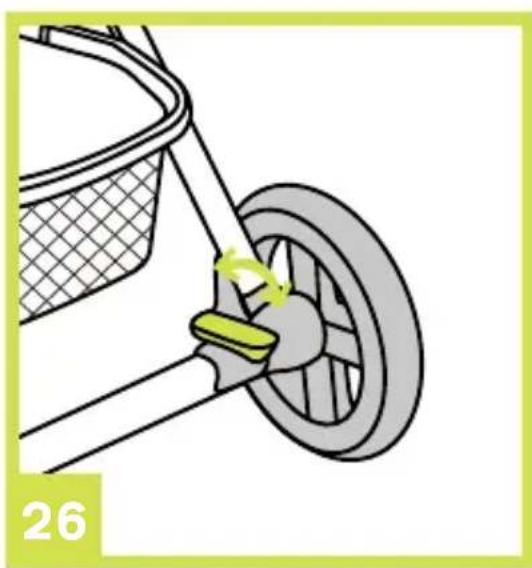
1 To lock wheels, step on brake lever and push downwards. (26)
2 To release wheels, lift the brake lever upwards.
3 Always apply brake when stroller is in stopped position.
Adjust Calf Support
1 The calf support has 2 positions.
2 To raise the calf support, push it upwards.
3 To lower calf support, press the adjusting button in the middle of footrest, and rotate the footrest downwards. (27)
Adjust Handle
1 The handle has 6 positions.
2 To adjust the height of the handle, pull the handle upward or downward (28)-2 while pulling up on the handle adjustment button. (28)-1
Use Arm bar
1 There are 2 positions for the armrest.
2 Press the adjusting buttons on two sides of the armrest, and rotate the armrest to the suitable position.
! Adjust the armrest to the second position as needed.
! Positioning the arm rest in the first position before folding will provide a more compact fold. (29)
Fold Stroller
Please fold the hood before folding the stroller.
1 Press the recline adjusting button to fold the stroller seat back down.
(30)-1
2 Lift the folding button and rotate the handle for (30)-2, (30)-3.
3 To trolley stroller, grab handel at the bottom of the seat. (38)
4 The stroller seat can also be removed before folding (37)
5 Lift the webbing in the basket of the stroller to transport after folding. (37)
! Please rotate the front wheels to the suitable position to make the stroller stand alone. (31)
Accessories
! Not all accessories are included on some models.
Use Rain Cover
1 To assemble the stroller rain cover, place it over the stroller seat. (39)
! Please always check ventilation, especially in hot weather when the rain cover is on the product.
! Please check that the rain cover has been cleaned and dried before folding.
Use with Nuna Pipa Infant Car Seat
When using with Nuna Car Seat, please refer to the following instructions.
1 To attach adapters, place adapters onto mounts as show. A "click" sound means the adapter is locked. (32)
2 To attach car seat, place car seat onto adapter as show. (33)
A "click" sound means the car seat is locked. (34)
3 To remove car seat, lift the car seat upwards (35)-1 while pressing the two stroller release buttons. (35)-2
4 To remove adapters, lift the adapters upwards while pulling the two release buttons. (36)-1
! If you have any problems using the car seat, please refer to the car seat instruction manual.
! Please don't fold the IVVI when the car seat is attached.
Cleaning and maintenance
Your IVVI is a valuable piece of equipment and deserves careful handling.
You can clean the frame, the plastic parts, and the fabric with a damp cloth, but don't use abrasives or bleach. Do not machine wash.
Continued and extended exposure to sunlight can change the colour of many materials.
For reasons of safety, only use original Nuna parts.
Clean the wheels regularly with water and remove the dirt.
To ensure the long-lasting use of your IVVI, wipe it off with a soft, absorbent cloth after using it in rainy weather.
It is normal for fabric to discolour from sunlight and to show wear and tear after a long period of use, even when used normally.
Check regularly if any parts are torn, broken, or missing and that everything functions properly. If this is the case, stop using the IVVI.
Warranty and service
The Nuna IVVI is covered by a one-year warranty. If this product shows a defect during the warranty period, please contact your retailer. If the retailer is unable to help you, they will make contact with the local Nuna distributor.
Please be aware that the model number and serial number located under the seat of the stroller, and on the bottom of the carry cot will be required in the event of a warranty claim.
To register your product, please go to our website at nuna.eu
Terms of warranty
The warranty takes effect at the date of purchase of the product and is valid for one year. The warranty provides you with a right of repair but not a product exchange or return. The warranty will not be extended even if some repairs have been made. Nuna has the right to improve the design of the product without any obligation to update the products manufactured previously.
The warranty will not apply in the following circumstances:
- If you can not provide the sales receipt or proof of purchase of the product.
- If the defect results from normal wear.
- If the defect results from an accident.
- If the defect results from a failure to follow the instructions of assembly, use, care, and maintenance provided in the instruction manual.
- If the defect results from overloading (maximum weight = 15 kg).
- If repairs have been carried out by a third party.
- If the defect results from the use of accessories others than Nuna.
Where to find Nuna products?
If you are looking for Nuna retailers in your area, please consult our website: nuna.eu
Contact
We always look forward to improving our products and developing new ideas, so please feel free to contact us to submit any comments or questions regarding the Nuna products.
nuna.eu
Nuna International BV De Beeke 8, 5469 DW, ERP The Netherlands
Thanks for choosing Nuna!
ANDERE WAARSCHUWINgEN
Nuna International BV
De Beeke 8, 5469 DW,
ERP The Netherlands
Nuna International BV De Beeke 8, 5469 DW, ERP The Netherlands


Lieferumfang
Gestell
Sitz
Sitzregenschutz
Autositzadapter
Vorderrad
Hinterrad
Nuna International BV De Beeke 8, 5469 DW, ERP The Netherlands
Nuna International BV De Beeke 8, 5469 DW, ERP The Netherlands


Nuna International BV De Beeke 8, 5469 DW, ERP The Netherlands

natural_image
Illustration of a baby stroller with yellow canopy and gray body (no text or symbols)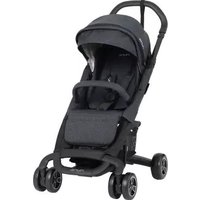


- iVvi™
- Thanks for choosing Nuna!
- Illustrations
- Contents
- Illustrations 1-9
- English (EN) 10
- Nederlands (NL) 26
- Safety and recommendations
- IMPORTANT! KEEP THESE INSTRUCTIONS FOR FUTURE REFERENCE!
- WARNINGgS
- FURTHER WARNINGgS
- Parts list
- Contents of the Box
- How to set up the Nuna IVVI
- Opening the Nuna IVVI
- Assemble Front Wheels
- Assemble Rear Wheels
- Assemble Hood
- Assemble Armbar
- How to use the Nuna IVVI
- Securing child
- Adjusting the shoulder harness position
- Switch Seat
- Adjust Recline
- Use Canopy
- Front Swivel Locks
- Brake
- Adjust Calf Support
- Adjust Handle
- Use Arm bar
- Fold Stroller
- Accessories
- Use Rain Cover
- Use with Nuna Pipa Infant Car Seat
- Cleaning and maintenance
- Warranty and service
- Terms of warranty
- The warranty will not apply in the following circumstances:
- Where to find Nuna products?
- Contact
- ANDERE WAARSCHUWINgEN
- Lieferumfang
Brand : Nuna
Model : Ivvi Pushchair
Category : Stroller