
DWR-118 - Router D-LINK - Free user manual and instructions
Find the device manual for free DWR-118 D-LINK in PDF.


| Product Type | 4G LTE Router |
| Brand | D-Link |
| Model | DWR-118 |
| Dimensions (L x W x H) | 150 x 100 x 30 mm |
| Weight | 200 g |
| Power Supply | 12V/1A power adapter |
| Mobile Technology | 4G LTE (up to 150 Mbps download) |
| WiFi | WiFi 802.11ac, dual-band 2.4 and 5 GHz |
| Ethernet Ports | 4 LAN ports 10/100/1000, 1 WAN port |
| Main Functions | 4G sharing, firewall, VPN, parental controls, QoS |
| Security | WPA2-PSK, MAC filtering, built-in firewall |
| Care and Cleaning | Clean with a soft, dry cloth. Do not use abrasive products. |
| Spare Parts and Repairability | No spare parts available. Contact D-Link after-sales service. |
| General Information | 4G LTE router for mobile connections, ideal for areas without ADSL. |
Frequently Asked Questions - DWR-118 D-LINK
User questions about DWR-118 D-LINK
0 question about this device. Answer the ones you know or ask your own.
Ask a new question about this device
Download the instructions for your Router in PDF format for free! Find your manual DWR-118 - D-LINK and take your electronic device back in hand. On this page are published all the documents necessary for the use of your device. DWR-118 by D-LINK.
USER MANUAL DWR-118 D-LINK
WIRELESS AC750 DUAL-BAND MULTI-WAN ROUTER DWR-118
QUICK INSTALLATION GUIDE
CD-ROM
INCLUDES TECHNICAL MANUALS
WIRELESS AC750 DUAL-BAND MULTI-WAN ROUTER DWR-118
ETHERNET CABLE
CAT5
POWER ADAPTER
If any of these items are missing from your packaging, contact your reseller.
PRODUCT SETUP
EASY SETUP: 3G/4G CONNECTION MODE

INSTALL THE 3G/4G USB ADAPTER
Plug the 3G/4G USB modem into the USB port of the DWR-118.

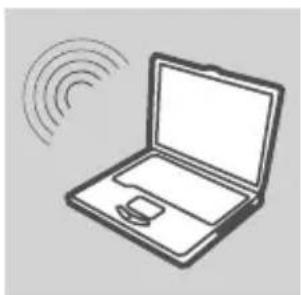
CONNECT TO THE DWR-118
Plug one end of the Ethernet cable into the DWR-118. Plug the other end of the cable into your PC's Ethernet port. You may also connect to the router wirelessly.

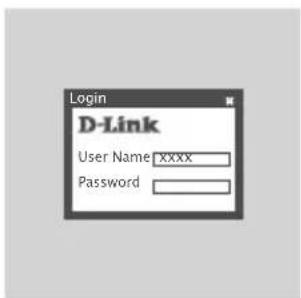
CONFIGURE THE DWR-118
Open a web browser and go to http://192.168.0.1. Enter admin as the User Name, and leave the Password field blank.
PRODUCT SETUP
EASY SETUP: WAN CONNECTION MODE
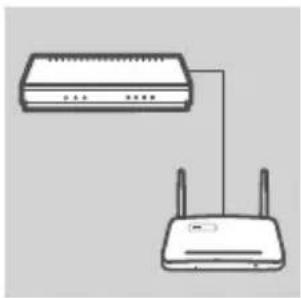
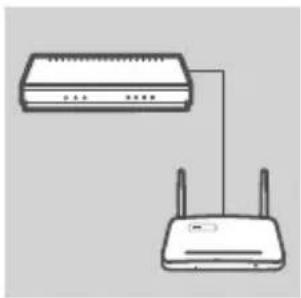
CONNECT TO A CABLE/DSL MODEM
Plug one end of the Ethernet cable into the DWR-118. Plug the other end of the cable into your cable/DSL modem.

CONNECT TO THE DWR-118
Use a PC with an active wireless adapter to open a web browser and scan for available wireless networks. Connect to the network with the SSID labeled dlink.

CONFIGURE THE DWR-118
Open a web browser and go to http://192.168.0.1. Enter admin as the User Name, and leave the Password field blank.
TROUBLESHOOTING
SETUP AND CONFIGURATION PROBLEMS
1. HOW DO I CONFIGURE MY DWR-118 3G/4G WIRELESS AC750 DUAL-BAND MULTI-WAN ROUTER WITHOUT THE INSTALLATION CD, OR CHECK MY WIRELESS NETWORK NAME (SSID) AND WIRLESS ENCRYPTION KEY?
- Connect your PC to the DWR-118 using an Ethernet cable.
- Open a web browser and enter the router address: http://192.168.0.1
- The default username is admin. The default password is blank (leave this box empty).
- If you have changed the password and cannot remember it, you will need to reset the router to factory defaults in order to set the password back to blank.
2. HOW DO I RESET MY DWR-118 3G/4G WIRELESS AC750 DUAL-BAND MULTI-WAN ROUTER TO FACTORY DEFAULT SETTINGS?
- Ensure that the DWR-118 is plugged in and receiving power.
- Press and hold the reset button on the front of the device for 5 seconds.
Note: Resetting the product to the factory default will erase the current configuration.
To reconfigure your settings, log into the DWR-118 as outlined in question 1, then run the Setup Wizard.
3. HOW DO I ADD A NEW WIRELESS CLIENT OR PC IF I HAVE FORGOTTEN MY WIRELESS NETWORK NAME (SSID) OR WIRELESS ENCRYPTION KEY?
- For each PC that needs to connect to the DWR-118 wirelessly, you must ensure that the correct Wireless Network Name (SSID) and encryption key has been entered.
- Use the web based user interface (as described in question 1 above) to verify or choose your wireless settings.
- Make sure you write down these settings so that you can enter them into each wirelessly connected PC. You will find a dedicated area on the back of this document to write down this important information for future use.
4. WHY AM I UNABLE TO ESTABLISH AN INTERNET CONNECTION?
- If connecting using a 3G/4G connection, make sure that you are within range of the mobile service provider, and that the service has been correctly configured.
- If connecting using the WAN via ADSL /Cable service, make sure the modem has been enabled/ connected and is operational, and that the service is correctly configured.
TECHNICAL SUPPORT
dlink.com/support
CONTENTS OF INHALT
INHALT

CD-ROM
WIRELESS AC750 DUAL-BAND MULTI-WAN ROUTER DWR-118
ETHERNET-KABEL
CAT5
STROMADAPTER/STECKERNETZTEIL
INSTALLATION DU PRODUIT
INSTALLATION FACILE : MODE DE CONNEXION 3G/4G

INSTALLATION DE L'ADAPTATEUR USB 3G/4G
CONNEXION AU DWR-118
CONFIGURATION DU DWR-118
INSTALLATION DU PRODUIT
INSTALLATION FACILE : MODE DE CONNEXION AU RÉSEAU ÉTENDU

CONNEXION À UN MODEM CÂBLE/DSL
CONNEXION AU DWR-118
CONFIGURATION DU DWR-118
CONEXIÓN AL DWR-118
CONEXIÓN AL DWR-118
CD-ROM
INCLUDE I MANUALI TECNICI
WIRELESS AC750 DUAL-BAND MULTI-WAN ROUTER DWR-118
CAVO ETHERNET
CAT5
ALIMENTATORE
CONNESSIONE A UN DISPOSITIVO DWR-118
CONNESSIONE A UN MODEM CAVO/DSL
CONNESSIONE A UN DISPOSITIVO DWR-118
WIRELESS AC750 DUAL-BAND MULTI-WAN ROUTER DWR-118
ETHERNET KABEL
CAT5
STROOMADAPTER
INSTALLEER DE 3G/4G USB-ADAPTER
Steek de 3G/4G USB-modem in de USB-poort van de DWR-118.

MAAK EEN VERBINDING MET DE DWR-118
CONFIGUREER DE DWR-118
MAAK EEN VERBINDING MET EEN KABEL/DSL MODEM
MAAK EEN VERBINDING MET DE DWR-118
CONFIGUREER DE DWR-118
ZAINSTALUJ KARTĘ USB 3G/4G
Podłącz modem USB 3G/4G do portu USB routera DWR-118.
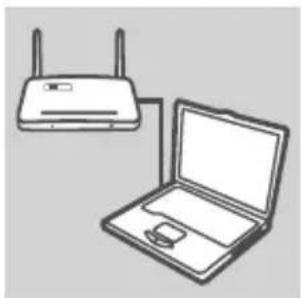
PODŁACZ DO ROUTERA DWR-118
PODŁĄCZ DO ROUTERA DWR-118
WIRELESS AC750 DUAL-BAND MULTI-WAN ROUTER DWR-118
ETHERNETOVÝ KABEL CAT5
NAPÁJECÍ ADAPTÉR
NAINSTALUJTE 3G/4G USB ADAPTÉR
Zapojte 3G/4G USB modem do USB portu směrovače DWR-118.

PŘIPOJENÍ KE KABELOVÉMU/DSL MODEMU
WIRELESS AC750 DUAL-BAND MULTI-WAN ROUTER DWR-118
ETHERNET KÁBEL
CAT5
TÁPADAPTER
A 3G/4G USB ADAPTER TELEPÍTÉSE
CSATLAKOZTATÁS A DWR-118-HEZ
CSATLAKOZÁS KÁBEL/DSL MODEMHEZ
CSATLAKOZTATÁS A DWR-118-HEZ
WIRELESS AC750 DUAL-BAND MULTI-WAN ROUTER DWR-118
ETHERNET KABEL CAT5
STR∅MADAPTER
INSTALLERE 3G/4G USB-ADAPTER
Sett USB 3G/4G-modem i USB-porten på DWR-118.
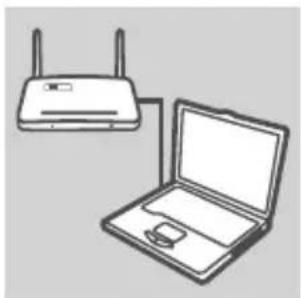
KOBLE TIL DWR-118
Sett den ene enden av ethernet-kabelen i DWR-118. Sett den andre enden av kabelen i PC-ens ethernet-port Du kan også koble til ruteren trådløst.

KONFIGURERE DWR-118
KOBLE TIL ET KABEL- / DSL-MODEM
Sett den ene enden av ethernet-kabelen i DWR-118. Sett den andre enden av kabelen i kabel- / DSL-modemet.

KOBLE TIL DWR-118
WIRELESS AC750 DUAL-BAND MULTI-WAN ROUTER DWR-118
ETHERNET-KABEL CAT5
SPÆNDINGSADAPTER
INSTALLÉR 3G/4G USB-ADAPTER
Stik 3G/4G USB-modemet i DWR-118's USB-port.
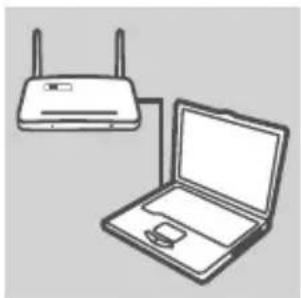
TILSLUT TIL DWR-118
NEM INDSTILLING: WAN TILSLUTNINGSMODUS

TILSLUT TIL ET KABEL/DSL-MODEM
TILSLUT TIL DWR-118
SISÄLTÄÄ TEKNISET OPPAAT
WIRELESS AC750 DUAL-BAND MULTI-WAN ROUTER
DWR-118
ETHERNET-KAAPELI
CAT5
VIRTASOVITIN
PIKA-ASENNUS: 3G/4G-YHTEYSTILA

ASENNA 3G/4G USB -SOVITIN
KYTKE DWR-118:EEN
PIKA-ASENNUS: WAN-YHTEYSTILA
KYTKE KAAPELI-/DSL-MODEEMIIN
KYTKE DWR-118:EEN
WIRELESS AC750 DUAL-BAND MULTI-WAN ROUTER DWR-118
ETHERNET-KABEL CAT5
NÄTADAPTER
ANSLUTA TILL ETT KABEL-/DSL-MODEM
ANSLUTA TILL DWR-118-ENHETEN
WIRELESS AC750 DUAL-BAND MULTI-WAN ROUTER DWR-118
CABOEthernet CAT5
CONFIGURAR O DWR-118
LIGUE A UM MODEM CABO/DSL
LIGAR AO DWR-118
CONFIGURAR O DWR-118
WIRELESS AC750 DUAL-BAND MULTI-WAN ROUTER DWR-118
ΚΑΛΩΔΙΟ ETHERNET
CAT5
ΠΡΟΣΑΡΜΟΓΕΑΣ ΙΣΧΥΟΣ
ΣΥΝΔΕΣΗ ΣΤΟ DWR-118
ΣΥΝΔΕΣΗ ΣΤΟ DWR-118
WIRELESS AC750 DUAL-BAND MULTI-WAN ROUTER DWR-118
ETHERNET KABEL CAT5
STRUJNI ADAPTER
Ako nešto od navedenog sadržaja nedostaje, obratite se prodavaču.
POSTAVLJANJE PROIZVODA
LAKO POSTAVLJANJE: 3G/4G NAČIN POVEZIVANJA

INSTALIRANJE 3G/4G USB ADAPTERA
POVEŽITE NA KABELSKI/DSL MODEM
Jedan kraj Ethernet kabela priključite u DWR-118. Drugi kraj tog kabela priključite u kabelski/DSL modem.

POVEZIVANJE S UREĐAJEM DWR-118
Na računalu s aktivnim bežičnim adapterom otvorite web-preglednik i potražite dostupne bežične mreže. Spojite se na mrežu s SSID-om označenim s dlink.
KONFIGURIRANJE UREĐAJA DWR-118
Otvorite web-preglednik i idite na http://192.168.0.1. U polje korisničkog imena unesite admin, a polje zaporke ostavite prazno.
OTKLANJANJE POTEŠKOĆA
POTEŠKOĆE S POSTAVLJANJEM I KONFIGURACIJOM
1. KAKO KONFIGURIRATI 3G/4G DŽEPNI USMJERNIK DWR-118 BEZ INSTALACIJSKOG CD-A ILI KAKO PROVJERITI NAZIV BEŽIČNE MREŽE (SSID) I KLJUČ ZA ŠIFRIRANJE BEŽIČNE MREŽE?
WIRELESS AC750 DUAL-BAND MULTI-WAN ROUTER DWR-118
ETHERNET KABEL
CAT5
NAPAJALNI ADAPTER
Če kateri koli izmed teh predmetov manjka, kontaktirajte svojega trgovca.
NAMESTITEV IZDELKA
PREPROSTA NAMESTITEV: NAČIN POVEZAVE 3G/4G

NAMESTITE USB ADAPTER 3G/4G
Vtaknite 3G/4G USB modem v USB priključek na DWR-118.
POVEZOVANJE Z DWR-118
POVEZOVANJE S KABELSKIM/DSL MODEMOM
Vtaknite en konec Ethernet kabla v DWR-118. Drugi konec kabla pa vtaknite v kabelski/DSL modem.
POVEZOVANJE Z DWR-118
CD-ROM
INCLUDE MANUALE TEHNICE
WIRELESS AC750 DUAL-BAND MULTI-WAN ROUTER DWR-118
CABLU Ethernet
CAT5
ADAPTOR DE ALIMENTARE
INSTALAREA ADAPTORULUI USB 3G/4G
CONECTAREA LA ROUTERUL DWR-118
CONECTAREA LA UN MODEM DE CABLU/DSL
CONECTAREA LA ROUTERUL DWR-118
- QUICK INSTALLATION GUIDE
- PRODUCT SETUP
- INSTALL THE 3G/4G USB ADAPTER
- CONNECT TO THE DWR-118
- CONFIGURE THE DWR-118
- CONNECT TO A CABLE/DSL MODEM
- TROUBLESHOOTING
- HOW DO I CONFIGURE MY DWR-118 3G/4G WIRELESS AC750 DUAL-BAND MULTI-WAN ROUTER WITHOUT THE INSTALLATION CD, OR CHECK MY WIRELESS NETWORK NAME (SSID) AND WIRLESS ENCRYPTION KEY
- HOW DO I RESET MY DWR-118 3G/4G WIRELESS AC750 DUAL-BAND MULTI-WAN ROUTER TO FACTORY DEFAULT SETTINGS
- HOW DO I ADD A NEW WIRELESS CLIENT OR PC IF I HAVE FORGOTTEN MY WIRELESS NETWORK NAME (SSID) OR WIRELESS ENCRYPTION KEY
- WHY AM I UNABLE TO ESTABLISH AN INTERNET CONNECTION
- CONTENTS OF INHALT
- INSTALLATION DU PRODUIT
- INSTALLATION DE L'ADAPTATEUR USB 3G/4G
- CONNEXION AU DWR-118
- CONFIGURATION DU DWR-118
- CONNEXION À UN MODEM CÂBLE/DSL
- CONEXIÓN AL DWR-118
- CONNESSIONE A UN MODEM CAVO/DSL
- CONNESSIONE A UN DISPOSITIVO DWR-118
- INSTALLEER DE 3G/4G USB-ADAPTER
- MAAK EEN VERBINDING MET DE DWR-118
- CONFIGUREER DE DWR-118
- MAAK EEN VERBINDING MET EEN KABEL/DSL MODEM
- ZAINSTALUJ KARTĘ USB 3G/4G
- PODŁACZ DO ROUTERA DWR-118
- PODŁĄCZ DO ROUTERA DWR-118
- NAINSTALUJTE 3G/4G USB ADAPTÉR
- PŘIPOJENÍ KE KABELOVÉMU/DSL MODEMU
- A 3G/4G USB ADAPTER TELEPÍTÉSE
- CSATLAKOZTATÁS A DWR-118-HEZ
- CSATLAKOZÁS KÁBEL/DSL MODEMHEZ
- INSTALLERE 3G/4G USB-ADAPTER
- KOBLE TIL DWR-118
- KONFIGURERE DWR-118
- KOBLE TIL ET KABEL- / DSL-MODEM
- TILSLUT TIL ET KABEL/DSL-MODEM
- TILSLUT TIL DWR-118
- ASENNA 3G/4G USB -SOVITIN
- KYTKE DWR-118:EEN
- KYTKE KAAPELI-/DSL-MODEEMIIN
- ANSLUTA TILL ETT KABEL-/DSL-MODEM
- ANSLUTA TILL DWR-118-ENHETEN
- CONFIGURAR O DWR-118
- LIGUE A UM MODEM CABO/DSL
- LIGAR AO DWR-118
- ΣΥΝΔΕΣΗ ΣΤΟ DWR-118
- POSTAVLJANJE PROIZVODA
- INSTALIRANJE 3G/4G USB ADAPTERA
- POVEŽITE NA KABELSKI/DSL MODEM
- POVEZIVANJE S UREĐAJEM DWR-118
- KONFIGURIRANJE UREĐAJA DWR-118
- OTKLANJANJE POTEŠKOĆA
- KAKO KONFIGURIRATI 3G/4G DŽEPNI USMJERNIK DWR-118 BEZ INSTALACIJSKOG CD-A ILI KAKO PROVJERITI NAZIV BEŽIČNE MREŽE (SSID) I KLJUČ ZA ŠIFRIRANJE BEŽIČNE MREŽE
- NAMESTITEV IZDELKA
- NAMESTITE USB ADAPTER 3G/4G
- POVEZOVANJE Z DWR-118
- POVEZOVANJE S KABELSKIM/DSL MODEMOM
- INSTALAREA ADAPTORULUI USB 3G/4G
- CONECTAREA LA ROUTERUL DWR-118
- CONECTAREA LA UN MODEM DE CABLU/DSL
Brand : D-LINK
Model : DWR-118
Category : Router