
sensorSecure TB76EXTREM - Iron SIEMENS - Free user manual and instructions
Find the device manual for free sensorSecure TB76EXTREM SIEMENS in PDF.


| Product type | Clothes iron |
| Brand | Siemens |
| Model | sensorSecure TB76EXTREM |
| Power | 2400 W |
| Supply voltage | 220-240 V, 50/60 Hz |
| Water tank capacity | 300 ml |
| Soleplate type | Ceranium |
| Steam function | Adjustable continuous steam, steam boost |
| Spray function | Yes |
| Anti-calc system | Integrated, self-cleaning |
| Auto shut-off | Yes, safety |
| Cord length | 2.5 m |
| Weight | 1.5 kg |
| Dimensions (L x W x H) | 30 x 15 x 20 cm |
| Maintenance | Clean the soleplate with a soft cloth; use the self-cleaning function regularly |
| Spare parts | Available via Siemens customer service |
| Repairability | Repairability index: 8.5/10 |
Frequently Asked Questions - sensorSecure TB76EXTREM SIEMENS
User questions about sensorSecure TB76EXTREM SIEMENS
0 question about this device. Answer the ones you know or ask your own.
Ask a new question about this device
Download the instructions for your Iron in PDF format for free! Find your manual sensorSecure TB76EXTREM - SIEMENS and take your electronic device back in hand. On this page are published all the documents necessary for the use of your device. sensorSecure TB76EXTREM by SIEMENS.
USER MANUAL sensorSecure TB76EXTREM SIEMENS

BOSCH

TDA 76..
SensorSecure
Thank you for buying the TDA76 steam iron from Bosch.
This iron has been designed according to ecological criteria, related to sustainable development; analyzing its whole lifecycle, from material selection to its later reusing or recycling; evaluating the improvement possibilities, from a technical, economical and environmental point of view.
This appliance has been designed exclusively for domestic use and must not be used for industrial purposes.
Carefully read through the operating instructions for the appliance and safeguard them for future reference.
General safety warnings
Danger of electric shocks or fire!
This appliance is to be connected to the mains supply and used in accordance with the information stated on its specifications plate.
Never plug the appliance into the mains supply if the cable or the appliance itself shows visible signs of damage.
This appliance must be connected to an earthed socket. If it is absolutely necessary to use an extension cable, make sure that it is suitable for 16A or more and has a socket with an earth connection.
In order to avoid that, under unfavourable mains conditions, phenomena like transient voltage drops or lighting fluctuations can happen, it is recommended that the iron is connected to a power supply system with a maximum impedance of 0.27 Ω. If necessary, the user can ask the public power supply company for the system impedance at the interface point.
This appliance is not intended to be used by persons (including children) with reduced physical, sensory or mental capacities, or lack of experience and knowledge, unless they have been given supervision or instruction.
Children should be supervised to ensure that they do not play with the appliance.
The appliance must be used and placed on a stable surface.
When placed in the upright position or in a support, make sure that the surface on which the support stands is stable.
The iron should not be used if it has been dropped, if there are visible signs of damage or if it is leaking water. In these cases, it must be checked by an authorized Technical Service Centre before it can be used again.
Remove the plug from the socket before filling the appliance with water or before pouring out the remaining water after use.
Never immerse the iron in water or any other fluid.
Do not leave the appliance exposed to weather conditions (rain, sun, frost, etc.)
The electrical plug must not be removed from the socket by pulling the cable.
Unplug the appliance from the mains supply after each use, or if a fault is found.
With the aim of avoiding dangerous situations, any work or repair that the appliance may need, e.g. replacing a faulty mains cable, must only be carried out by qualified personnel from an Authorised Technical Service Centre.
Unplug the iron from the mains supply when you have to leave the iron unattended.
Important warnings
Do not allow the power cord to come into contact with the soleplate when it is hot.
Store the iron in upright position.
Do not use descaling agents, they can damage the appliance.
Never use sharp objects or abrasive products to clean the soleplate or any other part of the appliance.
To keep the soleplate in good condition, do not allow it to come into contact with metal objects. Do not use scourers or chemical products to clean the soleplate.
Filling the water tank (1)
Set the steam regulator to the ✗ position and unplug the iron from the mains!
Use only clean tap water without mixing anything with it. The addition of other liquids, such as perfume, will damage the appliance.
Any damage caused by the use of the aforementioned products will make the guarantee void.
Do not use condensation water from tumble dryers, air conditioners, or similar. This appliance has been designed to use normal tap water.
To prolong the optimum steam function, mix tap water with distilled water 1:1. If the tap water in your district is very hard, mix tap water with distilled water 1:2.
To prevent spillage of water out of the appliance in vertical position, never fill beyond the "max" water level mark!
Before using the iron for the first time
Remove any label or protective covering from the soleplate.
With the iron unplugged, fill the tank of the iron with tap water and set the temperature control dial to "max".
Plug in the appliance to the mains. When the steam iron has reached the desired temperature (pilot light switches off), start steaming by setting the steam regulator to the maximum steam setting and by repeatedly pressing the button ⏻.
When using the steam function for the first time, do not apply it on the laundry, as there could still be dirt in the steam dispenser.
When turned on for the first time, your new iron may smell and emit a little smoke and a few particles; this will stop after a few minutes.
How to use the iron
Check the recommended ironing temperature on the label of the garment.
| • Synthetics |
| •• Silk-Wool |
| ••• Cotton-Linen |
If you don't know what kind or kinds of fabric a garment is made of, determine the right ironing temperature by ironing a part that will not be visible when you wear or use the garment.
Start ironing the garments that require the lowest ironing temperature, such as those made of synthetic fibres.
Silk, wool or synthetic materials: iron the reverse side of the fabric to prevent shiny patches.
Getting ready
Remove any labels or protective coverings from the soleplate.
Ironing without steam (2)
Set steam control to the ✗ position.
Ironing with steam (3)
Set temperature control to and following the heating up, set the steam control to or
Set the temperature control to position “••”: steam control to ⏻.
Set the temperature control to position “...” or “max”: steam control to ⚙.
ProEnergy
(Depending on the model)
The “e” steam setting (energy saving “e” setting: 24% energy saving*) can be used for most fabrics. The ⚙️ steam settings should only be used on thick fabrics where there are still wrinkles.
Steam setting
| Temperature Setting | Recommended Steam Regulator Setting |
| ... to “max” | e and ≈ |
| ... e |
*in comparison to the maximum steam setting of a regular 2400 Watt max Bosch iron
Note: At a temperature setting of “•”, the soleplate is not hot enough to produce steam so the steam regulator should be set to the ⚙ position to avoid water dripping from the soleplate.
Spray (4)
Do not use the Spray function with silk.
Shot of Steam (5)
Set the temperature control dial to at least the “•••” position
Interval between shots of steam should be 5 seconds.
Vertical Steam (6)
Do not iron clothing while it is being worn!
Never direct the steam at persons or animals!
Interval between shots should be 5 seconds.
Wait 10 seconds after each 4 shot cycle.
Multiple descaling system (7)
Depending on the model, this range is equipped with the "AntiCalc" system (components 1 + 2 + 3).
1. Self-clean
Each time you use the steam regulator, the "self-clean" system cleans the mechanism of scale deposits.
2. Calc'n Clean
The "calc'n clean" function helps to remove scale particles out of the steam chamber. Use this function approximately every 2 weeks, if the water in your area is very hard.
- Unplug the iron from the mains socket, set the steam regulator to the ✗ position and fill the water tank with water.
- Set the temperature selector to the "max" position and plug in the iron.
- After the necessary warm-up period, the pilot light goes out. Then, unplug the iron.
- Hold the iron over a sink. Press the "clean" button and gently shake the iron. Boiling water and steam will come out, carrying scale or deposits that might be there.
- When the iron stops dripping, release the button, plug the iron in and heat it up again until the remaining water has evaporated.
- Repeat the process if the iron still contains impurities.
3. Anti-calc
The “anti-calc” cartridge has been designed to reduce the build-up of scale produced during steam ironing, helping to extend the useful life of your iron. Nevertheless, the “anti-calc” cartridge cannot remove all of the scale that is produced naturally over time.
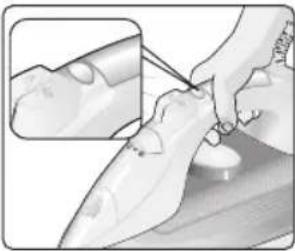
"SensorSecure" (8)
The “SensorSecure” function switches off the iron when the handle is no longer gripped, thus increasing safety and saving energy.
After plugging in the appliance, this function will be inactive for the first two minutes while the iron heats up to the set temperature.
Immediately after releasing the handle of the iron, the pilot light at the front of the handle will start flashing, indicating that the iron is about to switch itself off.
If the iron handle is not gripped again within 1 second, it will shut off automatically.
When the handle is gripped again, the iron will automatically switch itself back on and will start heating again. The pilot light at the front of the handle will stop flashing and will show a continuous light.
Important:
If the iron is left unattended for more than ten minutes, once the handle is momentarily or continuously gripped again, the initial two-minute heat-up process will start again.
Anti-drip system (9)
(Depending on model)
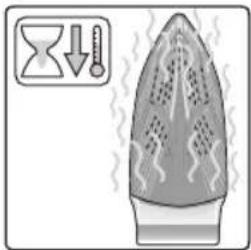
If the temperature is set too low, the steam is automatically switched off to avoid dripping.
Fabric-protection soleplate cover / blanket (10)
(Depending on the model)
The fabric-protection is used for steam-ironing delicate garments at maximum temperature without damaging them.
Use of the protector also does away with the need for a cloth to prevent shine on dark materials.
It is advisable to first iron a small section on the inside of the garment to see if it is suitable.
To attach the fabric protector to the iron, place the tip of the iron into the end of the fabric protector and press the rear of the protector upward until you hear a click. To release the fabric protector, pull down on the clip at the rear and remove the iron.
The fabric-protection soleplate cover may be purchased from the customer service or specialist shops:
| Accessory code(After-sales) | Name of accessoryProtect coversoleplate |
| 464851 TDZ | 1510 |
Storing (11)
Set the steam regulator to the ✕ position
Cleaning (12)
If the iron is only slightly soiled, pull out the plug and allow the soleplate to cool down. Wipe the housing and the soleplate with a damp cloth only.
If synthetic cloth melts due to too high temperature on the soleplate, switch off the steam and rub off the residue immediately with a thickly folded, dry cotton cloth.
To keep the soleplate smooth, you should avoid hard contact with metal objects. Never use a scouring pad, or chemicals to clean the soleplate.
Never decalcify the tank or treat it with detergents or solvents: otherwise the iron will drip water whilst steaming!
Tips on disposing of a used appliance
Before throwing a used appliance away, you should first make it noticeably inoperable and be certain to dispose of it in accordance with current national laws. Your Retailer, Town Hall or Local Council can give you detailed information about this.

This appliance is labelled in accordance with European Directive 2002/96/CE – concerning used electrical and electronic appliances (waste electrical and electronic equipment – WEEE).
The guideline determines the framework for the return and recycling of used appliances as applicable throughout the EU.
Tips to help you save energy
Steam production consumes the most energy. To help minimise the energy used, follow the advice below:
- Start by ironing the fabrics that require the lowest ironing temperature. Check the recommended ironing temperature in the label on the garment.
- Regulate the steam according to the selected ironing temperature, following the instructions in this manual.
- Only use steam if necessary. If possible, use the spray function instead.
- Try to iron the fabrics while they are still damp and reduce the steam setting. Steam will be generated from the fabrics rather than the iron. If you tumble dry your fabrics before ironing them, set the tumble drier on the 'iron dry' programme.
- If the fabrics are damp enough, turn off the steam regulator completely.
- Stand the iron upright during pauses. Resting it horizontally with the steam regulator on generates wasted steam.
GUARANTEE TERMS
The terms of the guarantee for this appliance are in accordance with that stated by our representative for the country in which it is sold. The details of these conditions can be obtained from the retailer from whom the appliance was purchased. The PURCHASE INVOICE must be presented when making any claims against the terms of this guarantee.
We reserve the right to make technical modifications.
Troubleshooting guide for minor issues
| Problem Probable cause Solution | ||
| The iron does not heat up. | 1. Temperature control dial in very low position.2. No mains supply. | 1. Turn to a higher position.2. Check with another appliance or plug the iron into a different socket. |
| The lamp at the back of the water tank does not switch on | 1. The iron is cooling.2. The iron does not heat up. | 1. Wait until the heating cycle is completed.2. See previous paragraph. |
| The clothes tend to stick. | 1. The temperature is too high. | 1. Turn the temperature control dial down and wait until the iron has cooled down. |
| Water comes out together with steam. | 1. Temperature regulator in very low position.2. Steam regulator in very high position with low temperature. | 1. Turn the temperature control dial regulator to a higher position and wait until the operating indicator switches off.2. Turn the steam regulator to a lower position. |
| Steam does not come out. | 1. Steam regulator in closed position※.2. No water in the tank.3. The temperature is too low. Anti-drip system not activated. | 1. Turn the steam regulator to an open steam position.2. Fill the tank.3. Set a higher temperature if compatible with the fabric. |
| Spray does not work. | 1. No water in the tank.2. Obstructed mechanism. | 1. Fill the water tank.2. Contact the Technical Service. |
| Water drips out of the soleplate. | 1. The steam regulator is not properly closed. | 1. Ensure the steam regulator is set to the position※.Do not forget to empty the tank when you have finished ironing. |
| Smoke comes out when connecting the iron for the first time. | 1. Lubrication of some of the internal parts. | 1. This is normal and will stop after a few minutes. |
You can download this manual from the local homepages of Bosch
fr
and electronic equipment – WEEE).
(waste electrical and electronic equipment – WEEE).


9 drip stop 10


11


12






BOSCH
001 TDA76 SensorSecure-12L/06/11
de,en,fr,it,nl,da,no,sv,es,pt,el,tr



- BOSCH
- TDA
- SENSORSECURE
- GENERAL SAFETY WARNINGS
- DANGER OF ELECTRIC SHOCKS OR FIRE
- IMPORTANT WARNINGS
- FILLING THE WATER TANK (1)
- SET THE STEAM REGULATOR TO THE ✗ POSITION AND UNPLUG THE IRON FROM THE MAINS
- ANY DAMAGE CAUSED BY THE USE OF THE AFOREMENTIONED PRODUCTS WILL MAKE THE GUARANTEE VOID
- BEFORE USING THE IRON FOR THE FIRST TIME
- HOW TO USE THE IRON
- GETTING READY
- IRONING WITHOUT STEAM (2)
- IRONING WITH STEAM (3)
- PROENERGY
- SPRAY (4)
- SHOT OF STEAM (5)
- VERTICAL STEAM (6)
- MULTIPLE DESCALING SYSTEM (7)
- SELF-CLEAN
- CALC'N CLEAN
- ANTI-CALC
- SENSORSECURE" (8)
- IMPORTANT
- ANTI-DRIP SYSTEM (9)
- FABRIC-PROTECTION SOLEPLATE COVER / BLANKET (10)
- STORING (11)
- CLEANING (12)
- TIPS ON DISPOSING OF A USED APPLIANCE
- TIPS TO HELP YOU SAVE ENERGY
- GUARANTEE TERMS
- FR
Brand : SIEMENS
Model : sensorSecure TB76EXTREM
Category : Iron