
HT-CT370S - Soundbar SONY - Free user manual and instructions
Find the device manual for free HT-CT370S SONY in PDF.


| Product Type | Soundbar with wireless subwoofer |
| Model | HT-CT370S |
| Brand | Sony |
| Channels | 2.1 |
| Total Power Output | Approximately 300 W |
| Soundbar Dimensions (W x H x D) | Approx. 900 x 52 x 85 mm |
| Subwoofer Dimensions (W x H x D) | Approx. 190 x 385 x 315 mm |
| Soundbar Weight | Approx. 2.2 kg |
| Subwoofer Weight | Approx. 5.0 kg |
| Power Consumption | Approx. 40 W (soundbar) + 30 W (subwoofer) |
| Standby Power Consumption | Less than 0.5 W |
| Audio Formats Supported | Dolby Digital, DTS, PCM |
| Connectivity | HDMI ARC, Optical, Bluetooth, USB |
| Bluetooth Version | 3.0 |
| HDMI Inputs | 1 (ARC) |
| Optical Input | 1 |
| USB Port | For service only |
| Wall Mountable | Yes (bracket included) |
| Remote Control | Yes (included) |
| Cleaning Instructions | Wipe with a soft, dry cloth. Do not use alcohol or solvents. |
| Safety | Do not expose to moisture or extreme temperatures. Keep vents clear. |
| Spare Parts Availability | Contact Sony support for remote or subwoofer replacement. |
Frequently Asked Questions - HT-CT370S SONY
User questions about HT-CT370S SONY
0 question about this device. Answer the ones you know or ask your own.
Ask a new question about this device
Download the instructions for your Soundbar in PDF format for free! Find your manual HT-CT370S - SONY and take your electronic device back in hand. On this page are published all the documents necessary for the use of your device. HT-CT370S by SONY.
USER MANUAL HT-CT370S SONY
natural_image
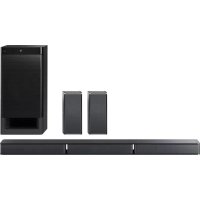
Black rectangular and rectangular electronic device with a curved black body, no visible text or symbols on the device itself.HT-CT370
Table of contents
Setup
1 What's in the box 4
2 Installation 5
3 Connection 6
4 Turning on the system 8
5 Listening to the sound 9
Basic Operations
Enjoying the sound effects 10
Listening to the sound from BLUETOOTH devices 12
Refer to the supplied Operating Instructions for more information on other features.
Setup
1 What's in the box
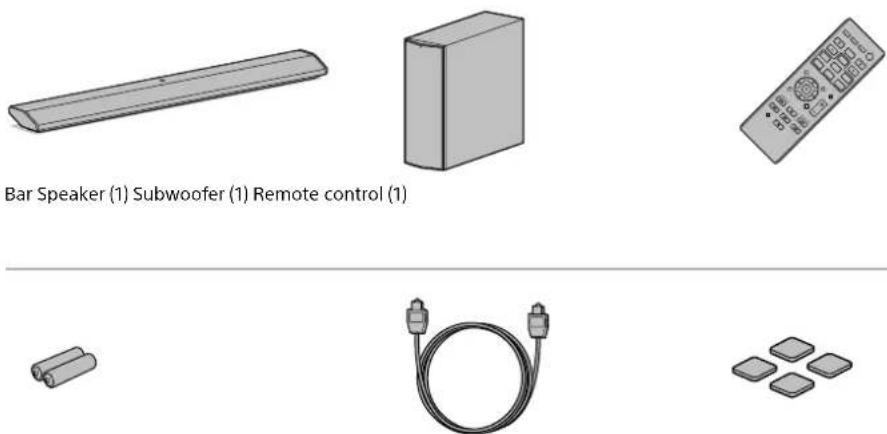
R6 (size AA) batteries (2) Optical digital cable for a TV (1) Speaker pads for the subwoofer (4)
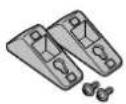

Wall mounting brackets (2) and screws (2) Startup Guide (this book) (1) Operating Instructions (1)
Setting up the remote control
Pull up the battery cover and insert in the orientation shown in the illustration two AA batteries.


Setup
2 Installation

natural_image
Modern white TV set with a black speaker and a monitor on top, placed on a wooden floor (no text or symbols visible)If you prefer...
To install the subwoofer horizontally
- Place the subwoofer so that the "SONY" logo is on the left side facing with the front side.


natural_image
3D diagram of a rectangular block with four vertical supports and upward arrows indicating force or displacement (no text or symbols)Speaker pads

natural_image
Simple line drawing of a flat-screen monitor mounted on a rectangular base (no text or symbols)To install the Bar Speaker on a wall
Refer to the supplied Operating Instructions.
Setup
3 Connection
Connecting with TV
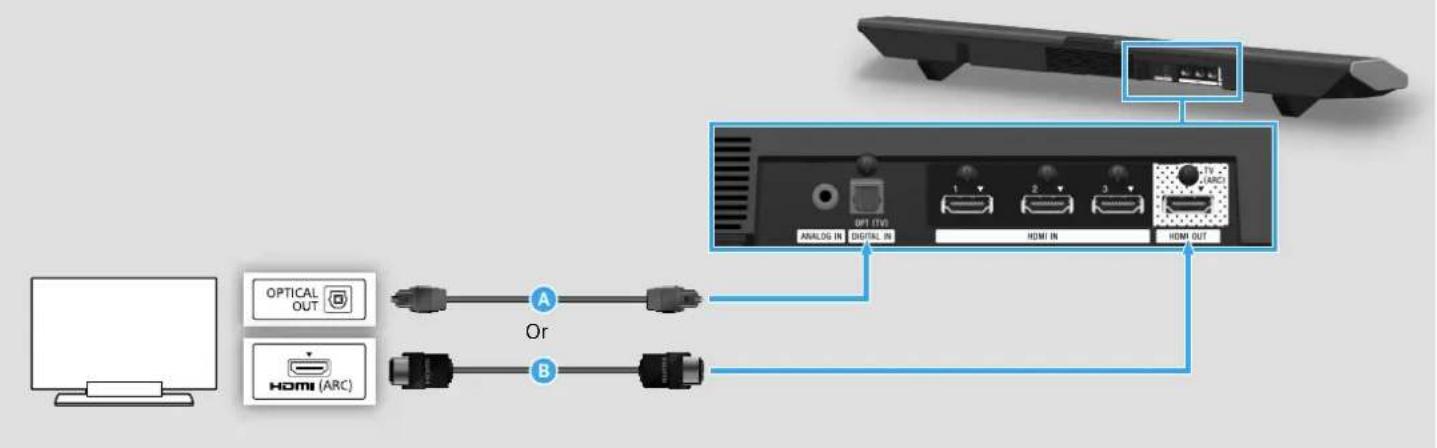
If the TV to be connected is not equipped with an optical audio output terminal, connect an HDMI cable (not supplied, High Speed type) to the HDMI input terminal labeled "ARC." If the HDMI input terminal labeled "ARC" is connected with another device, disconnect that device and connect this Bar Speaker.
When connecting with TV and other devices

This is a connection for enjoying surround sound more effectively.
A HDMI cable (not supplied, High Speed type)
If the HDMI input terminal on the TV is not labeled "ARC," perform connections both and .B
© HDMI cable (not supplied, High Speed type)
If it is connected to the TV, disconnect it and connect it to the Bar Speaker.
Setup
4 Turning on the system

flowchart
graph TD
    A["Display"] -->|1| B["Switch"]
    B -->|2| C["On/standby lamp"]
    C -->|3| D["Display"]
1 Connect the AC power cords (mains leads).
2 Press the I/⏻ (on/standby) button. The display lights.
3 Confirm that the on/standby lamp of the subwoofer is lit in green. If not, the wireless transmission is not activated. Refer to "No sound is heard from the subwoofer." of "Troubleshooting" in the supplied Operating Instructions.
4 Turn on the connected device.
Setup
5 Listening to the sound
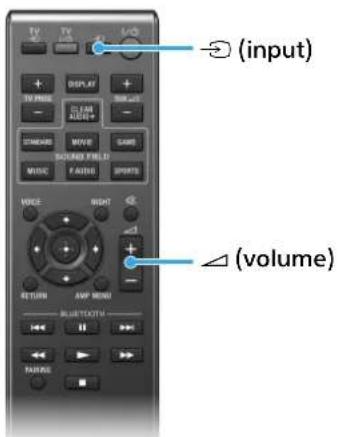

Input device selected
Listening to the audio of the TV
1 Press the → (input) button on the remote control or INPUT button on the Bar Speaker repeatedly to select "TV" input.
2 Press the △ (volume) button on the remote control or VOL button on the Bar Speaker to adjust the volume.
To listen to audio from an input device other than the TV
Press the ☑ (input) button on the remote control or INPUT button on the Bar Speaker repeatedly until the desired input device is indicated on the display.
TV→HDMI 1→HDMI 2→HDMI 3→ANALOG→BT AU
Setup completed! Enjoy!
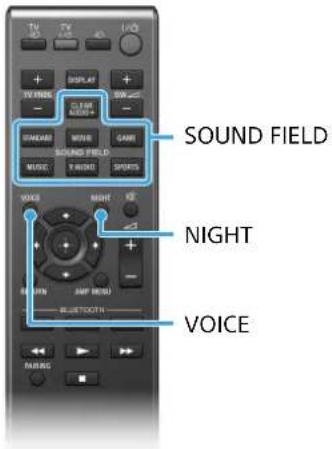
Enjoying the sound effects
To set a sound effect, press one of the sound effect buttons on the remote control to select the desired mode while checking the display.
| SOUND FIELD:Effects to suit to the input sound. | CLEARAUDIO+ | The suitable sound setting is automatically selected for the sound source. |
| STANDARD Corresponds to every source. | ||
| MOVIE | Dialogue is clear, and sound is powerful and realistic. | |
| SPORTS | Commentary is clear, cheers are heard as surround-sound, and sounds are realistic. | |
| GAME | Sounds are powerful and realistic, suitable for game play. | |
| MUSIC | Sounds are played back to suit to a music program, music Blu-ray Discs, or DVDs. | |
| P.AUDIO (Portable audio) | Sounds are played back to suit to a portable music player using DSEE*. | |
| VOICE:Helps make dialogues clearer. | TYPE1 Standard | |
| TYPE2 Dialogue | range is stressed. | |
| TYPE3 | Dialogue range is stressed, and the parts of range difficult to be discerned by the elderly are boosted. | |
| NIGHT:Sound is output at low volume with minimum loss of fidelity and clarity of dialogue. | ON Activates the | Night mode function. |
| OFF Inactivates the | Night mode function. | |
* DSEE stands for Digital Sound Enhancement Engine, a high range compensation and fine sound restoration technology developed independently by Sony.
Listening to the sound from BLUETOOTH devices
When registering BLUETOOTH devices

To pair the system with the device (Pairing)
1 Press the PAIRING button.
The lamp ➕ flashes quickly during BLUETOOTH pairing.
2 Set your BLUETOOTH device to pairing mode and select "SONY:HT-CT370."
If a Passkey is requested, enter "0000."
3 Make sure that the lamp lights up. (Connection has been established.)
Hint
Once the BLUETOOTH connection is established, an indication recommending which application to download will be displayed, according to what equipment you have connected.
Following the instructions displayed, an application called "SongPal," which will enable you to operate this system, can be downloaded.
Refer to "Controlling the system using a smartphone or tablet device (SongPal)" in the supplied Operating Instructions for details on "SongPal."
To listen to the sound of the registered device
1 Press the INPUT button repeatedly to display "BT AU."
The lamp flashes during attempting BLUETOOTH pairing.
2 On the BLUETOOTH device, select "SONY:HT-CT370."
3 Make sure that the lamp lights up. (Connection has been established.)
4 Start the audio playback with the music software in the connected BLUETOOTH device.
When using one-touch connection (NFC)

1 Download, install, and start the "NFC Easy Connect" app on your smartphone.

2 Touch the N mark of the Bar Speaker with the smartphone.
3 Make sure that the lamp (blue) lights up. (Connection has been established.)
- Compatible devices
Smartphones, tablets, and music players with the NFC function built-in
(OS: Android™ 2.3.3 or later, excluding Android 3.x)
© 2014 Sony Corporation Printed in China 4-488-969-21(2)


- Table of contents
- Setup
- Basic Operations
- What's in the box
- Installation
- If you prefer...
- Connection
- Turning on the system
- Listening to the sound
- Listening to the audio of the TV
- To listen to audio from an input device other than the TV
- Enjoying the sound effects
- Listening to the sound from BLUETOOTH devices
- To pair the system with the device (Pairing)
- Hint
- To listen to the sound of the registered device
Brand : SONY
Model : HT-CT370S
Category : Soundbar