
XV Signature - Robot vacuum Neato Robotics - Free user manual and instructions
Find the device manual for free XV Signature Neato Robotics in PDF.


| Product type | Robot vacuum |
| Brand | Neato Robotics |
| Model | XV Signature |
| Dimensions (diameter) | 33.5 cm |
| Height | 10 cm |
| Weight | 3.8 kg |
| Power supply | Lithium-ion battery 14.4 V / 3300 mAh |
| Runtime | Up to 60 minutes |
| Charging time | Approximately 2 hours |
| Dustbin capacity | 0.7 L |
| Navigation | Laser (LDS) for real-time mapping |
| Scheduling | Weekly timer |
| Cleaning modes | Turbo, standard, eco, spot, edge |
| Main brush | Combined rotating brush (bristles and blades) |
| Side brush | 1 side brush |
| Filter | Washable HEPA filter |
| Sensors | Drop, obstacle, dirt detection |
| Return to base | Automatic at end of cycle or low battery |
| Maintenance and cleaning | Empty the bin, clean the brushes and filter regularly |
| Spare parts | Brushes, filters, battery, wheels, sensors available |
| Repairability | Estimated repairability score of 7/10 |
Frequently Asked Questions - XV Signature Neato Robotics
User questions about XV Signature Neato Robotics
0 question about this device. Answer the ones you know or ask your own.
Ask a new question about this device
Download the instructions for your Robot vacuum in PDF format for free! Find your manual XV Signature - Neato Robotics and take your electronic device back in hand. On this page are published all the documents necessary for the use of your device. XV Signature by Neato Robotics.
USER MANUAL XV Signature Neato Robotics
natural_image
Line drawing of a beige robotic device with no visible text or symbols on the body or backgroundINTRODUCING NEATO
Congratulations on your new home robot! Neato can't wait to start vacuuming - so you don't have to. This guide introduces you to Neato's features and gives you some important pointers to set up and maintain your robot.
And don't forget to register your Neato at www.neatorobotics.com to activate your Warranty and get product updates and special offers.
Leave the vacuuming to Neato. What will you do with your free time?
PRÉSENTATION DE NEATO
SETTING UP YOUR NEATO
See inside back cover for pictures that show the robot parts.


natural_image
Illustration of a hand inserting a card into a device (no text or symbols visible)
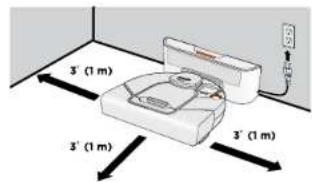
Plug in the power cord and push the charge base against the wall. Place the rounded side of your Neato against the metal contacts on the charge base.

Press SELECT button under t screen to choa language.

CHARGING AND OPTIMIZING THE BATTERY
- Before using, charge your Neato overnight – about 12 hours.
• IMPORTANT! To get the most from your battery, charge it and discharge it completely two to three times.
• Always put your Neato back on its charge base when you are finished cleaning.
Status Lights

SOLID GREEN
Fully charged and ready to clean.
BLINKING GREEN
Charging, battery not fully charged, can clean.
BLINKING AMBER
Charging, can't clean yet.
SOLID AMBER
Error, see message on screen.
- Wake up Neato by pressing the button. It may take a few seconds to wake up.
• From the home screen, press the SELECT button to get to the MENU.


Clock
- Select Set Clock and follow screens to set the time.


Schedule
- Select Schedule.
- Choose Set or Change and follow the screens to schedule cleaning.


MAKING YOUR HOME NEATO FRIENDLY
- Clear the area of small items like toys and clothing-furniture is OK. Tie up wires, curtains and other low-hanging items.
• To keep your robot out of places you don't want it to go, set down boundary markers included in the package. You can cut them to fit. - IMPORTANT! Keep your robot away from liquids and wet areas. Move or cover pet bowls and plant trays.
- Keep your Neato inside the house. It was not designed for outdoor cleaning or freezing temperatures.
- Be aware that shiny surfaces and black floors might confuse your robot.
USING YOUR NEATO
Wake Up
- Press the button to "wake up" your Neato.
Start Cleaning
- CLEAN House - Press the button to clean your house.
- CLEAN Spot - Select Spot Clean from MAIN menu to clean a 4' (1.2m) x 6' (1.8m) square in front of your Neato.
Pause Cleaning
- Press button.
Stop Cleaning
- Press button.
- Press the arrows to highlight Stop Cleaning.
- Press SELECT using button under the screen on the PAUSE Menu or RESUME Menu.
Sleep
Hold the button down for 5 seconds to put your Neato to "sleep".
MAINTAINING YOUR NEATO
IMPORTANT! Your robot needs regular maintenance to operate reliably.
Dirt Bin and Filters
• After each use, empty the dirt bin and clean the filter and airways/openings.

natural_image
Illustration of four different stages of a cleaning or packaging process: hand holding a container, hand holding a tray, and bucket with a lid (no text or symbols)- Replace the filter in the dirt bin every one to two months.
Sensors
- Use a dry cotton swab to clean the two drop sensor windows on the bottom of the robot.

- Clean the top of the robot and the area around the laser top with a damp cotton cloth.

Brushes
- Remove the guard over the brush by pulling up on both sides.

- Remove hair and dirt from the brush and brush ends (remove the end caps and clean them, being careful not to lose the bearings.)
- Replace the brush and the guard over the brush.
REGISTERING YOUR ROBOT AND GETTING HELP
Visit www.neatorobotics.com
- Register your Neato to stay up to date on software releases and special offers.
• Find more helpful information, including frequently asked questions, and tips and tricks for optimal operation.
WARRANTY
Visit www.neatorobotics.com for warranty information.
natural_image
Illustration of a hand inserting a card into an air conditioner unit (no text or symbols visible)2
natural_image
Illustration of three different hand tools: a box with a handle, a battery pack, and a bucket with a lid (no text or symbols present)natural_image
Illustration of a hand inserting a card into a device (no text or symbols visible)2
natural_image
Illustration of three different tasks: handling a container, handling a slide with a tray, and pouring liquid into a bucket (no text or symbols present)natural_image
Illustration of a hand holding a small object with an arrow pointing to it, next to a device labeled 'SAR' (no text or symbols on the object itself)2
natural_image
Illustration of three different hand-drawn scenarios: a container with a flame, a battery pack, and a bucket with a lid (no text or symbols)2
natural_image
Illustration of three different tasks: handling a container, handling a plastic bag, and collecting a trash bin (no text or symbols present)neatorobotics.com | Neato Robotics, Inc., 8100 Jarvis Avenue, Suite 100, Newark, CA 94560 USA


- INTRODUCING NEATO
- PRÉSENTATION DE NEATO
- SETTING UP YOUR NEATO
- CHARGING AND OPTIMIZING THE BATTERY
- Clock
- Schedule
- MAKING YOUR HOME NEATO FRIENDLY
- USING YOUR NEATO
- Wake Up
- Start Cleaning
- Pause Cleaning
- Stop Cleaning
- Sleep
- MAINTAINING YOUR NEATO
- Dirt Bin and Filters
- Sensors
- Brushes
- REGISTERING YOUR ROBOT AND GETTING HELP
- Visit www.neatorobotics.com
- WARRANTY
- 2
Brand : Neato Robotics
Model : XV Signature
Category : Robot vacuum