
CMX-108 - Radio SCOTT - Free user manual and instructions
Find the device manual for free CMX-108 SCOTT in PDF.


| Product Type | Portable AM/FM Radio |
| Brand | Scott |
| Model | CMX-108 |
| Dimensions (approx.) | 150 x 80 x 30 mm (5.9 x 3.1 x 1.2 in) |
| Weight (without batteries) | 200 g (7.1 oz) |
| Power Supply | 2 x AA batteries (1.5 V each) |
| Frequency Bands | AM (520-1710 kHz), FM (87.5-108 MHz) |
| Controls | Volume knob, Tuning knob, On/Off switch, AM/FM selector |
| Speaker | Built-in mono speaker, 3 W output |
| Headphone Jack | 3.5 mm stereo jack |
| Antenna | Built-in ferrite rod for AM, telescopic rod for FM |
| Display | Analog dial with frequency markings |
| Material | ABS plastic casing |
| Cleaning Instructions | Wipe with a soft, dry cloth. Do not use liquids or solvents. |
| Safety Warnings | Keep away from water and heat sources. Do not disassemble. |
| Spare Parts | Batteries (standard AA), optional earphones |
| Reparability | No user-serviceable parts inside. Contact professional repair. |
| Manual | Available for download in PDF format |
Frequently Asked Questions - CMX-108 SCOTT
User questions about CMX-108 SCOTT
0 question about this device. Answer the ones you know or ask your own.
Ask a new question about this device
Download the instructions for your Radio in PDF format for free! Find your manual CMX-108 - SCOTT and take your electronic device back in hand. On this page are published all the documents necessary for the use of your device. CMX-108 by SCOTT.
USER MANUAL CMX-108 SCOTT
To reduce the risk of electric shock, do not remove the cover. There are no user serviceable parts inside the unit. Refer all servicing to qualified personnel.

The lightening flash with arrowhead symbol within the triangle is a warning sign alerting the user of "dangerous voltage" inside the unit.

The exclamation point within the triangle is a warning sign alerting the user of important instructions accompanying the product.
WARNING
To reduce the risk of fire or electric shock, do not expose this appliance to rain or moisture.
IMPORTANT
DO NOT THROW BATTERIES IN FIRE!
THE APPARATUS SHALL NOT BE EXPOSED TO DRIPPING OR SPLASHING.
ENSURE A MINIMUM DISTANCE OF 5 CM AROUND THE APPARATUS FOR SUFFICIENT VENTILATION.
ENSURE THAT THE VENTILATION IS NOT IMPEDED BY COVERING THE VENTILATION OPENINGS WITH ITEMS, SUCH AS NEWSPAPERS, TABLE-CLOTHS, CURTAINS, ETC..
DO NOT PLACE NAKED FLAME SOURCES, SUCH AS LIGHTED CANDLES ON THE APPARATUS.
TAKE ATTENTION TO THE ENVIRONMENTAL ASPECTS OF BATTERY DISPOSAL.
USE THE APPARATUS ONLY IN MODERATE CLIMATES (NOT IN TROPICAL CLIMATES).
DO NOT EXPOSE THE APPARATUS TO DRIPPING OR SPLASHING.
DO NOT PLACE OBJECTS FILLED WITH LIQUIDS, SUCH AS VASES, ON THE APPARATUS.
In case of misfunction due to electrostatic discharge the apparatus has to be reset by disconnecting it from mains supply.
Where to place the item :
Today's furniture is coated with a wide variety of lacquers and synthetic-coatings that are treated with an extensive range of cleaning products. Therefore, the possibility that some of these substances contain components that react adversely to the rubber feet of the item and soften them, cannot be completely excluded. The rubber feet of the appliance can cause discoloring to furniture surfaces. If necessary, place the appliance on a non-slide surface.
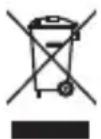
If at any time in the future you should need to dispose of this product please note that Waste electrical products should not be disposed of with household waste. Please recycle where facilities exist. Check with your Local Authority or retailer for recycling advice. (Waste Electrical and Electronic Equipment Directive)
THE MARKING PLATE IS LOCATED AT THE BACK OF ENCLOSURE OF THE APPARATUS.
LOCATIONS OF PARTS AND CONTROLS


- Speaker
- LED display
- Alarm set button
- Time set button
- Sleep button
- Hour set button
- Min set button
- Aux in jack
- Dial scale
- Dial pointer
-
Snooze button
-
Mirror lens
- Alarm indicator
- Tuning control
- Tone selector
- Wire Antenna
- Volume control
- Function switch
- Phone jack
- AC socket
- Battery compartment
- AC adapter
POWER SUPPLY
This unit is designed to operate with AC Adapter (Included) as main supply. Plug one end of the AC adapter into the AC socket, then plug the other end into AC wall inlet. The 9V type (1x006p not included) battery is used for clock back up only.

natural_image
Simple line drawing of a device with a box and a magnifying glass (no text or symbols)LISTEN TO THE RADIO
- Slide the Function Switch to "ON" position.
- Select the sound effect use Tone switch.
- For a better reception in FM, extend the antenna.
- Adjust the Volume Control for a desired listening level and select your favourite station with the Tuning control.
- To turn off the radio, slide the Function Switch to "OFF" position.
TO SET THE TIME
- Press and hold the Time set button.
- Press the Hour set button to advance the hour display.
- Press the Minute set button to advance the minute display until the correct time appears on the time display.
- Release the Time set button . The correct time is shown on display.
TO SET THE ALARM
- Press and hold the Alarm set button while repeating step 2 and 3 described under "TO SET THE TIME" to set the desired wake-up time.
- To check the correct alarm time, press the Alarm set button.
USING THE RADIO / BUZZER ALARM
- Set the alarm as shown in "TO SET THE ALARM".
- Follow the procedure in "LISTEN TO THE RADIO" to tune the desired station.
- Set the Volume Control to your required listening level.
- Slide the Function Switch to " ♪" position. The radio will turn on to wake you up at the preset time.
- To wake to the buzzer instead of the radio, set the alarm as shown in "TO SET THE ALARM". Slide the Function Switch to " △ position. The buzzer will turn on to wake you up at the preset time.
6 To turn off the radio or buzzer, slide the Function Switch to "OFF" position or press the Alarm set button.
SNOOZE FUNCTION
When the radio or buzzer sounds, press the Snooze button to switch off the alarm. Approximately 9 minutes later, the alarm will switch on again. This snooze cycle will be activated up to 5 times within an hour period. To stop the snooze cycle, slide the Function switch to "OFF" position or press ALarm set button.
SLEEP FUNCTION
- Set the Function Switch to "ON", "OFF", "播放" or "播放" position.
- Press the Sleep button. The clock display will show 59 minutes. The radio turns on and off automatically after 59 minutes.
- To reduce the automatic shut off time, hold down the Sleep button and press the Minute set button to adjust to the desired sleep time.
- To set the automatic play for up to 1 hour and 59 minutes, press and hold the Sleep button and press the Hour set button once. The clock will read 1 hour 59 minutes.
- To turn the radio off prior to the preset sleep time, simply press the Snooze button.
AUX. IN
Connect an external LINE OUT to AUX. IN socket on the top of the unit.
(AUX IN CABLE NOT INCLUDED)
ANTENNA
The FM radio has a flexible wire antenna on the back of the unit, uncoil the wire and extend to its full length for best reception.
SPECIFICATIONS
Power Source: AC : 230V \~ 50Hz
DC : 9V backup (1x006P)
Frequency range: FM : 87.5 - 108 MHz
Dimension: 133(L) x 69(D) x 133(H) mm
Weight: 510 g
Due to continuing improvement, the features and the design are subject to change without notice.
ADAPTER SPECIFICATION
Input : 230V AC 50Hz 40mA
Output : 9V AC 400 mA
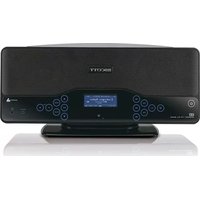


Brand : SCOTT
Model : CMX-108
Category : Radio