
HTL2100W - Soundbar PHILIPS - Free user manual and instructions
Find the device manual for free HTL2100W PHILIPS in PDF.


| Product Type | Soundbar |
| Brand | Philips |
| Model | HTL2100W |
| Dimensions (W x H x D) | 101.7 x 9.0 x 5.2 cm |
| Weight | 1.2 kg |
| Power Consumption | 30 W (standby < 0.5 W) |
| Power Supply | AC 100-240V, 50/60 Hz |
| Speaker Output Power | 2 x 15 W RMS |
| Audio Inputs | Bluetooth, AUX (3.5mm), USB, Optical |
| Bluetooth Version | 4.2 |
| Frequency Response | 20 Hz - 20 kHz |
| Impedance | 4 ohms |
| Remote Control | Included (battery CR2025) |
| Mounting Options | Tabletop or wall-mountable |
| Cleaning Instructions | Wipe with a dry soft cloth. Avoid liquids. |
| Safety Precautions | Do not expose to rain or moisture. Use only supplied power adapter. |
| Spare Parts Availability | Contact Philips support for replacement parts |
| Repairability Index | 6.5 / 10 |
| General Information | Music control via Bluetooth, USB playback, and wall-mountable design |
Frequently Asked Questions - HTL2100W PHILIPS
User questions about HTL2100W PHILIPS
0 question about this device. Answer the ones you know or ask your own.
Ask a new question about this device
Download the instructions for your Soundbar in PDF format for free! Find your manual HTL2100W - PHILIPS and take your electronic device back in hand. On this page are published all the documents necessary for the use of your device. HTL2100W by PHILIPS.
USER MANUAL HTL2100W PHILIPS
Always there to help you
Register your product and get support at
www.philips.com/welcome
HTL2100
HTL2100B
HTL2100C
HTL2100G
HTL2100S
HTL2100T
HTL2100W

User manual
PHILIPS
Contents
1 Important 3
Safety 3
Mains fuse 4
Care for your product 4
Care of the environment 4
Help and support 4
2 Your SoundBar 6
Main unit 6
Remote control 6
Connectors 7
3 Connect 8
Connect audio from TV and other
devices 8
4 Use your SoundBar 9
Adjust the volume 9
Choose your sound 9
MP3 player 9
Auto standby 9
Apply factory settings 9
5 Wall mount 10
6 Product specifications 11
7 Troubleshooting 12
8 Notice 13
Compliance 13
Trademarks 13
1 Important
Read and understand all instructions before you use your product. If damage is caused by failure to follow instructions, the warranty does not apply.
Safety
Risk of electric shock or fire!
- Never expose the product and accessories to rain or water. Never place liquid containers, such as vases, near the product. If liquids are spilt on or into the product, disconnect it from the power outlet immediately. Contact Philips Consumer Care to have the product checked before use.
- Never place the product and accessories near naked flames or other heat sources, including direct sunlight.
- Never insert objects into the ventilation slots or other openings on the product.
- Where the mains plug or an appliance coupler is used as the disconnect device, the disconnect device shall remain readily operable.
- Disconnect the product from the power outlet before lightning storms.
- When you disconnect the power cord, always pull the plug, never the cable.
Risk of short circuit or fire!
- Before you connect the product to the power outlet, ensure that the power voltage matches the value printed on the back or bottom of the product. Never connect the product to the power outlet if the voltage is different.
Risk of injury or damage to the SoundBar!
- For wall-mountable products, use only the supplied wall mount bracket. Secure the wall mount to a wall that can support the combined weight of the product and the
wall mount. Koninklijke Philips Electronics N.V. bears no responsibility for improper wall mounting that results in accident, injury or damage.
- Never place the product or any objects on power cords or on other electrical equipment.
- If the product is transported in temperatures below 5°C, unpack the product and wait until its temperature matches room temperature before connecting it to the power outlet.
- Parts of this product can be made of glass. Handle with care to avoid injury and damage.
Risk of overheating!
- Never install this product in a confined space. Always leave a space of at least four inches around the product for ventilation. Ensure curtains or other objects never cover the ventilation slots on the product.
Risk of contamination!
- Do not mix batteries (old and new or carbon and alkaine, etc.).
- Danger of explosion if batteries are incorrectly replaced. Replace only with the same or equivalent type.
- Remove batteries if they are exhausted or if the remote control is not to be used for a long time.
- Batteries contain chemical substances, they should be disposed of properly.
Risk of swallowing batteries!
- The product/remote control may contain a coin/button type battery, which can be swallowed. Keep the battery out of reach of children at all times! If swallowed, the battery can cause serious injury or death. Severe internal burns can occur within two hours of ingestion.
- If you suspect that a battery has been swallowed or placed inside any part of the body, seek immediate medical attention.
- When you change the batteries, always keep all new and used batteries out of
reach of children. Ensure that the battery compartment is completely secure after you replace the battery.
- If the battery compartment cannot be completely secured, discontinue use of the product. Keep out of reach of children and contact the manufacturer.

This is CLASS II apparatus with double insulation, and no protective earth provided.
Mains fuse
This information applies only to products with a UK mains plug.
This product is fitted with an approved molded plug. If you replace the fuse, use one with:
• the ratings shown on the plug,
• a BS 1362 approval, and
• the ASTA approval mark.
Contact your dealer if you are not sure about what type of fuse to use.
Caution: To conform with the EMC directive (2004/108/EC), do not detach the plug from the power cord.
Copyright in the U.K.
- Recording and playback of material may require consent. See Copyright Act 1956 and The Performer's Protection Acts 1958 to 1972.
Care for your product
Use only microfiber cloth to clean the product
Care of the environment

Your product is designed and manufactured with high quality materials and components, which can be recycled and reused.
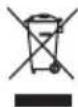
When this crossed-out wheeled bin symbol is attached to a product it means that the product is covered by the European Directive 2002/96/EC. Please inform yourself about the local separate collection system for electrical and electronic products.
Please act according to your local rules and do not dispose of your old products with your normal household waste.
Correct disposal of your old product helps to prevent potential negative consequences for the environment and human health.

Your product contains batteries covered by the European Directive 2006/66/EC, which cannot be disposed with normal household waste.
Please inform yourself about the local rules on separate collection of batteries because correct disposal helps to prevent negative consequences for the environmental and human health.
Help and support
Philips provides extensive online support. Visit our website at www.philips.com/support to:
- download the user manual and the quick start guide
- watch video tutorials (available only for selected models)
• find answers to frequently answered questions (FAQs)
- email us a question
• chat with our support representative.
Follow the instructions on the website to select your language, and then enter your product model number.
Alternatively, you can contact Philips Consumer Care in your country. Before you contact Philips, note down the model number and serial number of your product. You can find this information on the back or bottom of your product.
2 Your SoundBar
Congratulations on your purchase, and welcome to Philips! To fully benefit from the support that Philips offers, register your SoundBar at www.philips.com/welcome.
Main unit
This section includes an overview of the main unit.
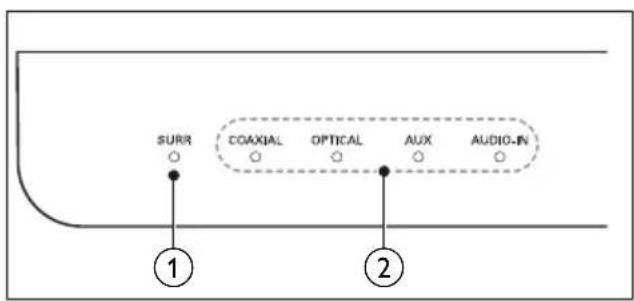
① SURR indicator
Lights up when you select Virtual Surround sound.
② Source indicators
Source indicator lights up when a source is selected.
• COAXIAL: Lights up when you switch to coaxial input source.
• OPTICAL: Lights up when you switch to optical input source.
• AUX: Lights up when you switch to analog input source.
• AUDIO-IN: Lights up when you switch to audio input source (3.5mm jack)
Remote control
This section includes an overview of the remote control.
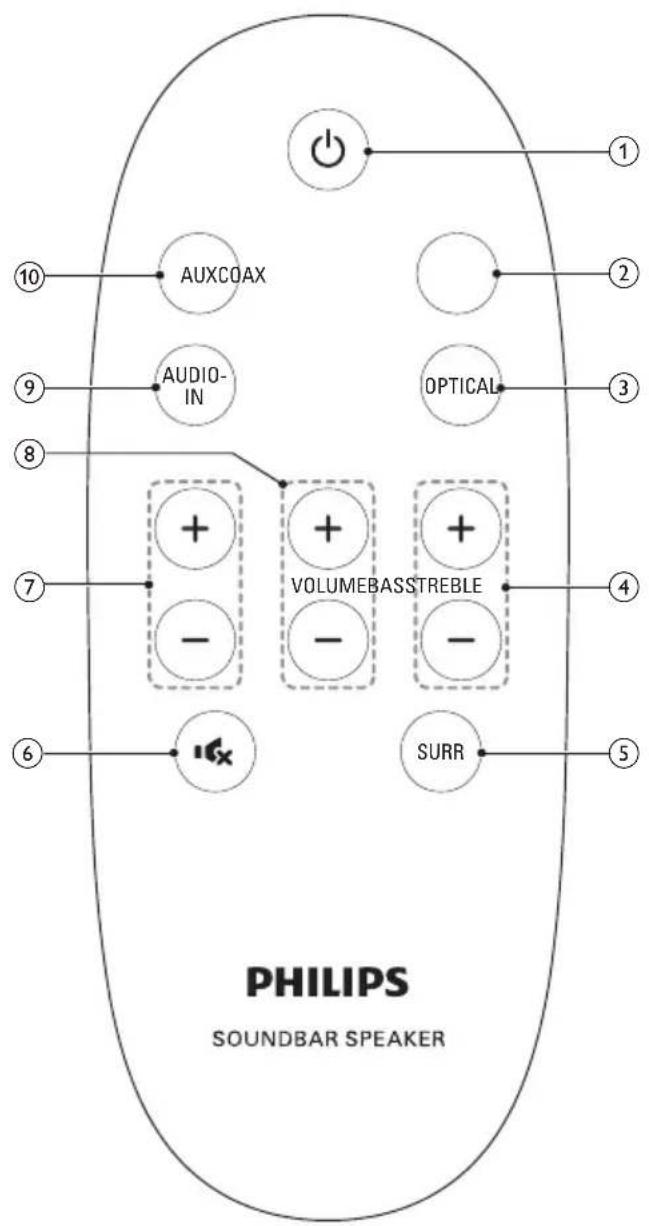
① ⏻(Standby-On)
Switch the SoundBar on or to standby.
② COAX
Switch your audio source to the coaxial connection.
③ OPTICAL
Switch your audio source to the optical connection.
④ TREBLE +/-
Increase or decrease treble.
⑤ SURR
Toggle between stereo and virtual surround sound.
⑥
Mute or restore volume.
⑦ BASS +/-
Increase or decrease volume.
⑧ VOLUME +/-
Increase or decrease volume.
⑨ AUDIO-IN
Switch your audio source to audio input connection (3.5mm jack).
⑩ AUX
Switch your audio source to the AUX connection.
Connectors
This section includes an overview of the connectors available on your SoundBar.
Side right
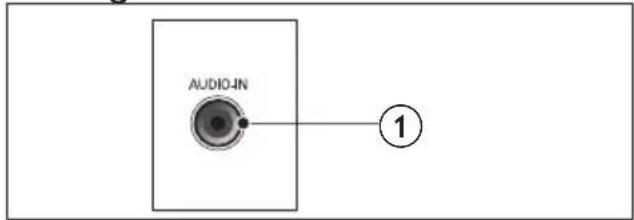
① AUDIO-IN
Audio input from an MP3 player (3.5mm jack).
Rear connectors
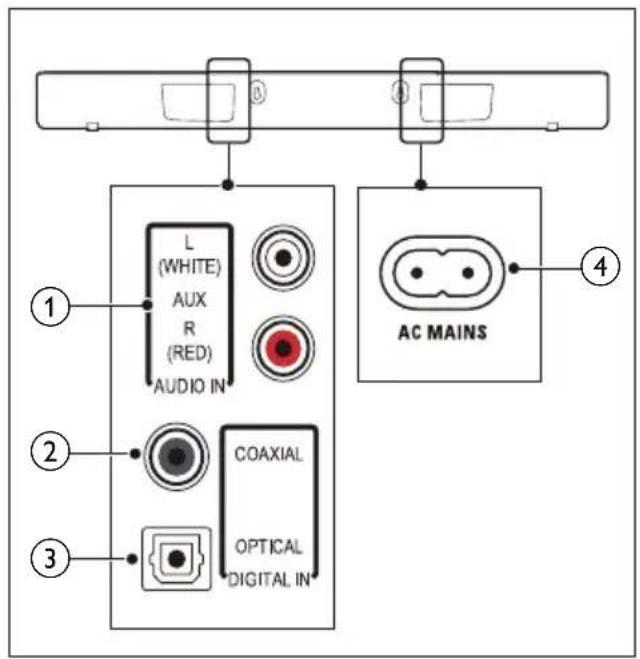
① AUDIO IN-AUX
Connect to an analog audio output on the TV or an analog device.
② DIGITAL IN-COAXIAL
Connect to a coaxial audio output on the TV or a digital device.
③ DIGITAL IN-OPTICAL
Connect to an optical audio output on the TV or a digital device.
④ AC MAINS\~
Connect to the power supply.
3 Connect
This section helps you connect your SoundBar to a TV and other devices.
For information about the basic connections of your SoundBar and accessories, see the quick start guide.

Note
- For identification and supply ratings, refer to the type plate at the back or bottom of the product.
• Before you make or change any connections, make sure that all devices are disconnected from the power outlet.
Connect audio from TV and other devices
Play audio from TV or other devices through your Soundbar speakers.
Use the best quality connection available on your TV, Soundbar, and other devices.
Option 1: Connect audio through a digital optical cable
Best quality audio
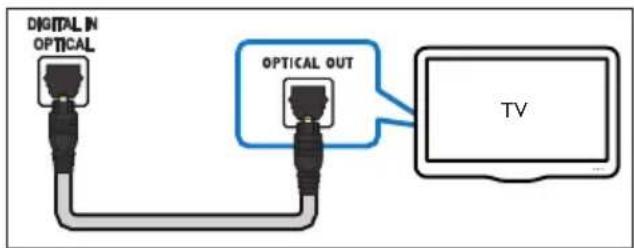
1 Using an optical cable, connect the OPTICAL connector on your SoundBar to the OPTICAL OUT connector on the TV or other device.
• The digital optical connector might be labeled SPDIF or SPDIF OUT.
Option 2: Connect audio through a digital coaxial cable
Best quality audio
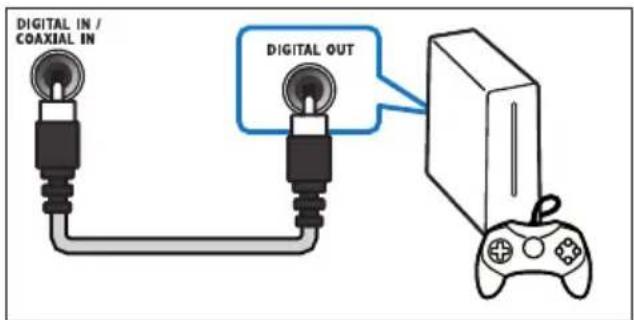
1 Using a coaxial cable, connect the COAXIAL connector on your SoundBar to the COAXIAL/DIGITAL OUT connector on the TV or other device.
• The digital coaxial connector might be labeled DIGITAL AUDIO OUT.
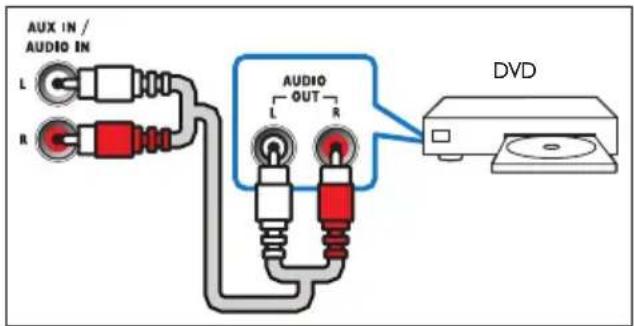
Option 3: Connect audio through analog audio cables
Basic quality audio
1 Using an analog cable, connect the AUX connectors on your SoundBar to the AUDIO OUT connectors on the TV or other device.
4 Use your SoundBar
This section helps you use the SoundBar to play audio from connected devices.
Before you start
- Make the necessary connections described in the quick start guide and the user manual.
- Switch the SoundBar to the correct source for other devices.
Adjust the volume
1 Press VOLUME +/- to increase or decrease a volume level.
• To mute sound, press (MUTE).
• To restore the sound, press ×(MUTE) again or press VOLUME +/-
→ All Source indicators on the main unit blink twice when a volume is set to the maximum or minimum value.
Choose your sound
This section helps you choose the ideal sound for your video or music.
Surround sound mode
Experience an immersive audio experience with surround sound modes.
1 Press SURR to select a surround mode.
• [Virtual Surround]: Creates a highly surround listening experience The SURR indicator on the main unit lights up.
• [Stereo]: Two-channel stereo sound. Ideal for listening to music.
Equalizer
Change the high frequency (treble) and low frequency (bass) settings of the SoundBar.
1 Press TREBLE +/- or BASS +/- to change the frequency.
All Source indicators on the main unit blink twice when treble or bass is set to the maximum or minimum value.
MP3 player
Connect your MP3 player to play your audio files or music.
What you need
• An MP3 player.
• A 3.5mm stereo audio cable.
1 Using the 3.5mm stereo audio cable, connect the MP3 player to the AUDIO-IN connector on your SoundBar.
2 Press AUDIO-IN.
3 Press the buttons on the MP3 player to select and play audio files or music.
Auto standby
When playing media from a connected device, the SoundBar automatically switches to standby if:
• no button is pressed for 15 minutes, and
• no audio play from a connected device.
Apply factory settings
You can reset your SoundBar to the default settings programmed at the factory.
1 In mute mode, quickly press AUX twice.
→ The factory settings is restored.
5 Wall mount

Note
- Koninklijke Philips Electronics N.V. bears no responsibility for improper wall mounting that results in accident, injury or damage. If you have any query, contact Philips Consumer Care in your country.
• Before wall mounting, make sure the wall can support the weight of your SoundBar.
Screw length/diameter
Depending on the type of wall mounting your SoundBar, make sure that you use screws of a suitable length and diameter.
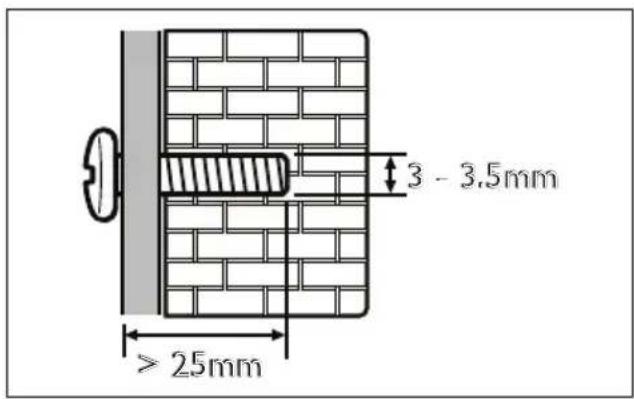
For information about how to wall mount your SoundBar, see the quick start guide.
6 Product specifications

Note
- Specifications and design are subject to change without notice.
Amplifier
• Total output power: 40W RMS (+/- 0.5 dB, 10% THD)
• Frequency response: 20 Hz-20 kHz / ±3 dB
• Signal-to-noise ratio: > 65 dB (CCIR) / (A-weighted)
- Input sensitivity:
- AUX: 650 mV
- AUDIO-IN: 400 mV
Audio
• S/PDIF Digital audio input:
• Coaxial: IEC 60958-3
• Optical: TOSLINK
Main unit
• Power supply: 220-240 V\~, 50 Hz
• Power consumption: 40 W
• Standby power consumption: ≤ 0.5 W
• Speaker impedance: 8 ohm (full range)
• Speaker drivers: 4 × 54.5 mm (2")
- Dimensions (WxHxD): 845 × 74.5 × 94 mm
• Weight: 2.0 kg
Remote control batteries
- 1 × CR2025
7 Troubleshooting

Warning
- Risk of electric shock. Never remove the casing of the product.
To keep the warranty valid, never try to repair the product yourself.
If you have problems using this product, check the following points before you request service. If you still have a problem, get support at www.philips.com/support.
Sound
No sound from SoundBar speakers.
- Connect the audio cable from your SoundBar to your TV or other devices.
- Reset your SoundBar to its factory settings.
- On the remote control, select the correct audio input.
• Make sure that the SoundBar is not muted.
Distorted sound or echo.
• If you play audio from the TV through the SoundBar, make sure that the TV is muted.
8 Notice
This section contains the legal and trademark notices.
Compliance
CE
This product complies with the radio interference requirements of the European Community.
Trademarks
DOLBY.
DIGITAL
Manufactured under license from Dolby Laboratories. Dolby and the double-D symbol are trademarks of Dolby Laboratories.

Specifications are subject to change without notice
All rights reserved.
HTL2100_12_UM_V4.0

- Always there to help you
- Contents
- Important 3
- Your SoundBar 6
- Connect 8
- Use your SoundBar 9
- Wall mount 10
- Product specifications 11
- Troubleshooting 12
- Notice 13
- Important
- Safety
- Risk of electric shock or fire!
- Risk of short circuit or fire!
- Risk of injury or damage to the SoundBar!
- Risk of overheating!
- Risk of contamination!
- Risk of swallowing batteries!
- Mains fuse
- Copyright in the U.K.
- Care for your product
- Care of the environment
- Help and support
- Your SoundBar
- Main unit
- ① SURR indicator
- ② Source indicators
- Remote control
- ① ⏻(Standby-On)
- ② COAX
- ③ OPTICAL
- Connectors
- Connect
- Note
- Connect audio from TV and other devices
- Option 1: Connect audio through a digital optical cable
- Option 2: Connect audio through a digital coaxial cable
- Option 3: Connect audio through analog audio cables
- Basic quality audio
- Use your SoundBar
- Before you start
- Adjust the volume
- Choose your sound
- Surround sound mode
- Equalizer
- MP3 player
- What you need
- Auto standby
- Apply factory settings
- Wall mount
- Screw length/diameter
- Product specifications
- Amplifier
- Audio
- Remote control batteries
- Troubleshooting
- Warning
- Sound
- No sound from SoundBar speakers.
- Distorted sound or echo.
- Notice
- Compliance
- CE
- Trademarks
- DOLBY.
- DIGITAL
Brand : PHILIPS
Model : HTL2100W
Category : Soundbar