
PT-046 - Waterproof case OLYMPUS - Free user manual and instructions
Find the device manual for free PT-046 OLYMPUS in PDF.



| Product type | Waterproof housing for digital camera |
| Brand | OLYMPUS |
| Model | PT-046 |
| Maximum depth | 40 meters |
| Materials | Polycarbonate body, optical glass lens window, stainless steel button shafts |
| Dimensions (L × H × D) | 139.5 × 99 × 78 mm |
| Weight | 305 g (without camera or accessories) |
| Compatibility | Olympus FE-3010 / X-895 digital cameras |
| Lens ring diameter | 46 mm |
| Included accessories | O-ring (POL-041), silica gel (SILCA-5S), silicone grease (PSOLG-2), lens cap (PRLC-11), strap |
| Built-in controls | Shutter, power on/off, zoom, navigation, OK, MENU, AF lock |
| Seal maintenance | Regular cleaning and lubrication with specified silicone grease; replacement at least once a year |
| Pressure resistance | Up to 40 m depth (factory tested) |
| Intended use | Underwater photography (wide-angle, close-up) |
| Precautions | Perform a leak test before each dive; do not disassemble or modify |
| Available spare parts | O-ring, silica gel, silicone grease (Olympus references) |
| Warranty | Limited (see manual); not covered in case of misuse |
Frequently Asked Questions - PT-046 OLYMPUS
User questions about PT-046 OLYMPUS
0 question about this device. Answer the ones you know or ask your own.
Ask a new question about this device
Download the instructions for your Waterproof case in PDF format for free! Find your manual PT-046 - OLYMPUS and take your electronic device back in hand. On this page are published all the documents necessary for the use of your device. PT-046 by OLYMPUS.
USER MANUAL PT-046 OLYMPUS
natural_image
Technical line drawing of a camera module with no visible text or symbols| Jp | 取扱説明書 防水プロテクターデジタルカメラ FE-3010/X-895用 |
| En | Instruction Manual Underwater CaseFor the digital camera FE-3010/X-895 |
| Fr | Mode d'emploi Caisson étanchePour l'appareil photo numérique FE-3010/X-895 |
| De | Bedienungsanleitung UnterwassergehäuseFür die Digitalkamera FE-3010/X-895 |
| Sp | Manual de Instrucciones Caja estancaPara la cámara digital FE-3010/X-895 |
| Cs | 使用说明书 防水机壳数码照相机 FE-3010/X-895 |
| Kr | 취급설명서 방수 케이스디지털 카메라 FE-3010/X-895 |
日本語
ENGLISH
FRANÇAIS
DEUTSCH
ESPAÑOL
中文
한국어
natural_image
Line drawing of a camera with a strap and a circular base labeled 'SOMFUS' (no text or symbols on the device itself)注意:
natural_image
Black and white photo of multiple fish swimming in the water (no visible text or symbols)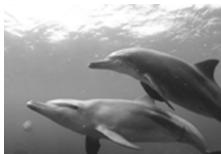
natural_image
Two dolphins swimming underwater, no visible text or symbols水中マクロ
natural_image
Illustration of a cartoon character with flowing hair, surrounded by blurred background (no text or symbols)注意:
natural_image
Illustration of a hand inserting a device into a device panel with a cursor pointing to the component (no text or symbols present)砂・ゴミなどを取り除きます
natural_image
Line drawing of two hands tying a knot around a ring (no text or symbols)natural_image
Technical line drawing of a mechanical component with internal gears and housing (no text or symbols)注意:
natural_image
Close-up of a textured surface with diagonal dark bands and faint linear patterns (no text or symbols)髪の毛
natural_image
Circular cropped image showing a railway track with overhead power lines (no visible text or symbols)繊維屑
natural_image
Circular cropped image showing a dark smoky or smoky surface with faint horizontal lines and a small bright spot (no text or symbols)砂粒
消耗品は取り替えます
■ Thank you for buying the Underwater Case PT-046 (hereinafter Case).
■ Please read this instruction manual carefully and use the product safely and correctly. Please keep this instruction manual for reference after reading it.
■ Wrong use may cause damage to the camera inside the Case due to water leakage, and repair may not be possible.
■ Before use, perform an advance check as described in this manual.
Introduction
● Unauthorized copying of this manual in part or in full, except for private use, is prohibited. Unauthorized reproduction is strictly prohibited.
- OLYMPUS IMAGING CORP. shall not be responsible in any way for lost profits or any claims by third parties in case of any damage occurring from improper use of this product.
Please read the following items before use
This Case is a precision device designed for use at a water depth within 40 m. Please handle it with sufficient care.
- Please use the Case correctly after sufficient understanding of the contents of this manual in regard to handling of the Case, checks before use, maintenance, and storage after use.
- OLYMPUS IMAGING CORP. shall in no way be responsible for accidents involving immersion of a digital camera in water. In addition, expenses incurred for damage of internal materials or loss of recorded contents due to water entering the camera will not be compensated.
- OLYMPUS IMAGING CORP. shall not pay any compensation for accidents (injuries or material damage) at the time of use.
For safe use
This instruction manual uses various pictographs for correct use of the product and to prevent danger to the user and other persons as well as property damage. These pictographs and their meanings are shown below.
| ⚠ WARNING | This indicates contents for which the possibility of human death or severe injury in case of handling under disregard of this indication can be assumed. |
| ⚠ CAUTION | This indicates contents for which the possibility of human injury or the possibility of material damage in case of handling under disregard of this indication can be assumed. |
⚠ WARNING
① Keep this product out of the reach of babies, infants, and children. There is the possibility of occurrence of the following types of accidents.
- Injury by dropping onto the body from a height.
- Injury from parts of the body getting caught in parts which open and close.
- Swallowing of small parts, O-ring, silicone grease and silica gel. Please consult a physician immediately if any parts have been swallowed.
- Triggering of the flash in front of the eyes may cause permanent vision impairment etc.
② Do not store with a battery in the digital camera housed in this product. Storage with a battery inserted may lead to leakage of the battery liquid and fire.
③ If leakage of water should occur with a camera installed in this product, quickly remove the battery from the camera. There is the possibility of ignition and explosion from generation of hydrogen gas.
④ This product is made of resin. There is the possibility that injuries may be caused when it becomes broken because of strong impact with a rock or other hard objects. Please handle it with sufficient care.
CAUTION
① Do not disassemble or modify this product. This may cause water leakage or trouble. OLYMPUS IMAGING CORP. shall not be responsible for damage, lost profits, etc. caused by loss of image data because of disassembly, repair or modification of this product by people other than third parties specified by OLYMPUS IMAGING CORP. or for other reasons.
② Use or storage of the product at the following locations may cause defective operation, defects, trouble, damage, fire, internal clouding, or water leakage. This should be avoided.
- Locations reaching high temperatures such as those under direct sunlight, in an automobile, etc.
- Locations with open fire
• Water depths in excess of 40 m - Locations subject to vibrations
- Locations with high temperature and humidity or with severe temperature changes
- Locations with volatile substances
③ Opening and closing at locations with much sand, dust, or dirt may impair the waterproof characteristic and cause water leakage. This should be avoided.
④ This product is not a case to soften impacts to the camera inside the product. When this product with a digital camera inside it is subjected to impacts or heavy objects are placed onto it, the digital camera may become damaged. Please handle it with sufficient care.
⑤ Do not use the following chemicals for cleaning, corrosion prevention, prevention of fogging, repair or other purposes. When these are used for the Case directly or indirectly (with the chemicals in vaporized state), they may cause cracking under high pressure or other problems.
| Chemicals which cannot be used | Explanation |
| Volatile organic solvents, chemical detergents | Do not clean the Case with alcohol, gasoline, thinner or other volatile organic solvents or with chemical detergents etc. Use pure water or lukewarm water. |
| Anticorrosion agent | Do not use anticorrosion agents. The metal parts use stainless steel or brass. Wash with pure water. |
| Commercial defogging agents | Do not use commercial defogging agents. Always use the specified desiccant silica gel. |
| Grease other than specified silicone grease | Use only the specified silicone grease for the silicone O-ring, as otherwise the O-ring surface may deteriorate and water leakage may occur. |
| Adhesive | Do not use adhesive for repairs or other purposes. When repair is required, please contact a dealer or a service station of OLYMPUS IMAGING CORP. |
⑥ Jumping into the water with the Case in your pocket or in your hand, throwing the Case from a boat or ship into the water, and other rough handling may cause water leakage. Please handle with sufficient care, when handing it over from hand to hand etc.
⑦ If the camera on the inside should become wet because of water leakage etc., immediately wipe off all moisture and confirm the operation after the Case is dried.
⑧ Please remove the O-ring when traveling by air. Otherwise air pressure may make it impossible to open the Case.
⑨ For safe use of the digital camera in this product, please read the "Instruction Manual" for the digital camera carefully.
⑩ When sealing this product, take sufficient care that no foreign matter gets caught at the O-ring and the contact surfaces.
Contents
Introduction 2
Please read the following items before use 2
For safe use 3
- Preparations 8
Check the contents of the package....8
Names of the parts 9
Using the accessories.... 11
Install the strap.... 11
Mounting and removing the lens cap 11
- Advance Check of the Case.... 12
Advance check before use.... 12
- Install the digital camera.... 13
Check the digital camera.... 13
Open the Case.... 14
Load the digital camera.... 15
Make sure the camera is loaded properly 15
Seal the Case.... 16
Check the operation of the loaded camera 16
Perform the final checks.... 17
Visual Inspection 17
Water Leakage Test.... 18
- Taking Pictures Under Water 19
Underwater shooting modes 19
How to select the shooting scene 20
Locking AF during underwater shooting.... 20
- Handling After Shooting 21
Wipe off any waterdrop 21
Take out the digital camera.... 21
Wash the Case with pure water 22
Dry the Case 22
- Maintaining the Waterproof Function 23
Remove the O-ring.... 23
Remove any sand, dirt, etc. 23
How to Apply Grease to the O-ring 25
Install the O-ring.... 26
Replace consumable parts 26
- Appendix......27
Specifications....27
En
1. Preparations
Check the contents of the package
En
Check that all accessories are in the box.
Contact your dealer if accessories are missing or damaged.
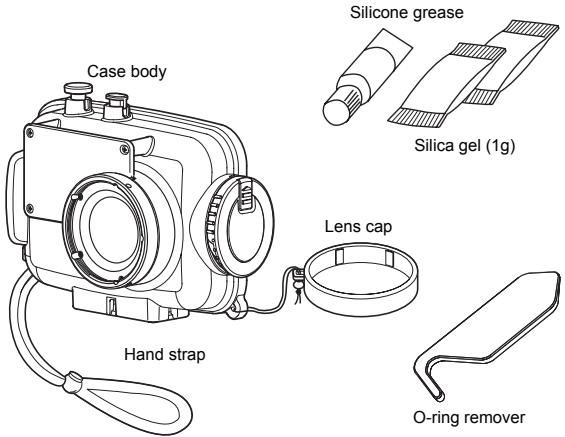
(Check that the O-ring is installed)
OLYMPUS distributor list
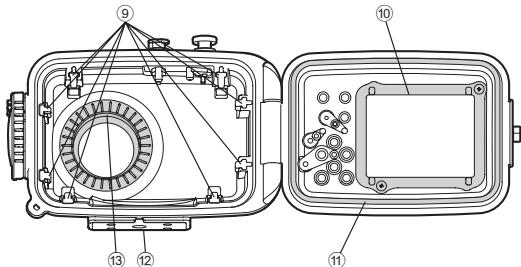
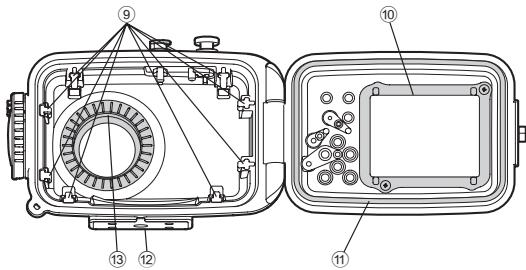
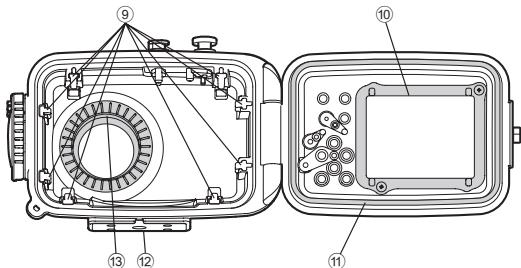
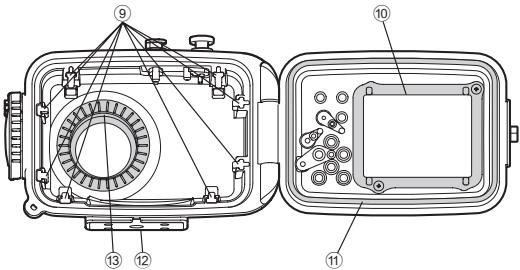
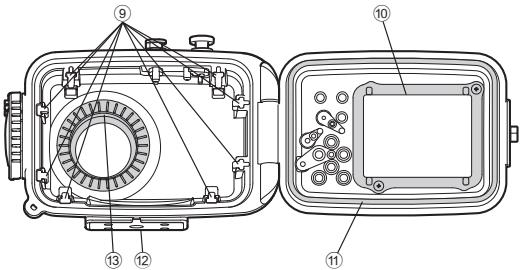
Names of the parts
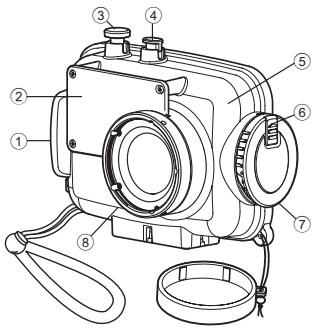
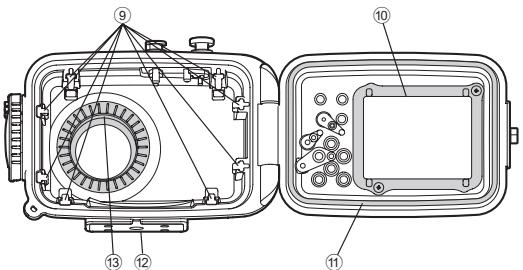
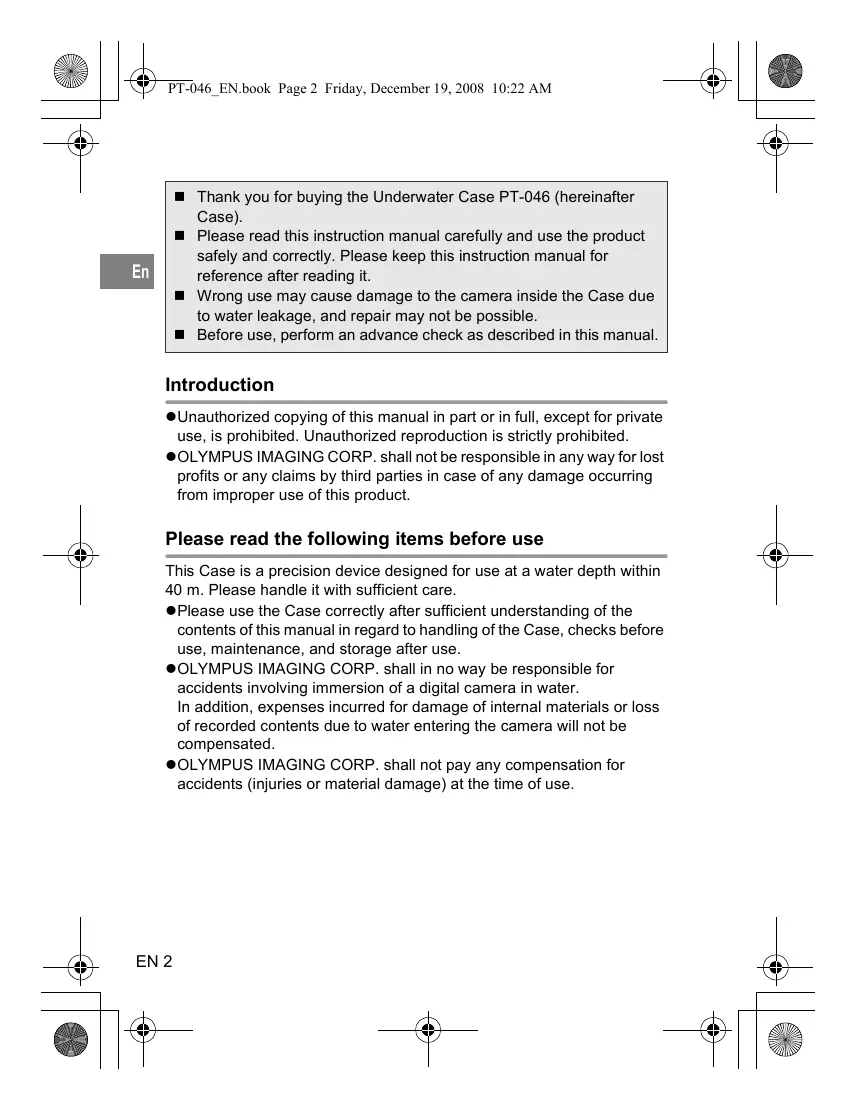
① Palm grip
② Diffuser
*③ Shutter button
*④ ON/OFF button
⑤ Front lid
⑥ Slide lock
⑦ Open/close dial
⑧ Lens ring
⑨ Loading guide rails
⑩ LCD inner hood
⑪ O-ring
⑫ Tripod seat
⑬ Light shield hood
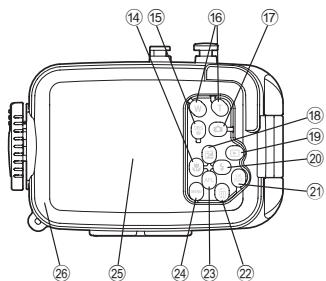
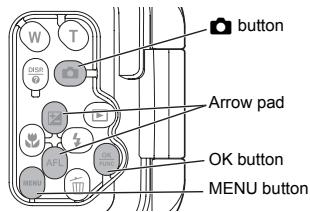
*⑭ button/arrow pad
*⑮ DISP./? button
*⑯ Zoom buttons
*⑰ button
*⑱ button/arrow pad
*⑲ button
*⑳ button/arrow pad
*②1 OK/FUNC button
*⑳ button
*②3 AFL button (*1)/arrow pad
(*1) During Underwater Wide-Angle 1 or Underwater Macro shooting mode, the down arrow pad functions as the AF LOCK button.
*⑳ MENU button
⑲ LCD monitor window
⑳ Rear lid
Memo:
The Case operation parts marked by * corresponds to the operation parts of the digital camera. When the operation parts of the Case are operated, the corresponding functions of the digital camera will operate. For details of the functions, refer to the instruction manual for the digital camera.
Install the strap
Install the strap on the Case body.
Installation illustration
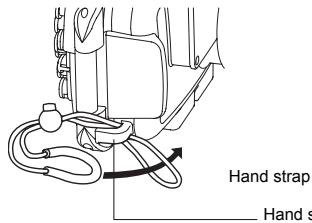
Installation completed
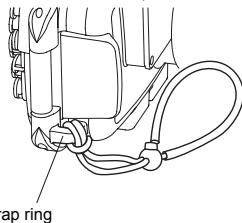
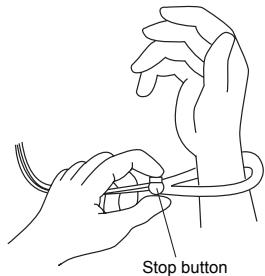
How to use the hand strap
Pass your hand through the hand strap and adjust the length with the stop button.
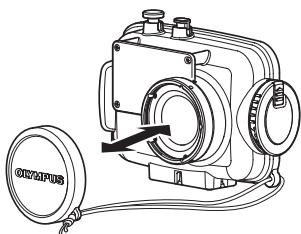
Mounting and removing the lens cap
Fit the lens cap onto the lens ring as shown in the figure. Be sure to remove the lens cap before shooting.
natural_image
Line drawing of a camera with lens and attached circular component (no text or symbols)2. Advance Check of the Case
Advance check before use
This Case has been the subject of thorough quality control for the parts during the manufacturing process and thorough function inspections during the assembly. In addition, a water pressure test is performed with a water pressure tester for all products to confirm that the performance conforms to the specifications.
However, depending on the carrying and storage conditions, the maintenance status, etc., the waterproof function may be damaged. Before using, always perform the following advance checks.
Advance Check
① Before installing the digital camera in the Case, immerse the empty Case to confirm that there is no water leakage. We recommend to immerse the empty Case to the intended water depth, however, if you cannot perform this way, check the Case by referring “Water Leakage Test” (P.18).
② Main causes of water leakage are as follows.
- The O-ring has not been installed.
- A part of the O-ring or the entire O-ring is outside the specified groove.
- O-ring damage, cracks, deterioration or deformation
- Sand, fibers, hair or other foreign matter sticking to the O-ring, the O-ring groove or the O-ring contact surface on the front lid
- Damage to the O-ring groove or the O-ring contact surface on the front lid
- Catching of the strap, silica gel, etc. when closing the Case Perform the test after the above causes have been eliminated.
CAUTION:
If a leak is detected in normal handling, do not use the Case and contact Olympus.
3. Install the digital camera
Check the digital camera
Check the digital camera before loading it in the Case.
1. Battery Confirmation
The flash is used very frequently during underwater shooting.
Before diving, make sure that you have enough remaining battery power.
2. Confirmation of the Remaining Number of Pictures to be Taken
Confirm that the image storage has a sufficient remaining number of pictures to be taken.
3. Remove the hand strap from the digital camera.
When a digital camera is loaded without removing the strap, the strap may get caught between the Case lids and may cause water leakage.
Open the Case
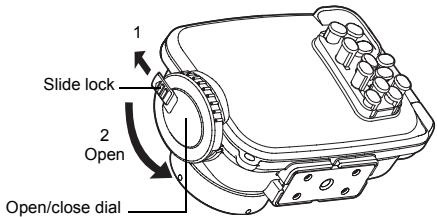
① Slide and hold the slide lock towards the arrow direction (1 of figure below) and turn the open/close dial counter clockwise (2 of figure below).
② Turn the open/close dial to the position where it cannot be turned further.
③ Open the rear lid of the Case gently.
CAUTION:
Do not exert too much force while turning the open/close dial. Doing so may damage the dial.
Load the digital camera
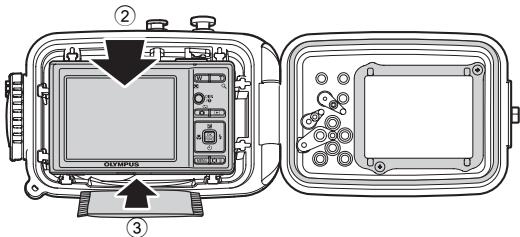
① Confirm that the digital camera is OFF.
② Gently insert the digital camera into the Case.
③ Insert a silica gel bag (1g) between the bottom of the digital camera and the Case.
The silica gel bag provided for prevention of fogging.
CAUTION:
The silica gel bag will be caught when the Case is sealed and water leakage will occur. Once silica gel has been used, the moisture absorption performance will be impaired. Always replace the silica gel when the Case is opened and closed.
Make sure the camera is loaded properly
Check the following points before sealing the Case.
- Is the digital camera loaded properly?
- Is silica gel inserted all the way at the specified location?
- Is the O-ring attached properly to the opening on the Case?
- Is there any dirt or foreign matter on the O-ring or the O-ring contact surface on the front lid?
- Is the waterproof function maintenance performed? For details of the maintenance, see “6. Maintaining the Waterproof Function” (P.23) of this manual.
Seal the Case
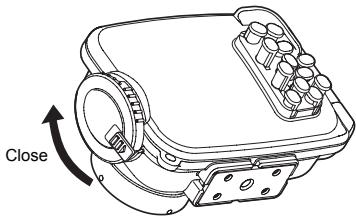
① Close the rear lid of the Case gently.
② Turn the open/close dial clockwise.
- The Case is sealed when the dial is turned 180 degrees.
natural_image
Technical line drawing of a mechanical device with a close button and housing (no text or symbols)CAUTION:
- If the open/close dial is not fully turned, the Case will not be sealed. This will cause water leakage.
- Close the rear lid of the Case so that the lens cap strap doesn't catch. If it catches, water leaks may result.
Check the operation of the loaded camera
After sealing the Case, check that the camera operations normally.
① Push the ON/OFF button on the Case and confirm that the camera turns ON/OFF.
② Operate the control buttons on the Case and confirm that the camera functions properly.
③ Press the shutter button on the Case and confirm that the camera shutter releases.
Perform the final checks
Visual Inspection
After sealing the Case, check the sealing part of front and rear lid visually to confirm that the O-ring is not twisted or out of the groove and that no foreign matter has been caught. Also check that the Case is not broken or cracked.

CAUTION:
Hairs, fibers, and other narrow items are not very apparent, but they may cause water leakage. In addition, pay special attention to breaks and cracks on the Case.
Water Leakage Test
The final test after loading the camera is explained below. Always perform this test. It can be performed easily in a water tank or a bathtub. The required time is about five minutes.
| Simple water leakage test | Explanatory image | Hints | |
| 1 | Place the Case slowly into the water. | 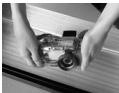 | As the Case is transparent, waterdrops entering into it can be confirmed easily. |
| 2 | At first, immerse the Case for only three seconds. | 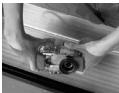 | In case of trouble with the O-ring, three seconds are enough for water to enter. Are there air bubbles coming out between the lids? Please check carefully. |
| 3 | Check that no water has entered into the Case. | 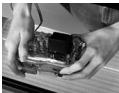 | Remove the Case from the water and check that no water has leaked at the inside of the Case. |
| 4 | Next, immerse the Case for 30 seconds. | 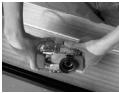 | Check carefully for air bubbles! Do not perform any operation yet, but just observe. |
| 5 | Check that no water has entered into the Case. | 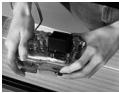 | Remove the Case from the water and check that no water has leaked at the inside of the Case.Perform very careful confirmation. |
| 6 | Next, check by immersing for three minutes. | 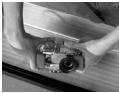 | Check carefully for air bubbles! Try operation of the all buttons, levers and dials. Check carefully for air bubbles! If there is still no entry of water, everything is OK! |
| 7 | This is the final check. Has the silica gel become moist? | 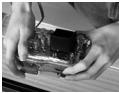 | This is very important! Has the silica gel become moist? Please check carefully! |
| 8 | Now everything is all right. | 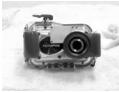 | Now everything is all right! |
4. Taking Pictures Under Water
Underwater shooting modes
Underwater Wide-Angle 1
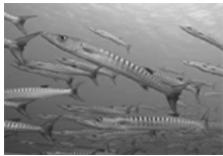
Suitable for shooting a scene that extends across a wide range such as a school of fish swimming through the water. Background blues are vividly reproduced.
^2 Underwater Wide-Angle 2
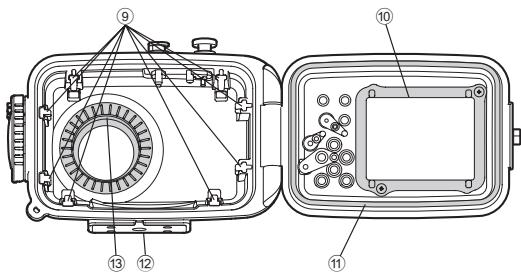
Suitable for shooting a large, fast moving subject such as a dolphin or manta ray. In many dolphin-watching locations, use of a flash is not permitted to avoid frightening the dolphins. Although this mode was originally designed to work without the flash, it can also be enabled if required, for example when shooting a manta ray.
Underwater Macro
Suitable for close-up shooting of small fish and other underwater creatures. Natural colors of the underwater are accurately reproduced.
natural_image
Black and white photo of a fish swimming in the ocean (no visible text or symbols)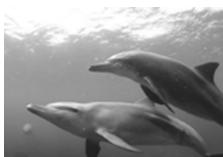
natural_image
Two dolphins swimming in the ocean under sunlight (no text or symbols visible)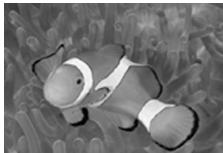
natural_image
Illustration of a cartoon character with a headband and tentacles, surrounded by abstract floral patterns (no text or symbols)CAUTION:
When the Underwater Wide-Angle 1 or Underwater Macro scene mode is selected, you can easily lock the focus position (AF lock operation) by pressing the down arrow pad (AFL button) on the rear of the protector. When the focus is locked, the AF lock indicator (AFL) appears on the top right of the LCD monitor screen of the camera.
How to select the shooting scene
① Press the 📄 button to set the camera's shooting mode to "SCN".
② Press the up/down arrow pad to select "Underwater Wide-Angle 1", "Underwater Wide-Angle 2" or "Underwater Macro".
③ Press the OK button.
Switching to a different underwater shooting mode
① Press the MENU button.
② Press the down arrow pad to select the shooting mode selection icon on the LCD monitor, and then press the OK button.
③ Select "SCN" and then press OK.
④ Press the up/down arrow pad to select shooting scene.
⑤ Press the OK button.
Locking AF during underwater shooting
When the “Underwater Wide-Angle 1” or “Underwater Macro” mode is selected, you can easily lock the focus position (AF lock operation) by pressing the down arrow pad (AFL button) on the rear of the protector.
When the focus is locked, the AF lock indicator (AFL) appears on the top right of the LCD monitor screen of the camera.
To cancel the AF lock, press the down arrow pad (AFL button) again.
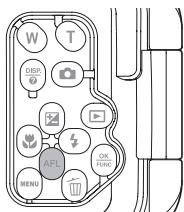
Functions as the AF LOCK button in the Underwater Wide-Angle 1 and Underwater Macro modes.
5. Handling After Shooting
Wipe off any waterdrop
After completing the shooting and returning to land or a ship, wash lightly in pure water and wipe off any waterdrop sticking to the Case. Use air or a soft cloth not leaving any fibers to thoroughly wipe any waterdrop etc. from the joint between the front and rear lid, the shutter lever, the palm grips, and the open/close dial.

CAUTION:
When waterdrops remain between the front and the rear lid, they may spill to the inside when the Case is opened. Take special care to wipe off all waterdrops.
Take out the digital camera
Open the Case carefully and take the digital camera out.

CAUTION:
- When opening the Case, take sufficient care that no water will drip from your hair or body onto the Case and the camera.
- Before opening the Case, make sure that your hands or gloves are free of sand, fibers, etc.
- Do not open or close the Case at locations where there is water spray or sand.
- Take care not to touch the digital camera or the battery with hands wet with sea water.
Wash the Case with pure water
After use, seal the Case again after taking out the camera and wash it sufficiently in pure water as soon as possible. After using in sea water, it is important to immerse it for a fixed time (30 minutes to 1 hour) in pure water to remove any salt.
CAUTION:
- Water leakage may occur when a high water pressure is partially applied. Before washing the Case with water, take out the digital camera from it.
- Operate the shutter button and various buttons of this product in pure water to remove salt adhering to the shaft. Do not disassemble for cleaning.
- Drying the Case with salt adhered may impair the function. Always wash off any salt after use.
Dry the Case
After washing with pure water, use a clean cloth to wipe off any waterdrops. Be sure to use a cloth free of salt residue that doesn't leave any loose fibers. Dry the Case completely at a well ventilated location in the shade.
CAUTION:
- Do not use hot air from a hair dryer or the like for drying and do not expose the Case to direct sunlight, as this may accelerate deterioration and deformation of the Case and deterioration of the O-ring, leading to leakage of water.
- When wiping the Case, take care not to cause scratches.
6. Maintaining the Waterproof Function
Whenever you open the rear lid of the Case, always be sure to perform the O-ring maintenance operation as described below.
Perform at the location without sand or dust, after washing and drying your hands.
Remove the O-ring
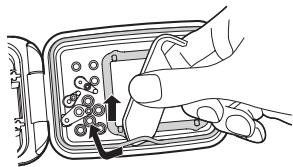
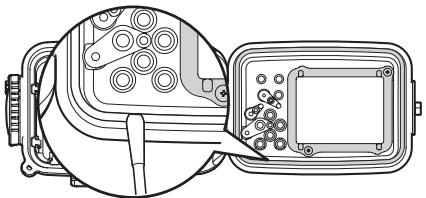
① Insert the O-ring remover between the O-ring and the O-ring groove.
② Slip the tip of the inserted O-ring remover below the O-ring.
(Be careful not to scratch the O-ring groove with the tip of the O-ring remover.)
③ Hold the O-ring with your fingertips after it has come out of the groove and remove it from the Case.
Remove any sand, dirt, etc.
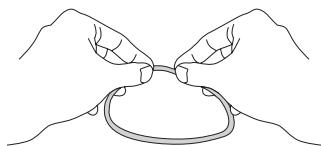
After visually checking that dirt has been removed from the O-ring, checks for sand and other foreign matter adhered, damage and cracks can be done by squeezing the entire circumference of the O-ring lightly with your fingertips.
natural_image
Line drawing of two hands tying a knot around a ring (no text or symbols)Remove any foreign matter adhered to the O-ring groove using a lint-free clean cloth or cotton swab. Also remove any sand or dirt adhered to the O-ring contact surface on the front lid of the case.
natural_image
Technical line drawing of a mechanical component with internal parts and a close-up view (no text or symbols)CAUTION:
- Maintenance of the waterproof functions is required even before using this product underwater for the first time.
- When a sharp object is used to remove the O-ring or to clean the inside of the O-ring groove, the Case and the O-ring may be damaged and water leakage may occur.
• Take care not to stretch the O-ring. - Never use alcohol, thinner, benzene or similar solvents or chemical detergents to clean the O-ring. When such chemicals are used, the O-ring may be damaged or its deterioration will be accelerated.
How to Apply Grease to the O-ring
| 1 | Apply the exclusive lubricant to each O-ring. | 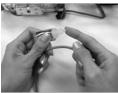 | Make sure that your fingers and the O-ring are free of dirt, and squeeze about 5 mm of lubricant onto a finger. (5 mm is the most appropriate amount.) |
| 2 | Spread the lubricant all over the O-ring. | 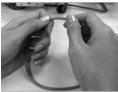 | Apply the lubricant with three fingers and spread it over the ring. Be careful not to use force as this may stretch the O-ring. |
| 3 | Check that the O-ring is free of scratches or unevenness. | 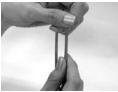 | After spreading the lubricant, check visually and by touch that the O-ring is not scratched and that its surface is flat. If it is damaged in any way, be sure to replace it with a brand-new O-ring. |
| 4 | Apply lubricant on the O-ring contact surface. | 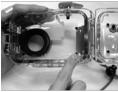 | Use the lubricant remaining on the fingers to clean and lubricate the case's contact surface. |
CAUTION:
- Always perform maintenance of the waterproof function even when the Case has been opened every shooting. Neglecting this maintenance may cause water leakage.
- When the Case is not to be used for a long time, remove the O-ring from the groove to prevent deformation of the O-ring, apply a thin coat of silicone grease, and store it in a clean plastic bag or the like.
Install the O-ring
Confirm that no foreign matter is adhered, apply a thin coat of the grease provided to the O-ring, and fit the O-ring into the groove. At this point, confirm that the O-ring does not stick out from the groove.
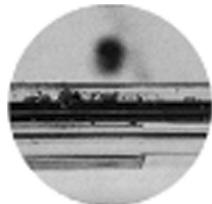
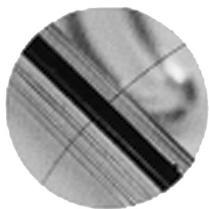
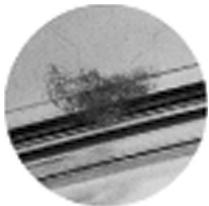
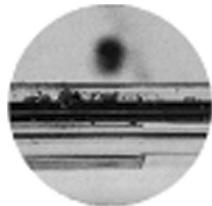
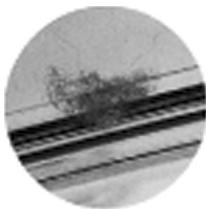
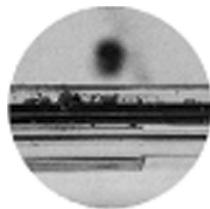
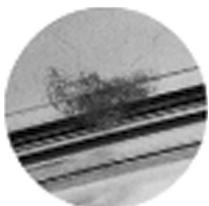
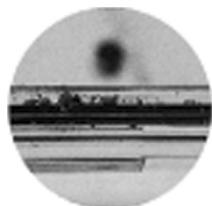
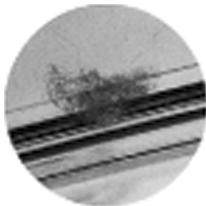
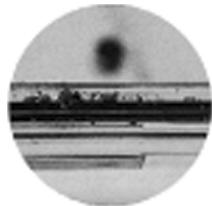
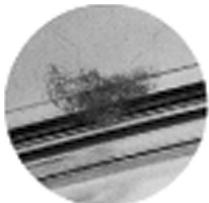
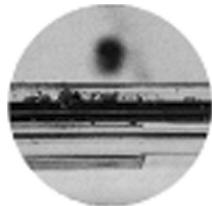
- When sealing this product, make sure that no hairs, fibers, sand particles or other foreign matter stick not only to the O-ring, but also to the contact surface (front cover). Even a single hair or a single grain of sand may cause water leakage. Please check with special care.
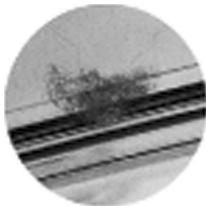
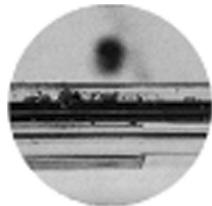
Examples of foreign matter sticking to the O-ring
natural_image
Close-up of a textured surface with diagonal dark bands and faint linear patterns (no text or symbols)Hair
natural_image
Circular cropped image showing a railway track with overhead power lines (no visible text or symbols)Fibers
natural_image
Circular cropped image showing a dark smudge or light source above a horizontal line, with no visible text or symbols.Grains of sand
Replace consumable parts
- The O-ring is a consumable part. Regardless of the number of times the Case is used, it is recommended that the O-ring be replaced with a new one at least once a year.
- Deterioration of the O-ring is accelerated by the use conditions and the storage conditions. Replace the O-ring even before a year has passed if it shows signs of damage, crack or loss of elasticity.
Note:
- Please use genuine Olympus silicone grease, silica gel and O-ring.
- Do not try to replace the O-ring by yourself.
- We recommend to perform the check periodically.
7. Appendix
Specifications
| Compatible models | Olympus digital cameraFE-3010/X-895 |
| Pressure resistance | Depth of up to 40 m |
| Main materials | Body/Open/close dial/Grip/Shutter button/Operation buttons: PolycarbonateLens window: Optical glassOperate button shafts: stainless steel |
| Diameter of lens ring | ∅46 mm |
| Dimensions | Width 139.5 mm x height 99 mm x thickness 78 mm |
| Weight | 305 g (camera and accessories not included) |
* We reserve the right to change the external appearance and the specifications without notice.
Supplied accessories for PT-046
O-ring: POL-041
Silica gel: SILCA-5S
Silicone grease: PSOLG-2
Lens cap: PRLC-11
Sold separately accessories
Silicone grease: PSOLG-1, PSOLG-3
Balance weight: PWT-030
Accessories can be purchased.
Products of other model types describing above cannot be used.
OLYMPUS IMAGING CORP.
Shinjuku Monolith, 3-1 Nishi-Shinjuku 2-chome, Shinjuku-ku, Tokyo, Japan
OLYMPUS IMAGING AMERICA INC.
3500 Corporate Parkway, P.O. Box 610, Center Valley, PA 18034-0610, U.S.A. Tel. 484-896-5000
Technical Support (USA)
24/7 online automated help: http://www.olympusamerica.com/support
Phone customer support: Tel. 1-888-553-4448 (Toll-free)
Our phone customer support is available from 8 am to 10 pm
(Monday to Friday) ET
http://olympusamerica.com/contactus
Olympus software updates can be obtained at: http://www.olympusamerica.com/digital
OLYMPUS IMAGING EUROPA GMBH
Premises: Wendenstrasse 14-18, 20097 Hamburg, Germany
Tel: +49 40-23 77 3-0 / Fax: +49 40-23 07 61
Goods delivery: Bredowstrasse 20, 22113 Hamburg, Germany
Letters: Postfach 10 49 08, 20034 Hamburg, Germany
European Technical Customer Support:
Please visit our homepage http://www.olympus-europa.com
or call our TOLL FREE NUMBER*: 00800 - 67 10 83 00
for Austria, Belgium, Denmark, Finland, France, Germany, Italy, Luxemburg, Netherlands, Norway, Portugal, Spain, Sweden, Switzerland, United Kingdom
* Please note some (mobile) phone services providers do not permit access or request an additional prefix to +800 numbers.
For all European Countries not listed and in case that you can't get connected
to the above mentioned number, please make use of the following
CHARGED NUMBERS: +49 180 5 - 67 10 83 or +49 40 - 237 73 4899
Our Technical Customer Support is available from 9 am to 6 pm MET (Monday to Friday)
MEMO
natural_image
Line drawing of a DSLR camera with attached lens and cable (no text or symbols)natural_image
Black and white photo of a fish swimming in the ocean (no visible text or symbols)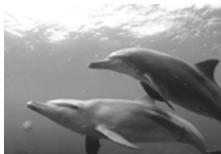
natural_image
Two dolphins swimming underwater, no visible text or symbols
natural_image
Illustration of a cartoon character with a white headband, standing on a textured surface (no text or symbols)
ATTENTION:
natural_image
Illustration of a hand inserting a component into a device (no text or symbols visible)natural_image
Line drawing of two hands tying a knot around a ring (no text or symbols)natural_image
Technical diagram of a mechanical assembly with internal components and a close-up view of a component (no text or symbols)ATTENTION:
natural_image
Close-up of a textured surface with diagonal dark bands and faint linear markings (no text or symbols)Cheveu
natural_image
Circular cropped image showing a railway track with overhead power lines (no visible text or symbols)Fibres
natural_image
Circular cropped image showing a dark circular object above a horizontal line with a small rectangular object at the bottom (no text or symbols visible)Grains de sable
*⑭ -Taste/Pfeiltasten
*⑮ DISP./?-Taste
*⑯ Zoomtasten
*⑰ -Taste
*⑱ +Taste/Pfeiltasten
*⑲▶-Taste
*⑳-Taste/Pfeiltasten
*②1 OK/FUNC-Taste
natural_image
Line drawing of a camera with a circular base and cable, no text or symbols present⚠ VORSICHT:
natural_image
Black and white photo of multiple fish swimming in the water (no visible text or symbols)
natural_image
Two dolphins swimming underwater, no visible text or symbols
natural_image
Illustration of a cartoon character with flowing hair, surrounded by blurred background (no text or symbols)
VORSICHT:
natural_image
Illustration of a hand inserting a component into a device panel (no text or symbols visible)natural_image
Line drawing of two hands tying a knot around a ring (no text or symbols)natural_image
Technical line drawing of a mechanical component with internal parts and a close-up view (no text or symbols)⚠ VORSICHT:
natural_image
Close-up of a textured surface with diagonal dark bands and faint linear markings (no text or symbols)Haar
natural_image
Circular cropped image showing a railway track with overhead power lines (no visible text or symbols)Fasern
natural_image
Circular cropped image showing a dark circular light source above a horizontal line with faint horizontal bars, no visible text or symbols.Sandkörner
Shinjuku Monolith, 3-1 Nishi-Shinjuku 2-chome, Shinjuku-ku, Tokyo, Japan
OLYMPUS IMAGING AMERICA INC.
3500 Corporate Parkway, P.O. Box 610, Center Valley, PA 18034-0610, USA. Tel. 484-896-5000
natural_image
Line drawing of a DSLR camera with a circular lens and cable, no text or symbols presentPRECAUCIÓN:
natural_image
Black and white photo of multiple fish swimming in the water (no visible text or symbols)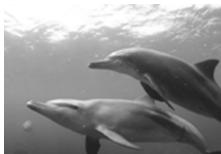
natural_image
Two dolphins swimming underwater, no visible text or symbols
Macro submarino
natural_image
Illustration of a cartoon character with a white headband, standing on a textured surface (no text or symbols)
PRECAUCIÓN:
natural_image
Line drawing of two hands tying a knot around a ring (no text or symbols)natural_image
Technical line drawing of a mechanical component with internal gears and a central square component (no text or symbols)⚠️ PRECAUCIÓN:
natural_image
Close-up of a textured surface with diagonal dark bands and faint linear patterns (no text or symbols)Pelo
natural_image
Circular cropped image showing a railway track with overhead power lines (no visible text or symbols)Fibras
natural_image
Circular cropped image showing a dark smudge or light source above a horizontal line, with no visible text or symbols.Granos de arena
*⑭ 按钮 / 箭头按钮
*⑮ DISP./? 按钮
*⑯ 调焦按钮
*⑰ 按钮
*⑱ 按钮 / 箭头按钮
*⑲按钮
*⑳按钮 / 箭头按钮
*②1 OK/FUNC按钮
*⑳按钮
*②3 AFL按钮(*1)/箭头按钮
natural_image
Line drawing of two hands tying a knot around a small object (no text or symbols)缩扣
镜头盖的安装和取下方法
natural_image
Line drawing of a vintage camera with attached lens and cable (no text or symbols)2. 防水机壳的预先检查
使用前的预先检查
注意:
natural_image
Black-and-white photo of a fish swimming in the ocean (no visible text or symbols)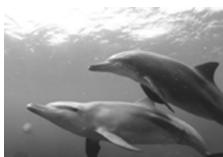
natural_image
Two dolphins swimming in the ocean under sunlight (no text or symbols visible)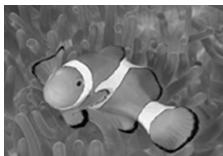
natural_image
Illustration of a cartoon character with flowing hair, surrounded by abstract floral patterns (no text or symbols)注意:
natural_image
Illustration of a hand inserting a plug into a device component with a cable (no text or symbols visible)清除沙粒、灰尘等
natural_image
Line drawing of two hands tying a knot around a ring (no text or symbols)natural_image
Technical line drawing of a mechanical component with internal parts and a close-up view (no text or symbols)注意:
natural_image
Close-up of a textured surface with diagonal dark bands and faint linear patterns (no text or symbols)头发
natural_image
Circular cropped image showing a railway track with overhead power lines (no visible text or symbols)纤维
natural_image
Circular cropped image showing a dark smudge or light source above a horizontal line, with no visible text or symbols.沙粒
更换消耗性零件
Shinjuku Monolith, 3-1 Nishi-Shinjuku 2-chome, Shinjuku-ku, Tokyo, Japan
奥林巴斯(上海)映像销售有限公司
natural_image
Line drawing of a vintage camera with a circular base and cable, no text or symbols present2. 케이스 사전 점검
사용 전 사전 검사
⚠ 주의:
natural_image
Black-and-white photo of a large fish swimming in water, no visible text or symbols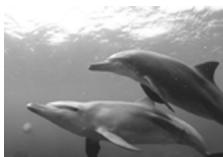
natural_image
Two dolphins swimming in the ocean under sunlight (no text or symbols visible)수중 접사
natural_image
Illustration of a cartoon character with flowing hair, surrounded by abstract floral patterns (no text or symbols)⚠ 주의:
natural_image
Illustration of a hand inserting a component into a device (no text or symbols visible)이들질 제거
natural_image
Line drawing of two hands tying a knot around a ring (no text or symbols)natural_image
Technical diagram showing a mechanical assembly with internal components and a close-up view of a component (no text or symbols present)⚠ 주의:
natural_image
Close-up of a textured surface with parallel lines and dark bands, no visible text or symbols머리카락
natural_image
Circular cropped image showing a railway track with overhead power lines and a tree on the ground (no visible text or symbols)섬유질
natural_image
Circular cropped image showing a dark circular light source above a horizontal line with faint rectangular elements below (no text or symbols)모래
소모품 교체
Shinjuku Monolith, 3-1 Nishi-Shinjuku 2-chome, Shinjuku-ku, Tokyo, Japan
- 注意:
- 水中マクロ
- 砂・ゴミなどを取り除きます
- 消耗品は取り替えます
- Introduction
- Please read the following items before use
- For safe use
- ⚠ WARNING
- CAUTION
- Contents
- Preparations
- Check the contents of the package
- Names of the parts
- Memo:
- Install the strap
- How to use the hand strap
- Mounting and removing the lens cap
- Advance Check of the Case
- Advance check before use
- Advance Check
- CAUTION:
- Install the digital camera
- Check the digital camera
- Battery Confirmation
- Confirmation of the Remaining Number of Pictures to be Taken
- Remove the hand strap from the digital camera.
- Open the Case
- Load the digital camera
- Make sure the camera is loaded properly
- Seal the Case
- Check the operation of the loaded camera
- Perform the final checks
- Visual Inspection
- Water Leakage Test
- Taking Pictures Under Water
- Underwater shooting modes
- Underwater Wide-Angle 1
- Underwater Wide-Angle 2
- Underwater Macro
- How to select the shooting scene
- Switching to a different underwater shooting mode
- Locking AF during underwater shooting
- Handling After Shooting
- Wipe off any waterdrop
- Take out the digital camera
- Wash the Case with pure water
- Dry the Case
- Maintaining the Waterproof Function
- Remove the O-ring
- Remove any sand, dirt, etc.
- How to Apply Grease to the O-ring
- Install the O-ring
- Replace consumable parts
- Note:
- Appendix
- Supplied accessories for PT-046
- Sold separately accessories
- OLYMPUS IMAGING CORP.
- OLYMPUS IMAGING AMERICA INC.
- Technical Support (USA)
- OLYMPUS IMAGING EUROPA GMBH
- European Technical Customer Support:
- MEMO
- ATTENTION:
- ⚠ VORSICHT:
- VORSICHT:
- PRECAUCIÓN:
- Macro submarino
- ⚠️ PRECAUCIÓN:
- 镜头盖的安装和取下方法
- 防水机壳的预先检查
- 使用前的预先检查
- 清除沙粒、灰尘等
- 更换消耗性零件
- 奥林巴斯(上海)映像销售有限公司
- 케이스 사전 점검
- 사용 전 사전 검사
- ⚠ 주의:
- 수중 접사
- 이들질 제거
- 소모품 교체
Brand : OLYMPUS
Model : PT-046
Category : Waterproof case