SC-AH986E102 - Humidifier Scarlett - Free user manual and instructions
Find the device manual for free SC-AH986E102 Scarlett in PDF.


| Product Type | Air Humidifier |
| Brand | Scarlett |
| Model | SC-AH986E102 |
| Water Tank Capacity | 4 liters |
| Humidification Technology | Ultrasonic |
| Control Panel | Touch buttons with digital display |
| Mist Intensity Levels | 3 levels (1, 2, 3) |
| Humidity Setting Range | 40% to 80% relative humidity |
| Auto Shut-off | Yes (when target humidity reached or water empty) |
| Timer Function | Yes (timer setting button) |
| Aromatherapy | Yes (essential oil cup, use 2-3 drops) |
| Wi-Fi Connectivity | Yes (via Home Intellect app) |
| Voice Assistant Compatibility | Yandex Alice (via Home Intellect) |
| Water Level Indicator | Yes (red LED when water is low) |
| Display Color | Blue |
| Cleaning Frequency | Every 2-3 weeks for water tank |
| Descaling Method | Use vinegar or baking soda solution |
| Safety Features | Auto shut-off, do not immerse in water, unplug before cleaning |
| Usage | Indoor only |
| Included Accessories | Essential oil cup, water tank cap |
Frequently Asked Questions - SC-AH986E102 Scarlett
User questions about SC-AH986E102 Scarlett
0 question about this device. Answer the ones you know or ask your own.
Ask a new question about this device
Download the instructions for your Humidifier in PDF format for free! Find your manual SC-AH986E102 - Scarlett and take your electronic device back in hand. On this page are published all the documents necessary for the use of your device. SC-AH986E102 by Scarlett.
USER MANUAL SC-AH986E102 Scarlett
ENG DESCRIPTION
- Water tank
- Mist nozzle
- Water tank cap
- Water tank base
- Cabel with plug
- ON/OFF button, mist output lever setting (1/2/3)
- Timer setting button
- Display
- Essential oil cup
- Membrane
- Float
- Level float
- Please read this instruction manual carefully before use and keep in a safe place for future reference.
- Before the first connecting of the appliance check that voltage indicated on the rating label corresponds to the mains voltage in your home.
- For home use only. Do not use for industrial purposes. Do not use the appliance for any other purposes than described in this instruction manual.
- Do not use outdoors.
- Always unplug the appliance from the power supply before cleaning and when not in use.
- To prevent risk of electric shock and fire, do not immerse the appliance in water or in any other liquids. If it was happened DO NOT TOUCH the appliance, unplug it immediately and check in service center.
- The appliance is not intended for use for physically, sensory or mental disabled person (including children) or for person with lack of life experience or knowledge, if only they are under supervision or have been instructed about the use of the unit by responsible person.
- This appliance can be used by children aged from 8 years and above and persons with reduced physical, sensory or mental capabilities or lack of experience and knowledge if they have been given supervision or instruction concerning use of the appliance in a safe way and understand the hazards involved. Cleaning and user maintenance shall not be made by children without supervision.
- Children must be under control in order not to be allowed to play with the appliance.
- Do not use other attachments than those supplied.
- In case of power cord is damaged, its replacement should be done by the manufacture or service department or the other high-skill person to avoid any danger.
- Do not attempt to repair, adjust or replace parts in the appliance. Check and repair the malfunctioning appliance in the nearest service center only.
- Keep the cord away from sharp edges and hot surfaces.
- Do not pull, twist, or wrap the power cord around appliance.
- Do not pour the rest water from the gullet when humidifier connected to power supply.
- When wash humidifier, avoid leaking the water into the inner parts of humidifier otherwise the spare part will be humid and cause problem.
- When switch on the appliance, do not touch the energy-exchanger.
- Operate the appliance only with water in the tank. Do not add water over 40 °C into the water tank, or use it for cleaning, to avoid possible deformation or discoloring.
• Take the humidifier under bottom and support water tank when handle.
- Do not add water through the mist outlet.
- Do not add water directly to the water channel on the base.
- Do not add metals or chemicals into the water tank and the water channel on the base.
- Avoid water freezing in the humidifier.
- Do not lift the water tank while the humidifier is working.
- Do not pour water from the water channel when humidifier connected to power supply. Otherwise the energy exchanger will immediately break.
- Do not place humidifier close to the ventilating hole and keep away from the furniture and other electrical appliances.
- If the unit was got from the environment with temperature < 0°C , keep it under the room conditions at least 2 hours.
- ATTENTION: unplug the device from the socket before filling or cleaning.
- NOTE. During operation it is acceptable that white bloom occurs on the nearby objects which is caused by high-salinity water being used, in this case we it is recommended to fulter the water before pouring it to water tank of the device.
- The manufacturer reserves the right to introduce minor changes into the product design without prior notice, unless such changes influence significantly the product safety, performance, and functions.
- Manufacturing date is indicated on the unit and/or on packing as well as in accompanying documents in the following format XX.XXXX where first two figures XX is the month of production, and following four figures XXXX is the year of production.
OPERATION
• This appliance is used for indoors air humidifying
- Place the device on an even dry surface.
- ATTENTION: Before pouring water inside, unplug the device
- WARNING!
- Before filling the water tank for the first time, make sure that there is no transport plug installed on the water level float in the main part of the device body. Remove it.
- If the transport plug is not removed, then when you try to turn on the device with a tank filled with water, the humidifier will signal about the absence of water in the device and will not work.
- Remove the top cover of the tank, pour clean water and close the lid tightly.
- ATTENTION: This appliance allows tap water usage. Purified water is still more preferable for usage, especially if tap water is too hard. If tap water is too hard, fill in only distilled or demineralized water.
• Water tank capacity is 4 l. - Wipe the surface of water tank with a dry cloth.
- Place the water tank onto the base
- Insert the plug into the socket and switch on the appliance using the on/off dial.
SWITCH ON

- To turn on the humidifier, press the power button and adjust the humidification intensity
- The moistening process will start automatically.
• The display will turn blue.
MOISTURE INTENSITY SETTING

again the desired
- To adjust the intensity of humidification, after switching on, press the button number of times.
- The display will show your chosen intensity level (from 1 to 3).
HUMIDITY SETTING

- To adjust the level of humidity in the room, press the button [ ] the desired number of times. The display will show the selected humidity level from 40% to 80%. The most comfortable for people is the humidity level of the room is 50-60%.
- When the humidity in the room reaches the set level, the unit automatically turns off. The reached humidity level will be shown on the display.
AROMAFUNCTION / ESSENTIAL OIL
- Put no more than 2-3 drops of essential oil into the essential oil cup before placing water tank onto the base and turning the unit on.
- Turn on the unit as indicated above.
- And the scented will be come out with the wind after turn on the machine
WATER LEVEL INDICATION
- When water level it too low, the unit will automatically turn off and water level indicator will turn red. This means that filling tank with water is needed.
CONNECTING THE DEVICE TO THE HOME INTELLECT APP


- Go to the Home Intellect website using the links above.
• Install the Home Intellect app on your mobile device or tablet. - Make sure your smartphone or tablet is connected to 4G internet or Wi-Fi.
-
Make sure your smartphone or tablet is running iOS 8.0 (or higher) or Android 4.4 (or higher).
-
Make sure your router's signal is in the 2.4GHz band.
- Make sure your smartphone and the device have the same WLAN.
2. Create an account in the mobile application:
- Open the application and create a new account in it:
Enter your email address

An automatic email with a confirmation code will be sent to the entered email address, enter this code in the field that appears
- Set the desired password for your account
- Your new account will consist of an email and a password you created
<
3. Connect the device to the mobile application
- Make sure geolocation is enabled on your device.
- Click on the plus icon in the top corner of the screen.
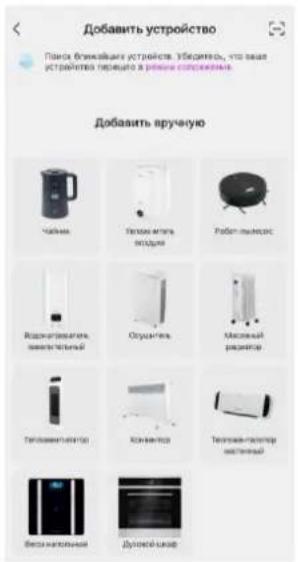
- Select "Add Device"
- Next, you need to select "Air humidifier".

- Press the "Mode" button in the top right corner of the screen, select "EZ mode". Press "Next"
- On the screen "3" press "Next".

- If the location feature on your mobile device is enabled, the app will locate the nearest Wi-Fi hotspot.
- Enter the password for this Wi-Fi (make sure the password is correct)

- The application will take no more than 2 minutes to detect the device

- The HOME INTELLECT mobile application contains all the functions of the device available on the control panel
Main features of Wi-Fi application:
- Adjustment of steam outlet intensity
• Relative humidity adjustment - Timer settings
- Turning the device ON and OFF
How to create a home in the app and add users:
In order for your family members to use this device via the Home Intellect mobile application, you can create a home in it. Detailed information is provided in the section "Profile" – "FAQ and feedback" – "Application" – "Device sharing".

WHAT TO DO IF THE APP DOES NOT DETECT THE DEVICE:
1) Make sure your Wi-Fi is connected to the 2.4GHz band
2) Make sure the Wi-Fi password is correct
3) Make sure that App is set in EZ mode

4) Make sure that the appliance is set to be detected by the application: Turn off the device, unplug it and plug it in after 10 seconds. Log in to the app to reconnect.
5) Make sure that this device is not paired with another mobile device. In this case, delete it from the application on another mobile device.
The appearance of the mobile application, its interface, icons and the location of functions may change without prior notice to improve its performance.
ALICE VOICE ASSISTANT
With help of the Home Intellect system, you can easily control your smart home appliances from your smartphone, as well as using the Yandex Alice voice assistant. Connect your equipment to the program and control it from anywhere in the world. To control the device using the voice assistant Alice, in addition to the main Home Intellect application, you need to install the Home with Alice application and link accounts.
QR for downloading Home Intellect application:

QR for downloading the application Smart Home with Alice to control the voice functions of the device:

Connection procedure, linking Home Intellect application accounts and skill:
- Download Home Intellect app from the App Store or Google Play
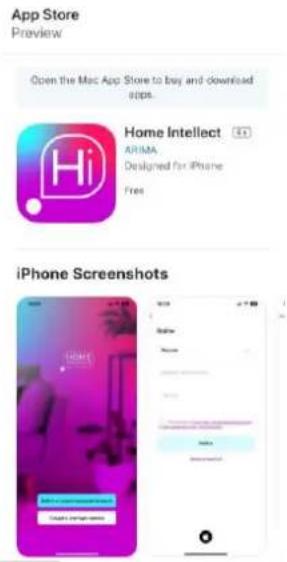
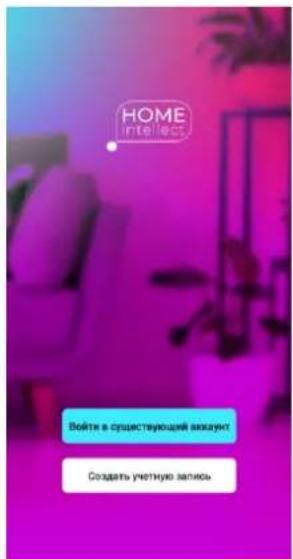
- Log into the app with your Home Intellect account or register as a new user
- Add your compatible devices to the Home Intellect app menu
- Download the House with Alice app from the App Store or Google Play
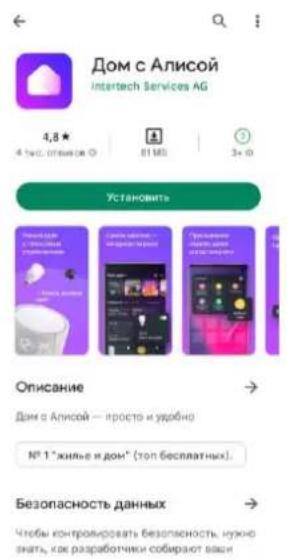
- In the House with Alice application, log in with your Yandex account or register as a new user. Add a new device through the "Devices" menu

- Select the Home Intellect skill from the list of manufacturers, click the "Link to Yandex" button and enter the registration data for the Home Intellect application from step 2. Link devices for this application account, enter the login, password for Home Intellect from step 2. Pass authorization from Yandex.

- Click the "Update device list" button, check the settings of the detected devices, change the name as necessary and specify the room, click "Finish setup". Now you can control smart devices using Alice. The list of voice commands is available in the "Voice commands" tab.

The number of voice commands to control smart technology with Alice is limited. When adding new devices in the Home Intellect application, it is necessary to update the list of devices in Alice. To do this, press the + button in the DEVICES interface, then ADD DEVICE, select Home Intellect in the list, then click UPDATE DEVICE LIST.
CLEAN AND CARE
- Do not forget to unplug the appliance from the power supply before cleaning.
WASH WATER TANK (EVERY TWO OR THREE WEEKS)
- Remove the top cover of the tank
• Take out the remaining water from the tank - Wash water tank with warm water (<40°C)
CLEANING THE OUTER SURFACE OF THE HUMIDIFIER
- Wipe the humidifier outside with a soft, damp cloth (<40°C).
- Rinse the steam sprayer with running water.
ATTENTION: Do not use chemicals, organic solvents or aggressive liquids, as well as abrasives for cleaning.
IMPORTANT: Use only a soft cloth to clean the energy exchanger. Never touch it with sharp or hard objects.
SCALE REMOVAL
- Hard scale is not allowed to be removed from the unit surfaces mechanically.
- Fill water tank with water solution of vinegar, one liter of water needs 150ml of vinegar. Instead of vinegar soda can be used, one liter of water needs 2 table spoon of baking soda.
- The nozzle of the unit should face open window, so that water mist is directed outdoors.
- Switch air humidifier for 30-60 min.
- Water with soda or with vinegar will eat the scale away during unit usage, so that after the procedure the scale will be removed from the unit walls.
STORAGE
- Switch off and unplug the appliance.
- Complete all requirements of chapter CLEAN AND CARE.
- Keep assembled appliance in a dry cool place.
COMMON PROBLEMS AND SOLUTIONS
| PROBLEMS | CAUSE | SOLUTION |
| The mist is smelling | 1. The appliance is new2. Water is dirty | Wash the tank and change the water Open the water tank and ventilate it for 12 hours |
| The Indicator light is on, no mist out and no air coming | The water level is excessive high | 1. Switch off the appliance and unplug it2. Take the water tank off and unscrew the water inlet lid. Pour off some water and close the lid tightly. Wipe the tank dry with a soft cloth. Place water tank back on the base3. Plug the humidifier in. Turn it on |
| The mist is poor | The energy-changeable appliance has scale or the water is dirty | Wash the energy-changeable appliance and change water |


The symbol on the unit, packing materials and/or documentations means used electrical and electronic units should not be toss in the garbage with ordinary household garbage. These units should be pass to special receiving point.
For additional information about actual system of the garbage collection address to the local authority.
Valid utilization will help to save valuable resources and avoid negative work on the public health and environment which happens with incorrect using garbage.


- ENG DESCRIPTION
- OPERATION
- SWITCH ON
- MOISTURE INTENSITY SETTING
- HUMIDITY SETTING
- AROMAFUNCTION / ESSENTIAL OIL
- WATER LEVEL INDICATION
- CONNECTING THE DEVICE TO THE HOME INTELLECT APP
- CREATE AN ACCOUNT IN THE MOBILE APPLICATION
- CONNECT THE DEVICE TO THE MOBILE APPLICATION
- MAIN FEATURES OF WI-FI APPLICATION
- HOW TO CREATE A HOME IN THE APP AND ADD USERS
- WHAT TO DO IF THE APP DOES NOT DETECT THE DEVICE
- ALICE VOICE ASSISTANT
- CONNECTION PROCEDURE, LINKING HOME INTELLECT APPLICATION ACCOUNTS AND SKILL
- CLEAN AND CARE
- WASH WATER TANK (EVERY TWO OR THREE WEEKS)
- CLEANING THE OUTER SURFACE OF THE HUMIDIFIER
- SCALE REMOVAL
- STORAGE
Brand : Scarlett
Model : SC-AH986E102
Category : Humidifier