
KASMAPF2PCA - Air purifier Kogan - Free user manual and instructions
Find the device manual for free KASMAPF2PCA Kogan in PDF.


| Brand | Kogan |
| Model | KASMAPF2PCA |
| Product Type | Air Purifier |
| Filter Type | H13 HEPA Filter |
| UV-C Lamp | Yes (non-replaceable by user) |
| Fan Speeds | 3 speeds (Low, Medium, High) |
| Auto Mode | Yes, with air quality sensor for automatic speed adjustment |
| Timer | 2, 4, and 8 hour presets |
| Sleep Mode | Yes; all lights off except sleep button, fan runs at low speed |
| Night Light | Yes, activated by long pressing the Sleep button |
| Child Lock | Yes, long press for 3 seconds to enable/disable |
| Filter Reset Indicator | LED turns red after approximately 4320 hours (6 months) |
| Wi-Fi Connectivity | 2.4GHz; compatible with Kogan SmarterHome app |
| Smart Control | Google Home and Amazon Alexa compatible |
| Power Button | Short press for on/off; long press for Wi-Fi pairing mode |
| Air Quality Indicator | LED ring: Red (heavily polluted), Orange (lightly polluted), Yellow (moderate) |
| Safety Features | UV-C radiation warning; child lock; automatic shut-off not specified |
| Cleaning Instructions | Use soft cloth with neutral cleanser; do not wash or vacuum the filter |
| Filter Replacement | Every ~4320 hours (6 months); replace with new H13 HEPA filter |
| Filter Reset Button | Press and hold for 3-5 seconds after replacing filter |
| Placement | At least 30cm away from walls or furniture for proper airflow |
| Usage | Indoor, household use only; do not use outdoors |
| Warranty | Refer to help.kogan.com for support; no specific duration mentioned |
Frequently Asked Questions - KASMAPF2PCA Kogan
User questions about KASMAPF2PCA Kogan
0 question about this device. Answer the ones you know or ask your own.
Ask a new question about this device
Download the instructions for your Air purifier in PDF format for free! Find your manual KASMAPF2PCA - Kogan and take your electronic device back in hand. On this page are published all the documents necessary for the use of your device. KASMAPF2PCA by Kogan.
USER MANUAL KASMAPF2PCA Kogan
natural_image
Line drawing of a kogan washing machine with circular perforated body and handle (no text or symbols on the device itself)KOGAN SMARTERHOME™ AIR PURIFIER 2 PRO
WITH H13 HEPA FILTER
KASMAPF2PCA
SAFETY & WARNINGS
This product should be used only in accordance with the specifications outlined in this user guide. Usage other than what has been specified here may result in serious injury.
When using electrical appliances, basic precautions should always be followed to reduce the risk of fire, electric shock and injury to persons, including the following:
- Read all instructions and safety warnings before using appliance. Retain this user guide for future reference.
- Keep the power cord away from high traffic areas. To avoid fire hazard, never place the cord under rugs, near radiators, stoves or heaters or other sources of heat.
- To protect against electrical hazards, do not immerse in water or other liquids. Do not use near water.
- Children cannot recognise the hazards associated with the usage of electrical appliances. For this reason, always supervise children when they are near the unit.
- Always unplug the air purifier before moving it, opening the grill, changing filters, cleaning or whenever the air purifier is not in use.
- When disconnecting from the electrical outlet, always grasp the plug. Do not the pull on the power cord.
- Never drop or insert an object into any openings on the appliance.
- Do not cover the power cord with throw rugs, runners or similar coverings.
- Do not route the cord under furniture or appliances.
- Do not operate the appliance with a damaged cord or plug, if motor fan fails to rotate, after the appliance malfunctions or if it has been dropped or damaged in any manner. Cease use immediately and contact help.Kogan.com for support.
- This appliance is only intended for household use. Any use other than what's described in this user guide may cause fie, electric shock or injury to persons.
- Do not use outdoors.
• Do not place anything on top of this appliance. - Never block the air openings, grills/outlets or place on a soft surface such as a bed or sofa, as this could cause the unit to tip over blocking the air openings.
- Do not attempt to repair any electrical or mechanical functions on this unit. The inside of the unit contains no user serviceable parts. Contact help.Kogan.com for support.
WARNING: To reduce the risk of fire or electric shock, do not use this appliance with any solid-state speed control device.
WARNING: UV radiation is dangerous for the eyes and skin. This appliance contains a UV-C emitter/lamp. Unintended use of the appliance or damage to the housing may result in the escape of dangerous UV-C radiation. UV-C radiation may, even in little doses, cause harm to the eyes and skin. Appliances that are obviously damaged must not be operated. UV-C Lamp is non-replaceable by the user, the user must not attempt to replace the UV-C lamp. The UV-C emitter must only be replaced by a qualified service/maintenance person.
OVERVIEW

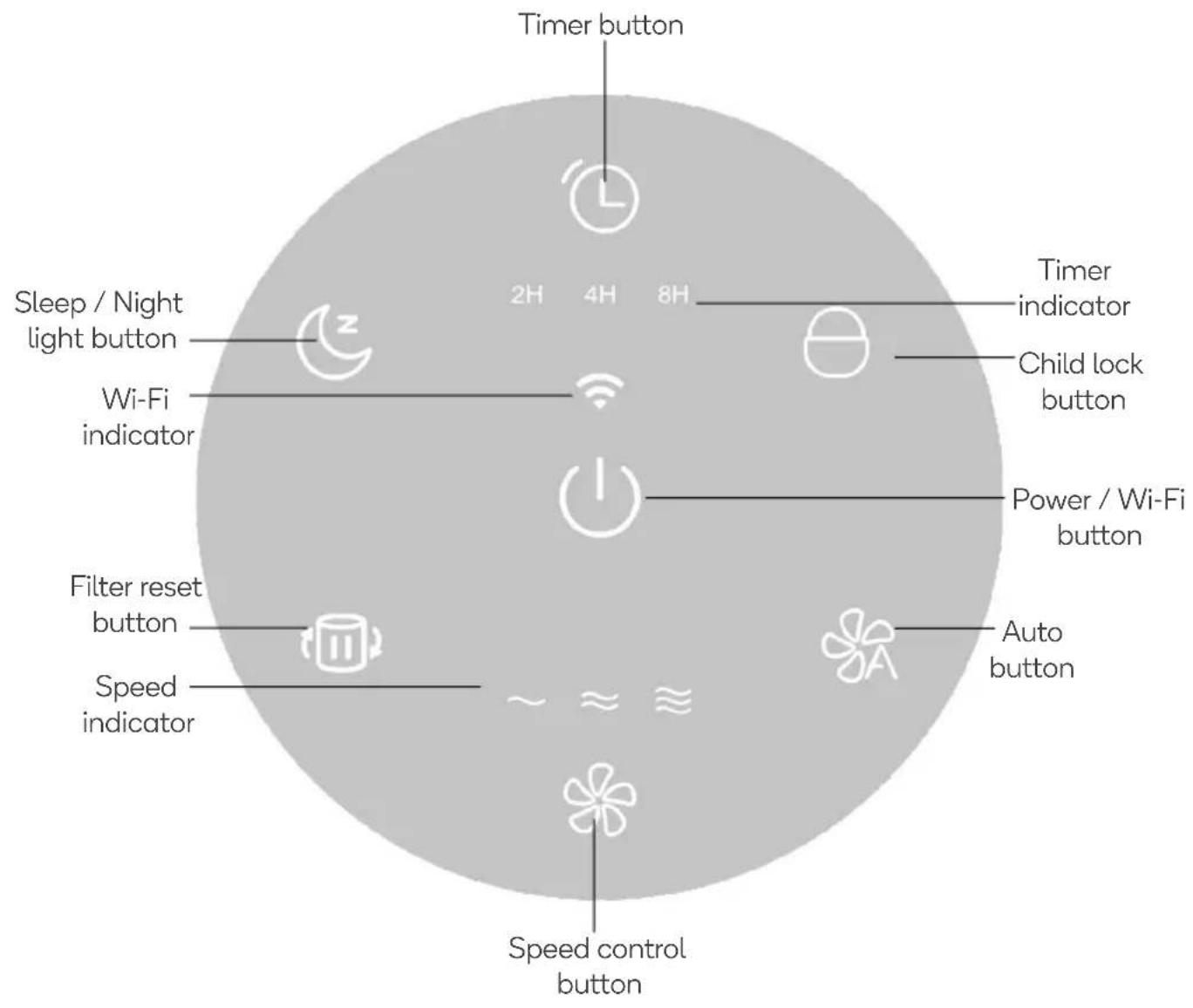
OPERATION
- Lift the air purifier out the carton and remove the two plastic bags from the unit and filter.
- Select a stable, level, and flat location for the air purifier.
- Connect the power cord into an electrical outlet.
Notes:
- For proper air flow, locate the unit at least 30cm away from any walls or furniture.
- Ensure none of the air intakes and vents are blocked.
Power /Wi-Fi Button

• Short press to turn the unit On/Off.
- Press and hold for 3-5 seconds to place the unit in pairing mode.
- When the unit is not in use, switch it off and unplug it.
Speed Button

Press this button to cycle through the fan speeds (Low, Medium, High).
Auto Button

- Press this button to enter Auto mode.
- In Auto mode, the unit will automatically change the speed according to the air quality.
- The Air quality indicator LED ring will illuminate different colours depending on the current air quality.
| Colour | Air Quality |
| Red | Heavily Polluted |
| Orange | Lightly Polluted |
| Yellow | Moderate |
Timer Button

Press the timer button to cycle through the preset timers (2, 4 & 8 hours).
Sleep / Night Light Button

- Short press the Sleep button to turn sleep mode On/Off.
- The sleep icon will flash for 5 seconds before the unit enters sleep mode.
- In sleep mode, all lights (except sleep button) will turn off and fan will run in low speed.
- Long press this button to turn the night light On/Off.
Child Lock Button

- Long press this button for 3 seconds to enable/disable child lock mode.
- If any button is pressed when child lock is activated, the icon will flash 3 times to remind the locked status.
Filter Reset Button

- After operating approximately 4320 hours, the filter reset indicator will turn red and the filter will need to be replaced.
- After replacing the filter, press and hold this button for 3-5 seconds to reset the filter timer.
CONNECT TO SMARTERHOME™ APP
Install App
Download the "Kogan SmarterHome" app from the Play Store (Android) or App Store (iOS).

Play Store (Android)


App Store (iOS)

To register:
- If you already have a SmarterHome account, select 'Log In'. To register a new account, select 'Sign Up'.
- The system will automatically recognise your country. If needed, you can manually select your country from the drop-down box. Enter your email address and tap 'Get Verification Code' to continue.
- A 6-digit code will be sent to the submitted email address. Enter this code before the one-minute timer expires.
- Continue to the next page and complete your SmarterHome profile.
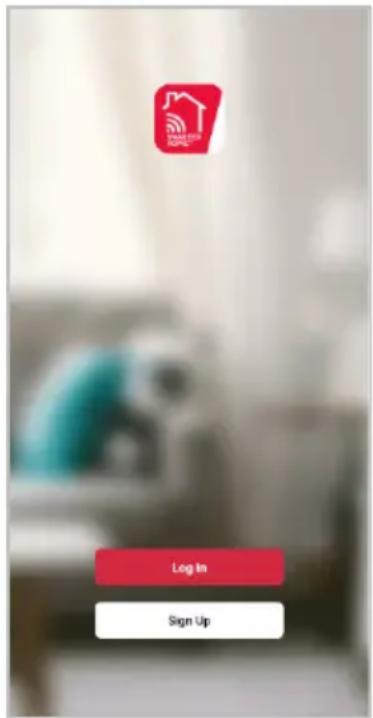


Set device in pairing mode
When the device is first turned on, it may automatically enter pairing mode (the Wi-Fi indicator will be rapidly flash).
If not automatically in pairing mode when powered on, you can manually set the device in pairing mode by pressing and holding the Power button for 3-5 seconds until the Wi-Fi indicator is rapidly flashing.
Add device through network
- Once registered, tap "Add Device" on the app's home page, or the "+" in the upper right corner, to add a new device through the network.
- Select the product type from the list of options in the app (Air Treatment> Air Purifiers).
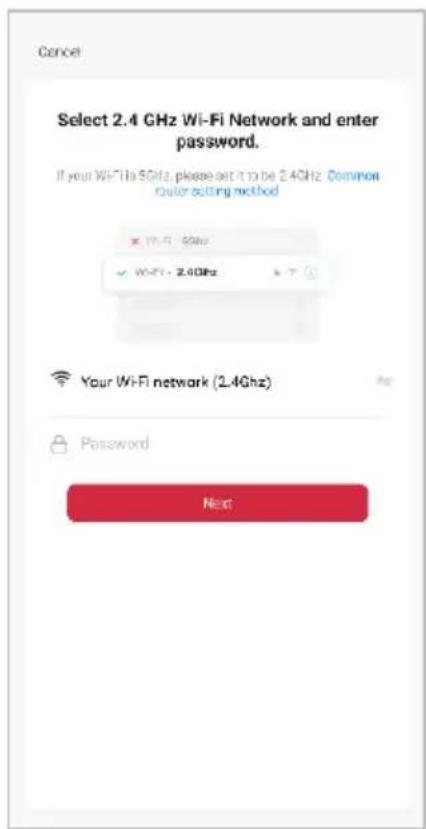
- Enter your Wi-Fi details. It is important that your SmarterHome™ device and the app are connected to the same Wi-Fi network during setup.
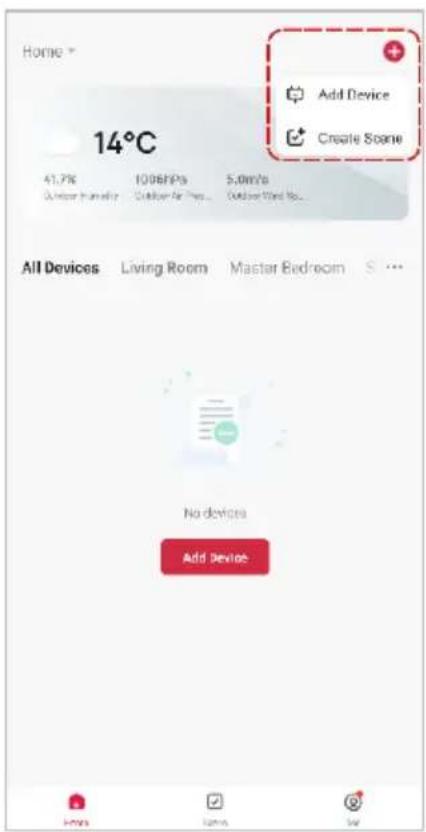
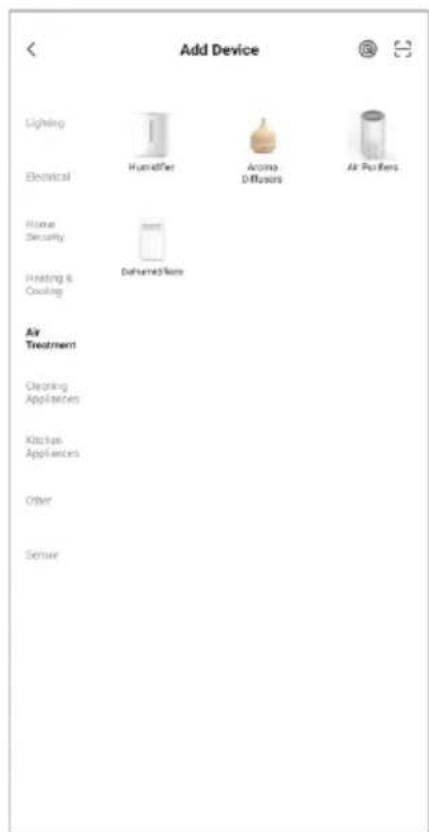
Notes:
- The device and the app have to use the same Wi-Fi network.
• The device is only compatible with 2.4Ghz networks. -
Depending on the product, Steps 3 and 4 may be in opposite order.
-
Ensure that the device is in pairing mode, with the Wi-Fi indicator rapidly flashing, and tap "Confirm light is rapidly flashing".
- The device will commence the pairing process and connect to the app. Ensure your Wi-Fi router, mobile phone, and the SmarterHome™ device are kept close until connection is complete.
- After successfully being added, you will have the option to rename the device and assign it to a location. It will now be listed on the app's home page. Tap the device listing to enter its control page.


Note:
Once connected, you can select Create Scene from the “+” in the upper right corner (or from the Scene tab) to group connected SmarterHome™ products and automate their functions.
GOOGLE HOME CONTROL
Adding "SmarterHome" to the Google Home app
- From the home page of the Google Home app, select the “+” icon (top left corner, see arrow in the below screenshot) to access the ‘Add and manage’ page.
- Select 'Set up device', then select the 'Works with Google' option.
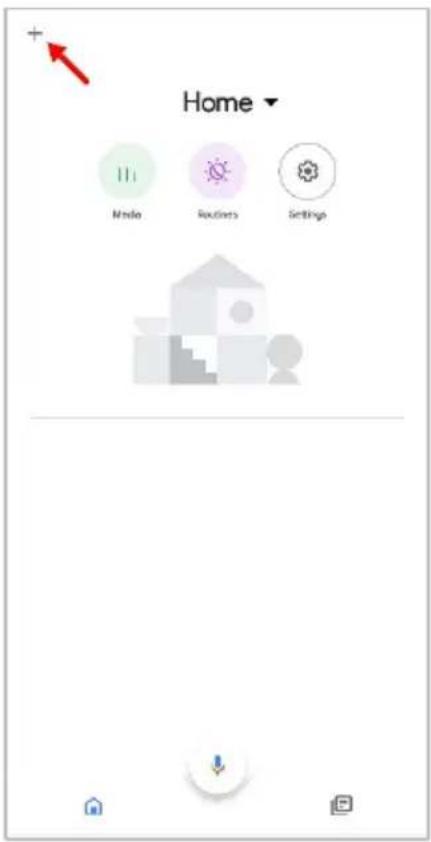


- Select the search bar and type 'Smarter Home' to locate the Kogan SmarterHome™ service.
- From here, you will be prompted to sign into your SmarterHome™ account using either your email or mobile phone number, depending on which method you used to register your account.
- Select "Kogan SmarterHome™" from the app options.


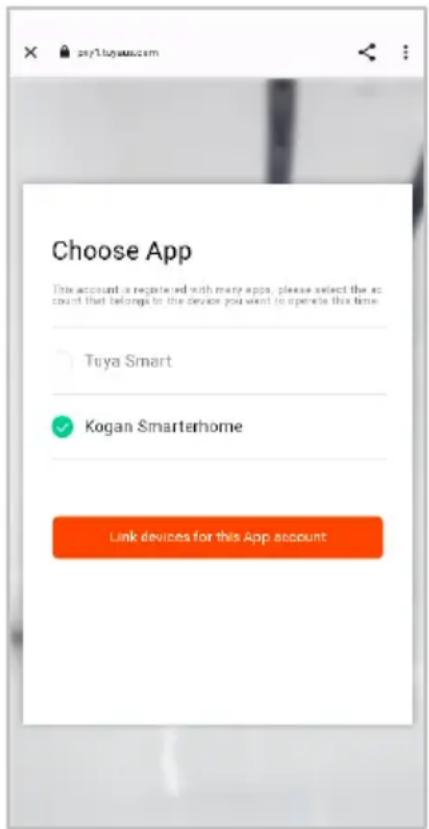
- Tap 'Authorise' to grant Google permission to access the SmarterHome™ app and your devices.
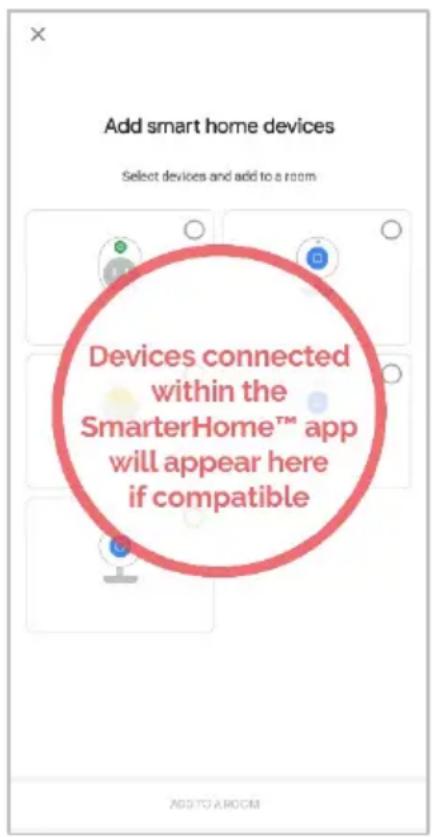
- Once connected, the app will display any compatible devices linked to your SmarterHome™ account. From here you can assign them to rooms and set up any routines. Tap on any of the devices to view a list of available commands.

Note:
Please note that Google Home can only control the base/core functions of any compatible SmarterHome™ devices. To make full use of this product's smart functionality, please use the Kogan SmarterHome™ app.
AMAZON ALEXA CONTROL
Note:
You will need to have set up an Alexa account prior to linking your Kogan SmarterHome™ device.
Adding "SmarterHome" to the Alexa app
- From the home page of the Alexa app, select the “?” icon in the bottom-right and select “Skills & Games” from the sidebar.
- Select the search bar and type 'Smarter Home' to locate the Kogan SmarterHome™ skill.


- Tap 'Enable to Use' to add the Kogan SmarterHome™ skill to Alexa.
- From here, you will be prompted to sign into your SmarterHome™ account using either your email or mobile phone number, depending on which method you used to register your account.
- Select "Kogan SmarterHome™" from the app options.


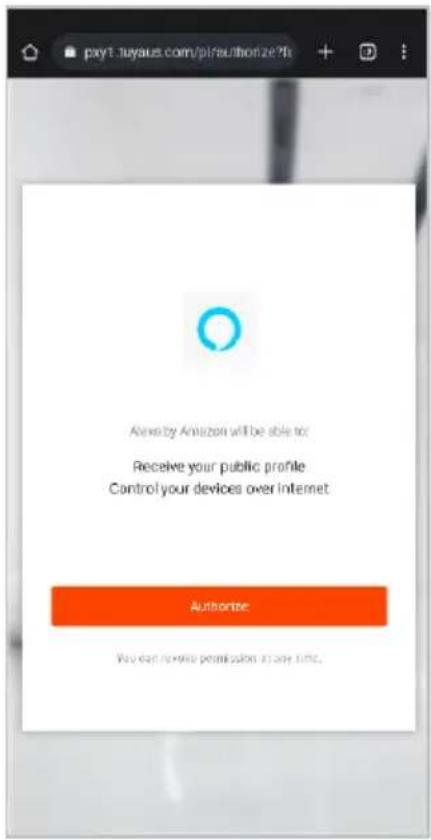
- Tap 'Authorise' to grant Alexa permission to access the SmarterHome™ app and your devices.
- Once connected, the app will perform a search and display the devices linked to your SmarterHome™ account. When your devices have successfully connected to the Alexa app, you will be able to control your Kogan SmarterHome™ devices via Alexa's voice commands.

Note:
Please note that Alexa can only control the base/core functions of any compatible SmarterHome™ devices. To make full use of this product's smart functionality, please use the Kogan SmarterHome™ app.
CLEANING & CARE
• Ensure that the machine is unplugged before maintenance.
• Do not immerse the air purifier into water or any liquid.
- Do not use abrasive, corrosive or flammable cleansers (such as bleach or alcohol) to clean any part of the unit.
- Do not use gasoline, benzine, thinner, harsh cleaners, etc. on and/or in the unit while cleaning as they will damage the product.
- Do not stick any foreign objects or your fingers inside of the unit.
- Do not wash the filter.
• Do not use a vacuum cleaner to clean the filter.
• Sterilise the filter under sunlight regularly.
- Ensure the machine is powered off and unplugged.
- Use a soft cloth with neutral cleanser to clean away any dust or debris from the surface of the machine and air inlet/outlet area.
- After the machine is completely dried out, put on the bag and place it in a cool and well-ventilated place.
- If you do not use it for a long time, please turn on the machine for a few minutes from time to time to ensure good performance.
Replacing the Filter
- The filter will need to be replaced approximately every 6 months (4320 hours of usage).
-
When filter reset indicator turns red, the filter will need to be replaced.
-
Flip the unit upside down.
- Rotate and base cover and lift upwards.
- Remove the old filter (if necessary) by lifting it upwards.
- Install the new filter. Note: Ensure the packing bag of the new filter is removed before replacing it.
- Reattach the base cover to the unit.
- Reset the filter timer by pressing the filter reset button.

natural_image
Line drawing of a portable electronic device with a mesh grille and a curved handle (no text or symbols)
NOTES
Need more information?
We hope that this user guide has given you the assistance needed for a simple set-up.
For the most up-to-date guide for your product, as well as any additional assistance you may require, head online to help.kogan.com
kogan.com


- KOGAN SMARTERHOME™ AIR PURIFIER 2 PRO
- SAFETY & WARNINGS
- OVERVIEW
- OPERATION
- Notes:
- Power /Wi-Fi Button
- Speed Button
- Auto Button
- Timer Button
- Sleep / Night Light Button
- Child Lock Button
- Filter Reset Button
- CONNECT TO SMARTERHOME™ APP
- Install App
- To register:
- Set device in pairing mode
- Add device through network
- Note:
- GOOGLE HOME CONTROL
- Adding "SmarterHome" to the Google Home app
- AMAZON ALEXA CONTROL
- Adding "SmarterHome" to the Alexa app
- CLEANING & CARE
- Replacing the Filter
- NOTES
- Need more information?
Brand : Kogan
Model : KASMAPF2PCA
Category : Air purifier