
NBPACCP16PA - Air purifier Kogan - Free user manual and instructions
Find the device manual for free NBPACCP16PA Kogan in PDF.


| Product Type | Air Purifier |
| Model | NBPACCP16PA |
| Brand | Kogan |
| Dimensions (HxWxD) | Approx. 50 x 30 x 20 cm |
| Weight | Approx. 5 kg |
| Power Supply | 220-240V, 50Hz |
| Power Consumption | 60W (max) |
| Filtration System | 3-stage: pre-filter, HEPA filter, activated carbon filter |
| Fan Speed Settings | 3 speeds (Low, Medium, High) |
| Timer | 1-8 hours |
| Auto Mode | Yes, with air quality sensor |
| Air Quality Indicator | Color-coded LED (blue, green, orange, red) |
| Noise Level | 25-50 dB (depending on speed) |
| Coverage Area | Up to 30 m² |
| Filter Replacement Interval | Every 6-12 months |
| Pre-filter Cleaning | Monthly with vacuum cleaner |
| Safety Features | Overheat protection, tip-over switch, child lock |
| Replacement Parts | HEPA filters, activated carbon filters (available online) |
| Warranty | 1 year |
Frequently Asked Questions - NBPACCP16PA Kogan
User questions about NBPACCP16PA Kogan
0 question about this device. Answer the ones you know or ask your own.
Ask a new question about this device
Download the instructions for your Air purifier in PDF format for free! Find your manual NBPACCP16PA - Kogan and take your electronic device back in hand. On this page are published all the documents necessary for the use of your device. NBPACCP16PA by Kogan.
USER MANUAL NBPACCP16PA Kogan
3-IN-1 ULTIMATE PROTECTOR KIT
(FOR iPhone 16, iPhone 16 PRO & iPhone 16 PRO MAX)
NBPACCP16MA, NBPACCP16PA & NBPACCP16AA
INSTALLATION

Step 1: Use the dust absorber, alcohol prep pad and cloth to clean the screen.
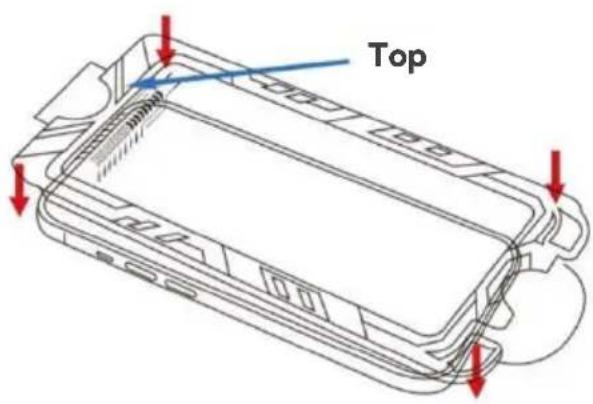
Step 2: Fix the quick installation box on the phone, make sure the top of the quick installation box is aligned with the top of the phone

Step 3: Press the two side of the quick installation box and pull out the film

Step 4: Slide from left to right on the top area of the quick installation box and wait 10-20 seconds.

Step 5: Press the film on the top, take out the quick installation box and then remove the film.
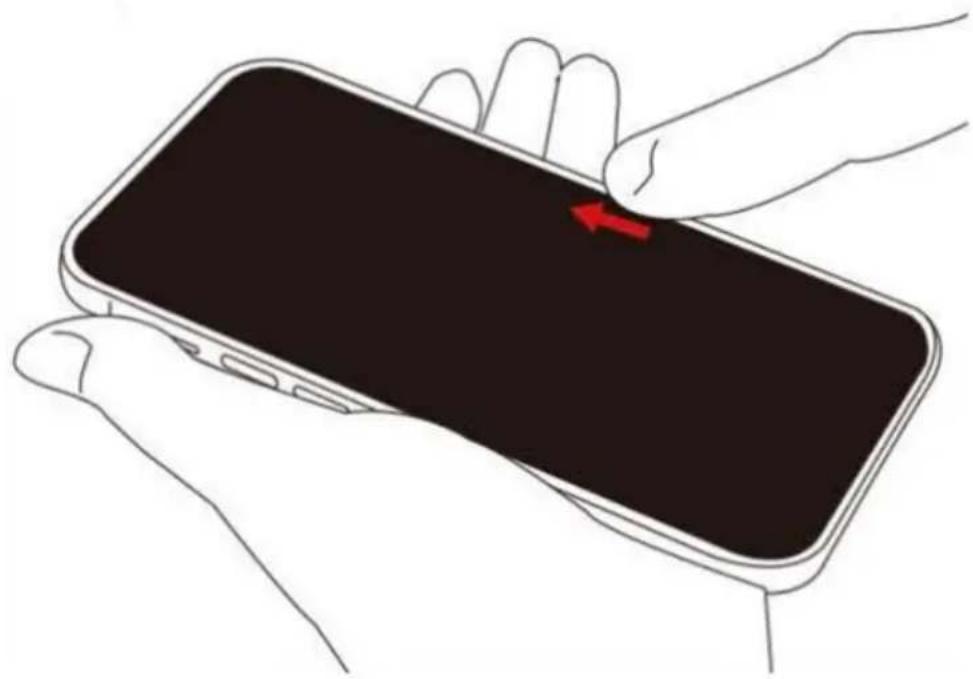
Step 6: Scrape off the remaining bubbles and press the edges of the screen protector with your thumb to ensure that the screen protector properly applied to the screen.
Need more information?
We hope that this user guide has given you the assistance needed for a simple set-up.
For the most up-to-date guide for your product, as well as any additional assistance you may require, head online to help.kogan.com


Brand : Kogan
Model : NBPACCP16PA
Category : Air purifier