
NBPACCP16AA - Air purifier Kogan - Free user manual and instructions
Find the device manual for free NBPACCP16AA Kogan in PDF.


| Product Type | Screen Protector Kit |
| Brand | Kogan |
| Model | NBPACCP16AA |
| Compatible Devices | iPhone 16, iPhone 16 Pro, iPhone 16 Pro Max |
| Kit Contents | Screen protector, dust absorber, alcohol prep pad, cloth, quick installation box |
| Installation Method | Quick installation box alignment and slide action |
| Number of Installation Steps | 6 |
| Installation Time | Approximately 10-20 seconds after slide |
| Bubble Removal | Scrape and press edges with thumb |
| Surface Cleaning Required | Yes, using included alcohol prep pad and cloth |
| Dust Removal Tool | Included dust absorber |
| Material | Tempered glass or similar (assumed) |
| Dimensions (Approx.) | Custom fit for iPhone 16 series |
| Weight (Approx.) | 15-20 grams |
| Repairability | Not repairable; replace if damaged |
| User Manual | Available online at help.kogan.com |
Frequently Asked Questions - NBPACCP16AA Kogan
User questions about NBPACCP16AA Kogan
0 question about this device. Answer the ones you know or ask your own.
Ask a new question about this device
Download the instructions for your Air purifier in PDF format for free! Find your manual NBPACCP16AA - Kogan and take your electronic device back in hand. On this page are published all the documents necessary for the use of your device. NBPACCP16AA by Kogan.
USER MANUAL NBPACCP16AA Kogan
natural_image
Technical line drawing of a rectangular electronic component with internal channels and mounting holes (no text or symbols)3-IN-1 ULTIMATE PROTECTOR KIT
(FOR iPhone 16, iPhone 16 PRO & iPhone 16 PRO MAX)
NBPACCP16MA, NBPACCP16PA & NBPACCP16AA
INSTALLATION
natural_image
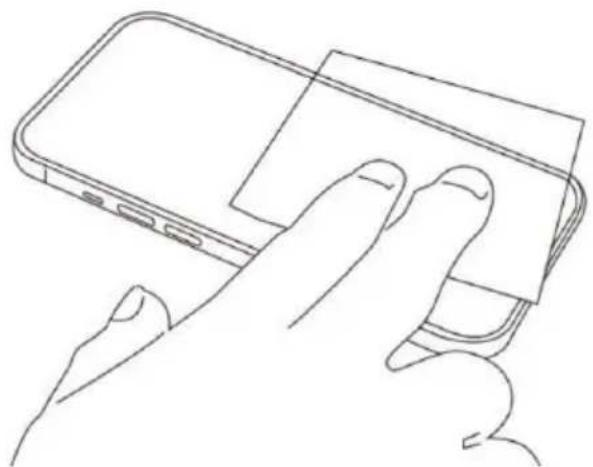
Line drawing of a hand pressing down on a smartphone screen (no text or symbols)Step 1: Use the dust absorber, alcohol prep pad and cloth to clean the screen.

Step 2: Fix the quick installation box on the phone, make sure the top of the quick installation box is aligned with the top of the phone

natural_image
Line drawing of a rectangular device with a red arrow pointing to its side (no text or symbols present)Step 3: Press the two side of the quick installation box and pull out the film
natural_image
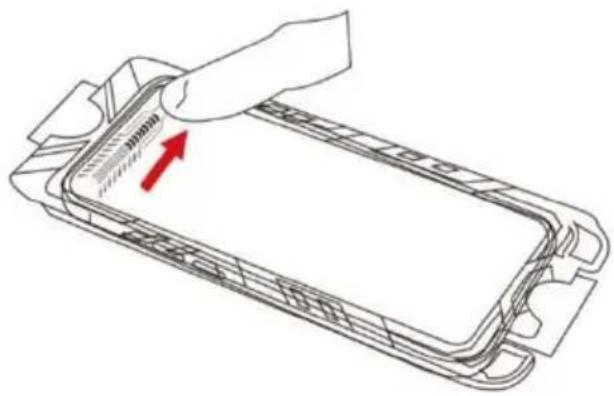
Diagram of a device's internal structure with a hand holding a clip, showing internal components and a red arrow indicating direction (no text or symbols present)Step 4: Slide from left to right on the top area of the quick installation box and wait 10-20 seconds.
natural_image
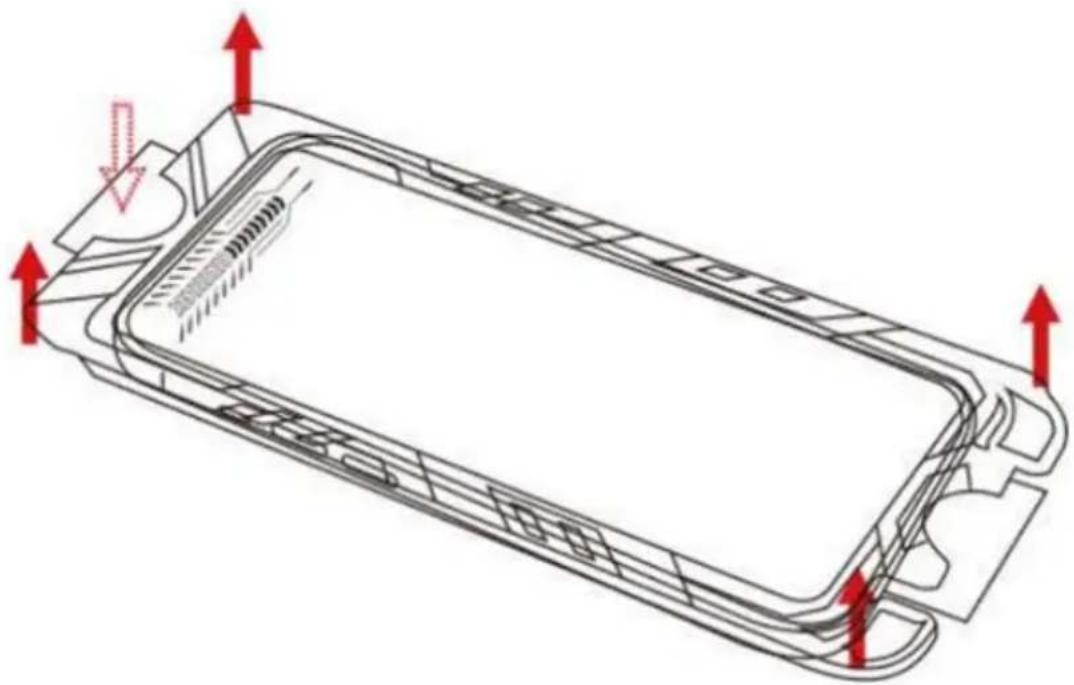
Technical line drawing of a rectangular electronic component with internal channels and red directional arrows indicating movement or force (no text or symbols)Step 5: Press the film on the top, take out the quick installation box and then remove the film.
natural_image
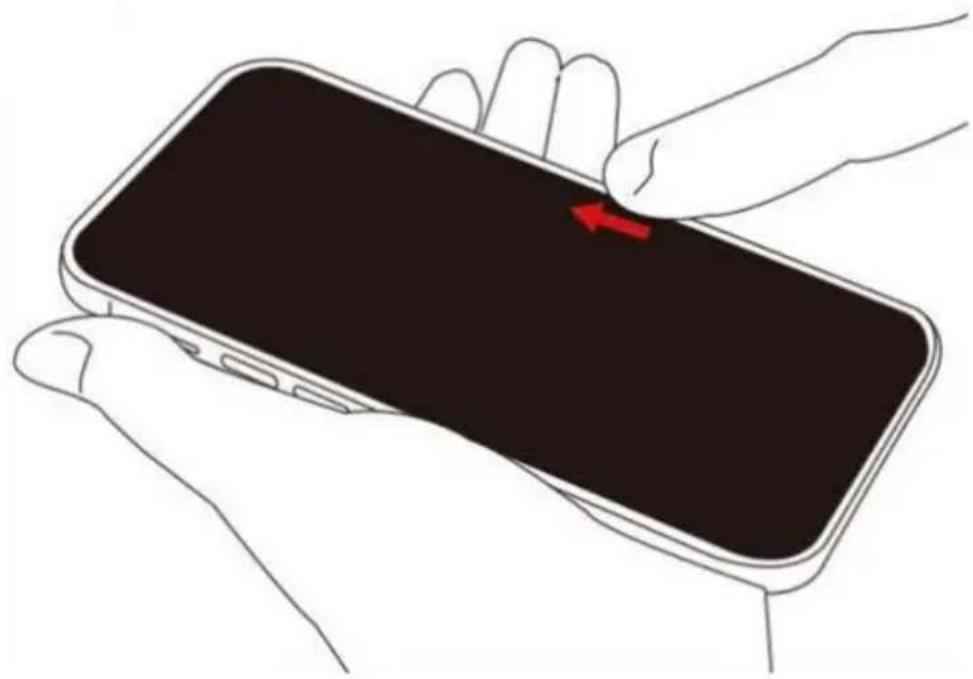
Line drawing of a hand holding a smartphone with a red arrow pointing to the screen (no text or symbols)Step 6: Scrape off the remaining bubbles and press the edges of the screen protector with your thumb to ensure that the screen protector properly applied to the screen.
Need more information?
We hope that this user guide has given you the assistance needed for a simple set-up.
For the most up-to-date guide for your product, as well as any additional assistance you may require, head online to help.kogan.com


Brand : Kogan
Model : NBPACCP16AA
Category : Air purifier