
PAMP2000 - Mp3 player Pyle - Free user manual and instructions
Find the device manual for free PAMP2000 Pyle in PDF.


| Product Type | MP3 Player |
| Brand | Pyle |
| Model | PAMP2000 |
| Dimensions | 2.5 x 1.5 x 0.5 inches |
| Weight | 1.5 oz |
| Power Source | Rechargeable lithium-ion battery |
| Battery Life | Up to 10 hours |
| Display | LCD screen |
| Supported Audio Formats | MP3, WMA, WAV |
| Internal Storage | 8 GB |
| Expandable Storage | Yes, via microSD up to 32 GB |
| Connectivity | USB 2.0, 3.5 mm headphone jack |
| Functions | Play, pause, skip, volume control, FM radio, voice recording |
| Charging | Via USB cable (included) |
| Special Features | Compact and portable design |
| Cleaning | Wipe with a dry, soft cloth |
| Safety | Do not expose to moisture or extreme temperatures |
| Spare Parts | Not available separately; compatible accessories (e.g., USB cable, headphones) can be purchased |
| Reparability | Not user-serviceable; contact Pyle support |
| General Information | Manual available for free download in PDF format |
Frequently Asked Questions - PAMP2000 Pyle
User questions about PAMP2000 Pyle
0 question about this device. Answer the ones you know or ask your own.
Ask a new question about this device
Download the instructions for your Mp3 player in PDF format for free! Find your manual PAMP2000 - Pyle and take your electronic device back in hand. On this page are published all the documents necessary for the use of your device. PAMP2000 by Pyle.
USER MANUAL PAMP2000 Pyle
Read Instructions — All the safety and operating instructions should be read before the appliance is operated.
-
Retain Instructions — The safety and operating instructions should be retained for future reference.
-
Heed Warnings — All warnings on the appliance and in the operating instructions should be adhered to.
-
Follow Instructions — All operation and use instructions should be followed.
-
Water and Moisture — The appliance should not be used near water - for example, near a bathtub, washbowl, kitchen sink, laundry tub, swimming pool, or a wet basement.
-
Ventilation — The appliance should be situated so that its location or position does not interfere with its proper ventilation. For example, the appliance should not be situated on a bed, sofa, rug, or similar surface that may block the ventilation openings: or placed in a built-in installation, such as a bookcase or cabinet that may impede the flow of air through the ventilation openings.
-
Heat — The appliance should be situated away from heat sources such as radiators, heat registers, stoves, or other appliances (including amplifiers) that produce heat.
-
Power Sources — The appliance should be connected to a power supply only of the type described in the operating instructions or as marked on the appliance.
-
Grounding or Polarization — Precaution should be taken to insure that the grounding or polarization means of an appliance is not defeated.
-
Power-Cord Protection — Power supply cords should be routed so that they are not likely to be walked on or pinched by items placed upon or against them, paying particular attention to cords at plugs, convenience receptacles, and the point at which they exit from the appliance.
-
Cleaning — The appliance should be cleaned only as recommended by the manufacturer.
-
Power Lines — An outside antenna system should not be located in the vicinity of overhead power lines or other electric light or power circuits, or where it can fall into such power lines or circuits. When installing an outside antenna system, extreme care should be taken to keep from touching such power lines or circuits as contact with them might be fatal.
-
Nonuse Periods — The power cord of the appliance should be
unplugged from the outlet when the appliance is to be left unused for a long period of time.
- Object and Liquid Entry — Care should be taken so that objects do not fall and liquids are not spilled into the enclosure through openings.
Gives you the power and versatility you need in a professional sound system. The wide frequency response handles easily amplification of voice and music. The signal sensing of dual inputs turns the amplifier on automatically when music is sensed on RCA inputs. The activation of Line 1 input, will override Line 2 input, making the amplifier perfect as a zone amplifier for multi-room distribution audio systems.
FEATURES AND CONTROLS
Front Panel

FEATURES AND CONTROLS
- Power On/Off with indicator inside
Main power switch, it will light when the amplifier is turned on.
- Speaker A/B Channel Input Selectors with indicator inside
Lets you select speakers you want to use with the amplifier in channel A or Channel B.
- Balance Control
Lets you adjust the volume of the left and right outputs.
- Volume Control
Lets you control the total of output power level.
- BT/LINE Input Switch (For PAMP2000BT only)
Press in, it's Bluetooth Input status, and press it out, it's LINE input status.
- Bluetooth Antenna (For PAMP2000BT only)
The antenna is best receiving for Bluetooth signal.
- Line 1 Input
It acts as a "Priority" input over Line 2 and is used to connect to a local audio source such as
input mode to provide over 160 watts RMS mono output. For mono application use only the R+ and L- of SPEAKER A channel output. Please preset the volume control at MIN and adjust to the desired level.
11. Auto On Switch
Lets you select AUTO position to activate the amp automatically when the signal is sent to input source, the amp will shut down automatically after a period of time without the signal source is sent, please preset the Power On/Off switch to ON position in this application. Select NORMAL position to activate the amp manually by pushing On/Off Power Button.
12. Speaker A/B Binding Post Terminals
Let you to connect two stereo pairs of speakers via the wire terminals.
13. Voltage Switch
This amplifier has selectable input voltage from 110V/60Hz (the standard in USA and CANADA) to 220V/50Hz (for EUROPEAN operation). Please make sure the switch is in the proper position before operating, otherwise severe damage will be incurred and not covered by the warranty.
CONNECTION

flowchart
graph TD
    A["TELEVISION"] --> B["DISTRIBUTED AUDIO"]
    B --> C["SPEAKERS"]
    C --> D["AC INPUT"]
    C --> E["AC IN"]
    C --> F["DISTRIBUTED AUDIO"]
    F --> G["AC INPUT"]
    F --> H["DISTRIBUTED AUDIO"]
    H --> I["AC INPUT"]
    H --> J["DISTRIBUTED AUDIO"]
    K["STANT"] --> L["OUTPUT"]
    L --> M["LIVE 1 IN"]
    L --> N["LIVE 2 IN"]
    L --> O["LIVE OUT"]
    P["ACINION"] --> Q["OUTPUT"]
    Q --> R["INPUT"]
    R --> S["OUTPUT"]
    S --> T["INPUT"]
    U["POWER"] --> V["DATA INPUT"]
    V --> W["DATA OUTPUT"]
    X["AC/DC"] --> Y["AC INPUT"]
    Y --> Z["AC OUTPUT"]
    AA["AC/DC"] --> AB["AC INPUT"]
    AB --> AC["AC OUTPUT"]

flowchart
graph TD
    A["COMPUTER"] --> B["TELEVISION"]
    B --> C["SPEAKERS"]
    C --> D["VOUTRAGE"]
    C --> E["FUSE 4A"]
    C --> F["AC OUTPUT"]
    G["SAVINGS"] --> H["MODE"]
    H --> I["SPEAKS"]
    I --> J["OUTPUT"]
    K["UNITS"] --> L["MODE"]
    L --> M["SPEAKS"]
    M --> N["OUTPUT"]
    O["UNITS"] --> P["MODE"]
    P --> Q["SPEAKS"]
    Q --> R["OUTPUT"]
    S["UNITS"] --> T["MODE"]
    T --> U["SPEAKS"]
    U --> V["OUTPUT"]
CONNECTION DIAGRAM-B:
In this application a computer's sound card acts as "Priority" source at Line 1 input and the TV audio signal acts as "Primary" local source at Line 2 input. Whenever the computer is activated, its signal overrides the TV signal of Line 2, only the computer audio will be heard via the amp. Once the computer is turned off, the amp will switch to the TV automatically as an audio source, if the TV is still active.
BLUETOOTH OPERATION INSTRUCTION (For PAMP2000BT only):
External devices which have a built-in Bluetooth feature can be connected to this amplifier wirelessly to play through the amplifier's speakers. If your amp is connected to speakers, you will hear audible tones which will help for connecting.
- At first be sure that the amplifier is powered on, and turn the volume to low. Please remember to connect the Bluetooth Antenna at the back panel for better receiving signal.
- Press the BT/Line button switch in on the front panel, you will hear the voice "POWER
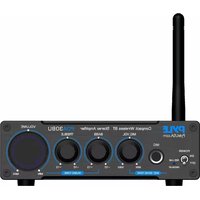


Brand : Pyle
Model : PAMP2000
Category : Mp3 player