
PSWP25 - Mp3 player Pyle - Free user manual and instructions
Find the device manual for free PSWP25 Pyle in PDF.


| Product Type | MP3 Player |
| Brand | Pyle |
| Model | PSWP25 |
| Internal Memory | 8 GB (approx.) |
| Display | LCD Screen |
| Audio Formats Supported | MP3, WMA, FLAC |
| Connectivity | USB 2.0 |
| Power Source | Built-in Rechargeable Lithium-Ion Battery |
| Charging Method | USB Cable (included) |
| Battery Life | Up to 10 hours |
| Headphone Jack | 3.5mm |
| Dimensions | 3.5 x 1.5 x 0.5 inches |
| Weight | 1.5 oz |
| Functions | Playback, Shuffle, Repeat, FM Radio, Voice Recording, Folder Navigation |
| Language Support | English, Spanish, French, German, etc. |
| Maintenance | Keep dry, avoid extreme temperatures, clean with soft cloth |
Frequently Asked Questions - PSWP25 Pyle
User questions about PSWP25 Pyle
0 question about this device. Answer the ones you know or ask your own.
Ask a new question about this device
Download the instructions for your Mp3 player in PDF format for free! Find your manual PSWP25 - Pyle and take your electronic device back in hand. On this page are published all the documents necessary for the use of your device. PSWP25 by Pyle.
USER MANUAL PSWP25 Pyle
pyleaudio.com
PSWP25BK
PSWP25BL
PSWP25GN

natural_image
Profile view of a swimmer wearing a Pyle cap and goggles, captured in black and white (no text or symbols on the subject)PYLE® SPORTS
4GB Waterproof MP3 Player /Fm Radio/Pedometer/
Lap Counter W/ Backlit LCD display
Before you begin
Thank you for purchasing this elegant waterproof sports MP3 player from us.
This waterproof sports MP3 player is the latest generation of our MP3 players. With its compact design and waterproof function, you can enjoy music underwater while you are swimming or exercising. It offers stereo FM radio with a wide frequency range. What's more, it is also a perfect pedometer.
Before using this product, we commend reading this manual step by step to obtain the best results with your new waterproof sports MP3 player. We wish you a lot of fun!
Copyright warning
This player is for your personal use only. Unauthorized recording or duplication of copyrighted material may infringe upon the rights of third parties and may be contrary to copyright laws.
Back up your data regularly. The manufacturer is not responsible for lost data.
You are cautioned that any change or modifications to the equipment not expressly approved by the manufacturer could void your warranty.
The user manual is subject to change without notice.
Safety Notice:
To prolong the life of the waterproof sports MP3 player, all the following safety, operating instructions and maintenance should be read and adhered to before the player is operated.
※ Do not drop the player, and do not damage or take apart the player, otherwise your warranty will be voided.
※ Do not expose the player to high temperatures and direct sunlight for prolonged periods of time.
※ Handle the player with care. Avoid contact with sharp objects. Keep device off of metallic objects.
※ Only use accessories recommended from the manufacturer.
※ Listening at high volume for a long period of time could cause damage to your ears.
※ Do not use the player while driving, as this could result in an accident.
※ Protect the player from vibration or shock.
Usage Notice
Do:
√ Turn off and unplug the power before cleaning the player.
√ Use a soft dry chiffon with mild detergent to clean the display housing.
√ Unplug the power if the product is not used for a long periods of time.
√ Ensure the operating temperature is within 23^ F\~ 104^ F
Do not:
✗ Use abrasive cleaners, waxes or solvents to clean the unit.
✗ Use under the following conditions:
In extremely hot, cold or humid environments.
In areas susceptible to excessive dust or dirt.
- Near any appliance generating a strong magnetic field or electric field.
▶ In direct sunlight.
Connecting to the PC/Notebook via earphone jack
Computer system requirements
Pentium III 500MHz or higher recommended
Windows® XP (service pack 1 or higher) or Windows Vista™ or Windows® 7
Internet access
Windows Media Player 10 or higher
250MB or more free hard disk space for the software
128MB RAM (256MB recommended)
CD drive capable of digital audio extraction
USB port (2.0 recommended)
Sound card

natural_image
Technical line drawing of a cylindrical mechanical component with mounting flanges and central hub (no text or symbols)Earphone Jack/USB jack
Connect the player to your PC USB port as shown through equipped USB cable. Connect the PC USB port and the MP3 USB port with the provided USB cable The player will turn on automatically and display "USB connected" on the display. The player will appear as a drive letter on your computer, a Mass Storage Class (MSC) device, and behave as a detachable drive for file transfer in one or both directions.
- It might take several seconds for the player to be detected. Click Refresh in My Computer or Windows Explorer to make sure the player has been detected.
- The player is capable of transferring files at USB 2.0. If USB 2.0 port is available on your computer, use it to connect to your player. The player is still backward compatible with the older USB 1.1 ports. However, you will not be able to take full advantage of the potential speed increase.
• IMPORTANT: Don't disconnect the USB cable to the PC or the player during the software installation.

Adding/Removing Mp3 files/folders You can use the player as a removable USB storage.
Connect the PC USB port and the MP3 USB port with the provided USB cable.
Add MP3 files/folders to the USB storage's folder.
I. Open files/folders to be transferred on your computer.
II. Open My Computer → Removable Disk from the desktop.
III. Select the files/folders to be transferred from your computer and drag and drop them to a folder of your choice in the Removable Disk (you can also transfer files on your PC to the player using the "Copy" and "Paste" functions).

Delete MP3 files from the removable USB storage (use the "Delete" command).
Remove the player from PC Please follow the steps in case of damaging the player or data loss
- Left click the icon on the taskbar at the bottom right corner of the desktop.
- Click the "Safely remove USB Mass Storage Device – Drive(G:)" column.
- Disconnect the player from your computer.
CAUTION:
Do not remove the player while files from the USB Mass Storage are being played on your PC/Notebook.
Do not disconnect the player from your PC/Notebook while transferring file, or it will cause damage to the player or data loss.
Package Contents
Please check that the package contains the following items:
Waterproof sports MP3 player
USB cable
Waterproof earphone
Quick Start Guide
Product Overview
Button Definition:
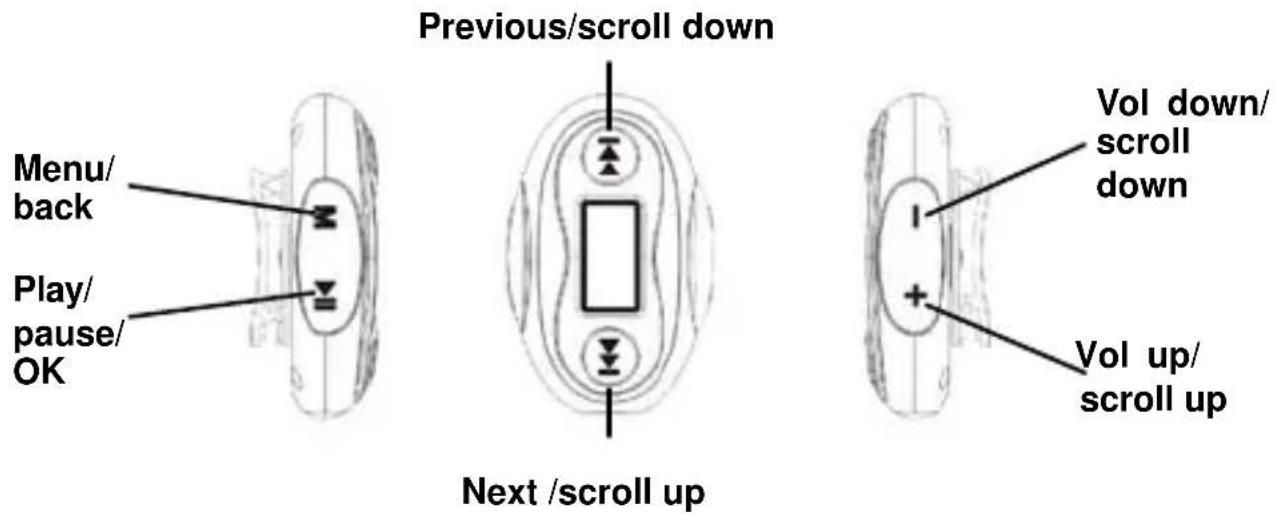
Menu Navigation
【M】button: Enter main menu, submenu or return.
Skip button (【】/【】): Shift menus.
Play/Pause button (【▶】): Play, Pause, or confirm.
Lock/Unlock: When you are walking or running, you can set the player to "Lock" mode, then all buttons are disabled. To unlock, just long press 【M】 button until lock icon disappears.
If the unit freezes and/or is not working properly. Press both 【M】 and 【◀◀】 button at the same time to reset. The unit will reset.
Charge the player
The player charges automatically whenever you connect it to your computer. To fully charge the player, make sure your computer is on and the device is connected for at least 3 hours. Refer to the battery level indicator on the display to check the battery level. Recharge the player when the level indicator is blank.
Notes: After use, shake and blow off the surface water on the earphone or use a soft absorbent cloth to dry it.
Power on/off
Press and hold 【▶】 button for approximately 3 seconds to power on until “Welcome” displays on the screen:

Press and hold [▶] button for approximately 3 seconds to power off till "Good Bye" displays on the screen:

Main menu (Home menu)
The player's main menu allows you to access Music, FM Radio, Pedometer, Swim Fitness and Settings.
- Short press [+] / [-] button or [▶] / [◀] button to scroll up and down the list of items in the main menu.
- Press 【▶】 button to enter your selection.
- Long press 【M】 button to exit.
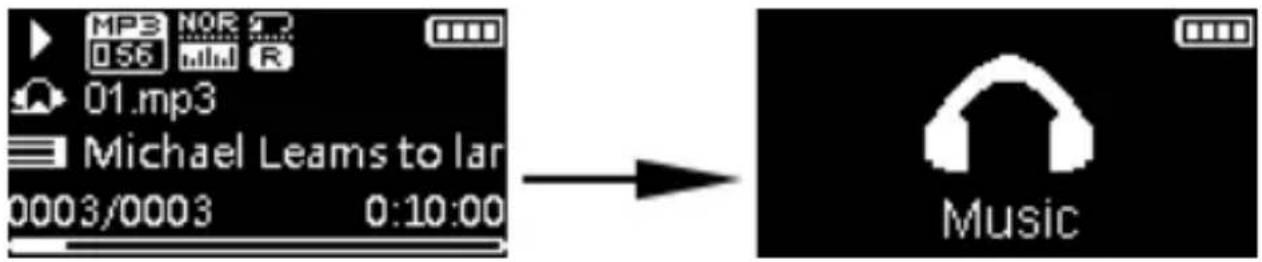
Music Mode
- Select 📄 on the main menu and press [▶] button to enter music mode:
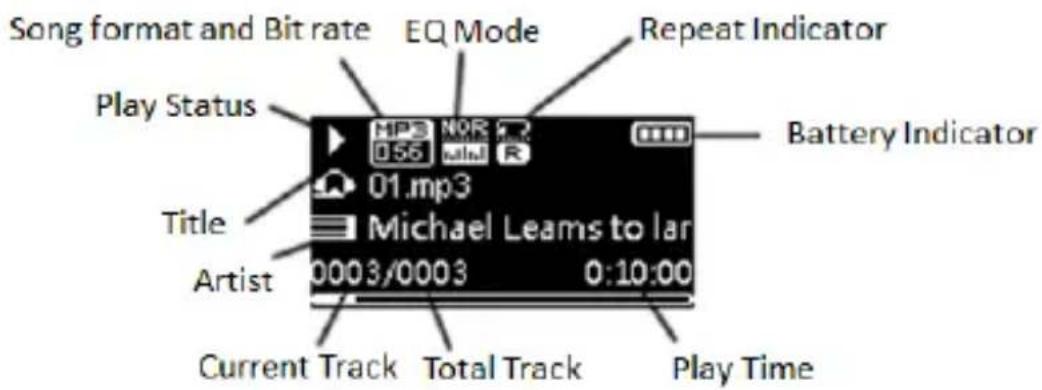
- Under music mode, short pres [▶] to play or pause the track. Use [+] / [-] button to increase or decrease the volume. Use [▶] / [◀] button to skip to the next/previous melody.
- Under music mode(Playing state), short press 【M】 button to enter option menus, short press 【+】/【-】button or 【▶】/【◀】button to select an option menu and short press 【▶】button to enter. The option menus under music mode are:
3.1 Repeat: select and press [▶] button to enter and short press [+]/[−] button or [▶] / 【▶】 button to select a repeat mode from the following seven modes: Normal, Repeat One, Folder, Repeat Folder, Repeat All, Shuffle and Intro, then press [▶] button to confirm.
3.2 Equalizer: select and press 【▶】 button to enter and short press 【+】 / 【-】 button or 【▶】 / 【▶】 button to select an EQ mode and press 【▶】 button to confirm. There are 7 EQ modes for selection: Nature, Rock, Pop, Classic, Soft, Jazz & DBB (Dynamic Bass Boost).
3.3 Music File: select and press [▶] button to enter and short press [▶] / [▶] button to select a MP3 file and press [▶] button to start playing the selected file. But if icon is selected, pressing [▶] button will get you back to the previous menu with background music playing.
3.4 Pedometer: select and press [▶] button to get you to pedometer mode with background music playing.
3.5 Swim Fitness: select and press 【▶】 button to get you to swim fitness mode with background music playing.
Under music mode (Playing state), long press 【】/【】 button to fast forward or fast backward the current playing melody.
Use 【M】 button to return to previous menu in turn.
FM Radio Mode
1. Select
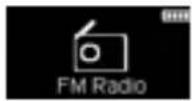
on the main menu and press 【▶】 button to enter FM Radio mode:

Note: For the first time Radio mode is entered (no preset is stored before), the unit will automatically search whole band and store any stations it finds as presets. After it's done, it will return to the first preset station.
-
Under FM radio mode, use [+] / [-] button to increase or decrease the volume. Press [▶] button to switch the search mode between Manual and Preset.
-
Short press 【】 / 【】 button to skip to the next/prev. radio station.
-
Under FM radio mode (broadcasting state), press 【M】 button to enter option menus, use 【+】 / 【-】 button or 【▶】 / 【◀】 button to select the option menu and press 【▶】 button to enter. The option menus under FM radio mode are:
4.1 Delete: select and press [▶] button to delete current broadcasting FM radio station.
4.2 Auto Search: select and press 【▶】 button to start auto search.
4.3 Pedometer: select and press [▶] button to enter the pedometer mode with background radio broadcasting.
4.4 Swim Fitness: select and press 【▶】 button to enter swim fitness mode with background radio broadcasting.
- Use 【M】 button to exit.
Pedometer Mode
- Select 🖱️ on the main menu and press 【▶】 button to enter Pedometer mode:

- Under pedometer mode, press [▶▶] button to start/pause the pedometer or stopwatch (calories counting) at the same time.
- Under pedometer mode, press [M] button to enter option menus, use [+] / [-] button or [▶] / [◀] button to select the option menu and press [▶] button to enter. The option menus under pedometer mode are:
3.1 Save: select and press [▶] button to save the record.
3.2 Delete All: select and press [▶] button to delete all the records in records list.
3.3 Records List: select and press [▶] button to view the records.

3.4 Exit: select and press [▶] button to return to the main menu.
Note: Pedometer is still counting while carrying out the above option menus.
Input Personal Information
For a accurate use of the pedometer, personal information should be input into the player first. Please refer to the following steps:
- Select settings icon and press [▶] button to enter.
- Short press 【+】/【-】 button or 【▶】/【◀】button to select “Personal Info”, then press 【▶】 button to enter.
-
Short press [+] / [-] button or [▶] / [◀] button to select from stride, weight, arm length, pool length and unit, press [▶] button to enter the selected option.
-
Then use 【▶】/【▶】button to set parameters and press 【▶】button to confirm settings.
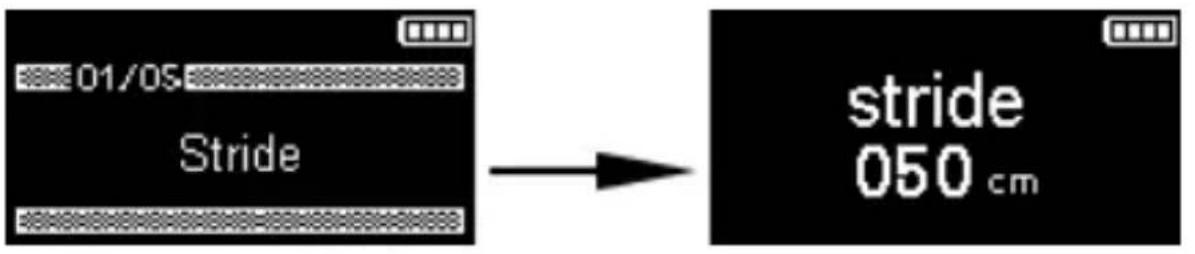
Press 【M】 button to exit in turn.
Swim Fitness Mode
- Select Swim Fitness on the main menu and press [▶] button to enter swim fitness mode:

- Under swim fitness mode, press 【▶】 button to start/pause the swim fitness and stopwatch (calories counting) at the same time.
- Under swim fitness mode, press "M" button to enter option menus, use【+】/【-】button or 【▶】/【◀】button to select the option menu and press 【▶】button to enter. The option menus under swim fitness mode are:
3.1 Save: select and press [▶] button to save the record.
3.2 Delete All: select and press [▶] button to delete all the records in records list.
3.3 Records List: select and press 【▶】 button to view the records.

3.4 Exit: select and press [▶] button to return to the main menu.
Note: Swim fitness is still counting while carrying out the above option menus.
Input Personal Information
For accurate use of the swim fitness function, personal information should be input into the player first. Please refer to the following steps:
- Select settings icon and press [▶] button to enter.
- Short press 【+】/【-】button or 【▶】/【▶】button to select “Personal Info”, then press 【▶】button to enter.
-
Short press [+] / [-] button or [▶] / [▶◀] button to select from stride, weight, arm length, pool length and unit, press [▶◀] button to enter the selected option.
-
Then use 【▶】/【▶】button to set parameters and press 【▶】button to confirm settings.

Press 【M】 button to exit in turn.
Settings
1. Select

on the main menu and press 【 】 button to enter settings mode:

- Short press 【+】/【-】button or 【▶】/【▶】button to select an option you want to set and press 【▶】button to enter.
2.1 Power save: auto off time can be set to Close/1 minute/2 minutes/5 minutes/10 minutes, The player will power off automatically if no operation within the set time.
Use【+】/【-】button or【▶】/【◀】button to set and press【▶】button to confirm setting.
2.2 Language: there are 22 languages for selection.
Use【+】/【-】button or【▶】/【◀】button to set and then press【▶】button to confirm setting.
2.3 Display.
2.3.1 Contrast: use 【+】/【-】 button or 【▶】/【◀】 button to select contrast and press
【▶】button to enter. Then use 【+】/【-】button or 【▶】/【▶】button to set parameters and press 【▶】button to confirm.
2.3.2 Backlight: duration can be set to Close/10 seconds /20 seconds/ 30 seconds/1 minute. The backlight will be on auto off if the units setting is not changed.
Use【+】/【-】button or【▶】/【▶】button to set and press the【▶】button to confirm setting.
2.4 Auto Lock: time interval can be set Close/ 10 seconds/ 20 seconds/ 30 seconds/ 1 minute before auto lock activates.
Use【+】/【-】button or【▶】/【◀】button to set and press【▶】button to confirm setting. To unlock, long press【M】button until lock icon disappears.
2.5 System tools
2.5.1 Delete( delete music files): use【+】/【-】button or【▶】/【▶】button to select Delete and press【▶】button to enter, then use【▶】/【▶】button to move cursor to a music file, pressing【▶】button will delete the selected file. But if 🔒 icon is highlighted, pressing【▶】button will return to previous menu.
2.5.2 Format: Use【+】/【-】button or【】/【】button to select Format and press the
2.5.3 Restore defaults: use【+】/【-】button or【▶】/【▶】button to select Restore defaults and press【▶】button to enter, then short press 【+】/【-】button or【▶】/【▶】button to select Yes/No and press【▶】button to confirm setting and return to previous menu.
2.5.4 System Info: use 【+】/【-】button or 【▶】/【▶】button to select System Info and press 【▶】button to view firmware version, free space and total space capacity.
2.6 Personal Information
1 Short press【+】/【-】button or【▶】/【◀】button to select “Personal Info”, then press【▶】button to enter.
2. Short press 【+】 / 【-】 button or 【▶】 / 【▶】 button to select from stride, weight, arm length, pool length and unit, press 【▶】 button to enter the selected option.
3. Then use【▶】/【◀】button to set parameters and press【▶】button to confirm settings.
Note: The player will exit and return to previous menu if no operation is made within 5 seconds.
Maintenance
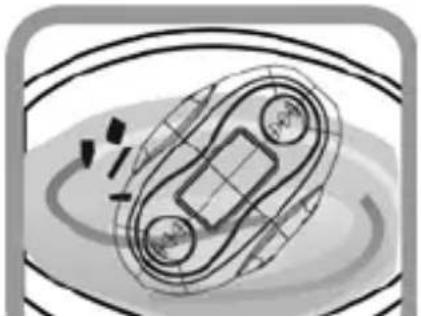
Please be aware that water in the swimming pool and the sea is corrosive. To keep your MP3 player in good condition we recommend that you rinse it with fresh water after use.
- Wash and rinse it under running tap water.

natural_image
Abstract line drawing of a mechanical or electrical component with no visible text or symbols- Immerse it for around 2 or 3 minutes in pure water to remove any salt or dirt.
natural_image
Diagram of a mechanical or electrical component with no visible text, numbers, or symbols- After washing it with pure water, take it out and shake it several times.

natural_image
Illustration of a hand holding a device with radiating lines and sparkles (no text or symbols)- Use a clean soft chiffon which won't leave any loose fiber to wipe off any excess water.

natural_image
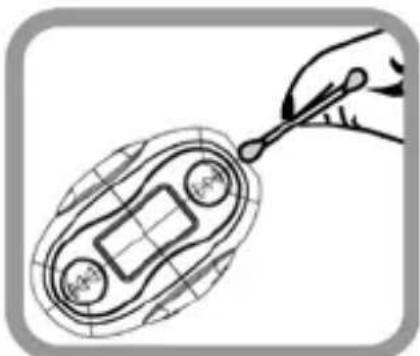
Illustration of a vehicle on a road with a grid-patterned roof and lane markings (no text or symbols)- Use cotton buds to thoroughly wipe off water in the seams.
natural_image
Illustration of a hand holding a pen over a cell membrane (no text or symbols)
natural_image
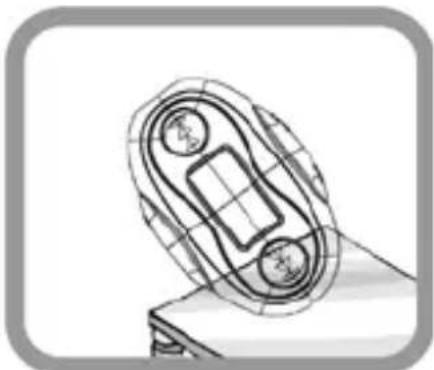
Illustration of a hand holding a pen or stylus, no text or symbols present- Dry it completely in a well ventilated shady place.
natural_image
Technical line drawing of a mechanical component with no visible text or symbolsTechnical Specification
| Name | Description |
| Capacity of Flash Memory | 4GB |
| USB Interface | USB2.0(High speed) |
| LCD Display | 128×64 OLED display |
| Power supply | Built-in Li-polymer battery |
| EQ | Nature, Rock, Pop, Classic, Soft, Jazz, DBB |
| Audio Format MP3, WMA | |
| Waterproof IPX-8 | |
| Stereo FM Frequency Range | 87.5MHz~108MHz |
| Sports Pedometer Yes | |
| Lyric synchronization Yes | |
| Operating Temperature | 41°F - 104°F |
VER: 1.0




- Before you begin
- Copyright warning
- Safety Notice:
- Usage Notice
- Do:
- Do not:
- Connecting to the PC/Notebook via earphone jack
- Computer system requirements
- Earphone Jack/USB jack
- Adding/Removing Mp3 files/folders You can use the player as a removable USB storage.
- Remove the player from PC Please follow the steps in case of damaging the player or data loss
- CAUTION:
- Package Contents
- Product Overview
- Menu Navigation
- Charge the player
- Power on/off
- Main menu (Home menu)
- Music Mode
- FM Radio Mode
- Select
- Pedometer Mode
- Input Personal Information
- Swim Fitness Mode
- Settings
- Maintenance
Brand : Pyle
Model : PSWP25
Category : Mp3 player