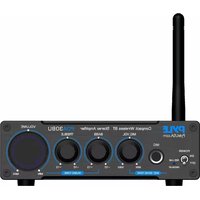
PDA30BU - Mp3 player Pyle - Free user manual and instructions
Find the device manual for free PDA30BU Pyle in PDF.


| Product Type | Compact Stereo Amplifier with Bluetooth |
| Model | PDA30BU |
| Brand | Pyle |
| Power Output | 200W |
| Frequency Range | 20Hz - 20kHz (±1dB) |
| Total Harmonic Distortion (THD) | 0.5% |
| Signal-to-Noise Ratio (SNR) | 95dB |
| Input Sensitivity | 280mV |
| Speaker Impedance | 4Ω - 8Ω |
| Power Supply | 19V DC, 4.5A |
| Dimensions (L x W x H) | 5.31" x 5.57" x 1.73" (135 x 141 x 44 mm) |
| Weight | Approx. 1.5 lbs (0.68 kg) |
| Construction Material | Aluminum |
| Bluetooth Version | 5.0 |
| Bluetooth Range | Up to 45 ft (13.7 m) |
| Bluetooth Network Name | PYLEUSA |
| Audio Inputs | RCA (L/R) Line Input, Wireless Bluetooth |
| Speaker Outputs | Banana Speaker Terminals (L/R) |
| Microphone Input | 1/4" (6.35mm) with volume control |
| Tone Controls | Bass and Treble (±10dB at 100Hz/10kHz) |
| Front Panel Controls | Power ON/OFF, Master Volume, Bass, Treble, Mic Volume |
| Included Accessories | 19V/4.5A Adapter, Bluetooth Antenna, AC Power Cord |
| Safety Compliance | California Proposition 65 warning (Nickel Carbonate) |
| Maintenance | Clean with dry cloth; avoid moisture and direct sunlight |
| Spare Parts / Repair | Contact Pyle customer support for service |
Frequently Asked Questions - PDA30BU Pyle
User questions about PDA30BU Pyle
0 question about this device. Answer the ones you know or ask your own.
Ask a new question about this device
Download the instructions for your Mp3 player in PDF format for free! Find your manual PDA30BU - Pyle and take your electronic device back in hand. On this page are published all the documents necessary for the use of your device. PDA30BU by Pyle.
USER MANUAL PDA30BU Pyle
Blue Series Compact and Audio Streaming Amp with RCA & Speaker Terminals
User Manual
Read through this user manual before using the product to ensure its correct use. Keep this manual for future reference.
Quick Setup:
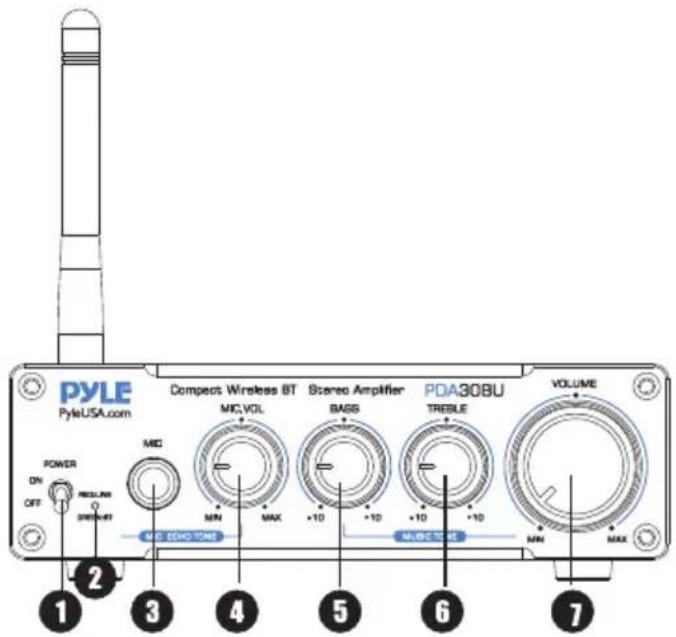

Rear PanelFront Panel
- Main Power ON Switch: Switch ON/OFF the amplifier by using this switch.
- Input LED: RED--LINE input model Green--Wireless BT input model.
- MIC Input
- Mic volume control: Use this control to set the volume level of Microphone.
- BASS KNOB: Adjust to boost or cut LOW frequencies.
- TREBLE KNOB: Adjust to boost or cut HIGH frequencies.
- Master Volume: Adjusts main audio system volume level.
- RCA L/R LINE Input: Lets you connect the desired LINE input source.
- Speaker output (L/R)
- AC IN
- Wireless BT Antenna: Wireless BT Streaming receiver
Setup and pairing (Wireless BT amplifiers) are really easy. The following instructions will help you connect Audio Amplifiers to your music system or pair with your tablet, computer, or smartphone.
1. Connecting the Speaker Wire
Audio stereo power amplifiers that will power one pair of passive speakers between 4 and 8 ohms (or subwoofer if you got the 2.1 CH amp or subwoofer amp). To connect the amplifier to your speakers you will need 2-conductor stranded speaker wire. The amplifiers use high-quality binding posts that will accept heavy gauge bare wire banana plugs, spade lugs, or pin terminators. If you use your own speaker wire we recommend using at least 16 gauge wire and using the same length of wire from the amplifier to each speaker It's also a good idea to turn off your amplifier before connecting power, audio sources or speakers.
Preparing the Speaker Wire
- Separate the last 3" of each speaker wire conductor.
- Strip 1/2" of insulation from the end of each wire.
- Twist the exposed copper strands with your fingers 3 or 4 times so the strands stay together.
NOTE:
As you make your connections, be sure to connect the positive (+) terminals on your amplifier to the positive (+) terminals on your speakers. Even if your wire does not have (+) or (-) markings, most 2-conductor speaker wire has printing on one side to help you differentiate between the wire pairs.
If you are Using Bare Wire
- Use your thumb and finger to unscrew the binding post connectors on the back of each speaker.
- Insert each speaker wire into the holes on the side of the binding post connectors, observing proper polarity.
- Retighten the binding posts with your fingers.
- The stripped portion of the wire should be secured firmly in each connector.
- Make sure that none of the speaker wire strands have come in contact with an adjoining terminal.
2. Connecting the Power Supply
Be sure that the volume/power switch on the front panel is in the OFF position by rotating it counter clockwise.
Connect the cable with the round end from the power supply to rear panel power connector. Connect the AC power cable from the power supply to a power outlet and verify that the indicator light on the power supply is illuminated. We recommend using a high-quality surge suppressor and/or AC line later on all electronics equipment.
3. Connecting Audio Sources
Using the appropriate audio cable (RCA cable), connect your audio source (computer, iPod, etc.) to the amplifier audio inputs.
If you got the Wireless BT amplifier and want to connect the amplifier to the audio source via Wireless BT, you can pair them when the amplifier is turned on. Audio Wireless BT amplifiers can connect to only one device at a time, however, they will remember the devices they connected, they will auto-paired at next time.
NOTE:
Audio Wireless BT amplifiers have the "BT" and "AUX" selector, you can choose the input way when you connect the audio source. The RCA input will interrupt, so if you want to connect the amplifier with RCA input, you need interrupt the Wireless BT connection from your Wireless BT device.
4. Operation
Turn on the amplifier volume/power knob and set the volume control to an initial setting of about 3 o'clock. The front panel power indicator will be illuminated. Turn on your audio input source and adjust the volume to your desired listening level.

WARNING:
This product can expose you to a chemical or group of chemicals, which may include "Nickel Carbonate" which is known in the state of California to cause cancer, birth defects, or other reproductive harm. For more info, go to https://www.p65warnings.ca.gov/.
Features:
- Compact and Powerful Mini Amp System
- With Bass and Treble Volume Control
- With Microphone Input and Volume Control
- Wireless BT Receiver for Wireless Audio Streaming Ability
- RCA (L/R) Audio Input - Connect & Stream Audio from External Devices
- Banana Speaker L/R Terminals
- Front Panel Rotary Controls
- Antenna for Extended Bluetooth Wireless Range
• Power ON / OFF Switch
Wireless BT Connectivity:
- Simple & Hassle-Free Pairing Ability
- Works with All of Today's Latest Devices (Smartphones, Tablets, Laptops, Computers, etc.)
- Wireless BT Network Name: 'PYLEUSA'
- Wireless BT Version: 5.0
- Wireless BT Transmission Distance: 45ft
What's in the Box:
- Stereo Amplifier System
- 19V/4.5A Adaptor
- Wireless BT Antenna
- AC Power Cord
Technical Specs:
• Power Output: 200W
• THD: 0.5%.
• Frequency Range: 20Hz - 20kHz (±1 dB);
- SNR: 95dB;
- Input Sensitivity: 280mV;
• Terminating Impedance: 4Ohm - 8Ohm;
• Power Supply: 19V 4.5A
• Power Supply Range: 12V - 19V
- Construction Material: Aluminum
• Power Cable Length: 4.9' ft.
- Tone Controls: Bass & Treble: +/-10dB (100Hz/10kHz)
- Product Dimension (L x W x H): 5.31" x 5.57" x 1.73"-inches
PYLE
PyleUSA.com

natural_image
Illustration of a laptop with a red checkmark on the screen (no text or symbols)VISIT US ONLINE:
Have a question?
Need service or repair?
Want to leave a comment?
PyleUSA.com/ContactUs

Questions? Issues?
We are here to help!
Phone: (1) 718-535-1800
Email: support@pyleusa.com


- Read through this user manual before using the product to ensure its correct use. Keep this manual for future reference.
- Quick Setup:
- Connecting the Speaker Wire
- Preparing the Speaker Wire
- NOTE:
- If you are Using Bare Wire
- Connecting the Power Supply
- Connecting Audio Sources
- Operation
- Features:
- Wireless BT Connectivity:
- What's in the Box:
- Technical Specs:
- PYLE
- PyleUSA.com
Brand : Pyle
Model : PDA30BU
Category : Mp3 player