OE2 - Earphones BOSE - Free user manual and instructions
Find the device manual for free OE2 BOSE in PDF.


User questions about OE2 BOSE
0 question about this device. Answer the ones you know or ask your own.
Ask a new question about this device
Download the instructions for your Earphones in PDF format for free! Find your manual OE2 - BOSE and take your electronic device back in hand. On this page are published all the documents necessary for the use of your device. OE2 by BOSE.
USER MANUAL OE2 BOSE
natural_image
Black Sony headphones with earbuds and headband, isolated on white background (no text or symbols visible)BOSE® OE2i AUDIO HEADPHONES
Owner's Guide | Brugervejledning | Bedienungsanleitung Guía de usuario | Notice d'utilisation | Manuale di istruzioni Felhasználói útmutató | Gebruiksaanwijzing | Podręcznik użytkownika Omistajan opas | Bruksanvisningen | คู่มือผู้ใช้ | 사용자 안내서 用户指南 | 使用者指南 オーナーズガイド دليل الملك
Please read this owner's guide
Please take the time to follow the instructions in this owner's guide carefully. It will help you set up and properly use your new headphones. Please save this owner's guide for future reference.
CAUTIONS:
- Long-term exposure to loud music may cause hearing damage. Please avoid extreme volume when using headphones, especially for extended periods.
- Do not use headphones when operating a motor vehicle or anywhere the inability to hear outside sounds may present a danger to you or others. Check and follow local laws regarding headphone use.
- Sounds that you rely on as reminders or warnings may have an unfamiliar character when using headphones. Be aware of how these sounds may vary in character so you can recognize them as needed.
- Do not drop, sit on, or allow the headphones to be immersed in water.

This product conforms to all applicable EMC Directive requirements. The complete Declaration of Conformity can be found at www.Bose.com/compliance.
WARNING: DO NOT use mobile phone adapters to connect headphones to airplane seat jacks, as this could result in personal injury such as burns or property damage due to overheating. Remove and disconnect immediately if you experience warming sensation or loss of audio.
English
Introduction
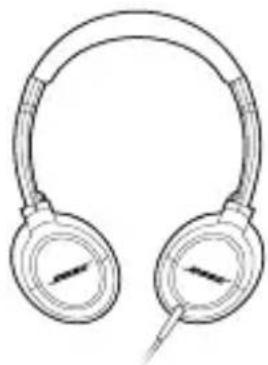
Thank you for purchasing the Bose ^® OE2i audio headphones. Enjoy your music with smooth, full range sound, a comfortable on-ear fit and a contoured design that folds up for easy portability. An in-line remote and microphone provide convenient control of select Apple products.
For use with:
The remote and microphone are supported only by iPod nano (4th generation and later), iPod classic (120GB, 160GB), iPod touch (2nd generation and later), iPhone 3GS, iPhone 4, iPad, iPad 2 and 2009 models or later of MacBook and MacBook Pro. The remote is supported by iPod shuffle (3rd generation and later). Audio is supported by all iPod models.
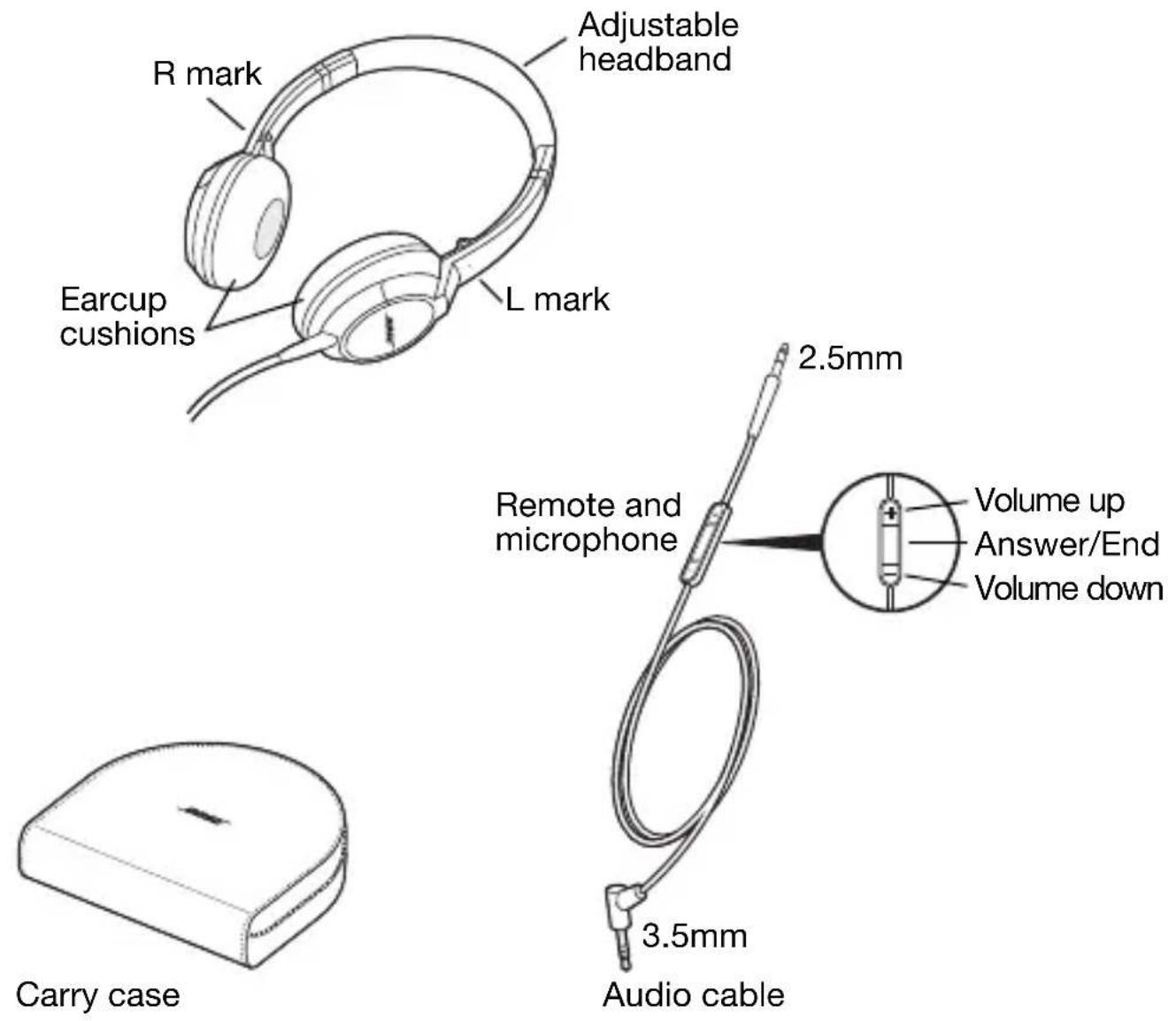
Components
English
Storing your headphones
1
natural_image
Line drawing of a pair of headphones with earband and headband (no text or symbols)2
natural_image
Line drawing of a pair of headphones with earbuds and leads (no text or symbols)3

text_image
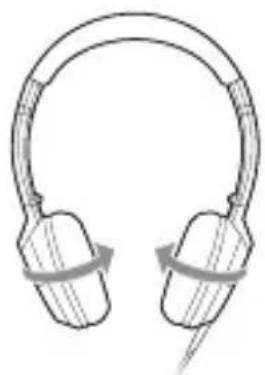
Diagram illustrating a mechanical or optical setup with labeled components and directional arrows indicating motion or transformation.Note: Do not try to exceed the limits of the pivots or over-rotate the earcups.
Using your headphones
Wearing the headphones
After removing the headphones from the case and unfolding them (see page 5), put on the headphones using the markings that identify the left (L) and right (R) earcups. Adjust the headband so it rests gently on top of your head and the earcup cushions fit comfortably on your ears.
Cleaning the headphones
The Bose ^® OE2i audio headphones do not require scheduled cleaning. Should cleaning be necessary, simply wipe the outside surfaces with a soft cloth. Be sure the earcup ports are kept clear, and that no moisture is allowed to get inside the earcup.
Connecting to your Apple device
Ensure that the 2.5mm plug is securely inserted into the left earcup. Plug the other end of the cable (3.5mm plug) securely into the audio output jack of the Apple audio device.
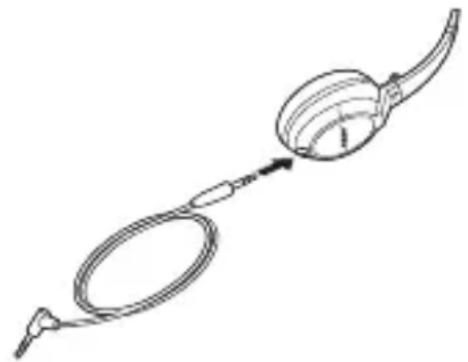
natural_image
Line drawing of a medical or laboratory procedure with a coiled tube and bulb (no text or symbols)English
Using the headphones with your Apple device
The Bose OE2i headphones come with a small in-line remote with an integrated microphone for convenient control of select Apple products. Easily control volume, track selection and voice applications, plus switch between your calls and music.
Note: Full controls may not be available for some Apple products.
Basic functions
| Increase volume Press | and release the + button. |
| Decrease volume Press | and release the – button. |
Call-related functions
| Answer a call When you receive an incoming call, press and release the Answer/End button to answer. | |
| End a call Press and release the Answer/End button. | |
| Decline an incoming call | Press and hold the Answer/End button for about two seconds, then release. |
| Switch to an incoming or on-hold call and put the current call on hold | While on a call, press and release the Answer/End button once. Press and release again to switch back to the first call. |
English
| Switch to an incoming or on-hold call and end the current call | While on a call, press and hold the Answer/End button for about two seconds, then release. |
| Use Voice Control Press | s and hold the Answer/End button.See iPhone User Guide for compatibility and usage information about this feature. |
Media playback functions
| Play or pause a song or video | Press and release the Answer/End button. |
| Skip to the next song or chapter | Press and release the Answer/End button twice quickly. |
| Fast-forward Press and | and release the Answer/End button twice quickly and hold the second press. |
| Go to the previous song or chapter | Press and release the Answer/End button three times quickly. |
| Rewind Press and release the Three Times Quickly and hold the third press. | |
Replacement parts and accessories
Replacement parts and accessories such as the carry case, earcup cushion, and the audio cable can be ordered through Bose® Customer Service. See the contact information for your area included in this guide.
English
Troubleshooting
If you experience any trouble using your headphones, try the following troubleshooting instructions
| Problem What to do | |
| No audio or audio in one earcup only | ·Ensure both ends of the audio cable are securely connected.·Try a different audio device. |
| Distorted bass · | Ensure both earcup cushions are firmly secured. |
| Misshaped earcup cushion | ·The high-density earcup cushion foam will regain its shape after a few minutes in a neutral position. |
| Microphone is not picking up sound | ·Make sure the headphone plug is securely connected to the headphone jack.·Make sure the microphone is not being blocked or covered.The microphone is located on the back of the Answer/End button. |
| Phone is not responding to button presses | ·Make sure that the headphone plug is securely connected to the headphone jack.·For multi-press functions: vary speed of presses. |
| Apple product is not responding to remote | ·Full controls may not be available for some Apple products. |
If any problem persists, contact Bose® Customer Service. See the phone number for your area, included in this guide.
Replacing earcup cushions
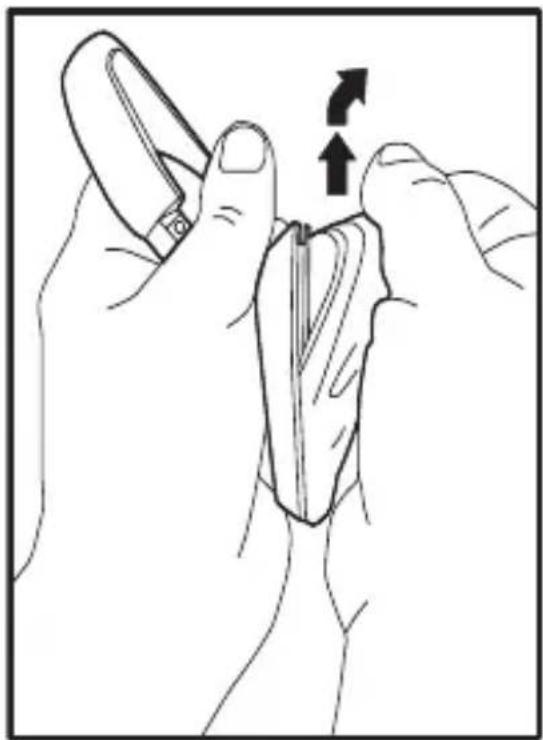
Remove earcup cushion:
- Grasp the earcup cushion securely.
2.Pull up and out to remove the earcup cushion.
Re-attach earcup cushion:
- Place the edge of the earcup cushion skirt into the slot behind the earcup flange.
- Work the remainder of the skirt into the slot all the way around the earcup.
natural_image
Illustration of hands holding a tool with an arrow indicating direction (no text or symbols)
text_image
Re-attachRemoveEnglish
Limited Warranty
Your Bose ^® headphones are covered by a limited warranty. Details of the limited warranty are provided on the product registration card that is included in the carton. Please refer to the card for instructions on how to register. Failure to register will not affect your limited warranty rights.
What you must do to obtain Limited Warranty Service: Return product, with proof of purchase from an authorized Bose dealer, using the following procedures:
- Contact the Bose organization in your country/region (visit Global.Bose.com/register for Bose contact information in your country/region) for specific return and shipping instructions;
2.Label and ship the product, freight prepaid, to the address provided by the Bose organization in your country; and - Place any necessary return authorization number prominently on the outside of the carton. Cartons not bearing a return authorization number, where required, will be refused.
Note: The serial number is located on the warranty card included in the carton.
| Names and Contents of Toxic or Hazardous Substances or Elements | ||||||
| Toxic or Hazardous Substances and Elements | ||||||
| Part Name | Lead (Pb) | Mercury (Hg) | Cadmium (Cd) | Hexavalent (CR(VI)) | Polybrominated Biphenyl (PBB) | Polybrominated diphenylether (PBDE) |
| PCBs | X | 0 | 0 | 0 0 | 0 | |
| Metal parts | X | 0 | 0 | 0 0 | 0 | |
| Plastic parts | 0 | 0 | 0 | 0 0 | 0 | |
| Speakers | X | 0 | 0 | 0 0 | 0 | |
| Cables | X | 0 | 0 | 0 0 | 0 | |
| O: Indicates that this toxic or hazardous substance contained in all of the homogeneous materials for this part is below the limit requirement in SJ/T 11363-2006. | ||||||
| X: Indicates that this toxic or hazardous substance contained in at least one of the homogeneous materials used for this part is above the limit requirement in SJ/T 11363-2006. | ||||||
English
©2011 Bose Corporation. No part of this work may be reproduced, modified, distributed, or otherwise used without prior written permission.
Apple, iPad, iPhone, iPod, iPod classic, iPod nano, iPod shuffle, iPod touch and MacBook are trademarks of Apple Inc., registered in the U.S. and other countries.

text_image
Made for iPod iPhone iPad“Made for iPod,” “Made for iPhone,” and “Made for iPad” mean that an electronic accessory has been designed to connect specifically to iPod, iPhone, or iPad, respectively, and has been certified by the developer to meet Apple performance standards. Apple is not responsible for the operation of this device or its compliance with safety and regulatory standards. Please note that the use of this accessory with iPod, iPhone, or iPad may affect wireless performance.
BOSE CORPORATION
USA
The Mountain.
Framingham, MA, 01701
888 757 9943
owners.Bose.com
Canada
9133 Leslie Street,
Suite 120, L4B 4N1
800 905 2177
www.Bose.ca
Australia
Unit 3/2 Holker
St.Newington NSW, 2127
1 800 061 046
www.Bose.com.au
Belgique/ Belgie
B-3700 Tongeren
012 390 800
www.Bosebelgium.be
China
2203-2305 22F, West Gate
Tower/1038 West Nanjing
Road-MeiLongzhen Plaza,
Shanghai, 200041
86 400 880 2266
www.Bose.cn
Denmark
2605 Brondby
4343 7777
www.Bose.dk
Deutschland
D-61381 Friedrichsdorf
0 6172 71040
www.Bose.de
France
78100 Saint Germain en
Laye
01 30 61 67 39
www.Bosefrance.fr
India
Shriram Bhartiya Kala
Kendra, 1 Copernicus
Marg, New Delhi, 100-001
1 800 11 2673
www.Boseindia.com
Ireland
Castlebury Road,
Carrickmacross, Co
Monaghan
42 967 1500
www.Bose.ie
Italia
Gillingham Business Park,
Gillingham, Kent, ME8 ONJ
0844 209 2630
Info_uk@Bose.com
Hong Kong
Suite 1203, Midas Plaza, 1
Tai Yau Street, San Po
Kong, Kowloon, Hong
Kong
852 2123 9000
support_hk@Bose.com
Finland
Kornetintie 6b Helsinki, 380
010 778 6900
www.Bose.fi
Poland
ul. Woloska 12
Warszawa, 02-675
+48 (0)22-8522928
www.Bose.pl
World Wide Web
www.Bose.com
www.Boseeurope.com
Made for

iPod

iPhone

iPad

text_image
346800-0010BOSE®
Better sound through research®
©2011 Bose Corporation, The Mountain, Framingham, MA 01701-9168 USA
AM346800 Rev.0