MKT 250 S-Line - Air Conditioning REMKO - Free user manual and instructions
Find the device manual for free MKT 250 S-Line REMKO in PDF.


User questions about MKT 250 S-Line REMKO
0 question about this device. Answer the ones you know or ask your own.
Ask a new question about this device
Download the instructions for your Air Conditioning in PDF format for free! Find your manual MKT 250 S-Line - REMKO and take your electronic device back in hand. On this page are published all the documents necessary for the use of your device. MKT 250 S-Line by REMKO.
USER MANUAL MKT 250 S-Line REMKO
Operation • Technology • Spare Parts
natural_image
White portable air conditioner unit with control panel and German text label (no readable document content)2 Safety Notices
2 Scope of Supply
3 Device Structure
3 Erecting the Device
3 Exhaust Air Conductance
4-5 Operation
4 Control Panel and Remote Control
4 "Mode" Selection
5 "Cool" Mode
5 "Dehumidify" Mode
5 "Fan" Mode
5 "Timer"
6 Functional Principle of the Cooling Process
5-7 Maintenance and Care
6 Cleaning the Filter
6 Draining the Condensate
7 Trouble Shooting
8 Taking the Device Out of Service
8 Warranty
9 Environment and Recycling
3-12 Technology
8 Electrical Wiring Diagram.
9 Installation Instructions for the Wall Bushing
10 Device Diagram
11 Spare Part List, Accessories
12 Technical Data
Safety Notices
Before delivery, this device was subjected to numerous material, function, and quality tests. Nevertheless, the device may present a danger if used by untrained personnel, improperly, or no according to regulation!

Caution
Operation other than as described in these instructions is prohibited. Nonobservance leads to the extinguishment of any liability and warranty claims.
Observe the following notices:
The device is not suited for outdoor operation.
The device may not be set up and operated in rooms at risk of explosion and in atmospheres containing oil, sulphur, or salt
Make sure it is at a suffi cien security distance to infl ammable objects
Do not place any objects on the device.
- Observe the minimum clearances (Fig. 2)
Do not insert any objects into air inlets and outlets
Erect the device on an even, stable surface. Never place it on its side (Fig. 3).
Operate the device only when it is upright
Do not expose the device to direct water spray
Operate the device only within its permissible operating limits (16 to 35°C)
Do not pull on or bend the mains supply line
- Protect all electrical lines of the device from damage, even from animals.
Select the extension lines of the mains supply line depending on the connected load of the device, the line length, and the intended use.
Do not lay lines under carpeting.
Never operate the device without an air filter - Never direct the air flow at people.
■ Never open the device housing as there is a danger of an electrical shock.
■ Work on the cooling system and the electrical equipment may be carried out only by an authorised specialist.
Transporting the device
Before transport, switch off the device and pull the mains plug.
Transport the device only in an upright position
We recommended that any condensate be drained using the condensate drain spout on the back side of the device before transport.
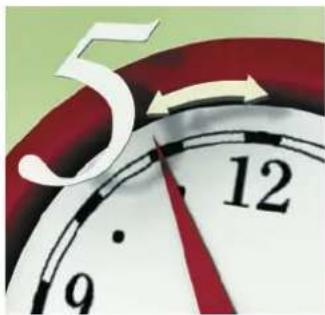
After every transport of the device, wait at least 5 minutes before recommissioning it (Fig. 4).

CAUTION

TIP

DANGER
Scope of Supply
1 MKT 240 air conditioner
1 Infrared remote control
2 Batteries (type AAA/1.5 V)
1 Air outlet hose with connection pipe adapter and window jet

text_image
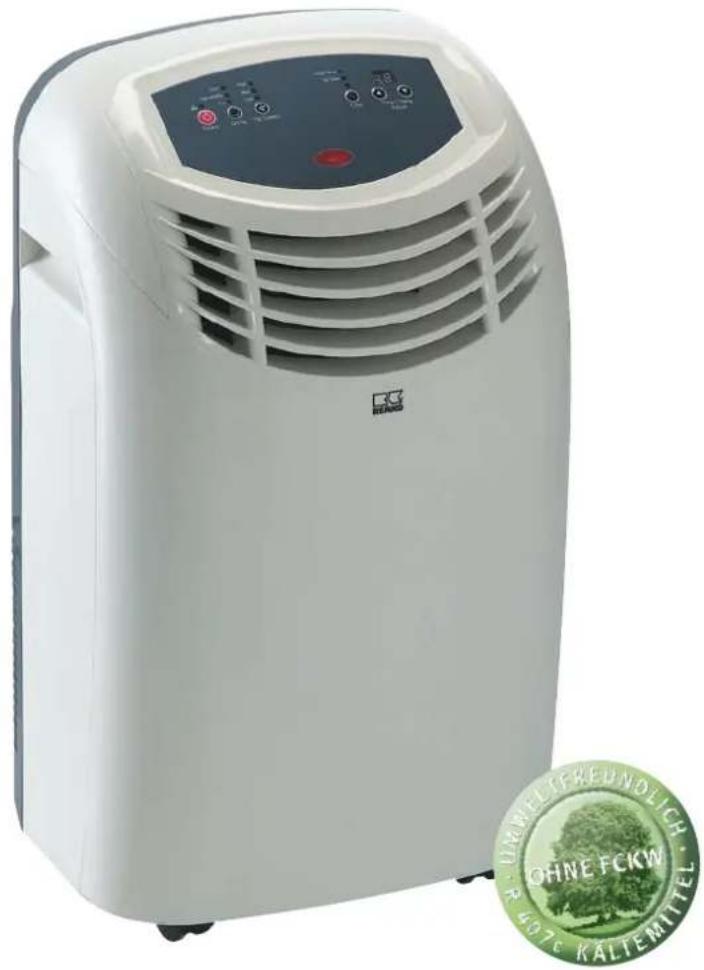
Control panel Infrared receiver Recessed grip Air directing plate fins Transport rollers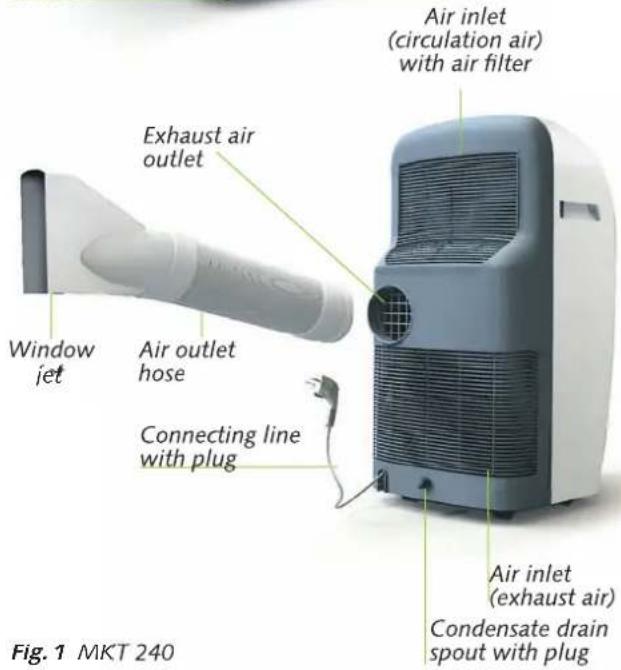
text_image
Air inlet (circulation air) with air filter Exhaust air outlet Window jet Air outlet hose Connecting line with plug Air inlet (exhaust air) Condensate drain spout with plug Fig. 1 MKT 240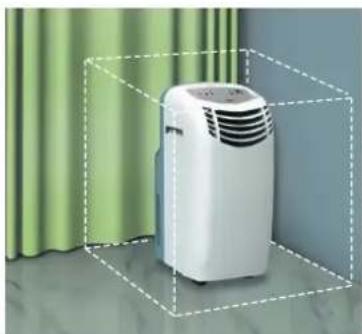
natural_image
White portable air conditioner unit enclosed in a dashed bounding box, placed against a green curtain background (no text or symbols visible)Fig.2
Minimum clearances
Side 500 mm
Front 500 mm
Rear 400 mm
10p 100 mn
Device Structure
Delivery
All devices are carefully packed before shipping. Please check the device immediately after delivery. Make a note of any damage or missing parts on the delivery note and inform the forwarding agent and your contractual partner. No warranty can be assumed for later complaints.
Erecting the device
Make sure that all air intake and air outlet openings are free; observe the minimum clearances (Fig. 2).
Erect the device on a solid, even foundation (Fig. 3)
Make sure that people and sensitive objects such as plants are not directly affected by the emerging air.
Connect the device to a properly installed plug socket (230V/50Hz) (Fig. 5)
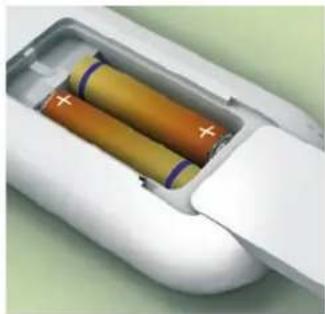
Insert the batteries into the remote control. To do so push up the cover on the back side of the remote control and insert the batteries while
observing the proper polarity. Observe the marking inside the compartment (Fig. 6).
Check whether the plug of the condensate drain spout has been provided and whether it has been properly inserted. There is otherwise a danger of water emerging.
Exhaust air conduction
During the operation of the air conditioner, the device creates humid exhaust air that must be conducted outside of the room so that the cooling effect can be maintained
Observe the following notices:
Plug the air outlet hose included in delivery onto the air outlet on the rear panel of the device.
- Lock both catches on the air outlet into both openings of the air outlet hose.
- Keep the air outlet hose as short as possible (max. length 1400 mm).
Always lay the air outlet hose with a constant upward incline from the device to the wall/window. Make sure it has
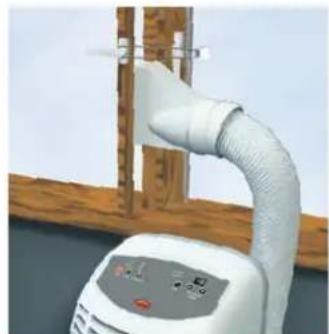
Fig. 8 Hanging the window jet into a pivot-hung

natural_image
Exterior view of a wall-mounted HVAC unit next to a wooden door opening, with a digital display nearby (no visible text or symbols)Fig.9 Secure the double-wing window using a holding strap.
natural_image
Close-up of a white industrial piping bag attached to a wall-mounted device, with no visible text or symbols.a wide curve radius (Fig. 7).
The air outlet hose may not be extended
Pivot-hung windows
- Connect the air outlet hose to the window jet and the device.
- Open the window and lay the fl at nozzle between the window trim and the window frame (Fig. 8..
Double-wing window
Lay the fl at nozzle between the wings, close the window as far as possible, and secure the wings with a holding strap (Fig. 9)
Wall bushing
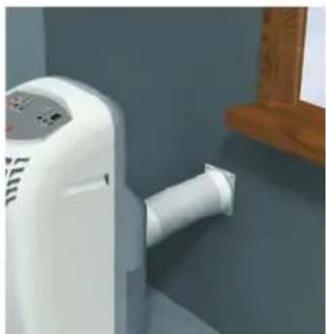
In case of permanent installation (s. p. 9, Fig. 19), the exhaust air from the device is conducted outside the room through the wall bushing (Fig. 10)
Fig. 10 Permanent installation with a wall bushing (accessory, not included in supply schedule)
natural_image
Close-up of a white air purifier attached to a wall-mounted pipe, next to a wooden door (no visible text or symbols)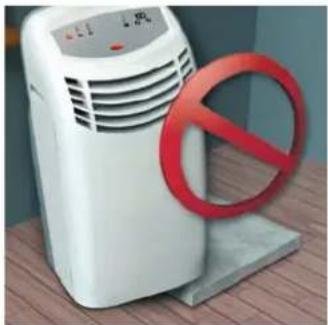
natural_image
White portable air purifier with red prohibition symbol on base, placed on wooden surface (no text or symbols)Fig. 3 Vertical erection on solid, even foundation
natural_image
Close-up of a red analog clock face showing time with hour and minute hands (no text or symbols beyond numbers)Fig. 4 Five-minute "wait"

natural_image
White electrical plug with a green arrow pointing to its side (no text or symbols visible)Fig. 5 230 V / 50 Hz
natural_image
Interior view of a white cylindrical battery pack with two colored batteries and a power cord (no text or symbols visible)Fig. € Remote control

text_image
Prohibition sign with red prohibition symbol over a pipe, indicating no smoking or anti-smokingAbb. 7 Attach the air outlet hose with a constant upward incline
Operation
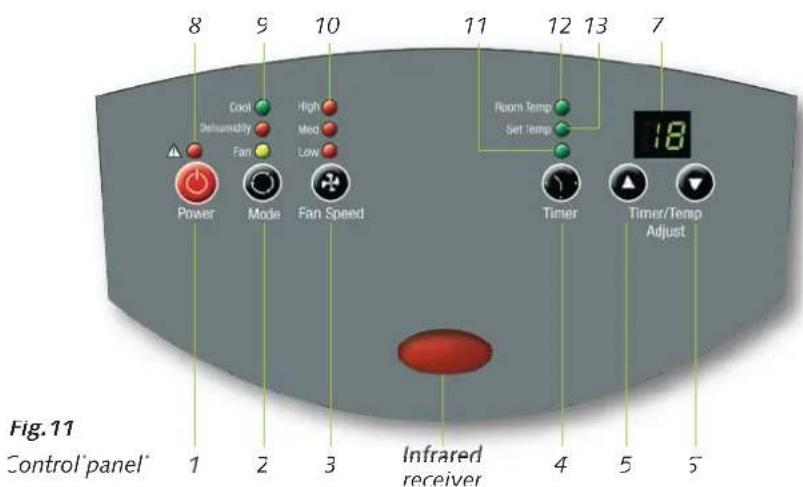
The device is operated comfortably using the control panel on the device or the infrared remote control. Keys with the same symbols have the same function.
- Point the infrared transmitter of the remote control at the infrared receiver on the control panel.
n order for the signal to be received without interference, there should be
text_image
8 9 10 11 12 13 7 Cool Delhumidity High Med Low Room Temp Set temp Power Mode Fan Speed Timer Timer/Temp Adjust 18 2 3 4 5 6 Infrared receiver Fig. 11 Control panel* Control panel* 1 2 3 4 5 6no objects between the remote control and the device (reach of approx. 5 m).
The proper reception of the signal is indicated acoustically.

text_image
Infrared transmitter 1 2 3 4 5 6 7 14 12Fig. 12 Infrared remote control
1 On/off "Power" buttor
2 "Mode" button
3 "Fan Speed" button
4 "Timer" button
b+6 Temperature/time setting buttons
"Timer/Temp. Adjust": 5 higher, 6 lower
7 Display
8 Red fault LED: Reservoir full (s. p. 7 Trouble Shooting;
An acoustic and an optical signal indicate that the float switch of the internal reservoir has shut down the operation of the device. The acoustic signal dies down after a short period of time, but the LED remains active.
9 Mode LED
Green: "Cool"
Orange: "Dehumidify"
Yellow: "Fan"
10 Orange LED for the fan speed, with high/medium/low speed "High"/"Med"/"Low"
11 Green LED for the time delay, "Timer
12 Green "Room Temp" LED
(If this LED lights up the current room temperature is shown in the display (7))
13 Green "Set Temp" LEL
14 "°C/°F" toggle button (only on the remote control)
"Mode" selection (2)
"Cool"
The device is used to cool the room. It filter and dehumidifi es the air and thus creates a pleasant room climate.
"Dehumidify"
n the "Dehumidify" mode, humidity is removed from the air.
“=an”
The device circulates the air, filters it, and creates an even air flow
"Cool" mode
- Attach the air outlet hose to the wall bushing or the window.
- Activate the device using the "Power" button (1).
- Press the "Mode" button (2) until the "Cool" LED (9) lights up.
- Select the fan setting using the "Fan Speed" button (3): "High" highest speed "Med" medium speed "Low" lowest speed
- If the "Room Temp." LED (12) lights up, the current room temperature is shown in the display (7).
- As soon as the (4/5/6) button is pressed, the display switches from the room temperature to the set temperature (LED 13 lights up) and shows the desired temperature for 15 seconds.
- Set the desired room temperature using the "Timer/Temp. Adjust" button (5/6). The up arrow (5) increases the set value shown in the display (7), while the down arrow (6) decreases it.
"Dehumidify" mode
- Attach the air outlet hose to the wall bushing or the window
- Activate the device using the "Power" button (1).
- Press the "Mode" button (2) until the "Dehumidify" LED (9) lights up; the fan is automatically switched to the "Med" or medium fan speed stage.
"Fan" mode
- Activate the device using the "Power" button (1).
- Press the "Mode" button (2) until the "Fan" LED (9) lights up.
- Select the fan setting using the "Fan Speed" button (3):
"High" highest speed
"Med" medium speed
"Low" lowest speed - The room temperature is not influenced and remains constant. For this reason, the temperature and time setting "Timer/Temp. Adjust" buttons (5/6) cannot be used.

"Timer" time delay (4)
You can turn the device on and off automatically using the timer. To do so, an activation/deactivation delay is programmed.
Automatic activation
- Activate the device using the "Power" button (1).
- Select the mode and make all settings for the desired mode.
- Deactivate the device using the "Power" button (1)
- Press the "Timer" button (4).
- Set the time using the "Timer/Temp. Adjust" button (5/6). Only whole hours can be entered.
- The LED (11) fl ashes
- The device activates automatically at the set time.
■ Automatic deactivation
- The device is running in the previously set mode.
- Press the "Timer" button (4).
- Set the remaining run time using the "Timer/Temp. Adjust" button (5/6).
Only whole hours can be entered. - The LED (11) fl ashes
- The device deactivates automatically at the set time.

TIP
"Cool" mode
You can achieve a pleasant room climate by selecting a set temperature that is a maximum of 4 to 7°C below the outdoor temperature.
text_image
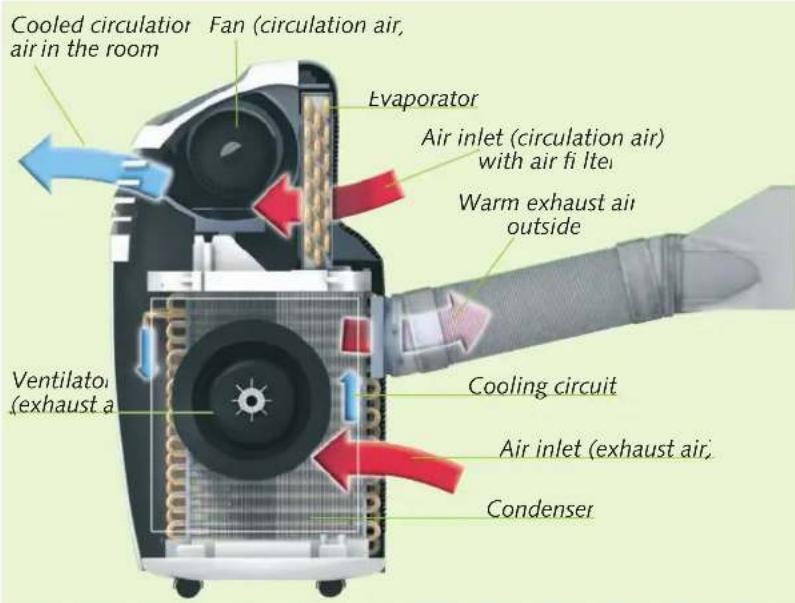
Cooled circulation Fan (circulation air, air in the room) Evaporator Air inlet (circulation air) with air fi lte Warm exhaust air outside Ventilator (exhaust a Cooling circuit Air inlet (exhaust air) CondenserFunctional principle of the cooling process
The air conditioner cools the air by removing heat from it. The fan (circulation air) conducts cooled air into the room. The heat that the device has removed from the air is conducted outside via the air outlet hose.
Humidity is removed from the air and drips as condensate from the evaporator onto the hot condenser and evaporates. Excess condensate drips from the condenser into a collection tray and conducted from there to the condenser again using a rotor, evaporated, and then conducted away with the exhaust air flow
Fig.13 Functional principle of the cooling process
Maintenance and Care
natural_image
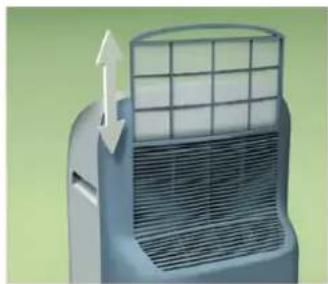
3D rendering of a car air conditioner unit with airflow direction arrow (no text or symbols)Fig.14 Removing the air fi lte upwards from the machine

natural_image
Close-up of a grid-patterned surface with a blue-handled tool extending from it (no text or symbols visible)
natural_image
Close-up of a metal pipe holding a transparent container with liquid, placed on a grid-patterned surface (no text or symbols visible)Fig. 15/16 Cleaning the air fi lte
With low cleaning effort, you can guarantee malfunction-free operation and a long service life
Use only mild, environment-friendly cleaning agents.
Regularly clean the ventilation slots.
Clean the device as required, but at least once a year, with a moist cloth and lukewarm water
Do not expose the device to direct water spray
CAUTION
Always turn off the device and pull the mains plug before cleaning!
Never operate the device without the air fi lte,
Cleaning the air fi lte
Clean the air fi Iter regularly but at least every 100 operating hours. In case of strongly contaminated air, the period is reduced accordingly
- Switch off the device and pull the mains plug.
- Remove the filter from the device (Fig. 14).
- Clean the filter using a vacuum cleaner or, in case of heavy soiling, carefully using lukewarm water (Fig. 15/16).
- Let the filter air-dry and their reinsert it
Draining the condensate
The condensate evaporates during operation and is then conducted outside with the exhaust air via the air outlet hose.
In case of extreme humidity, the device collects condensate in a reservoir. If the permissible level is exceeded, the red fault LED lights up and the device shuts down.
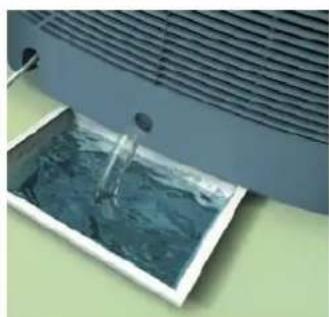
The reservoir must be emptied via the condensate drain spout (Fig. 17).
natural_image
Exterior view of a modern office building (no signage)Fig.17 Draining the condensal
Trouble Shooting
The device is not functioning and the control panel remains dark.
Make sure that
- the mains plug is properly inserted;
- there is no power failure;
• the mains voltage is present (fuse)
- Check the mains supply line for damage.
The device is not cooling properly.
- Check the mode: the "Cool" LED must be lit.
For an optimum cooling capacity, close the curtains and blinds. In addition, make sure the windows and doors are closed.
Make sure that
- the air outlet hose has been properly attached. It may not be bent, declining, or laid in a tight curve;
- no foreign bodies impair the exhaust or intake air supply (observe the minimum clearances);
- the air directing plate fi ns are free of soiling or foreign objects
- the set temperature is not too high (operating limits of the device: 16 to 35^ ).

DANGER
Contact your dealer or contractual partner if the device cannot be commissioned.
Never open the device housing.
Never perform work on the cooling circuit or the electrical equipment.

The device is not functioning and the "Timer" time de ay LED is fl asling.
- "Timer" time delay is programmed. Delete the timer setting.

The device is not functioning and
"E1" is being shown in the display.
The room temperature lies outside the operating range of 16 to 35°C. Wait until the room temperature lies in the working range (reduce the incident of sunlight and close windows and doors, if necessary).
The device does not react to the remote control.
Make sure that
- the batteries are functioning; change them if necessary;
- the batteries are inserted with the correct polarity (cf. the marking);
- there are no objects between the remote control and the device (reach of approx. 5 m).

The device deactivates automatically. The fault LED fl ashes and a signal sounds (reservoir full).
To drain the reservoir, proceed as follows
- Switch off the device and pull the mains plug.
- Place a fl at tray under the condensate drain spout and remove the plug (Fig. 17).
- After the condensate has drained, reinsert the plug firmly
Condensate is emerging.
Make sure that
- the device is on a horizontal foundation;
- the air outlet hose is properly attached;
- the plug is firmly inserted in the condensate drain spout.

text_image
Electrical wiring diagram Control panel Evaporator fan White Red Orange Yellow Condenser Mains plug Hi Med Lo JU7 L RL7U1 Brown I N F L COMF Red Red Red Blue Blue Blue Blue Condenser Compressor Evaporator fan Reservoir motor Microswitch Temperature sensor Technical dimensions and design subject to alterationFig. 18 Electrical wiring diagram.
Taking out of service
To take the device out of service, deactivate it first by pressing the "Power" button. Then pull the mains plug.
If the device must be shut down for a longer period of time, for example, for storage during the winter, observe the following:
- Let the machine run for about two hours in the "Fan" mode to dry the surface of the evaporator plate fi ns. In this way, the residual moisture is removed from the device and you can prevent unpleasant smells during recommissioning.
- Switch off the device, pull the mains plug, and roll up the mains supply line
- Drain the condensate (s. p. 6).
Warranty
The function of the device was precisely checked several times at the factory. If malfunctions that are not described in the "Trouble Shooting" chapter (s. p. 7) still appear, contact your dealer or contractual partner
In order for REMKO to assume the warranty, the "Warranty Certifi cate" included in delivery must be completely filled out and sent to REMKO GmbH & CO KG immediately after purchasing or commissioning
CAUTION
The manufacturer is not liable for damage that occurs due to nonobservance of manufacturer instructions or the legal requirements or due to unauthorised changes to the device.
Fig. 19
Installation diagram for the wall bushing

text_image
JAHWELTREUNDOLICH JAHWELTREUNDOLICH KALTEMITIEL
natural_image
Abstract green recycling symbol composed of three interlocking arrows forming a circular design (no text or symbols)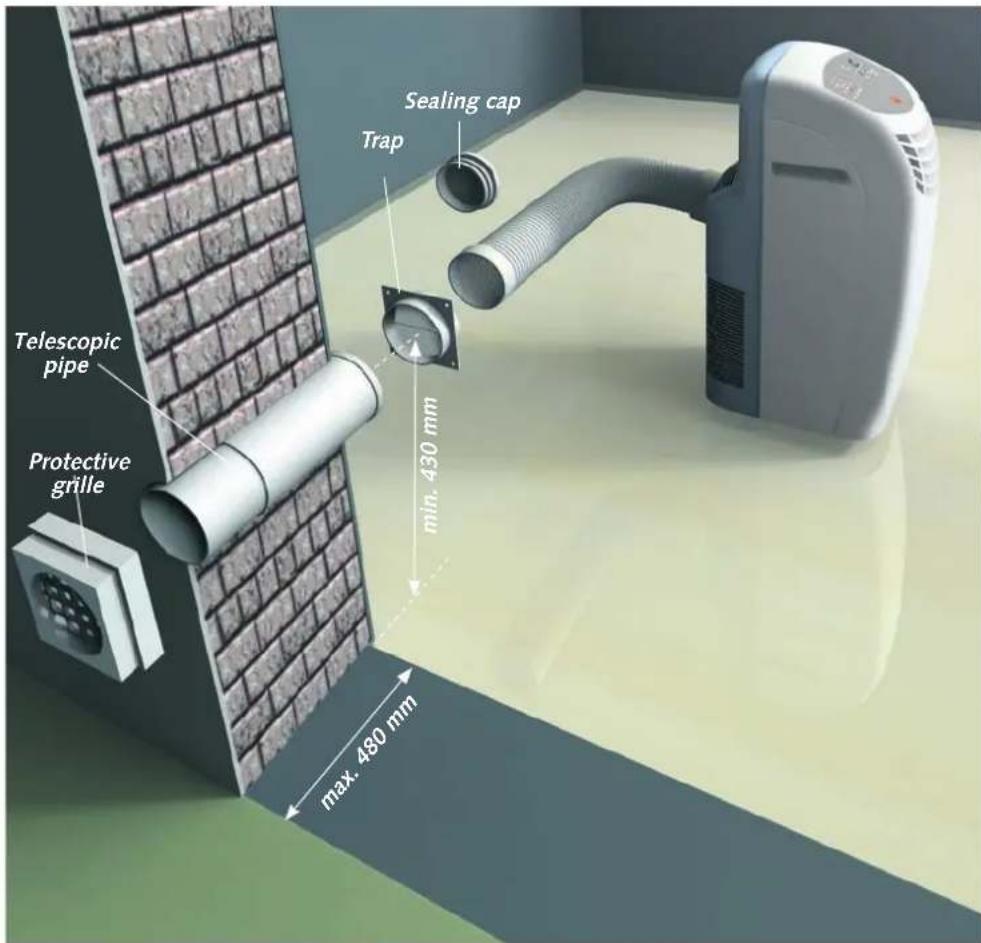
text_image
Telescopic pipe Protective grille Sealing cap Trap min. 450 mm max. 480 mmEnvironment and Recycling
■ Dispose of the packaging in an eco-friendly manner
Do not dispose of the device in domestic rubbish
Both the refrigerant and the plant parts are subject to special disposal conditions
The refrigerant used belongs to the chlorofl uorocarbon refrigerant group. It is released into the air due to damage to the cooling circuit, injury to the respiratory organs of people and animals will not occur
Installation Instructions for the Wall
■ Create a core hole in the outside wall (max.- wall thickness of 480 mm) with a diameter of at least 135 mm.
Take the minimum distance of 430 mm between the floor (mounting surface of the device) and the centre of the wall bushing into consideration.
- Insert the telescopic pipe into the wall bushing
To prevent cold bridges, insulate the telescopic pipe with suitable insulating material.
■ Wall the telescopic pipe into the core hole in such a way that it is fl ush to both sides of the wall.
Mount the protection grill on the outside of the wall (make sure it is protected from rain)
Fix the trap to the inside.
The "top" label on the trap must be legible from the inside
When taking the device out of service, for example, at the beginning of winter, close the opening of the trap using the sealing cap to prevent air circulation
text_image
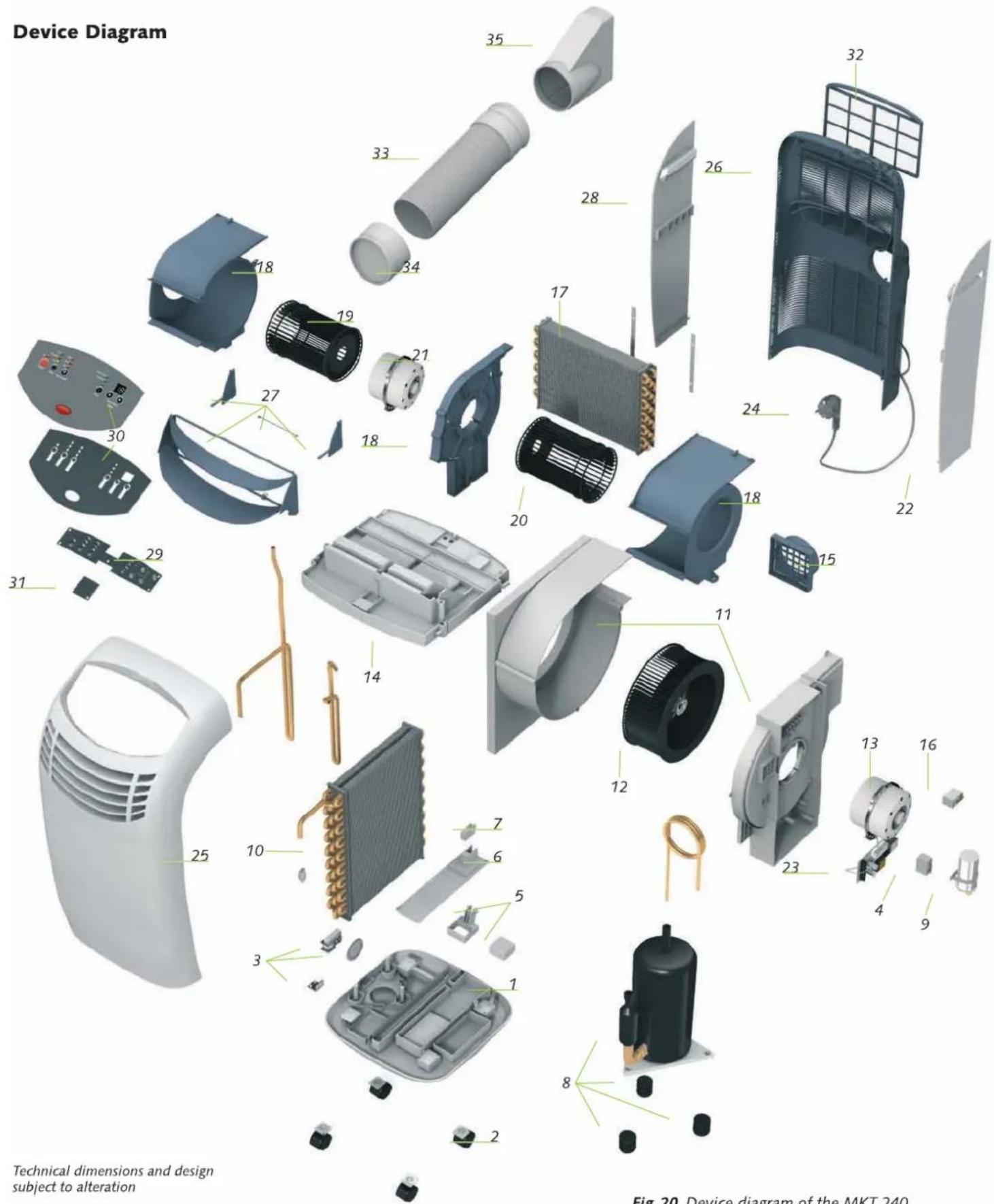
Device Diagram Technical dimensions and design subject to alteration Fig 20. Device diagram of the MKT 240Fig.20 Device diagram of the MKT 240
Spare Part List
| Fig. no. Designation | Ref. no. |
| 1 Unit bottom | 1106850 |
| 2 Transport roller | 1106851 |
| 3 Condensate motor with rotor | 1106852 |
| 4 Condenser 2.5 μF (evaporator fan) | 1106853 |
| 5 Float regulator (reservoir) | 1106854 |
| 6 Cover (reservoir) | 1106855 |
| 7 Microswitch (reservoir) | 1106856 |
| 8 Compressor, cpl. | 1106857 |
| 9 Condenser 2.5 μF (compressor) | 1106858 |
| 10 Evaporator | 1106859 |
| 11 Fan housing (exhaust air) | 1106860 |
| 12 Fan wheel (exhaust air) | 1106862 |
| 13 Fan motor (exhaust air) | 1106863 |
| 14 Condensate tray | 1106864 |
| 15 Exhaust air pipe adapter | 1106315 |
| 16 Condenser 1.5 μF | 1106316 |
| 17 Evaporator | 1106317 |
| 18 Fan housing, 3-pc. (circulation air) | 1106318 |
| 19 Fan wheel, left (circulation air) | 1106869 |
| 20 Fan wheel, right (circulation air) | 1106870 |
| 21 Fan motor (circulation air) | 1106871 |
| 22 Side wall, right | 1106872 |
| 23 Circuit board | 1106873 |
| 24 Mains supply line with plug | 1106874 |
| 25 Front wall | 1106875 |
| 26 Back wall | 1106876 |
| 27 Air outlet segment | 1106877 |
| 28 Side wall, left | 1106878 |
| 29 PCB with control | 1106879 |
| 30 Control panel | 1106880 |
| 31 Entry circuit | 1106881 |
| 32 Air fi liter | 1106883 |
| Air outlet hose, cpl. (Nos. 33, 34, 35) | 1106885 |
| 33 Air outlet hose | 1106886 |
| 34 Connection pipe adapter | 1106887 |
| 35 Window jet | 1106888 |
| Not shown Condensate drain spout with plug | 1106882 |
| Not shown Sensor (circulation air | 1106889 |
| Not shown Remote contrc | 1106884 |
Accessories
| Designation | Ref. no. |
| Wall bushing | 1613115 |
| (incl. telescopic pipe, protective grille, trap, sealing cap) |
When ordering spare parts, enter the serial of the device on the rating plate in addition to the Ref. no
REMKO GmbH & Co. KG
Air-conditioning and heating technology
Im Seelenkamp 12 · 32791 Lage, Germany
P.O. Box 1827 · 32777 Lage, Germany
Phone +49-5 2 32-606-130
Fax +49-5 232-606-260
E-mail export@remko.de
URL www.remko.de
Technical Data
REMKC MKT 240
| Device type | MKT 24C | |
| Nominal cooling capacity * kW 2.30 | ||
| Energy effi ciency class, cooling B | ||
| Energy effi ciency variable 2.42 | ||
| Dehumidifi cation capacity Max. l/h | 1.60 | |
| Application range (room air volume) Approx. n^3 | 70 | |
| Temperature setting range °C | 16 bis 32 | |
| Temperature operating limits °C | 16 bis 35 | |
| Refrigerant | R 407 C | |
| Refrigerant quantity kg | 0.77C | |
| Circulation air volume flow rate n^3/h 230/260/300 | ||
| Exhaust air volume flow rate Max. n^3/h | 36C | |
| Sound pressure level ** dB (A) | 49/51/55 | |
| Voltage supply V/Ph/Hz 230/1~/50 | ||
| Type of protection | IP 20 | |
| Power consumption kW 0.95 | ||
| Current consumption A 4.43 | ||
| Air outlet hose, length mm | 1400 | |
| Air outlet hose, diameter mm 125 | ||
| Dimensions, height mm 450 | ||
| Dimensions, width mm 770 | ||
| Dimensions, depth mm 430 | ||
| Weight kg | 27.00 | |
| Ref. no. | 1612240 | |
* Room temperature dry-bulb 35°C / wet-bulb 24°C
** Distance 1 m