MXD260 - Air-conditioner REMKO - Free user manual and instructions
Find the device manual for free MXD260 REMKO in PDF.


User questions about MXD260 REMKO
0 question about this device. Answer the ones you know or ask your own.
Ask a new question about this device
Download the instructions for your Air-conditioner in PDF format for free! Find your manual MXD260 - REMKO and take your electronic device back in hand. On this page are published all the documents necessary for the use of your device. MXD260 by REMKO.
USER MANUAL MXD260 REMKO
natural_image
Exterior view of a black and silver air conditioning unit with ventilation grilles (no text or symbols visible)Contents
| Safety notes | 4 |
| Environmental protection and recycling | 4 |
| Warranty | 4 |
| Intended use | 5 |
| Transport and packaging | 5 |
| Equipment description | 5 |
| Combinations | 6-7 |
| Operation | 8-14 |
| shut-down | 15 |
| Care and maintenance | 15-16 |
| Troubleshooting and customer service | 17-18 |
| Installation instructions for qualified personnel | 19 |
| Installation | 19-20 |
| Condensate drain | 20-21 |
| Electrical connection | 21 |
| Electrical connection diagram and choice of unit | 22 |
| Electrical circuit diagram | 22 |
| Commissioning | 23 |
| Unit dimensions | 23 |
| Exploded view | 25 |
| Spare parts list | 25 |
| Technical data | 26 |
| EC-Declaration of Conformity | 27 |
Safety notes
Carefully read the operating instructions before commissioning the equipment for service. It provides useful tips and information as well as hazard warnings to prevent injury or material damage. Failure to follow the directions in this manual can result in endangerment to persons, the environment and the equipment itself and will void any claims for liability.
- Keep this manual and the refrigerant data sheet near the unit.
The unit should be set up and installed only by qualified personnel.
The set-up, connection, and operation of the unit and its components must be in accordance with the operating conditions stipulated in this manual and comply with all applicable local regulations.
■ Mobile units must be set up securely on suitable surfaces and in an upright position. Stationary units must be permanently installed for operation.
■ Modification of equipment and components supplied by REMKO is not permitted and can cause malfunctions.
■ Equipment and components may not be operated in areas where there is an increased risk of damage. Observe the minimum clearances.
■ The electrical supply is to be adapted to the requirements of the equipment.
The operational safety of equipment and components is only assured if they are fully assembled and used as intended. Safety devices may not be modified or bypassed.
- Do not operate equipment or components with obvious defects or signs of damage.
All housing parts and openings in the device, e.g. air inlets and outlets, must be free of foreign objects, fluids, or gases.
The equipment and components must be kept an adequate distance from flammable, explosive, combustible, abrasive and dirty areas or atmospheres.
■ Touching some parts of the equipment can result in burns or other injury.
Installation, repair and maintenance work may be carried out only by authorised specialists. Visual inspections and cleaning can be performed by the operator as long as power is disconnected from the equipment.
To preclude any danger from the equipment, take appropriate hazard-prevention measures when performing installation, repair or maintenance work or cleaning the equipment.
The equipment or components are not to be exposed to any mechanical stresses, extreme levels of humidity or direct sunlight.

Environmental protection and recycling
Disposal of packaging
All products are packed for transport in environmentally friendly materials. Make a valuable contribution to reducing waste and sustaining raw materials. Only dispose of packaging at approved collection points.

Disposal of equipment and components
Only recyclable materials are used in the manufacture of the devices and components.
Help protect the environment by ensuring that the devices or components (for example batteries) are not disposed in household waste, but only in accordance with local regulations and in an environmentally safe manner, e.g. using certified firms and recycling specialists or at collection points.
Warranty
Prerequisites for possible warranty claims are that the ordering party or their representative has completely filled out the "warranty registration card" and commissioning report included with the unit at the time when the equipment was purchased and first put into operation and returned it to:
REMKO GmbH & Co. KG and placing the unit in service.
The warranty conditions are listed in the "General terms and conditions". Furthermore, only the parties to a contract can strike special agreements beyond these conditions. For this reason please contact your contractual partner in the first instance.
Intended use
Depending on the model, the equipment and the additional fittings with which it is equipped is only intended to be used as an air-conditioner for the purpose of cooling or heating the air in an enclosed room.
Different or additional use shall not be classed as intended use. The manufacturer/supplier assumes no liability for damages arising from an unintended use of the equipment. The user bears the sole risk in such cases.
Using the equipment as intended also includes working in accordance with the operating manual and installation instructions and complying with the maintenance requirements.
Transport and Packaging
The equipment is shipped in sturdy transport packaging. Immediately check the equipment on delivery and make note of any damage or missing parts on the delivery note and inform the forwarding agent and your contractual partner.
Warranty claims at a later date will not be accepted.
Equipment description
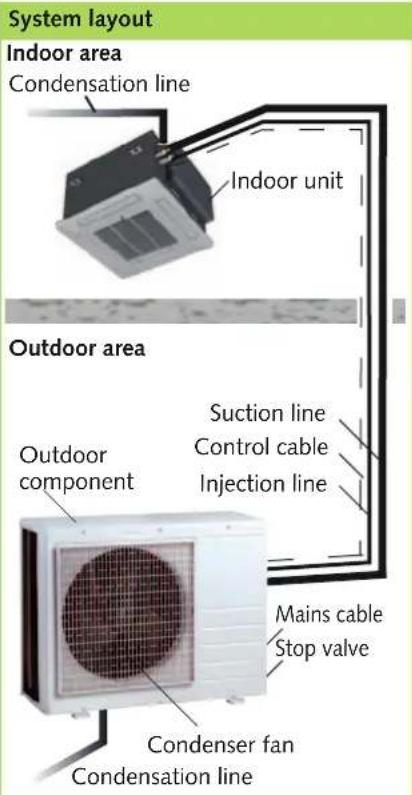
The indoor unit on the split-design combined room air conditioning units serves to extract heat from the indoor room being cooled. The outdoor unit then expels this heat to the outside.
If combined heating/cooling units are operated as heaters, the heat absorbed by the outdoor unit can be discharged by the indoor unit into the room being heated.
The unit is designed for installation high up on indoor walls. Operation takes place using an infrared remote control.
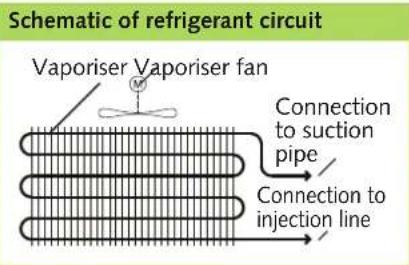
The indoor unit consists of a fin vaporiser, vaporiser fan, controller and condensation pan. The indoor unit can be combined with REM-KO outdoor units of series MVT 600/900/950/1050 DC with sufficient cooling output. The outdoor component is controlled via the controller of the indoor unit.
Condensation pumps are available as an accessory.
text_image
System layout Indoor area Condensation line Indoor unit Outdoor area Outdoor component Suction line Control cable Injection line Mains cable Stop valve Condenser fan Condensation lineRefrigerant pipes are used to connect the indoor unit to the outdoor unit.
text_image
Schematic of refrigerant circuit Vaporiser Vaporiser fan Connection to suction pipe Connection to injection lineREMKO MXD
Combinations
Interior units
Indoor units MXD 200-520 can be combined with MVT series outdoor units.
The following combinations are possible.
Outdoor unit MVT 600 DC
| MXD200 | MXD260 | MXD350 | |
| One indoor unit | |||
| Combination 1 | ● | ||
| Combination 2 | ● | ||
| Combination 3 | ● | ||
| Two indoor units | |||
| Combination 4 | ● ● | ||
| Combination 5 | ● ● | ||
| Combination 6 | ● | ● | |
| Combination 7 | ● | ● | |
| Combination 8 | ● | ● | |
Outdoor unit MVT 900 DC
| MXD200 | MXD260 | MXD350 | |
| One indoor unit | |||
| Combination 1 | ● | ||
| Combination 2 | ● | ||
| Combination 3 | ● | ||
| Two indoor units | |||
| Combination 4 | ● ● | ||
| Combination 5 | ● ● | ||
| Combination 6 | ● ● | ||
| Combination 8 | ● | ● | |
| Combination 9 | ● | ● | |
| Three indoor units | |||
| Combination 13 | ● ● ● | ||
| Combination 14 | ● ● ● | ||
| Combination 15 | ● ● ● | ||
| Combination 16 | ● ● ● | ||
| Combination 17 | ● ● ● | ||
| Combination 18 | ● ● ● | ||
| Combination 19 | ● ● ● | ||
| Combination 20 | ● ● ● | ||
| Combination 21 | ● | ● | |
Outdoor unit MVT 950 DC Outdoor unit MVT 1050 DC
| MXD200 | MXD260 | MXD350 | MXD520 | |
| One indoor unit | ||||
| Combination 1 | ● | |||
| Combination 2 | ● | |||
| Combination 3 | ● | |||
| Combination 4 | ● | |||
| Two indoor units | ||||
| Combination 5 | ●● | |||
| Combination 6 | ●● | |||
| Combination 7 | ●● | |||
| Combination 8 | ● | ● | ||
| Combination 9 | ● | ● | ||
| Combination 10 | ● | ● | ||
| Combination 11 | ● | ● | ||
| Combination 12 | ● | ● | ||
| Combination 13 | ● | ● | ||
| Combination 14 | ●● | |||
| Three indoor units | ||||
| Combination 15 | ●●● | |||
| Combination 16 | ●●● | |||
| Combination 17 | ●●● | |||
| Combination 18 | ●●● | |||
| Combination 19 | ●●● | |||
| Combination 20 | ●●● | |||
| Combination 21 | ●●● | |||
| Combination 22 | ●●● | |||
| Combination 23 | ●●● | |||
| Combination 24 | ●●● | |||
| Combination 25 | ●●● | |||
| Combination 26 | ●●● | |||
| Combination 27 | ●●● | |||
| Combination 28 | ●●● | |||
| Combination 29 | ●●● | |||
| Four indoor units | ||||
| Combination 31 | ●●●● | |||
| Combination 32 | ●●●● | |||
| Combination 33 | ●●●● | |||
| Combination 34 | ●●●● | |||
| Combination 35 | ●●●● | |||
| Combination 36 | ●●●● | |||
| Combination 37 | ●●●● | |||
| Combination 38 | ●●●● | |||
| Combination 39 | ●●●● | |||
| Combination 40 | ●●●● | |||
| Combination 41 | ●●●● | |||
| Combination 42 | ●●●● | |||
| MXD200 | MXD260 | MXD350 | MXD520 | |
| One indoor unit | ||||
| Combination 1 | ● | |||
| Combination 2 | ● | |||
| Combination 3 | ● | |||
| Combination 4 | ● | |||
| Two indoor units | ||||
| Combination 5 | ●● | |||
| Combination 6 | ●● | |||
| Combination 7 | ●● | |||
| Combination 8 | ● | ● | ||
| Combination 9 | ● | ● | ||
| Combination 10 | ● | ● | ||
| Combination 11 | ● | ● | ||
| Combination 12 | ● | ● | ||
| Combination 13 | ● | ● | ||
| Combination 14 | ●● | |||
| Combination 15 | ● | ● | ||
| Combination 16 | ● | ● | ||
| Combination 17 | ● | ● | ||
| Combination 18 | ●● | |||
| Three indoor units | ||||
| Combination 19 | ●●● | |||
| Combination 20 | ●●● | |||
| Combination 21 | ●●● | |||
| Combination 22 | ●●● | |||
| Combination 23 | ●●● | |||
| Combination 24 | ●●● | |||
| Combination 25 | ●●● | |||
| Combination 26 | ●●● | |||
| Combination 27 | ●●● | |||
| Combination 28 | ●●● | |||
| Combination 29 | ●●● | |||
| Combination 30 | ●●● | |||
| Combination 31 | ●●● | |||
| Combination 32 | ●●● | |||
| Combination 33 | ●●● | |||
| Combination 34 | ●●● | |||
| Combination 35 | ●●● | |||
| Combination 36 | ●●● | |||
| Four indoor units | ||||
| Combination 37 | ●●●● | |||
| Combination 38 | ●●●● | |||
| Combination 39 | ●●●● | |||
| Combination 40 | ●●●● | |||
| Combination 41 | ●●●● | |||
| Combination 42 | ●●●● | |||
| Combination 43 | ●●●● | |||
| Combination 44 | ●●●● | |||
| Combination 45 | ●●●● | |||
| Combination 46 | ●●●● | |||
| Combination 47 | ●●●● | |||
| Combination 48 | ●●●● | |||
| Combination 49 | ●●●● | |||
| Combination 50 | ●●●● | |||
| Combination 51 | ●●●● | |||
| Combination 52 | ●●●● | |||
| Combination 53 | ●●●● | |||
| Combination 54 | ●●●● | |||
| Combination 55 | ●●●● | |||
REMKO MXD
Operation
The indoor unit is easily operated using the standard infrared remote control. The indoor unit beeps to acknowledge the correct transmission of data. If it is not possible to program the indoor unit using the remote control, it can also be manually operated.
Manual operation
The indoor units can be started manually.
Press the RESET button on the receiver unit of the cover to activate automatic mode. In manual mode, the following settings apply:
Cooling mode: 24 °C,
Fan speed AUTO
Heating mode: 26 °C,
Fan speed AUTO
Pressing any button on the infrared remote control interrupts manual mode.
Display on the indoor unit
The lit LED indicators show the settings.
LED H red = high fan speed
LED M yellow = medium fan speed
LED L green = low fan speed
Display on the indoor unit

text_image
UNIT FOR RECEIVING SIGNALS FROM THE REMOTE CONTROL OPERATION THERN DEF/TAN ALARM Operation indicator Timer indicator Fan Defrost Alarm indicatorinfrared remote control
The infrared remote control sends the programmed settings over a distance of up to 6 m from the receiver of the indoor unit. Data will only be received correctly if the remote control is pointed at the receiver and no objects obstruct the transmission path.
First insert the batteries supplied on delivery
(2 x type AAA) into the remote control. To do so, pull off the flap of the battery compartment and insert the batteries according to their polarity (see markings).
Maximum distance

text_image
max. 6 m
CAUTION
Faults are indicated in code (see chapter Troubleshooting and Customer service).

NOTE
Immediately replace flat batteries with a new set, otherwise there is a risk of leakage. It is recommended that the batteries be removed if the equipment is shut down for long periods.
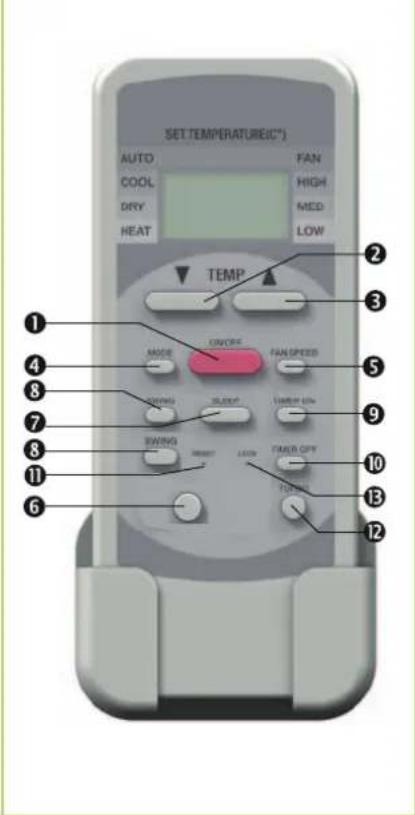
Keys on the remote control
text_image
SET TEMPERATURE(°C) AUTO COOL DRY HEAT FAN HIGH MED LOW TEMP ① ② ③ ④ ⑤ ⑥ ⑦ ⑧ ⑨ ⑩ ⑪ ⑫ ⑬ TEMP OFF TURINGKeys on the remote control
① "ON/OFF"key
Press this key to operate the unit.
② "▼" key
With this key, the desired temperature can be decreased to 17^ C.
③ "▲" key
With this key, the desired temperature can be increased up to 30^ C.
④ "MODE" key
Press this key to select the operating mode. The indoor unit has 4 modes:
-
Automatic mode In this mode, the unit works in cooling or in heating mode.
-
Cooling mode In this mode, the warm air in the room is cooled down to the desired temperature.
-
Dehumidification mode In this mode the room is mainly dehumidified and the adjusted temperature is maintained.
-
Heating mode In this mode, the warm air in the room is warmed to the desired temperature.
-
Air circulation mode In this mode, the air in the room is circulated with no change in temperature.
⑤ "FAN SPEED" key
Press this key to set the desired fan speed. 4 speeds are available: Automatic, high, medium and low fan speed.
⑥ "Follow me" function key
With this key, the sensing of the room temperature is moved from the interior unit to the remote control.
The temperature measured on the remote control is then transmitted to the interior unit in certain intervals.
⑦ Key "SLEEP"
Pressing this key will automatically increase or decrease the target temperature by 1 °C every hour in cooling and heating mode respectively.
⑧ Key „SWING“
This key directly activates the oscillating function of the fins for better air distribution in the room.
⑨ "TIMER ON" key
This key serves to program the automatic shut-off time in 0.5 h intervals within the following 24 hours.
⑩"TIMER OFF" key
This key serves to program the automatic shut-off time in 0.5 h intervals within the following 24 hours.
⑪ "RESET" key
This key resets the remote control to its factory default configuration.
⑫ "TURBO"key
The TURBO function activates the maximum fan speed and the compressor.
⑬ "Lock" key
This key can be used to lock the keys on the remote control. This allows unintentional adjustment to be prevented.
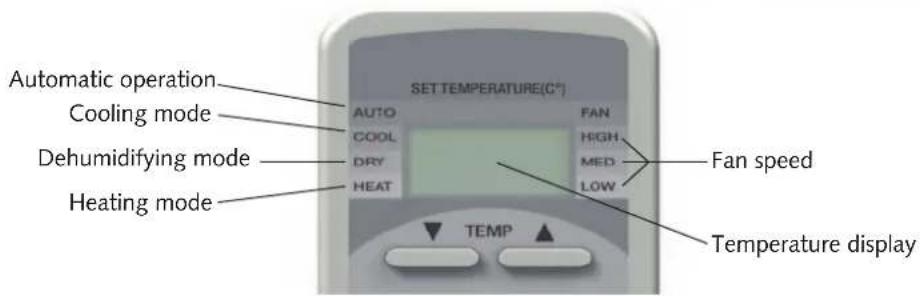
Remote control display
Indicator arrows will be displayed according to the settings.
Display on indoor unit
text_image
Automatic operation Cooling mode Dehumidifying mode Heating mode SET TEMPERATURE(C²) AUTO COOL DRY HEAT FAN HIGH MED LOW Fan speed TEMP Temperature displayKey functions
A symbol is shown on the display to indicate that the settings are being transferred.
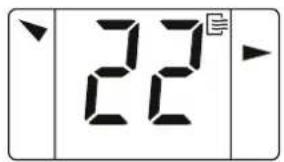
Remote control on/off
text_image
22The remote control's on/off function is shown at the upper right of the remote control by a "wind symbol".
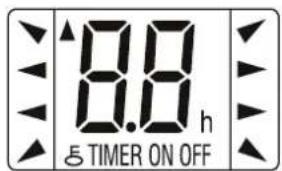
RESET key
text_image
8.8 h 5 TIMER ON OFFThe remote control can be reset by pressing the RESET key (recessed key).
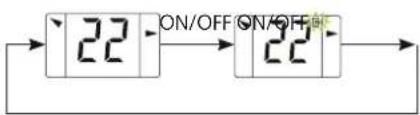
ON/OFF key

text_image
22Your air-conditioner is activated and deactivated by pressing the ON / OFF key. The programmed settings and adjustment values before the unit was turned off will appear in the display.
text_image
22 ON/OFF ON/OFF▲/▼ Keys
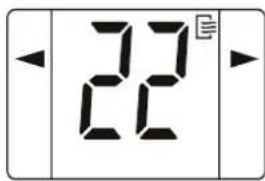
text_image
22Using the key, the target temperature can be adjusted up or down by 1^ C. The temperature range lies between 17^ C and 30^ C
Cooling mode

flowchart
graph LR
    A["22"] --> B["20"]
    B --> C["▲"]
Automatic mode

flowchart
graph LR
    A["22"] --> B["20"]
    B --> C["22"]
MODE key

text_image
20Use the MODE key to select between individual operating modes. A total of 5 modes are available:
- Automatic cooling or heating operation
- Cooling primarily summer mode
- Dehumidifying operating mode for summer or winter
- Heating primarily winter mode
- Circulation air circulation only

flowchart
graph LR
    A["Automatic Cooling Dehumidifying Heating"] --> B["20"]
    B --> C["22"]
    C --> D["22"]
    D --> E["MODE MODE"]
    E --> F["22"]
    F --> G["Air circulation"]
AUTOMATIC MODE
text_image
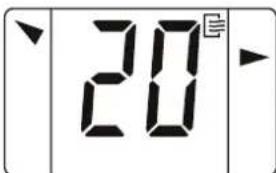
20°In automatic mode, the controller autonomously selects between heating, circulation or cooling mode based on the room temperature Tr and the selected target value Ts. The target value can be adjusted between 17°C and 30°C by means of the ▲/▼ keys. The fan speed is selected automatically.

text_image
22 MODE 20 AUTOMATICOperational sequence:
If Tr is less than 1K as Ts, then operating mode "Heating" is selected.
If Tr is greater than 2K as Ts, then operating mode "Cooling" is selected.
If Tr is between Ts -1K as Ts +2K, then operating mode "Circulation" is selected.
If after the compressor is shut down and not required for more than 15 mins. within an operating mode, then, in the event that the room temperature deviates, the corresponding mode heating, cooling or circulation will be selected again.
Cooling MODE
In cooling mode, the air in the room is cooled down to the adjusted nominal temperature. The desired room temperature is set with the ▲/▼ keys in 1 °C increments. If the room temperature is 0.5 °C above the selected nominal temperature, then the interior unit starts to cool down the air in the room. If the temperature falls to approx. 1 °C below the set room temperature, the controller will switch off the cooling function. To protect the compressor, the controller only turns cooling on again after a waiting period of 3 minutes.
MODE
COOLING
OPERATION
Dehumidification MODE
It is recommended that the target temperature be set to 24^ C in dehumidifying mode. Due to the low temperature of the refrigerant, the dew point of the air at the condenser is undercut. The excess moisture in the air is condensed by the vaporiser, the room is dehumidified.
MODE
DEHUMIDIFICATION MODE
HEATING Mode
In the heating mode, you can heat the room in spring or fall. The selected room temperature is set using the ▲/▼ keys in 1 °C increments. If the room temperature is 1 °C below the selected target temperature, the indoor unit starts to heat the air in the room. If the set room temperature is exceeded by approx. 1 °C, the controller will switch off the heater function. To protect the compressor, the controller will wait 3 minutes before switching on the heating mode again.
MODE
HEATING
OPERATION
©
REMKO MXD
SLEEP key

text_image
22A programming function is activated using this key, which increases the target temperature in cooling mode by 1^ C after one hour and by 2^ C after 2 hours. In heating mode, the target temperature is decreased by 1^ C after one hour by 2^ C after 2 hours. The unit switches off automatically after 8 hours.
TIMER Key
text_image
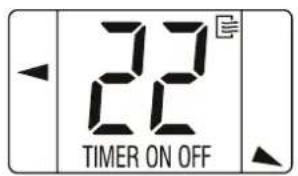
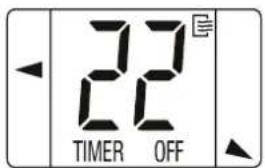
22 TIMER ON OFFThe activation and switch-off time can be programmed with this key. The timer is activated and the time display is switched off by pressing the Timer on or Timer off key. The timer display on the indoor unit illuminates. The desired activation or deactivation time is set by pressing the Timer On or Timer Off keys. When the programmed time has been reached, the device automatically switches on or off. If the indoor unit is automatically switched on, the mode, temperature and fan speed for the last setting are activated. Deleting the preset on and off time early is carried out by pressing the ON/OFF key. The timer display on the interior unit turns off.
TIMER ON Key

text_image
22 TIMER ON
flowchart
graph LR
    A["22s"] -->|Timer On| B["0.0h"]
    B -->|Timer On| C["0.5h"]
    C -->|3 sec.| D["22s"]
TIMER OFF Key
text_image
22 TIMER OFF
flowchart
graph LR
    A["22"] -->|Timer Off| B["0.0 h TIMER OFF"]
    B -->|Timer Off| C["0.5 h TIMER OFF"]
    C -->|3 sec.| D["22"]
Shut-down
Temporary shut-down
- Allow the indoor unit to run for 2 to 3 hours in air circulation mode or in cooling mode at the maximum temperature setting in order to remove any residual moisture from the unit.
- Shut down the system using the remote control.
- Switch off the voltage supply to the unit.
- Check the unit for visible signs of damage and clean it as described in the chapter "Care and maintenance".
Permanent shut-down
Ensure that equipment and components are disposed of in accordance with the applicable regulations, e.g. through authorised disposal and recycling specialists or at collection points.
REMKO GmbH & Co. KG or your contractual partner will be pleased to provide a list of certified firms near you.
Care and maintenance
Regular care and observation of some basic points will ensure trouble-free operation and a long service life.

CAUTION
Prior to performing any work, ensure the equipment is isolated from the voltage supply and secured to prevent accidental switch-on!

NOTE
Statutory regulations require an annual leak test for the refrigerant circuit in relation to the refrigerant medium fill level. Inspection and documentation is to be carried out by specialist technicians.
Care
■ Ensure the unit is protected against dirt, mould and other deposits.
Clean the unit using a damp cloth. Do not use any caustic, abrasive or solvent-based cleaning products. Do not use a jet of water.
- Clean the fins on the unit prior to long shutdown periods.
Maintenance
We recommend a maintenance contract with annual maintenance interval with an appropriate specialist company.

TIP
This ensures the operational reliability of your system!
Cleaning the cover of the indoor unit
- Disconnect the supply voltage to the equipment.
- Open and fold down the air inlet guard on the cover. The filter is held in place by the flaps screwed in at the side of the guard (Page 16, Fig. 1).
- Clean the guard and cover using a soft, damp cloth.
- Switch the supply voltage back on.
| Type of taskChecks/Maintenance/Inspections | Commissioning | Monthly | Half-yearly | Yearly |
| General | ● | ● | ||
| Measure voltage and current | ● | ● | ||
| Check function of compressor/fans | ● | ● | ||
| Dirt on condenser/vaporiser | ● | ● | ||
| Check refrigerant fill quantity | ● | ● | ||
| Check condensation drain | ● | ● | ||
| Test insulation | ● | ● | ||
| Check moving parts | ● | ● | ||
| Sealing test for refrigerant circuit | ● | ● 1) |
1) See note
Air filter for indoor unit
Clean the air filter at intervals of no more than two weeks. Reduce this interval if the air is especially dirty.
Cleaning the filter
- Disconnect the supply voltage to the equipment.
-
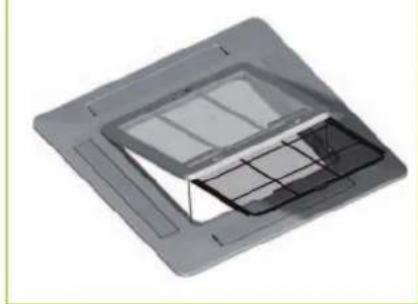
Open and fold down the air inlet guard on the cover. The filter is held in place by the flaps screwed in at the side of the guard (Fig. 1).
-
Tilt the filter to lift it out (Fig. 1).
-
Clean the filter using a normal vacuum cleaner (Fig. 2). To do so, turn the dirty side upward.
-
Dirt can also be removed by carefully cleaning with lukewarm water and mild cleaning agents. To do so, turn the dirty side downward (Fig. 3).
-
When using water, allow the filter dry out properly in air before replacing it in the unit.
-
Carefully insert the filter. Make sure it is seated correctly.
-
Close the cover as described above but in reverse order.
-
Switch the supply voltage back on.
-
Switch the unit on again.
Cleaning the condensation pump
The indoor unit includes a built-in condensation pump, for pumping the condensation to a drain at a higher level.
The pump is more or less maintenance free. The condensation pipes should be checked for dirt at regular intervals. Clean them as required.
If an external pump is also used, observe the maintenance and care instructions given in the separate operating manual.
1 Pull out the filter
natural_image
3D rendering of a square electronic component with internal grid structure (no text or symbols)2 Cleaning using a vacuum cleaner

natural_image
Close-up of a brush applying paint to a grid-patterned surface (no text or symbols visible)3 Cleaning with lukewarm water

natural_image
3D illustration of a pipe fitting onto a grid-patterned surface (no text or symbols)Troubleshooting and customer service
The equipment and components are manufactured using state-of-the-art production methods and tested several times to verify their correct function. If malfunctions should occur, please check the functions as detailed in the list below. For installations with an indoor unit and outdoor unit, refer to the chapter "Troubleshooting and customer service" in both manuals. Please inform your dealer if the unit is still not working correctly after all the functional checks have been performed!
Malfunctions
| Fault Possible cause Checks Remedy | |||
| The unit does not start or switches itself off off. | Power outage, undervoltage, defective mains fuse / main switch in off position | Are all other electrical installations functioning correctly? | Check voltage if necessary wait until turned on again. |
| Damaged mains cable | Are all other electrical installations functioning correctly? | Repair by a specialist | |
| Wait time after switching on is too short | Have approx. 5 minutes elapsed since the restart? | Schedule longer waiting periods | |
| Temperature outside operating range. | Are the fans in the indoor unit and outdoor component working correctly? | Take into account the temperature range for the indoor unit and outdoor component | |
| Electrical surges caused by thunderstorms | Have there been lightning strikes in the area recently? | Switch off the mains breaker and switch it back on. Have it checked by a specialist | |
| Fault in external condensation pump | Did the pump shut down due to a fault? | Check and if necessary clean the pump | |
| The unit does not respond to the remote control | Transmission distance too far / receiver affected by interference | Does the indoor unit beep when pressing a button? | Reduce the distance to less than 6 m or change position |
| Defective remote control | Is the unit running in manual mode? | Replace the remote control | |
| Receiver or transmitter unit exposed to excessive solar radiation | Does it function correctly in the shade? | Place the receiver & transmitter unit in the shade | |
| Electromagnetic fields are interfering with transmission | Does it function when switching off possible sources of interference? | Signal is not transmitted when interference sources are operational | |
| Button in remote control jammed / two buttons pressed at same time | Does the "Send" symbol appear on the display? | Release the button / press only one button | |
| Batteries in remote control are flat | Have new batteries been inserted? Is the display incomplete? | Insert new batteries | |
| The unit is running with reduced or without cooling / heating output | Filter is unclean / air inlet / outlet blocked by foreign objects | Have the filters been cleaned? Clean the filters | |
| Windows and doors open. Heating cooling loads increased | Have there been any structural / usage-related changes? | Close windows and doors / install additional units | |
| Neither cooling nor heating mode has been set | Does the cooling symbol appear on the display? | Correct the settings for the unit | |
| Fins on outdoor component blocked by foreign objects | Is the fan on the outdoor component running? Are the fins unobstructed? | Check the fan or winter controller, reduce the air resistance | |
| Leaking refrigerant circuit | Are there signs of frost on the fins of the indoor unit? | Repair by specialist | |
| Outdoor component iced up | Check outdoor component. Has the cassette sensor on the outdoor component been correctly positioned? | De-ice and fit the sensor at the point where the most ice forms | |
| Condensation discharge on unit | Drainage pipe on collection container clogged / damaged | Can the condensation drain off without any obstruction? | Clean the drainage pipe and collection container |
| Faulty external condensation pump or float | Is the collection tray full of water and the pump not running? | Call out a specialist to replace the pump | |
| Condensation has not drained away and has collected in the condensation line | Is there a steady fall on the condensation pipe? Check there is no blockage in the pipe. | Ensure there is a fall when laying the condensation pipe and clean the pipe. | |
| Condensation does not drain off | Are the condensation lines un-blocked and laid on a slope? Are the condensation pump and float switch functioning correctly? | The condensation line must have a fall. If necessary, clean the pipe. A faulty condensation pump and float switch should be replaced. | |
| Float is stuck or jammed due to excessive dirt. | Are the LEDs on the receiver unit of the indoor unit flashing? | Should be cleaned by specialist firm | |
Fault indication by flashing code
| LED Operation | LED Timer | LED Defrost | LED Alarm | OU dis-play | Cause Required action | |
| flashes - Sensor air circulation faulty / tripped | Check resistance | |||||
| flashes - Sensor on vaporiser faulty / tripped Check resistance | ||||||
| flashes E7 | Communication error between PCBs OU & IU | Check electrical connection leads | ||||
| flashes flashes E0 EEPROM error Check EEPROM | ||||||
| flashes On - Inverter module shutdown | ||||||
| flashes - | Condensation pump float switch faulty/tripped | Contact specialist dealer | ||||
| flashes On E4 Outdoor temp sensor on OU tripped | Check resistance and temperature on sensor | |||||
| flashes On On | E5 Surge voltage on outdoor unit | Check power supply | ||||
| flashes | On | P0 | Excess temperature in compressor | Allow compressor to cool | ||
| flashes | On | On | - | Mode conflict | Switch system off | |
| flashes | flashes | flashes | P3 | OU power consumption too high | Check power consumption | |
Installation instructions for qualified personnel
Important notes prior to installation
For installation of the entire system, observe the operating instructions of the indoor unit and the outdoor unit.
Transport the unit in its original packaging as close as possible to the installation location. This avoids transportation damage.
Check the contents of the packaging for completeness and check the unit for visible transport damage. Immediately notify any deficiencies to the contractual partner and forwarding agent.
Lift the unit at the corners and not by the refrigerant or condensation connections.
The refrigerant pipes (injection and suction pipe), valves and connections to make them tight against vapour diffusion. If necessary, also insulate the condensation line.
■ Select an installation location which allows air to freely flow through the inlet and outlet (see section "Minimum clearances")
Do not install the unit in the immediate vicinity of devices with intensive thermal radiation. Installation near sources of thermal radiation reduces the output of the unit.
- Install the refrigerant pipes from the indoor unit to the outdoor unit.
Seal off open refrigerant lines with suitable caps or adhesive strips to avoid the infiltration of moisture and never kink or compress the refrigerant pipes.
Only use the union nuts for the refrigerant pipes included in the delivery, and remove them shortly before connecting the refrigerant pipes.
■ Establish all electrical connections in accordance with the relevant DIN and VDE standards.
■ Always ensure electrical cables are properly connected to the terminals, otherwise there is a risk of fire.
■ Service openings should be provided in the suspended ceiling to allow maintenance access to the control box.
Installation material
The indoor unit is fastened using a wall brace and 4 bolts (provided by the customer).
In order to complete the installation, use the supplied installation material. Appropriate dowels, trapezoidal sheet metal supports, steel profiles, fixing clips for refrigerant and condensation pipes (as well as laying ducts) and connection fittings for condensation pipes must also be provided.
Minimum clearances
Observe the minimum clearances to allow access for maintenance, repair work and for optimum air distribution.
Minimum clearances
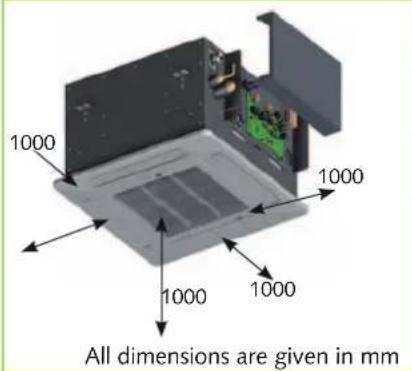
text_image
1000 1000 1000 1000 All dimensions are given in mmSelection of the installation location
The indoor unit is designed for horizontal mounting in suspended ceilings with Euroraster dimensions. It can also be installed in other types of suspended ceilings with different dimensions.
Take into account the installation height of the equipment.
Installation
NOTE
Installation may only be performed by authorised specialists.
Unit installation
The unit is mounted on four thread-ed rods with the cover face down. Take into account the ceiling grid and any other installations.
-
Use the dimensions of the ceiling cassette to mark the fixing points for the threaded rods on structural parts approved to support the static load, and above the suspended ceiling.
-
Fit the indoor unit onto the threaded rods and use the lower nuts to level the unit (Figure 5).
- Ensure a clearance of 35 mm from the ceiling. Connect the refrigerant pipes, electrical cables and condensation pipe to the indoor unit as described below.
- Check that the unit is level.
- The final task is to tighten the counternuts and attach the cover.
5 Hooking in the unit

text_image
Structural componentUnit attachment

text_image
MXD 200-520 280 615Connecting the refrigerant lines
The refrigerant lines on the MXD 200-520 should be connected by the customer to the centre of the long side.
It may be necessary to fit a reducing or extending adapter to the indoor units. These fittings are included with the indoor unit as an accessory kit. Once installed, the connections should be sealed to prevent vapour diffusion.
CAUTION
The units are factory filled with dry nitrogen to check for leaks. The pressurised nitrogen is released when the union nuts are loosened.
Condensate drain
If the temperature falls below the dew point, condensation will form on the cooling fins during cooling mode.
A collection tray together with a condensation pump and float switch are fitted as standard below the cooling fins. Should the float switch trip a protective shutdown due to inadequate removal of the condensation, the pump will switch on immediately and run on for approx. three minutes.
The condensation pipe should have a fall of min. 2 %. This is the responsibility of the customer. If necessary, fit vapour diffusion proof insulation.
If the level of the condensation pipe on the unit is above that of the outlet, route the pipe vertically upwards (max. see P. 21) and then with a fall to the drain.
Lead the condensation line freely to the run-off line. If the condensation runs directly into a sewer pipe, fit a trap to prevent any unpleasant odours.
When operating the unit at outdoor temperatures below 4 °C, ensure the condensation pipe is laid to protect it against frost.
If necessary, fit supplementary pipe heating.
Once the pipe has been laid, check the condensation drains off and permanently seal it.
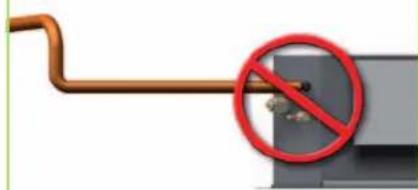
Condensation connection - Wrong!
Riser pipe too far away
natural_image
Pure electrical circuit lines without any symbolsNo fall

natural_image
Illustration of a cable with a red prohibition symbol (no text or symbols present)Condensation pipe too large/small
Cannot freely drain away
The unit's scope of delivery includes a five metre long, four-core control line for connecting the indoor unit to the outdoor unit. The control line to the outdoor unit contains a data cable which makes communication between the indoor unit and the outdoor unit possible. This is used for controlling cooling and heating output and for forwarding fault indications to the indoor unit. If the length is insufficient, you can extend these control lines on the indoor unit.
-
Connect the control line that has been pre-prepared on-site to the terminals (see electrical connection diagram P. 22).
-
Connect the on-site pre-prepared control line with the supplied control cable in a professional manner.
-
Insert the control line plug into the corresponding socket on the outdoor unit.
-
Re-assemble the unit.
Condensation connection - Correct!
min. 2% fall
16-20 mm
A
We recommend to install a main / repair switch on the building near the indoor unit.
The terminal blocks for making the connections are located at the rear of the unit. When the unit is installed, measurements can be made from the front by removing the cover.
6 Connecting the unit
Cover
MXD 200-520 IT
A 500 mm
If an optional condensation pump is used in conjunction with the unit, it may be necessary to install an additional relay with a higher contact rating after the switch-off contact on the pump to switch off the compressor.
Control cable from the outdoor unit
Electrical connection
A protected mains supply cable is to be connected to the outdoor unit and 4-core control line is to be connected to the indoor unit respectively.
! CAUTION
All electrical installation work is to be performed by specialist companies. Disconnect the voltage supply when connecting the electrical terminals.
Make the connection as follows:
- Open the air intake grill.
- Unfasten the covers on the right side (Figure 6).
- Loosen the control line on the terminal block and remove the control cable.
Terminal strip Strain relief Control cable
Electrical connection diagram and choice of unit
Connecting MVT 600 DC / MVT 900 DC MVT 950 DC / MVT 1050 DC
Outdoor componentIndoainable
| L | Exterior conductor | L | Exterior conductor | L1 | |
| N | Neutral conductor | N | Neutral conductor | N | |
| S | Data cable | S | |||
| PE | PE | Earth conductor | PE |
Choice of unit
DIP-switch 1 (SW1)
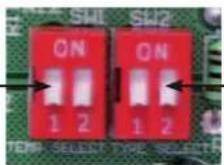
DIP-switch 2 (SW2)
DIP-switch 1 (SW1) DIP-switch 2 (SW2)
Choice of temperature Choice of unit Unit


MXD 200
MXD 260
MXD 350
MXD 520
Electrical circuit diagram
MXD 200 bis 520
Legend:
DPB Display board
FM Evaporator fan
M2 Condensate pump
WL Floating switch
M3 Swing motor
MCB Main control board
T2 Probe evaporator
PP Power plug
T1 Probe recirculating air
TR Transformer
Colour code:
BK black
BR brown
BU blue
GR green
RT red
WT white
YE yellow
YE/GR yellow/green

flowchart
graph TD
    A["MCB"] --> B["M2"]
    A --> C["M3"]
    B --> D["CX13"]
    B --> E["CX10"]
    B --> F["CX6"]
    B --> G["CX11"]
    B --> H["CX3"]
    B --> I["CX4"]
    C --> J["CX14"]
    C --> K["CX7"]
    L["DBP"] --> M["SWL"]
    L --> N["SW2"]
    O["WT"] --> P["CP"]
    Q["WL"] --> R["WP"]
    S["IN5"] --> T["DC"]
    U["YD/CR"] --> V["AC"]
    W["ME"] --> X["HR"]
    Y["YE"] --> Z["S"]
    AA["Connecting to the outdoor unit"] --> AB["DC"]
    AC["T2 T1"] --> AD["SWL/SW2"]
    AE["BR WT"] --> AF["SWL/SW2"]
Commissioning

NOTE
Commissioning should only be performed by specially trained personnel and documented after the certificate has been issued.
Observe the manuals for the indoor unit and outdoor unit when commissioning the entire system.
Functional test for cooling mode.

NOTE
Check the DIP switch settings on the PCB, as illustrated on Page 22.
If necessary, set the DIP switches to the appropriate indoor unit type.
-
Switch the supply voltage on.
-
Use the remote control to turn on the unit and select the cooling mode, maximum fan speed and lowest nominal temperature.
-
Measure and record all the required values in the commissioning report and check the safety functions.
-
Check the control system for the unit using the functions described in the chapter "Operation". Timer, temperature setting, fan speeds and changing to air circulation or dehumidifying mode.
-
Check the correct function of the condensation line by pouring distilled water into the condensation tray.
A bottle with a spout is recommended for pouring the water into the condensation tray.
Functional test for heating mode.
-
Switch the supply voltage on.
-
Use the remote control to switch on the unit and select the heating mode, maximum fan speed and highest nominal temperature.
-
Measure and record all the required values in the commissioning report and check the safety functions.
-
Measure the air intake temperature of the ceiling mounted cassette and the room temperature approx. 1.5 m above the floor. In the event of deviation, correct any temperature difference by means of the DIP switch SW1 (s.S22).
-
Check the control system for the unit using the functions described in the chapter "Operation".
Timer, temperature setting, fan speeds.
Final tasks
■ Reassemble all disassembled parts.
- Familiarise the operator with the system.

NOTE
Check that the stop valves and valve caps are tight after carrying out any work on the refrigerant circuit. Use appropriate sealant products as necessary.
Unit dimensions
MXD 200-520 IT

text_image
650 650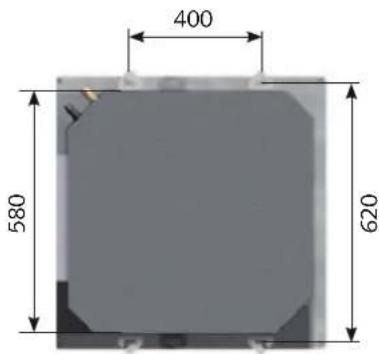
text_image
400 580 620
text_image
580 255 28REMKO MXD
Notes
Exploded view MXD 200 to MXD 520

text_image
Exploded view diagram of a device with numbered parts, including a 14-pin mobile phone and internal components like an LCD unit.We reserve the right to modify the dimensions and structural design as part of the ongoing technical-development process.
Spare parts list
| No. | Designation MXD 200 MXD 260 MXD 350 MXD 520 | |||
| From Series 770W5008 771W5014 772W5010 778W5000 | ||||
| 2 Air filter 1111031 1111031 1111031 1111031 | ||||
| 3 Cover 1111032 1111032 1111032 1111032 | ||||
| 4 Fin motor 1111033 1111033 1111033 1111033 | ||||
| 5 Condensation tray 1111034 1111034 1111034 1111034 | ||||
| 6 Outlet fins, set of 4 1111035 1111035 1111035 1111035 | ||||
| 7 Vaporiser 1111036 1111036 1111049 1111050 | ||||
| 8 Condensation pump, cpl. 1111037 1111037 1111037 1111037 | ||||
| 9 Fan wheel 1111038 1111038 1111038 1111038 | ||||
| 10 Vaporiser fan motor | 1111039 1111039 1111039 1111039 | |||
| 11 Control board | 1111040 1111040 1111040 1111040 | |||
| 12 Transformer | 1111041 1111041 1111041 1111041 | |||
| 13 Condenser, vaporiser fan | 1111042 1111042 1111048 1111051 | |||
| 14 IR remote control | 1111052 1111052 1111052 1111052 | |||
| Spare parts (not illustrated) | ||||
| Condensation float switch | 1111044 1111044 1111044 1111044 | |||
| Display board | 1111045 1111045 1111045 1111045 | |||
| Air circulation sensor | 1111046 1111046 1111046 1111046 | |||
| Vaporiser sensor | 1111047 1111047 1111047 1111047 | |||
When ordering spare parts, please state the computerised part no., device number and device type (see identification plate)!
Technical data
| Series MXD 200 MXD 260 MXD 350 MXD 520 | |||||
| Operating mode Ceiling cassette for combined cooling/heating | |||||
| Nominal cooling output1) | kW 2,05 2,61 3,53 5,2 1 | ||||
| Nominal heating output2) kW 2,41 2,86 3,8 5,94 | |||||
| Energy efficiency class, cooling1) A A B A | |||||
| Energy efficiency class, heating2) B B B A | |||||
| Energy efficiency ratio EER1) | 3,18 3,21 3,18 3,22 | ||||
| Coefficient of performance COP2) | 3,41 3,42 3,41 3,64 | ||||
| Power consumption, annual, (500h) K / H | 1290 / 1410 | 1120 / 1255 | 1290 / 1410 | 856 / 890 | |
| Operating range (room volume), approx. | m3 | 60 | 80 | 110 | 160 |
| Room-temperature adjustment range | °C | +17 to +30 | |||
| Operating range | °C | +17 to +32 | |||
| Refrigerant | R 410A4) | ||||
| Operating pressure max. / per cooling circuit | kPa | 4200 / 4200 | |||
| Air flow volume per speed setting | m3/h | 300 / 330 / 400 | 410/460/500 | 420/520/680 | 560/650/700 |
| Sound pressure level per speed setting3) | dB(A) | 30/ 33 / 35 | 32/34/36 | 33/35/38 | 38/40/42 |
| Power supply | V / Hz | 230 / 1~ / 50 | |||
| Protection class | IP | X 0 | |||
| Nom. electrical power consumption, cooling1) | kW 0,04 0,04 0,05 0,08 | ||||
| Nom. electrical power consumption, heating2) | kW 0,04 0,04 0,04 0,08 | ||||
| Nom. electrical current consumption, cooling1) | A | 0,17 0,17 0,19 0,4 | |||
| Nom. electrical power consumption, heating2) | A | 0,17 0,17 0,19 0,4 | |||
| Refrigerant connection - injection line | Inches(mm) | 1/4 | 1/4 | 1/4 | 1/4 |
| Coolant connection - suction line | Inches(mm) | 3/8 | 3/8 | 1/2 | 1/2 |
| Condensate drain | mm | 25 | 25 | 25 | 25 |
| Dimensions - Height | mm | 255 | 255 | 255 | 255 |
| Width | mm | 580 580 580 580 | |||
| Depth | mm | 580 580 580 580 | |||
| Weight | kg | 21,0 | 21,0 | 21,0 | 21,0 |
| Serial number | 770... | 771... | 772.. | 778 | |
| Computerised part no. | 1623250 | 1623255 | 1623260 | 1623265 | |
1) Air intake temp. TK 27°C / FK 19°C, outdoor temp. TK 35°C / FK 24°C, max. air volume, 5m pipe length in combination with MVT 900 / 950 DC
2) Air intake temperature TK 20°C outdoor temperature TK 7°C, FK 6°C, max. air volume, 5m pipe length in combination with MVT 900 / 950 DC
3) Distance 1 m free field
4) Contains greenhouse gas according to Kyoto protocol
EC – Declaration of Conformity
in accordance with the Machinery Directive, Annex II 1A
Original Declaration of Conformity
CE
We hereby declare that the devices described in the following section conform to the requirements of the specified applicable EC directives due to their design and type in the version as marketed by us.
Name of Manufacturer: REMKO GmbH & Co. KG
Name of Authorised Agent: REMKO GmbH & Co. KG
Equipment (machinery) - Implementation: Multi-inverter ceiling cassette
Series / Model: REMKO MXD 200, MXD 260, MXD 350, MXD 520
Series / Class Number: 770..., 771..., 772..., 778...
Applicable regulations:
MA DIR. 2006/42/EC Machinery Directive
LV DIR. 2006/95/EC Low-Voltage Directive
EMC DIR. 2004/108 EEC Electromagnetic Compatibility Directive
EnCLB DIR. 92/75/EEC Energy Consumption Labelling Directive
EC 97/23/EC Pressure Equipment Directive
Applicable Standards:
EN 292 - 1; EN 292 - 2; EN 294;
EN 14511 T1-4;
DIN 45635 - 1;
EN 378-1-4;
EN 55014 - 1; EN 55014 - 2; EN 55104
EN 60204 - 1; EN 60335 - 1; EN 60335 - 2 - 40;
EN 61000 - 3 - 2; EN 61000 - 3 - 3;
Lage, 22 January 2010 REMKO GmbH & Co. KG
N. Cunhous
Signature, Product Manager
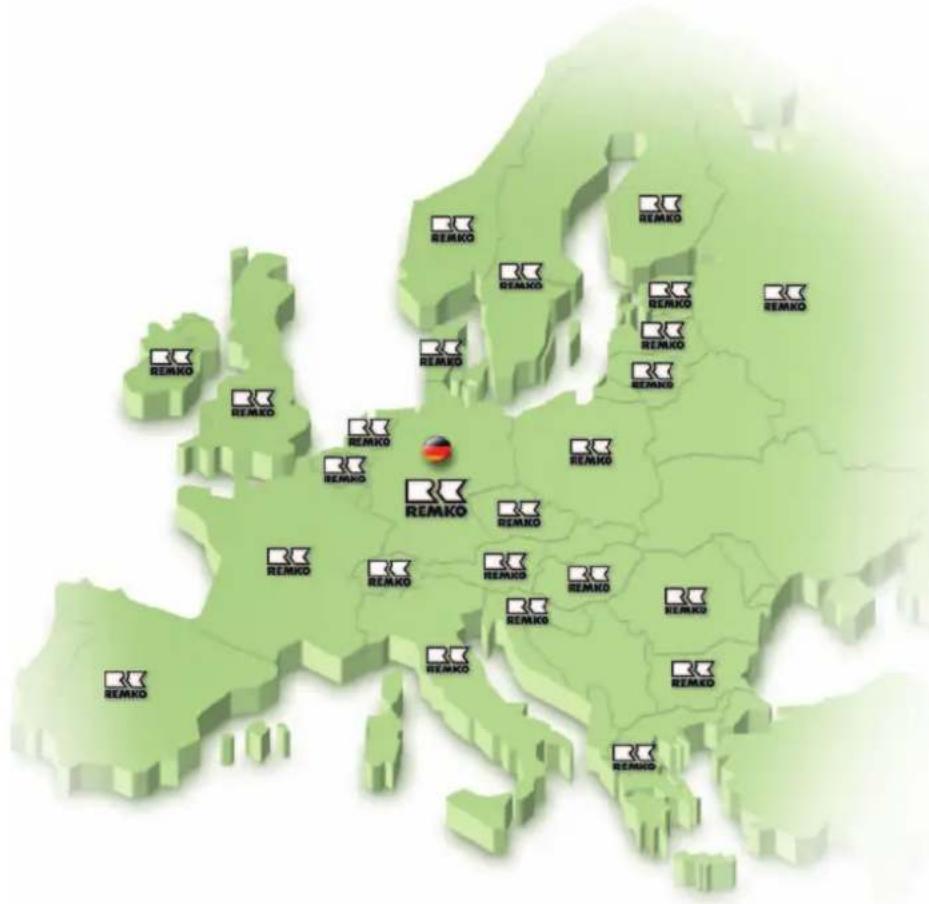
REMKO INTERNATIONAL
... and also right in your neighbourhood! Make use of our experience and advice
text_image
REMKO REMKO REMKO REMKO REMKO REMKO REMKO REMKO REMKO REMKO REMKO REMKO REMKO REMKO REMKO REMKO REMKO REMKO REMKO REMKO REMKO REMKO REMKO REMKO REMKO REMKOConsultation
Thanks to intensive training, our consultants are always completely up-to-date in terms of technical knowledge. This has given us the reputation of being more than just an excellent, reliable supplier:
REMKO, a partner helping you find solutions to your problems.
Sales
REMKO offers not just a well established sales network both nationally and internationally, but also has exceptionally highly-qualified sales specialists.
REMKO field staff are more than just sales representatives: above all, they must act as advisers to our customers on air conditioning and heating technology.
Customer Service
Our equipment operates precisely and reliably. However, in the event of a fault, REMKO customer service is quickly at the scene. Our comprehensive network of experienced dealers always guarantees quick and reliable service.
REMKO GmbH & Co. KG
Air conditioning and heating technology