
KFW 5028 - Scale KORONA - Free user manual and instructions
Find the device manual for free KFW 5028 KORONA in PDF.


| Product type | Digital impedance meter scale |
| Brand | Korona |
| Model | KFW 5028 |
| Maximum capacity | 180 kg (396 lb, 28 st) |
| Measurement units | kg / lb / st:lb |
| Number of user memories | 10 |
| Diagnostic functions | Weight, body fat, body water, muscle mass, bone mass, target weight analysis |
| Power supply | Batteries (type not specified, probably 2 AAA batteries) |
| Low battery indicator | Display "LO" |
| Display | Digital screen |
| Dimensions (approx.) | Not specified, approximately 30 x 30 x 3 cm |
| Weight (approx.) | Not specified, approximately 2 kg |
| Material | Safety glass and plastic |
| Cleaning and maintenance | Clean with a damp cloth, no abrasive products, do not immerse |
| Safety | Do not use with medical implants or during pregnancy; do not stand on the edge; stable and flat surface |
| Protection rating | Not specified, avoid moisture |
| Warranty | Not specified, standard according to retailer |
| Repairability | Repairs only by authorized personnel; batteries replaceable by user |
| Operating temperature | Not specified, domestic use |
Frequently Asked Questions - KFW 5028 KORONA
User questions about KFW 5028 KORONA
0 question about this device. Answer the ones you know or ask your own.
Ask a new question about this device
Download the instructions for your Scale in PDF format for free! Find your manual KFW 5028 - KORONA and take your electronic device back in hand. On this page are published all the documents necessary for the use of your device. KFW 5028 by KORONA.
USER MANUAL KFW 5028 KORONA
GB DIAGNOSTIC SCALE Instruction for Use
- Getting to know your instrument ....10
- Signs and symbols .....10
- Safety notes ....10
- Unit description .....11
- Initial use ....11
- Information ......11
- Settings 12
-
Operation ......13
-
Evaluation of results .....14
- Replacing batteries ....15
- Storage and maintenance 15
- Disposal 16
- What if there are problems? .....16
1. Getting to know your instrument
Function of the unit
This digital diagnostic scale is used to weigh you and to provide diagnostic data about your personal fitness.
The scale is intended for individual, household use.
The scale has the following diagnostic functions that can be used by up to 10 persons:
• Body weight percentage,
• Measurement of body fat percentage,
- Body water content, muscle mass, bone mass, target weight analysis.
2. Signs and symbols
The following symbols appear in these instructions.

Warning Warning instruction indicating a risk of injury or damage to health.

Important Safety note indicating possible damage to the unit/accessory.

Note Note on important information.
3. Safety notes
Safety notes

Warning
- The scales must not be used by persons with medical implants (e.g. heart pacemakers) Otherwise their function could be impaired.
- Do not use during pregnancy.
- Do not stand on the outer edge to one side of the scale otherwise it may tip!
- Keep children away from packaging materials (risk of suffocation).


General notes
- The unit is for personal use only and is not intended for medical or commercial applications.
- Please note that technically related measuring tolerances are possible, as the scale is not calibrated for professional medical applications.
- The scales' maximum load is 180 kg (396 lb, 28 St).
- Before submitting any complaint, first check the batteries and replace them if necessary.
• Repairs may only be performed by the authorised customer services team.
4. Unit description
Overview
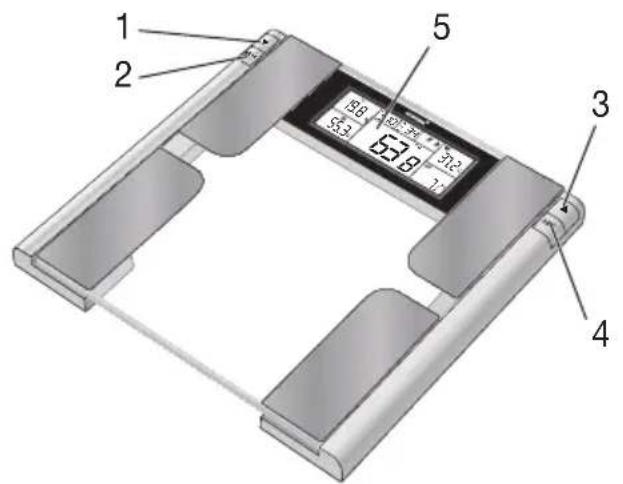

- Button ▼
- MEM
- Button ▲
- SET
- Display
5. Initial use
Inserting the batteries
Please remove the plastic insulating strip and/or position the batteries the correct way round. If the scale fails to operate, remove the batteries completely and reinsert them.
Changing the weight unit
The scale shows the values in kg. On the back of the device, there is a button that you can use to switch the units between kilograms (kg), pounds (lb) and stone (st:lb), by pressing it several times.
Setting up the scale
Set up the scale on a level and solid surface. A solid surface is a prerequisite for a correct measurement.
6. Information
General tips
- If possible, always weigh yourself at the same time of day (preferably in the morning), after using the toilet, on an empty stomach and unclothed, in order to achieve comparable results.
- Important for the measurement: only measure body fat when barefoot and with the soles of the feet slightly moist. Completely dry soles can result in unsatisfactory measurements due to inadequate conductivity.
- Stand still and upright during the measurement.
- Wait a few hours after unaccustomed physical activity.
- Wait approx. 15 minutes after getting up in the morning to allow the water in the body to distribute.
- Remember that only long-term trends are important. Short-term changes in weight within a few days are usually caused by a loss of fluid. Body water plays an important role towards our general wellbeing.
Limitations
When measuring body fat and other values, deviating and implausible results may occur in:
• children under approx. 10 years,
• competitive athletes and body builders,
- persons with fever, undergoing dialysis treatment or with symptoms of edema or osteoporosis,
- persons taking cardiovascular medication (affecting the heart and vascular system),
- persons taking vascular dilating or vascular constricting medication,
- persons with considerable anatomic deviations of the legs in relation to total body size (length of the legs considerably shortened or lengthened).
7. Settings
You must enter personal user parameters in order to measure your body fat percentage and other physical data.
The scale has 10 user memory locations which allows, for example, you and your family members to save personal settings and retrieve them later:
| User data Parameters | |
| Memory position 1 to 10 | |
| Sex | male (23C4) female |
| Age 10 to 99 years | |
| Body height 100 to 220 cm | (3’-03” to 7’-2,5”) |
| Athlete mode | Physical exercise leads to a specific metabolism and high muscle density. This leads to an increase in the body’s resistance. So that this increased resistance is not wrongly interpreted as fat, you can adapt the measurement parameters to suit different (sport-related) physical conditions. |
Setting user data
Check that the scale is in standby mode and that there are no values or symbols in the display. If this is not the case, wait for a few seconds until the display clears automatically.
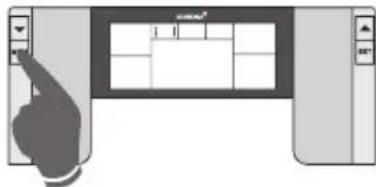
- Press MEM and "User 1" will appear in the display.

- Using the arrow buttons, call up the storage location.

- Press and hold SET until "Height" appears in the display.
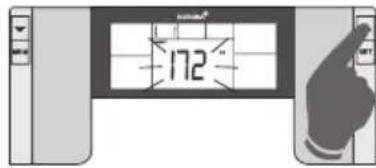
- Using the arrow buttons ▲ and ▼ you can set your height. Confirm with SET.

- "Age" appears in the display.
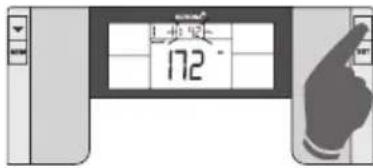
- Using the arrow buttons ▲ and ▼ you can set your age. Confirm with SET.

- "Gender" appears in the display.
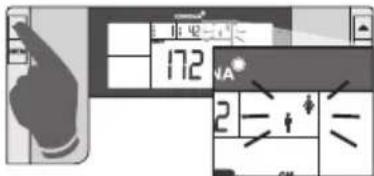
- Using the left-hand arrow button ▼ you can switch between male and female.
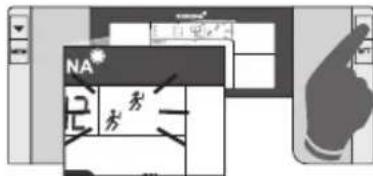
- Using the right-hand arrow button ▲ you can switch between normal and athlete mode. Now confirm with SET.
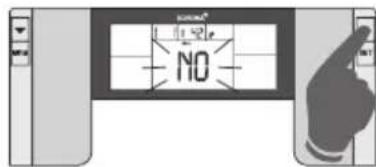
- "Goal" appears in the display. By pressing the arrow buttons, you can switch on target weight analysis with "Yes" or deactivate it with "NO". Confirm with SET.
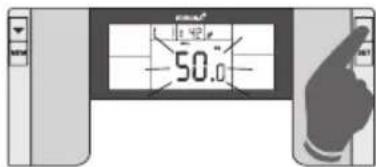
- If the target weight analysis was set with "Yes", "Goal" appears in the display along with a kilograms display. Using the arrow buttons, you can enter the target weight you would like to achieve. Confirm with SET.
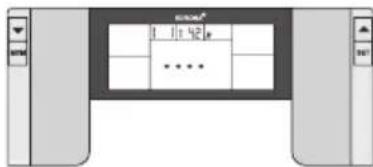
- Dotted lines will appear in the display. After this, the scale switches to 0.0 kg and you can step onto the scale to carry out the measurement.
8. Operation
Weighing and measuring other body values
To simultaneously weigh yourself and determine other body values:
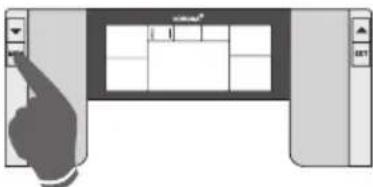
- Press MEM and "User 1" will appear in the display.

- Using the arrow buttons, call up the storage location. After the correct user has been selected, wait a moment.

- Display: last recorded weight and goal achieved so far are displayed.
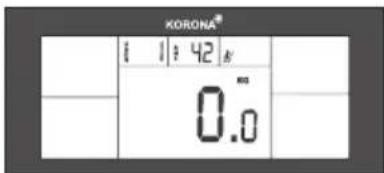
- The display switches to 0.0 and the scale is ready to take measurements.
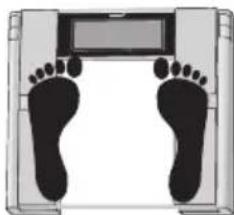
- Step onto the scale to carry out the measurement.
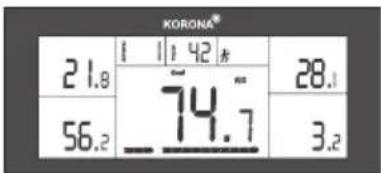
- Display: current measured weight and display for body fat, body water, muscle mass and bone weight.
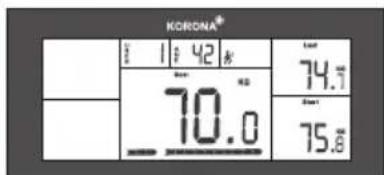
- The display switches to show your target weight (Goal), start weight (Start) and the last recorded measurement (Last).

- Furthermore, a bar chart shows the progress remaining until you reach your entered target weight.
- The scale will switch off.
You will find information on analysis on page 14 – 15.
Weighing only
If you only want to calculate your body weight, just touch the scale lightly with your foot.
Wait until "0.0 kg" is displayed.
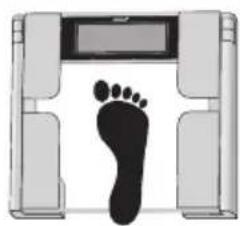
- Touch the scale and wait until 0,0 kg appears.

- Step onto the scale and stand still.
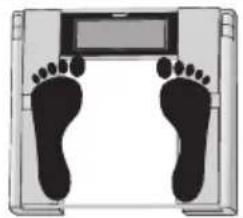
- After a few seconds, your weight will be displayed.
After displaying the weight, the scales automatically switch off.
9. Evaluation of results
Body fat percentage
The body fat values are shown in the display. The following body fat percentages are guide values (contact your physician for further information). The body fat chart that is also shown on the display (at the bottom) is only to provide more simple orientation.


A lower value is often found in athletes. Depending on the type of sports, training intensity and physical constitution, values may result which are below the recommended values stated. It should, however, be noted that there could be a danger to health in the case of extremely low values.
① Severely underweight ④ Overweight
② Underweight ⑤ Obese
③ Normal
Body water percentage
The body water percentage is normally within the following ranges:
Men Women
| Age poor good | good very good | good Age poor | good very good | d | |||
| 10-100<50 | 50-65>65 | 10-100<45 | 45-60>60 |
Body fat contains relatively little water. Therefore persons with a high body fat percentage have body water percentages below the recommended values. With endurance athletes, however, the recommended values could be exceeded due to low fat percentages and high muscle percentage.
This scale is unsuitable for measuring body water in order to draw medical conclusions concerning age-related water retention, for example. If necessary ask your physician. Basically, a high body water percentage should be the aim.
Target weight analysis
An additional feature is the ability to enter a target weight. This means that a progress check can be carried out and calculated automatically by the scale with each weighing; a percentage is then shown on the display in chart form. At each weighing, the last recorded weight is also displayed.

Results in relation to time
Remember that only long-term trends are important. Short-term fluctuations in weight over a few days are usually the result of a loss of fluid.
The interpretation of the results reflects changes in total body weight, percentage of body fat and body water as well as muscle density, and takes into account the length of time over which these changes take place. Sudden changes within days must be distinguished from medium term changes (over weeks) and long term changes (months).
A basic rule is that short term changes in weight almost exclusively represent changes in water content, whereas medium and long term changes may also involve the fat and muscle percentages.
- If your weight reduces over the short term, but your body fat percentage increases or remains the same, you have merely lost water – e.g. after a training session, sauna session or a diet restricted only to rapid weight loss.
- If your weight increases over the medium term and the body fat percentage falls or stays the same, then you could have built up valuable muscle mass.
- If your weight and body fat percentage fall simultaneously then your diet is working – you are losing fat mass.
- Ideally you should support your diet with physical activity, fitness or power training. This way you can increase your muscle percentage over the medium term.
- Body fat, body water or muscle percentages should not be added (certain elements of muscle tissue also contain body water).
10. Replacing batteries
The batteries in the scales must be replaced if the message “LO” appears in the display. If the batteries are too flat, then the scales will switch off automatically.

Note
- When changing batteries, always use batteries of the same type, brand and capacity.
• Always replace all batteries simultaneously. - Do not use rechargeable batteries.
- Use batteries that are free of heavy metals.
11. Storage and maintenance
The precision of the measurements and service life of the device depends on its careful handling:

Important
- The unit should be cleaned occasionally. Do not use abrasive detergents and never immerse the unit in water.
-
Make sure that no liquids come into contact with the scales. Never submerge the scales in water. Never rinse them in running water.
-
Do not stand any objects on the scales when not in use.
- Protect the scales from knocks, damp, dust, chemicals, drastic changes in temperature, electromagnetic fields and nearby sources of heat (ovens, heaters). Do not press the buttons violently or with pointed objects.
- Do not wash the unit in a dishwasher!
12. Disposal
Standard and rechargeable batteries should not be disposed of separately from the household waste. As a consumer, you are legally obliged to return used batteries for proper disposal. You can hand in your used batteries at public collection points in your district or sales outlets where batteries of this type are sold.

Note
The codes below are printed on batteries containing harmful substances:
Pb = Battery contains lead,
Cd = Battery contains cadmium,
Hg = Battery contains mercury.
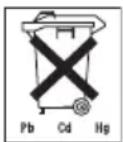
For environmental reasons, do not dispose of the scale with the batteries in the household waste at the end of its useful life. Dispose of the unit at a suitable local collection or recycling point.
Observe the local regulations for material disposal.
Dispose of the unit in accordance with EC Directive 2002/96/EC – WEEE (Waste Electrical and Electronic Equipment).
If you have any questions, please contact the local authorities responsible for waste disposal.

13. What if there are problems?
If the scale detects and error when measuring, the following is displayed.
| Display Cause Remedy | ||
| EE | The maximum load capacity of 180 kg was exceeded. | Do not load the unit with over 180 kg. |
| Lo | The batteries are almost empty. Replace the batteries. | |
| EE | The electrical resistance between the electrodes and the sole of your foot is too high (e.g. if you have tough calluses). | Repeat the measurement barefoot. If necessary, moisten the soles of your feet slightly. If necessary, remove the calluses from the soles of your feet. |
| The fat percentage is outside the measurable range (less than 4% or greater than 55%). | Repeat the measurement barefoot or, if necessary, moisten the soles of your feet slightly. | |
No measurement possible
| Possible errors Remedy | |
| The scale was not activated before you stood on it. If you step on the scale before “0.0 kg” is displayed, the scale will not work correctly. | Activate the scale correctly (wait for “0.0 kg”) and repeat the measurement. |
| The batteries in the scale are empty. Replace the batteries. |
Incorrect weight measurement
| Possible errors Remedy | |
| Scale is on carpeting. Place the scale on a level and | solid surface. |
| Incorrect zero point of scale. Activate the scale, | wait approximately 4 seconds, repeat measurement. |
FRANÇAIS
Sommaire
- Pulse la tecla MEM, en la pan-talla aparece „User 1“.
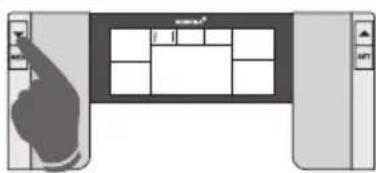
- Pulse la tecla MEM, en la pantalla aparece „User 1“.
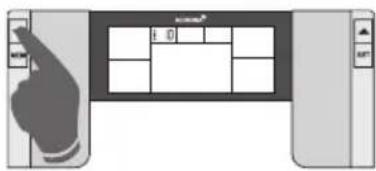
- Premere il pulsante MEM, sul display viene visualizzato „User 1“.

2002/96/EC - WEEE (Waste Electrical and Electronic Equipment).

- GETTING TO KNOW YOUR INSTRUMENT
- FUNCTION OF THE UNIT
- SIGNS AND SYMBOLS
- SAFETY NOTES
- WARNING
- GENERAL NOTES
- UNIT DESCRIPTION
- INITIAL USE
- INSERTING THE BATTERIES
- CHANGING THE WEIGHT UNIT
- SETTING UP THE SCALE
- INFORMATION
- GENERAL TIPS
- LIMITATIONS
- SETTINGS
- SETTING USER DATA
- OPERATION
- WEIGHING AND MEASURING OTHER BODY VALUES
- WEIGHING ONLY
- EVALUATION OF RESULTS
- BODY FAT PERCENTAGE
- BODY WATER PERCENTAGE
- TARGET WEIGHT ANALYSIS
- RESULTS IN RELATION TO TIME
- REPLACING BATTERIES
- NOTE
- STORAGE AND MAINTENANCE
- IMPORTANT
- DISPOSAL
- WHAT IF THERE ARE PROBLEMS
- FRANÇAIS
- SOMMAIRE
Brand : KORONA
Model : KFW 5028
Category : Scale