
MRC 832 P - Alarm Clock CLATRONIC - Free user manual and instructions
Find the device manual for free MRC 832 P CLATRONIC in PDF.


| Product type | Radio alarm clock |
| Brand | Clatronic |
| Model | MRC 832 P |
| Mains power supply | 230 V~, 50 Hz |
| Backup battery | 9 V block (not included) |
| Power consumption | 2 W |
| Net weight | 0.40 kg |
| Radio bands | FM 88-108 MHz, AM 540-1600 kHz |
| Display | LCD with time projection |
| Alarm function | Radio or buzzer with snooze (9 min) |
| Sleep timer | Up to 1h59, adjustable in increments |
| Projection | Time projection on wall/ceiling, adjustable focus |
| Date display | Yes (day, month) with adjustment |
| Seconds display | Yes, resettable |
| Time format | 12h or 24h selectable |
| Volume control | VOLUME +/- knob with off position for buzzer |
| Tuning | TUNING knob with frequency indicator |
| FM antenna | Flexible wire |
| AM antenna | Built-in (ferrite rod) |
| Speaker | Built-in |
| Protection class | II |
| Maintenance | Clean with a slightly damp cloth, without detergent |
| Safety instructions | Do not expose to water, do not block ventilation slots |
| Disposal | Do not dispose of with household waste, take to a recycling center |
Frequently Asked Questions - MRC 832 P CLATRONIC
User questions about MRC 832 P CLATRONIC
0 question about this device. Answer the ones you know or ask your own.
Ask a new question about this device
Download the instructions for your Alarm Clock in PDF format for free! Find your manual MRC 832 P - CLATRONIC and take your electronic device back in hand. On this page are published all the documents necessary for the use of your device. MRC 832 P by CLATRONIC.
USER MANUAL MRC 832 P CLATRONIC
Overview of the Components ....3
Instruction Manual 46
Technical Data 52
Disposal 53
Sommaire
Frequenzbereiche .... UKW / FM 88,0 \~ 108,0 MHz
MW / AM 540 \~ 1600 kHz
MW / AM 540 \~ 1600 kHz
MW / AM 540 \~ 1600 kHz
Thank you for choosing our product. We hope you will enjoy using the appliance.
General Safety Instructions
Read the operating instructions carefully before putting the appliance into operation and keep the instructions including the warranty, the receipt and, if possible, the box with the internal packing. If you give this device to other people, please also pass on the operating instructions.
- To avoid the risk of fire or an electric shock, you should not expose the device to rain or moisture. Consequently, do not use the device in the immediate vicinity of water - for example near a bath tub, a swimming pool or in a damp cellar.
- The appliance is designed exclusively for private use and for the envisaged purpose. This appliance is not fit for commercial use.
- Only connect the device at a properly installed plug socket. Pay attention that the specified voltage corresponds to the voltage of the plug socket.
- When using external mains supply, pay attention to the correct polarity and voltage. Always place the batteries in the correct direction.
- Assemble the device in such a way that the available ventilation openings are not covered.
- Never open the housing of the device. Incorrect repairs can constitute a considerable risk for the user. Should the device become damaged, in particular the mains supply cable, do not operate the device any longer, but rather have it repaired by an expert. Check the mains supply cable regularly for damage.
- For safety reasons a broken or damaged mains lead may only be replaced by an equivalent lead from the manufacturer, our customer service department or a similar qualified person.
- If the device is not used for a longer period, remove the plug connector from the plug socket or take out the batteries.
These symbols may be found on the machine and are intended to indicate the following:

The lightning symbol should advise the user of parts in the inside of the device which carry dangerously high voltage levels.

The symbol with an exclamation mark should advise the user of important operation or maintenance instructions in the accompanying documentation.
Symbols in these Instructions for Use
Important information for your safety is specially marked. It is essential to comply with these instructions in order to avoid accidents and prevent damage to the machine:

WARNING:
This warns you of dangers to your health and indicates possible injury risks.

CAUTION:
This refers to possible hazards to the machine or other objects.

NOTE: This highlights tips and information.
Children and Frail Individuals
- In order to ensure your children's safety, please keep all packaging (plastic bags, boxes, polystyrene etc.) out of their reach.

WARNING!
Do not allow small children to play with the foil as there is a danger of suffocation!
- This device is not intended to be used by individuals (including children) who have restricted physical, sensory or mental abilities and/or insufficient knowledge and/or experience, unless they are supervised by an individual who is responsible for their safety or have received instructions on how to use the device.
- Children should be supervised at all times in order to ensure that they do not play with the device.
Special Safety Instructions
- Do not use the device in locations that are extremely hot, cold, dusty or moist.
- Select a suitable location for the radio recorder, such as a dry, flat, non-slip surface on which it is easy to operate the machine.
- Ensure that the radio recorder is sufficiently ventilated!
- Do not cover any ventilation slits with objects such as magazines, tablecloths, curtains etc.
-
Never touch the mains plug or lead with wet hands.
-
Keep the mains lead away from heaters.
- Never put a heavy object on the electric lead.
- Keep the device away from vases, baths, wash basins etc. If liquid enters the device this may cause serious damage.
Overview of the Components
1 Lens
2 Swivel projector
3 Function key for projector (PROJECTION)
4 Function key for delayed switch-off (SLEEP)
5 Band selector (AM/FM)
6 Alarm function button (ALARM)
7 Function switch (ON/OFF/AUTO)
8 Set minutes (MIN)
9 Regulator (TUNING)
10 Volume control (VOLUME +/-)
11 Hour function key (HOUR)
12 Time setting function key (TIME)
13 Function key (SNOOZE)
14 Battery compartment
15 LCD display
16 FOCUS control
17 SET button
18 MODE button
GB
Rear (without illustration)
Speaker
Mains lead
FM wire antenna
Putting into function
- Choose a suitable location for the unit. A dry, level, slip-resistant surface on which you can operate the unit properly would be suitable.
- Insert the plug into a properly installed 230 V, 50 Hz power socket.
Radio station tuning
- Set the band selector switch (5) to FM or AM, depending on the frequency band you want to listen to.
- Move the function switch (7) to the ON position.
- Turn the tuning control in order to tune in to a station. An arrow mark on the controller indicates the tuned frequency.
- If reception is too weak, change the position of the dipole antenna in order to improve the reception.
- The antenna for reception of AM stations is integrated into the unit. The unit can be tuned to a station by changing the position of the unit.
$$ \mathrm{VHF} = \mathrm{FM}, \text { medium wave } = \mathrm{AM} $$
Volume
The desired volume can be sent using the VOLUME regulator (10).
Setting of the Clock (24 h)
Hours: Press the TIME key (12) and the HOUR key (11) simultaneously. Minutes: Press the TIME key (12) and the MIN key (8) simultaneously.
Switch-off
The device is switched off if the function switch (7) is in the "OFF" position.

NOTE: This also turns off the alarm function.
Alarm function
Setting of the Alarm (24 h)
Hours: Press the ALARM key (6) and the HOUR key (11) simultaneously. Minutes: Press the ALARM key (6) and the MIN key (8) simultaneously.
Radio alarm
Once the alarm times are set and a radio station has been selected, shift the function selector (7) to "AUTO". The “●” symbol lights up in the display (15).

NOTE:
As soon as the alarm time is reached, the radio is switched on. The selected radio station plays at the set volume.
Buzzer alarm
- If you do not want to wake up with the radio signal, turn the VOLUME control (10) to "OFF" until it snaps into place.
• Instead of the radio, the buzzer goes off when the alarm time is reached.
NOTE: The volume of the buzzer cannot be changed.
Turning off the Alarm
In order to turn off the alarm, move the function switch (7) to the OFF position.
Automatic Alarm Interval
The automatically set alarm function can be shut off for approximately 9 minutes with the SNOOZE key (13).
Delayed Shut-Off
The delayed switch-off function can be used when the switch is in the positions AUTO or OFF.
- When the SLEEP button (4) is pressed the radio switches off after a maximum of 1 hour and 59 minutes. The switch-off time can be adjusted by pressing the SLEEP and the HOUR button (11), or the MIN button (8) at the same time.
- This function can be cancelled with the SNOOZE key (4).
Projection
You can use this unit to project the time onto a wall or the ceiling.
- You can switch this function on and off with the ON/OFF / PROJECTION button (3).
- Swivel the projector (2) to the desired position.
-
The left side of the projector has the FOCUS setting wheel (16) with which you can adjust the sharpness of the projection.
-
By pressing the SET button (17), you can choose between different displays:
Press 1 x: Display the date.
Press 2 x: Display the seconds. Press the MODE button (18) to set the seconds to zero.
Press 3 x: Display the time again.
- You can make various settings by pressing the MODE button (18):
Press 1 x: Date and time are shown alternately.
Press 2 x: The currently set month is shown. The setting can be changed with the SET button (17).
Press 3 x: The currently set day is shown. The setting can be changed with the SET button (17).
Press 4 x: The currently set hour is shown. The setting can be changed with the SET button (17). You can switch between 24-hour display (H) and 12-hour clock (AM and PM).
Press 5 x: The currently set minutes are shown. The setting can be changed with the SET button (17).
Press 6 x: Display the time again.
Inserting the batteries
(not supplied)
If there is a power cut or the mains plug has been removed from the power socket, the settings will be retained if the power reserve batteries are inserted.
- Open the battery compartment on the underside.
- Connect a 9 V, E compound battery to the supply connection. Please ensure the correct polarity.
- Close the battery compartment again.
- If the device is not used for a prolonged period of time, please take the batteries out in order to prevent leakage of battery acid.

CAUTION:
Batteries are not to be disposed of together with domestic wastes. Dispose of the used batteries at the relevant collection bin or at your dealer's.

WARNING:
Do not expose the batteries to high temperatures or direct sunlight. Never throw batteries into the fire. There is a danger of explosion!
Cleaning

CAUTION:
- Do not dip the appliance in water.
- Remove the plug before cleaning.
- Clean the appliance with a slightly humid cloth without any additives.
Troubleshooting
| Symptoms Cause Solution | ||
| The unit cannot be operated. | The unit is blocked and “hangs”. | Disconnect the mains plug for approximately 5 seconds. Then turn on the unit again. |
Technical Data
Model: MRC 832 P
Power supply: 230 V\~50 Hz
Power consumption: 2 W
Battery power reserve: 9 V-Block
Protection class: ....II
Net weight: 0.40 kg
Radio section:
Frequency ranges: VHF / FM 88.0 \~ 108.0 MHz
MW / AM 540 \~ 1600 kHz
GB
Subject to technical changes without prior notice!
This device has been tested according to all relevant current CE guidelines, such as electro-magnetic compatibility and low voltage directives, and has been constructed in accordance with the latest safety regulations.
Disposal
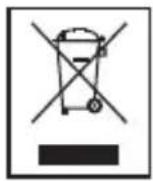
Meaning of the "Dustbin" Symbol
Protect our environment: do not dispose of electrical equipment in the domestic waste.
Please return any electrical equipment that you will no longer use to the collection points provided for their disposal.
This helps avoid the potential effects of incorrect disposal on the environment and human health.
This will contribute to the recycling and other forms of reutilisation of electrical and electronic equipment.
Information concerning where the equipment can be disposed of can be obtained from your local authority.
GB
Instrukcja obsługi
MW / AM 540 \~ 1600 kHz


- Sommaire
- General Safety Instructions
- Symbols in these Instructions for Use
- WARNING:
- CAUTION:
- Children and Frail Individuals
- WARNING!
- Special Safety Instructions
- Overview of the Components
- GB
- Rear (without illustration)
- Putting into function
- Radio station tuning
- Volume
- Setting of the Clock (24 h)
- Switch-off
- Alarm function
- Setting of the Alarm (24 h)
- Radio alarm
- NOTE:
- Buzzer alarm
- Turning off the Alarm
- Automatic Alarm Interval
- Delayed Shut-Off
- Projection
- Inserting the batteries
- Cleaning
- Troubleshooting
- Technical Data
- Disposal
- Meaning of the "Dustbin" Symbol
- Instrukcja obsługi
Brand : CLATRONIC
Model : MRC 832 P
Category : Alarm Clock