Cafitesse Excellence - Coffee machine Douwe Egberts - Free user manual and instructions
Find the device manual for free Cafitesse Excellence Douwe Egberts in PDF.


User questions about Cafitesse Excellence Douwe Egberts
0 question about this device. Answer the ones you know or ask your own.
Ask a new question about this device
Download the instructions for your Coffee machine in PDF format for free! Find your manual Cafitesse Excellence - Douwe Egberts and take your electronic device back in hand. On this page are published all the documents necessary for the use of your device. Cafitesse Excellence by Douwe Egberts.
USER MANUAL Cafitesse Excellence Douwe Egberts
Copyright 2012 © D.E Master Blenders 1753, the Netherlands
The English version is the original version of the operator manual.
Other languages are translations of the original operator manual.
Manufacturer:
N&W Global Vending SpA
Via Roma 24
24030 Valbrembo (BG)
Italy
TABLE OF CONTENTS
1 - INTRODUCTION 4
About the dispenser 4
Important 4
Symbols used in this manual 4
2 - SAFETY INSTRUCTIONS 5
General safety 5
Transport and storage 6
Installation 6
Food safety instructions (HACCP) 7
Training 7
3-OVERVIEW 8
Dispenser overview 8
Dispenser interface overview 9
Dispenser display overview 10
4 - OPERATING 11
Placing a product pack 11
Empty product packs 11
Cup/pot placement 11
Drink delivery 12
Portioned or continuous drink delivery 12
Drink delivery with preselections 13
Cold preselection 13
Volume preselection 13
Strength preselection 14
Locking/unlocking the dispenser 14
Drink delivery in locked mode (option) 14
Switching off the dispenser 15
Switching on the dispenser 15
5 - CLEANING 16
Cleaning procedures 16
When to clean the dispenser 16
Exterior cleaning 16
Flush 17
Clean & Flush 18
6 - PROGRAMMING 21
Starting the operator mode 21
Operator mode controls 21
COUNTERS 22
Drink counters 22
Preselection counters 22
VOLUME 23
STRENGTH 23
DATE/TIME 24
CLEANING DAYS 24
Determine cleaning days 24
Set days for "Clean & Flush" 25
Set days for "Flush" 25
ECO SETTINGS 26
Self-learning ECO mode 26
Enable/disable ECO mode 26
Setting the ECO start and end time 27
Setting the ECO boiler temperature 27
TELEPHONE # 27
Enable/disable telephone numbers 28
Set telephone numbers 28
7 - TROUBLESHOOTING 30
8 - SPECIFICATIONS 32
1 - INTRODUCTION
About the dispenser Symbols used in this manual
Thank you for choosing the Cafitesse Excellence dispenser.
The Cafitesse Excellence is a high quality dispenser specifically designed to deliver hot and cold* coffee, coffee based specialties, cocoa drinks (option) and hot water for the professional food service industry.
This manual contains comprehensive operating and safety instructions. Please operate and maintain the machine as described in this manual for the best machine performance and to comply with food safety regulations / HACCP. In case of questions, please contact your Cafitesse system supplier.
Important
The dispenser is only to be installed in locations where it can be overseen by trained persons.
Operation, filling and cleaning of the dispenser must be restricted to authorized and trained persons. Ensure that new staff reads the operator manual before they operate the dispenser and understand the safety and hygiene aspects.
The manufacturer and D.E MASTER BLENDERS 1753
cannot be held liable in case of damage and/or injury resulting from improper operation of the dispenser or from non-compliance with the procedures given in this manual.
The following symbols are used throughout this manual in combination with a statement to emphasize important and critical information. Observe the statements to ensure safety and prevent injury and product damage.

Note:
Gives additional information which may be helpful during the dispenser operation.

Caution:
Alerts against unsafe practices. Observe to ensure food safety, to prevent minor personal injury, or damage to the dispenser.

Warning:
Indicates a potentially hazardous situation which, if not avoided, could result in serious injury and even death.

Danger:
INDICATES A IMMINENTLY HAZARDOUS SITUATION WHICH, IF NOT AVOIDED, WILL RESULT IN SERIOUS INJURY AND EVEN DEATH.
2 - SAFETY INSTRUCTIONS
General safety
The equipment is not intended for use by persons (including children) with limited psychological or physical abilities or deficiencies. To warrant their safety, they should be supervised and instructed by a competent person regarding the usage of the equipment.
Danger:
NEVER TOUCH THE POWER SUPPLY PLUG WHEN YOUR HANDS OR THE POWER CORD / PLUG ARE WET.
Warning:
Do not leave children unattended near the dispenser.
Warning:
If the power cord of the dispenser is damaged, switch off the dispenser and contact your system supplier for replacement.
Warning:
The products delivered by the dispenser are very hot! In order to prevent scalds, keep your hands and other parts of the body away from the delivery area when a delivery button has been pressed or during flushing (machine cleaning).
Warning:
Do not place cups, pots, or containers filled with hot liquids on top of the dispenser.
Warning:
There is the risk of being scalded, in case the cups/pots/
containers fall down.

Warning:
Keep sufficient space around the dispenser to get away easily in case of hot liquid splashes.

Warning:
Place the dispenser on a table or counter with a minimum height of 60 cm/24 in to avoid that young children can press a drink button.

Caution:
Check and empty the drip tray of the dispenser regularly to avoid the risk of being scalded and to avoid a wet floor (slip danger) when (hot) liquids spill out of the drip tray.
Transport and storage
Always store and transport the dispenser in the original packaging. Before storing or transporting the dispenser:
- Place the product packs in the refrigerator.
- Clean the dispenser.
- Contact your Cafitesse system supplier so that an authorized and trained service technician can drain the water from the boiler and protect the dispenser against frost damage.

Caution:
The dispenser may not be subject to frost during operation, storage or transport.
Installation
Installation, relocation, service and programming of the dispenser is restricted to authorized and trained service technicians.
The equipment must be installed by your Cafitesse system supplier in compliance with the installation requirements:
The dispenser is designed for indoor installation only, place on a stable flat surface such as a table or a counter capable of supporting its weight. Shield the dispenser from direct sunlight, frost and rain.
Make sure that there is sufficient space around the dispenser for ventilation, and front/back sides are accessible for service.
Only use new water hoses and connections in compliance with EN61770 for connection to the water supply, old and/or used water hoses are not allowed.
The dispenser must be connected to the drinking water line in compliance with local regulations. In case of cold drink options, the quality of the water supply must be checked to ensure delivery of safe cold drinks according to local regulations.
Shield the dispenser from running water, splashes, spray or steam, heat or heavy dust.
The dispenser may not be cleaned using a water jet and is not suitable for installation on a surface where a water jet may be used in the vicinity (e.g. for cleaning purposes).
If the dispenser is connected with a permanently wired power supply (without mains plug), ensure the electric circuit is equipped with a circuit breaker with a contact opening of at least 3 mm / 0.12 in that controls all poles.
If connected to a wall outlet power supply, use a grounded safety plug socket in compliance with local regulations. Ensure that the electric circuit is secured by means of a fault current safety switch and that the power supply plug remains accessible after installation.
Food safety instructions (HACCP)
The machine is designed to comply with food safety regulations, including HACCP, as required in the food service industry.
The operator is responsible to observe basic food safety and hygiene. Observe the cleaning procedures given in this manual. Please note that HACCP regulations require that these are recorded.
- Follow the instructions printed on the Cafitesse product packs regarding storage and handling.
- Wash hands when handling product packs or machine parts that come in contact with ingredients.
- Do not touch the tip of the doser. If the doser needs cleaning, rinse with clear water only.
- Observe the "Best before" and "Expiry" date on the product pack. Do not use a product pack if either date has expired and use the packs that has been stored for the longest period first (first-in, first-out principle).
- Keep the area around the machine clean and tidy.
- Only use cleaning agents recommended by the food industry and your Cafitesse system supplier. For safe handling observe the instructions on the label of the cleaning agent.

Danger:
DO NOT SPRAY OR SPLASH THE DISPENSER WITH WATER. DO NOT USE A WATER JET FOR CLEANING.

Danger:
NEVER TILT THE DISPENSER TO CLEAN BEHIND OR BELOW IT. AVOID SCALDING! THE BOILER CONTAINS VERY HOT WATER THAT CAN SPILL OUT IF YOU TILT OR MOVE THE DISPENSER.
Training
Train new staff regarding food safety instructions (HACCP).
- Inform new staff about schedules and cleaning procedures.
- Ensure that new staff reads the operator manual before operating the dispenser.
- Keep the operator manual close to the dispenser.
If there are any questions, please contact your Cafitesse system supplier.
3 - OVERVIEW
Dispenser overview
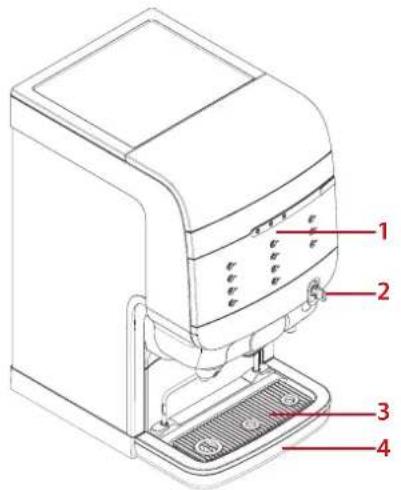
text_image
Technical diagram of a coffee maker with numbered parts labeled 1 to 4- Dispenser interface
- Door handle (lock optional)
- Cup tray
- Drip tray

text_image
Technical diagram of a device with numbered parts labeled 5 through 11- LOCK/Clear-Error button
- Dispenser door
- Cooling compartment
- Release bar
- Mixing bowls
- Internal drip tray
- Outlet compartment

text_image
12 13 14- Condensate grid
- Water connection
- Power cord
Dispenser interface overview
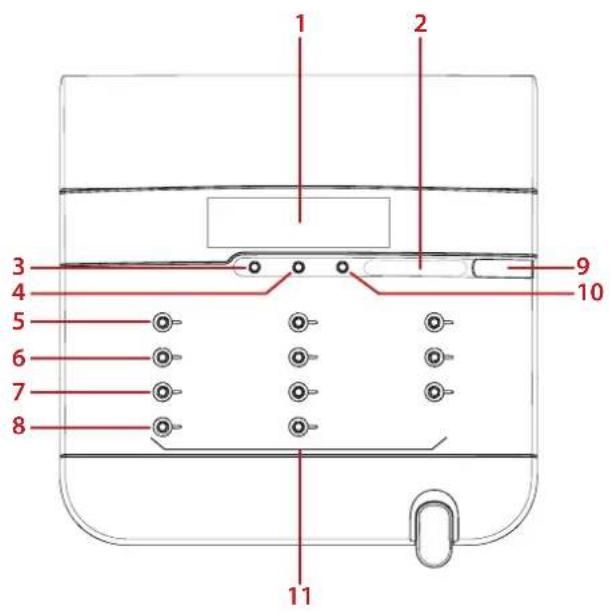
text_image
1 2 3 4 5 6 7 8 9 10 11- Display
- Preselection slider STRENGTH
- Preselection COLD (option)
- Preselection VOLUME
- Operator Mode: (▲p)
- Operator Mode: (Down)
- Operator Mode: ← (enter)
- Operator Mode: ← (back)
- Port for USB key
- STOP
- Drink selection: Left: Milk, Cocoa, Coffee or Tea* Middle: Coffee or Tea* Right: Water
Dispenser display overview
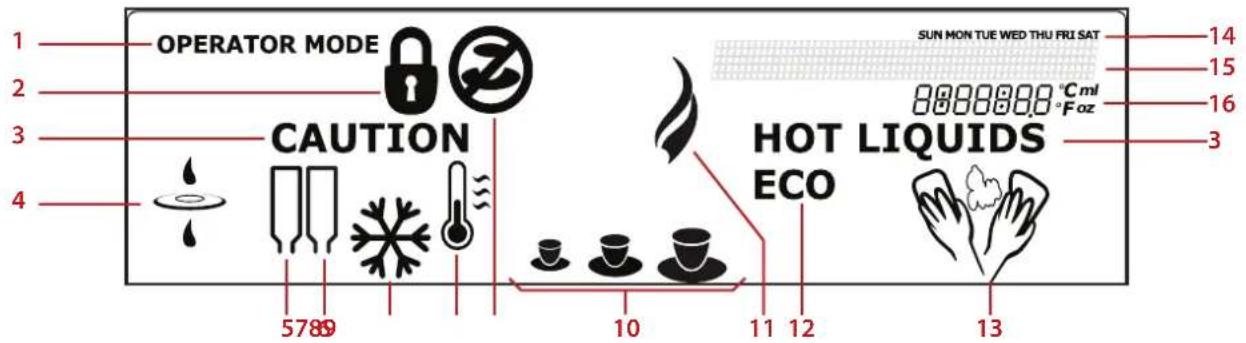
text_image
OPERATOR MODE CAUTION HOT LIQUIDS ECO SUN MON TUE WED THU FRI SAT 8888888.0 °Cml °Foz 14 15 16 3 5789 10 11 12 13- OPERATOR MODE
the USB operator stick is inserted and the Operator Mode is active - LOCK
the dispenser is locked and cannot dispense drinks - CAUTION HOT LIQUIDS*
the dispenser is delivering hot drinks or the dispenser is flushing - FILTER
replace water filter - PRODUCT PACK LEFT
- PRODUCT PACK RIGHT
-
COLD (Operator Mode only)** cold drinks
-
TEMPERATURE
the water temperature in the boiler is too low and the dispenser is heating up - DELIVERY BLOCKED
the dispenser cannot deliver the selected drink - VOLUME
small, medium, or large drinks - HOT (Operator Mode only) hot drinks
- ECO
the energy saving mode is active - CLEANING
the dispenser needs to be cleaned -
WEEKDAYS
-
MESSAGE -line
messages are displayed to guide you through the cleaning, programming steps, or in case of errors
- INFO-field
display of cooling compartment temperature, time, error codes, etc.
4 - OPERATING
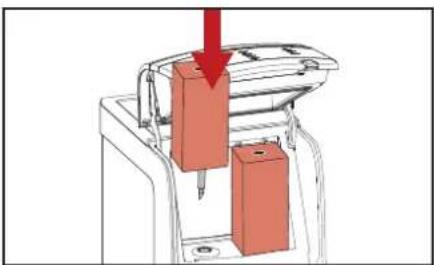
natural_image
Diagram of a mechanical device with two red blocks and a downward arrow, no visible text or symbolsFig. 4.1 - Place product pack Fig. 4.3 - Cup placement
natural_image
Simple line drawing of a rectangular object resembling a stylized pen or tool (no text or symbols)Fig. 4.2 - Empty product pack icon

natural_image
Line drawing of a printer with a red cup on a base (no text or symbols)Placing a product pack Empty product packs Cup/pot placement

Caution:
Never use a frozen or damaged product pack. Do not use a product pack if the "Best before" date has expired.
- Wash your hands before touching a product pack.
- Read and follow the instructions on the rear of the pack.
- Open the dispenser door.
- Insert the product pack (fig. 4.1).
- Close the dispenser door.
- Dispense a test drink.
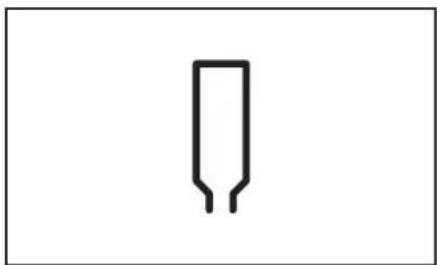
If a product pack is empty, the corresponding drink selection labels will not light up and the drinks cannot be delivered. The icon for empty product pack will be shown on the display (fig. 4.2).
The delivery of hot or cold water is still possible.
If an operator telephone number is set and enabled in the operator menu TELEPHONE #, the entered telephone number will be shown on the display:

0123456789
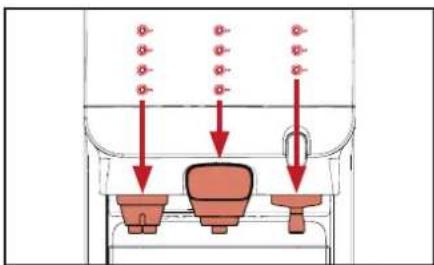
The dispenser has three product outlets:
• Left: for milk, cocoa, tea or coffee drinks*
- Middle: for coffee or tea*
• Right: for water

Caution:
Place your cup or pot under the outlet below the drink button of your selection.
Place your cup on the cup tray or drip tray (fig. 4.3).
A special dispenser foot is required when using pots.
text_image
Diagram showing three labeled containers with red arrows indicating downward flow or movement, possibly illustrating a process or system.Fig. 4.4 - Buttons correspond to outlets
Drink delivery Portioned or continuous drink delivery

Warning:
The liquids dispensed by the dispenser are hot! Avoid scalding! Keep hands and other body parts away from the dispenser while drinks are being delivered. Never leave children unsupervised near the dispenser.
To deliver a drink:
- Place your cup directly underneath the outlet of your selection (fig. 4.4).
- Press the drink button of your choice. The drink will be delivered via the corresponding outlet.
- Press STOP if you want to interrupt or cancel the drink delivery.
During installation, the service technician programs the dispenser to operate with one of the following delivery options:
Portioned delivery
The drink button only needs to be pressed once. The dispenser stops automatically after one portion is delivered. (The respective portion volumes can be programmed by the service technician).

Caution:
Press the STOP button if the cup or pot is too small for the delivered drink volume and when there is the risk of scalding by spilling of hot liquids.
Continuous delivery (free flow)
Press the drink button until the cup or pot is full. Delivery stops when you release the drink button.

Note:
We recommend portioned delivery with fixed cup sizes in self-service areas.
natural_image
Pure diagram of a pipe with three circular components and three red circular features above it, no text or symbols present.Fig. 4.5 - Volume preselection
Drink delivery with preselections Cold preselection Volume preselection
Your dispenser supports preselection options. The service technician may activate preselection options during installation. When the preselection button is pressed, the following options are displayed on the display:
• COLD drinks light up*
• VOLUME on display (small - medium - large)
• STRENGTH indicated by slider position

Note:
If you press a preselection button, but do not press the delivery button, the dispenser will return to the default state after a few seconds.
- Place your cup.
- Press the preselection button COLD to activate this preselection. The possible selections change from amber to white. All unavailable options are dimmed.
- Press a drink button. The cold drink is delivered.
-
Press STOP to return to the default state.
-
Place your cup.
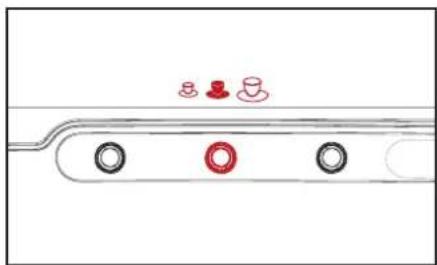
- Press the preselection button VOLUME to activate this preselection. A cup icon (small - medium - large) is display (fig. 4.5).
- Press the preselection button until the desired portion size is marked.
- Press a drink button. The drink is delivered with the selected portion size.

Warning:
The liquids dispensed by the dispenser are hot! Avoid scalding! Keep hands and other body parts away from the dispenser.
text_image
Diagram showing a hand interacting with a device with red directional arrows indicating movement or force, including a plus sign and arrow.Fig. 4.6 - Strength preselection
text_image
Clear ErrorStrength preselection Locking/unlocking the dispenser
- Place your cup.
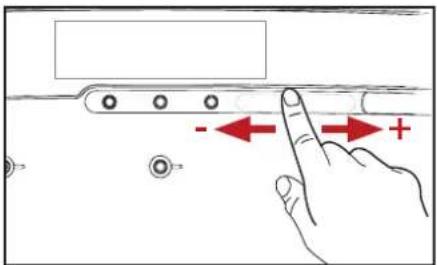
- Slide your finger over the STRENGTH - slider to preselect the strength of your drink (fig. 4.6).
- Press a drink button. The drink will be delivered with the selected strength.

Warning:
The liquids dispensed by the dispenser are hot! Avoid scalding! Keep hands and other body parts away from the dispenser.
- Open the dispenser door.
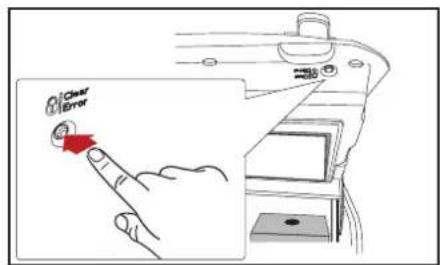
- Press the LOCK/Clear-Error button to block the drink delivery (fig. 4.7).
The lock icon appears on the display (fig. 4.8).
Drink delivery will be disabled. The cooling compartment and the boiler will remain in operation. - To unlock the dispenser, press the LOCK/Clear-Error button again to enable drink delivery.

natural_image
Simple black padlock icon on white background (no text or symbols)Fig. 4.8 - Lock icon Fig. 4.7 - LOCK/Clear-Error button
Drink delivery in locked mode (option)
Insert the USB release key into the USB port on the dispenser to enable temporary drink delivery.
As long as the USB release key is inserted, drinks can be delivered.
When the key is removed, the locked mode is reactivated and the lock icon is shown in the display.

text_image
Safety warning symbol showing thermometer and no-smoking symbol with Chinese textFig. 4.9 - Heating up/Delivery blocked icons
Switching off the dispenser Switching on the dispenser
Please take the following preparations when the machine is not to be used for a long period, e.g. holidays:
- Remove the product packs and check the expiry date.
- Store the product packs in a refrigerator until you switch the dispenser back on again. When the expiry date has passed, throw the product packs away.

Caution:
Do not freeze product packs.
- Clean and flush the dispenser.
- Pull the power plug out of the socket.
-
Close the water tap.
-
Open the water tap.
- Insert the power plug.
The dispenser starts heating up water and starts cooling down the cooling compartment. Drink delivery will be blocked until the water in the boiler has reached the correct temperature. - A flashing thermometer and the icon for "Delivery blocked" will be shown on the display (fig. 4.9).
- Once the water has reached the preset temperature, the flashing thermometer and the icon for "Delivery blocked" will disappear from the display, the dispenser is now ready for operation.

Note:
Depending on the dispenser model and ambient temperature, the heating of the boiler can take 30\~120 minutes. The cooling of the product compartment can take 24 hours or more.

Note:
If the dispenser has been shut down for longer periods, the date and time must be set so the programmed cleaning cycles and eco settings are reactivated.
5 - CLEANING
text_image
Warning sign with hand holding a mushroom and prohibition symbolFig. 5.1 - Cleaning & Delivery blocked icons
Cleaning procedures Exterior cleaning
There are two different cleaning programs:
- "Flush" the drink outlets
- "Clean & Flush" the cooling
compartment and the drink outlets.
You can select the weekdays for "Clean & Flush" and "Flush" programs in the operator menu CLEANING DAYS.

Caution:
It is mandatory to run the "Clean & Flush" program at least once a week to guarantee food safety. In addition, Milk-Coffee versions also need to run the "Flush" program at least once a week.

text_image
Close ErrorFig. 5.2 - Lock the dispenser Fig. 5.3 - Remove cup & drip trays
When to clean the dispenser
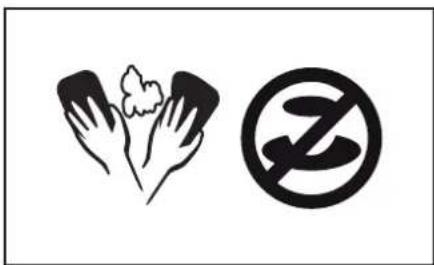
Run the cleaning program when the cleaning icon appears in the display (fig. 5.1).
If the dispenser is not cleaned and/or flushed within 24 hours, the drink delivery will be blocked and the delivery blocked icon appears in the display (fig. 5.1).
Start the cleaning program to resume delivery.

text_image
1 2
Note:
It is advised to clean the exterior of the dispenser daily.
- Open the dispenser door and press the LOCK/Clear-Error button (fig 5.2) to lock the dispenser interface to prevent accidentally dispensing drinks or hot water when cleaning the external parts.
- Remove the cup tray by lifting it from the bar (fig 5.3, 1).
- Remove the drip tray (fig 5.3, 2).
- Empty the drip tray.

Note:
Check and empty the drip tray at regular intervals.
- Clean the cup and drip trays.

text_image
+2 1 3-4 secFig. 5.4 - Enter cleaning mode

natural_image
Diagram of a mechanical device with red arrows indicating force or movement, no text or symbols presentFig. 5.5 - Pull red release bar

natural_image
Illustration of a hand pressing down on two mechanical components with red arrows indicating force or movement (no text or symbols)Fig. 5.6 - Insert Rinza tablets
Flush

Note:
You can flush the dispenser at any time by using the procedure described below.
- Press first STOP and then ◆d hold them pressed simultaneously for 3-4 seconds to enter the cleaning mode (fig. 5.4).
Follow the instruction on the display: PLEASE OPEN THE CONSOLE
- Open the dispenser door.
- Pull the red release bar to open the outlet compartment (fig. 5.5).
Follow the instruction on the display:
INSERT RINZA CLEANING TABLETS. CLOSE THE CONSOLE
- Insert a Rinza cleaning tablet in both mixing bowls (fig. 5.6).
- Press the outlet compartment upwards until you hear a beep.
- Close the dispenser door.
Follow the instruction on the display:
CONFIRM RINZA CLEANING TABLETS ARE INSERTED. PRESS FOR OK
- Press to confirm the insertion of the cleaning tablets.


natural_image
Illustration of a 3D printer printing a red box on a base, with no visible text or symbols.Fig. 5.7 - Place container
natural_image
Diagram of a mechanical device with two red blocks and a red upward arrow, no visible text or symbolsFig. 5.8 - Remove packs Fig. 5.9 - Clean cooling compartment

text_image
Diagram illustrating a sewing machine operation with a hand using a sewing machine to press down a spool, showing the process and magnified detail.rtment
Follow the instruction on the display:
PLEASE PLACE FLUSH BIN (MIN. 4L.). PRESS TOFLUSH
- Place the container (fig. 5.7) under the product outlets and press ◀ start flushing.

Warning:
The liquids dispensed by the dispenser are hot! Avoid scalding! Keep hands and other body parts away from the dispenser.
The progress is shown in the display.
When done, the dispenser is ready for use.
Clean & Flush
- Press first STOP and then and hold them pressed simultaneously for 3-4 seconds to enter the cleaning mode (fig. 5.4).
Follow the instruction on the display:
PLEASE REMOVE ALL PRODUCT PACKS
-
Open the dispenser door.
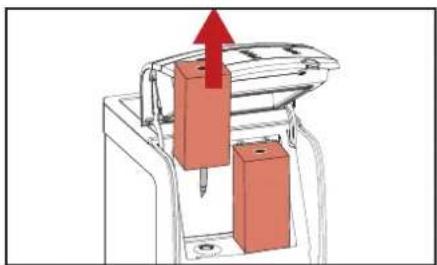
-
Remove the product packs (fig. 5.8).

Note:
It is recommended to use the included exchange kit, which consists of clean mixing bowls and sealing rings, to save time.
Follow the instruction on the display:
PLEASE CLEAN THE COOLING INTERIOR AND PUT BACK THE PRODUCT PACKS
-
Clean the doser opening with a brush and the interior of the cooling compartment with a clean, damp cloth (fig. 5.9). Dry with a clean paper cloth.
-
Place the product packs back if they have not passed the expiry date. Else, place new product packs.
Follow the instruction on the display:
PLEASE REMOVE AND CLEAN THE MIXING BOWLS OR USE EXCHANGE KIT
natural_image
Diagram of a car interior showing two red objects inside a vehicle (no text or symbols)Fig. 5.10 - Remove mixing bowls
natural_image
Technical line drawing of a car front bumper with a red arrow indicating direction (no text or symbols)Fig. 5.11 - Remove internal drip tray

natural_image
Technical illustration of a mechanical component with a red arrow indicating direction (no text or symbols present)Fig. 5.12 - Mixing bowl sealing ring
- Clean the mixing bowls:
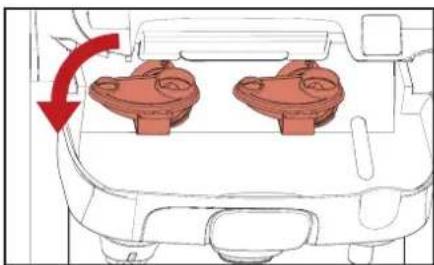
a. Pull the red release bar to open the outlet compartment (fig. 5.5).
b. Rotate the mixing bowls counterclockwise to release and pull to remove them (fig. 5.10).
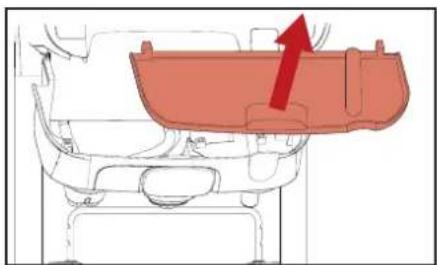
c. Remove the internal drip tray and clean it, if necessary (fig. 5.11).
d. Clean the mixing bowls and the sealing rings:
- Either in a dishwasher, or
- Soak them for 15 minutes in warm water with a food grade cleaning agent.
Note:
Comply with the safety instructions and cleaning instructions on the cleaning agent packaging.
e. Rinse the mixing bowls and sealing rings under a running tap and dry with a clean paper cloth.
Follow the instruction on the display:
REPLACE MIXING BOWLS AND INSERT RINZA CLEANING TABLETS. CLOSE THE CONSOLE
f. Insert clean mixing bowls with sealing rings, then rotate them clockwise until they cannot turn further.
Caution:
Check if the blue sealing rings are firmly attached to the mixing bowls (fig 5.12).
g. Place the internal drip tray back (if removed).
h. Insert a Rinza cleaning tablet in both mixing bowls (fig. 5.6).
i. Press the outlet compartment upwards until you hear a beep.
j. Close the dispenser door.
Follow the instruction on the display:
CONFIRM RINZA CLEANING TABLETS ARE INSERTED. PRESS FOR OK

- Press to confirm the insertion of the cleaning tablets.
Follow the instruction on the display:
PLEASE PLACE FLUSH BIN (MIN. 4L.). PRESS TOFLUSH
- Place the container (fig. 5.7) under the product outlets and press ← start flushing.

Warning:
The liquids dispensed by the dispenser are hot! Avoid scalding! Keep hands and other body parts away from the dispenser.
The progress is shown in the display.
When done, the dispenser is ready for use.
natural_image
Hand holding a red tool interacting with a component, no text or symbols visibleFig. 6.1 - Insert operator USB key
Starting the operator mode
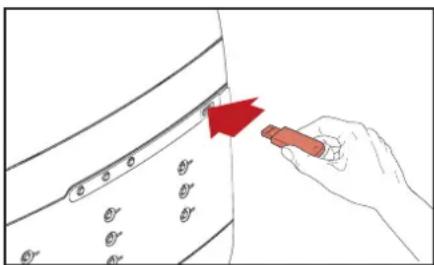
Insert the supplied operator USB key (fig. 6.1). This immediately starts the operator mode. The first menu item (COUNTERS) is displayed
The following menus are available:
• COUNTERS - read counters
• VOLUME - change cup volume
• STRENGTH - change drink strength
• DATE/TIME - set date and time
- CLEANING DAYS - set weekdays for cleaning and flushing
• ECO SETTINGS - energy saving mode settings
- TELEPHONE # - enable/disable and set telephone numbers for service and operator
Please note that menu items might be disabled by the service technician. Contact your Cafitesse systems supplier if you want this altered.
Operator mode controls
(fig. 6.2)
- -▲roll up or increase value
- -▼roll down or decrease value
- -inter menu
- -to previous menu
- STOP - go to previous menu (hold for 2 seconds to return to main menu)
- Display
- Port for USB key
^* = dispenser programming is not available in all markets
6 - PROGRAMMING*

text_image
5 6 7 1—●● 2—●● 3—●● 4—●●Fig. 6.2 - Operator mode controls
natural_image
Simple line drawing of three teacups on saucers, no text or symbols present
natural_image
Two black symbols: a flame and a snowflake, displayed side by side on a white background (no text or labels)Fig. 6.3 - VOLUME icons (small selected) Fig. 6.4 - HOT (left) and COLD (right) icons
COUNTERSDrink counters Preselection counters
In the COUNTERS menu, you have various possibilities to read out the drink counters:
• Total number of drinks dispensed
- Subtotals per drink button
- Subtotals VOLUME and COLD (option) per drink button
• Total number of HOT and COLD(option) drinks
- Select the COUNTERS menu by using ▲ or ▼ and press to access it.
The display will show the total number of drinks:
TOTAL DRINKS 123456
alternating with:
SELECT DRINK
- Press a drink button to see the total for that specific drink.
The number of deliveries for the selected drink button appears on the display.
Press the preselection buttons VOLUME and/or COLD* for more detailed counter readings:
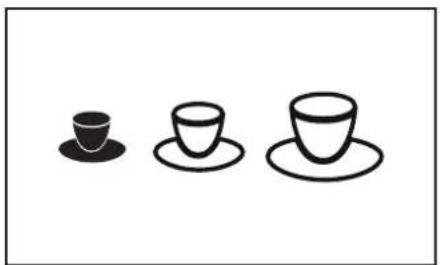
- Press the preselection button VOLUME. The cup icons (fig. 6.3) and the counter reading for the small volume of the selected drink appear on the display.

Note:
If you press the preselection button VOLUME, the display shows counter readings for the small, middle, large, and total drinks.
- Press the preselection button COLD*
The COLD icon (fig. 6.4) and the counter reading for the iced variation of the selected drink appear on the display.

Note:
If you press the preselection button COLD, the display shows counter readings for the cold, hot, and total drinks.

Note:
You can also combine the VOLUME and COLD preselections to get a more detailed counter readings.
- Press STOP or ← go back one level within the COUNTERS menu.
- Press another drink button to display the respective counter reading for this button.
VOLUMESTRENGTH
In the VOLUME menu, you can change the drink volumes for all available drinks at once in the range of +10% to -10%.
- Select the VOLUME menu by using ▲ or ▼ and press to access it.
The following message appears on the display:
VOLUME
+8%
- Increase or decrease the cup volume using ▲ and .▼
- Confirm the required value with ← The new cup volume will be accepted immediately.

Note:
If you would like to modify the drink volume again, press ←
In the STRENGTH menu, you can change the drink strength for all available drinks at once in the range of +10% to -10%.
- Select the STRENGTH menu by using ▲ or ▼ and press to access it.
The following message appears on the display:
STRENGTH
+8%
- Increase or decrease the drink strength using ▲ and .▼
- Confirm the required value with .← The new drink strength will be accepted immediately.

Note:
If you would like to modify the drink strength again, press ←
DATE/TIME CLEANING DAYS
You can set the date and time in the DATE/TIME menu.

Note:
The time setting needs to be adjusted at the start and end of daylight saving time.
- Select the DATE/TIME menu by using ▲ or ▼ and press to access it.
The date and time settings are shown on the display. The month setting is flashing.
- Use or to select the correct value.
- Press to got to the next field.
- Repeat steps 1 and 2 for all fields:

- When all fields are set you will see the time.

Note:
If the dispenser has been shut down for longer periods, the date and time must be set again.
You can set the weekdays that you want to clean or flush the dispenser in the CLEANING DAYS menu.
Select the CLEANING DAYS menu by using ▲ or ▼ and press to access it.
There are two submenus:
- CLEAN - set "Clean & Flush" days
- FLUSH - set "Flush" days
Caution: It is mandatory to run the "Clean & Flush" program at least once a week to guarantee food safety. In addition, Milk-Coffee versions also need to run the "Flush" program at least once a week.
Determine cleaning days
If you have a Coffee-Coffee version, the dispenser only needs to run the "Clean & Flush" program once a week. You can select any day you prefer.
If you have a Milk-Coffee version the dispenser needs to run both the "Clean & Flush" and the "Flush" programs at least once a week. You must select at least two days with a maximum interval of 4 days. The table below indicates which days can be combined (red = Clean & Flush, gray = Flush).

text_image
Sun Mon Tue Wed Thu Fri Sat Sun Mon Tue Wed Thu Fri Sat Sun Mon Tue Wed Thu Fri Sat Sun Mon Tue Wed Thu Fri Sat Sun Mon Tue Wed Thu Fri Sat Sun Mon Tue Wed Thu Fri Sat
Note:
You can always set more cleaning and/or flushing days then the minimum required number of days.
Set days for "Clean & Flush"
- Use ▲ to select the submenu.
CLEAN
The □con indicates the active weekday(s) for cleaning:
SUN MON TUE WED THU FRI SAT
CLEAN:

- Press to enter the submenu.
The _icon is displayed, it is positioned under SUN (Sunday):
SUN MON TUE WED THU FRI SAT

-
Use ▲ to move the icon to the weekday you would like to select or deselect for cleaning.
-
Press to activate or deactivate the selected weekday.
The icon appears under activated weekday(s).
Note: Sev
Vote:
Several days for cleaning can be set in sequence.
- Press STOP or to-go back one level within the CLEANING DAYS menu.
Note:
"Clean & Flush" is required at least once a week.
Set days for "Flush"
- Use ▲ to select the submenu.
FLUSH
The □con indicates the active weekday(s) for flushing:
SUN MON TUE WED THU FRI SAT
FLUSH:

- Press to enter the submenu.
The _icon is displayed, it is positioned under SUN (Sunday):
SUN MON TUE WED THU FRI SAT
FL. SET:

-
Use ▲ to move the icon to the weekday you would like to select or deselect for flushing.
-
Press to activate or deactivate the selected weekday.
The icon appears under activated weekday(s).
Note: Sey
Several days for flushing can be set in sequence.
- Press STOP or go back one level within the CLEANING DAYS menu.
ECO SETTINGS
You can reduce power consumption by using the menu ECO SETTING.
These settings only apply to periods during which the dispenser is not used.
Select the ECO SETTINGS menu by using ▲ or ▼ and press to access it.
There are four submenus:
• ECO ENABLE/DISABLE
• ECO START
- ECO END
• ECO TEMPERATURE
Self-learning ECO mode
To optimize power consumption the Cafitesse Excellence has a self-learning ECO mode. When ECO mode is enabled, the dispenser will automatically adjust the ECO mode start and end time according to use of the dispenser. For example, if the ECO mode start time is set to 18.00 hours but the dispenser is never used after 17.30 hours it will gradually change the start time to 17.30 hours automatically.
Your Cafitesse system supplier can disable this function if you do not want to use it.
Note: Whe
When the energy saving mode is active, the ECO text is shown on the display of the dispenser.
Note: The dispenser will become active again when a button is pressed. Your Cafitesse system supplier can disable this function if you do not want the dispenser to be used while in ECO mode.
Enable/disable ECO mode
- Use ▲ to select the ECO ENABLE/ DISABLE submenu and press ← access it.
The status is flashing on the display.
- Use ▲ to select ENABLED or DISABLED.
- Press to confirm the selected status.
- Press STOP or go back one level within the ECO SETTINGS menu.
Note: By default the ECO mode is enabled between 19.00 & 7.00 hours.
Setting the ECO start and end time

Note:
ECO mode needs to be enabled for the next submenus to show.
- Use ▲ to select the ECO START or ECO END submenu.
The current ECO time is shown on the display.
-
Press to enter the submenu. The option hour setting flashes and is active.
-
Use ▲ to set the correct time (hours).
-
Confirm with .
The option minutes setting flashes and is active.
-
Use ▲ to set the correct time (minutes).
-
Confirm with .
The new ECO time is shown on the display.
Setting the ECO boiler temperature

Note:
ECO mode needs to be enabled for the next submenu to show.
- Use ▲ to select the ECO TEMPERATURE submenu.
The current ECO boiler temperature is shown on the display.
- Press to enter the submenu.
The temperature setting is flashing.
-
Use ▲ to select the desired temperature.
-
Confirm with .
The new ECO boiler temperature is shown on the display.
Note:
The lower the ECO boiler temperature is set, the longer it takes for the dispenser to become fully functional again after coming out of ECO mode.
TELEPHONE #
You can set the telephone numbers of operator and service in this menu.
You can also select whether the numbers should be displayed in case:
- cleaning is required (operator)
- a product pack is empty (operator)
- a malfunction is detected (service)
Select the TELEPHONE # menu by using ▲ or ▼ and press to access it.
The status is shown in the display:
OPERATOR NR: 0123456789
There are four submenus:
• SHOW OPERATOR NR
• SHOW SERVICE NR
• OPERATOR NR
- SERVICE NR
Enable/disable telephone numbers Set telephone numbers
- Use ▲ to select the SHOW OPERATOR NR or SHOW SERVICE NR submenu and press ←
The display shows: Y (yes) or N (no).
-
Use a to select Y to activate the number display or N to deactivate the number display.
-
Confirm with .
The new setting will then be shown continuously on the display.
- Use ▲ to select the OPERATOR NR or SERVICE NR submenu and press ←
The display shows the telephone number. The first digit is flashing:
0: 123456789
Note: O = operator, S = service
-
Use ▲ to change the first digit.
-
Confirm with .
When confirmed the second digit starts flashing:
0: 0123456789
- Repeat steps 2 and 3 until all 10 digits are set.
The new telephone number will be shown on the display.
7 - TROUBLESHOOTING
| Display message Cause Action | |||
 0123456789 0123456789 | The product pack is:1. empty2. incorrectly positioned3. or not present | 1. Replace the empty product pack, see page 11.2. Check whether the product pack is inserted correctly, see page 11.3. Insert a product pack.Call the operator when the number is shown on the display. | |
  | The water in the boiler has not yet reached the required temperature. | • The drink delivery of the dispenser is blocked until the temperature reaches the correct value. | |
 012 012    | The drink delivery is blocked because the LOCK/Clear-Error button on the dispenser was pressed. | • Press the LOCK/Clear-Error button again to unlock the dispenser, see page 14.• Insert the USB release key into the USB port on the dispenser for temporary enable (option). | |
 | The dispenser must be cleaned. • Start the cleaning program on the same day, see page 16.Call the operator when the number is shown on the display. | ||
[5T28]  | The drink delivery is blocked because the dispenser was not cleaned as scheduled. | • Start the cleaning program immediately, see page 16.Call the operator when the number is shown on the display. | |
 | The water filter of the dispenser must be replaced. | • Contact service to replace the water filter. | |
 |  | The drink delivery is blocked because the energy saving mode is switched on. | · The energy saving mode will end automatically at the set time, see page 27.· (option) Press a drink button. The boiler temperature increases and the drink is dispensed as soon as the correct temperature is reached. The energy saving mode becomes active again 10 minutes after the boiler was heated up or the last drink was dispensed. |
| [STBT] |  Err 11/17/18/19 Err 11/17/18/19 | Water system error · Check the water supply line to the dispenser is blocked, open the water tap completely.· Press the LOCK/Clear-Error switch.Contact service if the error remains. | |
 |  Err 30 Err 30 | Cooling error · Check the ventilation and the ambient temperature of the dispenser, and clean the condensate grid, if necessary.· Press the LOCK/Clear-Error switch.Contact service if the error remains. | |
| Err 60/61/63 | Mixing bowl(s) not detected · Check if both mixing bowls are correctly in place.Contact service if the error remains. | ||
| Water leaks from the hot water outlet or a product outlet. | Scale particles block the respective outlet valve, it cannot close completely. | · Perform the program "Flush", see page 17.Contact service if the problem persists. | |
| The dispenser does not respond to pressing a button or using the strength slider. | A software jam has occurred. · Reset the dispenser:Disconnect the power supply and connect again after 5 seconds.Contact service if the problem persists. | ||
8 - SPECIFICATIONS
Versions*
Coffee-Coffee Milk-Coffee
Coffee-Coffee with Cold Milk-Coffee with Cold
Coffee-Coffee with Light Guidance Milk-Coffee with Light Guidance
Coffee-Coffee with Cold & Light Guidance Milk-Coffee with Cold & Light Guidance
Dimensions
Height Door closed: 692 mm / 27.24 in (Door open: 920 mm / 36.2 in)
Width 380 mm / 14.96 in
Depth 524 mm / 20.63 in
Weight
empty 38.5 kg / 86 lbs
filled 49 kg / 108 lbs
Maximum cup/pot height
Cups: 157 mm / 6.2 in
Pots: 157 mm / 6.2 in (with drip tray)
207 mm / 8.2 in (without drip tray or when using the optional pot extension)
Ingredient capacity 2 disposable Bag-in-Box (BIB) ingredient packs with a capacity of:
2 liter / 0.53 gal, or
1.25 liter / 0.33 gal, or
0.75 liter / 0.20 gal
Drink capacity 300 cups at 100 ml / 3.3 fl. oz. per hour at 3.3 kW (230V)
Boiler capacity 6 liter / 1.58 gal
Standard water connection 1/2" or 3/8" supply line with 3/4" BSP connecting piece
Drinking water line with stop valve
Max. water inlet temperature 60°C / 140°F
Dynamic pressure Min. 0.08 MPa at 10 l/min - 11 psi at 2.6 gal/min
Static pressure Max. 1.0 MPa - 140 psi
Hot water connection Via copper pipes only
Connection water cooling unit Dynamic pressure: min. 0.08 MPa at 1.2 l/min - 11 psi at 0.7 gal/min
Refrigerant 0.035 kg of R134a
Electrical specification • By power cord and plug 1.80 m / 70.9 in
- Direct power connection according to the Safety Instructions
For the connected loads refer to the rating plate.
1-phase operation Europe: max. 3.3 kW at 230-240 VAC (16A)
3-phase operation Europe: max. 8.9 kW at 400 VAC (3×16A)
1-phase operation North America: max. 1.4 kW at 120 VAC (20A)
2-phase operation North America: max. 9.0 kW at 120/240 VAC (50A)
Environmental specifications
Acoustic Emission The A-weighted sound pressure level of the dispenser is below 48 dB.
Ambient Temperature for installation & operation
Between 5°C / 41°F and 32°C / 90°F
Compliancy
VDE, CE
(2006/42/EC machinery directive, 2004/108/EC EMC directive, 2002/72/EC food safety)
The manufacturer reserves the right to change specifications without prior notice.
