FG1070DA - Cooker Atag - Free user manual and instructions
Find the device manual for free FG1070DA Atag in PDF.


User questions about FG1070DA Atag
0 question about this device. Answer the ones you know or ask your own.
Ask a new question about this device
Download the instructions for your Cooker in PDF format for free! Find your manual FG1070DA - Atag and take your electronic device back in hand. On this page are published all the documents necessary for the use of your device. FG1070DA by Atag.
USER MANUAL FG1070DA Atag
natural_image
Exterior view of a stainless steel electric stove with multiple doors and top cabin (no visible text or symbols)FG1011DA
FG1070DA
FG1211DA
FG9011EA
FG9070EA
NL Handleiding NL 3 - NL 31
EN Manual EN 3 - EN 31
natural_image
Simple diagram of a circular device with bidirectional arrows indicating rotation or clockwise motion (no text or symbols)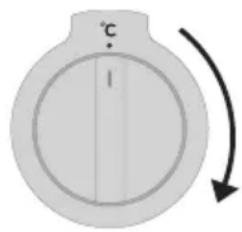
text_image
℃ Inatural_image
Simple diagram of a circular device with bidirectional arrows indicating rotation or sequence (no text or symbols)natural_image
Simple diagram of a circular device with a vertical line and arrow indicating rotation (no text or symbols)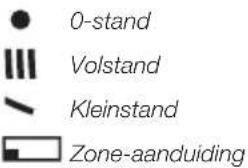
text_image
0-stand Volstand Kleinstand Zone-aanduidingnatural_image
Simple diagram of a circular device with a vertical bar and arrow indicating rotation (no text or symbols)natural_image
Simple diagram of a circular device with a vertical line and arrow indicating rotation (no text or symbols)
text_image
0-stand Volstand Kleinstand Binnenring Buitenringnatural_image
Simple diagram of a circular device with a vertical line and a curved arrow indicating rotation (no text or symbols)natural_image
Illustration of a cooking pot on a stove burner (no text or symbols)Fout
natural_image
Illustration of a cooking pot on a gas stove (no text or symbols)Goed

Speciale emailcoating
natural_image
Diagram of a mechanical device with rotating components and directional arrows (no text or symbols)natural_image
Diagram showing a person cleaning a window with labeled points A, including a magnified inset (no text or symbols present)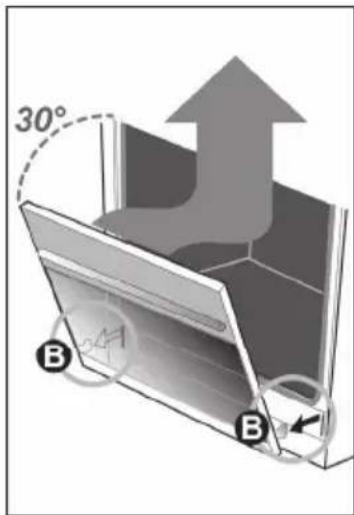
text_image
30° B Bnatural_image
Circular diagram showing a wall corner with a tool and a downward arrow, labeled 'A' (no text or symbols beyond the label)natural_image
Diagram of a heat exchanger or cooling unit with directional arrows indicating flow (no text or symbols)natural_image
Diagram of a metal rack with an arrow indicating downward force (no text or symbols)natural_image
Symbol of a trash bin with crossed-out lines indicating no waste or discharge (no text or numbers present)Setting the clock 10
Manual operation of the main oven 10
Main oven functions 10
Operating the small oven 11
Small oven functions 12
Operating the oven with clock 12
Turning off the oven in between uses 14
Setting the audible signal 15
Kitchen timer 15
Operating the gas hob
Ignition and adjustment 16
Operating the teppanyaki grill
Switching the teppanyaki grill on and off 17
Comfortable cooking
Optimal use of the hob 18
Wok burner 18
Maintenance 19
Faults 25
Installation 27
Environmental aspects 32
Introduction
You have chosen an ATAG cooker. Optimum user comfort and easy operation were paramount during the development of this product. The extensive adjustment options allow you to always choose the perfect method of preparation.
The gas hob has been designed for people who love to cook. The many different burner capacities ensure that you can prepare every dish. The integrated spark ignition allows you to ignite and operate the burners with only one hand. The gas hob is furthermore fitted with a flame safeguard that will shut off the gas supply if the flame goes out while cooking.
The oven functions are logically grouped on the function knob. The oven is also fitted with a timer. The timer switches off the oven when the cooking time has elapsed. Efficient and hassle free.
The teppanyaki grill allows you to quickly prepare tasty light meals. The finely-chopped ingredients are cooked in a dash of oil while stirring continuously. Everything stays fresh and full of flavour, while none of the vitamins are lost. As befits a modern kitchen. With the teppan yaki grill, you will soon discover that cooking can be both delicious and healthy.
This manual describes how you can make the best possible use of the cooker. In addition to information about its operation, you will also find background information that may assist you when using the appliance.
Read the manual thoroughly before using the appliance, and store these instructions in a safe place for future reference.
The manual also serves as reference material for the Service Department. The appliance identification card contains all the information the Service Department will need in order to respond appropriately to your needs and questions.
Enjoy your cooking!
Description
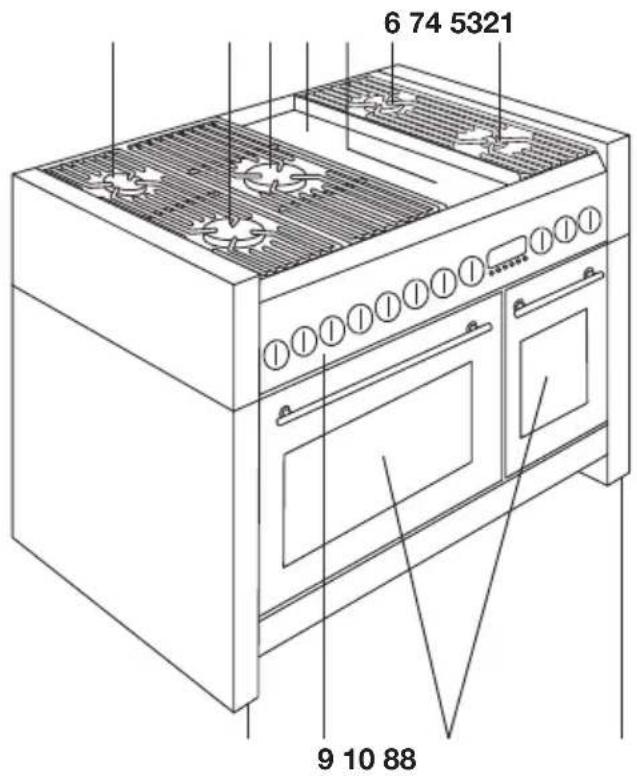
FG1211DA FG1011DA/FG1070DA
text_image
6 74 5321 9 10 88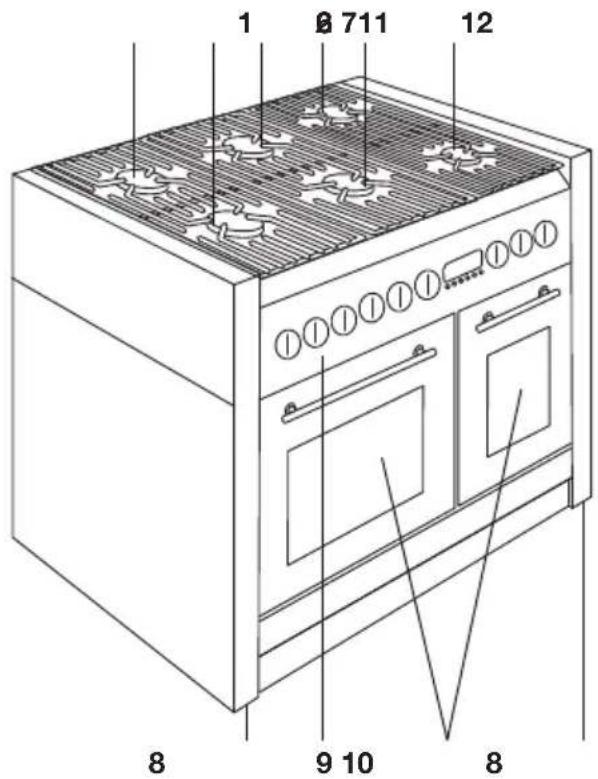
text_image
1 8 711 12 8 9 10 8FG9011EA/FG9070EA

text_image
1 8 711 12 ①①①①①①①①①①①①①①①①①①①①①①①①①①①①①①①①①①①①①①①①①①①①①①①①①①② 8 9 10 8- Rear left standard burner
- Front left wok burner
- Middle wok burner
- Back teppanyaki grill
- Front teppanyaki grill
- Rear right rapid burner
- Front right simmer burner
- Levellers
- Control panel
- Oven
- Rear middle wok burner
- Middle front standard burner
Control panel
FG1211DA

text_image
1 2 3 4 5 6 7 8 10 9 11 12FG1011DA/FG1070DA

text_image
1 2 13 14 5 6 9 10 11 12FG9011EA/FG9070EA

text_image
1 2 13 14 5 6 9 10 11- Front left burner control knob
- Rear left burner control knob
- Inner ring duo wok burner control knob
- Puter ring duo wok burner control knob
- Front right burner control knob
- Rear right burner control knob
- Front teppanyaki grill control knob
- Back teppanyaki grill control knob
- Oven display with buttons
9a. Timer button
9b. Duration button
9c. End time button
9d. Manual control button
9e. - button
9f. + button
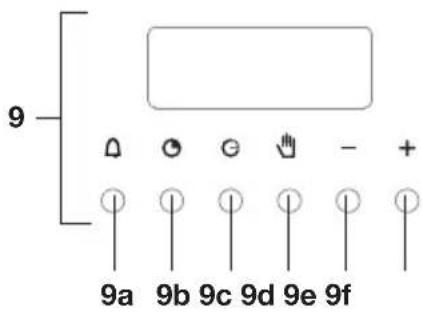
text_image
9 △ ○ ⊙ - + 9a 9b 9c 9d 9e 9f- Oven function knob
- Oven temperature knob
- Small oven function knob
- Middle front burner control knob
- Rear middle burner control knob
Using the oven
- Remove all accessories from inside the oven and clean them with warm soapy water. Do not use any abrasive cleaning agents.
- Set the oven at its highest setting for one hour with top and bottom heat. This will remove any protective grease used during manufacture.
- When you heat the oven for the first time you will notice a ‘new-oven smell’. Don’t worry, this is normal. If necessary, switch on the cooker hood.
• After letting it cool down, clean the oven with hot water. - Only preheat the oven if it is required in the recipe or in the tables of this manual.
Cooking tips
Energy-conscious use of the oven
- Open the oven door as little as possible.
- Prepare dishes with the same cooking temperature simultaneously (e.g., an apple pie and an oven dish) on the same grid, or above each other using hot air. You can also let meat stew at the same time.
- Prepare more meals after each other, for example an oven meal after a cake. Often, the preparation time of the second dish will be 10 minutes shorter because the oven is still hot.
- Because the oven is insulated, the residual heat from the oven will continue to cook dishes with longer cooking times (from 1 hour). Turn the oven off 10 minutes earlier than indicated, but leave the door closed.
- Pre-heating is generally not necessary, with the exception of dishes with cooking times of less than 30 minutes, or when indicated by a recipe.
- Remove everything you don't need for the dish from the oven.
- Turn the oven off before taking out the cooked dish.
Ovenware
- In principle, you can use any type of heat-resistant ovenware.
- Do not rinse glass ovenware with cold water immediately after use. The sudden temperature difference can cause the glass to crack.
- Use black or dark baking tins. These conduct heat better and allow the food to cook more evenly.
Do not cover the oven floor
- Covering the oven bottom with, for example, aluminium foil or a baking tray can lead to overheating and damage to the enamel.
- It is possible to prevent spring forms from leaking onto the oven floor by folding a container out of aluminium foil and placing it on the grid under the form or by laying baking paper under it.
Time setting
- Choose a 5 minute shorter cooking time than indicated in the recipe. This will allows you to check whether your food or cake is cooked through and golden brown at the last moment. If not, close the oven door and check again after some time. Opening and closing of the door should be done slowly. Preferably not before three quarters of the cooking time has elapsed.
Keeping food warm
- You can use the oven to keeping already prepared dishes warm. To do so, select the hot air setting and a temperature of 75^ C. Cover dishes you want to keep warm to prevent them from drying out.
Roasting meat
- Large pieces of meat, from 1 kg, are the most suitable. The meat will get a regularly shaped, crispy crust, with virtually no weight loss.
- Rub the meat with salt and spices fifteen minutes beforehand. Use 80 to 100 g of butter or fat (or mixture of the two) per 500 g of meat for roasting.
Cooking times
- Flat, thin pieces require approximately 5 minutes less cooking time than thick or rolled pieces of meat. When cooking larger pieces of meat, cook for 15 to 20 minutes longer per 500 grams extra.
- Put the meat in a roasting pan and douse in hot butter or fat. Place the meat in the roasting pan with the fatty side facing up. Make sure to baste meat without a fatty side every 15 minutes. Meat with
a fatty side should be basted every 30 minutes.
- If the gravy is too dark, add a few spoonfuls of water now and then during roasting.
- Cover the meat loosely with foil and let stand for 10 minutes before serving.
Using the gas hob
- Regularly check that the burner caps and burner rings are correctly positioned on the burner bases. Incorrect positioning can result in poor ignition, poor combustion, or damage to the caps.
- Over time, the enamel on the support point can become burnt in because the pan support is very strongly heated by the burner. This is unavoidable and is therefore not covered by the guarantee.
Using the teppanyaki grill
The teppanyaki grill is operated using two control knobs. The control knobs allow you to adjust the temperature per zone (front and rear).
Preheat the teppan yaki grill until the desired temperature has been reached. Lightly grease the grill plate with cooking oil before grilling your first dish. After that, no more oil needs to be added. The grill is hotter in the middle than on the sides. You can therefore use the sides to keep food warm or continue cooking it.
The combination of two zones with separately adjustable temperatures is characteristic of the teppan yaki method of preparation. You can sear the ingredients on the hot zone, stir-fry them, and then shift them to the warm zone. You can then continue braising and softly cooking the food on the warm zone, while possibly adding spices or sauces.
Setting the clock


When connecting the unit for the first time, 'auto' and '0:00' will flash on the display. The correct time of day has yet to be set.
- Press the 'manual' button.
'0:00' will stop flashing and the cooking symbol will appear.
- Press ‘+’ or ‘-’ within 5 seconds to set the correct time.
The time of day is set and the unit is set to manual (for the large oven).
▶Each press of the button increases/decreases the time by one minute.
- You can press and hold the ‘+’ or ‘−’ button to set the desired time quicker.
Manual operation of the main oven
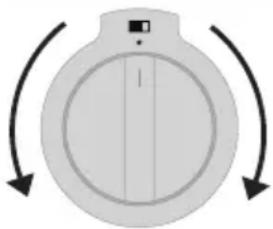
natural_image
Simple diagram of a circular device with bidirectional arrows indicating rotation or clockwise motion (no text or symbols)
text_image
°C I- Select a temperature with the temperature knob and an oven function with the function knob.
The red function indicator light and the orange temperature indicator light will light up; the oven is switched on.
▶See the table below for more information on the various oven functions that are available.
- After the cooking time has elapsed, turn the temperature knob and the function knob to '0' to switch the oven off.
Main oven functions
 | Oven lightThe oven light switches on. |
 | Top and bottom heat (conventional)A top and bottom heating element heat the food, suitable for the preparation of one dish. This mode is used for light pastry and cake where the heat supply from above and below needs to be equal to obtain an airy result. The dish should preferably be placed in a preheated oven, i.e., once the indicator light next to the temperature knob has gone out. |
  | Top heatThis mode is suitable for quickly baking soufflé's, meringues, etc., a little longer. When you are finished baking, turn the function knob to ‘top heat’.Bottom heatThis mode is recommended for dishes where the bottom should be well cooked. The bottoms of dishes are cooked well.Before you are finished baking (with a quarter of the baking time to go), switch the function knob to ‘bottom heat’ mode. Adjust the temperature knob to the maximum setting. The dish will be heated mainly by the bottom element, while continuing to brown on top. |
 | GrillThe top element heats the dish. This mode is suitable for grilling steaks, sausages, and making cheese on toast. The fan distributes the heat from the grill through the oven. This makes sure that the food is cooked evenly. Ideal for larger dishes such as poultry and larger pieces of meat. Put a baking dish under the dish to catch dripping fat. |
 | Fan with grillYou can grill with the fan running. The radiant heat is distributed around the dish by the fan. |
 | Conventional with fanThe top and bottom heating element are turned on. The fan evenly distributes the heat throughout the oven. This function is suitable for roasting meat and baking cakes. This function can also defrost food. To do so, set the temperature knob to ‘0’. |
 | Hot air circulationThe air in the oven is heated by the hot air element. The fan in the rear wall blows hot air in the oven. This is how the dishes are heated. You can bake on multiple levels simultaneously, allowing you to save energy. Because of the intensive heat transfer, you can choose a temperature that is approximately 20–30°C lower than indicated in conventional recipes. |
 | DefrostThis function may be used for slowly defrosting food. You do not need to set a temperature. The fan will start running, causing the air to circulate through the oven. |
Operating the small oven (FG1011/FG1070/FG1211)
All of the functions of the small oven can be operated using one knob. The most suitable temperature for the various functions is set automatically. If you adjust the temperature manually, the top and bottom element will be switched on. The display with electronic timer has no influence on the operation of the small oven.

natural_image
Simple diagram of a circular device with bidirectional arrows indicating rotation or clockwise motion (no text or symbols)-
Select a temperature or an oven function with the function knob. The orange indicator light of the small oven will light up; the oven is switched on.
▶See the table below for more information on the various oven functions that are available. -
After the cooking time has elapsed, turn the temperature knob and the function knob to '0' to switch the oven off.
Small oven functions
 | Oven lightThe oven light switches on. |
| 60-265°C | Top and bottom heat (conventional)A top and bottom heating element heat the food, suitable for the preparation of one dish. This mode is used for light pastry and cake where the heat supply from above and below needs to be equal to obtain an airy result. The dish should preferably be placed in a preheated oven, i.e., once the indicator light next to the temperature knob has gone out. |
 | Bottom heatThis mode is recommended for dishes where the bottom should be well cooked. The bottoms of dishes are cooked well.Before you are finished baking (with a quarter of the baking time to go), switch the function knob to ‘bottom heat’ mode. Adjust the temperature knob to the maximum setting. The dish will be heated mainly by the bottom element, while continuing to brown on top. |
 | Top heatThis mode is suitable for quickly baking soufflé’s, meringues, etc., a little longer. When you are finished baking, turn the function knob to ‘top heat’. |
 | GrillThe top element heats the dish. This mode is suitable for grilling steaks, sausages, and making cheese on toast. The fan distributes the heat from the grill through the oven. This makes sure that the food is cooked evenly. Ideal for larger dishes such as poultry and larger pieces of meat. Put a baking dish under the dish to catch dripping fat. |
Operating the oven with clock (for the small oven)
The electronic timer can be used in two ways:
- It allows you to determine the duration of baking / roasting / grilling. The oven switches off when the set time has elapsed. An audible signal will sound once the time is up.
- You can also enter a duration or an end time (for an automatic baking process). The oven will start and stop automatically. An audible signal will sound once the automatic baking process is finished.


Programming baking time
- Press the 'duration' button.
The display will read '0:00'.
-
Press ‘+’ or ‘-’ within 5 seconds to set the duration.
-
Pressing the ‘+’ or ‘-’ button for the first time will call up ‘auto’ in the display.
- You can press and hold the ‘+’ or ‘-’ button to set the desired time quicker.
When the ‘duration’ button is released, the countdown of the programmed baking time will start and the current time will once again be shown in the display.
- Select a temperature with the temperature knob and an oven function with the function knob.
The red function indicator light and the orange temperature indicator light will light up; the oven is switched on.
-
When the set baking time has elapsed, an audible signal will sound and the oven will switch off automatically.
-
Switch off the audible signal by pressing the 'manual' button.
-
After the cooking time has elapsed, turn the temperature knob and the function knob to '0' to also switch off the indicator lights of the oven.
- You can see the remaining baking time in the display at any time by pressing the 'duration' button.
If you want to adjust the duration, press the 'duration' button and immediately after that the '+' or '-' button.
Programming the automatic baking process
You can program the oven to turn on and off automatically by setting a duration and end time. The oven will calculate the start time and switch off automatically after the end of the cooking time.

text_image
Grid of icons including alarm, lock, push, minus sign, plus, download, and handshake symbols arranged in 4x4 grid- Press the 'duration' button.
The display will read '0:00'.
-
Press '+' or '-' within 5 seconds to set the duration.
-
Pressing the ‘+’ or ‘-’ button for the first time will call up ‘auto’ in the display.
-
You can press and hold the ‘+’ or ‘-’ button to set the desired time quicker.
-
Press the 'end time' button.
In the display you will see the current time multiplied by the set duration.
-
Press ‘+’ or ‘-’ within 5 seconds to set the end time.
-
Pressing the ‘+’ or ‘-’ button will cause the cooking symbol in the display to disappear.
- You can press and hold the ‘+’ or ‘-’ button to set the desired time quicker.
When the 'end time' button is released, the countdown of the programmed time will start and the current time will once again be shown in the display.
- Select a temperature with the temperature knob and an oven function with the function knob.
The red function indicator light and the orange temperature indicator light will light up as soon as the start time is reached; the oven is switched on.
-
When the set baking time has elapsed, an audible signal will sound and the oven will switch off automatically.
-
Switch off the audible signal by pressing the 'manual' button.
-
After the cooking time has elapsed, turn the temperature knob and the function knob to '0' to also switch off the indicator lights of the oven.
-
You can see the remaining baking time in the display at any time by pressing the ‘duration’ button.
- You can see the end time in the display at any time by pressing the ‘end time’ button.
If you want to adjust the duration, press the 'duration' button and immediately after that the '+' or '-' button.
- Example: Current time: 17:30, the set duration of the baking process: 1 hour and 15 minutes, the set end time of the baking process: 19:45. The oven will start the baking process at 18:30 with the preset temperature and function and will stop at 19:45.
Turning off the oven in between uses
- Press the 'duration' button.
- Press the ‘–’ button until the time in the display shows ‘0.00’. You will hear an audible signal.
- Switch off the audible signal by pressing the 'manual' button.
Setting the audible signal
If you have not set an oven function, you can change the audible signal using the ‘-’ button. There are three different types.
- Press the ‘-’ button twice.
You will hear an audible signal.
Kitchen timer
[NO TEXT]
©
G
○
O
O
- Then immediately press the ‘-’ button a third time. You will hear a different audible signal.
- Then immediately press the ‘-’ button a fourth time. You will hear yet another audible signal.
- Choose from these three signals by pressing the ‘-’ button (several times).
The audible signal of the kitchen timer will only sound after the expiry of the set time. The timer will not turn off the oven.
- Press the 'kitchen timer' button. The display will read '0:00'.
- Press the 'kitchen timer' button again and hold.
-
Use the '+' or '-' button to adjust the desired time.
-
Pressing the ‘+’ or ‘-’ button for the first time will call up kitchen timer symbol in the display.
- You can press and hold the ‘+’ or ‘-’ button to set the desired time quicker.
When the ‘kitchen timer’ button is released, the countdown of the time will start and the current time will once again be shown in the display.
- When the time has elapsed, an audible signal will sound and the kitchen timer symbol will disappear.
- Switch off the audible signal by pressing the 'manual' button.
▶You can see the remaining time in the display at any time by pressing the 'kitchen timer' button.
If you want to adjust the time, press the 'kitchen timer' button and immediately after that the '+' or '-' button to adjust the time.
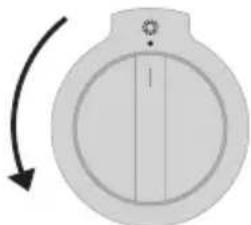
Igniting and adjusting

natural_image
Simple diagram of a circular device with a vertical line and arrow indicating rotation (no text or symbols)- Position 0
III High
Low
Burner zone
A symbol next to the control knob indicates which burner is being operated. Each burner is infinitely variable between high and low.
Spark ignition
Push in the control knob and turn it to the left.
The burner ignites.
The control knob should be pushed in for about 10 seconds in connection with the flame safeguard.
Flame safeguard
Your gas hob has a flame failure device. This ensures that the gas supply is shut off if the flame goes out during cooking.
If the burner fails to ignite, check that:
- the burner cap is securely placed on the burner;
- the burner / spark plug is clean and dry.
Wok burner (FG1211DA)
natural_image
Simple diagram of a circular device with a vertical bar and arrow, no text or symbols present.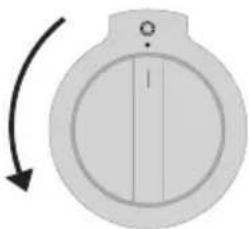
natural_image
Simple diagram of a circular device with a vertical bar and arrow indicating rotation (no text or symbols)- Position 0
III High
Low
Inner ring
Outer ring
The FG1211DA has two control knobs for the middle wok burner. This allows you to operate the flames of inner ring and outer ring separately.
Switching the teppanyaki grill on and off
natural_image
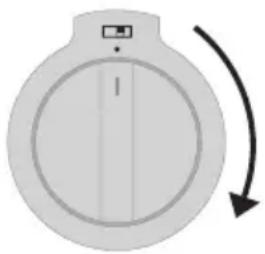
Simple diagram of a circular device with a vertical line and a curved arrow indicating rotation or direction (no text or symbols)- Select a mode with the control knob.
| 1 - 4 | Keeping food warm on the plate |
| 5 - 7 | Gentle frying |
| 8 - 9 | Grilling |
| 10 - 11 | Grilling thick meat |
| 11 | For rapid warming and cleaning |
The red indicator light will come on and the teppan yaki grill will switch on.
- Place the food you wish to prepare onto the griddle.
- After you are finished, switch the control knob back to '0'
▶ Please note: the teppanyaki grill takes a while to cool down after it has been switched off.
High-temperature cut-off
A sensor continuously measures the temperature of certain parts of the griddle while the teppanyaki grill is switched on. If the temperature is too high the power is reduced automatically.
Drainage groove
The groove at the front is primarily intended to easily carry off any food residues, moisture and excess oil or grease. Larger food residues can be slid into the drainage groove during use.
The griddle is removable so that any food residues can be put in the bin after use.
Optimal use of the hob

natural_image
Illustration of a cooking pot on a stove burner (no text or symbols)Wrong
Always ensure that the flames remain below the pan. If flames play around the edges of the pan, a lot of energy is lost. In addition, the handles can get too hot. Do not use pans with a base diameter of less than 12 cm. Smaller pans will not be stable.

natural_image
Illustration of a cooking pot on a gas stove (no text or symbols)Right

- When frying, stir-frying, cooking through large quantities, or deep-frying, it is best to use the rapid or wok burner.
- Preparing sauces, simmering and boiling can be done best on the simmer burner. On its high setting this burner is large enough for cooking food right through.
• Cook with the lid on the pan. This way you save up to 50% energy. - Use pans with a flat, clean, dry base. Pans with a flat base stand stably and pans with a clean base transfer the heat more effectively to the food.
Wok burner
With the wok burner you can prepare dishes at a very high temperature. For this purpose it is important:
• to cut the ingredients into strips, slices or pieces before cooking.
- to use good-quality oil, such as olive, maize, sunflower or peanut oil when stirfrying. A small quantity is enough. Butter and margarine on the other hand will burn because of the high heat.
- place the dishes with the longest cooking time in the pan first, so that at the end of the cooking time all ingredients are cooked al dente at the same time.
Please note
Disconnect the appliance from the power supply before beginning repairs. Preferably unplug the appliance, switch off the fuses, or set the switch in the meter cupboard to zero. Turn off the gas tap on the supply line.
Do not use steam cleaners or high-pressure steam cleaner to clean the device.
General
Ffront of the unit
Clean the surface with a liquid, non-abrasive cleaner for smooth surfaces and a soft cloth. Apply the cleaning agent to the cloth and wipe away the dirt; then rinse with water. Do not apply the cleaning agent directly onto the surface. Do not use harsh or abrasive cleaning agents, sharp objects, or steel wool, as this can cause scratches on the unit.
Aluminium surfaces
Aluminium surfaces should be cleaned with non-abrasive, liquid cleaning agents designed for such materials. Apply the cleaning agent to a damp cloth and wipe the surface clean; then rinse the surface with water. Do not apply the cleaning agent directly onto the aluminium surface. Do not use any abrasive cleaning materials or scourers. The surface must not come into contact with oven sprays.
Stainless steel front panels
Clean the surface with a mild detergent (soapsuds) and a soft sponge that doesn't scratch the surface. Do not use abrasive or solvent-based cleaning agents. If you do not follow these instructions the casing may become damaged.
Painted and plastic surfaces
Clean the knobs/buttons and door handle with a soft cloth and liquid cleaning agent suitable for cleaning smooth, painted surfaces. You can also use cleaning agents specifically designed for this type of surfaces. In this case, follow the instructions of the manufacturer.
Enamelled parts
The inside of the oven door, the entire oven interior, and the baking tray and griddle are entirely enamelled. They can best be cleaned with warm soapy water.
Glass
Clean glass parts with soapy water or Glassex.
Cleaning the oven
- The inside of the oven can be cleaned in the traditional way (with cleaning agents or oven spray), but only when the oven is very dirty and the stains are very stubborn.
- The following procedure is recommended for regular cleaning (after each use):
▷Set the oven to ‘top and bottom heat’ mode. Set the temperature knob to 50°C.
Pour 0.6 litres of water into a baking tin and place it on the bottom rack. After half an hour the food residues on the enamel of the oven will become soft and you can gently wipe them off with a damp cloth.
In the event of stubborn stains, the following should be observed:
The oven should be cooled down before cleaning.
- Clean the oven and the accessories after each use, in order to prevent the dirt from burning into the oven.
- The easiest way to remove grease is by using warm soapy water while the oven is still warm.
- For very stubborn dirt, use conventional oven cleaners. Make sure to thoroughly rinse the oven afterwards with clean water, to remove any residual cleaning agent.
- Never use aggressive cleaning agents such as steel wool, scouring pads, stain removers, etc.
- Varnished, stainless steel, and galvanised surfaces, and aluminium parts must never come into contact with oven sprays, because this will damage and discolour them. The same applies to the thermostat sensor (if the device is equipped with a timer with a sensor), and to the heating elements that are accessible at the top.

- When purchasing and using cleaning agents, be sure to take account of the environment and heed the instructions of their manufacturer.
Please Note: never use abrasive cleaning agents or sharp metal scrapers to clean the glass of the oven door. These can scratch the surface, which could cause the glass to break.
Practical tips
- It is recommended to wrap large pieces of fatty meat in aluminium foil or put them in a suitable roasting bag to prevent grease from splashing on the oven walls.
- Put a drip tray under the meat when grilling.
Accessories
Wash any accessories (baking trays, grids, etc.) with warm water and standard washing-up liquid.
Special enamel coating
The oven, the inside of the door, and the baking trays have been treated with special enamel, which has a smooth and strong surface. This special coating makes cleaning at room temperature easier.
natural_image
Diagram of a mechanical device with rotating components and directional arrows (no text or symbols)Replacing the oven bulb
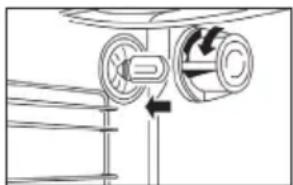
- You need a bulb with the following specifications: E14 socket, 230V / 15Hz, 15W, suitable for high temperatures (300°C).
- Remove the glass cover (counter-clockwise), switch the oven light bulb, and replace the glass cover.

Disassembly of the oven door
In normal use, the oven door will not need to be removed. However, should you want to do this, please follow the instructions below.
Warning! The oven door is very heavy and should be well supported.
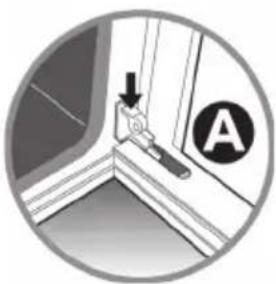
- Open the door and tilt lock A in both hinges fully to the outside.
- Close the oven door halfway, so that the tension is off of the springs (the oven door will be at an angle of approximately 30^ ).
- Hold the door securely at both sides, move along with the closing movement of the door, while simultaneously lifting the door.
- Turn the lower part of the door with the hinges B towards you. The door has now been removed.
- Clean the door. The door may optionally be tilted so as to clean the space between the glass with a soft bottlebrush.

natural_image
Diagram showing a person interacting with a window and screen, with labeled points A (no text or symbols on the diagram itself)
text_image
30° B BTo put the door back in place, proceed in reverse order. The door hinges are in the extended position.
natural_image
Circular diagram showing a wall-mounted device with an arrow and a circular symbol labeled 'A' (no text or labels present)- Slide the door hinges into the hinge openings.
- Tilt the door in the horizontal position and click the hinges in place by tilting lock A back inwards.
Please note: the hinge protectors must always be secured again after replacing the oven door.

natural_image
Diagram of a heat exchanger or cooling unit with downward arrows indicating flow direction (no text or symbols)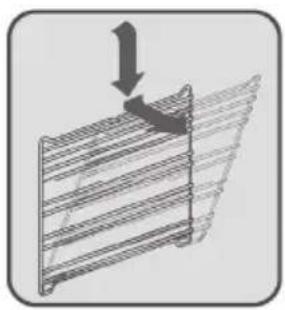
natural_image
Diagram showing a structural component with an arrow indicating downward force or compression (no text or symbols present)Removing the runners
You can remove both runners to clean the oven easier. The runners are attached to the oven wall at three points (see figure).
- Click the runner out of the lock by pushing in the middle of the top of the runner.
- Lift the runner upwards slightly and pull it outwards.
To put the runners back in place, proceed in reverse order.
- Place the lower part of the runner on the two lower attachment points.
- Then press and click the upper part back into the upper attachment point.
Cleaning the gas hob
Your gas hob has been manufactured from high-grade, easy to clean materials.
- Regular cleaning immediately after use prevents food spills from being able to become ingrained and cause stubborn stains that are difficult to remove. Use a mild cleaning agent. Do not use too much moisture, as there is a risk that it will penetrate into the burner or vent holes.
- Clean the control knobs, burners, and pan supports first and then the drip tray. This avoids the drip tray getting dirty again during cleaning.
- The ignition plugs should preferably be cleaned with a cloth. Do this carefully. Otherwise the spark plug can become defective. The spark plug will only operate correctly in a dry environment. If the plug is very dirty, you can clean it with a tiny brush.
- Set the pan supports down vertically, without sliding them over the drip tray.
- Assemble the burner parts using the guide ridges. Pay attention to the notches for the ignition plug and thermocouple. Make sure the burner parts are lying flat.
Cleaning the pan supports
Do not clean the pan supports in the dishwasher. The enamel on the pan supports is suitable for cleaning in the dishwasher, but the connection with the rubber feet is not. Moreover, the pan supports might show some discolouration if washed in the dishwasher. If the rubber feet are lost, the pan support is likely to damage the drip tray.
Stubborn stains on enamel (pan supports, burner caps, and drip tray)
Stubborn stains can best be removed with a liquid cleaning agent. Never use scouring powder, scouring pads, sharp objects, or aggressive cleaning agents.
Cleaning removable burner components
Burner parts should not be cleaned in the dishwasher. The parts may be damaged by the dishwasher detergent! The removable burner components (including those of the wok) are best cleaned with a mild cleaning agent and a soft cloth. For stubborn stains, soak the burner components in hot soapy water. Never use scouring powder, scouring pads, sharp objects, or aggressive cleaning agents.
Cleaning the teppanyaki grill
We recommend you clean the teppanyaki grill immediately after use. This way you avoid food residues from burning in and causing stubborn stains.
Daily cleaning
We recommend you use lemon juice and water for daily cleaning of the grill. Put the lemon juice on the grilling surface when it is nice and hot (100°C). The liquid will soak any food residues loose, which you can then dispose of using the drainage groove. Leave the grill on for a little longer at a lower temperature. You can wipe away the loosened residues together with the water with a little kitchen paper once the grill plate has cooled. Finish drying the teppanyaki grill with kitchen paper or a dry cloth.
Faults table
When in doubt about the proper operation of your appliance, this does not automatically mean there is a defect. Make sure to check the points mentioned below in the table first, or visit our website ‘www.atag.nl’ for more information.
| Problem with the hob Possible cause Solution | ||
| There is a smell of gas in the vicinity of the appliance. | The gas connection of the unit is leaking. | Turn off the main gas tap.Contact your installer. |
| A burner won’t ignite. Plug not in socket. Plug the plug into the wall socket. | ||
| Problem with the hob Possible cause Solution | ||
| The burner won’t burn evenly. | Burner parts not correctly installed. | Assemble the burner parts using the centring ridges. |
| Burner components dirty/ damp. | Clean/dry the burner components. Make sure that the outflow holes are open. | |
| Wrong type of gas used. Check | that the gas used is suitable for the appliance. If not, contact your gas fitter. | |
| The burner goes out after igniting. | Control knob not pressed in long enough. | Keep the control knob pressed in for at least 10 seconds. |
| Problem with the oven Possible cause Solution | |
| The oven won’t heat up. No temperature set. Set the temperature using the temperature knob. | |
| Problem with the teppanyaki grill | Possible cause Solution | |
| A slight smell is noticeable the first few times the grill plate is used. | Warming up the device. This is | normal and disappears after the device has been used a few times Ventilate the kitchen |
| The grill plate heats too much during grilling and cannot be adjusted to the required temperature. | The temperature control is defective. | Contact your service centre. |
General

This appliance should only be connected by a registered installer! The gas connection and the electrical connection must comply with national and local regulations.
Warning!
This appliance must be earthed at all times.
Installation, maintenance, or repairs should only be carried out by professionals who are authorised by the manufacturer, as failure to do so will void the guarantee.
The device should be disconnected from the mains prior to installation, maintenance or repairs. The device is only disconnected from the electric power if:
- the main switch of the domestic electrical system is switched off, or
- the fuse of the domestic electrical system has been completely removed, or
- the plug has been pulled out of the socket.
Faulty parts may only be replaced by original ATAG parts. Only those parts are guaranteed by ATAG to meet the safety requirements.
To avoid dangerous situations resulting from any damage to the connecting cable, this should only be replaced by the manufacturer, the manufacturer's service organisation or suitably qualified persons.
Gas connection

- We recommend that the hob be connected by means of a fixed pipe. Connection using a specially designed safety hose is also permitted.
- The pipe behind the oven must be made entirely out of metal.
Warning!
- A safety hose may not be bent and must not come into contact with moving parts of kitchen units.
- The connection tap for the appliance must always be positioned such that it is easily accessible.
- The type of gas and the country for which the appliance has been designed are indicated on the appliance identification card.

Before using the appliance for the first time check the connections using water and washing-up liquid to ensure that there are no gas leaks.
Electrical connection
230-240 V\~ - 50/60Hz
• Wall socket and plug must be accessible at all times.
- Make sure that the cable does not come into contact with parts of the oven that may become hot.
- If you want to make a fixed connection, ensure that a multi-pole switch with a distance between contacts of 3 mm is installed in the supply cable.
- Do not use a multiple socket or an extension lead to connect the device to the electrical mains. Safe use of the device cannot be guaranteed with such accessories.
Installation
- When placing the cooker next to a tall cupboard or another wall made of flammable material, keep at least 50 mm distance between the cooker and the walls.
- Also keep a minimum distance of 650 mm between the hob and any cooker hood placed above the cooker.
- If you place the cooker in a kitchen unit, the minimum space must be adhered to.
- If the cooker is built in between kitchen cabinets, the lining of the units must be able to withstand temperatures up to 90°C.
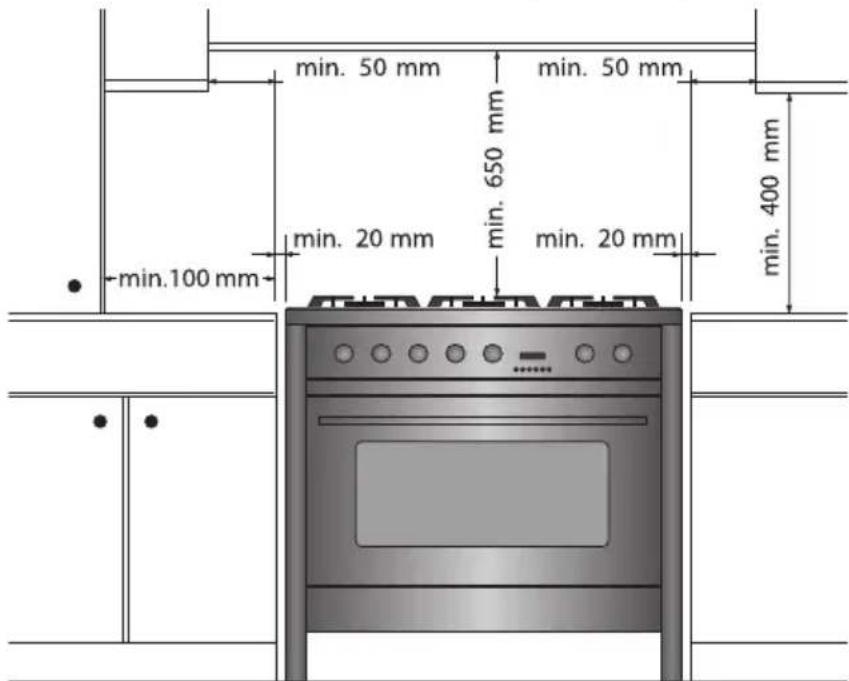
The height of the cooker can be adjusted with the adjusting feet.
If you want to install the cooker on a platform, make sure that it is securely fastened.

Warning!
After installation of the device, check whether the burners work properly. The flame pattern should be regular and stable on the high setting, and the burners must not go out on low.
Dimensions
FG1211DA FG1011DA/FG1070DA
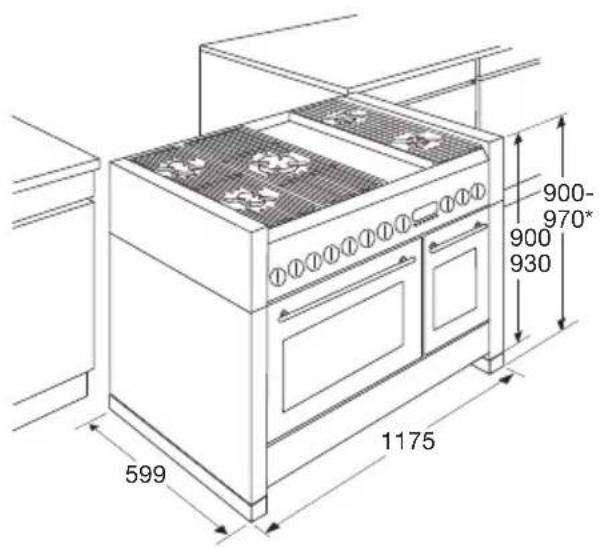
text_image
599 1175 900- 970* 900 930
text_image
900- 970* 900- 930 599 998FG9011EA/FG9070EA
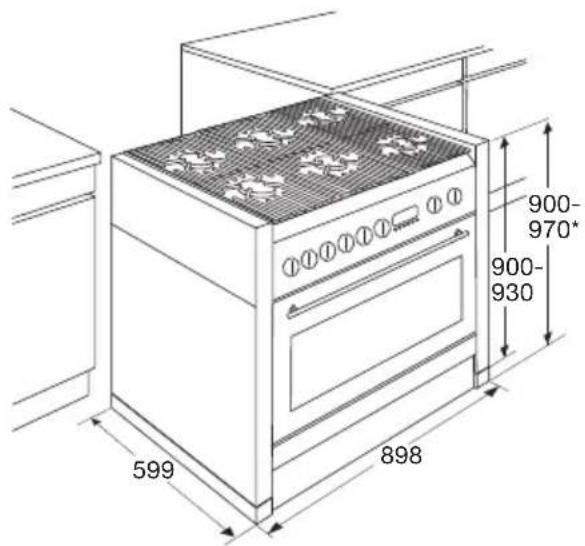
text_image
599 898 900- 970* 900- 930Technical data
The appliance identification card lists the total connected load, the required voltage, and the frequency.
This appliance meets all relevant CE guidelines.
| FG1211DA | FG1011DA/FG1070DA | FG9011EA/FG9070EA | |
| Connection 230V - 50Hz | 230V - 50Hz 230V - 50Hz | ||
| Power 7.0kW 3.9kW 2.9kW | |||
| Volume | 85 litres (small oven 31 litres) | 65 litres (small oven 31 litres) | 85 litres |
Gas information
| Burner Gas Operating | pressure (mbar) | EE (%) | |
| High (3.0kW) G25/G25,3 25 59,2 | |||
| Medium 1.8kW G25/G25,3 25 59,9 | |||
| Simmer (1kW) G25/G25,3 25 - | |||
| Wok (3.5kW) G25/G25,3 25 52,4 | |||
| Wok (4.6kW) G25/G25,3 25 53,6 | |||
Disposal of packaging and appliance
Durable materials were used in the manufacture of this appliance. Make sure to dispose of the unit responsibly at the end of its life cycle. Ask your local authorities for more information about how to do so.
The appliance packaging is recyclable. The following may have been used:
- cardboard;
• polyethylene film (PE);
• CFC-free polystyrene (PS rigid foam).
Dispose of these materials in a responsible manner and in accordance with government regulations.

natural_image
Symbol of a trash bin with crossed-out lines indicating no waste or discharge (no text or numbers present)The product is marked with a crossed-out dustbin symbol to remind you to dispose of household appliances separately. This means that at the end of its working life, the product must not be disposed of as urban waste. The appliance must be taken to a special municipal centre for separated waste collection or to a dealer providing this service.
Separate collection of household appliances helps to prevent potential negative impact on the environment and on human health caused by improper disposal. It ensures that the materials that make up the unit can be recycled to achieve a significant saving in terms of energy and raw materials.
CE
Declaration of Conformity
We hereby declare that our products satisfy the applicable European directives, orders and regulations, as well as the requirements stated in the referenced standards.

natural_image
Warning symbol with exclamation mark inside a triangle (no text or numbers)The appliance rating label is located on the inside of the appliance.
When contacting the service department,
have the complete type number to hand.
Adressen en telefoonnummers van de serviceorganisatie vindt u op de garantiekaart. You will find the addresses and phone numbers of the service organisation on the guarantee card.
ATAG