DEH-2250UB - Receiver PIONEER - Free user manual and instructions
Find the device manual for free DEH-2250UB PIONEER in PDF.


User questions about DEH-2250UB PIONEER
0 question about this device. Answer the ones you know or ask your own.
Ask a new question about this device
Download the instructions for your Receiver in PDF format for free! Find your manual DEH-2250UB - PIONEER and take your electronic device back in hand. On this page are published all the documents necessary for the use of your device. DEH-2250UB by PIONEER.
USER MANUAL DEH-2250UB PIONEER
ThankyouforpurchasingthisPIONEER product.
Toensureproperuse, pleasereadthrough this manualbeforeusingthisproduct.Itisesespeciallyimportantthatyoureadandobserve
WARNINGSandCAUTIONsinthismanual.
Pleasekeepthemanualinasafeandaccessible placeforfuturereference.
Aboutthisunit

CAUTION
- Donotallowthisunittocomeintocontact withliquids. Electricalshockcouldresult. Also, damagetothisunit, smoke, andoverheatingcouldresultfromcontactwithliquids.
- "CLASS1LASERPRODUCT" Thisproductcontainsalaserdiodeofhigher classthan1.Toensurecontinuedsafety,do notremoveanycoversorattemptogainaccesstotheinsideoftheproduct.Referallservicingtoqualifiedpersonnel.
• Always keep the volumelowen ought to hear outsidesounds. - Avoidexposuretomoisture.
- If the battery is disconnected, an preset memory will be erased.
Incaseoftrouble
Should this unit fail to operate properly, please contact your dealer or nearest authorized PIONEERServiceStation.
Operatingthisunit
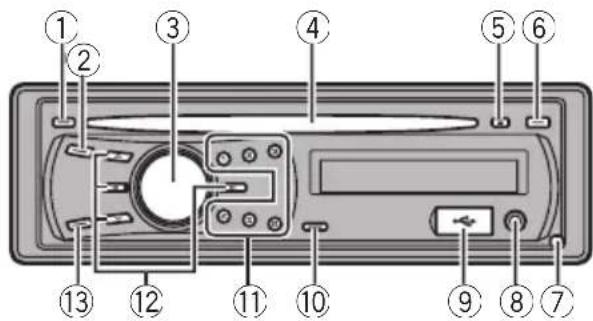
Headunit
text_image
Diagram of a device rear panel with numbered components for identificationPartPart
| 1DISP/ ⇌/SCRL8 | AUXinputjack(3.5 mmstereojack) | |
| 2SRC/OFF9USBport | ||
| 3 MULTI-CONTROL (M.C.) | 10 | Q (list) |
| 4Discloadingslot11to6 | ||
| 5 ▲ (eject) | 12 | ▲/▼/◄/► |
| 6CLOCK13BAND/ESC | ||
| 7Detachbutton | ||

CAUTION
UseanoptionalPioneerUSBcable(CD-U50E)to connecttheUSBaudioplayer/USBmemory to theUSBport.SincetheUSBaudioplayer/USB memoryisprojectedforwardfromtheunit,itis dangeroustoconnectdirectly. Donotusetheunauthorizedproduct.
Remotecontrol

text_image
14 - VOLUME + BANJ/ESC MUTE 13 20 FUNCTION 15 19 SEQ 12 16 DISP 17 18PartOperation
| 14VOLUME | Presstoincreaseordecreasevolume. |
| 15MUTE | Presstomute.Pressagaintoun-mute. |
| 16AUDIO | Presstoselectanaudiofunction. |
| 17DISP/SCRL | Presstoselectdifferentdisplays.Pressandholdtoscrollthroughthetextinformation. |
| 18II | Presstopauseorresume. |
| 19FUNCTION | Presstoselectfunctions.Pressandholdtorecalltheinitialsettingmenuwhenthesourcesareoff. |
| 20LIST/ENTER | Presstodisplaythedisctitle,tracktitle,folder,orfilelistde-pendingonthesource.Whileintheoperatingmenu,presstocontrolfunctions. |

Displayindication

text_image
1 2 3 5 7 9 10 11 12 13 14 4 6 8 LOC 10V 10V 10V 10V 10V 10V E:\PHYIndicator Operation
| 1 | (disc) | Thedisc(album:nameisdis-played.Albumsearchrefinementthe iPodbrowsingfunctionisinuse. |
| 2 | (artist) | Thedisc(track)artistnameisdis-played.Artistsearchrefinementthe iPodbrowsingfunctionisinuse. |
| 3 | Maindis-playsec-tion | Tuner:bandandfrequencyBuilt-inCD,USBandiPod:elapsedplaybacktimeand textinformation |
| 4 (song) | Thelrack(song)nameisdis-played.Aplayableaudiofilehasbeense-lectedwhileoperatingthelist.Songsearchrefinementonthe iPodbrowsingfunctionisinuse. |
| 5◀ | Anuppertieroffolderormenu exists. |
| 6 ≡ (folder)Thelistfunctionisoperated. | |
| 7▶ | Alowertieroffolderormenuex-ists.Itflasheswhenasong/albumre-latedtothesongcurrentlyplaying isselectedfromiPod. |
| 8LOCThelocalseektuningison. | |
| 9 ▼ LOUD(loudness) | Theloudnessison. |
| 10○(stereo) | Theselectedfrequencyisbeing broadcastedinstereo. |
| 11 ↗ (repeat)Trackorfolderrepeatison. | |
| 12 ×× (ran-dom) | Randomplayison. |
| 13 × (shuf-fle) | Shufflefunctionisonwhilethe iPodsourceisbeingselected. |
| 14 S.Rtrv(soundre-triever) | Thesoundretrieverfunctionis on. |

BasicOperations

Important
- Handlegentlywhenremovingorattaching thefrontpanel.
- Avoid subjecting the front panel to excessive shock.
- Keepthefrontpaneloutofdirectsunlightand hightemperatures.
- Removeanycablesanddevicesattachedto thisunitbeforedetachingthefrontpanelto avoiddamagetothedeviceorvehicleinterior.
| Removingthefrontpaneltoprotectyourunitfromtheft1 Pressthedetachbuttontoreleasethefrontpanel.2 Grabthefrontpanelandremove.3 Putthefrontpanelintotheprovidedprotectivecaseforsafekeeping. |
Re-attachingthefrontpanel1 Slidethefrontpaneltotheleftuntilclicks.Frontpanelandtheheadunitareconnectedontheleftside.Makesurethatthefrontpanelhasbeenproperlyconnectedtotheheadunit. 2 Presstherightsideofthefrontpaneluntilitisfirmlyseated.Ifyoucan'tattachthefrontpaneltotheheadunitsuccessfully,tryagain.However,forcingthefrontpanelintoplacemayresultindamage. 2 Presstherightsideofthefrontpaneluntilitisfirmlyseated.Ifyoucan'tattachthefrontpaneltotheheadunitsuccessfully,tryagain.However,forcingthefrontpanelintoplacemayresultindamage. |
| Turningtheuniton1 PressSRC/OFFtoturntheuniton. |
| Turningtheunitoff1 Press SRC/OFF and hold until the unit turns off. |
| Selectingasource1 PressSRC/OFFtocyclebetween:TUNER (tuner)—CD (built-in CD player)—USB(USB)/IPOD(iPod)—AUX(AUX) |
| Adjustingthevolume1 TurnM.C.toadjustvolume. |

Notes
- Whenthisunit'sblue/whiteleadisconnected tothevehicle'sauto-antennarelaycontrol terminal,thevehicle'santennaextendswhen thisunit'ssourceisturnedon.Toretractthe antenna,turnthesourceoff.
- Inthismanual,iPodandiPhonewillbereferredtoasiPod.
Useandcareoftheremote control
Usingtheremotecontrol
① Pointtheremotecontrolinthedirectionofthe frontpaneltooperate. Whenusingforthefirsttime,pulloutthefilm protrudingfromthetray.
Replacingthebattery
①Slidethetrayoutonthebackoftheremotecontrol.
② Insertthebatterywiththeplus(+)andminus(-) polesalignedproperly.

natural_image
Diagram of a mechanical or laboratory procedure showing a tool interacting with a component, no text or symbols present.
WARNING
- Keepthebatteryoutofthereachofchildren. Shouldthebatterybeswallowed,consulta doctorimmediately.
- Batteries(batterypackorbatteriesinstalled) must not be exposed to excessive heats such as sunshine, fireorthelike.

CAUTION
• UseoneCR2025(3V) lithium battery.
- Removethebatteryiftheremotecontrolisnot usedforamonthorlonger.
- Thereisadangerofexplosionifthebatteryis incorrectlyreplaced.Replaceonlywiththe sameorequivalenttype.
- Donothandlethebatterywithmetallictools.
- Donotstorethebatterywithmetallicobjects.
- If the battery leaks, wipetheremote control completely clean and install anew battery.
- Whendisposingofusedbatteries,comply withgovernmentalregulationsorenvironmentalpublicinstitutions’rulesthatapplyinyour country/area.

Important
- Donotstoretheremotecontrolinhighttemperaturesordirectsunlight.
- Theremote control may not function properly indirect sunlight.
- Donotlettheremotecontrolfallontothe floor,whereitmaybecomejammedunderthe brakeoracceleratorpedal.
Menuoperationsidentical forfunctionsettings/audio adjustments/initial settings/lists
| ReturningtothepreviousdisplayReturningtothepreviouslist/category(thefolder/Categoryonelevelhigher)1|PressDISP/ ⇌/SCRL. |
| ReturningtothemainmenuReturningtothetoptieroflist/category1|PressandholdDISP/ ⇌/SCRL. |
| ReturningtotheordinarydisplayCancelingtheinitialsettingmenu1|PressBAND/ESC. |
| Returningtotheordinarydisplayfromthelist/category1|PressBAND/ESC. |

Tuner

Important
If you are using this unit in North, Central or South America, reset the AM tuning step (referto AMSTEP(AM tuning step) on page 11).
BasicOperations
Selectingaband
1 Press BAND/ESC until the desired band (F1, F2, F3 for FMorAM) is displayed.
Manualtuning(stepbystep)
1Press◄or►.
Seeking
[1]Pressandhold◀or▶, and then release. Youcancancelseektuningbybrieflypressing◀ or▶. Whilepressingandholding◀or▶, youcanskip stations.Seektuningstartsassoonasyoure- lease◀or▶.
Storingandrecallingstations
Youcaneasilystoreuptosixstationsforeach bandaspresets.
- When you find a station that you want to store in memory, press one of the preset tuning buttons (1 to 6) and hold until the preset number stops flashing.
Storedradiostationfrequencycanberecalled bypassingthepresettuningbutton.
■Youcanalsorecallstoredradiostationsby pressing▲or▼duringthefrequencydisplay.
Functionsettings
1PressM.C.todisplaythemainmenu.
2TurnM.C.tochangethemenuoption andpresstoselectFUNCTION.
3TurnM.C.toselectthefunction.
Afterselecting, perform the following procedure to set the function.
BSM(beststationsmemory)
BSM(beststationsmemory)automaticallystoresthe sixstrongeststationsintheorderoftheirsignal strength.
1 PressM.C.toturnBSMon. Tocancel, press M.C. again.
2 TurnM.C.toselectthedesiredsetting. FM: OFF—LEVEL 1—LEVEL 2—LEVEL 3—LEVEL 4 AM:OFF—LEVEL1—LEVEL2 Largersettingnumberishigherlevel.Thehighest levelsettingallowsreceptionofonlythestrongest stations,whilelowersettingsletyoureceiveprogressivelyweakerstations.
3 PressM.C.toconfirmtheselection.

Note
Operationiscompleteevenifthemenuiscancelledbeforebeingconfirmed.
CD/CD-R/CD-RWandUSB storagedevices
BasicOperations
| PlayingaCD/CD-R/CD-RW1Insertthedisc,labelsideup,intothediscloading slot.1If a disc has already been inserted, pressSRC/OFFtoselectthebuilt-inCDplayer. |
| EjectingaCD/CD-R/CD-RW1Press▲. |
| PlayingsongsonaUSBstoragedevice1OpentheUSBconnectorcoverandpluginthe USBstoragedeviceusingaUSBcable. |
| StopplayingaUSBstoragedevice1YoumaydisconnecttheUSBstoragedeviceat anytime. |
| Selectingafolder1Press▲or▼. |
| Selectingatrack1Press◄or►. |
| Fastforwardingorreversing1Pressandhold◄or►. |
Operatingthisunit
| Returningtorootfolder1PressandholdBAND/ESC. |
| SwitchingbetweencompressedaudioandCD-DA1PressBAND/ESC. |

Notes
- When playing compressed audio, there is no sound during fast forward or reverse.
- USBportableaudioplayersthatcanbe chargedviaUSBwillberechargedwhen pluggedinandtheignitionswitchissetto ACCorON.
- DisconnectUSBstoragedevicefromunit whennotinuse.
- IfplugandplayisonandaUSBstoragedeviceispresent,dependingonthetypeofdevice,thesourcemayswitchtoUSB automaticallywhenyouturnontheengine. Pleasechangeplugandplaysettingasnecessary.RefertoUSB(plugandplay)onpage12.
Displayingtextinformation
| Selectingthedesiredtextinformation1PressDISP/ ⇌/SCRL.CDTEXTdiscs:Playtime—disctitle—discartistname—tracktitle—trackartistnameWMA/MP3: Play time—folder name—file name—track title—artist name—album title—comment—bitrate—folderandtracknumbersWAV: Play time—folder name—file name—samplingfrequency—folderandtracknumbers |
| Scrollingthetextinformationtotheleft1PressandholdDISP/ ⇌/SCRL. |

Notes
- Incompatible text stored with the audio file may not be displayed or may be displayed incorrectly.
- DependingontheversionofiTunesusedto writeMP3filesontoadisc,commentinformationmaybeincorrectlydisplayed.
- WhenplayingbackVBR(variablebitrate)-recordedWMAfiles,theaveragebitratevalueis displayed.
- WhenplayingbackVBR(variablebitrate)-recordedMP3files, VBRisdisplayedinsteadof bitratevalue.
Selectingandplayingfiles/ tracksfromthenamelist
1Presstoswitchtothefile/track namelistmode.
2UseM.C.toselectthedesiredfilename (orfoldername).
| Changingfileorfoldername1TurnM.C. |
| Playing1Whenafileortrackisselected,pressM.C. |
| Seeingalistofffiles(orfolders)intheselectedfolder1Whenafolderisselected,pressM.C. |
| Playingasongintheselectedfolder1Whenafolderisselected,pressandholdM.C. |

Note
Tracktitlelistwilldisplaythelistoftracktitleson aCDTEXTdisc.
Advancedoperationsusing specialbuttons
| Selectingarepeatplayrange1Press6/ → tocyclebetweenthefollowing:CD/CD-R/CD-RW•DISC-Repeatalltracks•TRACK-Repeatthecurrenttrack•FOLDER-RepeatthecurrentfolderUSBaudioplayer/USBmemory•TRACK-Repeatthecurrentfile•FOLDER-Repeatthecurrentfolder•ALL-Repeatallfiles |
| Playingtracksinrandomorder1Press5/ ×× toturnrandomplayonoroff.Tracksinaselectedrepeatrangeareplayedin randomorder. |
Pausing playback
1 Press 2/PAUSE to pause or resume.
Enhancingcompressed audio and restoring rich sound (sound retriever)
1 Press1/S.Rtrvtocyclebetween:
OFF(off)—1—2
1 is effective for low compression rates, and 2 is effective for high compression rates.
Functionsettings
1PressM.C.todisplaythemainmenu.
2TurnM.C.tochangethemenuoption andpresstoselectFUNCTION.
3TurnM.C.toselectthefunction.
Afterselecting, perform the following procedure to set the function.
REPEAT(repeatplay)
①PressM.C.todisplaythesettingmode.
2TurnM.C.toselectarepeatplayrange.
Fordetails, referto Selecting are repeat play range on the previous page.
3PressM.C.toconfirmtheselection.
RANDOM(randomplay)
1PressM.C.toturnrandomplayonoroff.
PAUSE(pause)
1PressM.C.topauseorresume.
S.RTRV(soundretriever)
Automaticallyenhancescompressedaudioandre-storesrichsound.
1|PressM.C.todisplaythesettingmode.
2TurnM.C.toselectthedesiredsetting.
Fordetails, refertoEnhancingcompressedaudio andrestoringrichsound(soundretriever) on this page.
3 | PressM.C.toconfirmtheselection.

Note
Operationiscompleteevenifthemenuiscancelledbeforebeingconfirmed.
iPod
BasicOperations
PlayingsongsoniPod
|1 OpentheUSBconnectorcoverandpluginan iPodusingtheiPodDockConnectortoUSB Cable.
Selectingatrack(chapter)
1 Press◄or►.
Fastforwardingorreversing
1 Pressandhold◀or▶.

Notes
- TheiPod's batterywillbechargediftheignitionswitchissettoACCorON,whileconnected.
- While the iPodisconnectedtothisunit, the iPodcannotbe turnedonoroff unless the controlmodeissettoIPOD.
- DisconnectheadphonesfromtheiPodbefore connectingtothisunit.
•TheiPodwillturnoffabouttwominutesafter theignitionswitchissettoOFF.
Displayingtextinformation
Selectingthedesiredtextinformation
1 PressDISP/ →/SCRL. Playtime—songtitle—artistname—albumtitle—numberofsongs
Scrollingthetextinformationtotheleft
1 PressandholdDISP/ ⇌/SCRL.

Note
IncompatibletextsavedontheiPodwillnotbe displayedbytheunit.
Browsingforasong
1PresstosWitchtothetopmenuof thelistsearch.
2UseM.C.toselectacategory/song.
| Changingthenameofsongorcategory1TurnM.C.PLAYLISTS (playlists)—ARTISTS (artists)—AL-BUMS (albums)—SONGS (songs)—PODCASTS (podcasts)—GENRES (genres)—COMPOSERS (composers)—AUDIOBOOKS(audiobooks) |
| Playing1Whenasongisselected,pressM.C. |
| Seeingalistof songsintheselectedcategory1Whenacategoryisselected,pressM.C. |
| Playingasongintheselectedcategory1Whenacategoryisselected,pressandholdM.C. |
| Searchingbyalphabetinthelist1Whenalistfortheselectedcategoryisdisplayed, press toswitchtoalphabetsearchmode.2TurnM.C.toselectaletter.3PressM.C.todisplaythealphabeticallist. Ifalphabetsearchisaborted.NOTFOUNDisdis-played. |

Note
DependingonthenumberoffilesintheiPod, theremaybeadelaywhendisplayingalist.
Advancedoperationsusing specialbuttons
| Selectingarepeatplayrange1Press6/ → tocyclebetweenthefollowing:ONE-RepeatthecurrentsongALL-Repeatallsongsintheselectedlist |
| Playingallsongsinarandomorder(shuffleall)1Press5/ ×× toturnshuffleallon. |
| Pausing playbackRefertoPausingplaybackonthepreviouspage. |
Playingsongsrelatedtothecurrentlyplayingsong Youcanplaysongsfromthefollowinglists.
• Albumlistofcurrentlyplayingartist
• Songlistofcurrentlyplayingalbum
• Albumlistofcurrentlyplayinggenre
1 PressandholdM.C.toswitchtothelinkplay mode.
2TurnM.C.tochangethemode;presstoselect.
• ARTIST – Plays an album of currently playing artist.
• ALBUM—Playsasongofcurrentlyplaying album.
- GENRE—Playsanalbumofcurrentlyplaying genre.
Theselected song/album will be played after the currently playings song.
Theselected song/album may be cancelled if you operate functions other than link search (e.g. fast forward and reverse).
Ifnorelatedalbums/songsarefound.NOTFOUND isdisplayed.
Dependingonthesongselectedtoplay,theendof thecurrentlyplayingsongandthebeginningofthe selectedsong/albummaybecutoff.
Operatingthisunit'siPodfunctionfromyouriPod Thisfunctionisnotcompatiblewiththefollowing iPodmodels.
- iPodnano1stgeneration
- iPod5thgeneration
Thisunit'siPodfunctionallowsyoutoconductoperationsfromyouriPodandlistentoitusingyourcar's speakers.
1Press4/IPODtoswitchthecontrolmode.
- IPOD – This unit's iPod function can be operated from the connected iPod.
- AUDIO – This unit's iPod function can be operated from this unit.
Enhancingcompressed audio and restoring rich sound (sound retriever)
RefertoEnhancingcompressedaudioandrestoring richsound(soundretriever)onthepreviouspage.
Functionsettings
1PressM.C.todisplaythemainmenu.
2TurnM.C.tochangethemenuoption andpresstoselectFUNCTION.
3TurnM.C.toselectthefunction.
Afterselecting, perform the following procedure to set the function.
REPEAT(repeatplay)
- Refer to REPEAT (repeat play) on page 8. HowevertherepeatrangeisdifferentfromCD/USBstoragedevice.RefertoSelectingarepeatplayrangeonthepreviouspage.
SHUFFLE(shuffle)
1PressM.C.todisplaythesettingmode.
2TurnM.C.toselectyourfavoritesetting.
- SONGS – Play back songs in the selected list inrandomorder.
- ALBUMS—Playback songs from randomly selected albumin order.
- OFF-Cancelrandomplay.
3PressM.C.toconfirmtheselection.
SHUFFLEALL(shuffleall)
1PressM.C.toturnshuffleallon.
Toturnoff, set SHUFFLE in the FUNCTION menu to off.
LINKPLAY(linkplay)
①PressM.C.todisplaythesettingmode.
2TurnM.C.tochangethemode;presstoselect. Fordetailsaboutthesettings,refertoPlaying songsrelatedtothecurrentlyplayingsongonthe previouspage.
CTRL(controlmode)
1PressM.C.toselectyourfavoritesetting.
Fordetailsaboutthesettings, refertoOperating thisunit'siPodfunctionfromyouriPodonthepreviouspage.
PAUSE(pause)
• Refer to PAUSE (pause) on page 8.
AUDIOBOOK(audiobookspeed)
Theplaybackspeedofaudiobookcanbechanged.
1PressM.C.todisplaythesettingmode.
2TurnM.C.toselectyourfavoritesetting.
- FASTER-Playbackfasterthannormalspeed
•NORMAL-Playbackinnormalspeed
- SLOWER-Playbackslowerthannormal speed
3PressM.C.toconfirmtheselection.
S.RTRV(soundretriever)
• Refer to S.RTRV (sound retriever) on page 8.

Notes
- Operationiscompleteevenifthemenuiscancelledbeforebeingconfirmed.
- SwitchingthecontrolmodetoIPOD pauses song playback. OperatetheiPodtoresume playback.
- The following functions are still accessible from the uniteven if the control mode is set to IPOD.
—Volume
—Fastforward/reverse
—Trackup/down
—Pausing
—Switchingthetextinformation
- WhenthecontrolmodeissettoIPOD, operationsarelimitedasfollows:
— Only CTRL (control mode), PAUSE (pause) and S.RTRV(soundretriever)functions are available.
—Browsefunctioncannotbeoperatedfrom thisunit.
AudioAdjustments
1PressM.C.todisplaythemainmenu.
2TurnM.C.tochangethemenuoption andpresstoselectAUDIO.
3TurnM.C.toselecttheaudiofunction.
Afterselecting, perform the following procedure to set the audio function.
FAD/BAL(fader/balanceadjustment)
Youcanchangethefader/balancesetting.
1 PressM.C. to display the setting mode.
2 PressM.C.tocyclebetweenfaderandbalance.
3 TurnM.C. toadjustspeaker balance.
Adjustmentrange(front/rear): F15 to R15
Adjustmentrange(left/right): L15 to R15
FRO isthepropersetting when only twospeakers are used.
EQUALIZER(equalizerrecall)
Operatingthisunit
TherearesixstoredsettingsDYNAMIC(dynamic),
VOCAL (vocal), NATURAL (natural), CUSTOM (custom), FLAT(flat)andPOWERFUL(powerful).
- When FLAT is selected no adjustments are made to the sound.
1 PressM.C.todisplaythesettingmode.
2|TurnM.C.toselecttheequalizer. DYNAMIC—VOCAL—NATURAL—CUSTOM—FLAT—POWERFUL
3 PressM.C.toconfirmtheselection.
TONECTRL(equalizeradjustment)
Youcanadjustthebass/mid/treblelevel.
- Adjustedequalizercurvesettingsarestoredin CUSTOM.
1 PressM.C.todisplaythesettingmode.
2 Press M.C. to select BASS (bass)/MID (mid)/TRE-BLE(treble).
3TurnM.C.toadjustthelevel. Adjustmentrange:+6to-6
LOUDNESS(loudness)
Loudnesscompensatesfordeficienciesinthelow-andhigh-frequencyrangesatlowvolume.
1PressM.C.todisplaythesettingmode.
2TurnM.C.toselectthedesiredsetting. OFF (off)—LOW(low)—HIGH (high)
3 PressM.C.toconfirmtheselection.
SLA(sourceleveladjustment)
SLA(Sourceleveladjustment)letsyouadjustthevolumelevelofeachsourcetopreventradicalchangesinvolumewhenswitchingbetweensources.
- SettingsarebasedontheFMvolumelevel,which remainsunchanged. Beforeadjustingsourcelevels,comparetheFM volumelevelwiththelevelofthesourceyouwish toadjust.
• The AM volume level can also be adjusted with source level adjustments.
1 PressM.C.todisplaythesettingmode.
2TurnM.C.toadjustthesourcevolume. Adjustmentrange:+4to-4
3PressM.C.toconfirmtheselection.

Notes
- WhenselectingFMasthesource,youcannot switchtoSLA.
- Operationiscompleteevenifthemenuiscancelledbeforebeingconfirmed.
InitialSettings
1PressSRC/OFFandholduntiltheunit turnsoff.
2PressM.C.andholduntilCLOCKSETappearsinthedisplay.
3TurnM.C.toselecttheinitialsetting.
Afterselecting, perform the following procedure to set the initial setting.
CLOCKSET(settingtheclock)
|1|PressM.C.todisplaythesettingmode.
|2|PressM.C.toselectthesesegmentoftheclockdisplayyouwishtoset.
Hour—Minute
Asyouselectsegmentsoftheclockdisplay,the selectedsegmentflashes.
|3|TurnM.C.toadjusttheclock.
FMSTEP(FMtuningstep)
TheFMtuningstepemployedbyseektuningcanbe switchedbetween100kHz,thepresetstep,and50 kHz.
- Ifseektuningisperformedin50kHzsteps,stationsmaybetunedinimprecisely.Tuneinthestationswithmanualtuningoruseseektuning again.
- Thetuningstepremainsat50kHz during manual tuning.
1PressM.C.todisplaythesettingmode.
2TurnM.C.toselecttheFMtuningstep. 50KHZ(50kHz)—100KHZ(100kHz)
3PressM.C.toconfirmtheselection.
AMSTEP(AMtuningstep)
TheAMtuningstepcanbeswitchedbetween9kHz, thepresetstep,and10kHz.Whenusingthetunerin North,CentralorSouthAmerica,resetthetuning stepfrom9kHz(531kHzto1602kHzallowable)to10 kHz(530kHzto1640kHzallowable).
1PressM.C.todisplaythesettingmode.
2TurnM.C.toselecttheAMtuningstep. 10KHZ(10kHz)—9KHZ(9kHz)
3PressM.C.toconfirmtheselection.
AUX(auxiliaryinput)
Activate this setting when using auxiliary device connected to this unit.
1PressM.C.toturnAUXonoroff.
USB(plugandplay)
ThissettingallowsyoutoswitchyoursourcetoUSB/ IPODautomatically.
1) PressM.C.toturntheplugandplayonoroff. ON-WhenUSBstoragedevice/iPodisconnected,thesourceisautomaticallyswitchedtoUSB/IPOD.IfyoudisconnectyourUSBstorage device/iPod,thisunit'ssourceisturnedoff. OFF-WhenUSBstoragedevice/iPodisconnected,thesourceisnotswitchedtoUSB/IPOD automatically.PleasechangethesourcetoUSB/IPODmanually.

Note
Operationiscompleteevenifthemenuiscancelledbeforebeingconfirmed.
UsingtheAUXsource
1Insertthestereominiplugintothe AUXinputjack.
2PressSRC/OFFtoselectAUXasthe source.

Note
AUXcannotbeselectedunlesstheauxiliarysettingisturnedon.Formoredetails,refertoAUX(auxiliaryinput)onthepreviouspage.
Turningtheclockdisplay onoroff
- PressCLOCKtoturntheclockdisplay onoroff.

Note
Theclockdisplaydisappearstemporarilywhen youperformotheroperations,buttheclockdisplayappearsagainafter25seconds.

WARNING
- Usespeakersover50W(outputvalue)andbetween4Ωto8Ω(impedancevalue).Donot use1Ωto3Ωspeakersforthisunit.
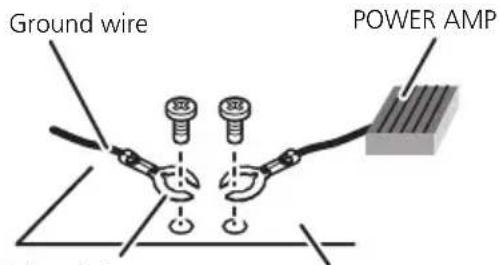
- Theblackcableisground.Wheninstalling thisunitorpoweramp(soldseparately),make suretoconnectthegroundwirefirst.Ensure thatthegroundwireisproperlyconnectedto metalpartsofthecar'sbody.Thegroundwire ofthepowerampandtheoneofthisunitor anyotherdevicemustbeconnectedtothecar separatelywithdifferentscrews.Ifthescrew forthegroundwireloosensorfallsout,it couldresultinfire,generationofsmokeor malfunction.
text_image
Ground wire POWER AMPOther devices
(Another electronic
device in the car)
Metal parts of car's body

Important
- Wheninstallingthisunitinavehiclewithout anACC(accessory)positionontheignition switch,failuretoconnecttheredcabletothe terminalthatdetectsoperationoftheignition keymayresultinbatterydrain.

ACC position

No ACC position
- Usethisunitwitha12-voltbatteryandnegativegroundingonly.Failuretodosomayresultinafireormalfunction.
- Topreventashort-circuit,overheatingormal-function,besuretofollowthedirections below.
—Disconnectthenegativeterminalofthe batterybeforeinstallation.
—Securethewiringwithcableclampsoradhesivetape.Wrapadhesivetapearound wiringthatcomesintocontactwithmetal partstoprotectthewiring.
—Placeallcablesawayfrommovingparts, suchasthegearshiftandseatrails.
—Placeallcablesawayfromhotplaces, suchasneartheheateroutlet.
—Donotconnecttheyellowcabletothebatterybypassingitthroughtheholetothenginecompartment.
—Coveranydisconnectedcableconnectors withinsulatingtape.
—Donotshortenanycables.
—Nevercuttheinsulationofthepowercable ofthisunitinordertosharethepower withotherdevices.Thecurrentcapacityof thecableislimited.
—Useafuseoftheratingprescribed.
—Neverwirethenegativespeakercabledirectlytoground.
—Neverbandtogethernegativecablesof multiplespeakers.
- Whenthisunitison, controlsignalsaresent throughtheblue/whitecable. Connect this cabletothesystemremotecontrolofanexternalpoweramporthevehicle'sauto-antenna relaycontrolterminal(max.300mA12VDC). If the vehicle is equipped with a glass antenna, connect it to the antennaboosterpower supply terminal.
- Neverconnecttheblue/whitecabletothe powerterminalofanexternalpoweramp. Also,neverconnectittothepowerterminalof theautoantenna.Doingsomayresultinbatterydrainoramalfunction.
Connectiondiagram

flowchart
graph TD
    A["This product"] --> B["Antenna jack"]
    B --> C["Fuse (10 A)"]
    C --> D["Wired remote input\nHard-wired remote control\nadaptor can be connected\n(sold separately)."]
    D --> E["Power amp (sold separately)"]
    E --> F["Connect with RCA cables (sold separately)"]
    F --> G["System remote control"]
    G --> H["Blue/white\nConnect to system control terminal of the\npower amp or auto-antenna relay control\nterminal (max. 300 mA 12 V DC)."]
    H --> I["White/Black"]
    I --> J["Front speaker Front speaker"]
    I --> K["Left Right"]
    I --> L["Rear speaker Rear speaker"]
    L --> M["Rear output"]
    M --> N["White"]
    M --> O["Green"]
    M --> P["Violet"]
    M --> Q["Violet/black"]
    M --> R["Gray"]
    M --> S["Gray/black"]
    M --> T["+"]
    M --> U["-"]
    M --> V["+"]
    M --> W["-"]
Perform these connections when using the optional amplifier.


Important
- Checkallconnectionsandsystemsbefore finalinstallation.
- Donotuseunauthorizedpartsasthismay cause malfunctions.
- Consultyourdealerifinstallationrequiresdrillingofholesorothermodificationstothevehicle.
- Donotinstallthisunitwhere: —itmayinterferewithoperationofthevehicle. —itmaycauseinjurytoapassengerasaresultofasuddenstop.
- These semiconductor laser will be damaged if it overheats. Install this unit away from hot places such as near the heater outlet.
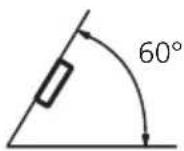
- Optimumperformanceisobtainedwhenthe unitisinstalledatanangleoflessthan60°.
- Toensureproperheatdispersalwhenusing thisunit,makesureyouleaveamplespace behindtherearpanelandwrapanyloose cablessotheyarenotblockingthevents wheninstallingtheunit.
DINfront/rearmount
Thisunitcanbeproperlyinstalledeitherfrom "Front"(conventionalDINfront-mount)or "Rear"(DINrear-mountinstallation, utilizing threadedscrewholesonthesidesofunit chassis). Fordetails, refertothefollowinginstallationmethods.
DINFront-mount
1Insertthemountingsleeveintothe dashboard.
For installation in shallow spaces, usethesup- pliedmountingsleeve. If thereisenough
space, usethemountingsleevethatcame withthevehicle.
2Securethemountingsleevebyusinga screwdrivertobendthemetaltabs(90°) intoplace.

text_image
Dashboard 182 53 400 1.400 0.24 0.6 0.2Mountingsleeve
3Installtheunitasillustrated.
Usecommerciallyavailablepartswheninstalling.

text_image
Nut Firewall or metal support Metal strap Screw Screw (M4 × 8)■ Makesurethattheunitisinstalledsecurelyin place. An unstable installation may cause skipping or other malfunctions.
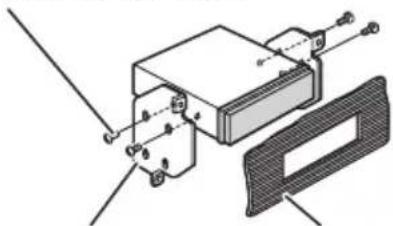
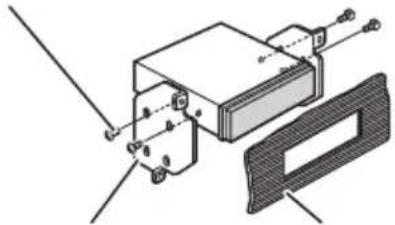
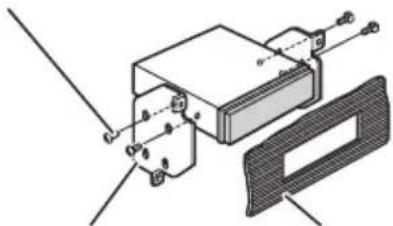
DINRear-mount
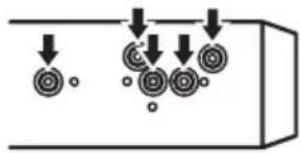
1 Determinetheappropriateposition wheretheholesonthebracketandthe sideoftheunitmatch.
natural_image
Diagram showing downward arrows pointing to circular patterns on a rectangular object (no text or symbols)2Tightentwoscrewsoneachside.
Trussscrew(5mm×8mm)
natural_image
Technical diagram of a mechanical assembly with labeled components (no readable text or symbols)MountingbracketDashboardorconsole
Removingtheunit
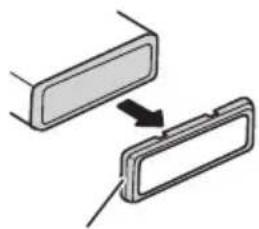
1 Extendtopandbottomofthetrimring outwardstoremovethetrimring. (When reattachingthetrimring, pointtheside with thegroovedown.)
natural_image
Diagram showing two rectangular components with an arrow indicating transformation or alignment (no text or symbols)Trimring
- Releasingthefrontpanelallowseasieraccesstothetrimring.
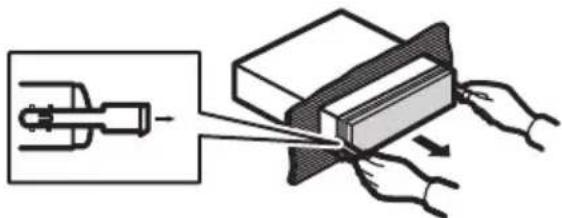
2Insertthesuppliedextractionkeysinto bothsidesoftheunituntiltheyclickinto place.
3Pulltheunitoutofthedashboard.
natural_image
Diagram showing a mechanical device interacting with a block, with hands pulling the components (no text or symbols present)
Troubleshooting
| SymptomCauseAction | ||
| Thedisplay automatically returnstothe ordinarydis-play. | Youdidnotper-formanyopera-tionwithinabout 30seconds. | Performoperation again. |
| Therepeatplay rangechanges unexpectedly. | Dependingon therepeatplay range,these-lectedrangemay changewhense-lectinganother folderortrack,or whenfastfor-warding/rever-sing. | Selecttherepeat playrangeagain. |
| Asubfolderis notplayed back. | Subfolderscan-notbeplayed whenFOLDER (folderrepeat)is selected. | Selectanotherre-peatplayrange. |
| NOXXXXap-pearswhena displayischan-ged(e.g.,NOTITLE). | Notextinforma-tionembedded | Switchthedisplay orplayanother track/file. |
| Theunitismal-functioning. Thereisinter-ference. | Youareusinga device,suchasa cellphone,that transmitselectro-magneticwaves neartheunit. | Moveelectricalde-vicesthatmaybe causingtheinter-ferenceawayfrom theunit. |

Errormessages
Whenyoucontactyourdealeroryournearest PioneerServiceCenter,besuretonotethe errormessage.
Built-inCDPlayer
| MessageCauseAction | |
| ERROR-11,12, 17,30 | DirtydiscCleandisc. |
| ScratcheddiscReplacedisc. | |
| ERROR-10,11, 12,15,17,30, A0 | Electricalorme-chanical | Turntheignition switchOFFand backON,orswitch toadifferent source,thenback totheCDplayer. |
| ERROR-15Theinserteddisc isblank | Replacedisc. | |
| ERROR-22,23UnsupportedCD format | Replacedisc. | |
| FRMTREAD | Thereissome-timesadelaybetweenthestartof playback and whenyoustartto hearanysound | Waituntilthemes-sagedisappears andyouhear sound. |
| NOAUDIO | Theinserteddisc doesnotcontain anyplayablefiles | Replacedisc. |
| SKIPPED | Theinserteddisc containsDRM protectedWMA files | Replacedisc. |
| PROTECT | Allthefileson theinserteddisc areembedded withDRM | Replacedisc. |
USBstoragedevice
| MessageCauseAction | ||
| NODEVICE | Whenplugand playisoff,no USBstoragedeviceisconnected. | •Turntheplug andplayon.•Connectacom- patableUSBsto- ragedevice. |
| FRMTREAD | Thereissome- timesadelaybe- tweenthestartof playbackand whenyoustartto hearanysound | Waituntilthemes- sagedisappears andyouhear sound. |
| NOAUDIO | NosongsTransfertheaudio | |
| filestotheUSB storagedeviceand connect. | ||
| Theconnected USBstoragede- vicehassecurity enabled | FollowtheUSB storagedevicein- structionstodis- ablethesecurity. | |
Additional Information
| SKIPPED | Theconnected USBstoragede-vicecontains WMAfilesem-beddedwith WindowsMed-iaTMDRM9/10 | Playanaudiofile notembeddedwith WindowsMedia DRM9/10. |
| PROTECTAllthefilesinthe USBstoragede-viceareem-beddedwith WindowsMedia DRM9/10 | Transferaudiofiles notembeddedwith WindowsMedia DRM9/10tothe USBstoragede-viceandconnect. | |
| N/AUSBTheUSBstorage deviceconnected toisnotsup-portedbythis unit. | ConnectaUSB MassStorage Classcompliant device. | |
| CHECKUSBTheUSBconnec-tororUSBcable hasshort-circuited. | Checkthatthe USBconnectoror USBcableisnot caughtinsome-thingordamaged. | |
| Theconnected USBstoragede-viceconsumes morethan500 mA(maximum allowablecur-rent). | ||
| ERROR-18Notcompatible USBdevice | Disconnectyour deviceandreplace itwithacompati-bleUSBstorage device. | |
| ERROR-19Communication failure | Performoneofthe followingopera-tions.-Turntheignition switchOFFand backON.-Disconnector ejecttheUSBsto-ragedevice.-Changetoadif-ferentsource.Then,returntothe USBsource. | |
| ERROR-23 | USBstoragede-viceisnotfor-mattedwithFAT16orFAT32 | USBstoragede-viceshouldbefor-mattedwithFAT16orFAT32. |
iPod
| MessageCauseAction | |
| NODEVICEWhenplugand playisoff,no USBstoragede-viceoriPodis connected. | •Turntheplug andplayon.•Connectacom- patibleiPod. |
| FRMTREADThereissome- timesadelaybe- tweenthestartof playbackand whenyoustartto hearanysound | Waituntilthemes- sagedisappears andyouhear sound. |
| ERROR-19Communication failure | Disconnectthe cablefromiPod.OnceiPod'smain menuisdisplayed, reconnectcable. ResettheiPod. |
| iPodfailureDisconnectthe cablefromiPod.OnceiPod'smain menuisdisplayed, reconnectcable. ResettheiPod. | |
| ERROR-16,18OldiPodfirm- wareversions | UpdatetheiPod version. |
| iPodfailureDisconnectthe cablefromiPod.OnceiPod'smain menuisdisplayed, reconnectcable. ResettheiPod. | |
| CHECKUSBiPodoperates correctlybut doesnotcharge | Checkifthecon- nectioncablefor iPodshortedout (e.g.,notcaughtin metalobjects). Afterchecking, turntheignition switchOFFand backONordiscon- necttheiPodand reconnect. |
| NOSONGSNosongs | Transfersongsto iPod. |
AdditionalInformation
STOP
Nosongsinthe currentlist
Selectalistthat containssongs.

Handlingguideline
Discsandplayer
Useonlydiscsfeaturingeitheroffollowingtwologos.


Use12-cmdisc.Donotuse8-cmdiscoranadapter for8-cmdisc.
Useonlyconventional,fullycirculardiscs.Donotuse shapeddiscs.


DonotinsertanythingotherthanaCDintotheCD loadingslot.
Donotusecracked, chipped, warped, or otherwise damaged discsastheymaydamagetheplayer.
UnfinalizedCD-R/CD-RWdiscplaybackisnotpossible.
Donottouchtherecordedsurfaceofthediscs.
Storediscsintheircaseswhennotinuse.
Avoidleavingdiscsinexcessivelyhotenvironments includingunderdirectsunlight.
Donotattachlabels, writeonorapplychemicalsto thesurfaceofthediscs.
TocleanaCD, wipethediscwithasoftclothoutward from the center.
Condensationmaytemporarilyimpairtheplayer's performance.Leaveittoadjusttotherwarmertemperatureforaboutonehour.Also,wipeanydamp discswithasoftcloth.
Playbackofdiscsmaynotbepossiblebecauseof disccharacteristics, discformat, recordedapplication, playbackenvironment, storageconditions, and soon.
Roadshocksmayinterruptdiscplayback.
Read the precautions for discs before using them.
USBstoragedevice
AddressanyquestionsyouhaveaboutyourUSBstoragedevicetothemanufacturerofthedevice.
ConnectionsviaaUSBhubarenotsupported.
DonotconnectanythingotherthanaUSBstorage device.
DonotleavetheUSBstoragedeviceinanyplacewith hightemperatures.
FirmlysecuretheUSBstoragedevicewhendriving. DonotlettheUSBstoragedevicefallontothefloor, whereitmaybecomejammedunderthebrakeoracceleratorpedal.
DependingontheUSBstoragedevice, the following problemsmayoccur.
- Operationsmayvary.
- Thisunitmaynotrecognizethestoragedevice.
• Thefilemaynotbeplayedbackproperly.
• The device may generate noise in the radio.
iPod
DonotleavetheiPodindirectsunlightforextended amountsoftime.Extendedexposuretodirectsun-lightcanresultiniPodmalfunctionduetotheresult-inghightemperature.
Donotleavethei Podinanyplace with hightemperatures.
Toensureproperoperation,connectthedockconnectorcablefromtheiPoddirectlytothisunit.
FirmlysecuretheiPodwhendriving.Donotletthe iPodfallontothefloor,whereitmaybecomejammed underthebrakeoracceleratorpedal.
AdditionalInformation
Fordetails, refertotheiPod'smanuals.
AboutiPodsettings
- YoucannotoperatetheiPodEqualizeronPioneer products. WerecommendthatyousettheiPod Equalizertooff, beforeconnectingtothisunit.
- You cannot set Repeat to off the iPod when using this unit. Repeats automatically changed to all when connecting the iPod to this unit.
DualDiscs
DualDiscsaretwo-sideddiscsthathavearecordable CDforaudioononesideandarecordableDVDfor videoontheother.
SincetheCDsideofDualDiscsisnotphysicallycompatiblewiththegeneralCDstandard,itmaynotbe possibletoplaytheCDsidewiththisunit. FrequentloadingandejectingofaDualDiscmayresultinscratchesonthedisc.Seriousscratchescan leadtoplaybackproblemsonthisunit.Insome cases,aDualDiscmaybecomestuckinthedisloadingslotandwillnoteject.Topreventthis,werecommendyourefrainfromusingDualDiscwiththisunit. PleaserefertotheinformationfromthediscmanufacturerformoredetailedinformationaboutDualDiscs.

Compressedaudio compatibility(disc,USB)
WMA
Fileextension:.wma
Bitrate:48kbpsto320kbps(CBR),48kbpsto384kbps(VBR)
Samplingfrequency:32kHz,44.1kHz,48kHz
WindowsMediaAudioProfessional, Lossless, Voice/DRMStream/Streamwithvideo: No
MP3
Fileextension:.mp3
Bitrate:8kbpsto320kbps
Sampling frequency: 16kHz to 48kHz (32, 44.1, 48 kHz foreemphasis)
CompatibleID3tagversion:1.0,1.1,2.2,2.3,2.4(ID3 tagVersion2.xisgivenpriorityoverVersion1.x.)
M3uplaylist:No
MP3i(MP3interactive),mp3PRO:No
WAV
Fileextension:.wav
Quantizationbits:8and16(LPCM),4(MSADPCM)
Sampling frequency: 16kHz to 48kHz (LPCM), 22.05 kHz and 44.1kHz (MSADPCM)
Supplementalinformation
Onlythefirst32characterscanbedisplayedasafilename(includingthefileextension)orafoldername.
Thisunitmaynotoperatecorrectlydependingonthe applicationusedtoencodeWMAfiles.
Theremaybeaslightdelaywhenstartingplaybackof audiofilesembeddedwithmagedata.
Disc
Playablefolderhierarchy:uptoeighttiers(Apractical hierarchyislessthantwotiers.)
playablefolders:upto99
playablefiles:upto999
Filesystem:ISO9660Level1and2,Romeo,Joliet
Multi-session playback: Yes
Packetwritedatatransfer: No
Regardless of the length of blank section between the song so the original recording, compressed audio discs play with short pause between songs.
USBstoragedevice
Playablefolderhierarchy:uptoeighttiers(Apractical hierarchyislessthantwotiers.)
playable folders: upto500
playablefiles:upto15000
Playbackofcopyrightprotectedfiles:No
AdditionalInformation
PartitionedUSBstoragedevice:Onlythefirstpartition canbeplayed.
Theremaybeaslightdelaywhenstartingplaybackof audiofilesonaUSBstoragedevicewithnumerous folderhierarchies.

CAUTION
Pioneeracceptsnoresponsibilityfordataloston theUSBstoragedeviceevenifthatdataislost whileusingthisunit.
iPodcompatibility
ThisunitsupportsonlythefollowingiPodmodels. SupportediPodsoftwareversionsareshownbelow. Olderversionsmaynotbesupported.
- iPodnano4thgeneration(softwareversion1.0.3)
- iPodnano3rdgeneration(softwareversion1.1.3)
- iPodnano2ndgeneration(softwareversion1.1.3)
- iPodnano1stgeneration(softwareversion1.3.1)
- iPodtouch2ndgeneration(softwareversion2.2.1)
- iPodtouch1stgeneration(softwareversion2.2.1)
• iPodclassic120GB(softwareversion2.0.1) - iPodclassic(softwareversion1.1.2)
- iPod5thgeneration(softwareversion1.3)
- iPhone3G(softwareversion2.2.1)
DependingonthegenerationorversionoftheiPod, somefunctionscannotbeoperated.
OperationsmayvarydependingonthesoftwareversionofiPod.
WhenusinganiPod,iPodDockConnectortoUSB Cableisrequired.
PioneerCD-IU50interfacecableisalsoavailable.For details,consultyourdealer.
Compatiblefile:MP3(.mp3)/WAV(.wav)/AAC(.m4a)
Compatible format: AAC(16Kbpsto320Kbps), AAC VBR, Protected AAC (Purchased from iTunes Music Store)/MP3(16Kbpsto320Kbps), MP3VBR/Audible (Format2, 3, 4), AppleLossless, AIFF, WAV
AudioBook, Podcast: Yes

CAUTION
Pioneeracceptsnoresponsibilityfordataloston theiPodevenifthatdataislostwhileusingthis unit.
Sequenceofaudiofiles
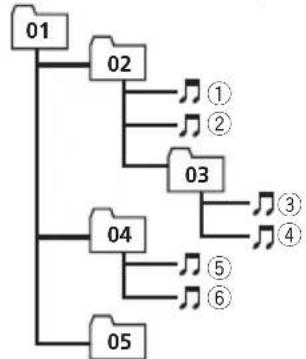
Theusercannotassignfoldernumbersand specify playbacksequenceswiththisunit.
Exampleofahierarchy
flowchart
graph TD
    A["01"] --> B["02"]
    B --> C["①"]
    B --> D["②"]
    B --> E["03"]
    E --> F["③"]
    E --> G["④"]
    H["04"] --> I["⑤"]
    H --> J["⑥"]
    K["05"] --> L["⑦"]
Level 1 Level 2 Level 3 Level 4
:Folder Compressed audiofile 01to05:Folder number ①to⑥:Playback sequence
Disc
Folderselectionsequenceorotheroperation may differ depending on the encoding or writing software.
USBstoragedevice
Playbacksequenceisthesameasrecorded sequenceintheUSBstoragedevice.
Tospecifythe playbacksequence, the following method is recommended.
①Createthefilenameincludingnumbersthat specifythe playbacksequence(e.g., 001xxx.mp3and099yyy.mp3).
2 Putthosefilesintoafolder.
3 SavethefoldercontainingfilesontheUSB storagedevice.
However, depending on the system environment, you cannot specify the playback sequence.
ForUSBportableaudioplayers,thesequence isdifferentanddependsontheplayer.
Copyrightandtrademark
iTunes
AppleandiTunesaretrademarksofApple Inc., registeredintheU.S.andothercoun-tries.
AdditionalInformation
MP3
Supplyofthisproductonlyconveysalicense forprivate,non-commercialuseanddoesnot conveyalicensenorimplyanyrighttouse thisproductinanycommercial(i.e.revenue-generating)realtimebroadcasting(terrestrial, satellite,cableand/oranyothermedia),broadcasting/streamingviainternet,intranetsand/orothernetworksorinotherelectroniccontentdistributionsystems,suchaspay-audioor audio-on-demandapplications.Anindependentlicenseforsuchuseisrequired.Fordetails,pleasevisit
http://www.mp3licensing.com.
WMA

text_image
Plays Windows Media™WindowsMediaandtheWindowslogoaretrademarksorregisteredtrademarksofMicrosoft CorporationintheUnitedStatesand/orother countries.
Thisproductincludestechnologyownedby MicrosoftCorporationandcannotbeusedor distributedwithoutalicensefromMicrosoft Licensing,Inc.
iPod

text_image
Made for iPodiPodisatrademarkofAppleInc., registered in the U.S. and other countries.
"MadeforiPod" meansthatanelectronicaccessoryhasbeendesignedtoconnectspecifi-callytoiPodandhasbeencertifiedbythe
developertomeetAppleperformancestandards.
Appleisnotresponsiblefortheoperationof thisdeviceoritscompliancewithsafetyand regulatorystandards.
iPhone

text_image
Works with iPhoneiPhoneisattrademarkofAppleInc.
"WorkswithiPhone" meansthatanelectronic accessoryhasbeendesignedtoconnectspecificallytoiPhoneandhasbeencertifiedby thedeveloppertomeetAppleperformance standards.
Appleisnotresponsiblefortheoperationof thisdeviceoritscompliancewithsafetyand regulatorystandards.
Specifications
General
Ratedpowersource......14.4VDC (allowablevoltagerange: 12.0Vto14.4VDC)
Groundingsystem......Negativetype
Maximumcurrentconsumption 10.0A
AdditionalInformation
Continuouspoweroutput...22W×4(50Hzto15000
Hz,5%THD,4Ωload,both
channelsdriven)
Load impedance .... 4 Ω (4 Ω to 8 Ω allowable)
Preoutmaximumoutputlevel
2.0V
Tonecontrols:
Bass
Frequency.....100Hz
Gain....±12dB
Mid
Frequency.....1kHz
Gain....±12dB
Treble
Frequency.....10kHz
Gain....±12dB
CDplayer
System....Compactdiscaudiosystem
Usablediscs....Compactdisc
Signal-to-noiseratio....94dB(1kHz)(IEC-Anet-
work)
Numberofchannels......2(stereo)
WMAdecodingformat......Ver.7,7.1,8,9,10,11(2ch
audio)
(WindowsMediaPlayer)
MP3decodingformat......MPEG-1&2AudioLayer3
WAVsignalformat....LinearPCM&MSADPCM
(Non-compressed)
USB
USBstandardspecification
USB2.0fullspeed
Maximumcurrentsupply...500mA
Minimummemorycapacity
.256MB
USBClass....MSC(MassStorageClass)
Filesystem.....FAT16,FAT32
WMAdecodingformat......Ver.7,7.1,8,9,10,11(2ch
audio)
(WindowsMediaPlayer)
MP3decodingformat......MPEG-1&2AudioLayer3
WAVsignalformat....LinearPCM&MSADPCM
(Non-compressed)
FMtuner
Frequencyrange.....87.5MHzto108.0MHz
Usable sensitivity .... 11 dBf (0.7 μV/75 Ω, mono,
S/N:30dB)
Signal-to-noiseratio....72dB(IEC-Anetwork)
AMtuner
Frequencyrange.....531kHzto1602kHz(9kHz)
530kHzto1640kHz(10
kHz)
Usablesensitivity.....25μV(S/N:20dB)
Signal-to-noiseratio......62dB(IEC-Anetwork)
Infraredremotecontrol
Wavelength....940nm±50nm
Output.....typ;12mw/srperInfrared
LED

Note
Specificationsandthedesignaresubjecttomod-
ificationswithoutnotice.
Antesdecomenzar
text_image
Diagram of a device rear panel with numbered components for identificationParteParte
| 1DISP/ | SCRL8 | Conectordeentra-daAUX(conector estéreode3,5mm) |
| 2SRC/OFF9PuertoUSB | ||
| 3 | MULTI-CONTROL (M.C.) | 10 Q (lista) |
| 4 | Ranuradecargade discos | 111a6 |
| 5 | ▲ (expulsar) | 12 ▲/▼/▲/▶ |
| 6 | CLOCK13BAND/ESC | |
| 7 | Botóndesoltar | |

PRECAUCIÓN
natural_image
Diagram of a mechanical or laboratory setup with a tool and rotating components (no text or symbols visible)
ADVERTENCIA
AM:OFF—LEVEL1—LEVEL2
DYNAMIC—VOCAL—NATURAL—CUSTOM—FLAT—POWERFUL
natural_image
Diagram showing downward arrows pointing to circular patterns inside a rectangular container (no text or symbols)2Aprietelosdostornillosencadalado.
Tornillodecabezaredonda(5mm×8mm)
natural_image
Technical diagram of a mechanical assembly with mounting brackets and a central housing (no text or symbols)CarcasaSalpicaderooconsola
Retiradadelaunidad
natural_image
Diagram showing two rectangular components with an arrow indicating transformation or alignment (no text or symbols)Anillodeguarnición
natural_image
Diagram showing a mechanical device interacting with a block, with hands holding it (no text or symbols present)
Solucióndeproblemas
text_image
Works with iPhonetext_image
Diagram of a device rear panel with numbered components for identificationParteParte
| 1DISP/ | SCRL8 | Conectordeentra-daAUX(conector estéreode3,5mm) |
| 2SRC/OFF9PortaUSB | ||
| 3 | MULTI-CONTROL (M.C.) | 10 Q (Lista) |
| 4 | Slotdecarrega-mentodedisco | 111a6 |
| 5 | ▲ (Ejetar) | 12 ▲/▼/◄/► |
| 6CLOCK13BAND/ESC | ||
| 7BotãoDesencaixar | ||

CUIDADO
natural_image
Diagram of a laboratory procedure showing a pipette and test tube on a test tube with a magnified view (no text or symbols)
ADVERTÊNCIA
AM:OFF—LEVEL1—LEVEL2
FMSTEP(PassodesintoniaFM)
OpassodesintoniaFMempregadopelasintoniapor buscapodeseralternadoentre100kHz,opassoprogramadoe50kHz.
- Seasintoniaporbuscaforexcutadaempassos de50kHz,asemissoraspoderãosersintonizadas deformaimprecisa.Sintonizeasemissorasutilizandoasintoniamanualouutilizenovamentea sintoniaporbusca.
- Opassodesintoniapermanecea50kHzdurante asintoniamanual.
1 Pressione M.C. paravisualizaromododeajuste.
②GireM.C.paraselecionaropassodesintoniaFM.50KHZ(50kHz)—100KHZ(100kHz)
3 Pressione M.C. para confirmaraseleção.
AMSTEP(PassodesintoniaAM)
OpassodesintoniaAMpodeseralternadoentre9 kHz,opassoprogramadoe10kHz.AoutilizarosintonizadoraAméricadoNorte,CentraloudoSul,rea-justeopassodesintoniade9kHz(531a1602kHz permissível)para10kHz(530a1640kHzpermissível).
natural_image
Diagram showing downward arrows pointing to circular patterns inside a rectangular container (no text or symbols)2Apertedoisparafusosemcadalado.
Parafusosdecabeçatreliçada(5mm×8mm)

natural_image
Technical diagram of a mechanical assembly with mounting brackets and a cover plate (no text or symbols)natural_image
Diagram showing two rectangular components with an arrow indicating transformation or alignment (no text or symbols)Aneldeacabamento
- Sevocêretiraropainelfrontal, oacessoao aneldeacabamentoficarámaisfácil.
natural_image
Diagram showing a mechanical device interacting with a rectangular block, with hands holding it (no text or symbols present)text_image
Plays Medium Medium™text_image
Works with iPhoneiPhoneéumamarcacomercialdaAppleInc.
text_image
Diagram of a rear panel with numbered components for identification部位部位
| 1DISP/ ⇌/SCRL8 | AUX輸入插孔(3.5mm立體聲插孔) | |
| 2SRC/OFF9USB埠 | ||
| 3 MULTI-CONTROL(M.C.) | 10 | Q (清單) |
| 4 碟片槽 | 11 | 1至6 |
| 5 ▲(退出) | 12 | ▲/▼/◄/► |
| 6CLOCK13BAND/ESC | ||
| 7拆卸按鈕 | ||

注意
AM : OFF—LEVEL 1—LEVEL 2
DYNAMIC—VOCAL—NATURAL—CUSTOM—FLAT—POWERFUL
3 按M.C.確認選擇。
TONE CTRL(等化器調整)
您可以調整低音/中音/高音等級。
natural_image
Diagram showing circular patterns with downward arrows entering a container (no text or symbols)03 安装
2 鎖緊各邊的兩顆螺絲。
十字槽螺絲(5 mm × 8 mm)
natural_image
Technical diagram of a mechanical assembly with mounting brackets and a cover plate (no text or symbols)托架
儀表板或操縱台
移除本機
natural_image
Diagram showing two rectangular components with a directional arrow, no text or symbols present飾環
- 拆下前面板後,可更輕易的進入飾環。
natural_image
Diagram showing a mechanical device interacting with a block, with hands pulling the components (no text or symbols present)
故障排除
text_image
Works with iPhoneiPod是Apple Inc.的商標。
(Windows Media Player)
(Windows Media Player)
text_image
Works with iPhone.Apple Inc ﹠ ﹠ ﹠ ﹠ ﹠ ﹠ ﹠ ﹠ ﹠ ﹠ ﹠ ﹠ ﹠ ﹠ ﹠ ﹠ ﹠ ﹠ ﹠ ﹠ ﹠ ﹠ ﹠ ﹠ ﹠ ﹠ ﹠ ﹠ ﹠ ﹠ ﹠ ﹠ ﹠ ﹠(\text{iPhone}) ﹠ ﹠ ﹠ ﹠ ﹠(\text{(iPhone }) ﹠ ﹠ ﹠(\text{(iPhone }) Works with iPhone ﹠(\text{(iPhone }) ﹠(\text{(iPhone }) ﹠(\text{(iPhone }) ﹠(\text{(iPhone }) ﹠(\text{(iPhone }) ﹠(\text{(iPhone }) ﹠(\text{(iPhone }) ﹠(\text{(iPhone }) ﹠(\text{(iPhone }) ﹠(\text{(iPhone }) (\text{apple}) \apple) \\text{apple}) \apple) \\text{apple}) \apple) \\text{apple}) \apple) \\text{apple}) \apple) \\text{apple}) \apple) \\text{apple}) \apple) \\text{apple}) \$\text{n}=\text{m}=\text{m}=\text{m}=\text{l}=\text{t}=\text{l}=\text{i}=\text{n}=\text{i}=\text{m}=\text{o}=\text{i}=\text{n}=\text{i}=\text{m}=\text{o}=\text{i}=\text{n}=\text{i}=\text{n}=\text{i}=\text{n}) الله \apple\ \apple\ \apple\ \apple\ \apple\ \apple\ \apple\ \apple\ \apple\ \apple\ \apple\ \apple\ \apple\ \apple\ \apple\ \apple\ \apple\ \Apple \ \text{ apple }\apple \ \text{ apple }\apple \ \text{ apple }\apple \ \text{ apple }\apple \ \text{ apple }\apple \ \text{ apple }\apple \ \text{ apple }\apple \ \text{ apple }) الله \apple\ \apple\ \apple\ \apple\ \apple\ \apple\ \apple\ \apple\ \apple\ \apple\ \apple\ \apple\ \apple\ \apple\ \apple\ \apple\ \\

• (1,3 iPod Manufacturer Appod) iPod (1,3
Apple Lossless, AIFF, WAV, (٤ و
natural_image
Technical diagram of a mechanical assembly with labeled components (no readable text or symbols)كتيفة التركيلب
فلك الوحدة
natural_image
Diagram showing two rectangular components with an arrow indicating transformation or alignment (no text or symbols)بِيْطَ
natural_image
Diagram showing a mechanical device being processed into a block, with hands pulling the components (no text or symbols present)
natural_image
Diagram showing circular particles entering a container with downward arrows indicating flow or movement (no text or symbols)
AUX ل baking OFF/SRC 1

—CUSTOM—NATURAL—VOCAL—DYNAMIC
POWERFUL—FLAT
| يتم تشغيل وطيفة القائمة. | (مجلد) | 6 |
| توجد طبقة سفلية للمجلد أو القائمة. | ||
| يومض عندما يتم تحديد أغنية/أبووم مرتبطبالاغنية التي يتم تشغيلها contractual.iPod | 7▶ | |
| موالفة البحث المحلي قيد الت “[ش”,”,”,”,”,”,”,”,”,”,”,”,”,”,”,”,”,”,”,”,”,”,”,”,”,”,”,”,”,”,”,”,”,”,”,”,”,”,”,”,”,”,”,”,”,”,”,”,”,”,”,”,”,”,”,”,”,”,”,”,”,”,”,”,”,”,”,”,”,”,”,”,”,”,”,”,”,”,”,”,”,”,”,”,”,”,”,”,”,”,”,”,”,”,”,”,”,”,”,”,””,”,”,”,”,”,”,”,”,”,”,”,”,”,”,”,”,”,”,”,”,”,”,”,”,”,”,”,”,”,”,”,”,”,”,”,”,”,”,”,”,”,”,”,”,”,”,”,”,”,”,”,”,”,”,”,”,”,”,”,”,”,”,”,”,”,”,”,”,”,”,”,”,”,”,”,”,”,”,”,”,”,”,”,”,”,”,”,”,”,”,”,”,”,”,”,”,”,”” | LOC | 8 |
| وظيفة علو الصوت قيد الت “[ش”,”,”,”,”,”,”,”,”,”,”,”,”,”,”,”,”,”,”,”,”,”,”,”,”,”,”,”,”,”,”,”,”,”,”,”,”,”,”,”,”,”,”,”,”,”,”,”,”,”,”,”,”,”,”,”,”,”,”,”,”,”,”,”,”,”,”,”,”,”,”,”,”,”,”,”,”,”,”,”,”,”,”,”,”,”,”,”,”,”,”,”,”,””,”,”,”,”,””,”,”,”,”,”,”,”,”,”,”,”,”,”,”,”,”,”,”,”,”,”,”,”,”,”,”,”,”,”,”,”,”,”,”,”,”,”,”,”,”,”,”,”,”,”,”,”,”,”,”,”,”,”,”,”,”,”,”,”,”,”,”,”,”,”,”,”,”,”,”,”,”,”,”,”,”,”,”,”,”,”,”,”,”,”,”,”,”,”,”,”,”,”” | LOUD | 9(صْطُولِعٍ) |
| يتم بث التردد المختار بصوت استریو. | (استریو) | 10 |
| تکرار المجلد أو المقطوعة قيد الت “[ش”,”,”,”,”,”,”,”,”,”,”,”,”,”,”,”,”,”,”,”,”,”,”,”,”,”,”,”,”,”,”,”,”,”,”,”,”,”,”,”,”,”,”,”,”,”,”,”,”,”,”,”,”,”,”,”,”,”,”,”,”,”,”,”,”,”,”,”,”,”,”,”,”,”,”,”,”,”,”,”,”,”,”,”,”,”,”,”,”,”,”,”,”,””— | 11 | |
| التشغيل العشواني قيد الت “[ش”,”,”,”,”,”,”,”,”,”,”,”,”,”,”,”,”,”,”,”,”,”,”,”,”,”,”,”,”,”,”,”,”,”,”,”,”,”,”,”,”,”,”,”,”,”,”,”,”,”,”,”,”,”,”,”,”,”,”,”,”,”,”,”,”,”,”,”,”,”,”,”,”,”,”,”,”,”,”,”,”,”,”,”,”,”,”,”,”,”,”,”,”,”!” | (عشرواني) | 12 |
| وظيفة الخلوط قيد الت “[ش”,”,”,”,”,”,”,”,”,”,”,”,”,”,”,”,”,”,”,”,”,”,”,”,”,”,”,”,”,”,”,”,”,”,”,”,”,”,”,”,”,”,”,”,”,”,”,”,”,”,”,”,”,”,”,”,”,”,”,”,”,”,”,”,”,”,”,”,”,”,”,”,”,”,”,”,”,”,”,”,”,”,”,”,”,”,”,”,”,”,”,”,”,”.”,iPod | 13 | |
| وظيفة مسترجع الصوت قيد الت “[ش”,”,”,”,”,”,”,”,”,”,”,”,”,”,”,”,”,”,”,”,”,”,”,”,”,”,”,”,”,”,”,”,”,”,”,”,”,”,”,”,”,”,”,”,”,”,”,”,”,”,”,”,”,”,”,”,”,”,”,”,”,”,”,”,”,”,”,”,”,”,”,”,”,”,”,”,”,”,”,”,”,”,”,”,”,”,”,”” | S.Rtrv | 14(جِيقق)الصْتَو |




العمليات الأساسية

TEXAMAL BRQFQE END FAKI LLOHUE AMAIMY AOK TAKI YH.
text_image
Diagram of a CD-ROM drive with numbered components for identification"CLASS 1 LASER PRODUCT" •
Visit us on the World Wide Web at
http://pioneer.jp/group/index-e.html
Pioneer Gulf.FZE
http://www.pioneer-uae.com
Pioneer Electronics Australia. Pty.Ltd
http://www.pioneeraus.com.au
Pioneer Electronics Asiacentre.Pte
http://www.pioneer.com.sg
Pioneer (HK) Ltd.
http://www.pioneerhongkong.com.hk
Pioneer High Fidelity Taiwan Co., Ltd.
http://www.pioneer-twn.com.tw
Pioneer International Latin America S.A.
http://www.pioneer-latin.com
PIONEERCORPORATION
4-1,MEGURO1-CHOME,MEGURO-KU
PIONEERELECTRONICSAUSTRALIAPTY.LTD.
178-184BoundaryRoad, Braeside, Victoria3195, Australia
TEL:(03)9586-6300
PIONEERELECTRONICSOFCANADA, INC.
300AllstateParkway, Markham, OntarioL3R0P2, Canada
TEL:1-877-283-5901
TEL:905-479-4411
PIONEERELECTRONICSDEMEXICO,S.A.deC.V.
Blvd.ManuelAvilaCamacho13810piso
Col.LomasdeChapultepec,Mexico,D.F.11000
TEL:55-9178-4270
先鋒股份有限公司
總公司:台北市中山北路二段44號13樓
電話:(02)2521-3588
先鋒電子(香港)有限公司
香港九龍尖沙嘴海港域世界商業中心
9樓901-6室
電話:(0852)2848-6488
PublishedbyPioneerCorporation.
Copyright©2009byPioneerCorporation.
Allrightsreserved.