GW2600 - Blower BLACK & DECKER - Free user manual and instructions
Find the device manual for free GW2600 BLACK & DECKER in PDF.


User questions about GW2600 BLACK & DECKER
0 question about this device. Answer the ones you know or ask your own.
Ask a new question about this device
Download the instructions for your Blower in PDF format for free! Find your manual GW2600 - BLACK & DECKER and take your electronic device back in hand. On this page are published all the documents necessary for the use of your device. GW2600 by BLACK & DECKER.
USER MANUAL GW2600 BLACK & DECKER
natural_image
Line drawing of a robotic arm with a curved head and extended arm, no text or symbols presentEnglish 7
Italiano 13
Deutsch 19
Français 26
Nederlands 32
Español 38
Português 44
Ελληνικα50
Dansk 57
Suomi 63
Norsk 68
Svenska 73
A

text_image
1 2 3 4 5 713 6 8 9 10 11 12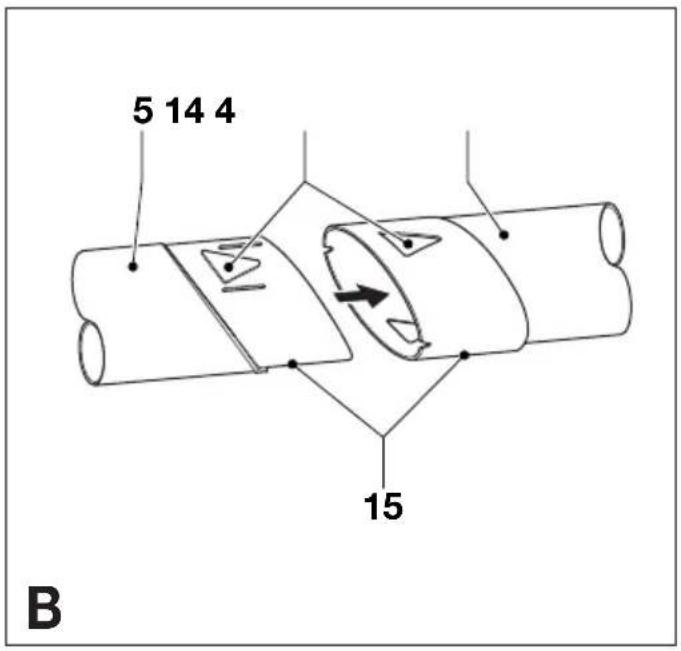
text_image
5 14 4 15 B
text_image
6 16 7 C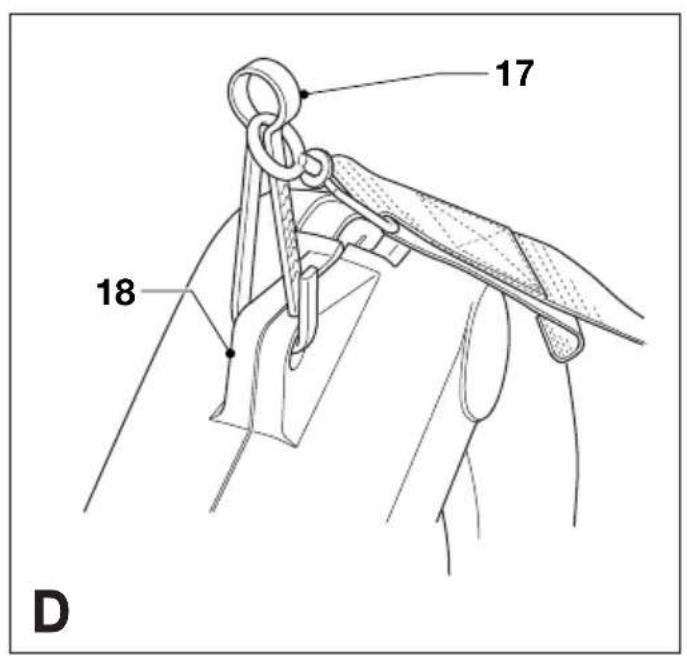
text_image
17 18 D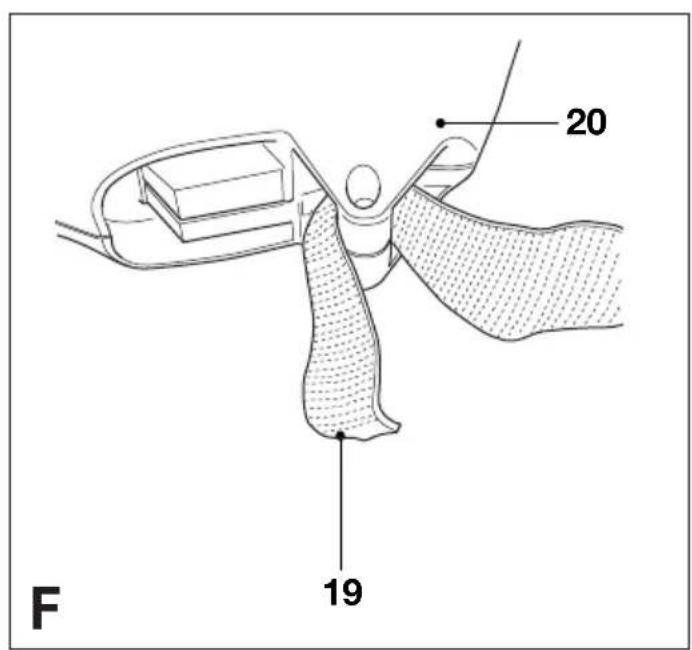
text_image
20 19 F
text_image
21 E
natural_image
Line drawing of a medical device with attached tubing and a circular component (no text or symbols)
natural_image
Diagram of a mechanical or biological structure with no visible text, numbers, or symbols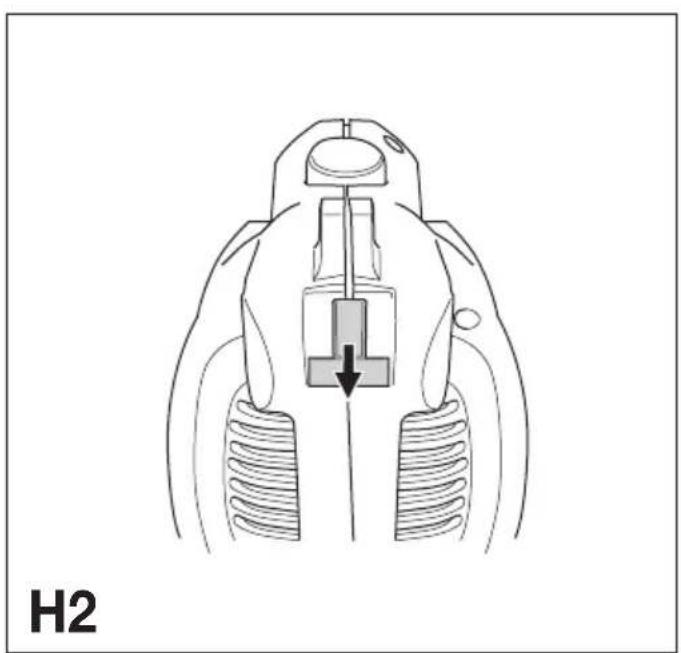
natural_image
Diagram of a mechanical component with internal structure and directional arrow, labeled H2 (no text or symbols on diagram itself)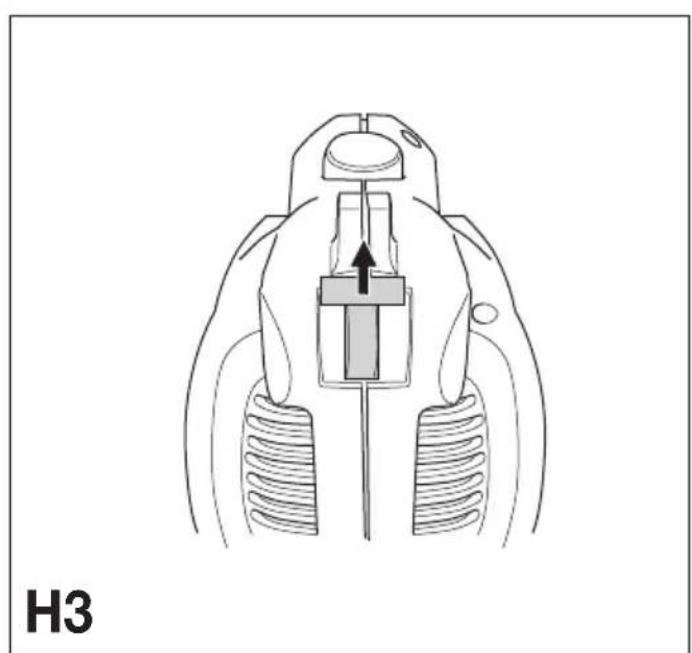
natural_image
Diagram of a mechanical device with internal components and a central arrow, labeled H3 (no text or symbols on the diagram itself)
text_image
22 12
text_image
24 3 2 23 J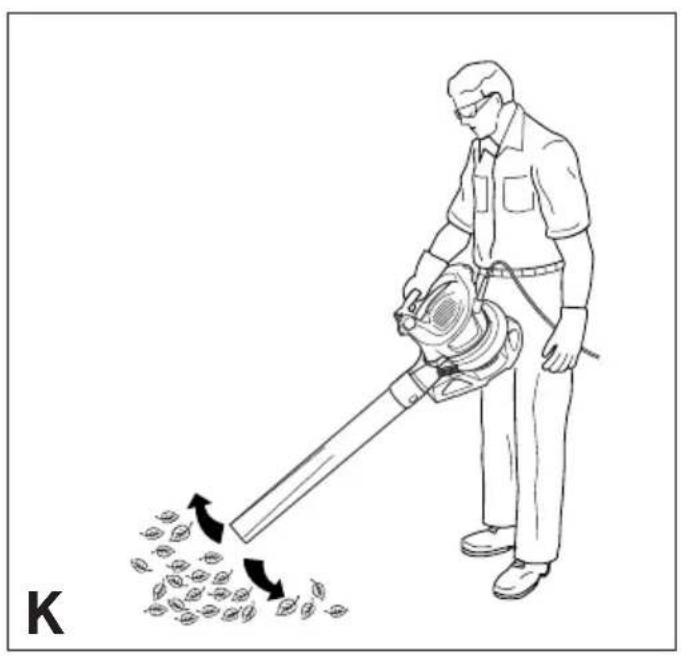
natural_image
Illustration of a person using a manual power tool to generate leafy leaves, with arrows indicating the process (no text or symbols present)
natural_image
Line drawing of a person using a power shaver to shoot seeds, with arrows indicating movement (no text or symbols)
text_image
M 25 26 27
natural_image
Technical line drawing of a mechanical component with a compass indicating rotation direction (no text or symbols)
text_image
28 O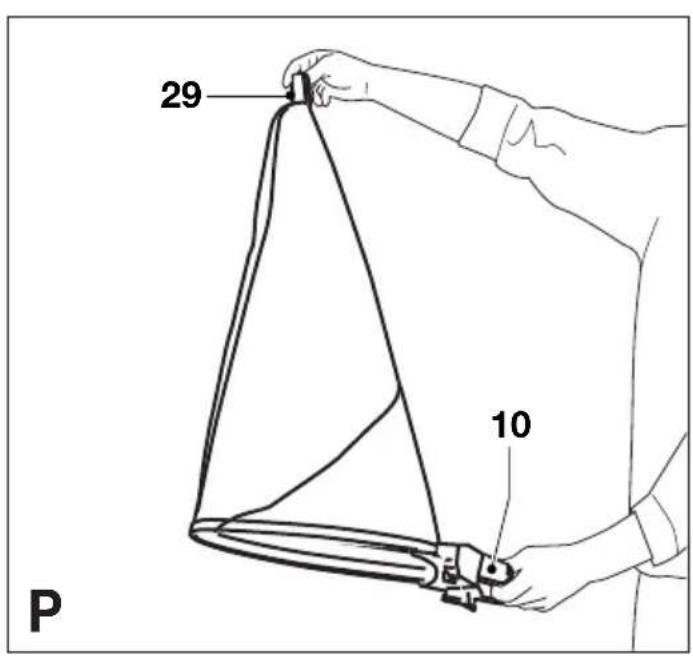
text_image
29 10 PGW2600/GW3000
User manual
Congratulations!
On purchasing the Black & Decker system which will assure you of problem free leaf clearing.
GW2600 & GW3000 - Blower Vac
2-speed Vacuuming √ Shredding √ 2-speed Blowing √
Your product has many features designed for your benefit, including:
- Powerful motor that blows air and will vacuum/mulch.
- Unique 5 blade fan that will shred leaves into small debris in a 10 to 1 ratio.
- 2-speed switch for maximum convenience.
- Ergonomic design improves comfort and ease of use.
- Large aperture vacuuming tube to maximise the intake of leaves.
• 35 litre easy empty collection bag.
Description (Fig. A)
A Following is a list of parts that will be mentioned in this user manual and are shown in the diagrams:
- Two-speed on/off switch
- Powerhead
- Release button
- Vacuum tube - upper
- Vacuum tube - lower
- Blow clamshell
- Blow tube
- Bag top
- Collection bag
- Collection bag handle
- Carrying strap
- Cable restraint
- Scraper
Know your product

Read this manual carefully, observing all recommended safety precautions before, during and after using your product.
Maintain your product in good working order.
Familiarise yourself with the controls on your product before attempting to operate it, but above all, be sure you know how to stop the product in an emergency.
Retain this manual and all other literature supplied for future reference.
Safety instructions
Training
- Do not allow the unit to be used by persons under the age of 16 or other persons who have not read this user manual. You are responsible if there is an accident.
- Remember that the operator/user is responsible for accidents or hazards occurring to other people or their property.
- Do not allow children, animals or other persons near your product when in use - always keep them at least 6m (20ft) away from the working area.
- Never carry your product by the cable or jerk the cable. Keep the cable away from heat sources, oils or sharp edges. Check the condition of your cable before use and do not use if damaged.
Preparation
- Do not operate your product barefoot or in open sandals.
- To protect your feet and legs, always wear stout shoes or boots and long trousers - freshly cut grass is damp and slippery. Rubber or man made footwear will enhance your safety.
- Use protective equipment. Wear safety spectacles or goggles whilst operating your product.
- To prevent dust irritation the wearing of a suitable face mask is recommended.
- Use ear protection if the sound level seems uncomfortable when using your product.


Warning! Secure long hair so it is above shoulder length. Keep loose clothing, ties, tassels and hanging straps away from openings and moving parts.
- The power supply cable should be regularly inspected for signs of damage or ageing, and only used if in good condition.
- Always be sure your product is in a safe operating condition and all parts are secure before use.
- Do not operate the product if any parts are defective or worn.
- Do not pick up burning materials such as lit cigarette butts.
- Do not operate the blower/vacuum in a gaseous or explosive atmosphere as motors in these tools normally spark and this may ignite fumes.
Operation
- Do not use in vacuum mode without the vacuum tubes and collection bag in place.

Always switch off your product, allow the fan to stop and remove the plug from the socket when:
- Changing from blower to vacuum.
- The supply cable has become damaged or entangled.
- You leave your product unattended.
- Clearing a blockage.
- Checking, adjusting, cleaning or working on your product.
- If the appliance starts to vibrate abnormally.
- Do not place the inlet or outlet of the vacuum near eyes or ears when operating. Never blow debris in the direction of bystanders.
- Do not use your product in the rain and do not allow it to get wet. Avoid using the product in wet conditions.
- Use your product only in daylight or good artificial light.
- Do not cross gravel paths or roads whilst your product is switched on during blow/vac mode. Walk, never run.
- Do not place your unit down on gravel whilst it is switched on.
- Always be sure of your footing, particularly on slopes. Do not overreach and keep your balance at all times.
- Do not pick up matter that may be contaminated with flammable or combustible liquids such as gasoline, or use in areas where they might be present.
- Do not place any objects into the openings. Never use if the openings are blocked - keep free of hair, lint, dust and anything that may reduce the airflow.

Warning! Always use your product in the manner outlined in this manual. Your product is designed to be used in an upright mode and if it is used in any other way it may result in injury. Never run your product whilst lying on it's side or upside down.
- Do not carry the appliance by the cable.
- Always direct the cable to the rear away from the appliance.
- If a cord becomes damaged during use, disconnect the supply cord from the mains immediately. DO NOT TOUCH THE CORD BEFORE DISCONNECTING THE SUPPLY.

Maintenance and storage
- Store your product in a dry place when not in use, out of the reach of children.
- Do not use solvents or cleaning fluids to clean your product - use a blunt scraper to remove grass and dirt.
- Before use, carefully check the appliance and mains cable for damage. Check for misalignment and seizure of moving parts, breakage of parts, damage to guards and switches and any other conditions that may affect its operation. Ensure that the appliance will operate properly and perform its intended function. Do not use the appliance if any part is damaged or defective. Do not use the appliance if the switch does not turn it on and off.
- Have any damaged or defective parts repaired or replaced by an authorised repair agent. Never attempt any repairs yourself.
- If the supply cord is damaged, it must be replaced by the manufacturer or its service agent or a similarly qualified person in order to avoid a hazard. Replace damaged or unreadable labels.
- Check the Debris collector frequently for wear or deterioration.
- Replacement fans are available from a Black & Decker service agent. Only use genuine replacement parts and accessories.

Double insulation

This tool is double insulated; therefore no earth wire is required. Always check that the power supply corresponds to the voltage on the rating plate.
Guard against electric shock.
- Electric safety can be further improved by using a high-sensitivity (30 mA / 30 mS) residual current device (RCD).
- Your appliance is designed for use on AC (mains) electrical supplies only. Do not attempt to use it on any other supply.
Plug replacement (UK only)
Mains plug replacement (U.K. & Ireland only)
If a new mains plug needs to be fitted:
- Safely dispose of the old plug.
- Connect the brown lead to the live terminal in the new plug.
- Connect the blue lead to the neutral terminal.
- Connect the green/yellow lead to the earth terminal.
Warning! Follow the fitting instructions supplied with good quality plugs. Recommended fuse: 13 A.
Extension cables
When using the appliance outdoors, only use weatherproof extension cables fitted with couplers according to IEC 60320-2-3.
Up to 25 m of Black & Decker 1.5 mm HO5VVF 3-core extension cable can be used without loss of power.
Assembly prior to use (Fig. B & C)
B
Vacuum tube assembly (Fig. B)
- Vacuum tubes must be assembled together before use.
- To ease assembly apply soapy water solution to joint area.
- Align the notches (15) and the triangles (14) on upper (4) and lower (5) tubes.
- Push the lower tube (5) firmly into the upper tube (4), until the triangles click into place. (Never operate apart).

Warning! In the interests of safety, never separate the tubes once assembled.
C
Blow tube assembly (Fig. C)
- Blow tube must be assembled to the blow clamshell before use.
- Align the circles (16) on the clamshell (6) and the tube (7).
ENGLISH

- Push the tube (7) firmly onto the clamshell (6) until the circles click into place.
Warning! In the interests of safety, never separate the tubes once assembled.
Carrying strap assembly (Fig. D - G)
- Fit the carrying strap to the powerhead, if required, and adjust to suit the user. For your comfort, the shoulder strap is designed to be fitted in two ways:
Single Point Attachment (Fig. D)
- Clip the hook (17) through the eyelet (18) on the powerhead.
- Adjust the length of the loop with the buckle.
Double point attachment (Fig. D, E, F & G)
- Clip the hook (17) through the eyelet (18) on the powerhead.
- Remove the loose end of the strap from the buckle.
- Pass the loose (19) end under the boss (20), and thread it back through the buckle (21).
- Adjust the length of the loop with the buckle (Fig. G).
On/off switch (Fig. H1, H2, H3)

Warning! Use both hands to grip the product firmly when switching on.
- For extra control, your blowvac is fitted with a two speed switch located on the handle of the powerhead.
- The switch has a central off. Position 0 (Fig. H1).
- To use in low speed, move the switch fully to the rear. Position I (Fig. H2).
- To change to high speed push the switch back to the off position and then fully forward. Position II (Fig. H3).
Cable restraint (Fig. I)

- A cable restraint is incorporated into the rear of the powerhead.
- Loop the cable (22) through the cable restraint (12).
Using your product (Fig. J)
When using as a blower or vacuum, always wear safety glasses. If using in dusty conditions, wear a filter mask as well.

Switch off your product, allow the fan to stop and remove the plug from the socket before carrying out any adjustment, servicing or maintenance.

Blow mode
- Attach the blow clamshell and tube (6 & 7) to the powerhead (2) (Fig. J) by locating the blower as indicated by arrow 23, then pivot about this point until the locking/release catch (24) is fully engaged.
- Hold the blow tube approximately 180mm (7") above the ground, switch your product on and using a sweeping motion from side to side, advance slowly keeping the accumulated debris/leaves in front of you (Fig. K).
- Once you have blown the debris/leaves into a pile, you can convert to vacuum mode to collect the debris.
Removing blow/vacuum tube (Fig. J)

- To disconnect the blow clamshell or vacuum tube from the powerhead, depress the release button (3), ensuring the tube does not fall to the ground.
- The release button will not depress if the switch is in the "on" position.
Vacuum mode (Fig. L - P)
To fit the bag assembly to your product: (Fig. M, N, O)
- For vacuuming/shredding, the collection bag (9) must be fitted to the bag holder (8).
- Fig. M: Locate the bag rim (25) into the bag holder channel (26) ensuring that the front of the bag is placed over the vacuum outlet (27).
- Slide the bag fully into the channel and depress the latch (28) to lock the handle into the bag top (Fig. N & O).
-
Position the tube slightly above the debris/leaves. Switch your product on, then using a sweeping motion the debris/leaves will be sucked up the tube, shredded and thrown into the collection bag (Fig. L).
-
For stubborn debris/leaves your vacuum tube is incorporated with a scraper (13). Use this scraper to loosen the debris and continue to vacuum as normal.
- As the bag fills the power of the suction will decrease, switch off your product and unplug from the mains power supply.
- To remove the bag, depress the latch (28) to disengage from the bag holder and slide the bag out.
- To empty, hold the plastic handle (10) and grab the nylon handle (29) on the underside of the bag. Turn the bag upside down and shake out any debris and leaves.
Fault finding
| Failure to operate (1) Check the connection to the power supply.(2) Check the fuse in the plug, if blown, replace (UK only).(3) Check that the blow/vacuum tube assembly is correctly fitted to the powerhead.(4) If the fuse continues to blow - immediately disconnect from the mains power supply and consult your local Black & Decker authorised repair agent. |
| Poor vacuum/ (1) Switch off - disconnect from high pitched whinethe mains power supply, debris should fall clear of the tube.(2) Remove and empty the collection bag.(3) Check that both the inlet and exit ports on the vacuum tube are clear.(4) Remove any debris from the fan area.(5) If poor vacuuming continues - immediately disconnect from the mains power supply and consult your local Black & Decker authorised repair agent. |
| Poor shredding (1) Switch off - disconnect from the mains power supply and remove the collection bag.(2) Remove the vacuum tube and inspect the fan.(3) Clean any debris from the fan blades.(4) If the fan is cracked or damaged, do not use - consult your local Black & Decker authorised repair agent. |
Cleaning your product

Keep your product dry. Under no circumstances spray with water.
- Clean your product regularly.
- Remove any leaves stuck to the inside of the vacuum tube.
- Plastic parts may be cleaned using a mild soap and a cloth dampened with hot water.

Do not use any type of detergent, cleaner or solvent which may contain chemicals that could seriously damage the plastic.
- Self lubricating bearings are used in your product, therefore lubrication is not required.
Protecting the environment

Separate collection. This product must not be disposed of with normal household waste.
Should you find one day that your Black & Decker product needs replacement, or if it is of no further use to you, do not dispose of it with household waste. Make this product available for separate collection.

Separate collection of used products and packaging allows materials to be recycled and used again. Re-use of recycled materials helps prevent environmental pollution and reduces the demand for raw materials.
Local regulations may provide for separate collection of electrical products from the household, at municipal waste sites or by the retailer when you purchase a new product.
Black & Decker provides a facility for the collection and recycling of Black & Decker products once they have reached the end of their working life. To take advantage of this service please return your product to any authorised repair agent who will collect them on our behalf.
You can check the location of your nearest authorised repair agent by contacting your local Black & Decker office at the address indicated in this manual. Alternatively, a list of authorised Black & Decker repair agents and full details of our after-sales service and contacts are available on the Internet at: www.2helpU.com
ENGLISH
EC Declaration of conformity GW2600/GW3000
Black & Decker declares that these products conform to:
98/37/EC, 89/336/EEC, 73/23/EEC,
EN 55014, EN 55104, EN 60335,
2000/14/EC, Leaf blower/collector = 11 m³/min, Annex V
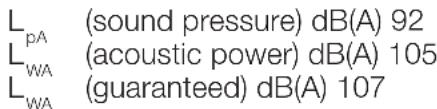
Level of sound pressure, measured according to 2000/14/EC:
text_image
LpA (sound pressure) dB(A) 92 LwA (acoustic power) dB(A) 105 LwA (guaranteed) dB(A) 107Hand/arm weighted vibration value according to EN ISO 5329: 12 m/s ^4

Kevin Hewitt
Director of Consumer Engineering Spennymoor, County Durham DL16 6JG, United Kingdom
01-07-2007 (Date of 1st manufacture)
UK patent application nos. 0229517.8; 0300442.1; 0302170.6
UK design application no. 3 010 507
European patent nos. 0 723 758 B1; 0 723 759 B1
US patent nos. 5 673 457; 5 604 954
Guarantee
Black & Decker is confident of the quality of its products and offers an outstanding guarantee. This guarantee statement is in addition to and in no way prejudices your statutory rights. The guarantee is valid within the territories of the Member States of the European Union and the European Free Trade Area.
If a Black & Decker product becomes defective due to faulty materials, workmanship or lack of conformity, within 24 months from the date of purchase, Black & Decker guarantees to replace defective parts, repair products subjected to fair wear and tear or replace such products to ensure minimum inconvenience to the customer unless:
- The product has been used for trade, professional or hire purposes;
- The product has been subjected to misuse or neglect;
- The product has sustained damage through foreign objects, substances or accidents;
- Repairs have been attempted by persons other than authorised repair agents or Black & Decker service staff.
To claim on the guarantee, you will need to submit proof of purchase to the seller or an authorised repair agent. You can check the location of your nearest authorised repair agent by contacting your local Black & Decker office at the address indicated in this manual. Alternatively, a list of authorised Black & Decker repair agents and full details of our after-sales service and contacts are available on the Internet at: www.2helpU.com
Please visit our website
www.blackanddecker.co.uk to register your new Black & Decker product and to be kept up to date on new products and special offers.
Further information on the Black & Decker brand and our range of products is available at
www.blackanddecker.co.uk
Other outdoor tools
Black & Decker has a full range of outdoor power tools that make life in the garden easy. If you would like further information on the following products, please contact our Service and Information Centre (see the address page towards the end of this manual) or your local Black & Decker retailer.
String trimmers
Chainsaws
Cordless shear
Hedgetrimmers
Lawnmowers
Lawnrakers
Leafbusters
Shredders
Not all products are available in all countries.
Spennymoor, County Durham DL16 6JG, United Kingdom
Director of Consumer Engineering
Spennymoor, County Durham DL16 6JG, United Kingdom
Director of Consumer Engineering
Spennymoor, County Durham DL16 6JG, United Kingdom
Interruptor (Fig. H1, H2, H3)

Spennymoor, County Durham DL16 6JG, United Kingdom
Interruptor on/off (Fig. H1, H2, H3)

Director de Engenharia do Consumo
Spennymoor, County Durham DL16 6JG, United Kingdom
01-07-2007 (Data de fabrico)
Spennymoor, County Durham DL16 6JG, United Kingdom
Reservedele / reparationer
Spennymoor, County Durham DL16 6JG, United Kingdom
Director of Consumer Engineering
Spennymoor, County Durham DL16 6JG, United Kingdom
EC Declaration of conformity
GW2600/GW3000
Spennymoor, County Durham DL16 6JG, United Kingdom
Director of Consumer Engineering
Spennymoor, County Durham DL16 6JG, United Kingdom
English Please complete this section immediately after the