Coffee Joy - Coffee machine Schaerer - Free user manual and instructions
Find the device manual for free Coffee Joy Schaerer in PDF.


User questions about Coffee Joy Schaerer
0 question about this device. Answer the ones you know or ask your own.
Ask a new question about this device
Download the instructions for your Coffee machine in PDF format for free! Find your manual Coffee Joy - Schaerer and take your electronic device back in hand. On this page are published all the documents necessary for the use of your device. Coffee Joy by Schaerer.
USER MANUAL Coffee Joy Schaerer
Operating instructions
V02 / 08.2012

natural_image
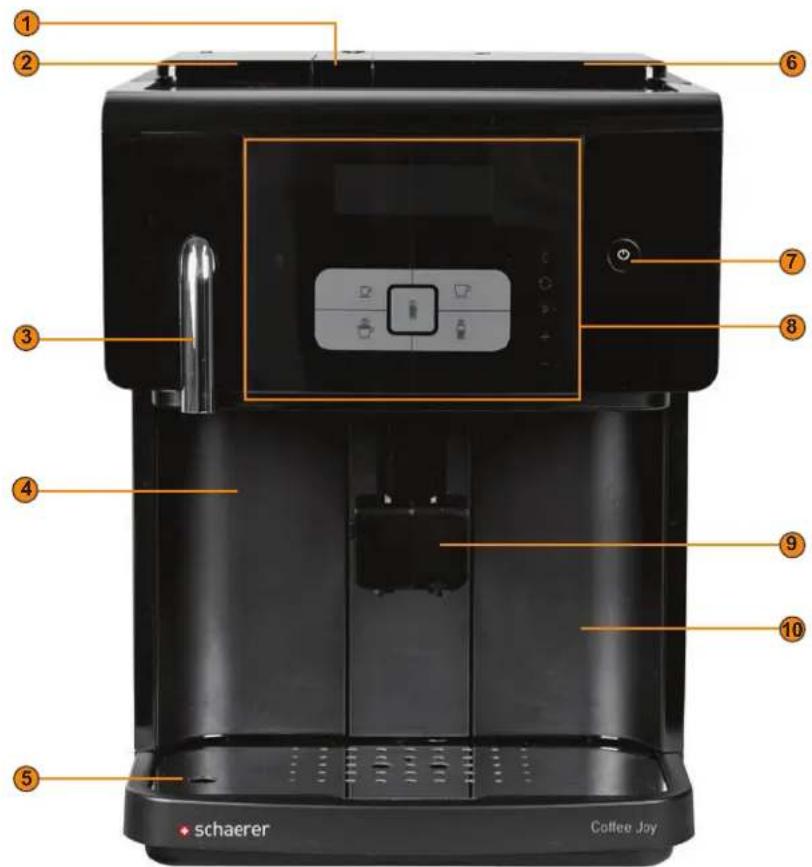
Black coffee machine with digital display and control panel (no visible text or symbols on main body)1 Inlet for ground coffee
2 Bean hopper
3 Hot water dispensing
4 Grounds container
5 Drip tray with drip grid
6 Brewing unit shaft cover
7 On/off
8 User panel
9 Beverage outlet
10 Drinking water reservoir
text_image
① ② ③ ④ ⑤ schaerer Coffee Joy ⑥ ⑦ ⑧ ⑨ ⑩1 Display
2 Hot water
Beverage buttons
Press briefly Press and hold
a Espresso 2 espressos
b Café crème 2 café crème
c Latte Macchiato Milk coffee
d Cappuccino 2 cappuccinos
e Hot milk Milk foam
4 Cancel
5 Cleaning menu
6 Programming menu
7 Change adjustable values/ Navigate through menus

flowchart
graph TD
    A["1"] --> B["2"]
    B --> C["3"]
    C --> D["4"]
    D --> E["5"]
    E --> F["6"]
    F --> G["7"]
    G --> H["+"]
    H --> I["-"]
    I --> J["C"]
    I --> K["C̅"]
    I --> L["P"]
    I --> M["+"]
    M --> N["-"]
Schaerer Coffee Joy
Operating instructions
V02 / 08.2012
Published by
Schaerer Ltd., P.O. Box, Allmendweg 8, CH-4528 Zuchwil
Edition
Version 02 | 08.2012
Software
V0.10
Concept and editorial department
Schaerer Ltd., P.O. Box, Allmendweg 8, CH-4528 Zuchwil
Copyright by ©
Schaerer Ltd., P.O. Box, Allmendweg 8, CH-4528 Zuchwil
This document is copyrighted. All rights are reserved. The reproduction, distribution, transmission via electronic systems or translation of this document in another language is not permitted without the written consent of Schaerer Ltd. This applies to the entire document, as well as to individual excerpts thereof. The contents of the document are based on the most current data available at the time of printing. Schaerer Ldt. reserves the right to make changes at any time without further notice. All pictures, illustrations and display messages in this manual serve only as examples. Due to the wide variety of possible options, a particular machine may differ from the devices depicted here. Schaerer AG is only liable for the contents of the original German document.
Table of contents
Welcome....6
Welcome....6
Signs and symbols 6
Product description .....7
Intended use 7
Beverage types and output....7
Scope of delivery and accessories ....8
Options and optional accessories....8
Technical data 9
Serial plate 10
Declaration of conformity 10
Manufacturer's address....10
Applied standards 10
Installation and commissioning .....11
Setting up the coffee machine .....11
Location....11
Ambient conditions 11
Power supply 11
Conditions 11
Power requirements 12
Water connection/draining 12
Conditions 12
Power requirements ....13
Installation....13
Unpacking the machine....13
Install a mains water supply (Option) .....13
Connecting the milk....13
Commissioning program....14
Deinstallation and disposal 15
Operation....16
Check before switching on ....16
Filling and connecting....16
Coffee beans....16
Water....16
Milk 17
Switching on 17
Dispensing 18
Prewarming the cups....18
Adjusting outlets 18
Beverages 18
Hot water 19
Hot milk 19
Milk foam 19
Double beverage....19
Beverages with ground coffee....20
Dispensing options .....20
Stopping continuous dispensing .....20
Select coffee strength .....20
Emptying....21
Grounds container....21
Drip tray....21
Transport conditions 21
Display messages/instructions 21
Switching off 23
End of operation 23
Lengthy downtimes (more than 1 week) 23
Cleaning 24
Cleaning intervals 24
Mandatory cleaning 24
Daily cleaning 25
Automatic coffee system rinsing 25
Milk system rinse 25
Grounds container 25
Drip tray 25
Internal drinking water tank 25
Milk container.... 25
Side cooling unit (Option).... 26
Weekly cleaning 27
Monthly cleaning 29
Brewing unit 29
As needed 29
Outer surfaces of the coffee machine 29
Cleaning the steam nozzle. 30
Optional accessories (Option).... 30
Warm-up rinse. 30
HACCP Cleaning Concept 31
Cleaning regulations 31
Cleaning schedule 31
Cleaning products 33
Cleaning tablet. 33
Milkpure 33
Decalcifier 33
Service and maintenance 34
Decalcification 34
Adjusting the grinding fineness 35
Water filter (Option).... 35
Installing the water filter for the internal drinking water tank (Option) 35
Changing the water filter for the internal drinking water tank (Option) 36
Maintenance 37
Programming 38
Navigation 38
Overview 38
cup size (beverage volume) 38
beverage settings 39
basic settings. 40
counters.... 43
system information 44
Troubleshooting....45
Faults with display message 45
Faults without display message 46
Water quality 48
Water values 48
Determining the water hardness 49
Filter technology....49
Safety notes.... 50
User at risk. 50
Risk from cleaning products....51
Application 51
Storage 51
Disposal 51
Emergency information....51
Risk of damage to the machine 52
Hygiene regulations 52
Water 52
Coffee 53
Milk 53
Liability.... 54
Operator responsibilities 54
Warranty and liability 54
Welcome
Welcome
This coffee machine is part of the next generation of fully automatic coffee machines. Our company's core competence as well as decades of experience flowed into designing this equipment.
These operating instructions provide information about the product, its operation and how to clean the coffee machine. If the coffee machine is not used according to the instructions, we shall not be held liable for any damages. However, these operating instructions cannot take every conceivable application into account. For further information, please contact our customer service.
The performance of the coffee machine depends on its correct operation and the maintenance. Carefully read the operating instructions before using the machine for the first time, and keep the instructions in an easily accessible place.
We hope you enjoy using your new coffee machine!
Signs and symbols

See also "Safety notes".
The following signs and symbols are used in these operating instructions to point out sources of danger and special features:
DANGER! Risk of electrocution!

An imminently dangerous situation that may result in death or serious injury from electric shock. The measures described to prevent this danger must be adhered to.
CAUTION! User at risk!

A generally dangerous situation that may result in injury. The measures described to prevent this danger must be adhered to.
CAUTION! Risk of machine damage!

A situation that may result in damage to the machine. The measures described to prevent this danger must be adhered to.
CAUTION! Hot fluid!

A dangerous situation that may result in scalding injuries. The danger arises at the dispensing locations. In the following description, this danger is only indicated by the symbol. The measures described to prevent this danger must be adhered to.
CAUTION! Hot steam!

A dangerous situation that may result in scalding injuries. The danger arises at the dispensing locations. In the following description, this danger is only indicated by the symbol. The measures described to prevent this danger must be adhered to.
CAUTION! Hot surface!

A dangerous situation that may result in burn injuries. The danger arises at the dispensing locations and cup warmer locations (option). In the following description, this danger is only indicated by the symbol. The measures described to prevent this danger must be adhered to.
CAUTION! Risk of trapping fingers!

A dangerous situation that may result in crushing injuries. In the following description, this danger is only indicated by the symbol. The measures described to prevent this danger must be adhered to.
Product description
Intended use
Schaerer Coffee Joy is designed to dispense variations of coffee beverages and/or milk beverages in cups or mugs. The device can also dispense hot water.
This machine is designed for private and commercial use. It can be used in businesses, offices, restaurants, hotels and similar establishments. It can also be used in domestic situations. The machine must be cleaned and cared for by specially trained personnel. The machine may be placed in self-service areas if attended to by trained personnel.

Use of this equipment is subject to the "General Terms and Conditions" of Schaerer AG and these operating instructions. In legal terms, any other use is not an intended use. The manufacturer accepts no liability for damage resulting from unintended use.
CAUTION! Risk of machine damage!

Improper handling of the coffee machine can result in damage.
The Schaerer Coffee Joy must not be used to heat or dispense any liquid other than coffee, hot water (beverage, cleaning) or milk (refrigerated, pasteurised, homogenised, UHT) under any circumstances.
Beverage types and output
Depending on the machine model and options, the following beverages can be prepared (beverage output is specified in cups per hour/day):
| Espresso (50 – 60 ml) ±50 cups | |
| Café creme (120 ml) ±40 cups | |
| Milk beverages ±30 cups | |
| Hot water ±7.5 l |
Scope of delivery and accessories
| Quantity Designation Article number | ||
| 1 Schaerer Coffee Joy coffee machine - | ||
| Documentation | ||
| 1 Operating instructions (EN) See the document | ||
| 1 | See the installation instructions of the mains water supply* | See the document |
| 1 Weekly Cleaning Reference Card (EN) See the document | ||
| 1 Delivery Quality Form - | ||
| General accessories | ||
| 1 Milk nozzle | black (diameter: 1.3) 33.2415.1000 | |
| 1 Milk nozzle | brown (diameter: 1.5) 33.2415.2000 | |
| 1 Grease for sealing rings (tube) 33.2179.9000 | ||
| 1 Air suction tube 33.2832.0000 | ||
| 1 Steam nozzle 33.2427.7000 | ||
| 1 Multitool 33.2397.7000 | ||
| Accessory for mains water supply* | ||
| 1 FWS connector housing + drinking water tank complete 071930 | ||
| 1 | Plug-in power supply 90 – 264 VAC/47 – 63 Hz | 071910 |
| 1 Input plug, EU plug-in power supply 071911 | ||
| 1 Armoured hose 1.5 m 3/8" 067766 | ||
| 2 Flat seal 10/15x0.8 064249 | ||
| 2 Cable holder 071933 | ||
| Cleaning/cleaning accessories | ||
| 1 "Milkpure" cleaner 071531 | ||
| 1 Cleaning tablets (blister with 10 tablets) 062867 | ||
| 1 Cleaning brushes (set of 2) 33.2408.0000 | ||
| 1 Carbonate hardness test (bag with 2 test strips) 067720 | ||
** Depending on machine version.
Options and optional accessories
| Example | Option | Description |
 | Side cooling unit External cooling unit for machines with Milk Smart.Capacity: 2 l | |
 | Add-on bean hopper | Additional mountable bean hopper for greater bean capacity.Capacity: 400 g |
| Example Option Description | ||
 | Water filter for internal drinking water tank | The water filter can be installed in the internal drinking water tank.Capacity: 200 l |
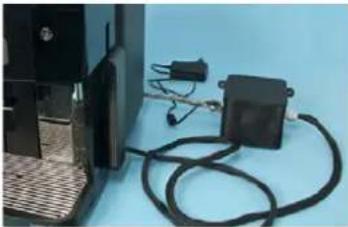 | Mains water supply The tank is filled via a water inlet outside of the machine. This option can be retrofitted. | |

For detailed information, please contact your sales partner.
Technical data
| Nominal power* 1700 – 2300 W | ||
| Operating temperature Steam boiler Hot water boiler | ||
| Minimum operating temperature (T min.): 130°C 86°C | ||
| Maximum operating temperature (T max.) 130°C 102°C | ||
| Overpressure | Steam boiler Hot water boiler | |
| Working overpressure | 2.5 bar | 16 bar |
| Permissible working overpressure (p max): | 16 bar | 16 bar |
| Test overpressure | 24 bar | 24 bar |
| Water tank capacity | 2.2 l | |
| Bean hopper capacity | 250 g | |
| Grounds container capacity | 15 – 20 coffee grounds cakes | |
| External dimensions | ||
| Width | 305 mm | |
| Height | 400 mm | |
| Depth | 443 mm | |
| Empty weight | 16 kg | |
| Permanent noise level** | <70 dB (A) | |
We reserve the right to make technical changes.
* For special equipment, see serial plate. The values specified here apply to the basic equipment.
** The A-weighted noise level (slow) and Lpa (impulse) at the workplace of the operating personnel is below 70 dB (A) for every operating mode.
Serial plate
text_image
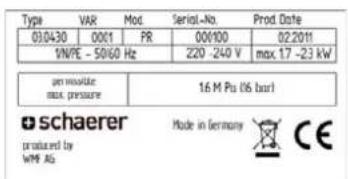
Type VAR Mod Serial-No. Prod Date 03/04/30 0001 PR 000100 02/2011 1N/PE - 50/60 Hz 220 -240 V max 17 -23 kW per module max pressure 16 M Pu (6 bar) schaerer produced by WMF AG Made in Germany CEExample of a serial plate
The serial plate is located behind the drip tray on the left side
In the event of a technical problem or warranty claim, specify the serial number shown on the serial plate.
Declaration of conformity
Manufacturer's address
| Manufacturer Responsible for documentation | |
| Schaerer AGP.O.BoxAllmendweg 8CH-4528 Zuchwil, SwitzerlandTel. +41 (0) 32 681 62 00F +41 (0)32 681 64 04info@schaerer.comwww.schaerer.com | Schaerer AGHans-Ulrich HostettlerP.O.BoxAllmendweg 8CH-4528 Zuchwil, Switzerland |
Applied standards
The following harmonised standards have been applied:
| Low Voltage Directive 2006/95/EC EMC Directive 2004/108/EC | |
| EN 60335-1:2002 +A1 +A11 +A12 +A13+A14 +A15 +A2EN 60335-2-75:2004 +A1 +A11 +A2+A12EN 62233:2008 | EN 55014-1:2006 +A1EN 55014-2:1997 +A1 +A2EN 61000-3-2:2006 +A1 +A2EN 61000-3-3:2008 |
| Safety EMC | |
| IEC 60335-1:2001 +A1 +A2IEC 60335-2-14:2006 +A1IEC 60335-2-15:2002 +A1 +A2IEC 60335-2-75:2002 +A1 +A2IEC 62233 Ed1:2005 | CISPR 14-1 Ed 5.1: 2009CISPR 14-2 Ed 1.2: 2008IEC 61000-3-2 Ed 3.2: 2009IEC 61000-3-2 Ed2.1:2001IEC 61000-3-3:2008 |
The stated manufacturer declares herewith that this machine complies with all relevant stipulations of the specified EU directives. In case of any modifications of the units that have not been approved by Schaerer, this declaration is rendered invalid.
Installation and commissioning
Setting up the coffee machine
Location
CAUTION! Risk of machine damage!

The location where the coffee machine is set up must meet the conditions specified below. If these conditions are not ensured, the coffee machine may become damaged. The following conditions absolutely must be met:
- The installation surface must be stable and level so that is does not become deformed under the weight of the coffee machine.
- Do not set up the coffee machine on hot surfaces or close to ovens.
- Set up the coffee machine in such a way that it can be monitored by trained personnel at any time.
- Route the necessary supply connections to within 1 m of the machine location according to the on-site installation plans.
- Maintain the following clearances for maintenance work and operation:
- Allow enough space above the machine to refill beans.
- Leave a clearance of ± 35 cm on the left side.
- Leave a clearance of min. 15 cm from the rear of the machine to the wall (air circulation).
- Leave a clearance of min. 250 mm above the machine (needed to remove the brewing unit for cleaning and maintenance).
- Comply with all applicable local kitchen regulations.
Ambient conditions
CAUTION! Risk of machine damage!

The location where the coffee machine is set up must provide the ambient conditions specified below. If these conditions are not ensured, the coffee machine may become damaged.
The following conditions absolutely must be met:
Ambient temperature of +10 °C to +40 °C (50 °F to 104 °F)
Relative humidity of max. 80 % RH
The coffee machine is designed for indoor use only. Do not use in the open and never expose to the weather (rain, snow, subzero temperatures).
If the coffee machine was exposed to subzero temperatures:
▶ Contact customer service before commissioning.
Power supply
Conditions
The power supply connection must be made in accordance with the applicable requirements and the regulations of the respective country. The voltage specified on the serial plate must match the supply voltage at the installation location.
Danger of electric shock!
Please adhere to the following points:
- The phase must be fused at the ampere value specified on the serial plate.
- It must be possible to disconnect the device from the mains power supply at all poles.
- Never operate a device with a damaged power cord. Have a defective power cord or plug replaced immediately by a qualified service technician.
- Schaerer AG recommends against using an extension cable. If, despite this, an extension cable is used (minimum cross-section: 0.75 ~mm^2 ), observe the manufacturer data for the cable (operating instructions) and the locally applicable regulations.
- Route the power cord in such a way that it does not present a tripping hazard. Do not pull the cord over corners or sharp edges, pinch it between objects or allow it to hang loosely in the open. Do not position the cord over hot objects, and protect the cord from exposure to oil and aggressive cleaning products.
- Never lift or pull the device by the power cable. Never pull the plug out of the socket by its cord. Never touch the power cord or plug with wet hands. Never insert a wet plug into a power socket.
Power requirements
| Mains Power requirements | Fuse protection (site face) | Connecting cable conductor cross-section | |||
| 1L, N, PE | 220 – 240 V ~ | 50/60 Hz | 1700 – 2300 W | 10 – 16 A | 3 x 0.75 mm ^2 3 x 1 mm ^2 |
| 1L, N, PE | 110 – 120 V ~ | 50/60 Hz | 1200 W | 15 A | NEMA 5 – 15 |
| 2L, PE | 220 2 V ~ | 50/60 Hz | 2000 W | 10 – 16 A | |
| 1L, N, PE | 110 V ~ | 60 Hz | 1210 W | 13 A | NEMA 1 – 15 |
Water connection/draining
Conditions
The machine can suffer damage due to bad material and wrong water values. It is imperative that the following points are complied with:
The water must be free of contaminants and the chlorine content must not exceed 100 mg per litre.
Do not connect the machine to pure reverse osmosis water or other aggressive types of water.
The carbonate hardness must not exceed 5 - 6°dKH (German carbonate hardness) or 8 - 10°fKH (French carbonate hardness) and the total hardness value must always be greater than the carbonate hardness.
The minimum carbonate hardness is 4^ dKH or 7^ fKH. The pH value must be between 6.5 – 7.
Always use the new hose set (fresh water/waste water hose) provided with the machine.
The water supply connection must be made in accordance with the applicable requirements and the regulations of the respective country. If the machine is connected to a newly installed water pipe, the pipe and infeed hose must be rinsed well to ensure that no dirt gets into the machine.
The coffee machine must be connected to an installed drinking water line with a shut-off valve.
Power requirements
| Water pressure | Minimum: 0.2 MPa (2 bar) |
| Maximum: 0.6 MPa (6 bar) |
| Water inlet temperature | Minimum: 10°C | |
| Maximum: 35°C |
Installation
Unpacking the machine

Read the "Setting up the coffee machine" and "Power supply" chapters carefully before installing.
▶ Unpack the machine.
▶ Check the remaining package contents for accessories.
Remove the accessories supplied in the grounds container and water tank.

Important: When operating the machine with a mains water supply, it is important that you keep the provided internal drinking water tank. It is needed during the decalcification process.
▶ Keep the original packaging in case the equipment needs to be sent back.
Install a mains water supply (Option)

See the supplied installation instructions on the mains water supply.
Connecting the milk
natural_image
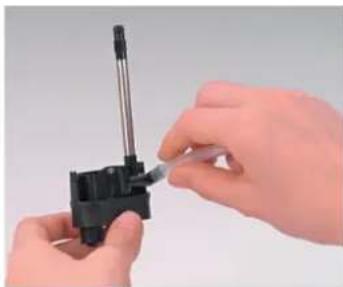
Close-up of hands assembling a small mechanical component with a tool (no visible text or symbols)▶ Mounting the milk hose on the beverage outlet (see figure).
▶ Select a suitable milk nozzle (brown = for cooled milk; transparent = for uncooled milk) and insert at the lower end of the milk hose.
▶ Insert the beverage outlet into the holder.
▶ Remove the grounds container out of the coffee machine.
▶ Move the beverage outlet to the lowest position.
natural_image
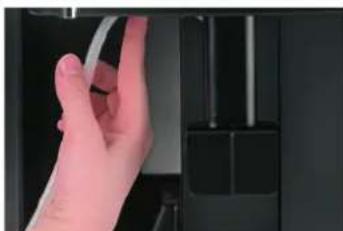
Hand holding a transparent cable inserted into a black electronic device (no visible text or symbols)▶ Clamp the milk hose in the provided guide.

See "Operation" - "Fill and connect" - "Milk" for filling milk.

If an external cooling unit is used: install the cooling unit as described in the operating instructions and route the milk hose from the coffee machine to the external cooling unit.
Commissioning program
When the coffee machine is started for the first time, the commissioning program is executed automatically. It goes through the initial settings step by step. A detailed description of all steps follows.
▶ Press the @ button.
☑ The coffee machine switches on and the commissioning program begins.
▶ Follow the instructions on the touch screen.
| Display / display text | Parameter description | Setting range | Notes |
| language: English | Select the required language with and. Confirm by touching ☐ "Initial setup of your Coffee Joy" appears on the display in the selected language. | GermanEnglishFrenchDutchSwedishDanishNorwegianRussianItalianSpanishJapanese | The presetting is "English". |
| Time hh:mm To set the current time: | Set the hours with and. Confirm by touching ☐ Set the minutes with and. Confirm by touching ☐ The next step appears. | hh = hoursmm = minutes | - |
| Date dd:mm:yyyy Set the current date: | Set the day with and. Confirm by touching ☐ Set the month with and. Confirm by touching ☐ Set the year with and. Confirm by touching ☐ The next step appears. | dd = daymm = monthyy = year | - |
| Switching off time: 30 min | The switching off time is defined in this step. After a beverage is dispensed, if the defined time elapses without another beverage being dispensed, the machines switches off automatically. Set the minutes with and. Confirm by touching ☐ The next step appears. | 0 min5 – 180 min | If set to "0 min", the machine does not switch off automatically. |
| Water hardness: 13 – 16 To set the water hardness: Perform the water hardness test.See "Service and maintenance" - "Determine the water hardness". Set the water hardness with and. Confirm by touching ☐ The next step appears. | 0 – 45 – 89 – 1213 – 16>16 | - | |
| Water filter: no To set the use of a water filter:► Set the use with and . —► Confirm by touching ⓅOption 1: Input "no"☑ The next step appears.Option 2: If "yes" is set, the filter rinse is executed automatically.► Place a container with a capacity of ca. 3 l under the hot water outlet.► Fill the drinking water container completely.☑ After the filter rinse cycle is completed, the next step is displayed. | Yes / no If "Yes" is set, a filter rinse is then executed automatically. | ||
| The machine heats up The coffee machine begins heating up.After heating, the coffee system is rinsed.► Place a container under the beverage outlet.☑ The rinse cycle takes ca. 40 sec. | – The coffee system rinse cleans and warms up all pipes. | ||
 "Espresso" beverage button "Espresso" beverage button | A test brewing is performed at the end of the commissioning program.The button flashes.► Place a suitable container below the beverage outlet.► Press the button.☑ The test brewing starts.► Pour away the test beverage; do not drink it. | – | – |
| Your selection please The coffee machine is now ready to use. – All settings that were | made now can be changed later.See "Programming". | ||
Deinstallation and disposal

The coffee machine must be disposed of correctly in conformity with local and legal regulations.
▶ Contact service partner.
Operation
Check before switching on
▶ Before switching on the coffee machine, check whether the following conditions are fulfilled.
Conditions for switching on the coffee machine:
- The fresh water supply is open or the water tank is filled.
• The bean hopper is filled. - The coffee grounds container is empty and inserted correctly.
- The coffee machine is correctly connected to the mains power supply.
Filling and connecting
Coffee beans
CAUTION!
User at risk!

Danger of injury from rotating grinding discs.
Never reach into the bean hopper while the coffee machine is switched on.
CAUTION!
Risk of machine damage!

Filling foreign bodies into the hopper can lead to clogging or destruction of the grinder. Never fill anything other than beans into the bean hopper.
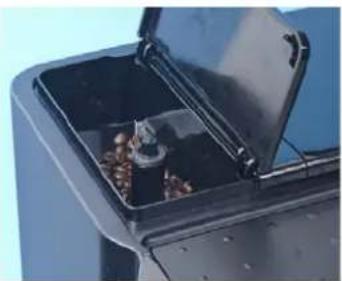
natural_image
Close-up of a black industrial waste bin with open lid and scattered food items (no visible text or symbols)▶ Open the bean hopper lid (see figure).
▶ Fill in beans (max. 250 g).
▶ Close the lid again.
Water
Option 1: Internal drinking water tank
Remove the drinking water tank daily and rinse out thoroughly with fresh water.
▶ Fill the drinking water tank with fresh drinking water before using it.
▶ Reinsert the drinking water tank.
Option 2: Mains water supply
CAUTION!
Risk of machine damage!

The machine can suffer damage, if the pump runs dry.
Before switching on the machine make sure that the main water valve is open.
▶ Open the stop valve on the main water valve.
For reasons relating to insurance law it is advisable that the main water valve is closed at the end of the day.

Milk
Option 1: Milk Smart

No more than 40 cm should be between the milk package and the beverage outlet.
▶ Have fresh, pre-cooled milk (3 – 5°C) ready.
▶ Hang the hose or hoses into the milk.
☑ The hose end must be in contact with the container floor.

See also "Safety notes" - "Hygiene" - "Milk".
Option 2: Additional cooling unit
▶ Open the door.
▶ Remove and rinse the milk container.
▶ Fill in fresh, pre-cooled milk (3 – 5°C).
▶ Place the milk container into the cooling unit.
▶ Hang the hose or hoses into the container.
☑ The hose end must be in contact with the container floor.
▶ Close the door.
Switching on
▶ Press the button.
☑ The coffee machine switches on and the greeting message appears on the display.
▶ Place a container under the beverage outlet.
☑ The coffee machine begins heating up.
☑ After heating up, the coffee machine performs a coffee system rinse (duration: ca. 40 sec).
Option 1: Mains water unit
▶ Connect the mains water unit to the power supply.

Note the voltage specifications on the serial plate of the mains water supply.
Option 2: Side cooling unit
▶ Connect the side cooling unit to the mains power supply and switch on by means of the main switch.

Take heed of the operating instructions of the side cooling unit.

See "Operation" - "Filling and connecting" - "Milk" - "Option: side cooling unit".
Dispensing
Prewarming the cups
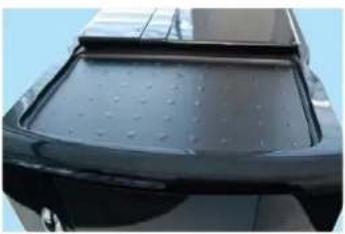
natural_image
Close-up of a black car's rear bumper with visible paint dots and roof trim (no text or symbols)A storage area for cups is located on top of the coffee machine. When the machine is switched on, the storage area is heated and the cups are prewarmed.
▶ Place the cups on the storage area.
☑ The cups are pre-warmed when the coffee machine is switched on.
Adjusting outlets
CAUTION!
Hot surface!


natural_image
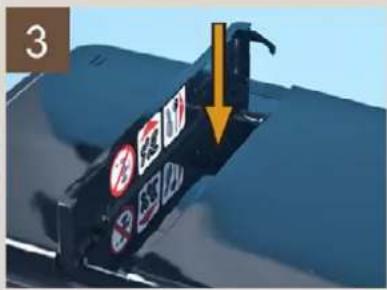
Close-up of a black industrial machine with a yellow double-headed arrow indicating vertical displacement (no text or symbols visible)Hot surfaces can cause burns.
Exercise care when moving the beverage outlet.
▶ Place a cup under the beverage outlet.
▶ Grasp the beverage outlet from the front and slide it into the correct position (see figure).
▶ Remove the cup after the beverage has been dispensed.

Adjustable height = 70 - 135 mm.
Beverages
The machine is ready to dispense a beverage when the beverage symbol appears.
▶ Place a cup under the beverage outlet.
▶ Adjust the height of the beverage outlet to the cup size.
The following beverages are available:
a Press briefly: espresso/press and hold: 2 espresso
b Press briefly: café creme/press and hold: 2 café cremes
c Press briefly: latte macchiato/press and hold: milk coffee
d Press briefly: cappuccino/press and hold: 2 cappuccinos
e Outlet at top, press briefly: hot milk/outlet at bottom, press and hold: foam

flowchart
graph TD
    a["Zone a"] --> e["Central teapot icon"]
    b["Zone b"] --> e
    c["Zone c"] --> e
    d["Zone d"] --> e
    e --> a
    e --> b
    e --> c
    e --> d
CAUTION!
Hot fluid!

▶ Press the required beverage button.
☑ Only the symbol of the selected beverage appears; dispensing of the beverage begins.
☑ The beverage name appears on the display.
▶ Remove the cup after the beverage has been dispensed.

See "Dispensing options" - "Stop dispensing" to stop dispensing of the beverage.
Hot water
Three different dosing variants are available for dispensing hot water:

The service technician can deactivate unrequired dosing variants or adjust the dosing quantity of the "dosed" variant.
▶ Place a cup under the hot water outlet.
▶ Adjust the height of the beverage outlet to the cup size.
CAUTION! Hot fluid!

Option 1: Dosed
▶ Press the button.
☑ The set quantity is dispensed.
Option 2: Freeflow
▶ Press and hold the button.
☑ Dispensing takes place while the button is pressed.
Option 3: Start/stop
▶ Press the button.
☑ Hot water is dispensed.
▶ Stop dispensing by pressing the 🎯 button again.

If dispensing is not stopped manually by pressing the button, dispensing ends automatically after a defined time period. This can be defined by the service technician.
Hot milk
Hot milk and milk foam are dispensed using the same button. Milk is dispensed when the outlet is all the way up. Milk foam is dispensed when the outlet is in a lower position.
▶ Place a cup under the beverage outlet.
▶ Slide the beverage outlet to the highest position.
☑ Air is always added to the milk unless the outlet is in the highest position.
CAUTION! Hot fluid!

▶ Press the button.
☑ Hot milk is dispensed.
Milk foam
Hot milk and milk foam are dispensed using the same button. Milk is dispensed when the outlet is all the way up. Milk foam is dispensed when the outlet is in a lower position.
▶ Place a cup under the beverage outlet.
▶ Push the beverage outlet down as far as possible.
CAUTION! Hot fluid!

▶ Press and hold the button.
☑ Dispensing takes place while the button is pressed.
Double beverage
Two beverages can be dispensed at the same time. This only applies to espresso, café creme and cappuccino.
▶ Place two cups under the beverage outlet.
▶ Adjust the height of the beverage outlet to the cup size.
CAUTION! Hot fluid!


▶ Press the required beverage button for ca. 3 sec.
☑ Only the symbol of the selected beverage appears; dispensing of the beverage begins.
☑ The display shows "2x beverage name".
▶ Remove the cups after the beverage has been dispensed.
See "Dispensing options" - "Stop dispensing" to stop dispensing of the beverage.
Beverages with ground coffee
CAUTION! Risk of machine damage!

Incorrect use may damage the machine.
Never put anything into the inlet other than ground coffee or cleaning tablets.
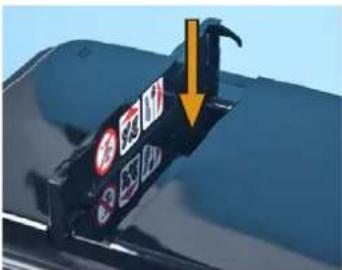
text_image
Close-up of a car's front bumper with visible warning signs and a yellow arrow pointing to a vehicle.▶ Open the inlet lid (see figure).
☑ The "insert coff. grounds" instruction appears.
▶ Fill ground coffee (max. 15 g).
▶ Close the inlet lid.
☑ The "select beverage" instruction appears.
▶ Press the required beverage button.
☑ Only the symbol of the selected beverage appears; dispensing of the beverage begins.
☑ The beverage name appears on the display.
▶ Remove the cup after the beverage has been dispensed.

See "Dispensing options" - "Stop dispensing" to stop dispensing of the beverage.
Dispensing options
Stopping continuous dispensing
The dispensing of beverages and hot water can be stopped at any time.
▶ Press the @button.
☑ The current dispensing process is stopped.
Select coffee strength
Before dispensing, the coffee strength can be selected. The following strengths are available:
• Strong (ca. 15% stronger than the setting of the particular beverage)
• Normal (presetting of the particular beverage)
- Mild (ca. 15% milder than the setting of the particular beverage)
If "strong" or "mild" is selected, the grinding time of the grinder and thus the quantity of ground coffee is adjusted accordingly.
If no preselection is made, the strength is automatically set to "Normal".
▶ Use the + button and the — button to select the beverage strength.
☑ The selection only applies to the beverage that will be dispensed next.
▶ Place a cup under the beverage outlet.
▶ Adjust the height of the beverage outlet to the cup size.
▶ Request the desired beverage.
☑ The beverage is dispensed.
☑ The beverage name and strength are shown in the display.
Emptying
Grounds container
The grounds container must be emptied regularly, at the latest when the instruction to do so appears on the display.
▶ Remove and empty the grounds container.
☑ Dispensing of beverages is blocked while the grounds container is not in place.
▶ Reinsert the grounds container.
☑ "grounds. cont. empty?" appears on the display.
▶ Confirm with the Pbutton.

If the request is accidentally confirmed with "No" after the grounds container is emptied, the display instruction to empty the container persists. The grounds container must be removed and inserted again, and the instruction then reappears.
Drip tray
The drip tray must be emptied as soon as the floater appears, but at least once daily.
CAUTION! Risk of trapping fingers!

▶ Carefully pull out the drip tray.
▶ Empty the drip tray and reinsert it.
▶ Check that it is correctly positioned; an incorrectly inserted drip tray can cause water to leak or blocking of the machine.
Transport conditions
▶ Before moving the coffee machine, it is essential that you detach the drinking water supply, power supply and waste water outlet.
Before moving the coffee machine, check the floor for obstacles and uneven areas.
Improper transport of the machine could damage the machine.
Adhere to the following instructions when moving machines on a cart:
CAUTION! Risk of machine damage!

- For safety reasons, the cart must be pulled and not pushed when moving the coffee machine.
- Only pull on the cart and never on the machine.
• The cart is not intended for transporting cargo.

The manufacturer cannot be held liable for any damage resulting from unintended use of the cart or from failure to follow the operating instructions.
Display messages/instructions
The machine displays messages if intervention by a user or service technician is needed to ensure operating readiness of the machine. There are two different categories of messages:
- Note
- Fault
Messages are usually instructions, such as the instruction to fill the drinking water tank.
▶ Perform the task as described in the following table.
If the display message persists, a malfunction may exist.

See "Troubleshooting" - "Malfunction with display message".
| Display message Cause What to do | ||
| Empty grounds container | The grounds container is full. | Remove and empty the grounds container.Dispensing of beverages is blocked while the grounds container is not in place.Place back the grounds container."grounds. cont. empty?" appears on the display.Confirm with thebutton. |
| beverage sel. locked refill water tank | The drinking water tank is empty.Beverages cannot be dispensed. | Option:With internal drinking water tankOpen the stop valve of the water supply.Remove the drinking water tank and fill it with fresh drinking water.Reinsert the drinking water tank.Option:With mains water supplyOpen the stop valve of the water supply. |
| refill beans confirm beverage | There are not enough beans in the grinder.The grinder stops and beverage dispensing is interrupted. | Open the bean hopper lid (see figure).Pour in coffee beans (max. 250 g).Close the lid again.Press the beverage button again.Dispensing of the previously selected beverage is completed. |
| insert coff. grounds select beverage | The lid of the ground coffee inlet is open.Beverages cannot be dispensed. | Option 1:Requesting a beverage with ground coffeeFill ground coffee (max. 15 g).Close the inlet lid.The "select beverage" instruction appears.Press the desired beverage button.Dispensing begins.Option 2:Stopping dispensing of the beverageClose the inlet lid.Stop dispensing with thebutton. |
| Change water filter The water | filter in the drinking water tank must be changed. | Change the water filter.See "Service and maintenance" - "Changing the water filter". |
| tank lid missing? The lid of the | drinking water tank is not in place.Beverages cannot be dispensed. | Correctly place the lid on the drinking water tank.Slide the drinking water tank into the machine. |
| beverage sel. locked lid open | The brewing unit lid is open or was not closed correctly.Beverages cannot be dispensed. | Correctly close the brewing unit lid. |
| Clean display The operating panel is dirty.The buttons no longer react. | Press the button for 5 sec.The machine switches off.Clean the display with a moist cloth.Press the button.The machine switches back on. | |
Switching off
End of operation
Only perform the following steps if the machine is not operated with automatic switching off time.
▶ ☺ Press the button for 5 sec.
☑ If beverages with milk were prepared, an instruction to rinse the milk system appears on the display.
▶ Follow the instructions on the display.
☑ After the milk system is rinsed, the coffee system is rinsed automatically.
CAUTION! User at risk!

If the machine is switched off automatically via the switching off time, a milk system rinse is not performed. If the machine remains switched off for an extended period, the milk residue in the milk hose will produce germs and mould.
Perform the milk system rinse daily during the operating times. If the machine is to be switched off for an extended period, a milk system rinse must be started manually before switching the machine off.

See also "Cleaning".
☑ The machine switches off after the milk system is rinsed.
▶ Empty the grounds container, clean it and reinstall it.
Only perform the following steps if the machine is not operated with an automatic switching on time.
▶ Disconnect the power plug.
Option 1: Mains water supply
▶ Close the main water valve of the mains water supply.
Option 2: Drinking water tank
▶ Empty the drinking water container, clean it and reinstall it.

Failure to do so will result in a loss of warranty coverage in the event of damage.
Lengthy downtimes (more than 1 week)

During extended periods of disuse, such as during company holidays, the coffee machine and the associated accessories must be taken out of service.
▶ Perform all activities described in the "End of operation" chapter.
If the machine will be exposed to subzero temperatures, the boiler must be drained beforehand.
▶ Please contact your service partner.
CAUTION! Risk of machine damage!

The boilers can be destroyed by freezing water as it expands. In rooms where the temperature can fall below zero, the boilers must be emptied.

When taking the machine back into service, perform a daily cleaning first.
Cleaning
Cleaning intervals
| Cleaning intervals | ||||||
| Daily | Weekly | Once a month | Automatically | As instructed | As needed | |
| Coffee machine | ||||||
| x x | x Coffee system rinse | |||||
| x x | Milk system rinse | |||||
| x Clean the milk system | ||||||
| x Machine cleaning (cleaning programme) | ||||||
| x Clean the brewing unit | ||||||
| x Rinse the drinking water tank with fresh water | ||||||
| x x | Empty and clean the grounds container | |||||
| x x | Empty and clean the drip tray | |||||
| x Clean the bean hopper | ||||||
| x Clean the steam nozzle | ||||||
| x Clean the outer surfaces of the coffee machine | ||||||
| Optional accessories/options | ||||||
| x Clean the milk container | ||||||
| x Clean the interior of the additional cooling unit | ||||||
| x Clean the outer surfaces of the side cooling unit | ||||||
Legend
Daily: At least once a day or more often if necessary.
Weekly: At least once a week or more often if necessary.
Monthly: At least once monthly or more often if necessary.
Automatically: Automatically when switching the machine on or off.
As instructed: An instruction appears on the display.
As needed: As needed (if dirty).

For a better overview of the cleaning steps that are required or that have already been performed, use the cleaning schedule in this chapter.
Mandatory cleaning
If a pending cleaning procedure is not performed although it is requested on the display, mandatory cleaning will set in (if programmed) after a certain time. When mandatory cleaning sets in, dispensing of beverages is blocked.
Beverages cannot be dispensed again until after the machine has been cleaned.

Mandatory cleaning and the period that elapses before it sets in can only be programmed by the service technician.
Daily cleaning
Automatic coffee system rinsing
The coffee system rinse is automatically performed every time the coffee machine is switched on and off. User actions are not required.
Milk system rinse
If milk was dispensed, the milk system is automatically rinsed every time the coffee machine is switched off. The following steps need to be performed:
▶ Place a container under the beverage outlet.
▶ Slide the beverage outlet to the highest position.
▶ Insert the milk hose with the milk nozzle in the hot water outlet and turn it clockwise all the way.
☑ The milk system rinse begins.
▶ After the milk system rinse, wipe off the outside of the milk hose with a moist cloth.
The milk system can also be rinsed as needed.
▶ Press the O button.
☑ The cleaning menu appears.
▶ Leaf to the "milk system rinsing" menu with the + button.
▶ Press the Pbutton.
▶ Perform all steps as described above.
Grounds container
CAUTION! User at risk!

Coffee grounds in the grounds container can quickly lead to mould formation. The spread of mould spores in the machine results in the danger of contamination of the coffee.
Therefore, clean the grounds container daily.
▶ Thoroughly clean the grounds container with water and a household cleaning product.
▶ Rinse with clear water and dry with a clean cloth.
Drip tray
▶ Thoroughly clean the drip tray and the drip grid with water and a household cleaning product.
▶ Rinse with clear water and dry with a clean cloth.
Internal drinking water tank
CAUTION! User at risk!

There is a danger of contamination of the drinking water tank due to deposits and bacteria.
Rinse the drinking water tank daily; do not use cleaning products.
▶ Thoroughly rinse the drinking water tank with fresh water several times.
▶ Dry with a clean cloth.
CAUTION! User at risk!

Milk container
There is a risk of contamination of the milk and milk container due to milk deposits and bacteria.
Clean the milk container daily and every time before filling.
▶ Mix 5 ml of Daypure cleaning product with 500 ml of warm water in a container.
CAUTION! User at risk!

▶ Clean the milk container using the prepared cleaning solution.
▶ Rinse with clear water and dry with a clean cloth.
Side cooling unit (Option)
There is a risk of contamination of the milk and cooling unit due to milk deposits and bacteria.
Clean the cooling unit daily.
▶ Take the milk out of the cooling unit.
▶ Thoroughly clean the interior of the cooling unit with water and a household cleaning product.
▶ Place the milk back into the cooling unit.
Weekly cleaning
Weekly cleaning
Schaerer Coffee Joy

schaerer

CAUTION!
User at risk!

See also "Safety instructions" and "Cleaning" in the operating instructions.
There is a risk of scalding in the dispensing area of beverages, hot water and steam. Never reach under the dispensing areas during dispensing or cleaning.
Machine cleaning (cleaning programme)
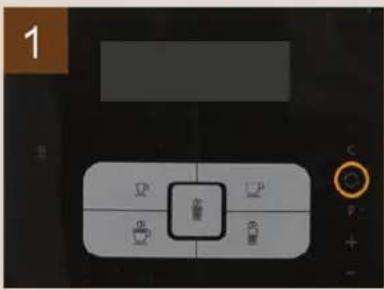
text_image
1- Press the button.
☑ The "Maintenance program" menu appears.
▶ Leaf through the menu to "Machine cleaning" using and.
▶ Confirm with .P ☑The cleaning programme starts.
natural_image
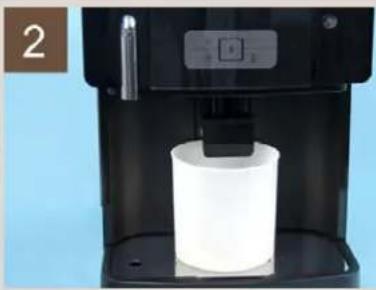
Close-up of a black industrial water dispenser with a white cylindrical container on a base (no visible text or symbols)▶ Empty the drip tray.
▶ Fill the drinking water tank.
▶ Place a container (min. 2 l) under the beverage outlet.
▶ Drop the cleaning tablet into the inlet with the little sponge.
▶ Close the inlet lid and confirm with .P ☑Cleaning starts. ☑The remaining cleaning duration appears on the display.
Milk system cleaning (manual)
natural_image
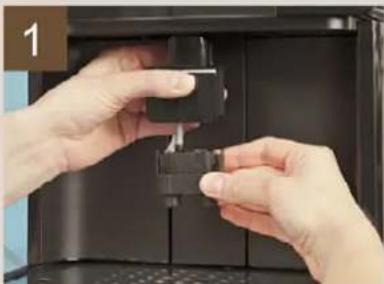
Close-up of hands installing or adjusting a black mechanical component inside a device (no visible text or symbols)After the machine cleaning programme is finished, the instruction for manual milk system cleaning appears on the display.
▶ Slide the beverage outlet to the highest position.
▶ Press the release on the back of the beverage outlet and pull the foamer head down and off.
▶ Remove the grounds container and release the milk hose out of the guide.
natural_image
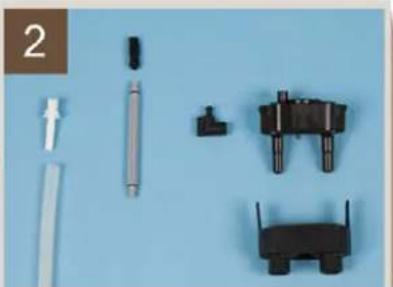
Collection of mechanical components and tools laid out on a blue background, including rods, cylindrical parts, and various black blocks (no text or symbols visible)▶ Disassemble all parts.
▶ Immerse all parts in a solution of 500 ml of hot water and 25 ml of "Milk-pure" cleaning product for ± 30 min.
▶ Wash all parts under luke warm, running water.
▶ Clean the outlets of the foamer head with the brushes contained in the scope of supply.
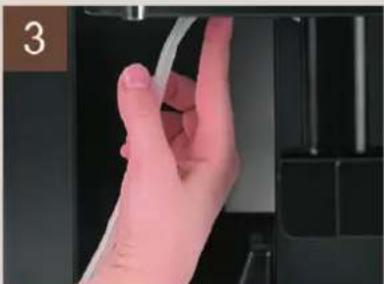
natural_image
Close-up of a hand holding a white cable, no visible text or symbols▶ Let the parts dry fully.
▶ Reassemble all parts.
▶ Attach the foamer head.
▶ Clamp the milk hose into the guide intended for this purpose.
▶ Insert the grounds container.
Cleaning the bean hopper

natural_image
Two-panel image showing a container filled with nuts and a lid open, both without any visible text or symbols.Old bean grease in the bean hopper can have a negative impact on the coffee quality.
▶ Wipe the inside of the bean hopper with a moist cloth.
▶ Dry with a clean cloth.
CAUTION!
User at risk!

Danger of injury from the rotating grinding discs in the grinder.
Never reach into the bean hopper while the coffee machine is switched on.
CAUTION!
User at risk!

Improper handling of beans, water, milk, powder or other coffee ingredients can lead to health problems!
Comply with the hygiene regulations stipulated in HACCP!

See "Safety instructions" - "HACCP hygiene regulations" in the operating instructions.
Schaerer Ltd.
P.O.Box
Allmendweg 8
CH-4528 Zuchwil
info@schaerer.com
www.schaerer.com
Schaerer Coffee Joy | V02 | 08.2012
QRCSCJ_w_en
N° 022481
Monthly cleaning
Brewing unit
CAUTION!
User at risk!

CAUTION!
Risk of machine damage!

Coffee residue in the brewing unit can quickly lead to the formation of mould. The spread of mould spores in the machine results in the danger of contamination of the coffee.
Clean the brewing unit monthly (depending on the degree of soiling) as described.
Never wash the brewing unit in a dishwasher as this may damage the unit considerably. Only clean the brewing unit as described below.
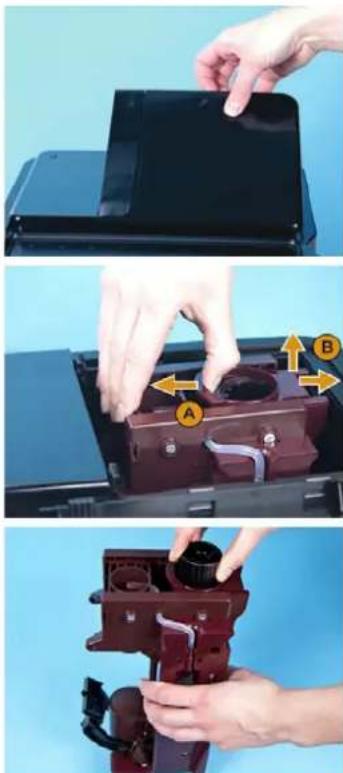
natural_image
Three-step diagram showing hand operating a device with labeled parts (A, B, C) against a blue background, no text or symbols present.▶ Remove the lid over the brewing unit.
▶ Pull back the latch of the brewing unit (A).
▶ Pull the brewing unit out of the machine while pushing it slightly to the right (B).
▶ Turn the thread on the head of the brewing unit anticlockwise until the ejector is located in the front position.
▶ Clean the brewing unit under flowing water.
▶ Let the brewing unit dry fully before reinstalling it in the machine.
▶ Turn the thread on the head of the brewing unit back into the original position (rear scraper).
▶ Place the lid on the brewing chamber.
As needed
Outer surfaces of the coffee machine
▶ Switch off the machine before cleaning the outer surfaces.
▶ Spray commercially available glass cleaner onto a paper towel.
▶ Use it to clean the user panel of the coffee machine.
▶ Clean the remaining outer surfaces of the coffee machine with a moist cloth.
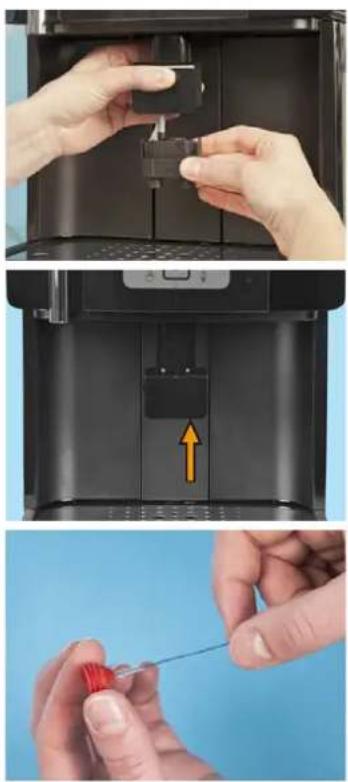
natural_image
Three-step illustration showing hands operating a device in a black case, with a yellow arrow highlighting the component (no text or symbols present)Cleaning the steam nozzle
The steam nozzle is located at the top in the beverage outlet. If needed, a second steam nozzle is contained in the scope of supply.
▶ Slide the beverage outlet to the highest position.
▶ Press the release on the back of the beverage outlet and pull the foamer head down and off.
▶ Take out the steam nozzle located in the beverage outlet at the top.
▶ Clean the steam nozzle with the brush.
▶ Insert the steam nozzle back into the beverage outlet.
▶ Attach the foamer head.
Optional accessories (Option)
CAUTION! User at risk!

There is a risk of contamination of the milk and cooling unit due to milk deposits and bacteria.
Clean the cooling unit daily.
▶ Take the milk out of the cooling unit.
▶ Thoroughly clean the interior of the cooling unit with water and a household cleaning product.
▶ Place the milk back into the cooling unit.
Warm-up rinse
The warm-up rinse rinses and warms the coffee machine pipes. If a beverage has not been dispensed for some time, a warm-up rinse can be performed before the next beverage is dispensed. This guarantees that the beverage has an optimal temperature.
▶ Press the button.
☑ The cleaning menu appears.
▶ Leaf to the "warm up rinsing" menu with the + button.
▶ Press the Pbutton.
☑ A warm-up rinse is performed.
HACCP Cleaning Concept
Cleaning regulations
When installed, maintained, cared for and cleaned properly, Schaerer AG coffee machines fulfil HACCP regulations.
CAUTION! Risk of machine damage!

If the coffee machine is not cared for and cleaned properly, the dispensing of milk beverages will become a health hazard in terms of food hygiene. Note and adhere to the following instructions:
Wear safety gloves during cleaning.
Wash your hands thoroughly before and after cleaning.
Clean the coffee machine daily after beverage dispensing has ended.
Clean the milk container every time before filling and after you have finished dispensing beverages for the day.
Never put cleaning products in the milk container.
Never put cleaning products in the drinking water tank (internal/external).
Never mix cleaning products.
Store cleaning products separately from coffee, milk and coffee machine powder.
Do not use any abrasive products, brushes or cleaning tools made of metal.
Do not touch parts that come into contact with beverages after cleaning.
Read and follow the dosing and safety instructions specified on the cleaning product.
For daily and weekly cleaning, proceed as described in the operating instructions and on the cleaning cards.

For a better overview of the cleaning steps that are required or that have already been performed, use the cleaning schedule in this chapter.
Cleaning schedule
▶ Copy the HACCP Cleaning Concept and store/post it in the vicinity of the machine.
▶ Record each cleaning with the time and a signature.
Year:
□ January
□ February
□ March
□ April
□ May
□ June
□ July
□ August
□ September
□ October
November
□ December
| Date | Machine cleanings (time and signature): | Signature | ||||
| Perform daily! | Perform weekly! | |||||
| Daily machine cleaning | Milk container (option) | Cleaning of cooler (option) | Weekly machine cleaning | Defrosting of cooler (option) | ||
| 1. | ||||||
| 2. | ||||||
| 3. | ||||||
| 4. | ||||||
| 5. | ||||||
| 6. | ||||||
| 7. | ||||||
| 8. | ||||||
| 9. | ||||||
| 10. | ||||||
| 11. | ||||||
| 12. | ||||||
| 13. | ||||||
| 14. | ||||||
| 15. | ||||||
| 16. | ||||||
| 17. | ||||||
| 18. | ||||||
| 19. | ||||||
| 20. | ||||||
| 21. | ||||||
| 22. | ||||||
| 23. | ||||||
| 24. | ||||||
| 25. | ||||||
| 26. | ||||||
| 27. | ||||||
| 28. | ||||||
| 29. | ||||||
| 30. | ||||||
| 31. | ||||||
Cleaning products
CAUTION!
Risk of machine damage!

Use of incorrect cleaning products can damage the machine.
Use only cleaning products for daily and weekly cleaning that are recommended by Schaerer AG.

Before using cleaning product, read the information on the package label and the HEALTH & SAFETY DATA SHEET carefully. If a HEALTH & SAFETY DATA SHEET is not present, please request it from the sales partner.
Cleaning tablet
| Information | |
| Application Weekly cleaning, coffee system | |
| Purpose of cleaning Removal of grease residue in the coffee system | |
| Application interval Once a week |
Milkpure
| Information | |
| Application Weekly cleaning of | the milk system |
| Purpose of cleaning | Removal of lime scale deposits and milk stone from the milk system and steam nozzle. |
| Application interval Once a week | |
Decalcifier
| Information | |
| Application Decalcification of boiler and line system | |
| Purpose of cleaning Removal of lime scale deposits in the coffee machine | |
| Application interval As instructed by the coffee machine |
Service and maintenance
Decalcification
When the machine needs to be decalcified, a corresponding request appears on the display.
The decalcification interval depends on the following factors:
- Water hardness
- Water flow rate
- Use of a water filter
CAUTION! User at risk!

CAUTION! Risk of machine damage!


natural_image
Close-up of hands installing or adjusting a black plastic component inside a machine (no visible text or symbols)Danger of poisoning from ingesting or inhaling the decalcifier.
Do not drink or inhale the decalcifier or the rinse water output during the decalcification process.
Household decalcifiers can destroy the coffee machine.
For decalcification, use Schaerer decalcifiers only. Liability cannot be accepted for damage resulting from the use of other decalcifiers.
The decalcification message on the display can be delayed by pressing the - button. However, dispensing of beverages will be blocked after another 50 brewings. After that, the decalcification process must be carried out.
▶ Slide the beverage outlet to the highest position.
▶ Press the release on the back of the beverage outlet and pull the foamer head down and off.
▶ Detach the milk hose from the milk foamer.
▶ Press the button.
☑ The cleaning menu appears on the display.
▶ Use the + button and — button to navigate to the "machine descaling" menu item.
▶ Confirm the selection with the P button.
▶ Empty the drip tray.
▶ Take the drinking water tank out of the machine.
▶ Remove the water filter (if present).
Pour a full bottle of Schaerer decalcifier (750 ml) into the drinking water tank.
▶ Fill the drinking water tank all the way with water.
▶ Slide the drinking water tank back into the machine.
▶ Place a large container (min. 3 l) under the beverage and hot water outlet.
▶ Start the decalcification process with the Pbutton.
☑ The decalcification process begins.
☑ The remaining decalcification time is shown on the display.
After approx. 30 min, the request to empty the drinking water tank appears on the display.
▶ Empty the drinking water tank and rinse it thoroughly
▶ Confirm the display request with the p button.
▶ Fill the drinking water tank with fresh water and slide it back into the machine.
▶ Confirm the display request with the Pbutton.
☑ The decalcification process is continued.
☑ The remaining decalcification time is shown on the display.

Recommendation: After the decalcification process is completed, dispense a test beverage and pour it away.
Adjusting the grinding fineness
The grinding fineness is influenced by wear on the grinder disk. To ensure a constant grinding quality, the grinding fineness needs to be adjusted when required.
CAUTION!
User at risk!

Danger of injury from rotating grinding discs in the grinder.
Never reach into the bean hopper while the coffee machine is switched on.
CAUTION!
Risk of machine damage!

If the grind level is set while the grinder is idle, the grinder can be set too firmly and may not start as a result.
The grinder must always be running while it is being adjusted.

natural_image
Hand placing a black plastic component into a black plastic container with a yellow arrow indicating the part (no text or symbols visible)▶ Open the cover of the bean hopper.
▶ Place the multitool onto the grind level adjuster (see figure).
▶ Press the beverage button (e.g. espresso) and wait for the grinder to start running.
Option 1: Finer setting of grind level
▶ Press the multitool down and turn anticlockwise.
Option 2: Coarser setting of grind level
▶ Press the multitool down and turn clockwise.
Water filter (Option)
Installing the water filter for the internal drinking water tank (Option)

Read the previous chapter entitled "Water quality".
The "Filter for the internal drinking water tank" initial installation set can be obtained from Schaerer AG if the water quality is insufficient (order number: 071398).

The water filter is only suitable for installation in the internal drinking water tank of the machine.

natural_image
Close-up of a hand holding a small transparent plastic clip attached to a white plastic clip (no text or symbols visible)▶ Remove the water outlet filter installed in the water tank.
▶ Open the water filter box.
☑ The water filter adapter is located on top, and the filter cartridge is packaged separately underneath it.
▶ Pull up the locking mechanism on the adapter.
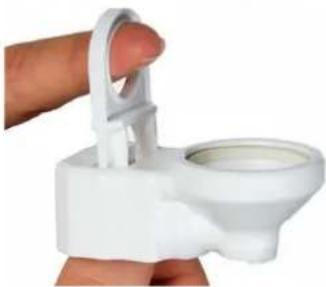
natural_image
Hand holding a white plastic toilet stand with a circular vent (no text or symbols visible)
natural_image
Close-up of a hand inserting a small white plastic component into a white container (no text or symbols visible)▶ Attach the adapter to the water outlet connector from above and push down the locking mechanism.
natural_image
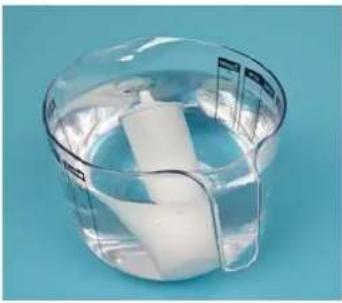
Transparent plastic container with a white cylindrical object inside, placed on a blue background (no text or symbols visible)▶ Unpack the filter cartridge and place it in water.
☑ Tiny bubbles will rise from the cartridge.
When there are no more bubbles, remove the filter cartridge from the water.
natural_image
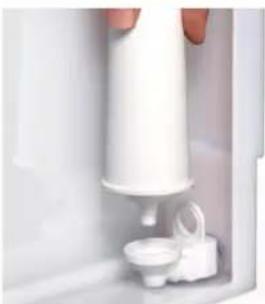
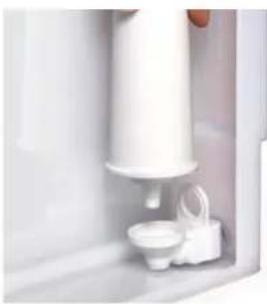
Close-up of a hand pouring liquid into a white container with a small side dish (no visible text or symbols)▶ Attach the filter cartridge to the adapter.

For correct calculation of the decalcification time, the hardness of the water (determined by the water hardness test) and the use of a filter must be entered in the coffee machine programming.

See "Programming" - "Basis settings".
natural_image
Close-up of a white appliance with a small white container and a small white object inside, no visible text or symbols.Changing the water filter for the internal drinking water tank (Option)
When the filter needs to be changed, a corresponding prompt appears on the display.
▶ Remove the drinking water tank from the machine.
▶ Take the old filter cartridge out of the adapter.
natural_image
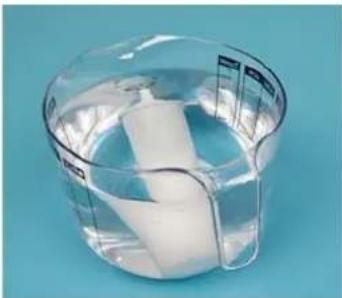
Transparent plastic container with a white cylindrical object inside, placed on a blue background (no text or symbols visible)▶ Unpack the new filter cartridge and place it in water.
☑ Tiny bubbles will rise from the cartridge.
▶ When there are no more bubbles, remove the filter cartridge from the water and attach it to the adapter.
▶ Slide the drinking water tank back into the machine.

Replacement cartridges can be ordered in sets of 4 from Schaerer AG (order number: 071397).
Maintenance
The coffee machine does not require regular maintenance. The maintenance schedule depends on multiple factors, especially the degree to which the machine is used.
When maintenance is due, the machine indicates this on the display. The machine can continue to be operated normally.
▶ Notify your service partner that maintenance is due.
CAUTION! Risk of machine damage!

Failure to perform a required maintenance in due time may lead to wear and reliable operation is no longer assured.
Inform the service partner as soon as possible after the maintenance message appears.
Programming
Navigation
| Symbol Description | |
| [4X48] | Cancel the procedure.Leave the programming."No" in response to requests. |
| [1CK7] | Opens the cleaning menu of the machine. |
 - - | Opens the programming of the machine."OK" to confirm new or existing settings and continue to the next menu item."Yes" in response to requests. |
 - - | Navigate forward in the programming.Set parameters. |
 | Navigate back in the programming.Set parameters. |
Overview

text_image
User interface screenshot showing a hand pointing to a control panel with icons for zoom, zoom, and battery.▶ Press the button.
☑ The programming opens.
▶ Navigate using + button and button.
The programming contains the following menus:
- Cup size
- Beverage settings
- basic settings
- counters
- System information

The menus and menu options are described below in this chapter.
cup size (beverage volume)
The total cup volume of the various beverages can be adjusted in the "cup size" menu.
The ingredients of the beverages are adjusted to the new cup volume without affecting the composition and quality.
▶ Navigate to the "cup size" menu in the programming.
▶ Press the Pbutton.
▶ Select the beverage you wish to set.
☑ The "cup volume" menu appears.
| Display/ display text | Parameter description | Setting range | Notes |
| Cup volume: 100% | ▶ Set the cup volume using the + button and — button.A test beverage can be dispensed by pressing the selected beverage button.▶ Press the P button to exit the setting. | 50 – 150% – |
beverage settings
Various beverage parameters can be set in the "beverage settings" menu.
▶ Navigate to the "beverage settings" menu in the programming.
▶ Press the Pbutton.
▶ Select the beverage you wish to set.
☑ The first menu item appears.
The menu contains:
- water volume
- strength
- milk volume
- rest period (for latte macchiato)
- sequence (dispensing sequence of milk and coffee, e.g. for cappuccino)
- pre brew
| Menu option (display text) | Description | Setting range | Notes |
| Water volume: 35 ml | This menu item can be used to adjust the water content of a beverage.► Set the water volume using the button and — button.A test beverage can be dispensed by pressing the selected beverage button.► P Press the button to exit the setting. | 20 – 300 ml | Factory setting:Espresso: 35 mlCafé creme: 140 ml |
| Strength: 100% | The coffee strength can be adjusted for every beverage. This setting changes the grinding time in the grinder and thus the quantity of ground coffee.► Set the coffee strength using the button and — button.A test beverage can be dispensed by pressing the selected beverage button.► P Press the button to exit the setting. | 50 – 150% The coffee strength can also be adjusted for each individual beverage that is dispensed.See "Operation" - "Selecting the coffee strength". | |
| Milk volume: 9 sec | This menu item can be used to set the dispensing duration of the milk and thus the milk quantity.► Set the milk volume using the button and — button.A test beverage can be dispensed by pressing the selected beverage button.► P Press the button to exit the setting. | 2 – 60 sec | Factory setting:Cappuccino: 9 secLatte macchiato: 19 secMilk coffee: 9 sec |
| Rest period: 15 sec The rest period | is a pause between the milk output and the coffee output.► Set the duration of the rest period using the + button and button.A test beverage can be dispensed by pressing the selected beverage button.► Press the button to exit the setting. | 2 – 60 sec When | dispensing latte macchiato, the rest period allows time for the milk to settle. This results in the pronounced layering typical of this beverage.Recommendation: 15 sec |
| sequence: milk-coffee This menu | item can be used to set the dispensing sequence of the milk and coffee.► Set the sequence using the + button and — button.A test beverage can be dispensed by pressing the selected beverage button.► Press the button to exit the setting. | milk-coffee milk+coffee coffee-milk | - |
| Pre brew: 9 sec This menu can be | used to switch pre-brewing on or off.During pre-brewing, the ground coffee is moistened with water to let it swell. This enables a uniform and more thorough extraction. The brewing process is lengthened slightly.► Switch pre-brewing on or off using the + button and — button.A test beverage can be dispensed by pressing the selected beverage button.► Press the button to exit the setting. | 2 – 60 sec Recommendation:Activate pre-brewing for espresso, cappuccino and latte macchiato. |
basic settings
Various machine parameters can be set in the "basic settings" menu.
▶ Navigate to the "basic settings" menu in the programming.
▶ Press the Pbutton.
☑ The first menu item appears.
The menu contains:
- language
• time
- date
- date/time (display)
- switch-on/off time
- water hardness
- water filter
- sound
- brewing temperature
- factory setting
- display contrast
| Menu option (display text) Description Setting range Notes | |||
| Language: German | ► Set the language using the + button and — button.►Press the button to exit the setting. | German, English, Dutch, Spanish, French, Italian, Danish, Swedish, Norwegian | - |
| Time: hh/mm/ss ► Set the hours using the button and + — button.►Press the button.► Set the minutes using the button and — button.►Press the button.► Set the seconds using the button and — button.►Press the button to exit the setting. | hh: 00 - 23mm: 00 - 59ss: 00 - 59 | - | |
| Date: dd/mm/yy | ► Set the day using the + button and — button.►Press the button.► Set the month using the button and — button.►Press the button.► Set the year using the button and button.►Press the button to exit the setting. | dd: 01 - 31mm: 01 - 12yy: 2000 - 2099 | If a non-existent date is entered (e.g. 31.06.2011), the date returns to its initial value after the setting is exited. |
| Date/time: on This menu item can be used to switch the date and time display on and off.► Switch the display on and off using the button and button.►Press the button to exit the setting. | On/Off - | ||
| Switch-on time: on | This menu item can be used to set the coffee machine to switch on automatically at a certain time.► Switch the switch-on time on or off using the button and button.►Press the button.The switch-on time is set to "on":☑ The time setting for the switch-on time appears.► Set the switch-on time using the button and — button.►Press the button to exit the setting. | On/Off Recommendation:Set the machine to switch on 10 min before it needs to be ready for operation. The machine will then be warm and ready to dispense beverages by the time it needs to be operational.Before beginning with dispensing, ensure that the drinking water tank is full or that the mains water supply is connected. | |
| Menu option (display text) | Description | Setting range | Notes |
| Switch-off time: 30 min | The switch-off time setting is used to switch off the machine after a certain period elapses during which no beverage was dispensed.► Set the switch-off time using the button and button.► Press the button to exit the setting.The machine needs to be switched on again to dispense the next beverage.CAUTION!Risk of machine  damage!If the machine is switched off automatically via the switch-off time, a milk system rinse is not performed. If the machine remains switched off for an extended period, the milk residue in the milk hose will produce germs and mould.Perform the milk system rinse daily during the operating times. If the machine is to be switched off for an extended period, a milk system rinse must be performed before switching the machine off. damage!If the machine is switched off automatically via the switch-off time, a milk system rinse is not performed. If the machine remains switched off for an extended period, the milk residue in the milk hose will produce germs and mould.Perform the milk system rinse daily during the operating times. If the machine is to be switched off for an extended period, a milk system rinse must be performed before switching the machine off. | 0 (= off)5 – 112 min | Automatic switching off of the machine during extended periods of disuse saves power. |
| Water hardness: 5-8 This menu item can be used to set the hardness of the water being used in the coffee machine.► Set the water hardness using the button and button.► Press the button to exit the setting. | 0-45-89-1213-16> 16 | This parameter is set during the commissioning program.See "Installation and commissioning" - "Commissioning program" for further information. | |
| Water filter: yes This menu item can be used to set the use of a water filter.► Set the use of a water filter to "Yes" or "No" using the button and button.► Press the button to exit the setting. | yes/no This parameter is set during the commissioning program.See "Installation and commissioning" - "Commissioning program" for further information. | ||
| Sound: on This menu item can be used to switch the acoustic signal for navigation in the programming and for beverage dispensing on and off.► Switch the acoustic signal on or off using the button and button.► Press the button to exit the setting. | On/Off – | ||
| Water tank yes/no Under this menu item, you define whether a normal drinking water tank or the mains water supply option is being used.► Set the use of a water filter to "Yes" or "No" using the button and button.► Press the button to exit the setting. | Yes = drinking water tankNo = mains water supply | This parameter is available as of software version 0.10. | |
| Brewing temperature: 92°C This menu item can be used to set the brewing water temperature.► Set the temperature using the button and button.► Press the button to exit the setting. | 60 – 95°C | Recommendation: 92°C | |
| Factory setting Activating the factory setting | factory setting resets all programming settings to the factory setting.► Set the factory setting to "yes" or "no" using the button and button.►Press the button to exit the setting.☑ The "yes" setting resets all settings to the factory settings. | yes/no – | |
| display contrast This menu item | can be used to set the display contrast.► Set the contrast using the button and button.☑ The contrast changes simultaneously.►Press the button to exit the setting. | Lighter + softer/darker + sharper | – |
counters
In the "counters" menu, the dispensing counter for all beverages can be viewed and cleared.
▶ Navigate to the "counters" menu in the programming.
▶ Press the Pbutton.
▶ Select the beverage you wish to set.
☑ The first menu item appears.
The menu contains:
- Counter, Espresso
- Counter, Café Creme
- Counter, Cappuccino
• Counter, Latte Macchiato - Counter, mug of milk
- Counter, Hot Water
- Counter, 2x espresso
- Counter, 2x café creme
- Counter, 2x cappuccino
- total counter
- reset all counters
| Menu item (display text) | Description | Setting range | Notes |
| Espresso: 23 | All beverage counters are listed in the "counters" menu.► Navigate through the counters using the + button and - button. | Espresso Café Creme Cappuccino Latte Macchiato mug of milk Hot Water 2x Espresso 2x Café Creme 2x Cappuccino | - |
| total counter: 50 | The total count of all dispensed beverages is displayed after the individual counters.► Navigate further using the - button. | - | - |
| Menu item (display text) Description Setting range Notes | |||
| reset all counters The request to | reset all counters appears at the end.► Press the P button for "Yes" to reset all counters.or► Press the C button for "No" to retain all counter values. | yes/no – | |
system information
The "system information" menu contains information on the machine.
▶ Navigate to the "system information" menu in the programming.
▶ Press the Pbutton.
☑ The first menu item appears.
The menu contains the following information:
- Software version and date
• Machine name and version
- Fabrication number
- Production date
Troubleshooting
General troubleshooting procedure:
▶ Switch the coffee machine off and, after several seconds, on again.
☑ In most cases, the fault will be eliminated automatically.
▶ Repeat the steps that led to the fault.
If the fault occurs again:
▶ Find the fault in the following tables.
▶ Perform the described troubleshooting steps.
If the fault persists:
▶ Contact your service partner and describe the fault.

If a fault occurs that is not described in this chapter, please contact your service partner immediately.
Faults with display message
Messages are displayed if intervention by a user or service technician is needed to ensure operating readiness of the machine. There are two different causes for display messages:
- Note
- Fault

See "Operation" - "Display messages" for notes.
The following table describes display messages pertaining to faults as well as the steps needed to eliminate these.
| Display message Cause What to do | ||
| place brewer | The brewing unit is not inserted. | ▶ Insert the brewing unit. |
| Brewer position switch The brewing unit is not correctly inserted. | ▶ Check that the brewing unit is correctly seated. | |
| The brewing unit is stiff. ▶ Remove the brewing unit.☑ There are two nozzles with black sealing rings on the inside of the machine.▶ Grease the sealing rings with grease from the accessories.▶ Put the brewing unit back in place. | ||
| Display message | Cause | What to do |
| Clear flow stopped | There is too much air in the pipes. | ► Dispense a cup of hot water.☑ This bleeds the pipes. |
| The water filter or the associated sieve is clogged. | ► Clean the sieve of the water filter.If this does not eliminate the problem:► Change the water filter. | |
| The non-return valve at the outlet of the drinking water tank is contaminated. | ► Clean the outlet and the non-return valve with one of the small brushes in the accessories. | |
| The brewing unit is clogged. | ► Remove and clean the brewing unit.See "Cleaning" - "Weekly cleaning". | |
| The grind level is too fine. The fine coffee powder contaminates the pipes. | ► Set the grind level to a coarser setting.See "Service and maintenance" - "Finer setting of grind level".► Remove and clean the brewing unit.See "Cleaning" - "Weekly cleaning". | |
| Cleaning haltedClear flow stopped | The brewing screen is clogged. | ► Clean the brewing screen."Cleaning" - "Weekly cleaning". |
| EEPROM error | System error | ► Switch the machine off and back on. |
| motor driver error | System error | ► Switch the machine off and back on. |
| grinder blocked | The grinder is blocked. | ► Switch off the machine and disconnect the power plug.► Stir the coffee beans in the bean hopper using a spoon.If the error persists:► Switch off the machine and disconnect the power plug.► Extract the beans, check the grinder and remove any blockages. |
| Temperature sensor steam | Overheating | ► Switch off the machine and let it cool for some time. |
| Temperature sensor water | Overheating | ► Switch off the machine and let it cool for some time. |
Faults without display message
| Fault description | Cause | What to do |
| No milk foam or milk output although there is milk in the container. | The milk hose is kinked at some location, preventing milk from flowing. | ▶ Check the milk hose and reroute if necessary. |
| The foamer head is clogged. | ▶ Take the foamer head out of the beverage outlet and clean it.See "Cleaning" - "Weekly cleaning". | |
| No milk foam, only warm milk. | Blockage in milk system. | ▶ Clean the milk system.See "Cleaning" - "Weekly cleaning". |
| The milk or milk foam is too cold.Fault description Cause What | Wrong milk nozzle.to do | The scope of delivery contains two different milk nozzles.▶ Change the milk nozzle. |
| The milk is too hot, its quantity is too low or the milk foam has bubbles.. | The milk in the milk container is too warm. | ► Only use pre-cooled milk (3 – 5°C). ► Cool the milk constantly during use. |
| Wrong milk nozzle. The scope of delivery | contains two different milk nozzles. ► Change the milk nozzle. | |
| The water tank is difficult to slide in place. | The O-ring on the water outlet connector must be greased. | ► Grease the O-ring with grease from the accessories. |
| The brewing unit is difficult to pull out and slide back in. | The brewing unit is stiff. ► Remove the | brewing unit. ☑ There are two nozzles with black sealing rings on the inside of the machine. ► Grease the sealing rings with grease from the accessories. ► Put the brewing unit back in place. |
| The pump makes loud noises. | There is too much air in the pipes. | Dispense a cup of hot water. ☑ This bleeds the pipes. |
| The coffee has no crema. | The coffee is no longer fresh. | Replace the beans. |
| The grind level is too coarse. | Set the grind level to a finer setting. See "Cleaning" - "Weekly cleaning". | |
| The brewing unit cannot be re-inserted. | The brewing unit is in the wrong position. | While inserting the brewing unit, readjust it using the multitool until it can be reinserted. |
| The brewing unit cannot be pulled out. | The brewing unit is in the wrong position. | Readjust the brewing unit using the multitool until it can be pulled out. |
| Internal/external cooling unit does not cool. | The cooling unit is not switched on or is switched on incorrectly. | Set the rocker switch on the rear of the cooling unit to "COLD". |
Water quality
A cup of coffee consists of 99 percent water. Therefore, the water has a significant effect on the coffee's taste. To obtain an excellent cup of coffee, you need excellent water.
The water is important not only to the taste of the coffee but also to the coffee machine itself. Poor water quality can lead to permanent machine damage.
Therefore, close attention needs to be paid to the water quality in order to obtain high quality coffee and protect the coffee machine.
Water values
Poor water values can lead to machine damage.
It is imperative that the specified values be complied with. Otherwise, Schaerer AG shall not accept liability.
The following water values are a precondition for the correct operation of the coffee machine:
- 4 – 6°dKH (German carbonate hardness)
- 7 – 8°dGH (German total hardness)
• pH value 6.5 – 7 (pH-neutral)
• Chlorine content max. 100 mg per litre
Water is referred to as hard or soft depending on its composition. The hardness of water is referred to as its total hardness.
The total hardness is differentiated into carbonate hardness (temporary hardness) and non-carbonate hardness (permanent hardness). In terms of the water hardness, the concentration of bicarbonate anions (HCO3-) is of special significance. The concentration of bicarbonate ions or the equivalent quantity of alkaline earth metal ions is referred to as carbonate hardness.
International conversion table (factors apply to total hardness and carbonate hardness)
| Unit | ° dH | ° eH | ° fH | ppm | mmol/l | |
| German hardness 1°dH 1 | 1.253 1.78 | 17.8 0.1783 | ||||
| English hardness 1°eH 0.79 | 8 1 1.43 1 | 4.3 0.142 | ||||
| French hardness | 1°fH 0.56 | 0.702 1 10 | 0.1 | |||
| Part(s) per million (USA) | 1 ppm | 0.056 | 0.07 | 0.1 | 1 | 0.01 |
| Millimole per litre | 1 mmol/l | 5.6 | 7.02 | 10 | 100 | 1 |
| Acidic | Neutral | Alkaline |
| 0 | 7 | 14 |
If the water values do not correspond to the above-mentioned specifications, the water must be prepared accordingly (decalcification/enrichment with minerals).

The service partner can provide detailed information on filter options and versions and can install this equipment at your location.
Determining the water hardness
A water hardness test must be performed to determine whether a water filter is needed. If the water values are poor, trouble-free operation of the machine cannot be ensured.
The water values must also be entered when the machine is taken into service and can be readily adjusted in the machine menu. On the basis of the entered values, the machine calculates the time to the next filter change (if a filter is in use) and the time to the next decalcification routine.
▶ Check whether a house filter system is already connected upstream from the machine.
In most water, the carbonate hardness is markedly lower than the total hardness. This is a good indicator for determining whether the water is straight from the mains or if it first passed through a house filter system.


text_image
Karbonathärtetest Carbonate Hardness Test ① 1 s ② 1 min ③ ④ 0 4 8 12 16 24 (1°SH = 1.25°SH = 1.78°SH) schaerer www.schaerer.comOption 1: Requesting information from the drinking water supplier
▶ Ask the local drinking water supplier for information on the water hardness (total hardness) of the drinking water.
Option 2: Performing a test
▶ Determine the water hardness using the test strips included in the scope of delivery.
▶ Dip the test strip into the tap water for ca. 1 sec.
▶ Remove the test strip and wait for ca. 1 min.
☑ The test strips changes colour.
▶ Compare the water analysis result with the "Total hardness" table in the "Water values" chapter.
▶ Install a water filter if the test result is poor.

See "Filter equipment" in this chapter or, for machines that are operated with drinking water, see the chapter entitled "Service and maintenance" - "Installing a water filter for the internal drinking water tank".
Filter technology
To protect the coffee machines and the coffee quality against hard or soft water, filters are used. Filters are essential for the care and maintenance of the machine, not to mention for hygiene, and for the best quality of coffee.
Even when using a filter, it is still necessary to measure the water values once a year. Water is a living element and therefore changes frequently.

The service partner can provide detailed information on filter options and versions and can install this equipment at your location.
Safety notes
Maximum safety is one of Schaerer AG's most important product features. The effectiveness of the safety devices is guaranteed only if the following instructions are observed to prevent injuries and health hazards:
- Read the User Manual carefully before using the device.
- Do not touch hot machine parts.
- Do not use the coffee machine if it is not working properly or is damaged.
- Under no circumstances may the installed safety devices be modified.
User at risk
DANGER! Risk of electrocution!

Improper handling of electrical devices can result in electric shock. The following instructions absolutely must be complied with:
• Work on electrical systems may only be performed by skilled electricians.
- The device must be connected to a fused electrical network (we recommend passing the connection through a fault current circuit breaker).
- All relevant guidelines on low voltage and/or country-specific or local safety regulations and laws must be observed.
- The connection must be properly earthed and protected from electric shock.
- The voltage must correspond to the data on the device's serial plate.
- Never touch energised parts.
- Before carrying out service work, always switch off the main switch and/or disconnect the device from the power supply system.
- The power cable may only be replaced by qualified service technicians.
CAUTION! User at risk!

Improper handling of the coffee machine can lead to light injuries. The following instructions absolutely must be complied with:
- This device is not intended to be operated by persons (including children) with limited physical, sensory or mental capabilities or a lack of experience and/or knowledge unless they are supervised by a person responsible for their safety or obtain instructions from this person on how to operate the device.
- Supervise children to ensure that they do not play with the device.
- The coffee machine must be installed so that there are no impediments to care and maintenance.
- In both self-service and full-service applications, trained personnel must supervise the machine in order to ensure that the care instructions are observed and the personnel is available for questions regarding use.
- Fill the bean hopper with beans only, the powder container with coffee machine powder only and the manual inlet with ground coffee only (or cleaning tablets during cleaning).
CAUTION! Hot fluid!

There is a risk of scalding in the dispensing area of beverages, hot water and steam. During dispensing or cleaning, never reach under the dispensing positions.
CAUTION! Hot surface!

The dispensing positions and the brewing unit may be hot. Do not touch any part of the dispensing equipment except the grips provided for this purpose. Only clean the brewing unit when the coffee machine has cooled down.
CAUTION! Risk of trapping fingers!

There is a risk of trapping fingers or hands when handling moving components. While the coffee machine is switched on, never reach into the bean or powder containers or into the opening of the brewing unit.
Risk from cleaning products
Application
CAUTION! User at risk!

Danger of poisoning from swallowing cleaning products. Please adhere to the following points:
- Store cleaning products away from children and unauthorised persons.
- Do not swallow the cleaning products.
- Never mix cleaning products with other chemicals or acids.
- Never put cleaning products in the milk container.
- Never put cleaning products in the drinking water tank (internal/external).
- Only use the cleaning and decalcifiers for the intended purpose (see label).
- Do not eat or drink while handling cleaning products.
- Ensure that the area is well-ventilated when handling cleaning products.
- Wear safety gloves when handling cleaning products.
- Wash your hands thoroughly after handling cleaning products.

Before using cleaning product, read the information on the package label and the HEALTH & SAFETY DATA SHEET carefully. If a HEALTH & SAFETY DATA SHEET is not present, please request it from the sales partner.
Storage
The following instructions absolutely must be complied with:
- Store them in a place that is inaccessible to children and unauthorised persons.
- Protect cleaning products from heat, light and moisture.
- Store them in a separate location from acids.
- Store them in the original packaging only.
- Store cleaning products for daily and weekly use separately.
- Do not store them together with foodstuffs or other edibles.
Disposal
If the cleaning products and their containers cannot be used otherwise, dispose of them according to the HEALTH & SAFETY DATA SHEET and legal regulations.
Emergency information
Obtain the phone number of the emergency information service (toxicology information centre) from the cleaning product manufacturer (see cleaning product label). If your country does not have this type of institution, note the following table:
| Swiss Toxicology Information Centre | |
| International calls +41 44 251 51 51 | |
| Call from Switzerland 145 | |
| Internet www.toxi.ch | |
Risk of damage to the machine
CAUTION! Risk of machine damage!

Improper handling of the coffee machine can lead to damage or contamination. The following instructions absolutely must be complied with:
- For water with a carbonate hardness above 5^ , install a water filter, as otherwise the coffee machine can be damaged due to calcification.
- For insurance law reasons, always ensure that after closing for the day, the main water valve (coffee machine with mains water supply) is closed and the electrical main switch is switched off or the mains plug is unplugged.
- All relevant guidelines on low voltage and/or country-specific or local safety regulations and laws must be observed.
- Do not operate the device if the water supply is blocked. Otherwise, the boilers will not be refilled and the pump will run dry.
- To prevent water damage in case of hose breakage, Schaerer AG recommend routing the water supply connection via a water stop valve (at the installation site).
• After extended downtime (e.g. holiday), the coffee machine must be cleaned before it is put back into operation. - Protect the coffee machine from weather (frost, humidity etc.).
- Faults may be remedied by a qualified service technician only.
- Only use Schaerer AG original spare parts.
- Report any noticeable damage or leaks immediately to an authorised service partner and have any faulty parts replaced and/or repaired.
- Never spray the device with water or clean it with a steam cleaner.
- When using caramelised coffee (flavoured coffee), clean the brewing unit twice daily.
- Fill the bean hopper with beans only, the powder container with coffee machine powder only and the manual inlet with ground coffee only (or cleaning tablets during cleaning).
- Never use freeze-dried coffee as it clogs the brewing unit.
- If the coffee machine and/or accessories are transported at temperatures below 10^ , the coffee machine and/or accessories must be stored for three hours at room temperature before the coffee machine and/or accessories are connected to the mains and switched on. Failure to observe this precaution can result in a danger of short-circuit or damage to electrical components.
• Always use the new hose set (drinking water/waste water hose) provided with the machine. Never use old hose sets.
Hygiene regulations
Water
CAUTION! User at risk!

Improper handling of water can lead to health problems. The following instructions absolutely must be complied with:
• The water must be uncontaminated.
- Do not connect the machine to pure reverse osmosis water or other aggressive types of water.
- The carbonate hardness must not exceed 4-6°dKH (German carbonate hardness) or 7-10°fKH (French carbonate hardness).
- The total hardness must always be higher than the carbonate hardness.
• The minimum carbonate hardness is 4^ dKH or 7^ fKH.
• Maximum chlorine content of 100 mg per litre.
- pH value between 6.5 – 7 (pH neutral).
Machines with drinking water tank (internal & external)
Fill the drinking water tank daily with fresh water.
Rinse the drinking water tank thoroughly before filling.
Coffee
CAUTION!
User at risk!

Improper handling of coffee can lead to health problems.
The following instructions absolutely must be complied with:
- Check the packaging for damage before opening.
- Do not add more beans than will be needed for one day.
- Close the bean hopper lid immediately after filling.
- Store coffee in a cool, dry and dark location.
- Store coffee separately from cleaning products.
- Use the oldest products first ("first-in-first-out" principle).
- Use before the expiry date.
- Always reclose packages after opening to ensure that the contents remain fresh and are protected from contamination.
Milk
CAUTION!
User at risk!

Improper handling of milk can lead to health problems.
The following instructions absolutely must be complied with:
- Do not use unpasteurised or raw milk.
- Only use pasteurised milk or milk heated at ultra-high temperatures.
- Only use homogenised milk.
- Use pre-cooled milk at a temperature between 3 - 5^ .
- When working with milk, wear protective gloves.
- Use milk directly from the original packaging.
- Never refill milk. Always clean the container thoroughly before filling.
- Check the packaging for damage before opening.
- Do not add more milk than will be needed for one day.
- Close the milk container lid and cooling unit (internal/external) immediately after filling.
- Store milk in a cool, dry (max. 7^ ) and dark location.
- Store milk separately from cleaning products.
- Use the oldest products first ("first-in-first-out" principle).
- Use before the expiry date.
- Always reclose packages after opening to ensure that the contents remain fresh and are protected from contamination.
Liability
Operator responsibilities
The operator must ensure that the machine undergoes regular maintenance and that the safety devices are checked regularly by a Schaerer AG service partner, a representative thereof, or other authorised persons.
Complaints about material defects must be reported to Schaerer AG in writing within 30 days! For hidden defects, this period is extended to 12 months from the date of installation (work report, handover report), but no longer than 18 months after the product leaves the factory in Zuchwil.
Safety-relevant parts such as safety valves, safety thermostats, boilers etc. must not be repaired in any circumstances. They must always be replaced!
The following intervals apply:
Safety valves: every 12 months.
Boilers (steam boilers, flow heaters) every 72 months.
These measures are performed by a Schaerer AG service technician or your service partner as part of the maintenance routine.
Warranty and liability
No responsibility will be taken for warranty or liability claims in the event of personal injury or material damage as a result of one or more of the following causes:
Non-intended use of the machine.
Improper installation, commissioning, operation, cleaning and maintenance of the device and the associated optional devices.
Failure to observe maintenance intervals.
Operating the unit with defective safety devices or safety and protective equipment that is not properly installed or is not functional.
Failure to observe the safety notes in the operating instructions pertaining to storage, installation, commissioning, operation and maintenance of the machine.
Operating the device when it is not in perfect condition.
Repairs carried out improperly.
Use of spare parts that are not original Schaerer AG spare parts.
Use of cleaning products that are not recommended by Schaerer AG.
Catastrophic incidents due to foreign objects, accident, vandalism or force majeure.
Penetrating the device with any type of object or opening the housing.
The manufacturer only accepts liability or honours warranty claims provided that all specified maintenance and service intervals have been kept and that only original spare parts supplied by the manufacturer or by a supplier authorised by the manufacturer have been used.

The "General Terms and Conditions" of Schaerer AG apply.