Access 2013 - Software MICROSOFT - Free user manual and instructions
Find the device manual for free Access 2013 MICROSOFT in PDF.


User questions about Access 2013 MICROSOFT
0 question about this device. Answer the ones you know or ask your own.
Ask a new question about this device
Download the instructions for your Software in PDF format for free! Find your manual Access 2013 - MICROSOFT and take your electronic device back in hand. On this page are published all the documents necessary for the use of your device. Access 2013 by MICROSOFT.
USER MANUAL Access 2013 MICROSOFT
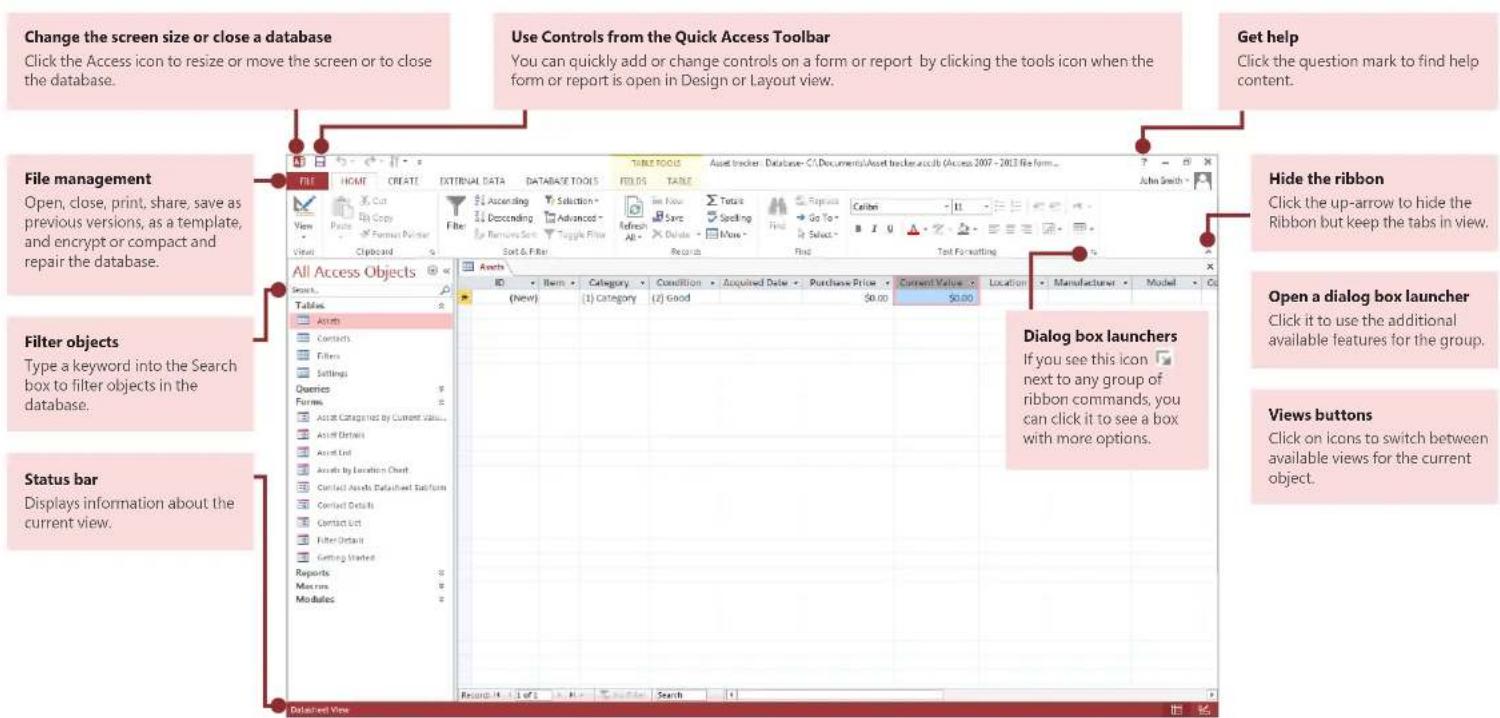
Microsoft Access 2013 looks different from previous versions, so we created this guide to help you minimize the learning curve.
text_image
Change the screen size or close a database Click the Access icon to resize or move the screen or to close the database. File management Open, close, print, share, save as previous versions, as a template, and encrypt or compact and repair the database. Filter objects Type a keyword into the Search box to filter objects in the database. Status bar Displays information about the current view. Use Controls from the Quick Access Toolbar You can quickly add or change controls on a form or report by clicking the tools icon when the form or report is open in Design or Layout view. Get help Click the question mark to find help content. Hide the ribbon Click the up-arrow to hide the Ribbon but keep the tabs in view. Open a dialog box launcher Click it to use the additional available features for the group. Views buttons Click on icons to switch between available views for the current object. Database Tools File Home CREATE EXTERNAL DATA DATABASE TOOLS FIELDS TABLE File Ascending Selection Sare Spelling Find Repairs Calibri B I U Select Find Text Formatting All Access Objects Assets ID Item Category Condition Acquired Date Purchase Price Current Value Location Manufacturer Model Dialog box launchers If you see this icon next to any group of ribbon commands, you can click it to see a box with more options. Tables Assets Contacts Filters Settings Overies Forms Asset Categories by Current Value... Asset Details Asset End Assets by Location Chart Contact Assets Database Buttons Contact Details Contact List Filter Details Getting Started Reports Macroms Modules Refresh: 1.1 (5) 1.0 (2) 0.9 (1) 0.8 (1) 0.7 (1) 0.6 (1) 0.5 (1) 0.4 (1) 0.3 (1) 0.2 (1) 0.1 (1) 0.0 (1) Datafile ViewMicrosoft
Access 2013
Office
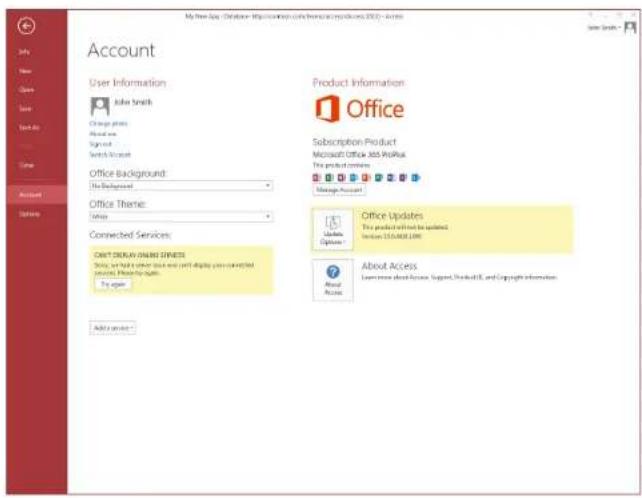
What can I find on the Account tab?
Click File > Account in Access 2013 to manage your user information, change the background or theme, view and add available web services, display information about your Office products, and manage your product subscriptions.
text_image
My free Age / Options - https://www.who.org/otherpublic.org/2013 - Access Account User Information John Smith Change photo About new Sign out Switch to account Office Background: The Background Office Theme: None Connected Services: NEXT ORDER ONLINE SYSTEMS Service: We have your own and your display you connected with your website: By the user. Product Information Office Subscription Product Microsoft Office 365 ProPlus The product company Manage Account Office Updates This product will not be updated. Section 3154081.COM About Access Learn more about access, support, Products, and Copyright information. Add your service - About AccessWhere did the Back Up option go?
It's always a good idea to back up your important data. To do this in Access 2013, click File > Save As. Then, under Save Database As > Advanced, click Back Up Database.

text_image
Save As File Types Save Database As Save Object As Save Database As Database File Types Access Database Only 3 Database Format Access 2000 Database Save a copy that will be compatible with Access 2000 Template Save the correct database as a database template (ACC.DT) Advanced Package and Sign Package the database and apply a digital package Text Up Database Back to progress database regularly in general access Make ACCDE File to be compiled into an accessible type file. Shared text Share the database by saving it for a document management server Save AsAccess 2013

Things you might be looking for
Use the list below to find some of the more common tools and commands in Access 2013.
| To... Click... And then look in the... | ||
| Open, close, create, save, print, publish, or manage your database | File | Backstage view (click the links in the left pane). |
| View objects, cut, copy or paste data, format text, add a totals row or find data | Home | Views, Clipboard, Sort & Filter, Records, and Text Formatting groups. |
| Add application parts, tables, queries, forms, reports, or macros | Create | Templates, Tables, Queries, Forms, Reports, and Macros & Code groups. |
| Bring in files or send data or link to external sources External | Data | Import & Link and Export groups. |
| Compact and repair a database, work with Visual Basic code, macros, relationships, and analyze or move data to SharePoint | Database Tools | Tools, Macro, Relationships, Analyze, and Move Data groups. |
| View and use the objects in the database Navigation | Pane | All Access Objects group. |
| Correct file problems or add a password to a database | File | Info, Compact & Repair, and Encrypt with Password groups. |
| Create an Access app | File | New, Custom web app, or web templates options. |
Access 2013

Office
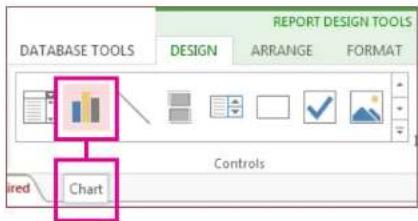
What happened to the Pivot Chart feature?
You can't create pivot charts or tables in Access 2013, but you can import them from Excel and other applications and then add them with the Chart control.
text_image
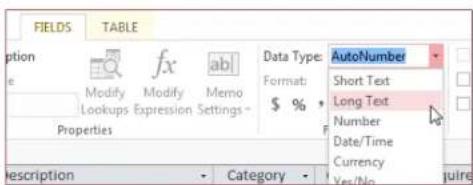
REPORT DESIGN TOOLS DATABASE TOOLS DESIGN ARRANGE FORMAT Chart ControlsLong Text is the new Memo
If you are looking for the Memo data type for longer text fields, try the Long Text data type instead.
text_image
FIELDS TABLE Option e Modify Modify Memo Lookups Expression Settings - Properties Description Category Data Type: AutoNumber Format: Short Text $ % Long Text Number Date/Time Currency Var/No quireWhat is an Access app?
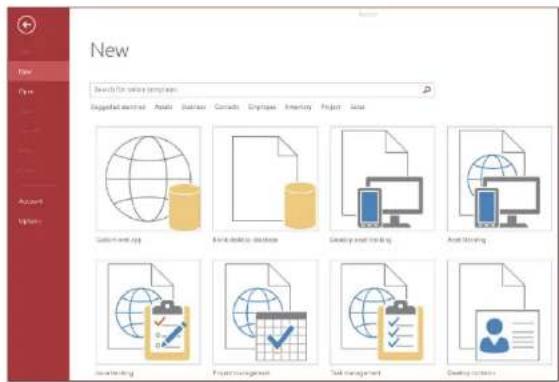
Access apps are like web databases that you can use to view and share your data in the cloud. With Access apps, you'll have secure, centralized data storage and management options.
With Access 2013, you can easily create and modify the design of an app. Get started with an app template or create your own custom web app.
text_image
New Search for online templates Designed: admin | Assets | Business | Contacts | Employee | Inventory | Project | Value Custom and app Build a database Develop email trading Edit sharing Accounting Project management Test management Develop systemsTemplate names that begin with the word "Desktop" will create a client database. To create Access apps, use any template that's marked with a globe icon.
Access 2013

How to work with people who don't yet have Access 2013
Here are some things to keep in mind when sharing or exchanging files with people who are using an older version of Access.
| In Access 2013... What happens? What should I do? | ||
| You open a database file that was created with Access 2007. | You can use Access 2013 to open and use files that were created in Access 2007. However, you will not be able to view or use features like Pivot Tables or conditional formatting. | Import just the tables and then reapply formats in Access 2013. |
| You save your database as an Access 2007 file. | You will be able to open and use the database. Nothing. | |
| You save your database as an Access 2010 file. | Access 2007 and 2010 use the same file format. If you published an Access 2010 web database and open it in Access 2013, you will only be able to view it; you will not be able to modify it. | If you published an Access 2010 database as a web database and want to later change it to an Access app, import the data into a custom web app. |
Access 2013

Office
What's on the Info tab?
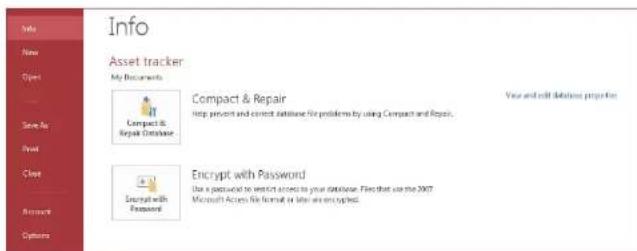
From any open database, click File > Info.
text_image
Info Asset tracker My Documents Compact & Repair Help product and correct database for problems by using Compact and Repair. Encrypt with Password Use a package to restrict access to your database. Files that use the 2007 Microsoft Access Web format as follows are encrypted.Compact & Repair Database can prevent and fix database problems or compact files to save space.
Files saved in Access 2007 or in a newer format are already encrypted, but you can add an optional password to further secure your data by clicking Encrypt with Password.
Clicking View and edit database properties displays information about objects in the database, revision tracking, and database size. You can also change the database title, author, company, and hyperlink information from the Summary tab found here.
Can I convert my Access data-base into an Access app?
Though Access apps are also used for tracking data, you cannot convert a desktop database into an Access app or vice versa. However, you can use data from a desktop database in an Access app.
Click New > Custom web app > Create a table from an existing data source.
