Activa 145 - Sewing machine BERNINA - Free user manual and instructions
Find the device manual for free Activa 145 BERNINA in PDF.


User questions about Activa 145 BERNINA
0 question about this device. Answer the ones you know or ask your own.
Ask a new question about this device
Download the instructions for your Sewing machine in PDF format for free! Find your manual Activa 145 - BERNINA and take your electronic device back in hand. On this page are published all the documents necessary for the use of your device. Activa 145 by BERNINA.
USER MANUAL Activa 145 BERNINA
See appendix for differences in the activa 135 S Patchwork Edition
030529.52.04_0303_a135 a145_EN

natural_image
Portrait of a man in a suit sitting at a desk (no visible text or symbols)"Welcome to the BERNINA family"
H.P. www.h
H.P. Ueltschi Owner BERNINA Sewing Machine Company
BERNINA®
In choosing BERNINA, you are assured of years of rewarding sewing. For over 100 years my family has concentrated on providing complete satisfaction to our customers. And it is my personal wish to continue this tradition of offering you Swiss precision engineering combined with state of the art technology and an after sales service second to none.
The new BERNINA activa 135 S and 145 S are characterized by a youthful appeal which is combined with a range of added value features to give you, dear Customer, more sewing pleasure than ever before.
Enjoy modern, creative sewing with BERNINA: our wide range of accessories as well as our sewing publications brimming with imaginative ideas and practical tips all add to the joy of sewing BERNINA style.
Any questions you have will be dealt with courteously and efficiently by our highly trained BERNINA dealers, who will also be glad to service your sewing computer for you.
Fritz Gegauf Ltd. · BERNINA Sewing Machines · CH-8266 Steckborn/Switzerland
030529.52.04_0303_a135 a145_EN
IMPORTANT SAFETY INSTRUCTIONS
When using an electrical machine, basic safety precautions should always be followed, including the following.
Read all instructions before using this sewing computer.
When the sewing computer is not in use, it should be disconnected from the electricity supply by removing the plug from the outlet.
DANGER

To reduce the risk of electric shock:
- A sewing computer should never be left unattended when plugged in.
- Always unplug the sewing computer from the electric outlet immediately after using and before cleaning.
- Always unplug before replacing light bulb. Replace the bulb with the same type rated 12 volts/5 watts.
WARNING

To reduce the risk of burns, fire, electric shock or injury to persons:
- Do not allow to be used as a toy. Close attention is necessary when the sewing computer is used by or near children and infirm persons.
- Use this sewing computer only for its intended use as described in this manual. Use only attachments recommended by the manufacturer as contained in this manual.
- Never operate this sewing computer if
- it has a damaged cord or plug
- it is not working properly
- it has been dropped or damaged
- it has fallen into water
Return the sewing computer to the nearest authorized
BERNINA dealer or service center for examination, repair, electrical or mechanical adjustment. - Never operate the computer with any air openings blocked. Keep ventilation openings of the sewing computer and foot control free from accumulation of lint, dust and loose cloth.
-
Keep fingers away from all moving parts. Special care is required around the sewing needle.
-
Always use the BERNINA original needle plate. The wrong plate can cause the needle to break.
- Do not use bent needles.
- Do not pull or push fabric while stitching. It may deflect the needle causing it to break.
- Turn power switch to «0» when making any adjustments in the needle area, such as threading or changing the needle, threading the bobbin or changing the presser foot.
- Always unplug the sewing computer from the electrical outlet when removing covers, lubricating or when making any other user servicing adjustments mentioned in this instruction manual.
- Never drop or insert any object into any opening.
- Do not use outdoors.
- Do not operate where aerosol (spray) products are being used or where oxygen is being administered.
- Before disconnecting, turn all controls to the off («0») position then remove the plug from the outlet.
-
Do not unplug by pulling on the cord but grasp the plug.
-
No responsibility will be taken for any possible damage as the result of misuse of the sewing computer.
- This sewing computer is provided with double insulation. Use only identical replacement parts. See instructions for Servicing of double-insulated machines.
SERVICING DOUBLE-INSULATED PRODUCTS
In a double-insulated product, two systems of insulation are provided instead of grounding. No grounding means is provided on a double-insulated product nor should a means for grounding be added to the product. Servicing a double-insulated product requires extreme care and knowledge of the system and should only be done by qualified service personnel. Replacement parts for a double-insulated product must be identical to those parts in the product. A double insulated product is marked with the words «DOUBLE INSULATION» or «DOUBLE INSULATED».
The symbol □ may also be marked on the product.
This sewing computer is intended for household use only.

SAVE THESE INSTRUCTIONS!
030529.52.04_0303_a135 a145_EN
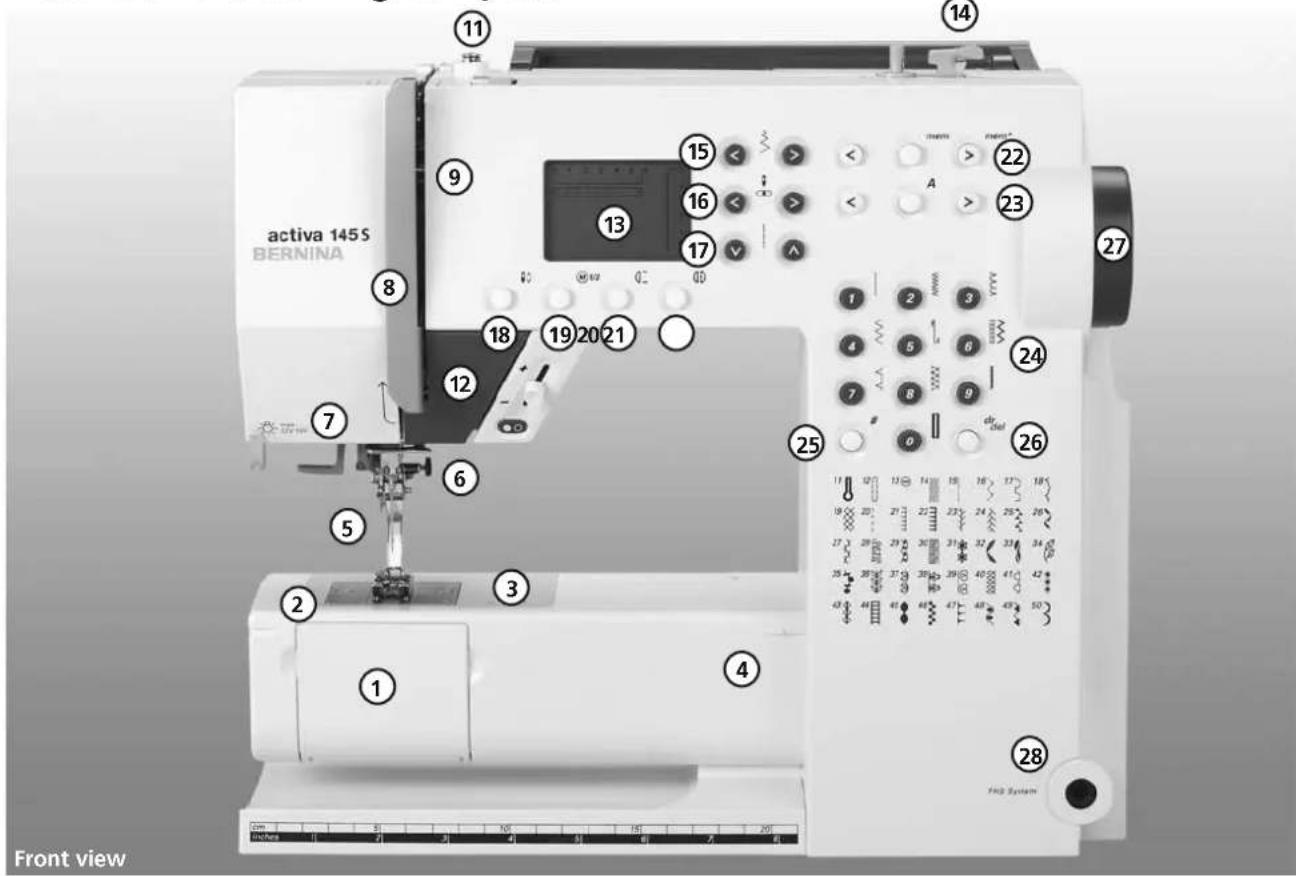
Details of the sewing computer
text_image
activa 145 S BERNINA Front view
text_image
10 11 14 27 34 29 33 30 31 32 Right end1 Bobbin cover
2 Stitch plate
3 Attachment base for special accessories
4 Sewing table socket
5 Presser foot
6 Needle clamp with fixation screw
7 Thread guide
8 Thread take up cover
9 Thread path
10 Thread tension adjustment
11 Bobbin pre-tension
12 Reverse button/quick and continuous
13 Screen
14 Bobbin winder with on/off switch and thread cutter
15 Stitch width button
16 Needle position button
17 Stitch length button
18 Needle stop up/down
19 1/2 speed
20 Pattern end
21 Mirror image
22 mem (memory) button
23 Alphabet buttons
24 Stitch selection buttons
25 #-button
26 clr/del-button
27 Handwheel
28 FHS connection
29 Balance adjustment knob
30 Power switch on/off
31 Power plug socket
32 Drop feed-dog
33 Foot control socket
34 Spool pin (vertical, collapsible)
Details6

text_image
43 42 40 BERNINA 36 45 37 39 3 2 4 Back view030529.52.04_0303_a135 a145_EN
text_image
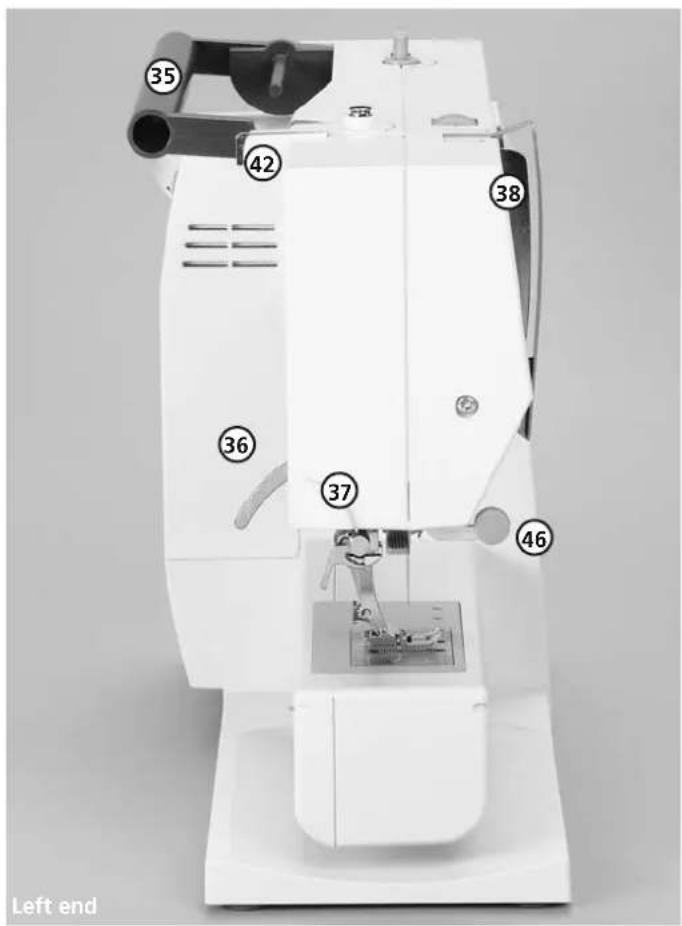
35 42 38 36 37 46 Left end35 Carrying handle 45 Needle Threader
36 Presser foot lifter 46 Lens holder
(manual)
37 Thread cutter
38 Thread take up
39 Darning ring connection
40 Accessory box connection
41 Thread tension disc
42 Rear thread guide
43 Horizontal spool pin
44 Accessory box catch

text_image
44 43 41 Sewing computer with Accessory boxAccessories
- foot control
- instruction manual
- power cable
- warranty card
- Accessory box
- presser foot lifter
Standard accessories\*:
4 bobbins (+ 1 in the capsule in the sewing computer)
Selection of 130/705H needles
Seam ripper
Screwdriver
Angle key Torx
Screwdriver Torx
Lint brush
Seam guide
Compensating plate
3 spool discs
Foam pad
Oiler
Fabric cover
• protects from dust and dirt
• compartment for accessories
Lens Set: \*\*
We recommend the use of the BERNINA Lens Set for more comfort when sewing.
Caution!
To avoid injury always attach the protective cover of the magnifying glass holder when the magnifying glass is not in use.
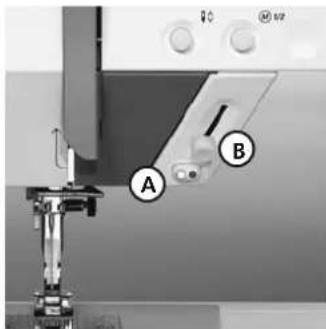
Start-stop-unit\*\*
text_image
Sewing machine component with labeled parts A and B, showing mechanical assembly and control panel* can vary from country to country; see presser foot selection p. 33
** available as a special accessory
natural_image
Close-up of a sewing machine needle and foot assembly (no visible text or symbols)Please refer to the safety instructions!
With the Start-stop-unit (SSU) the start-stop-function can be controlled by hand.
- press start-stop-button A = stitching starts
• with the speed regulator B the sewing speed can be regulated by hand
• to interrupt or stop sewing = press start-stop-button A again
Note:
If the foot control is connected with the sewing machine, the Start-stop-unit is out functions.
CFL \*\*
Contrary to an ordinary bulb, the CFL sewing light has a better illumination and a longer life.
Caution:
Please note that a defective CFL sewing light must ONLY be replaced by an authorized technician. The sewing computer must be brought to an authorized BERNINA dealer!
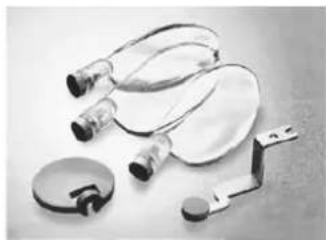
natural_image
Medical medical device components including stethoscope, gauze, and clamp (no text or symbols visible)Accessory box
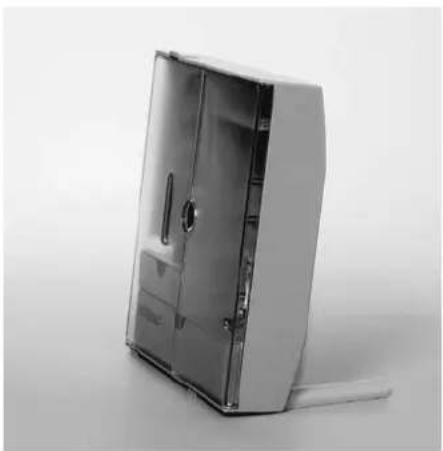
natural_image
Exterior view of a metallic open shelf cabinet with internal doors and handle (no text or symbols visible)Free standing accessory box
- pull both feet out until they click into place
- stand box in chosen position
Storing accessories
Standard accessories are supplied in a plastic bag.
The box is equipped with one small and one large drawer (B and C) as well as compartments for bobbin holders D and presser feet E. (Additional compartments and drawers are available as optional extras.)
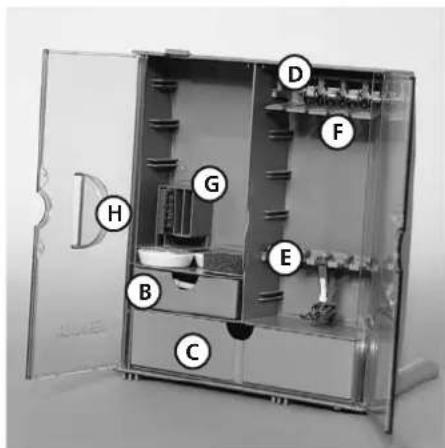
text_image
Labeled diagram of an open laboratory apparatus with numbered components- push the bobbins into the compartments provided
• to remove a bobbin, press the compartment holder F lightly - insert the presser feet into the slot E
- the needle selection box can be stored in compartment G
Attaching the accessory box to the sewing computer
- close the doors
- push feet back into position
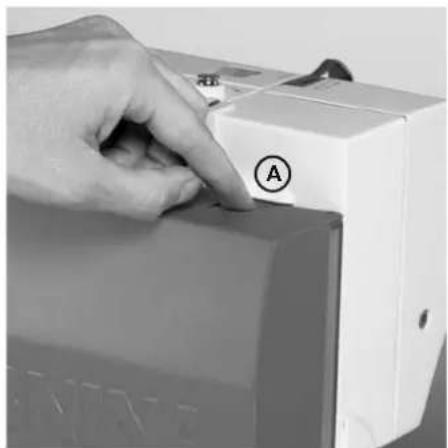
text_image
Close-up of a hand pressing down on a device with labeled button 'A' and Chinese characters '红' visible- attach the box to the sewing computer (catch A must engage); inserting the presser foot lifter into the opening H Note: first lower the presser foot lifter!
Removing the accessory box
- press catch A on the top of the box
- remove box to the rear
Available as a special accessory
Power cable

natural_image
Exterior view of a portable electronic device with labeled components (A, B, C) and cable connections (no readable text or symbols beyond labels)The power cable
- plug A into sewing computer
- plug B into wall socket
- plug C into sewing computer
Foot control cable
Power switch

natural_image
Close-up of a computer power adapter with a fan and cable, no visible text or symbolsImportant! (USA/Canada only) This sewing computer has a polarized plug (one blade wider than the other). To reduce the risk of electric shock, this plug is intended to fit in a polarized outlet only one way. If the plug does not fit fully in the outlet, reverse the plug. If it still does not fit, contact a qualified electrician to install the proper outlet. Do not modify the plug in any way.
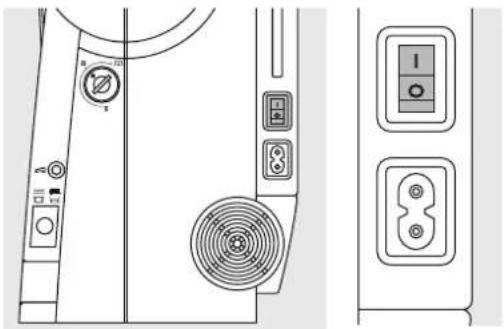
The switch is on the handwheel side of the computer
1 the computer is switched on
0 the computer is switched off
The sewing light is switched on and off with the power switch.

Refer to the safety instruction!
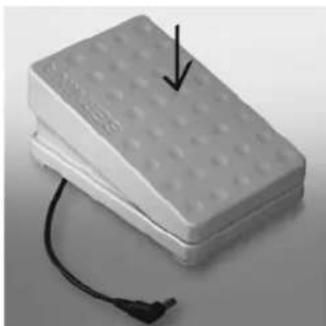
Foot control
natural_image
Stacked electronic components with a black arrow pointing to a dotted rectangular block and a black cable attached (no text or symbols visible)The foot control regulates the sewing speed
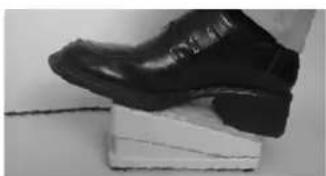
Sewing speed is adjusted by applying more or less pressure to the foot control.
Important! (USA/Canada only) Use only foot controller type SR-1 with sewing computers activa 135 S /145 S.
natural_image
Close-up of a black leather shoe resting on a white platform (no visible text or symbols)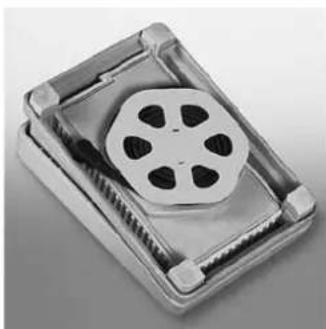
natural_image
Close-up of a metallic electronic component with a five-petal screw and internal structure (no visible text or symbols)Self storing cord
• wind the cord on the reel
- insert the plug into the groove provided
When sewing
- unwind the cable
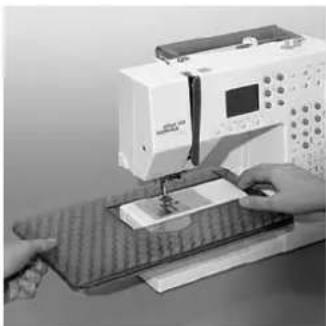
Sewing table
natural_image
Person operating a sewing machine on a workbench (no visible text or symbols)Increases the sewing surface.
To attach
- raise the needle and presser foot
- place the table over the free arm and press firmly so that it engages on the fixing cam
To remove
- raise the needle and presser foot
- pull the table out of the fixing cam
- pull in horizontal position to the left
Scale
• «0» corresponds to the centre needle position
Seam guide
- insert into the groove (under-side of table) from the right or left
- it can be freely adjusted over the whole width of the table Note: Remove the presser foot when attaching the seam guide!
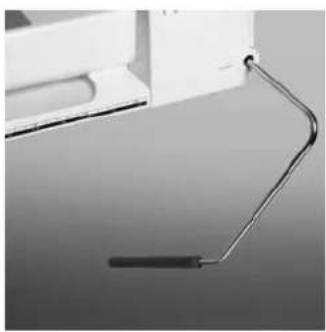
Free-Hand-System (FHS) presser foot lifter\* (knee-operated)
natural_image
Close-up of a metallic tool or probe inserted into a white container (no visible text or symbols)Attaching the presser foot lifter
Insert into the opening in the base plate: you should be able to operate the lifter with your knee in your normal sitting position.
The presser foot lifter raises and lowers the presser foot
- push to the right
• the presser foot is raised - the feed-dog is lowered simultaneously
• the feed-dog is raised as soon as the first stitch is sewn
* Special accessory can vary from country to country
Note:
Your dealer can adjust it if necessary.
Winding the bobbin

natural_image
Illustration of a hand pointing at a small mechanical component (no text or symbols visible)
natural_image
Technical line drawing of a mechanical assembly with pulleys and a spring (no text or symbols)
natural_image
Diagram of a mechanical assembly with a hand holding a tool, showing no text or symbols.Winding the bobbin
- turn power switch on
- place empty bobbin on spindle
• following the direction of the arrow take thread through the rear guide and round the pre-tension stud
- wind it several times round the empty bobbin
- press the engaging lever against the bobbin
- press the foot control
- the motor will stop automatically when the bobbin is full
- remove the bobbin
Thread cutter
- cut the thread on the thread cutter
Note:
When winding the bobbin on the vertical spool holder (p. 15), it may be necessary to adjust the speed.
Bobbin case
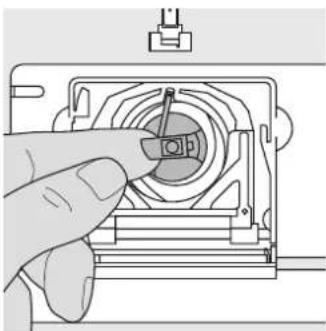
natural_image
Hand inserting a small component into a mechanical housing (no text or symbols visible)To remove the bobbin case
- raise the needle
- turn power switch to «0»
- open the bobbin cover
- grasp the latch of the bobbin case
- remove case
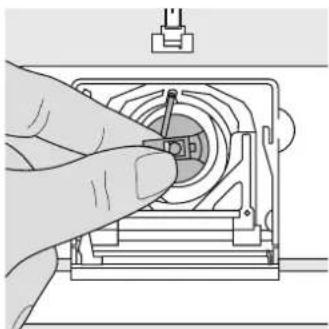
natural_image
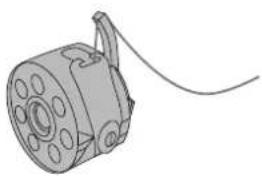
Hand holding a mechanical component with a circular housing and a pointer (no text or symbols visible)To insert the bobbin case
- hold the bobbin case latch
• the finger on the case should point upwards - insert so that it clicks into place

natural_image
Technical line drawing of a mechanical device with labeled component A (no text or symbols beyond label)Bobbin thread cutter
- insert the bobbin case
• take the thread over cutter A - thread is cut
- close the bobbin cover
Note:
The bobbin thread does not have to be brought up as the loose end is just the right length to start sewing.

Refer to the safety instruction!
Inserting the bobbin

natural_image
Illustration of hands holding a mechanical component with a rotating wheel (no text or symbols)Insert the bobbin
Insert the bobbin so that the thread runs clockwise.

natural_image
Line drawing of hands holding a mechanical component with a string (no text or symbols)Pull the thread counter clockwise into the slot.

natural_image
Illustration of hands holding a small mechanical component with a string, no text or symbols presentPull the thread to the left under the spring until ...

natural_image
Illustration of a hand holding a mechanical component with a tool, showing motion direction (no text or symbols)... it lies in the T-shaped slit at the end of the spring. The bobbin must turn clockwise when thread is pulled.
Changing the needle
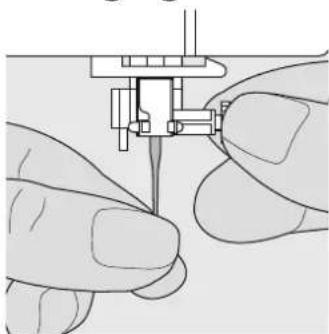
natural_image
Close-up of hands performing a sewing or needle application on a sewing machine (no text or symbols visible)Removing the needle
- raise the needle
- turn power switch to «0»
- lower the presser foot
- loosen the needle clamp screw
- pull the needle down to remove
Inserting the needle
- flat side of needle to the back
- insert the needle as far as it will go
• tighten the needle clamp screw

Refer to the safety instruction!
Changing the presser foot

natural_image
Diagram of a sewing machine needle and foot assembly (no text or labels)Presser foot with shank
- raise the needle and
- presser foot
- turn power switch to «0»
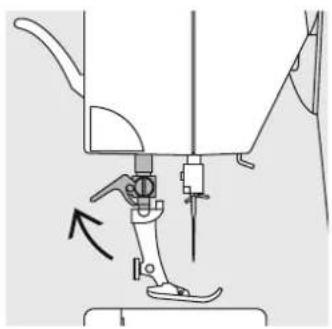
natural_image
Mechanical sewing machine diagram showing needle insertion and adjustment mechanism (no text or labels)- raise the clamping lever
- remove the presser foot
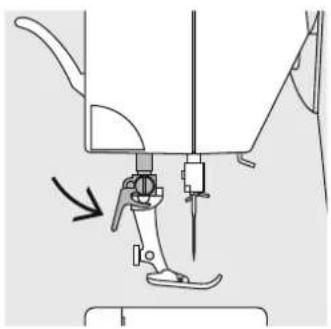
natural_image
Mechanical sewing machine diagram showing needle insertion and adjustment mechanism (no text or labels)Attaching the presser foot
• guide the foot upwards
• over the cone
- press the clamping lever down

Refer to the safety instruction!
Supplementary spool pin
Collapsible vertical spool pin
• found on the back of the sewing computer behind the handwheel
- essential aid for sewing with more than one thread, i.e. double needle work
- raise the pin until it clicks into its vertical position
- when using large reels, add the foam pad A for stability

natural_image
Illustration of a hand holding a tool with a circular component and an arrow indicating direction (no text or symbols)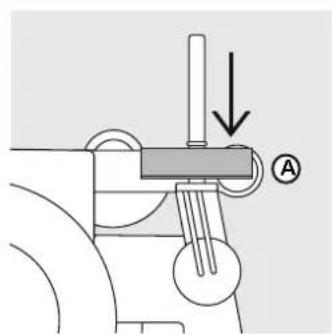
text_image
Technical diagram showing mechanical assembly with labeled component A and directional arrowThreading the upper thread
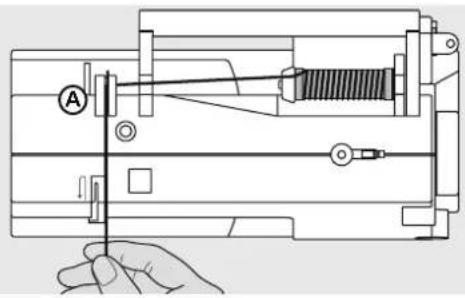
text_image
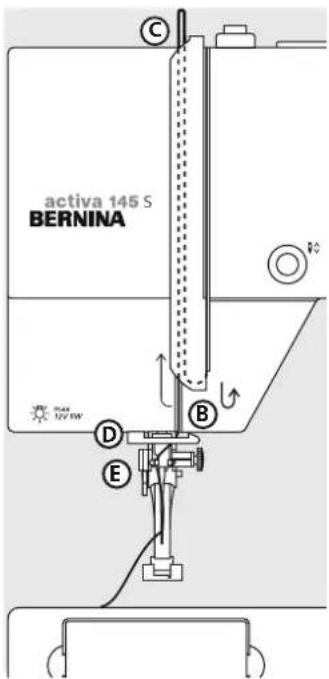
Technical diagram of a mechanical assembly with labeled components and a hand holding a tool- raise the needle and presser foot
- turn the power switch to «0»
- place spool on pin and attach the appropriate spool disc – diameter of spool = disc size
• take thread through rear guide A - then into slit of upper thread tension
- pull thread down to the right of the take-up cover to B
- then up to the left of the cover to C
- and down through guides D and E
text_image
activa 145 S BERNINA
natural_image
Pure diagram of a mechanical or fluidic component with directional arrows and a circular symbol, no text or labels present.
text_image
Technical diagram of a mechanical assembly with labeled components D and E
Refer to the safety instruction!
17Needle
Needle Threader

natural_image
Technical line drawing of a mechanical assembly with no visible text or symbolsThread in hook
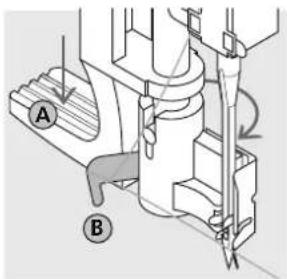
- lower the presser foot
· lay the thread behind hook B and hold lightly
text_image
Technical diagram showing mechanical assembly with labeled parts A and B, likely illustrating a cutting or machining process.Lever down
- press lever A down and simultaneously guide the thread around hook B to the right to the needle

natural_image
Technical line drawing of a mechanical assembly with no visible text or symbolsThread in front of needle
- put the thread from the front into the guide until it catches in the hook
natural_image
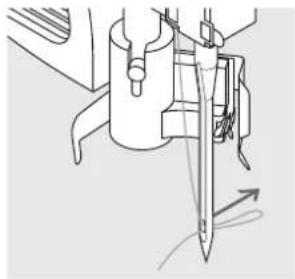
Technical line drawing of a mechanical assembly with a knife inserted (no text or symbols)Release the lever and thread
· let go of lever A and thread
Bringing up the lower thread
natural_image
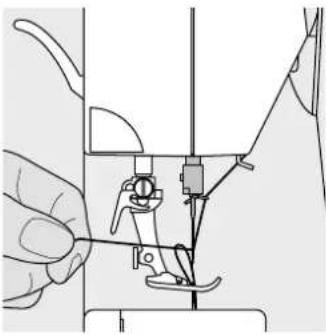
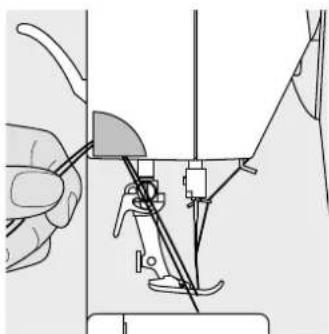
Illustration of a sewing machine needle being adjusted, showing hand positioning and tool path (no text or symbols)- hold the upper thread
- sew one stitch
- pull the upper thread until the bobbin thread appears in the stitch plate hole
- pull bobbin thread out of the hole and insert both threads through the slit in the presser foot towards the back
- pull threads over the cutter
Note:
The bobbin thread must be brought up through the stitch plate for certain types of work. The length of thread is sufficient for most normal work if the lower thread cutter has been used.
Thread cutter
natural_image
Illustration of a sewing machine needle and foot, showing the needle being inserted into a slot (no text or symbols present)- pull both threads from front to back over the cutter
- the threads release as soon as the first stitch is sewn
Stitch plate

text_image
1 5y8 1a 1/a 5y8 1 10 201020Stitch plate markings
- the stitch plate is marked with seam guide lines in mm and inches
- the millimetre markings are at the front
• the inch markings are at the back - the measurements show the distance (with needle position centre) from needle to line
• lines are provided to the right and left of the needle
• they are very useful guide lines for precise seaming - the horizontal lines are useful for sewing corners, etc.
Feed-dog
text_image
Diagram of a door panel with icons for handle, seat, and front panel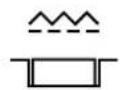
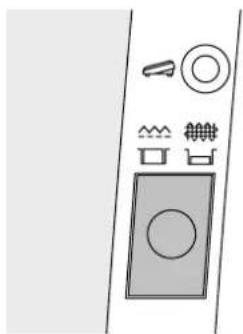
Button below the handwheel
Button flush with housing = sewing position
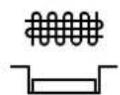
Button depressed = feed-dog is lowered
• for free-hand sewing (darning, embroidery, etc.)
Thread tension
The basic setting
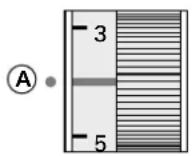
- is indicated when the red line on the tension adjustment wheel is in line with the marking A
- the tension does not need adjusting for normal sewing work
- for special sewing work, the tension can be adjusted to suit the fabric
The tension is factory set for the best results. Metrosene 100/2 (Arova Mettler, Switzerland) is used to set both the upper and lower thread tension.
If other sewing or embroidery threads are used, the tension may need adjusting to suit the fabric and chosen stitch.
To reduce the tension
turn to between 3 and 1
To increase the tension
turn to between 5 and 10
For example:
Tension Needle
Metallic thread approx. 3 90
Monofilament approx. 2–4 80
General instructions
natural_image
Technical line drawing of a washing machine front panel with control buttons and indicator lights (no text or symbols)Main switch to 1
• the sewing sewing computer is ready to sew
text_image
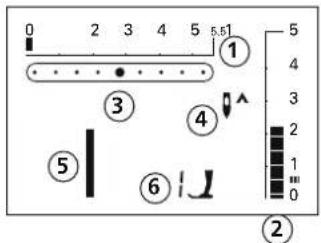
0 2 3 4 5 5.51 ① 4 3 2 1 0 ② ③ ④ ⑤ ⑥The screen shows
1 stitch width basic setting blinks constantly
2 stitch length basic setting blinks constantly
3 needle position (9 positions)
4 needle stop up/down (generally up)
5 stitch number 1 (straight stitch)
6 presser foot number 1 indicator (recommended foot for selected stitch)

text_image
1 2 3 4 5 6 7 8 9 # 0 clr delStitch\* selection
- stitches 1–10: touch the number of your choice; stitch number and basic width and length settings appear Note: touch «0» to select stitch number 10 (standard buttonhole)
- to select stitches 11–30 (activa 135 S) or 11–50 (activa 145 S): touch #-button and the appropriate number
* see p. 30 for the complete stitch selection; for activa 135 S PE see appendix A1
text_image
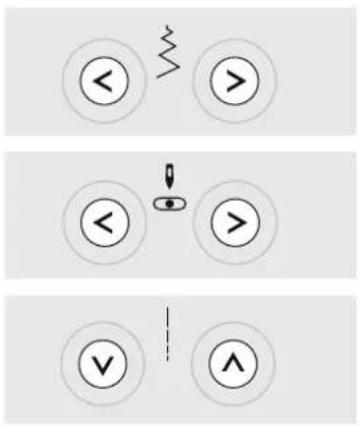
< > > < > < > ✓ ^Stitch width
- left button = narrow the stitch width - right button = widen the stitch width - the basic settings of the chosen stitch blink constantly
Needle position
- left button = needle to the left - right button = needle to the right
Stitch length
- left button = shorten the stitch length - right button = increase the stitch length
Functions
Functions are ...
activated when the symbol appears on the screen.
deactivated when the symbols no longer appear on the screen.

Reverse sewing quick reverse:
- press button
- Sewing computer sews reverse until button is released (max. stitch length 3 mm)
Applications: - programming buttonholes
- programming darning program
- switch to straight stitch securing program (stitch No. 5)
- manual securing (seam begin and end)
continuous reverse:
- press button quickly twice
- the sewing computer sews the chosen stitch in reverse
- press button once to cancel

1/2 speed
- press the button and the sewing speed will be halved
- press the button again to revert to full speed

Needle stop
- basic setting needle stop up
- press button
- arrow points down = sewing computer stops with needle down
- press button again
- arrow points up = sewing computer stops with needle up
Note:
Press key a bit longer = the needle will go automatically up or down.
Stitch end
- press button
- sewing computer stops at the end of a single stitch or stitch combination (in Memory)
Mirror image\*
- press button
• mirror image of selected stitch will be sewn
*activa 145 S only
#-button
Stitch selection button (see p. 22)

mem (Memory)
- press the centre button to open memory (capacity of 30)
- use the left and «mem+»-buttons to scroll and programme stitches, letters and numbers

clr/del (clear/delete)
- press button = reverts to basic settings
- other selected functions are cleared
Exceptions:
- needle stop down
- 1/2 speed
- altered basic settings for buttonholes = press «clr/del»-button twice
Altered Stitch Memory
- any stitch length or width alterations will be saved automatically For example:
- sew altered stitch, e.g. zig-zag
- select another stitch, e.g. straight stitch
- return to zig-zag, your alterations are still active
Letters, numbers and punctuation marks (only activa 145 S)
- press the alphabet button
- letters appear on the screen
- press the right button to scroll letters and numbers forwards (A B C ...)
- press the left button to scroll letters and numbers backwards (9 8 7 ...)
Alphabet contents
ABCEFGHIJKLMNOPQRSTUVXYZ
_-.‘!?%()[]ÄÖÜÄÆŒ∅ÑÈÉÊÀÄ
0123456789
Return to basic settings
- basic settings can be restored manually for individual stitches
- all altered settings are lost when the «clr/del»-button is pressed or when the sewing computer is turned off
Application:
• for all stitches and fabrics
• particularly useful for switching between different applications
Memory
Any combination of 30 stitches, letters or numbers can be saved in Memory, which is long term. They remain saved until deleted by the user. Power failures or disconnection from the electricity
supply do not affect the Memory. Alterations to the stitch length, width or needle position can be made at any time. Individual stitches, letters or numbers can be deleted or overwritten.

text_image
< mem > mem+Memory buttons
- press left button (<) to scroll contents backwards
- press centre button (mem) to open and close Memory
- press right button (mem+) to scroll contents forwards
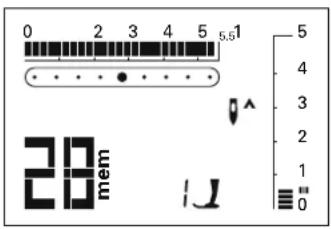
text_image
0 2 3 4 5 5.51 28 mem 1JExample: saved stitch
• saved stitch (28) is shown
To program stitches see p. 25
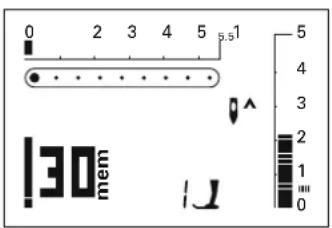
text_image
0 2 3 4 5 5.5 1 130 mem 1J 5 4 3 2 1 0Open Memory
- press «mem»-button to open Memory
- if the Memory is empty, the cursor and number 30 (= empty memories) blink
- if the Memory is not empty, the saved stitches, letters or numbers appear on the screen; scroll forwards until the cursor and number of empty memories blink
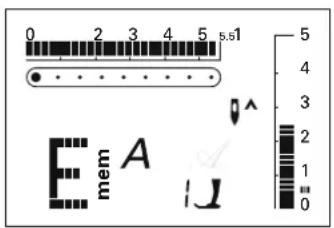
text_image
0 2 3 4 5 s.1 E mem A I JExample: saved letter
• saved letter (E) is shown
To program letters and numbers see p. 27

text_image
clr del mem mem+Delete complete Memory
- press «clr/del» and «mem»-button at the same time
- release both buttons
- leave Memory by pressing the mem button
• Memory is now completely deleted
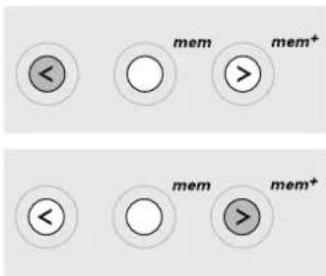
text_image
< mem mem+ < mem > mem+Scroll backwards
press left button = the programmed stitch numbers scroll backwards
Scroll forwards
press «mem+»-button = the programmed stitch numbers scroll forwards

text_image
0 2 3 4 5 s.51 21 mem 1JProgramming practical and decorative stitches
- open Memory (p. 25)
- select stitch (p. 22)
- stitch number appears on the screen (here 21)
- press «mem+» to program (save)
• the number of remaining empty memories (here 29) and the cursor blink - select next stitch, press «mem+» and continue in this manner
Begin sewing
- press the foot control = the sewing computer starts automatically at the beginning of a stitch sequence
- select Pattern End (☐) as well = the sewing computer stops automatically at the end of a stitch sequence
Note:
The following special programs cannot be saved in Memory:
No. 5, Securing program
Nos. 10–12, Buttonholes
No.13, Button sewing-on program
No. 14, Darning program
No. 15, Basting stitch

text_image
< A >
text_image
0 2 3 4 5 5.51 5 4 3 2 1 0 129 mem AProgramming letters, numbers and punctuation marks (activa 145 S only)
- open Memory (p. 25)
- press Alphabet button
- select letter or number (p. 24)
- press «mem+» to program (save)
• the number of remaining empty memories (here 29) and the cursor blink - select next letter/number, press «mem+» and continue in this manner
• programme single words or sentences/numbers - select(_) to program spacing

text_image
< mem mem+
text_image
Corrections in Memory
Changing individual stitches, letters and numbers
- scroll with the right or left button to find the stitch you want to change or correct
- then correct or change:
stitch
letter
number
stitch length or width needle position etc. - press «mem+» to save the change(s)
Note:
If the stitch length and/or width of letters or numbers have been altered, the alterations will affect all of them. If you only want to alter single letters or numbers, this must be done individually.
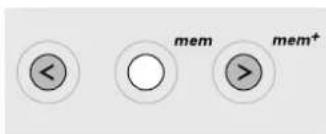
text_image

text_image
clr delDelete single stitch, letter or number
- scroll to find the stitch
- press «clr/del» to delete
-stitch/letter/number is deleted
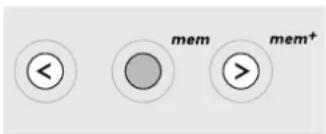
text_image

text_image
0 2 3 4 5 5.51 5 4 3 2 1 0Leave Memory
- press «mem»-button = contents are saved
- Memory is closed
«mem»-symbol disappears from the screen
The contents of the memory remain saved even when the sewing computer is disconnected from the electricity supply. They can be recalled at any time.
The contents of the memory will be lost if the sewing computer is switched off without pressing the mem button before closing the memory.
Balance

text_image
Technical diagram of a device rear panel with labeled ports and control buttonsYour sewing computer has been tested and factory set using a double layer of cretonne fabric and Metrosene 100/2 threads (Arova Mettler, Switzerland).
Different fabrics, threads and stabilisers can naturally affect the stitch balance so that they are sewn too close together or not close enough.
This can be remedied with Balance to suit the fabric and produce perfect results.
Applications:
Practical stitches, e.g.
Honeycomb stitch on jersey, decorative stitches, fantasy stitches, letters, buttonholes, etc.
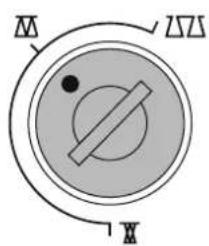
text_image
M Δ X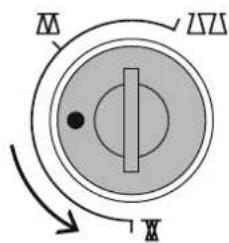
text_image
M N X
text_image
M ΔΣ X
Note:
If the balance has been adjusted, return it to the normal setting once sewing is completed.
Normal position Denser stitch formation
(shorter stitch length)
Finer stitch formation
(longer stitch length)
Stitches\*
Practical and decorative
1 Straight stitch
2 Zig-zag
3 Vari-overlock
4 Running stitch
5 Securing stitch
6 Triple straight and zig-zag
7 Blind stitch
8 Double overlock
9 Super stretch stitch
10 Standard buttonhole
11 Keyhole buttonhole
12 Straight stitch buttonhole
13 Button sewing-on program
14 Darning program
15 Basting stitch
16 Sewn-out zig-zag
17 Universal stitch
18 Gathering stitch
19 Honeycomb stitch
activa 135 S
20–22 Quilting stitches
23-30 Decorative stitches
activa 145 S
20–28 Quilting stitches
29–50 Decorative stitches
*activa 135 S PE see appendix A1
activa 135 S

text_image
1 2 3 4 5 6 7 8 9 # 0 clr del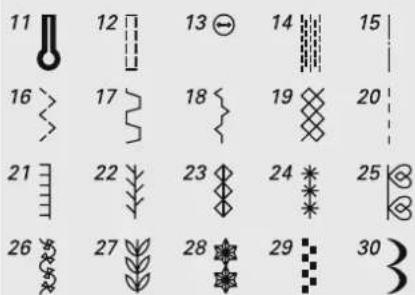
text_image
11 12 13 14 15 16 17 18 19 20 21 22 23 24 25 26 27 28 29 30activa 145 S

text_image
1 2 3 4 5 6 7 8 9 # 0 clr del
text_image
11 12 13 14 15 16 17 18 19 20 21 22 23 24 25 26 27 28 29 30 31 32 33 34 35 36 37 38 39 40 41 42 43 44 45 46 47 48 49 50Stitch selection*
| 1 Straight stitch | All non-stretch fabrics. All straight stitch work | |
| 2 Zig-zag | Most fabric types; all simple zig-zag such as oversewing fine fabrics. Sewing on elastic and lace | |
| 3 Vari-overlock | Primarily for fine jerseys, stretch overlock seams and hems | |
| 4 Running stitch | Most types of fabric. Mending, patching, reinforcing seams | |
| 5 Securing stitch | All types of fabric. Secures the beginning and end of seams sewn with straight stitch | |
| 6 Triple straight and triple zig-zag | Reinforced seams in tough, heavy fabrics | |
| 7 Blind stitch | Most types of fabric; blind hems, shell edging on soft jerseys and fine fabrics, decorative seams | |
| 8 Double overlock | All types of knit; Overlock = sew and neaten in one operation | |
| 9 Super stretch | Open seam for all super-stretch fabrics |
*activa 135 S PE see appendix A
| 14 | 19 | 20 | 14 Darning program | Automatic darning for fine and medium weight fabrics |
| 19 Honeycomb stitch | Most types of interlock and smooth fabrics; visible seams and hems | |||
| 20 Quilt/hand stitching | Hand stitched effect: only the one stitch (lower thread) is visible; the other stitch (upper thread = monofilament) is invisible; increase upper thread tension to suit the fabric (6-9) | |||
| 10 | 11 | 12 | 10 Standard buttonhole | Fine to medium weight woven fabrics; blouses, shirts, trousers, bedlinens, etc. |
| 11 Keyhole buttonhole | Heavy weight, non stretch fabrics. Jackets, coats, trousers, leisure wear, etc. | |||
| 12 Straight stitch buttonhole | Pre-stitch program for bound buttonholes (Foot No. 3A) or pocket openings (Foot No. 3, special accessory) | |||
Standard foot selection

1
Reverse pattern foot
Practical and decorative stitches

2
Overlock foot
Overlock seam, hems, oversewing edges, narrow satin stitch

natural_image
3D technical illustration of a mechanical assembly with no visible text or symbols3A
Buttonhole foot with slide
Buttonhole on smooth fabrics, darning
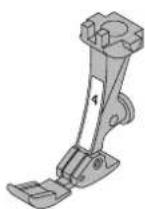
4
Zipper foot
Sewing in zips

5
Blind stitch foot
Blind hems, edge stitching

9
Darning foot
Freehand quilting for light to
medium weight quilts; darning

20
Open Embroidery foot

37
Patchwork foot
Patchwork with seam allowance
1/4" or 1/8" (≈6 or 3 mm)
activa 135 S = 6 feet (1, 2, 3A, 4, 5, 9)
activa 135 S PE = 7 feet (1, 3A, 4, 5, 9, 20, 37)
activa 145 S = 7 feet (1, 2, 3A, 4, 5, 9, 37)
Securing program

Stitch:
Needle:
Thread:
Feed-dog:
Presser foot:
Securing program No. 5*
size and type suitable for the fabric selected (see p. 57)
cotton/polyester
raised (sewing position)
Reverse pattern foot No. 1
Securing program
- for all fabrics
• secures seam begin and end
• sews exactly over the previous stitches
Seam begin
- sewing computer secures automatically (5 stitches forwards, 5 reverse)
• continues sewing straight stitch forwards
Seam end
- press the reverse button = sewing computer secures automatically (5 stitches reverse, 5 forwards)
• stops automatically when securing is complete
natural_image
Close-up of a vertical black line on a textured gray background, no text or symbols visibleBasting stitch
Stitch:
Needle:
Thread:
Feed-dog:
Presser foot:
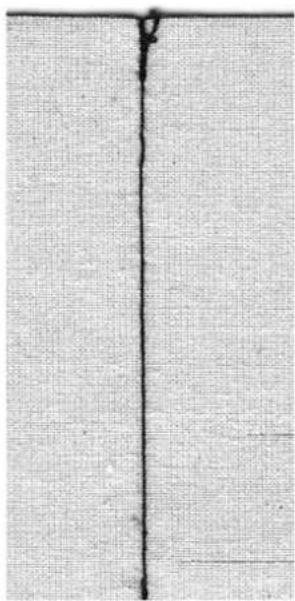
Basting stitch No. 15 (activa 135 S PE No. 14)
size and type suitable for the fabric selected (see p. 57)
cotton/polyester
lowered (darning position)
No. 9
Basting stitch
- for all work which requires a very long stitch
• for basting seams, hems, quilts, etc. - easy to remove
Preparation:
- pin work horizontally to basting direction to prevent the layers slipping
Basting
- lower the feed-dog
- position work under the presser foot and sew one stitch; hold threads when starting to sew
- pull work from behind to the required length of the stitch
- sew one stitch and repeat the procedure

TIP
Securing/fixing the thread
- sew a few basting stitches at the beginning and end of a seam
Basting
- use a fine darning thread for basting as it is easier to remove
030529.52.04_0303_a135 a145_EN
natural_image
Close-up of a textured gray surface with two vertical black lines (no text or symbols)Blind hem
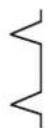
Stitch:
Needle:
Thread:
Feed-dog:
Presser foot:
Blind stitch No. 7
size and type suitable for the fabric selected (see p. 57)
cotton or polyester
up (sewing position)
Blind stitch foot No. 5
Blind hem
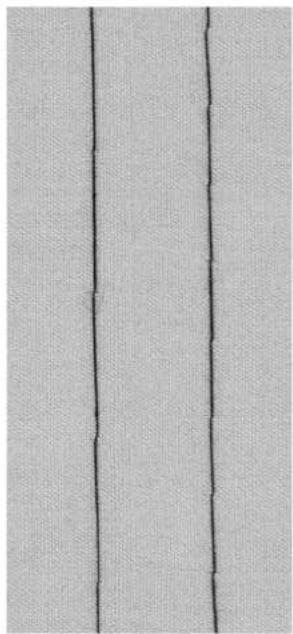
for «invisible» hems in medium to heavy cotton, wool and blended fabrics
Preparation
- neaten raw edges
• prepare seam as for sewing by hand - place work under the presser foot (see drawing)
Sewing
- the needle should just pierce the edge of the fold (same as hand sewing)
- adjust the stitch width to suit the fabric
• after sewing about 10 cm (4"), check both sides of fabric and adjust width again if necessary
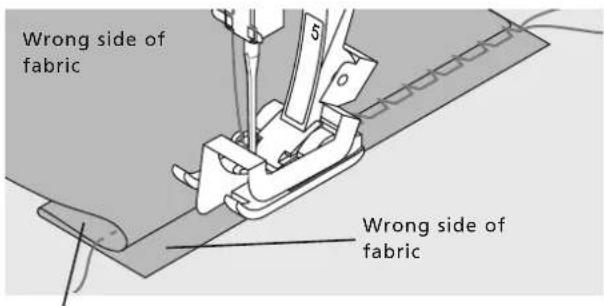
text_image
Wrong side of fabric Wrong side of fabricRight side of fabric
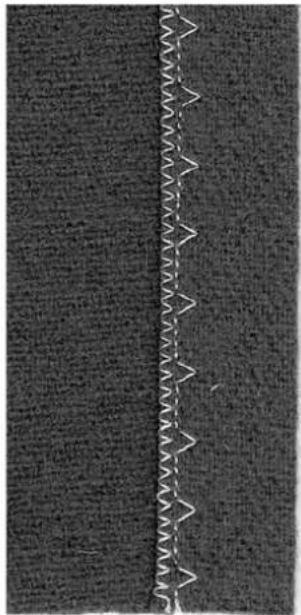
text_image
Cropped image showing a vertical line of white text on a dark textured background, possibly a signature or watermark.
TIP
Fine stitch width adjustment Guide the folded edge evenly along the metal guide on the foot = even depth
Darning program

Stitch:
Needle:
Thread:
Feed-dog:
Presser foot:
Darning Program No.14 (activa 135 S PE No. 13)
size and type suitable for the fabric selected (see p. 57)
darning thread
up (sewing position)
Reverse pattern foot No. 1
Buttonhole foot No. 3A
Quick darning of holes or worn areas
Replacement of damaged fibres/threads
Darning with Reverse pattern foot No.1 (auto stitch counter)
- insert needle in top left of damaged area
- sew the first length and stop the sewing computer
- press the securing button: length is programmed
- complete the darn; the sewing computer stops automatically
Large areas:
- the darning area can be extended by moving the work under the foot
- clear the programme by pressing the «clr/del»-button
Darning with Buttonhole foot with slide No. 3A
- use for small tears and damaged areas, not more than 3cm (11 / 4^ ) long
- use same method as with foot No. 1

natural_image
Close-up of a dark, elongated object on a textured gray background (no text or symbols visible)
TIP
Reinforcement
use fine fabric or interlining as a backing
Preparation
stretch fabric into darning ring* prevents puckering
*The darning ring is available as a special accessory
Zippers
Stitch:
Needle:
Thread:
Feed-dog:
Presser foot:
Needle position:
Straight stitch No. 1
size and type suitable for the fabric selected (see p. 57)
cotton or polyester
up (sewing position)
Zipper foot No. 4
far right or far left

natural_image
Illustration of a sewing machine needle stitching fabric (no text or symbols)Preparation:
- baste in zipper
- fabric edges should meet over the center of the zipper
Sewing
- sew in the zipper, each side from bottom to top
- once with needle position far right and once with needle position far left
• the edge of the foot runs along the teeth of the zip
• the needle inserts close to the teeth
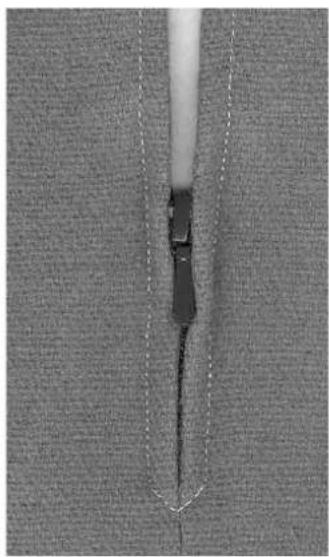
natural_image
Close-up of a mechanical component with a pointed tip and dashed line indicating measurement (no text or symbols)
TIP
To sew around zipper pull
- close zipper and sew up to about 5 cm (2") away from the pull
- insert needle, raise the presser foot, open the zipper, lower the foot and continue to sew
Seam begin
hold thread firmly when starting to sew = pull fabric slightly to the back (fewer stitches)
Zipper or fabric is thick or densely woven
use a 90–100 needle for even stitch formation
Everything you need to know about buttonholes

natural_image
Technical line drawing of a mechanical component with a coiled cable (no text or symbols)Buttonholes are not only practical closures, they can also be used to decorative effect
Select the buttonhole of your choice (No. 10 or 11); the following appears on the screen:

text_image
0 2 3 4 5 5.51 ① ③ ②1 Buttonhole number
2 Buttonhole symbol
3 Presser foot number
Thread tension
- thread the bobbin thread through the finger of the bobbin case = the bobbin tension is a little tighter
- this gives the beads on the right side of the fabric a slightly rounded appearance
- the buttonhole looks more attractive
· gimp reinforces buttonholes and enhances their appearance (pages 47, 48)
natural_image
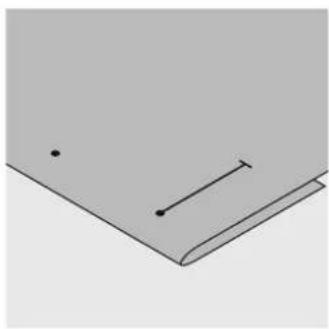
Simple 3D illustration of a folded paper or document with two dots and a horizontal line (no text or symbols)Mark the length of automatic buttonholes
- mark the length of just one buttonhole
• after sewing the first buttonhole, the length for all subsequent buttonholes is automatically programmed - mark only the beginning of all subsequent buttonholes
natural_image
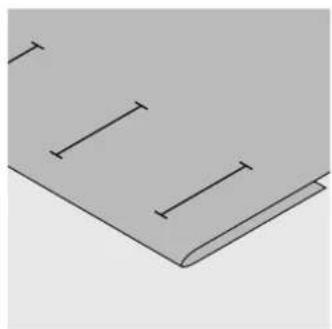
Simple line drawing of a folded paper or document with three horizontal lines and vertical tick marks (no text or symbols)Mark the length of manual buttonholes
- mark the buttonhole length in the appropriate position
- stitch using buttonhole foot No. 3 (optional accessory)
natural_image
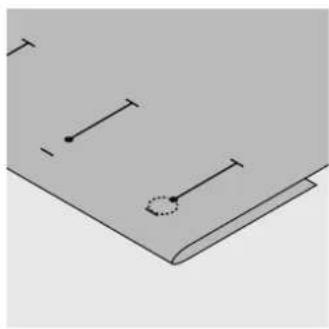
Pure diagram of a book with horizontal lines and a circular mark on the cover (no text or symbols)Mark the length of keyhole buttonholes
- mark the bead length only
- the correct length eye will be added when the buttonhole is sewn
Test sewing
• always test sew on the fabric and stabilizer you intend to use
- select the buttonhole type you intend to use
- sew the buttonhole in the same direction on the fabric (with or against the grain)
- cut the buttonhole open
- push the button through and adjust the buttonhole length if necessary
Corrections
To adjust the bead width:
- alter the stitch width
- altered stitch widths can be deleted by pressing the «clr/del»-button
Altering the stitch length:
- any alterations to the stitch length affect both beads (denser or less dense)
- altered stitch length can be deleted by pressing the «clr/del»-button

TIP

natural_image
Technical illustration of a mechanical device with an arrow indicating assembly or operation (no text or symbols present)If a buttonhole is to be sewn at right angles to a seam, we recommend the use of the buttonhole leveler. Insert the plate from behind between the fabric and the foot up to and over the thicker area.
Note: When all buttonholes have been sewn, return balance to the normal setting!
Balance for automatic/manual buttonholes
- any balance alterations to the 6-step manual and auto length buttonholes affects both beads identically because they are sewn in the same direction
Automatic standard buttonhole with auto length
Both beads are sewn in the same direction.
Note:
The automatic buttonhole foot No. 3A must lie perfectly flat on the fabric. If the foot lies on a seam, the length cannot be measured accurately.

Stitch:
Needle:
Thread:
Feed-dog:
Presser foot:
Standard buttonhole No. 10
size and type suitable for fabric selected (see p. 57)
cotton or polyester
up (sewing position)
Automatic buttonhole foot No. 3A

natural_image
Two dark rectangular objects placed vertically on a textured gray background (no text or symbols)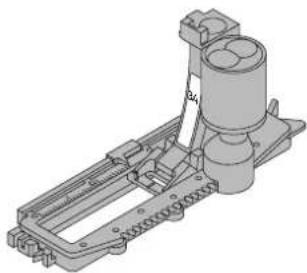
natural_image
3D technical drawing of a mechanical assembly with no visible text or symbolsAutomatic standard buttonhole
- insert the lower thread in the finger of the bobbin case (p. 39)
- when using Buttonhole foot No. 3A, the length of the button-hole is automatically registered by the lens on the foot = exact duplication and automatic sequence change when the maximum length has been sewn
• each step of the sewing sequence blinks on the screen
Note:
When any automatic buttonhole is selected, presser foot No. 3 is indicated on the screen.
030529.52.04_0303_a135 a145_EN
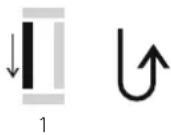

2
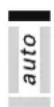
3
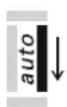
4

5
Programme the standard buttonhole
1 sew the first bead forwards, stop the sewing computer
- press the reverse button
- «auto» and presser foot No. 3A are indicated on the screen = the buttonhole length is programmed
2 the sewing computer sews reverse straight stitch automatically
3 the first bar tack
4 the second bead forwards
5 the second bar tack and securing stitches
- sewing computer stops and returns automatically to buttonhole begin
Auto buttonhole
- all subsequent buttonholes will be sewn to exactly the same length (no need to press the reverse button)
- press the «clr/del»-button to delete the programme
- the programmed buttonhole can be saved in the long term memory (see p. 49)
Corrections see p. 40
Note:
When all buttonholes have been sewn, return balance to the normal setting!
Balance
- any changes to the balance affect both beads of auto length buttonholes, because both beads are sewn in the same direction

TIP
Exact duplicates
the auto function ensures that each buttonhole will be exactly the same length as the previous one
Marking
mark only the beginning of the buttonholes – a real time saver!
Sewing speed
- sew at moderate speed for best results
- sew all buttonholes at the same speed for a consistent bead density
Compensating plates for buttonholes (special accessory)
If a buttonhole is to be sewn horizontally to the edge of the garment, it is worth using the compensating plates.
This accessory provides an even surface for the buttonhole foot with slide which results in a perfect buttonhole (see tips p. 40).
Automatic keyhole buttonhole with auto length
Both beads are sewn in the same direction.

Stitch:
Needle:
Thread:
Feed-dog:
Presser foot:
Keyhole buttonhole No. 11
size and type suitable for the fabric selected (see p. 57)
cotton or polyester
up (sewing position)
Automatic buttonhole foot No. 3A
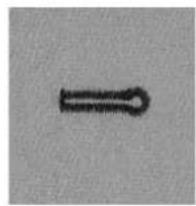
natural_image
Simple black line drawing of a horizontal double-headed arrow on a gray background (no text or symbols)
natural_image
3D technical drawing of a mechanical assembly with no visible text or symbolsAutomatic keyhole buttonhole
- insert the lower thread in the finger of the bobbin case (p. 37)
- when using Buttonhole foot No. 3A, the length of the button-hole is automatically registered by the lens on the foot = exact duplication and automatic sequence change when the maximum length has been sewn
Marking the keyhole buttonhole
- mark the bead length only. The correct eye length will be added when the buttonhole is sewn.
- each step of the sewing sequence blinks on the screen

text_image
1 auto 2 3 auto 4 auto 5 auto 6Note: When all buttonholes have been sewn, return balance to the normal setting!
Programming the buttonhole
1 sew the straight stitch forward, stop the sewing computer,
- press the reverse button
- auto and presser foot No. 3A are displayed on the screen = buttonhole length is programmed
2 the sewing computer automatically sews the eye
3 the first bead in reverse
4 sews second straight stitch
5 sews second bead in reverse
6 sews bartack and securing stitches
- the sewing computer stops and returns automatically to buttonhole begin
Auto buttonhole
- all subsequent buttonholes will be sewn automatically to the same length (without pressing the reverse button)
- Press the «clr/del»-button to delete the programme
- the programmed buttonhole can be saved in the long term memory (see p. 49)
Corrections see p. 40
Balance
- any changes to the balance affect both beads of auto length buttonholes, because both beads are sewn in the same direction
- any distortions to keyhole buttonholes can be corrected with balance
TIP
Exact duplicates
the auto function ensures that each buttonhole will be exactly the same length as the previous one
Marking
mark only the beginning of the buttonholes – a real time saver!
Double sewn keyhole buttonholes
• keyhole buttonholes can be sewn twice on thick fabrics
• after sewing the first button-hole, do not move the work
• simply tap the foot control once to begin sewing again
Manual buttonhole (all types)
Manual buttonholes are particularly suitable for single buttonholes or for repairing existing buttonholes.
Individual steps can be eliminated or repeated. The number of steps
corresponds to the buttonhole type. Manual buttonholes cannot be saved.
Stitch: any buttonhole
Needle: size and type suitable for the fabric selected (see p. 57)
Thread: cotton or polyester
Feed-dog: up (sewing position)
Presser foot: Buttonhole foot No. 3 (optional accessory)
natural_image
Technical line drawing of a mechanical component with a coiled cable (no text or symbols)Preparation
- select the desired buttonhole
- screen shows:
buttonhole number (10 or 11)
presser foot No. 3
the buttonhole symbol (the first step blinks on the screen)
- insert the lower thread in the finger of the bobbin case
Always test sew buttonholes
- test on the fabric and stabilizer you intend to use
- sew buttonholes in the same grain direction (with or against)
Note: Corrections see p. 40
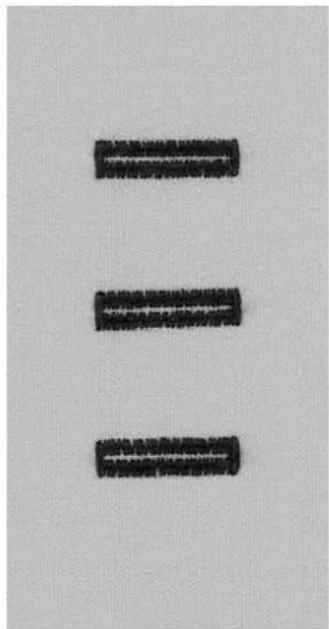
natural_image
Three black rectangular objects arranged vertically on a textured gray background (no text or symbols)
1


2




3
4
Sewing a manual standard buttonhole
Both beads are sewn in the same direction.
The individual steps blink on the screen.
1 sew the first bead forward, stop the sewing computer
- press the reverse button
2 sew reverse straight stitch, stop the sewing computer at the first stitch (buttonhole begin)
- press the reverse button
3 sew the bartack and the second bead, stop the sewing computer
- press the reverse button
4 sew the bartack and the securing stitches
Manual keyhole buttonhole
Sew both forward and reverse beads at the same speed.
The individual steps blink on the screen.

1

2


3


4


5
1 sew straight stitch forwards, stop the sewing computer, press the reverse button
2 sew the eye and the first bead in reverse, stop the sewing computer at the first stitch (buttonhole begin), press the reverse button
3 sew straight stitch forwards and stop at the keyhole, press the quick reverse button
4 sew the second bead in reverse, stop the sewing computer at the first stitch (buttonhole begin), press the reverse button
5 sew bartack and securing stitches
Buttonhole with gimp
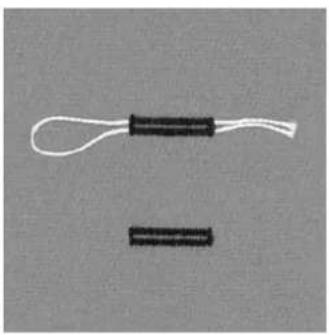
natural_image
Two black rectangular objects with white cables, one resembling a coiled cable or connector, against a plain gray background (no text or symbols)Gimp
• gimp cord reinforces button-holes and enhances their appearance
- the loop of the cord should be at the end of the button-hole most subject to wear cord loop = where button is sewn on
- position the work accordingly
- gimp cord is particularly recommended for standard and stretch buttonholes
Ideal cords
• Perle yarn No. 8
• strong hand sewing thread
- fine crochet yarn
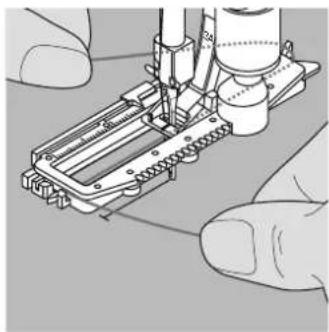
natural_image
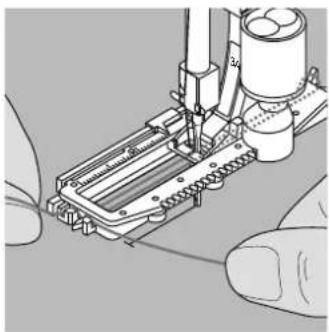
Illustration of a robotic arm assembling a mechanical component (no text or symbols visible)Hooking the cord in the buttonhole foot with slide No. 3A
- insert the needle at the beginning of the buttonhole
- raise the presser foot
• guide the cord under the foot to the right - hook the cord over the pin at the back of the foot
natural_image
Close-up of hands operating a sewing machine needle and screwdriver (no visible text or symbols)- bring the cords to the front of the foot
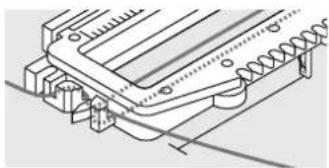
natural_image
Technical line drawing of a mechanical component with no visible text or symbols- pull them into the slit
- sew the buttonhole
Sewing
- sew the buttonhole in the usual manner
• do not hold the cord tightly - the buttonhole will form over the cord, covering it
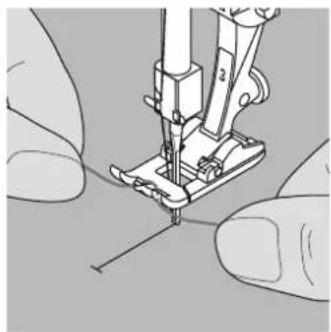
natural_image
Close-up of hands operating a sewing machine needle (no text or symbols visible)Hooking the cord onto presser foot No. 3
- insert the needle at the beginning of the buttonhole
- raise the presser foot
- hook the cord over the centre pin on the front of the foot
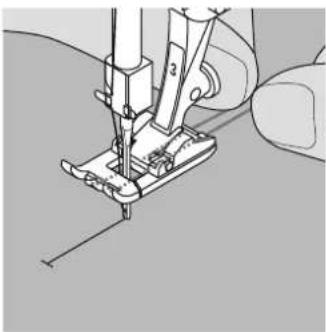
natural_image
Close-up of a sewing machine needle stitching fabric (no text or symbols visible)- place both ends of the cord in the grooves on the sole of the foot and pull them to the back
- lower the presser foot
Sewing
- sew the buttonhole in the usual manner
- do not hold the cord tightly
- the buttonhole will form over the cord, covering it

natural_image
Illustration of hands using a tool to draw or mark a circular arc on a textured surface (no text or symbols)Securing the cord
- pull the cord through the buttonhole
- pull cords through to back of fabric
- knot or secure with stitches
natural_image
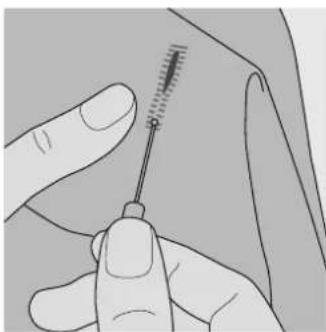
Illustration of a hand holding a needle inserted into a tissue sample (no text or symbols visible)Cutting buttonholes open with the seam ripper
• use the back of the seam ripper to nick the stitches
- cut from both ends towards the middle
natural_image
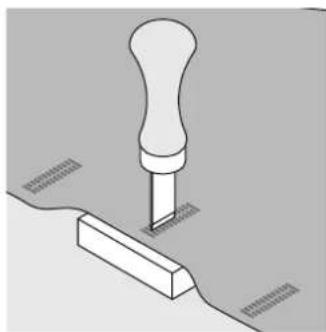
Isometric line drawing of a mechanical component with a handle and base, no text or symbols presentButtonhole cutter and block (special accessory)
- place the fabric on the wood
- place the cutter in the centre of the buttonhole
- press down on the cutter with your hand or a hammer
Programmed buttonholes
text_image
Saving programmed buttonholes in long term memory
• after programming press the «mem+»-button
- the buttonhole is now saved in long term memory
Opening saved buttonholes
Programmed saved buttonholes can be opened for re-use even after the sewing computer has been disconnected.
- select the buttonhole
- press the «mem»-button
- sew the programmed buttonhole
- only one of any style buttonhole can be saved, if a new length is saved with «mem+», it overwrites the previously saved buttonhole
Button sewing-on program

Stitch:
Stitch width
Needle:
Thread:
Feed-dog:
Presser foot:
Button sewing-on program No. 13 (activa 135 S PE No. 12) depends on distance between the holes size and type suitable for the fabric selected (see p. 57) cotton or polyester down (darning position)
Foot No. 9
Button sew-on foot No. 18 (optional accessory)
natural_image
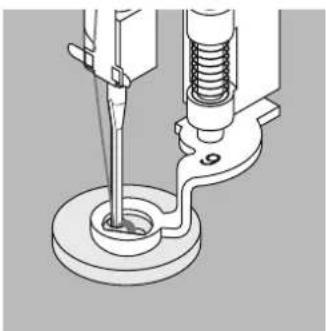
Mechanical assembly diagram showing a tool interacting with a spring and base mount (no text or symbols)Sewing on buttons
- sews buttons with 2 or 4 holes
- buttons being sewn on for decorative purposes only can be stitched without forming a thread shank
- the length of the shank (= thread between button and fabric) can be made shorter or longer as required with foot No. 18
Sewing on buttons with foot No. 9
- select Button Sew-on program
- sew the securing stitches; hold the threads when starting to sew
- check distances between holes with the handwheel and adjust stitch width if necessary
- sew
- sewing computer stops automatically when program is completed and is ready for the next button
Beginning and ending threads
• the threads are secured and can be trimmed
For added security
• after sewing on the button, pull the upper thread ends through to the wrong side and knot
030529.52.04_0303_a135 a145_EN
natural_image
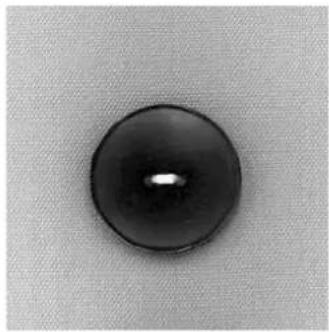
Close-up of a black circular button with a central dot, set against a textured gray background (no text or symbols)
natural_image
Technical line drawing of a sewing machine needle and base mount (no text or symbols)Sewing on buttons with foot No.18
- set the shank length with the screw on the foot
- select Button sewing-on program and continue as with foot No. 9 (p. 50)
Beginning and ending threads
• the threads are secured and can be trimmed
For added security
• after sewing on the button, pull the upper thread ends through to the wrong side and knot or
• using the upper thread ends to sew a «shank» by hand

TIP
4-hole button
- sew the front holes
- carefully move the button forward
- sew the back holes
- cut the diagonal joining thread
natural_image
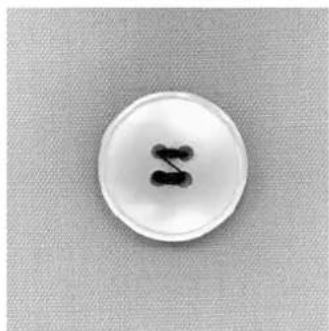
Close-up of a white circular button with black number 'S' on a textured gray background (no text or symbols beyond the button)Vari-overlock seam
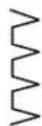
Stitch:
Needle:
Thread:
Feed-dog:
Presser foot:
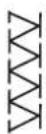
Vari-overlock No. 3
size and type suitable for the fabric selected (see p. 57)
cotton or polyester
up (sewing position)
Overlock foot No. 2 or
Reverse pattern foot No. 1
natural_image
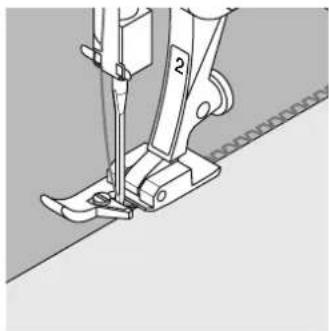
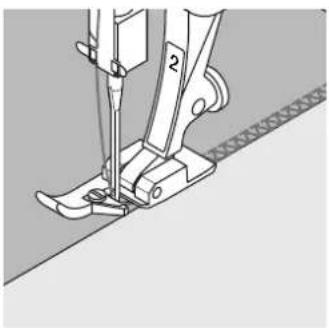
Technical line drawing of a sewing machine needle and foot (no text or symbols)Overlock foot No. 2 is specially designed for overlock stitches.
The pin on the foot produces more thread in each stitch so that the elasticity of the seam is maintained.
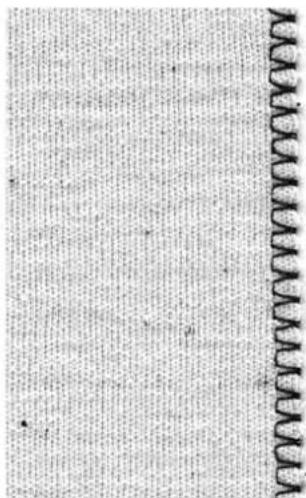
Closed seam
Stretchy seam in fine, soft knits such as silk jersey and interlock.
Sewing
• guide the raw edge along the pin on the overlock foot
- the stitch will form over the pin and over the edge of the fabric
text_image
www.www.com
TIP
Knits and jersey
use a new needle to prevent damaging the loops
Sewing stretch fabrics
if necessary use a stretch needle (130/705H-S) = needle point slides between the fibers
Double overlock seam
Stitch:
Needle:
Thread:
Feed-dog:
Presser foot:
Double overlock No. 8
size and type suitable for the fabric selected (see p. 57)
cotton or polyester
up (sewing position)
Overlock foot No. 2 or
Reverse pattern foot No. 1
natural_image
Mechanical sewing machine diagram showing blade and foot components (no text or symbols)Overlock foot No. 2 is specially designed for overlock stitches. The pin on the foot produces more thread in each stitch so th the elasticity of the seam is maintained.
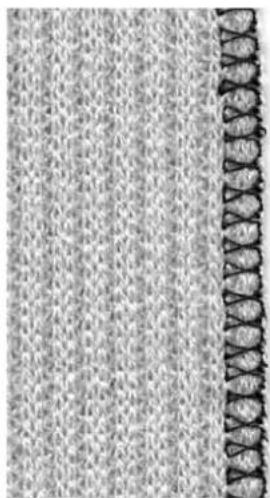
Closed seam
overlock seam in loose knits and cross seams in knits and jerseys
Sewing
- guide the raw edge along the pin on the overlock foot
- the stitch will form over the pin and over the edge of the fabric
natural_image
Close-up of a textured fabric with a vertical decorative border on the right (no text or symbols)
TIP
Knits and jersey
use a new needle to prevent damaging the loops
Sewing stretch fabrics
if necessary use a stretch needle (130/705H-S) = needle point slides between the fibers
Ribbing with overlock seam

Stitch:
Needle:
Thread:
Feed-dog:
Presser foot:
Vari-overlock No. 3
size and type suitable for the fabric selected (see p. 57)
cotton or polyester
up (sewing position)
Overlock foot No. 2 or
Reverse pattern foot No. 1
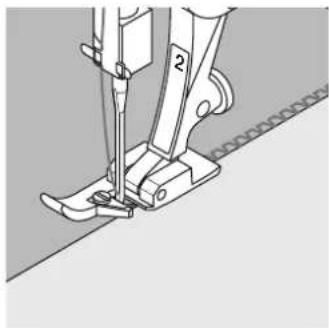
natural_image
Mechanical sewing machine diagram showing needle and base components (no text or symbols)Overlock foot No. 2 is specially designed for overlock stitches.
The pin on the foot produces more thread in each stitch so that the elasticity of the seam is maintained.
Ribbing with overlock seam
for all fine cotton, synthetic and mixed fiber jersey
Preparation
- fold ribbing in half
- pin and baste to opening, right side outside
Sewing
- sew Vari-overlock over the raw edge
- guide the edge along the pin on the foot
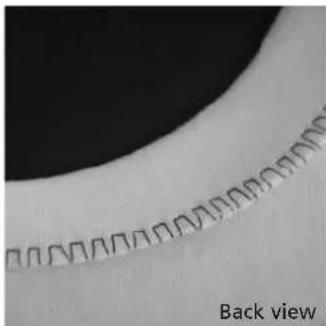
natural_image
Close-up of a curved surface with repeating square patterns, labeled 'Back view' at bottom (no other text or symbols)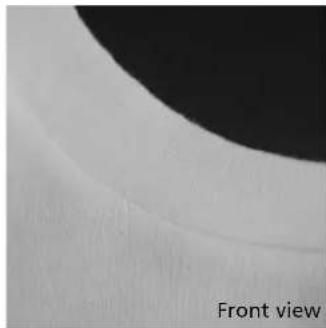
natural_image
Close-up of a curved surface with a black circular top and white textured band, labeled 'Front view' at bottom (no other text or symbols)
TIP
Needle stop down
needle stays in fabric when
you stop to adjust the ribbing
Self-facing with Honeycomb stitch

Stitch:
Needle:
Thread:
Feed-dog:
Presser foot:
Honeycomb No. 19 (activa 135 S PE No. 15)
universal, ballpoint or stretch as needed
cotton or polyester
up (sewing position)
Presser foot: Reverse pattern foot No.1
Ribbing with visible seam
for all cotton, wool, synthetic and mixed fiber jersey
Preparation
press 1 cm (3/8") to wrong side
Sewing
- sew from the right at a foot's width from the edge
- trim surplus fabric (wrong side)
Balance/corrections
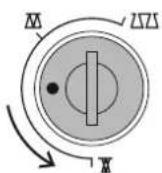
bring stitch together

open out stitch

natural_image
Close-up of a textured surface with a diagonal pattern and a dark circular shape (no text or symbols)
TIP
Needle stop down
needle stays in fabric when you stop to adjust the ribbing

Note:
After sewing return balance to the normal setting!
Important facts about sewing computer needles
Sewing computer, needle and thread
Your BERNINA uses needle system 130/705H.
Needle and thread
The most commonly sold needles are nos. 70–120.
The finer the needle, the lower the number. The table shows which needle is suitable for which threads.
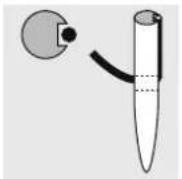
Needle appropriate for thread
When sewing, the thread runs in the long groove on the needle.

Needle inappropriate for thread
If the needle is too fine, the groove will be too narrow for the thread and faulty stitching or thread breakage can occur.
Needle and fabric
Condition of needle
The needle must be in perfect condition. Problems can occur with damaged needles.
| Needle 70 80 90 100 | 110–120 | ||||
| Darning thread | ● | ● | |||
| Embroidery thread | ● | ||||
| Mercerised cotton thread | ● | ● | |||
| Synthetic thread | ● | ● | |||
| Thick threads, synthetic mercerised thread | ● | ● | |||
| Buttonhole thread for decorative seams (cordonnet) | ● | ● |
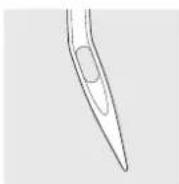
bent needle

blunt needle
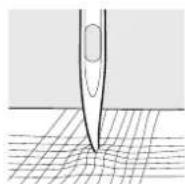
hooked needle
Special materials are easier to sew if the appropriate needle is used.
Special needles are available at your BERNINA dealer.
| Needle table | Description | Needle point | Suitable for | |
| Standard needle | 130/705 H | Normal point, slightly rounded | Universal needle for woven, needle synthetic and natural fibers, e.g. linen, chiffon, batiste, organdie, wool, satin, decorative stitching, embroidery |  |
| Special needles | 130/705-SES | Fine ball point | Fine knits, especially for synthetic fibers |  |
| 130/705 H-SUK | Medium ball point | Heavier knits in synthetic or natural fibers |  | |
| 130/705 H-S | Medium ball point | Special needle for delicate or difficult stretch fabrics |  | |
| 130/705 H-J | Extra fine point | Overalls, heavy linen, denim, canvas.Pierces dense fabrics easily |  | |
| 130/705 H-LR + H-LL | Cutting point | Natural and synthetic leather, plastic, coated and waxed fabric |  | |
| Double needle | 130/705 H ZWI | Widths: 1,6 / 2,0 / 2,5 3,0 / 4,0 | Visible hems in stretch fabrics, pintucks, decorative sewing |  |
| Triple needle | 130/705 H DRI | Widths: 2,5 / 3,0 | Decorative sewing |  |
| Hemstitch needle | 130/705 H HO | Width: 2,0 | Hemstitch in loose weaves030529.52.04_0303_a135 a145_EN |  |
Feed-dog and fabric feed
Feed-dog and stitch length
With each stitch the feed-dog moves forward by one step.
The length of this step is determined by the stitch length selected.
With an extremely short stitch length, the steps are also short.
The fabric moves under the foot quite slowly, even at full sewing speed. Buttonholes, satin stitch and decorative stitches are all sewn with a very short stitch length.
Important
natural_image
Abstract pattern of horizontal black lines on a light gray background, no text or symbols present.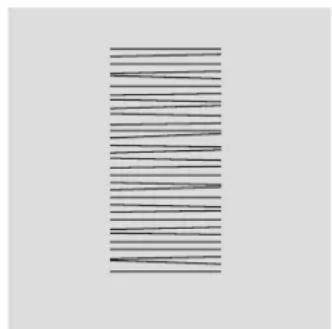
natural_image
Abstract pattern of horizontal black lines on a light gray background (no text or symbols)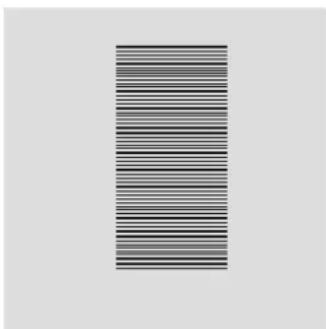
natural_image
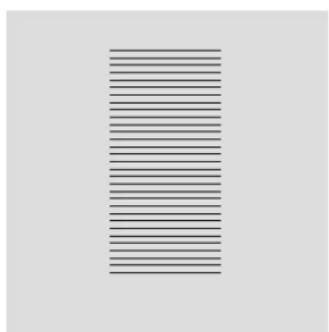
Abstract pattern of horizontal black and white stripes on a light gray background (no text or symbols)Let the fabric feed evenly! Holding Building will push trig will result in gaps.
knots.
59Needle,
Feed-dog and fabric feed with compensating plates
natural_image
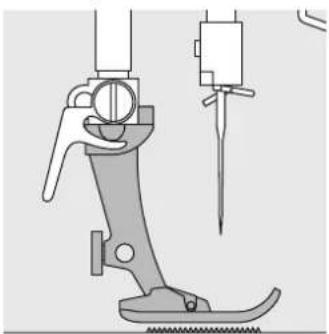
Technical line drawing of a sewing machine tool with a needle inserted (no text or symbols)The feed-dog can work normally when the foot is level.
natural_image
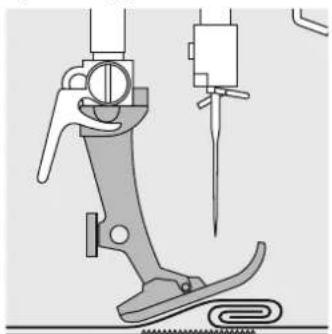
Technical illustration of a sewing machine tool with a needle inserted, showing no text or symbolsIf the foot is at an angle, e.g. when sewing over thick to thin or vice-versa, the feed-dog cannot grip and feed the fabric and the fabric hangs up.
natural_image
Technical line drawing of a sewing machine needle stitching fabric (no text or symbols)Uneven layers
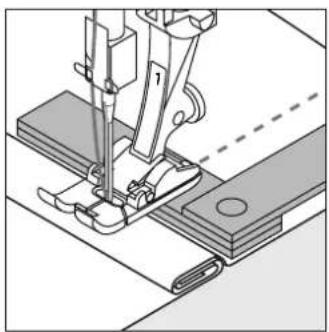
To solve this problem, place one, two or three compensating plates as required behind the needle under the presser foot.

natural_image
Technical line drawing of a sewing machine needle stitching a metal frame (no text or symbols)To correct the height in front of the foot, place one or more plates to the right of the foot close to the needle. Sew until the foot is level again and remove the plates.
Thick fabrics: feed-dog and sewing corners

natural_image
Pure technical diagram showing a ladder and vertical bars without any text, numbers, or symbolsThe gap between the two rows of teeth is relatively large due to the width of the stitch plate hole.
When sewing corners only a small section of the fabric is actually on the feed-dog so that it cannot grip the fabric well.

natural_image
Pure mechanical assembly diagram showing a bracket and alignment lines without any text or symbolsCorrect this by placing one or more compensating plates as close as possible to the edge of the fabric.
030529.52.04_0303_a135 a145_EN
Cleaning
natural_image
Close-up of a hand inserting a small component into a device (no visible text or symbols)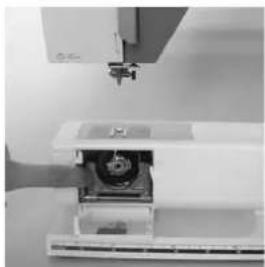
natural_image
Close-up of a white electronic device with a mechanical component, possibly a laser or scanner (no visible text or symbols)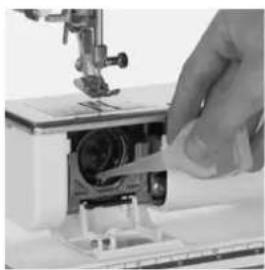
natural_image
Close-up of a hand using a sewing machine to adjust or install a mechanical component (no visible text or symbols)If the sewing computer is stored in a cold room, it should be brought to a warm room about one hour before use.
Cleaning
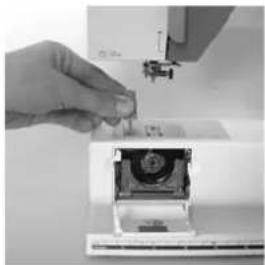
Clean the sewing computer after every use
- turn power switch to «0»
- remove presser foot and needle
- open the free-arm cover
- unscrew the stitch plate (with screwdriver TORX)
- lift and remove it
- clean the area with the brush
- replace the stitch plate
Cleaning the hook
- turn power switch to «0»
- remove the bobbin case
- push the release lever to the left
- push the locking lever to the left and fold down the hook race cover
- remove the hook
- clean the hook race with a cloth or brush, never use a sharp instrument
- replace the hook, turning the handwheel if necessary so that the hook driver is on the left
- close the hook race cover and secure with the locking lever, the locking pin must engage
- check by turning the handwheel
- insert the bobbin case
Cleaning the screen and the sewing computer
- wipe with a damp cloth

CAUTION
Disconnect plug from the socket before cleaning and servicing
Lubricating
- squeeze 2–3 drops of oil into the hook race
- run the machine for a short time without thread to prevent oil soiling your work
Important!
Never use alcohol, petrol, white spirit or any type of solvent to clean the sewing computer!

Refer to the safety instruction!
Sewing light
natural_image
Close-up of a white kitchen appliance with a hand operating a sewing machine, no visible text or symbols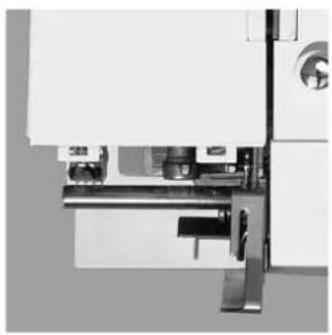
natural_image
Close-up of a mechanical assembly with metal brackets and a cylindrical component (no visible text or symbols)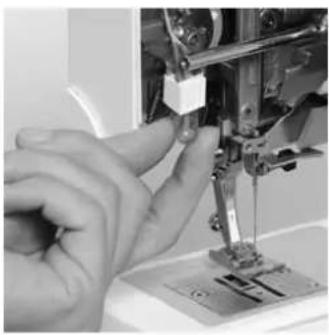
natural_image
Close-up of a hand operating a sewing machine needle (no visible text or symbols)
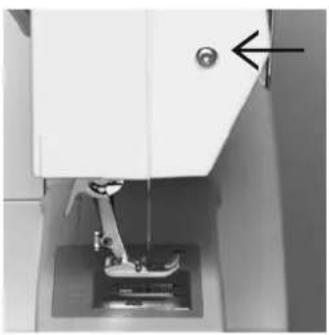
Replacing the bulb
- turn power switch to «0»
- loosen the screw
- remove the cover by lifting it slightly and detaching from the top
- remove the bulb
- insert the new bulb
- replace cover and tighten screw
Note:
Use bulb type
12 V 5 W.
W 2.1 x 9.5 d.
Light bulbs get hot.
Allow to cool down before removal.

Refer to the safety instruction!
Replacing the Sewing Light\*\*
natural_image
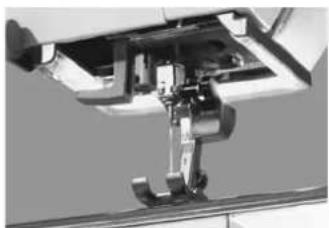
Close-up of a sewing machine needle and handle mechanism (no visible text or symbols)Contrary to an ordinary bulb, the CFL sewing light has a better illumination and a longer life.
Please refer to the safety instructions!
Caution:
Please note that a defective CFL sewing light must ONLY be replaced by an authorized technician. The sewing computer must be brought to an authorized BERNINA dealer!
** Available as a special accessory
Trouble shooting
In most cases you will be able to identify and remedy faults by checking the following.
Check whether:
• the upper and lower threads are threaded correctly
• the needle is inserted correctly
- the needle size is correct – check the needle/thread table p. 57
- the sewing computer is clean – brush out any thread fluff
• the hook race is clean
- any threads are trapped between the tension discs or under the bobbin case spring
- the bobbin runs smoothly in the case or if remnants or lint need removing
Upper thread breaks
- The upper thread tension is too tight.
• The needles are of a poor quality. Ideally needles should be purchased from your
• The needle is bent or blunt. - Poor quality, knotted or dried out thread has been used.
- Use the correct spool disc.
- Stitch plate or hook tip damaged. Take your sewing computer to your BERNINA dealer.
BERNINA dealer.
Lower thread breaks
- The lower thread tension is too tight.
- The bobbin is jamming in the bobbin case. Remove and replace the bobbin.
- The hole in the stitch plate has been damaged by the needle. This must be repolished by an expert.
• The needle is blunt or bent.
Skipped stitches
- Wrong needles used.
Use only 130/705H system.
• The needle is blunt, bent or incorrectly inserted. - Push right to the top when inserting.
- Needle inserted all the way to the top.
- The needle point does not suit the fabric being sewn. If necessary use a ball point for knitted fabrics and cutting point for hard leather.
Needle breaks
- Needle clamp screw loose.
- Fabric taken out in front instead of behind presser foot.
- When sewing over thick area, the fabric was pushed with the needle still in the fabric.
- Poor quality thread, unevenly wound or knotted.
• See pages 56 and 57 for information about needles
Faulty stitching
- Remnants of thread between the tension discs.
- Remnants of thread under the bobbin case spring.
- Lower thread still threaded in the bobbin case finger.
- Sewing computer threaded with foot down.
- Incorrect threading. Check upper and lower threads.
- Use the correct spool disc.
Sewing computer fails to run or runs slowly
- Plug not properly inserted.
• Power switch in off position. - Sewing computer has been standing in a cold room.
• Bobbin winder still switched on.
Index
A
Accessory box 8,9
B
Balance 29, 49, 55
Basting stitch 35
Blanket stitch A3
Blind hem 36
Bobbin 12
Bobbin case 13
Bobbin thread cutter 13
Bringing up the lower thread 18
Button sewing-on program 50
Buttonholes 39–49
- Altering buttonholes 49
• Automatic keyhole buttonhole 43
• Automatic standard buttonhole 41
- Buttonhole with gimp 47
- Manual buttonhole 45
- Programmed buttonholes 49
C
Changing the needle 14
Changing the presser foot 15
CFL 8,61
Cleaning 60
Compensating plates 59
D
Darning program 37
Details of the sewing computer 4–7
Double blanket stitch A3
Double overlock seam 53
F
Fabric cover 8
Fabric feed, Needles, Threads 56–59
Feather stitch A6
Feed-dog 18, 58
Foot control 10
Functions 23
- #-button 24
. 1/2 speed 23
- clr/del (clear/delete) 24
• Letters 24
- mem (Memory) 24
• Mirror image 23
- Needle stop 23
- Reverse sewing 23
- Stitch end 23
H
Handlook quilt stitch A5
Honeycomb stitch 55
|
Inserting the bobbin 14
K
Keyhole buttonhole 43
Knits and jersey 52, 53
L
Letters programming 27
Lower thread 18
Lens Set 8
M
Maintenance 60, 61
Memory 25
• Balance 29
• Corrections in Memory 27
- Leave Memory 28
- Memory buttons 25
. Open Memory 25
- Programming letters, numbers and punctuation marks 27
- Programming practical and decorative stitches 26
- Scroll backwards/forwards 26
• Stitches 30, 31, 32
N
Needle position 22
Needles, Threads, Fabric feed 56–59
Needle Threader 17
0
Overlock seam 54
P
Power cable 10
Presser feet 33
Presser foot lifter 11
Q
Quilters securing program A2
Quilt stitch (Handlook quilt stitch) A5
R
Ribbing with overlock seam 54
Reverse sewing 23
S
Screen shows 21
Seam guide 11
Securing program 34
Self-facing with Honeycomb stitch 55
Sewing light 61, 8
Sewing table 11
Single blanket stitch A3
Spool pin 15
Standard accessories 8
Standard buttonhole 41
Stiches 30, A1
Stipple stitch A4
Stitch length/width 22
Stitch plate 19
Stitch selection 22
Stretch fabrics 52, 53
Supplementary spool pin 15
T
Threads, Fabric feed, Needles 56–59
Thread cutter 12, 18
Thread tension 20
Threading the upper thread 16
Trouble shooting 62
U
Upper thread 16
V
Vari-overlock seam 52
W
Winding the bobbin 12
Z
Zippers 38
2 Important safety Instructions
4 Details
10 Setting up the sewing computer
21 Operating instructions
30 Stitches
33 Presser feet
Selected practical stitches:
34 • Securing program
35 • Basting stitch
36 • Blind hem
37 • Darning program
38 • Zippers
39 • Buttonholes
50 • Button sewing-on program
52 • Overlock
55 • Honeycomb
56 Needle, Thread, Fabric Feed
60 Cleaning, Maintenance, Troubleshooting
63 Index
A1-A6 Appendix
Impressum
Typesetting, Layout, DTP: Silvia Bartholdi
Graphics: Müller-Melzer ID, Kreuzlingen
© copyright 2003 by Fritz Gegauf AG, Steckborn
Stitches
Practical
1 Straight stitch
2 Zig-zag
3 Vari-overlock
4 Running stitch
5 Quilters securing program
6 Triple straight and zig-zag
7 Blind stitch
8 Double overlock
9 Blanket stitch
10 Standard buttonhole
11 Keyhole buttonhole
12 Button sewing-on program
13 Darning program
14 Basting stitch
15 Honeycomb stitch
16 Sewn-out zig-zag
17 Universal stitch
18 Gathering stitch
Quilting stitches
19 Stipple stitch
20 Handlook Quilt stitch
21 Double blanket stitch
22 Feather stitch
23-30 Decorative stitches
activa 135 S PE
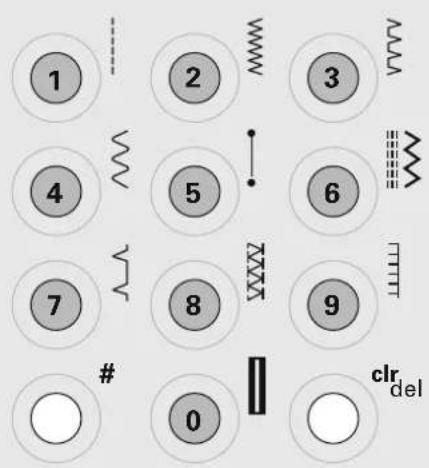
text_image
1 2 3 4 5 6 7 8 9 # 0 clr del
text_image
11 12 13 14 15 16 17 18 19 20 21 22 23 24 25 26 27 28 30a 135 S 6 feet standard
a 145 S 7 feet standard
a 135 S PE 7 feet standard
-#2
+#20
+#37
Quilters securing program

Stitch: Quilters securing program No. 5
Needle: 80 Quilting, Jeans, Sharp, or Microtex
Thread: cotton/polyester or Monofilament for the upper thread and cotton or polyester for the lower thread
raised (sewing position)
Presser foot: Reverse pattern foot No. 1 or
Walking foot No. 50 (optional)
Securing program
- for all fabrics
- secures seam begin and end
Seam begin
- sewing computer secures automatically (6 short stitches forwards)
• continues sewing straight stitch forwards
Seam end
- press the reverse button = sewing computer secures automatically (6 short stitches forwards)
• stops automatically when securing is complete

TIP
- when quilting, the quilt securing program can be combined for example with the handlook quilt stitch No. 20
• for work which is likely to be subjected to heavy wear or laundering, use straight stitch No. 1 for securing
Blanket stitch

Stitch:
Needle:
Thread:
Feed-dog:
Presser foot:
Needle position:
Single blanket stitch No. 9 or Double blanket stitch No. 21 80
machine thread
sewing
Reverse pattern foot No. 1 or Open Embroidery Foot No. 20
center
Preparation
• cut desired applique shapes
- fuse or baste as desired to a background fabric
Sewing
- place the fabric under the needle and position it so the wide portion of the stitch will form on the applique and the straight portion will fall just outside of it on the background fabric
- stitch around entire applique shape
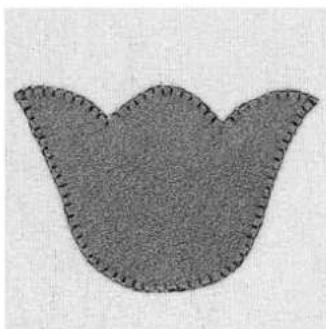
natural_image
Abstract gray pattern resembling a stylized flower or clover shape (no text or symbols)
TIP
- for a hand-stitched look, increase the stitch length and width when appliqueing heavy fabrics such as felt, flannel, and Ultra Suede®
Stipple stitch

Stitch: Stipple stitch No. 19
Needle: 80
Thread: machine thread
Feed-dog: sewing
Presser foot: Reverse pattern foot No. 1
Needle position: center
Preparation
- prepare a «quilt sandwich» by placing a layer of batting between the quilt top and the backing fabric (fabric will be right sides out)
- pin or baste layers together
Sewing
- place the quilt sandwich under the needle and sew the stipple stitch as desired across the fabric.

text_image
Scanned text of a document with dense vertical line pattern, likely a signature or official record.Handlook quilt stitch
| | | Stitch: | Hand-look quilt stitch No. 20 |
| Needle: | 80 Quilting, Jeans, Sharp, or Microtex | |
| | | Thread: | 0.044 monofilament for the upper thread and 40 or 30 weight cotton for the lower thread |
| | | ||
| Feed-dog: | sewing | |
| | | Presser foot: | Reverse pattern foot No. 1 or Walking foot No. 50 (optional) |
| Needle position: | as desired | |
| Tension: | tighten to 6–9 | |
| Balance: | adjust if necessary |
Preparation
- prepare a «quilt sandwich» by placing a layer of batting between the quilt top and the backing fabric (fabric will be right sides out)
- pin or baste layers together
Sewing
- place the quilt sandwich under the needle and sew the hand-look quilt stitch as desired across the fabric
- the bobbin thread should pull to the surface of the fabric and give the appearance of a hand-sewn running stitch
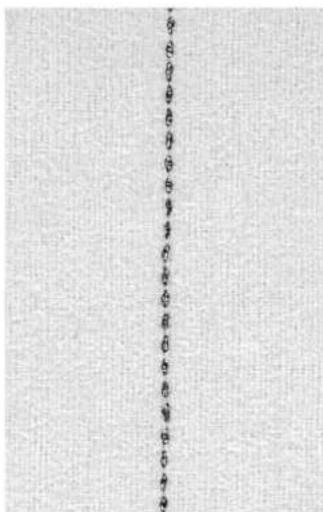
text_image
Vertical Chinese text on textured background, likely a document or label with vertical alignment
TIP
• moderate speed for best results
Feather stitch

Stitch: Feather stitch No. 22
Needle: 80
Thread: machine thread
Feed-dog: sewing
Presser foot: Reverse pattern foot No. 1 or
Open Embroidery Foot No. 20
Needle position: center
Use this delicate embroidery stitch to embellish fabric or to cover patchwork seams.
Preparation
- piece patchwork shapes as desired
Sewing
- place the fabric under the needle and position it so the center portion of the stitch will fall «in-the-ditch» of the seam
- stitch, embellishing seams as desired

natural_image
Close-up of a textured surface with a vertical seam or seam, showing parallel grooves (no text or symbols)
TIP
• for variety, increase or decrease the length and width of the pre-programmed feather stitch