
MC 1.0 - Meter VDO - Free user manual and instructions
Find the device manual for free MC 1.0 VDO in PDF.


| Product Type | Bicycle Computer with Altimeter |
| Brand | VDO |
| Model | MC 1.0 |
| Dimensions (Computer Head) | 45 x 52 x 16 mm |
| Weight (Computer Head) | 45 g |
| Power Supply | 3V CR 2032 battery |
| Speed Range | 2.5 to 120 km/h |
| Trip Distance | Up to 999.99 km/mi |
| Odometer per Bike | Up to 99,999 km/mi |
| Total Odometer | Up to 199,999 km/mi |
| Navigator (Second Trip Counter) | Up to 999.99 km/mi |
| Altitude Range | -380 m to 6500 m (-1247 to 21325 ft) |
| Inclinometer / Grade Display | Refresh every 4 sec, increments of 1% |
| Temperature Range | -19°C to 60°C (-4°F to 140°F) |
| Clock Modes | 12h or 24h |
| Language Options | 7 languages (English, German, French, Italian, Dutch, Spanish, Polish) |
| Service Interval Indicator | Every 750 km / 468 mi |
| Sleep Mode | After 5 min inactivity, display off (clock remains) |
| Mounting System | Twist-Click handlebar holder with wired sensor and spoke magnet |
| Included Accessories | Handlebar holder, sensor, cable, rubber shim, spoke magnet, 5 cable ties, battery, manual |
| Warranty | 5 years for original purchaser (excluding batteries) |
| Operating Temperature (LCD) | -15°C to +80°C |
Frequently Asked Questions - MC 1.0 VDO
User questions about MC 1.0 VDO
0 question about this device. Answer the ones you know or ask your own.
Ask a new question about this device
Download the instructions for your Meter in PDF format for free! Find your manual MC 1.0 - VDO and take your electronic device back in hand. On this page are published all the documents necessary for the use of your device. MC 1.0 by VDO.
USER MANUAL MC 1.0 VDO
natural_image
Diagram of a mechanical component with a red arrow indicating direction, no text or symbols present



natural_image
Line drawing of a coffee maker with lid and side cups (no text or symbols)

natural_image
Line drawing of hands using a tool to adjust a device with a red arrow indicating direction (no text or symbols)
flowchart
graph TD
    A["ENJOY YOUR HC 10"] -->|automatic| B["LAN GUAGE ENGL"]
    B --> C["SPRA CHE DEUT"]
    C --> D["LAN GUE FRAN"]
    E["JEZYK POLSK"] --> F["TAAL HEDL"]
    F --> G["LEW GUA ESPAN"]
    G --> H["LIN GUA ITAL"]
    style A fill:#f9f,stroke:#333
    style B fill:#ccf,stroke:#333
    style C fill:#cfc,stroke:#333
    style D fill:#fcc,stroke:#333
    style E fill:#cff,stroke:#333
    style F fill:#ffc,stroke:#333
    style G fill:#cfc,stroke:#333
    style H fill:#fcc,stroke:#333


radar
| MPH | Value | |---|---| | 47-305 | 16x1,75 | | 47-406 | 20x1,75 | | 34-540 | 24x1 3/8 | | 47-507 | 24x1,75 | | 23-571 | 26x10 | | 40-559 | 26x1,5 | | 44-559 | 26x1,6 | | 47-559 | 26x1,75 | | 50-559 | 26x1,9 | | 54-559 | 26x2,00 | | 57-559 | 26x2,125 | | 37-590 | 26x1 3/8 | | 20-571 | 26x3/4 | | 32-630 | 27x1 1/4 | | 40-622 | 28x1,5 | | 47-622 | 28x1,75 | | 40-635 | 28x1 1/2 | | 37-622 | 28x1 3/8 | | 18-622 | 700x18C | | 20-622 | 700x20C | | 23-622 | 700x23C | | 25-622 | 700x25C | | 28-622 | 700x28C | | 32-622 | 700x32C | | 37-622 | 700x37C | | 40-622 | 700x40C | | 32-630 | 27x1 1/4 | | 40-622 | 28x1,5 | | 47-622 | 28x1,75 | | 40-635 | 28x1 1/2 | | 37-622 | 28x1 3/8 | | 18-635 | 700x18C | | 20-635 | 700x20C | | 23-635 | 700x23C | | 25-635 | 700x25C | | 28-635 | 700x28C | | 32-635 | 700x32C | | 37-635 | 700x37C | | P9
flowchart
graph TD
    A["Start at TRIP DIST Press MODE 1 for 3 sec."] --> B["Press MODE 2 to select between KMH and MPH"]
    B --> C["Press MODE 1 to set WS1"]
    C --> D["Press MODE 2 to increase"]
    D --> E["Press MODE 1 to switch and MODE 2 to increase continue for all 4 digits"]
    E --> F["Press MODE 1 to end"]
    F --> G["Press MODE 1 to switch"]
    G --> H["Press MODE 2 to increase"]
    H --> I["Press MODE 1 to set WS2 Press MODE 1 3 sec. to end without setting WS2"]
    I --> J["End"]
flowchart
graph TD
    A["SET Clock"] --> B["Press MODE 1 3sec.to start"]
    B --> C["Press MODE 2 to switch between 24h or 12h"]
    C --> D["Press MODE 1 to set the hours"]
    D --> E["MODE 2 to increase the hours"]
    E --> F["Press MODE 1 to set the minutes"]
    F --> G["Press MODE 2 to increase the minutes"]
    G --> H["Press MODE 1 to set the hours"]
    H --> I["Press MODE 2 to switch between 24h or 12h"]
    I --> J["Press MODE 1 to end"]
    J --> K["Press MODE 1 3 sec. to end"]
    K --> L["Press MODE 2 to end"]

flowchart
graph TD
    A["Set Navigator\nWSI 00\nKMH 00\nAGS 18.0X 20°C\nNAV1 GATOR 0.00"] --> B["Press MODE 2\nto increase"]
    B --> C["Press MODE 1\nto switch"]
    C --> D["Press MODE1 3 sec. to end\nafter you set the navigator"]
    E["Reset Navigator\nWSI 00\nKMH 00\nAGS 18.0X 20°C\nNAV1 GATOR 11111"] --> F["Press MODE 2\nto reset"]
    F --> G["WSI 00\nKMH 00\nAGS 18.0X 20°C\nNAV1 GATOR 11111"]

flowchart
graph LR
    A["Press MODE 1<br>3sec.to start"] --> B["Press MODE 2<br>to increase"]
    B --> C["Press MODE 1<br>to switch"]
    C --> D["Press MODE1<br>3 sec. to end after you set the odometer"]
    D --> E["End"]
BIKE CHECK

flowchart
graph TD
    A["Set Home altitude"] --> B["Press MODE 1\n3sec.to Enter Home Altitude"]
    B --> C["Re-calibrating altimeter"]
    C --> D["Press MODE 2\nto increase previous value\nHold down to quickly scroll"]
    D --> E["Press MODE 1\nto decrease previous value\nHold down to quickly scroll"]
    E --> F["Press ALTI\n3sec. to end"]
P18
Correction of actual altitude

Press ALTI 3sec.to Enter Real Altitude
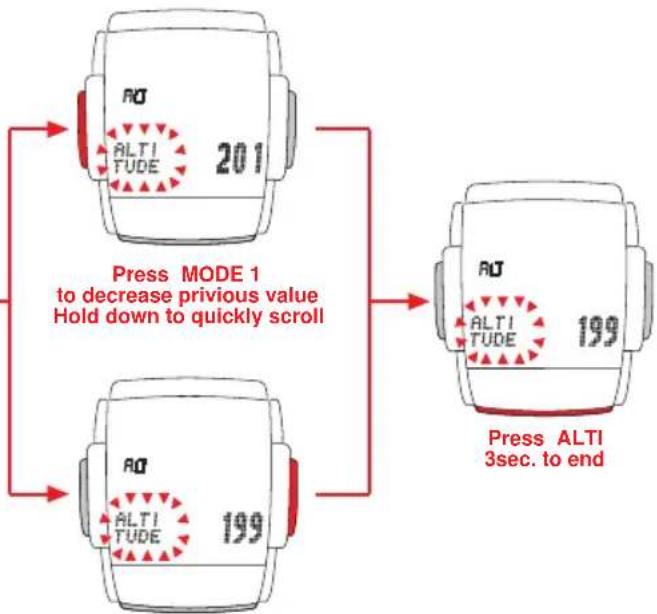
flowchart
graph TD
    A["Press MODE 1 to decrease previous value<br>Hold down to quickly scroll"] --> B["Press ALTI 3sec. to end"]
    B --> C["ALTI TUDE 199"]
    C --> D["ALTI TUDE 201"]
Press MODE 2 to increase previous value Hold down to quickly scroll
INSTALLATION AND OPERATION MANUAL - VDO MC 1.0
Index
Preface
Important information about the altimeter
- Mounting 2.7.1 Presetting the NAVIGATOR
1.1 Mounting cable sensor and magnet 2.7.2 Resetting the NAVIGATOR to zero
1.2 Mounting wire and VDO "any-size" handlebar holder 2.8 Presetting / programming the odometer
1.3 Twist-Click mounting of computer onto handlebarholder 2.9 Manual operation of the stopwatch
1.4 □ Installing the battery□ 3.□ Resetting information to zero
- □ Initial set-up of your VDO MC 1.0□ 4. □ SERVICE INTERVAL indicator
2.1 Basic information on how to operate your VDO MC 1.0 | 5. | SLEEP MODE
2.2 Interrogating information 6. Altimeter information of your VDO MC 1.0
2.3 □ Calling set-up mode□ 6.1 □ The home or basis altitude
2.3.1[Button / key covering in set-up mode]
2.4 Selecting your language
2.5 Selecting the wheel circumference (wheelsize)
2.5.1 How to determine the precise wheelsize
2.5.2 Entering (programming) the wheelsize
2.5.3 Switching wheelsizes (Changing from WS1 to WS2)
2.7 The NAVIGATOR
6.1.1 Significance of the home or basis altitude
6.1.2 Calibrating the altimeter to your home altitude or basis of choice
6.1.3 Re-calibrating the altimeter to absorb changes in barometric pressure
6.2 Correction of actual altitude
-
□ FAQ / Troubleshooting
-
□ Warranty
-
Packaging contents
Preface GB MC 1.0 Thank you trips are g
Thank you very much for buying a VDO MC 1.0 bicycle computer featuring an altimeter. The more familiar you get with this model, the more enjoyable your trips are going to be.
Hence, our urgent request:
Please read thoroughly all the information provided in this manual. You are getting important and useful hints for operation to make you fully benefit from all the technical features of your VDO MC 1.0.
We wish you enjoyable trips and rides on your bike with VDO
CYCLE PARTS GMBH
Important information about the altimeter
The altitude calculation works by measuring barometric pressure. Your VDO MC 1.0 converts the data of current barometric pressure into the respective altitude. Depending on the barometric pressure (weather) different altitude readouts for the same location may be displayed. That these barometric changes do not reflect in your altitude readout, your VDO MC 1.0 features an easy-to use barometric pressure re-calibration (see chapter 6.1.3)
Accurate calculation of altitude requires the precise determination of home or basis altitude.
To process barometric pressure data, there is a hole drilled into the bottom of the housing of your VDO MC 1.0
This hole must never be clogged or taped over.
Please do check on its cleanliness regularly and free the hole carefully if needed.
You must never poke a pointed instrument into the hole.
1.Mounting
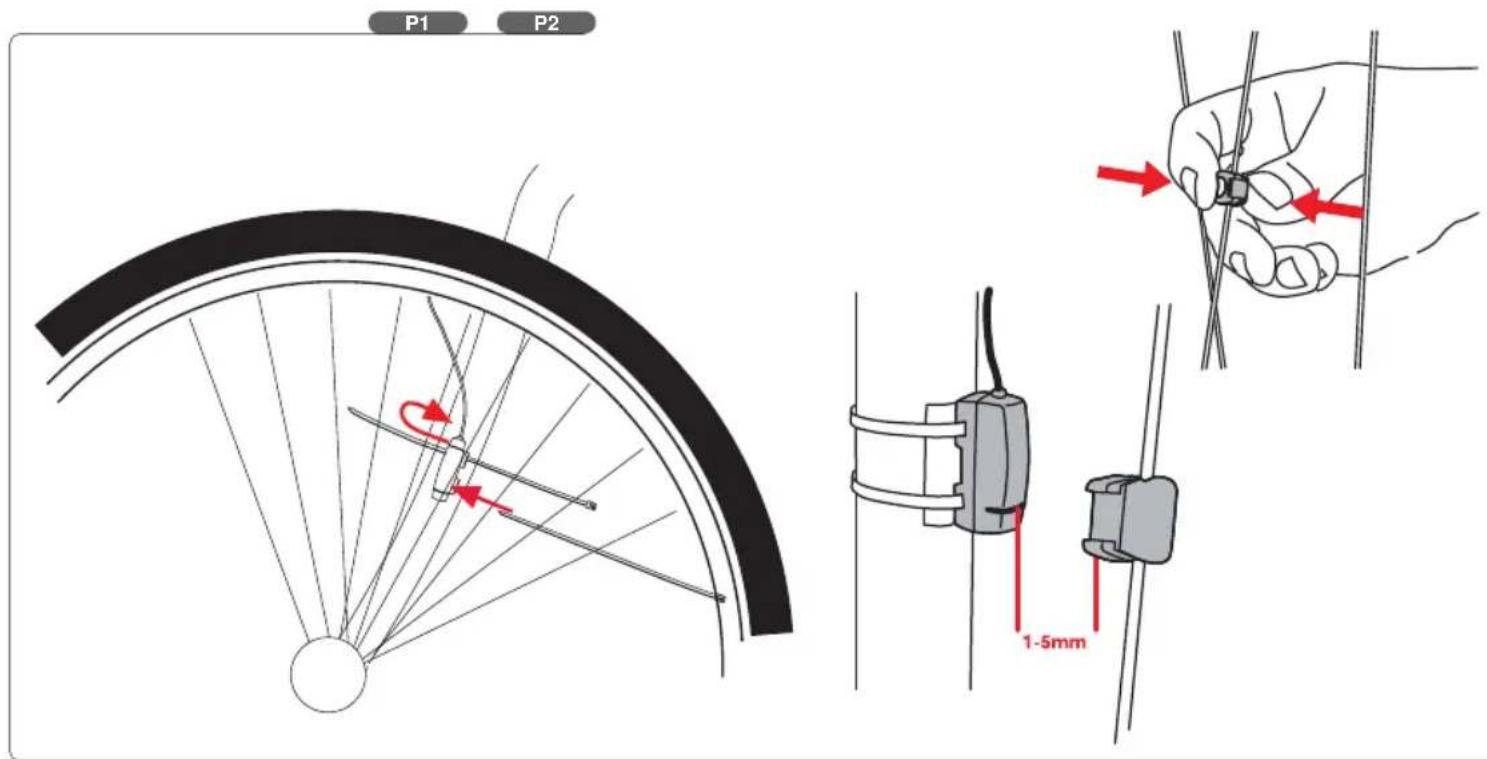
1.1 Mounting cable sensor and magnet
Important: mount the sensor first, then mount the wired handlebar holder as described under 1.2
Check the following while mounting:
a. II Distance between the sensor and magnet: 1 to 5 mm
b. Ⅱ When mounting the sensor on a suspension fork, don't forget to allow extra length for the cable. WATCH OUT: cable may tear
step 1: □Loosely attach the sensor on the fork leg with cable ties (do not tighten yet).
step 2: Mount the magnet on a spoke. Adjust the magnet to the marking on the sensor (distance 1-5 mm).
step 3: When adjustment has been done finalise mounting by tightening cable ties and clamping magnet.
1.2 Mounting wire and VDO "any-size" handlebar holder
step 1: Run the cable up the fork, pass it around the brake cable from the already fixed sensor to the handlebar.
Use the enclosed cable ties or duct tape. Spiral the wire around the brake cable (this has proven to be the best solution).
step 2: [position the holder on the handlebar.]
step 3: feed the fixing clamp through the slot below the holder socket, pass the clamp around the handlebar and tighten it with a small screw driver.
Do not overtighten, the plastic screw might be damaged. Readjust the cable so that it will not be stretched during steering.
Finally tighten the zip ties holding the sensor.
P1+P2
P3
1.3 Twist-Click mounting of computer on to holder
The Twist-Click mounting has been exclusively developed for the new line of VDO CYTEC computers. The VDO MC 1.0 also features the Twist-Click-System. The computerhead is put onto the handlebar and by a right turn of the computerhead (TWIST) fixed to the holder (CLICK).
It is just as easy to remove the computerhead from the handlebar holder. Slightly push the computerhead down, twist it to the left, remove computerhead from handlebar holder.
P4
Watch out: Please remove the computerhead from the handelbar holder when you intend not to use your bike for a longer period of time. (battery power)
P5
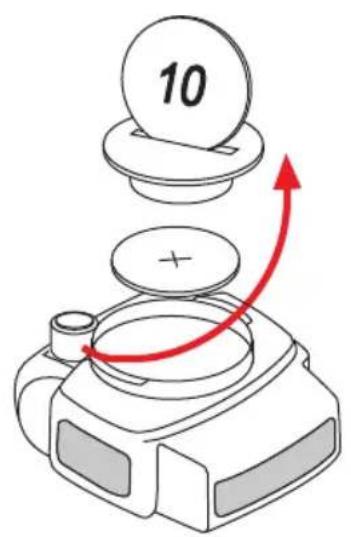
1.4 Installing the 3V battery (type 2032) into the computer head
To save battery power, your VDO MC 1.0 comes with the battery not yet fitted. Prior to initial use the batteries will first have to be installed with the positive pole on top.
Warning: Once the battery is installed your VDO MC 1.0 starts the set-up of display language (see also chapter 2.4 for details).
P6
If you find the computer is not functioning properly after the battery is changed, push the AC-button (Auto Clear) on the rear side of the computer to reset.
P7
2. Initial set-up of your VDO MC 1.0
2.1 Basic information on how to operate your VDO MC 1.0
Make sure you are familiar with the computers basic operating instructions before the initial set-up and use.
Your VDO MC 1.0 features 3 keys / buttons
Left ..... □Center.....□Right
MODE1.....□ ALTI.....□ MODE2
The display
The following information is permanently displayed:
- Current / actual speed in KMH or MPH accurate to +/- 0.5 KMH / MPH
- Symbol (MPH or KMH) for the measuring system selected,
- Wheelsize selected: Bike 1 (WS1) or Bike 2 (WS2)
- Symbols to compare actual speed and average speed (up-arrow, down-arrow, dot)
• ALTI - display of current / actual altitude - Current grade / inclination climbed or descended in %
• Current temperature in °C or °F

flowchart
graph TD
    A["Function\nTRIP DIST\nRIDE TIME\nAVG SPEED\nSTOP WATCH\nMAX SPEED\nMODE 1"] --> B["Display"]
    C["Function\nNAVI GATOR\nCLOCKII\nODO 1 METER\nODO 2 METER\nODO TOTAL\nMODE 2"] --> B
    B --> D["Function\nTRIP ALTI\nMAX ALTI\nAVG CLIMB\nMAX CLIMB\nTOTAL ALTI\nTOP ELVTN\nALTI"]
2.2 Interrogating information
With the MODE1 button you call up following information: TRIP DIST - RIDE TIME - AVG SPEED - STOP WATCH - MAX SPEED
TRIP DIST trip counter for your individual trip, counting to 999.99 km or mi
RIDE TIME|| trip timer featuring automatic start/stop function up to 19:59:59 h
AVG SPEED | average speed, accurate to two decimal points
STOP WATCH manually operated stop watch counting up to 19:59:59
MAX SPEED maximum speed achieved during a ride up to 199.5 km/h or mph
Important: If the ride timer overflows 19:59:59 h, it is automatically reset to 00:00:00. Simultaneously, your average speed counter AVG SPEED is reset to zero. If your trip counter overflows 999.99 KM or M, it is automatically reset to 000.00 Simultaneously, your average speed counter AVG SPEED and your ride timer RIDE TIME are reset to zero.
With the MODE2 button you call up following information: NAVI GATOR - CLOCK - ODO1 METER - ODO2 METER - ODO TOTAL
NAVI GATOR Second, manual trip counter, can be reset to zero individually, can be preset and counting up from there on.
CLOCK Time of the day in 12h or 24h mode
ODO 1 METER Odometer (sum of all trips) on Bike 1, up to 99.999 km or mi.
ODO 2 METER Odometer (sum of all trips) on Bike 2, up to 99.999 km or mi.
ODO TOTAL Odometer (sum of all trips on both bikes), sum of Bike 1 and Bike 2, up to 199.999 km or mi.
Important:] Switching conversions from mi to km at odometer 62.111 mi and up leads to a reset to zero of the odometer. (62.111 mi converts to approx 100.000 km but the display only holds 99.999 km max.)
With the ALTI button you call up following information: TRIP ALTI - MAX ALTI - AVG CLIMB - MAX CLIMB - TOTAL ALTI - TOP ELVTN
TRIP ALTI Indication of altitude gained / elevation climbed during the current trip as long as speed impulses are processed. Descended altitude is not counted.
MAX ALTI Indication of highest elevation reached during the current trip.
AVG CLIMB Indication of average inclination (in %) during the current trip.
MAX CLIMB Indication of maximum inclination (in %) during the current trip.
TOTAL ALTI Indication of total altitude climbed on all your trips for both wheelsizes WS1 + WS2
TOP ELVTN Indication of highest elevation reached for all your trips for both wheelsizes WS1 + WS2
2.3 Calling up set-up modes for computer / speedometer functions
Other than calling up various functions and informations, the MODE 1 key calls up any set-up mode. Calling up the set-up modes requires a 3 sec pressing of the MODE 1 key.
Set-up modes can be entered from various information displays:
| You want to set up: Display Information needed |
| Wheelsize 1 or Wheelsize 2 TRIP DIST |
| Clock CLOCK |
| Odometer for Bike 1 ODO 1 METER |
| Odometer for Bike 2 ODO 2 METER |
| Navigator, second trip counter NAVIGATOR |
2.3.1 Button / key covering in set-up mode
Once you have entered a set-up mode with MODE 1, the keys have the following (different) functions.
MODE 1 key: jump from digit to digit; exit set-up mode (pressing MODE 1 for 3 sec.)
MODE 2 key: increase/change of digit selected; selecting display symbols
2.4 Selecting your language
After installing the battery or pressing the AC-button your VDO MC 1.0 automatically requests a display language to be selected.
After installing the battery, your VDO MC 1.0 first greets you in English (by default) displaying "ENJOY YOUR MC1.0"
The VDO MC 1.0 will then automatically request you to select your display language.
The VDO MC 1.0 subsequently displays 7 languages:
ENTER LANGUAGE, -- EINGABE SPRACHE--CHOIX LANGUE--REGOL LINGUA--ENTER TAAL--AJUST LENGUA--USTAW JEZYK.
After this automatic scroll you can then select your language.
I.e. "LANGUAGE ENGL" will be in display
By pressing the MODE 2 key (right), the various languages will be displayed.
Process: LANGUAGE ENGL -M2-SPRACHE DEUT-M2-LANGUE FRAN -M2-LINGUA ITAL-M2-TAAL NEDL -M2-LENGUA ESPAN -M2-JEZYK POLSK
Once your language is displayed, press the MODE 1 key for 3 sec.
Your selected language is now stored, any further information is displayed in that language.
The display now shows TRIP DIST, if you have chosen English for your language.
2.5 Selecting the wheel circumference (wheelsize)
Your computer VDO MC 1.0 indicates your wheel size as WS (Wheelsize) = wheel circumference. Your VDO MC 1.0 is able to process two different wheelsizes for two different bikes (i.e. road bike and mountainbike) The following default values are preset
Wheelsize 1 WS1 = 2155 mm wheel circumference Wheelsize 2 WS2 = 2000 mm wheel circumference
Warning: After a battery change the above defaults are automatically applied. After a battery change, you have to re-enter the precise values for your bike(s).
2.5.1 How to determine the precise wheelsize
Place the front wheel of your bike with the valve at the bottom, mark this position with a line and push your bike ahead until exactly one rotation of the front wheel is completed. Draw another line where the valve now is. Take a ruler and measure the distance between marks 1 and 2 which reflects the wheelsize = wheel-circumference. The figure measured (inches or mm) is the wheelsize to be entered into your computer. see fig.□□□
If you have selected MPH readout you must enter your wheelsize in inches. Hence, altitude is displayed in ft and temperature in °F. If you have selected KMH readout you must enter your wheelsize in mm. Hence, altitude is displayed in m and temperature in °C.
Standard wheelsizes and respective values in mm and inches are shown in chart 1 (see page .....)
P8
P9
2.5.2 Entering (programming) the wheelsize(s)
Step 1: By pressing MODE 1 call TRIP DIST in your display.
Step 2: Press MODE 1 for 3 sec. In the upper part of the display you see "WS1" and "KMH" or "MPH" flashing. The lower part of the display alternately shows "ENTER MTRIC SYSTM" and "KMH" or "ENTER ENGL SYSTM" and "MPH".
Step 3: With MODE 2 you choose whether you want kilometers=KMH oder miles=MPH as a measuring unit.
Step 4: ☐ Once the conversion of KMH or MPH has been chosen, you proceed by briefly pressing (0.1 sec) MODE 1. The lower part of the display now ☐ alternates "ENTER WHEELSIZE1" and 2155. The last number "5" flashing.
Step 5: ☐ With MODE 1 and MODE 2 you enter your measured wheelsize 1 (bike1). MODE 2 increases the flashing number MODE 1 jumps to the next number, ☐ see set-up mode.
Step 6: ☐ Once you have entered the last number of wheelsize 1 and press the MODE 1 button, the computer automatically jumps to the setup mode for ☐ wheelsize 2. The lower part of the display alternately shows "ENTER WHEELSIZE2" and 2000 with the last number "0" flashing. Enter your wheelsize 2 as described in Step 5.
Step 7: ☐ Once you have entered wheelsize 2, press MODE 1 for 3 sec to exit set-up mode. The computer will return to displaying TRIP DIST.
Warning: Exiting setup procedure before having completely entered the precise wheelsize may lead to faulty readouts.
2.5.3 Switching wheelsizes (changing from WS1 to WS2)
To change from wheelsize 1 to wheelsize 2 and vice versa press and hold MODE1 and MODE2 simultaneously for 3 sec.
Warning: Once you have switched from wheelsize 1 to wheelsize 2 or vice versa following Tripdata of wheelsize 1 or 2 is automatically reset to zero: TRIP DIST, RIDE TIME, AVG SPEED, MAX SPEED, TRIP ALTI, AVG CLIMB, MAX ALTI, MAX CLIMB. All of these values are newly calculated after switching the wheelsize.
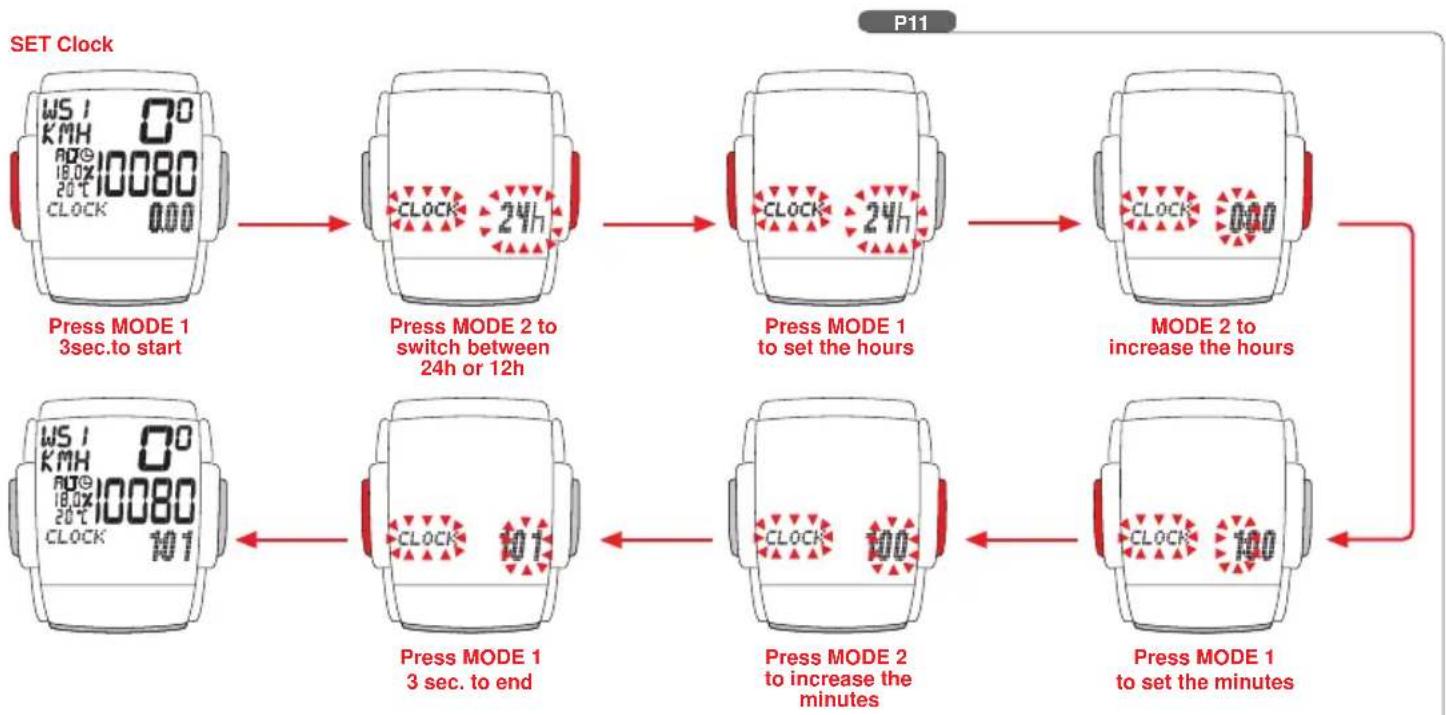
2.6 Setting the clock CLK
Your VDO MC 1.0 features a clock with hour and minute display in either 12 h or 24 h mode.
To access the clock setup mode proceed as follows:
Step 1: MODE 2 calls the CLK information into your display
Step 2: Press the MODE 1 for 3 sec. The set-up mode for the clock starts. The lower part of the display alternately shows "ENTER CLOCK" and "24" and "12"
Step 3: With MODE 2 you choose whether you want your time in a 24 or 12 hour mode.
Step 4: With MODE 1 you start the hour setup. The hour display will be flashing and can be changed with MODE 2.
Step 5: With MODE 1 you start the minute setup. The minute display will be flashing and can be changed with MODE 2.
Step 6: Once hours and minutes are correctly entered, you exit CLK set-up mode by pressing MODE 1 for 3 sec.
P11
2.7 The NAVIGATOR
The NAVIGATOR is a second, individual trip distance counter that can be:
- manually reset to zero
- preset to a certain value, the trip distance is then counted from this value.
The NAVIGATOR is very helpful following road book instructions or tour suggestions of bike magazines.
For example, your road book tour wants you "to go straight for a mile and then make a right turn, then go on for half a mile and make a sharp left turn". These instructions can be precisely followed by using the NAVIGATOR. Once you have arrived at the first intersection after the first mile, you reset the NAVIGATOR to zero and and follow the next leg for half of a mile. At the second intersection you reset to zero again and follow the next instruction of your road book.
The NAVIGATOR can be preset and proceed from this individual value. For example, you are unable to start your tour at the point 0 km/m, but at 5.3 km. This value can be preset / entered into the NAVIGATOR. The NAVIGATOR will then count on from 5.3 km. Should you have made a wrong turn, return to that spot and enter your leg distance anew, continue to follow your roadbook instructions
2.7.1 Presetting the NAVIGATOR
Step 1: MODE 2 calls NAVIGATOR into display
Step 2: Press MODE 1 for 3 sec. The lower part of the display alternately shows "ENTER NAVIGATOR" and "000.00" with the last digit "0" flashing.
Step 3: By pressing MODE 2 you increase the flashing number, by pressing MODE 1 you jump to the next number 000.00, etc.
Step 4: Once the NAVIGATOR is preset, exit setup mode by pressing MODE 1 for 3 sec. The display shows NAVIGATOR and the preset value. Your VDO MC 1.0 will be counting on from this preset value.
2.7.2 Resetting the NAVIGATOR to zero
Step 1: 1 MODE 2 calls NAVIGATOR into display
Step 2: Press MODE 2 for 3 sec., the value indicated is being reset to zero. Your VDO MC 1.0 will be counting on from zero.
Warning: Before resetting to zero, make sure the information NAVIGATOR is called in. If NAVIGATOR is not in the display, you are accidentally re-setting other information to zero.
2.8 Presetting (programming) the odometer
After a battery change, you can re-enter previous odometer values (for both bikes) into your VDO MC 1.0.
Step 1: [ ] With MODE 2 call "ODO1 METER" or "ODO2 METER" into display, depending which one of these values you want to re-enter.
Step 2: Press MODE 1 for 3 sec. The lower part of the display alternately shows "ENTER ODO1 METER" or "ENTER ODO2 METER" plus the respective value with the last number flashing.
Step 3: 1 With MODE 2 you increase the number, with MODE 1 you jump to the next number etc.
Step 4: ] Once you have entered your values for ODOMETER 1 and ODOMETER 2, you exit set-up mode by pressing MODE 1 for 3 sec.
2.9 Manual operation of the STOPWATCH
Your VDO MC 1.0 features a manual stopwatch in addition to the ride-timer with automatic Start/Stop function. The manual stopwatch is counting up to 19:59:59 HH:MM:SS There are two ways to call in the stopwatch and simultaneously start it:
Direct Start: By pressing M1 and M2 briefly the stopwatch is called in and started simultaneously. Starting downhill a brief pressing of M1 and M2 will do to call in the stopwatch and start it at the same moment.
Delayed Start: By pressing MODE1 the stopwatch is called in. By then pressing MODE1 and MODE2 briefly the stopwatch is started. With the stopwatch running you might as well call further information in your display. The stopwatch will keep running in the background. Display indication will show that the stopwatch is running.
3. Resetting information to zero
By pushing MODE2 for 3 sec information / data is reset to zero.
Following trip data is simultaneously reset to zero: TRIP DIST--RIDE TIME--AVG SPEED--MAX SPEED--TRIP ALTI--MAX ALTI--AVG CLIMB--MAX CLIMB
Following data may be individually reset to zero, if desired so:
NAVI GATOR
Call NAVI GATOR information in your display. Push M2 for 3 sec to reset this data to zero.
STOP WATCH
Call STOP WATCH information in your display. Push M2 for 3 sec to reset this data to zero.
TOTAL ALTI--TOP ELVTN--ODO TOTAL
These summarizing functions (total altitude climbed / highest elevation reached Total Odometer) are especially protected to unintended erasing / resetting. These informations can only be reset by changing battery or by pressing AC-button on backside of computer.
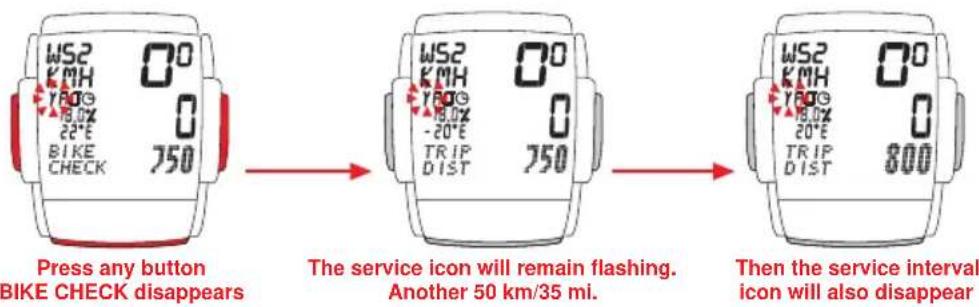
4. Service Interval Indicator
Your VDO MC 1.0 features a Service Interval Indicator to remind you to have your bike serviced at your trusted bike shop.
The service interval reminder is indicated separately for both your bikes.
Every 750 km / 468 mi, the service icon is activated.
The service icon flashes and the lower part of the display shows "BIKE CHECK"
By pressing any of the buttons, the "BIKE CHECK" information disappears. Other information can still be reviewed. The flashing service icon will remain in display.
After another 50 km / 35 mi, the service interval icon will also disappear.
5. Sleep-Mode
Your VDO MC 1.0 features SLEEP-Mode. During SLEEP-Mode the display is shut down. The clock, and if activated, the service interval icon and/or the stopwatch icon, remain displayed.
Your VDO MC 1.0 automatically goes into SLEEP-Mode after 5 min if
- no buttons are pressed
• no speed impulses are processed
SLEEP-Mode is terminated if
- any button is pressed
• speed impulses are processed
6. Altimeter information of your VDO MC 1.0
Your VDO MC 1.0 does permanently display following altimeter-information:
• current altitude in meters of feet
• current incline or grade in %
• current temperature in °C or °F
Important: Current incline or grade is displayed in increments of 1%. A negative grade (descent) is indicated by a negative sign.
The current incline / grade information is calculated every 4 sec (display refresh) by incorporating the TRIP DIST and TRIP ALTI information of the last 12 sec. Should you have climbed AND descended during the last 12 sec due to hilly conditions, the correct indication may be delayed.
Information to be called in by pushing the ALTI button
TRIP ALTI--MAX ALTI--AVG CLIMB--MAX CLIMB--TOTAL ALTI--TOP ELVTN
TRIP ALTI Indication of altitude climbed during the current / actual trip. Only positive changes in altitude are measured when speed impulses are processed simultaneously.
MAX ALTI Indication of the highest altitude reached during the current / actual trip.
AVG CLIMBI Indication of the average grade (in %) for the current / actual trip.
MAX CLIMB Indication of the maximum grade (in %) for the current / actual trip.
TOTAL ALTI Indication of total altitude climbed during ALL previous trips.
TOP ELVTN Indication of the highest elevation reached during ALL previous trips.
6.1. The home altitude or basis altitude of choice
6.1.1. Significance of the home or basis altitude
The altitude calculation works by measuring barometric pressure. Your VDO MC 1.0 converts the data of current barometric pressure into the respective altitude. In order for your VDO MC 1.0 to indicate altitude and climbing precisely, your home or basis altitude must be entered before. The current barometric pressure is allocated to the home altitude entered. Changes in barometric pressure due to weather changes require a re-calibration (= changed barometric pressure allocated to home altitude).
Your VDO MC 1.0 features the easy-to-use ALTI-correction (see chapter 6.1.3). Based on this this new home altitude (=changed barometric pressure of start location) all further measurings are calculated.
For your home altitude you enter the altitude of your start location (i.e. home) which can be obtained from topographical maps or inquired for at nearby airports. Changes in barometric pressure are only converted to altitude climbed when speed impulses are processed at the same time. This avoids changes in weather conditions reflect in changes of the gained altitude indication.
Accurate calculation of altitude requires the precise determination of home or basis altitude.
To process barometric pressure data, there is a hole drilled into the bottom of the housing of your VDO MC 1.0. This hole must never be clogged or taped over.
Please do check on its cleanliness regularly and free the hole carefully if needed. You must never poke a pointed instrument into the hole.
6.1.2. Setting up / entering your home or basis altitude
Step 1: By pressing ALTI call TRIP ALTI in the display. Push MODE1 for 3 sec ENTER HOME ALTI TUDE and its previous value will be displayed.
Step 2: By pressing MODE2 the previous value is increased. Hold down the button to quickly scroll. By pressing MODE1 the previous value is decreased. Hold down the button to quickly scroll. Display capacity from -300 to +6000 meters / -984 to +19685 feet.
Step 3: Once you have entered your home altitude, terminate set-up by pressing ALTI for 3 sec. TRIP ALTI information will be back in display. Depending on the home altitude entered the actual altitude may read out differently.
6.1.3. Re-calibrating the altimeter to absorb changes in barometric pressure
Changes in barometric pressure make your VDO MC 1.0 change the readout of the current / actual altitude. This new readout may differ from the value you have determined for your home altitude (= same location but changed barometric pressure). So before you go out for a ride, readjust the actual displayed altitude to your home altitude. The easy-to-use re-calibration feature allocates the changes in barometric pressure to the home altitude you have entered.
Step 1: Get TRIP ALTI in display
Step 2: Press Mode 1 for 3 sec will bring "ENTER HOME ALTITUDE in Display
Step 3: Press Mode1+Mode2-button for 3 sec.
Automatic recalibration of actual air pressure to your home altitude setting will be done, after that the display will show TRIP ALTI again.
6.2 Correction of actual altitude
While you ride, the airpressure changes due to your gain in altitude as well as due to a wether change. To correct that influence of the weather change you can also adjust the actual altitude display at your MC 1.0. Should you see a sign indicating actual altitude and should this altitude differ from the display readout at your MC 1.0, you can manually correct the actual altitude.
Step 1: Get any of the ALTI-informations in display
Step 2: Press the ALTI-button for 3 sec, the display will show "ENTER REAL ALTITUDE" and the actual value of the altitude.
Step 3: MODE 1 will decrease the value, MODE 2 will increase the value.
Step 4: After you have entered the corect real altitude, you leave the setting procedure by pressing ALTI-button for 3 sec.
7. Troubleshooting
This chart outlines possible malfunctions, their causes and removal.
| malfunctions□ most likely cause□ removal solutions□□ | ||
| irregular LCD readout□ computer software is not□ press AC-button at the rear of computer head to reset □□(i.e. after battery change)□ running smoothly□□□ | ||
| speed display does not appear□ check for proper distance between□ readjusting distance between sensor □□□sensor and magnet□ and magnet.□ □□□cable from sensor to computer broken □ check cable and replace if necessary. □ □□□computerhead is incorrectly twisted on □ place computerhead on handlebar □□□□handlebar holder□ holder and twist until detent (CLICK)□ □□□no wheelsize entered□ enter your wheelsize□□ | ||
| Display fades or disappears□ battery in computer empty□ check battery and replace if necessary.□□□temperatures below -15°C (40°F)□ Back in normal temperatures, display picks up working correctly. □□□dull display readout□□□ | ||
| No altitude readout □ computer in sleep-mode, not activated□ press any button to activate computer□□ | ||
| No altitude climbed indication□ no speed impulses processed□ see infomation "no speed display" above |
8. Warranty
We warranty VDO MC 1.0 (sensor, computer head and handlebar holder) to the original purchaser for five years from date of purchase against defects in material and workmanship. This does not cover the batteries and defects resulting from normal wear and tear, improper care, accidents, abuse or alteration.
Please take care to retain your receipt of purchase.
In case of legitimate complaints, you are entitled to receive a comparable replacement model. Due to possible model changes, your model might not be available any more.
You may contact your retailer or store where you purchased your VDO MC 1.0 or send the computer directly to us:
CYCLE PARTS GMBH
Grosse Ahlmuehle 33
76865 Rohrbach / Germany
In case of technical queries, call our consumer-service-hotline (German only) Phone
+49-6349-9635-20
Technical specifications of VDO MC 1.0 are subject to change.
- Technical data
| computer 45 x 52 x 16 mm 45 g | ||
| handlebar holder 15 g | ||
| batteries computer 3V, type 2032 | ||
| operating temperatures LCD-display -15 °C to +80 °C | ||
| speed range min 2.5 km/h max 120 km/h | ||
| trip distance counter up to 999.99 km or mi | ||
| NAVIGATOR up to 999.99 km or mi | ||
| Odometers 1 and 2 up to 99,999 km or mi | ||
| total odometer up to 199,999 km or mi | ||
| wheelsize 100 mm minimum 3999 mm maximum | ||
| altitude range -380 m / -1247 ft 6500 m / 21325 ft | ||
| temperature range -19 °C / -4 °F 60 °C / 140 °F | ||
| time window for inclinometer / display refresh min 4 sec max 20 sec |
10. Contents
1 computer head
1 handlebar holder with sensor, cable and screw
1 rubber shim for sensor mount
1 spoke magnet
5 cable ties
1 battery 3 V Type CR 2032
1 installation and operation manual
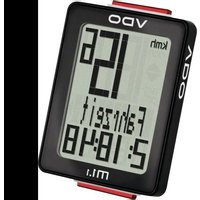
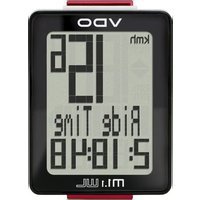
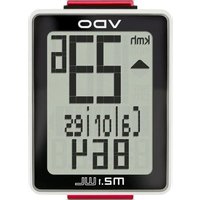
- INSTALLATION AND OPERATION MANUAL - VDO MC 1.0
- Index
- Preface
- Preface GB MC 1.0 Thank you trips are g
- Important information about the altimeter
- 1.Mounting
- Mounting cable sensor and magnet
- Mounting wire and VDO "any-size" handlebar holder
- Twist-Click mounting of computer on to holder
- Installing the 3V battery (type 2032) into the computer head
- Initial set-up of your VDO MC 1.0
- Basic information on how to operate your VDO MC 1.0
- Interrogating information
- Calling up set-up modes for computer / speedometer functions
- Button / key covering in set-up mode
- Selecting your language
- Selecting the wheel circumference (wheelsize)
- How to determine the precise wheelsize
- Entering (programming) the wheelsize(s)
- Switching wheelsizes (changing from WS1 to WS2)
- Setting the clock CLK
- The NAVIGATOR
- Presetting the NAVIGATOR
- Resetting the NAVIGATOR to zero
- Presetting (programming) the odometer
- Manual operation of the STOPWATCH
- Resetting information to zero
- NAVI GATOR
- STOP WATCH
- TOTAL ALTI--TOP ELVTN--ODO TOTAL
- Service Interval Indicator
- Sleep-Mode
- Altimeter information of your VDO MC 1.0
- The home altitude or basis altitude of choice
- Significance of the home or basis altitude
- Setting up / entering your home or basis altitude
- Re-calibrating the altimeter to absorb changes in barometric pressure
- Correction of actual altitude
- Troubleshooting
- Warranty
- Contents
Brand : VDO
Model : MC 1.0
Category : Meter