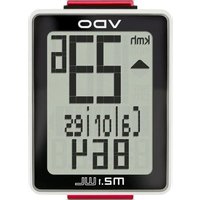
M2.1 WL - Meter VDO - Free user manual and instructions
Find the device manual for free M2.1 WL VDO in PDF.


Pick your language and provide your email: we'll send you a specifically translated version.
| Product Type | Wireless Bicycle Computer |
| Model | M2.1 WL |
| Brand | VDO |
| Dimensions (Display Unit) | Approx. 64 x 48 x 20 mm |
| Weight (Display Unit) | Approx. 35 g |
| Power Supply | 1 x CR2032 battery (3V) |
| Battery Life | Approx. 1 year under normal use |
| Transmission | Wireless (2.4 GHz or similar) |
| Functions | Current speed, average speed, maximum speed, trip distance, total distance, elapsed time, clock, stopwatch, auto start/stop |
| Display Type | LCD, multi-line |
| Wheel Size Setting | Manual input (mm) or preset values |
| Water Resistance | IPX4 (splash proof) |
| Mounting | Handlebar bracket with zip ties or rubber strap |
| Sensor Mount | Includes fork magnet and spoke magnet |
| Operating Temperature | 0°C to 50°C |
| Storage Temperature | -10°C to 60°C |
| Cleaning | Wipe with a damp cloth; avoid solvents |
| Safety | Do not use as primary navigation; ensure secure mounting |
| Spare Parts | Batteries, brackets, sensors available from VDO or retailers |
| Repairability | Battery user-replaceable; other repairs by service center |
Frequently Asked Questions - M2.1 WL VDO
How do I reset the trip distance on my VDO M2.1 WL?
Press and hold the SET button for about 2 seconds until the trip distance flashes, then press MODE to reset to zero.
How do I replace the battery?
Open the battery compartment on the back of the display unit with a small screwdriver. Replace with a CR2032 battery, ensuring correct polarity. Close the compartment securely.
Why is my speed showing 0 or erratic?
Check that the magnet on the spoke is aligned with the sensor on the fork, distance 2-5 mm. Also ensure the battery in the sensor (if wireless) is not dead.
How do I pair the sensor with the display?
The VDO M2.1 WL usually pairs automatically within a few seconds of wheel rotation. If not, remove and reinsert the display battery or press the PAIR button (if available) as per manual.
What is the correct wheel size setting?
Measure the wheel circumference in mm (e.g., 2124 for 700x25c). Input the value via the SET and MODE buttons. Refer to the manual for common values.
Is the computer waterproof?
It has an IPX4 rating, meaning it resists splashes but should not be submerged. Remove during heavy rain or car washes.
How do I switch between km/h and mph?
In the settings menu, navigate to the unit option and press SET to toggle. Confirm by pressing MODE.
What does 'WL' stand for?
WL stands for Wireless, indicating the sensor transmits data without a cable.
Can I use the computer on multiple bikes?
Yes, you can purchase additional sensor kits and mount the display on different handlebars. Ensure each sensor is paired properly.
How do I clean my VDO M2.1 WL?
Use a soft, damp cloth (no solvents). Avoid getting moisture inside the battery compartment. Dry thoroughly before using.
User questions about M2.1 WL VDO
0 question about this device. Answer the ones you know or ask your own.
Ask a new question about this device
No questions yet. Be the first to ask one.
Download the instructions for your Meter in PDF format for free! Find your manual M2.1 WL - VDO and take your electronic device back in hand. On this page are published all the documents necessary for the use of your device. M2.1 WL by VDO.
USER MANUAL M2.1 WL VDO

Manual assistant
Powered by Anthropic
Waiting for your message
Product information
Brand : VDO
Model : M2.1 WL
Category : Meter