MWG 2216 H EB - Microwaves BOMANN - Free user manual and instructions
Find the device manual for free MWG 2216 H EB BOMANN in PDF.


User questions about MWG 2216 H EB BOMANN
0 question about this device. Answer the ones you know or ask your own.
Ask a new question about this device
Download the instructions for your Microwaves in PDF format for free! Find your manual MWG 2216 H EB - BOMANN and take your electronic device back in hand. On this page are published all the documents necessary for the use of your device. MWG 2216 H EB by BOMANN.
USER MANUAL MWG 2216 H EB BOMANN
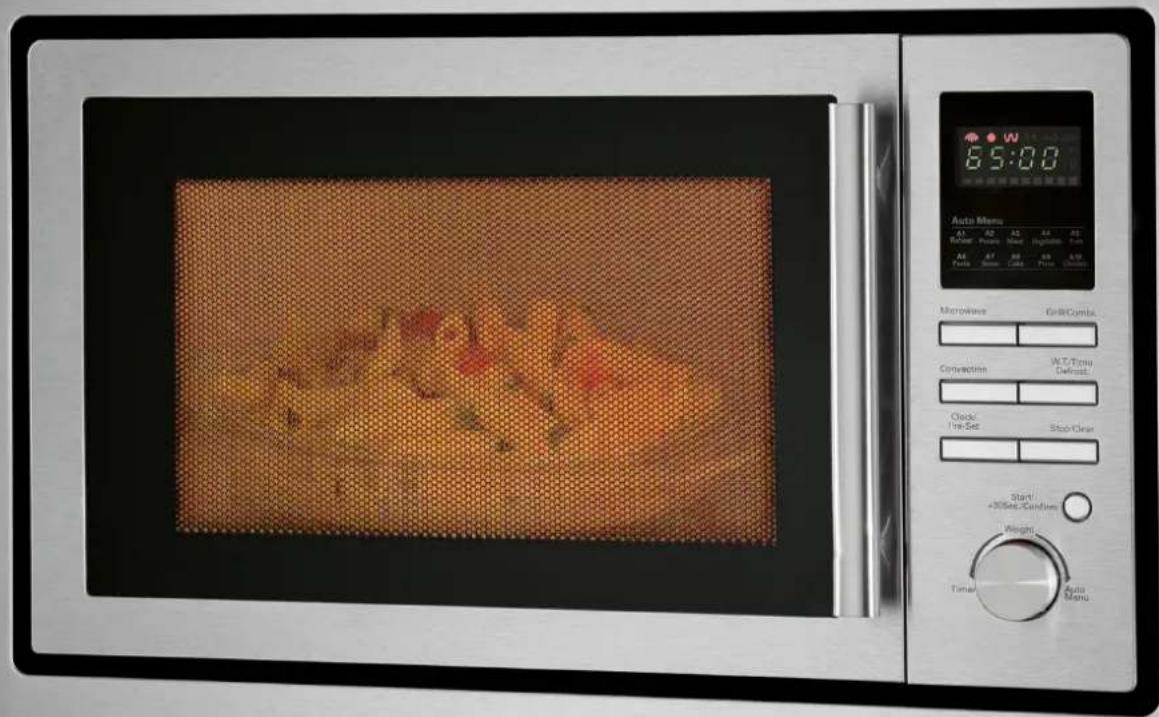
Microwave Oven with Grill and Hot Air
text_image
Auto Menu 6:5:00 W A1 A2 A3 A4 A5 Relear Potato Match Inglation Fan A1 A2 A3 A4 A5 A1 A2 A3 A4 A5 Auto Menu Microwave Cell/Combo Convection W.T./Time Default Clock/ Pre-Set Stop/Clear Start +30sec Condiam Weight Timer Auto MenuDEUTSCH
Inhalt
Overview of the Components ...... page 3
User manual......page 16
Table of Contents ...... page 16
Technical Specifications...... page 26
Disposal page 26
Overview of the Components
text_image
A 1 7 5 4 3 6 2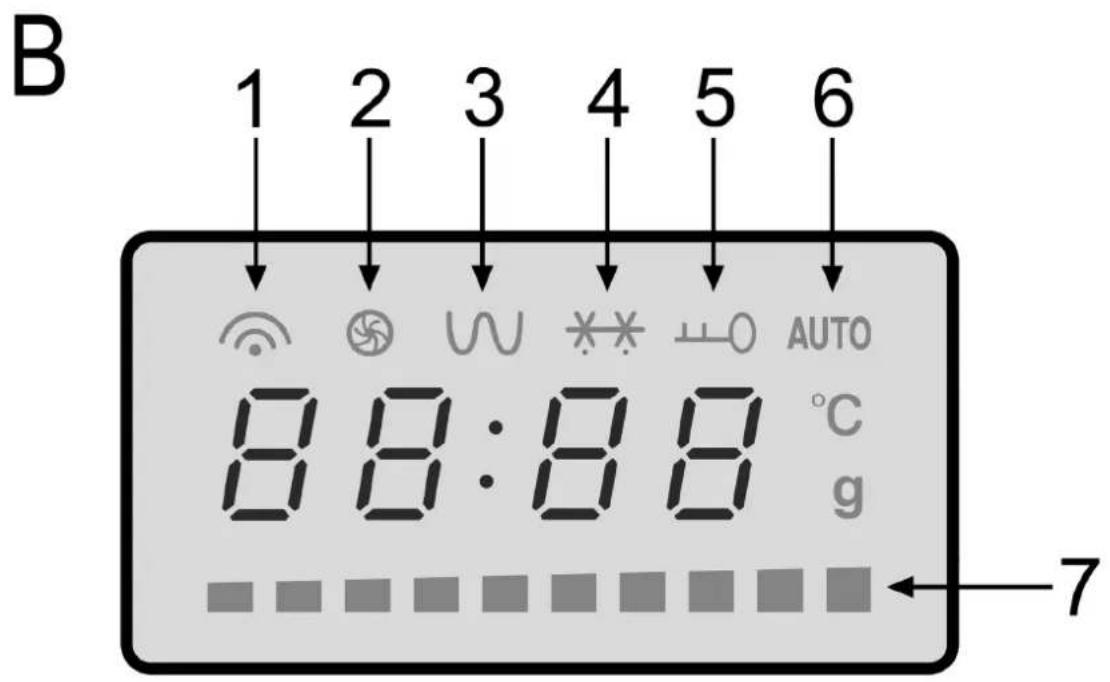
text_image
B 1 2 3 4 5 6 8 8:8 8 °C g 7△ ACHTUNG:
- Do not remove any installed parts from inside the oven or anything from the inside of the door!
• The foils on the inside of the door must not be removed!
Bedienungsanleitung
NOT REMOVE THIS COVER.
CAUTION: HOT SURFACE
Übersetzung:
Warnung-
Mikrowellenenergie-
natural_image
Technical line drawing of a door with internal fan and ventilation system (no text or symbols)| Display Mikrowelle Grill Heißluft | |||
| C-1 ● ● | |||
| C-2 ● ● | |||
| C-3 ● ● | |||
| C-4 ● ● ● | |||
Thank you for choosing our product. We hope you will enjoy using the appliance.
Read the operating instructions carefully before putting the appliance into operation and keep the instructions including the warranty, the receipt and, if possible, the box with the internal packing. If you give this device to other people, please also pass on the operating instructions.
Symbols in these Instructions for Use
Important information for your safety is specially marked. It is essential to comply with these instructions in order to avoid accidents and prevent damage to the machine:

WARNING:
This warns you of dangers to your health and indicates possible injury risks.

CAUTION:
This refers to possible hazards to the machine or other objects.

NOTE:
This highlights tips and information.
Table of Contents
General Notes 16
Important Safety Information! 16
Information Plates and Symbols on the Product 18
Overview of the Components 18
Switches on the control panel.... 18
Avoiding Fire Hazards with Built-in Appliances.... 18
Installation Instructions.... 19
Information on Grilling and Combined Operation 20
Suitable Microwave Tableware 20
Operation of the device 20
Initial Operation....20
Using the Device 21
Operation 21
Warming....21
Cooking....22
Quick start.... 23
Grilling 23
Convection 23
Combinations of microwave, grill and convection.... 23
Auto functions....24
Defrosting....24
Gradual cooking 24
Special functions 25
Cleaning....25
Troubleshooting....26
Technical Specifications.... 26
Disposal 26
General Notes
- The appliance is designed exclusively for private use and for the envisaged purpose. This appliance is not fit for commercial use.
- Do not use it outdoors. Keep it away from sources of heat, direct sunlight, humidity (never dip it into any liquid) and sharp edges. Do not use the appliance with wet hands. If the appliance is humid or wet, unplug it immediately.
- When cleaning or putting it away, switch off the appliance and always pull out the plug from the socket (pull the plug itself, not the lead) if the appliance is not being used and remove the attached accessories.
- Do not operate the machine without supervision. If you leave the room you should always turn the device off. Remove the plug from the socket.
- The device and the mains lead have to be checked regularly for signs of damage. If damage is found the device must not be used.
- Use only original spare parts.
- In order to ensure your children's safety, please keep all packaging (plastic bags, boxes, polystyrene etc.) out of their reach.

WARNING!
Do not allow small children to play with the foil as there is a danger of suffocation!
Important Safety Information!
Please read carefully and keep for future use.

WARNING:
- The microwave oven is intended for the heating of food and beverages. Drying of food or clothing and heating of heating pads, slippers, sponges, damp cleaning cloths and similar may result in injuries, ignition or fire.
- The microwave oven is not suitable for warming/heating up living animals.
- When the door or the door seals are damaged, the microwave oven must not be used until it has been repaired by a qualified specialist.
- Please do not repair the device yourself, but have it repaired by an authorised specialist. Carrying out maintenance or repair work which involves removal of the cover that protects the surroundings from microwave radiation is dangerous unless carried out by an expert.
- To avoid the exposure to danger, always have a faulty cable be replaced only by the manufacturer, by our customer service or by a qualified person and with a cable of the same type.
- Do not heat liquids in closed containers. DANGER OF EXPLOSION!
- The appliance and its accessible parts become hot during use. Care should be taken to avoid touching heating elements. Children less than 8 years of age shall be kept away unless they are continuously supervised.
WARNING:
- Only suitable tableware should be used such as: glass, porcelain, ceramics, heat-resistant plastic or special microwave tableware.
- If food is being heated or cooked in combustible materials, such as plastic or paper containers, the microwave oven should be checked frequently due to the risk of fire.
- If smoke is produced, turn the device off and remove the plug. Keep the door closed in order to suffocate any flames.
- The contents of babies' bottles and jars of baby food must be stirred or shaken and the temperature checked before use. There is a danger of burns.
- Use oven cloths or kitchen gloves when removing the containers. DANGER OF BURNS!
- Food with a shell or skin, such as eggs, sausages, sealed jars etc. must not be heated up in the microwave as they may explode even when heating by the microwaves is finished.
WARNING Delay in boiling:
During boiling, particularly during the reheating of liquids (water), it may happen that the boiling temperature has been reached but the typical bubbles have not yet started to rise. The liquid does not boil evenly. When the vessel is removed this so-called delay in boiling may result in the sudden formation of bubbles when the vessel is knocked, causing the water to boil over. There is a serious danger of burns! In order to achieve even boiling, please place a glass rod or similar item, but nothing metallic, in the vessel.
- This appliance can be used by children aged from 8 years and above and persons with reduced physical, sensory or mental capabilities or lack of experience and knowledge if they have been given supervision or instruction concerning use of the appliance in a safe way and understand the hazards involved.
• Children shall not play with the appliance. - Cleaning and user maintenance shall not be made by children unless they are older 8 years and supervised.
- Keep the appliance and its cord out of reach of children less than 8 years.
- Any dirt on the door frame/door seal and neighbouring parts must be carefully cleaned with a damp cloth.
- Clean the microwave oven regularly and remove any food residues from the interior.
- If the machine is not clean the surface may be damaged, affecting its serviceable life and possibly resulting in hazard-ous situations.
- Do not use any aggressive abrasive cleaners or sharp metal scrapers to clean the glass door. You could scratch the surface. This can destroy the glass.
- Steam cleaner is not to be used.
- Please do not operate the device with an external timer or a separate remote control system.
- This device is used
• for heating up and cooking solid or liquid foods
• for browning and grilling solid foods.
It is intended for the use in households and for similar applications, such as: - in staff kitchens of stores, offices, and other industrial areas;
- by guests of hotels, motels, and other housing facilities;
• in agricultural estates; - in bed and breakfasts.
Information Plates and Symbols on the Product
On the top of the microwave there is a hazard symbol with the following text:
WARNING-
MICROWAVE ENERGY-DO
NOT REMOVE THIS COVER.
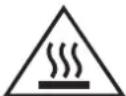
CAUTION: HOT SURFACE
During operation the temperature of the exposed surface may be very hot. Danger of burns!
On the back of the microwave there is an information plate with the following text:
WARNING
- MICROWAVE AND HIGH VOLTAGE INSIDE. BE SURE NOT TO REMOVE THE ENCLOSURE.
- THIS APPLIANCE IS EQUIPPED WITH A GROUNDED PLUG FOR YOUR PROTECTION AGAINST POSSIBLE SHOCK HAZARDS AND SHOULD BE CONNECTED TO A PROPERLY GROUNDED OUTLET.
• THIS DEVICE IS TO BE SERVICED ONLY BY PROPERLY QUALIFIED SERVICE PERSONNEL. - DISCONNECT POWER PLUG BEFORE SERVICING. REMOVAL OF THE ENCLOSURE WITH PRODUCT ENERGIZED COULD EXPOSE SERVICEMEN TO HAZARDOUS HIGH VOLTAGE POTENTIAL.
Overview of the Components
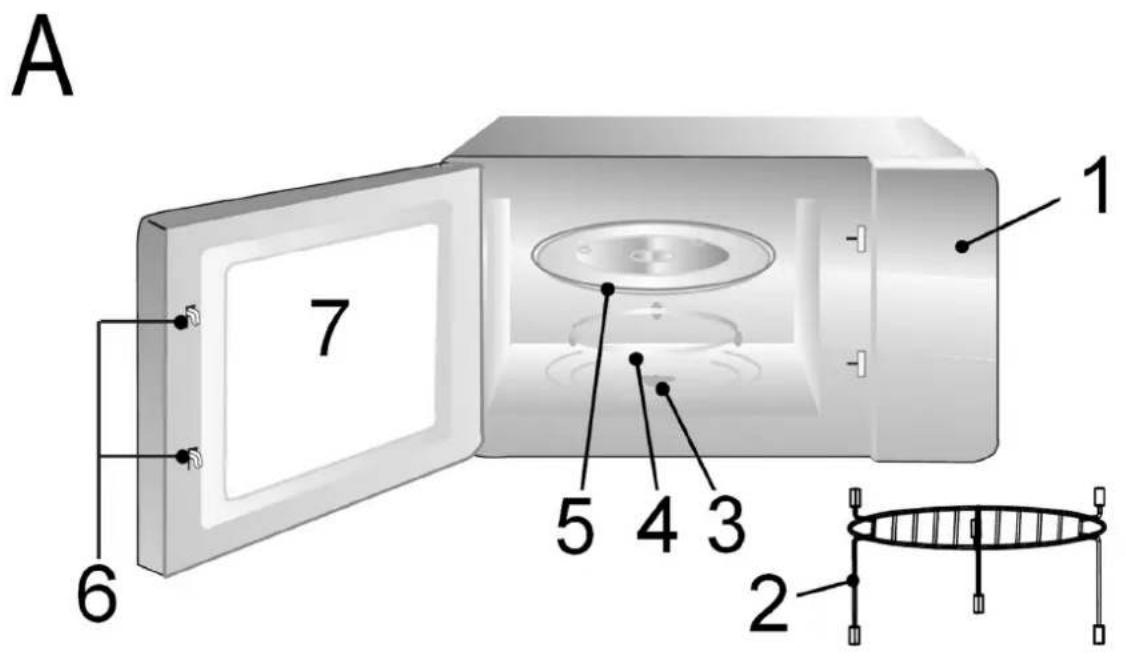
Picture A
| 1 | Control panel | 5 | Turntable |
| 2 | Grill | 6 | Door latches |
| 3 | Drive axle | 7 | Viewing window |
| 4 | Guide ring |
Picture B: Symbols on the control panel
| 1 | Microwave | 5 | Child-proof lock activated |
| 2 | Convection | 6 | Auto function |
| 3 | Grill | 7 | Temperature indicator |
| 4 | Defrost |
Switches on the control panel
MICROWAVE
Microwave: Select power setting of the microwave
GRILL/COMBI.
Grill: For roasting and scalloping Grill/Combi: Grill, microwave and convection operate in turns
CONVECTION
Convection: Convection without microwave operation; select a temperature.
W.T./TIME DEFROST
Defrosting by weight or time
CLOCK/PRE-SET
Clock: In combination with the turning knob for setting the clock or a starting time
STOP/CLEAR
Stop: Press once to stop cooking
Delete: Press twice to delete function
Sperren: Press and hold the STOP/CLEAR button for 3 seconds in order to lock (child-proof lock) or unlock the control panel
START/+30Sec./CONFIRM
- Starting the function
- Quick start of the microwave (always +30 seconds at 100% power)
- Prolonging the cooking time by 30 seconds during operation (except when defrosting or using auto function)
- Confirming a setting
TIMER • WEIGHT • AUTO MENU
Turning knob for setting the clock, cooking time, temperature, combi modes, auto functions or weight settings
Avoiding Fire Hazards with Built-in Appliances
Always observe the instructions contained in the section "Installation Instructions".
• Do not remove the feet on the bottom of the device.
- Only use the provided installation materials when mounting your device.
- When installing the microwave oven, please adhere to the dimensions shown in drawing 1.
• The rear wall of the cupboard must be removed!
- There is a ventilation slot at the bottom of the mounting frame. Keep it clear at all times.
Mounting accessories
| Pos. Piece Number | ||||
| A | 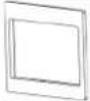 | Mounting frame 1 | ||
| B | 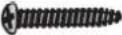 | Screw ,long 1 | ||
| C | 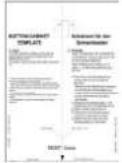 | Drilling template 1 | ||
| D |  | Screws ,short 2 | ||
| E |  | Mounting Bracket 1 | ||
Installation Instructions
This microwave oven must be installed in a tall cupboard. Please note the following instructions:
- Remove everything that is fragile from the adjacent cupboards.
-
For the installation, the cupboard must meet the following conditions:
-
The cupboard must not have any cracks, splinters or other damages. All joints must be stable.
• The cupboard must be designed to support at least 40 kg. - The microwave oven must be installed at a height of at least 85 cm.
- The rear wall of the cupboard must be removed to allow sufficient ventilation of the microwave oven.
- The side walls of the cupboard must be at least 19 mm thick.
-
The installation depth of the cupboard has to be at least 550 mm.
-
It is important that there is a power socket within reach of the device's power cable.
- The power socket must be easily accessible so that the plug can be quickly removed in case of an emergency.
- Important! Do not plug in the device until the installation has been completed!
• Further information and instructions can be found on the drilling template provided.

WARNING:
- Adhere to the dimensions given in the instructions.
- Only use the included installation accessories.
- Screws which are screwed in too deeply (or are too long) can damage the device or represent a potentially fatal safety hazard.
Dimensions of the Cupboard
Prepare a built-in cupboard /niche according to the following dimensional drawing Diagram 1.
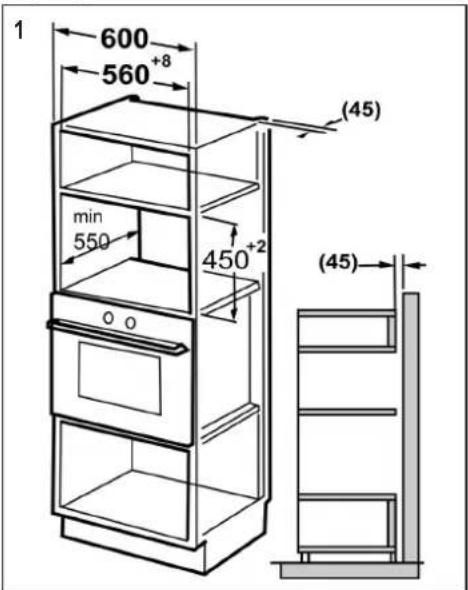
text_image
1 600 560 +8 min 550 450 +2 (45) (45)Installation (Steps. 2 to 4)

text_image
2 Ø3- Position the drilling template in the cabinet. Follow the instructions on the drilling template.
- Trace the drilling holes for the mounting bracket.
- Use the 2 short screws to attach the mounting bracket.
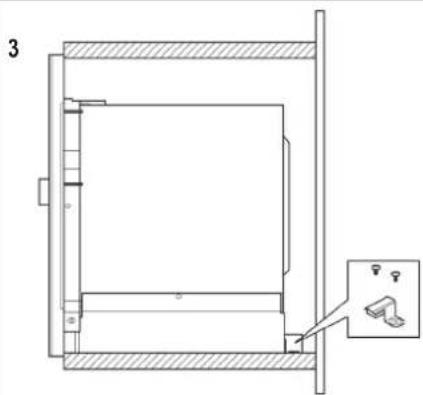
text_image
3Sectional drawing of the mounting bracket's position
4
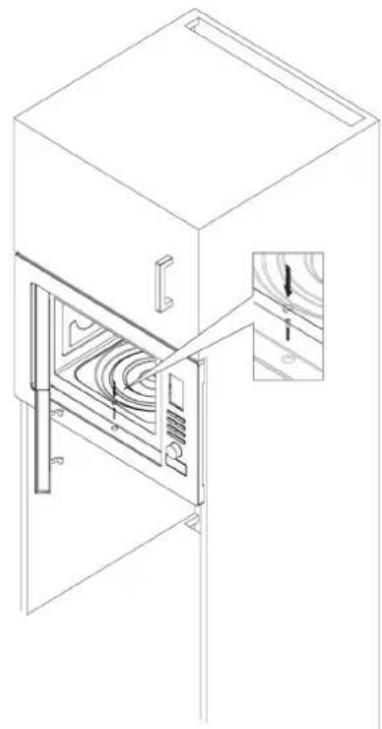
natural_image
Line drawing of a microwave oven with internal airflow patterns and a close-up inset showing airflow direction (no text or symbols)- Place the microwave oven in the cabinet and pull the mains cable.
• Fix the microwave oven using the long screw (B).
Information on Grilling and Combined Operation
- As heat radiation is used during grilling and combined operation, please use only heat-resistant tableware.
- When food is only being grilled, metal or aluminium tableware may also be used -but not during combined or microwave operation.
• Always leave the ventilation slits uncovered. - Please use the grilling grid to move the food to be cooked nearer to the heating element.
Suitable Microwave Tableware
- The ideal material for use in a microwave is transparent and allows the microwave radiation to heat the food evenly.
- Round/oval dishes and plates are more suitable than rectangular ones as the food in the comers may overcook.

CAUTION:
Danger of explosion from tightly sealed cookware.
- Open sealed containers before cooking or heating.
- Pierce plastic protective flms several times with a fork.
- Microwaves are not able to penetrate metal, so that no metal vessels or plates should be used.

CAUTION:
Do not use any paper dishes made of recycled material as these may contain small amounts of metal, which may result in sparks or fires.
The list below is intended to help you select suitable microwave tableware:
| Material | Suitable for | |||
| micro-wave | grill | Convection | combination* | |
| Heat-resistant glass vessel yes | yes yes | yes | ||
| Non-heat-resistant glass vessel | no no | no no | ||
| Heat-resistant ceramic vessel/plate | yes yes | yes yes | ||
| Plastic vessels suitable for microwave use | yes no | no no | ||
| Kitchen roll yes no no no | ||||
| Metal tray no yes yes no | ||||
| Grilling grid no yes yes no | ||||
| Aluminium foil and foil containers | no yes | yes no | ||
*) Combination of microwave with grill/convection or of grill with convection
Operation of the device
• A signal tone sounds when first turning the turning knob.
- Your selection by pressing buttons is confirmed by a signal tone. If not, you did not press properly.
- If you set a program but do not press the START/+30SEC./CONFIRM button within 5 minutes, the setting will be canceled. The display will then show the current time again.
- When starting a program (except during pre-heating), the remaining operating time will be displayed. The countdown runs.
- 5 signal tones will indicate the end of the program.
- The casing is cooled by a cooling fan. The cooling fan may continue to operate after a program is finished.
Initial Operation
• After removing all the accessories from inside the oven, unpack them and place the sliding ring in the middle.
- Position the glass plate on the drive axle in such a way that it locks into the dents of the drive shafts and is lying flat.
- Check the device for any visible damage, particularly in the area of the door. If any damage is found, the machine must not be used.
- In order to avoid interference to other machines when the microwave oven is operated, do not place it in the direct vicinity of other electronic devices.
- Remove any protective foils that may be adhered to the housing.
- Insert the mains plug into a properly installed 230 V\~, 50 Hz power socket.

CAUTION:
Do not remove any installed parts from inside the oven or from inside the door!
iNOTE:
If there are any oil or other residues from the manufacturing process on the housing or heating element, smoke or odours may initially be produced.
This is normal and will not occur after the oven has been used a few times.
The following procedure is strongly recommended:
- Turn the device to the grill function and allow it to run several times without any food inside.
- Please ensure sufficient ventilation.
Setting the clock:
i NOTE:
During the first setting a signal tone will sound and the display will show "0:00".
- Press the CLOCK/PRE-SET button once or repeatedly in order to toggle between 24 hour and 12 hour display mode.
- Use the turning knob to set the desired hour.
- Press the CLOCK/PRE-SET button to confirm your settings.
- Use the turning knob to set the desired minutes.
- Press the CLOCK/PRE-SET button again to activate the new time. The delimiter symbol “:” of the digital time will be flashing on the display.
Using the Device
What you should know about microwave operation
- Your device works with microwave radiation, which heats up water particles in food in a very short time. There is no heat radiation and therefore hardly any browning.
- Only food should be heated up with this device.
• The device is not suitable for baking in floating fat. - Only 1-2 portions should be heated up at the same time. Otherwise the microwave will become less efficient.
- Press the STOP/CLEAR button to stop the cooking process.
- Microwaves provide their full energy levels immediately. Preheating is therefore not necessary.
- Never operate the microwave function when the oven is empty.
- The microwave oven does not replace your traditional cooker. It is used mainly for:
• defrosting deep-frozen food
- rapid warming/heating of food or drinks
- cooking meals
Operation
- Place the food to be heated in a suitable piece of tableware.
- Open the door and place the vessel in the middle of the glass plate. Then close the door. (For safety reasons the oven only operates when the door is tightly closed.)
- Press the MICROWAVE button once/repeatedly to select the desired power setting. After pressing the button once you may also use the turning knob.
| Power setting on the display as selected in % | Power in Watt (approx.) | Application |
| P100 900 Quick heating | ||
| P 80 720 Cooking | ||
| P 50 450 Summering | ||
| P 30 270 Defrosting frozen food | ||
| P 10 90 Melting cheese etc. |
-
Press the START/+30SEC./CONFIRM button to confirm your settings.
-
Use the turning knob to set the desired cooking time between 5 seconds and 95 minutes.
-
Pres the START/+30SEC./CONFIRM button to start operation. The cooking time depends on the quantity and texture of the food. After a few times trying you will quickly learn to estimate the cooking time.
iNOTE:
• Each time pressing the START/+30SEC./CONFIRM button will prolong the operating time by 30 seconds.
- Cooking in a microwave is much faster than on a stove. If you are not sure, set a shorter cooking time and continue operation if necessary.
After the cooking time has elapsed the device will turn off and 5 signal tones will sound. Take the food from the device.
Pause or stop cooking
- If you wish to pause the cooking operation, press the STOP/CLEAR button once and open the door.
- If you wish to continue the cooking operation, close the door and press the START/+30SEC./CONFIRM button.
- If you wish to completely stop operation, press the STOP/CLEAR button twice.
Warming
The warming and heating of food is a particular strength of the microwave. Liquids and foods that are in the refrigerator can be easily brought up to room temperature or the right temperature for consumption without the need for many pots.
The heating times contained in the following table are only rough guides as the time depends very much on the starting temperature and the composition of the food. You are therefore advised to check from time to time whether the dish is already hot enough.
Heating Table
| Food/dish Quantity | Power stage | Approx. time in minutes | Cover | |
| Liquids | ||||
| Water, 1 cup 150 g P 100 | 0.5 - 1 no | |||
| Water, 0.5 l | 500 g | P 100 | 3.5 - 5 | no |
| Water, 0.75 l | 750 g | P 100 | 5 - 7 | no |
| Coffee, 1 cup | 150 g | P 100 | 0.5 - 1 | no |
| Milk, 1 cup | 150 g | P 100 | 0.5 - 1 | no |
| Tip: Put a glass stick into the container to avoid superheating; stir well before drinking. | ||||
| One-Course Meals | ||||
| Schnitzel, potatoes and vegetables | 450 g P | 100 2.5 | 3.5 yes | |
| Goulash with noodles | 450 g | P 100 | 2 - 2.5 | yes |
| Meat, dumpling and sauce | 450 g P | 100 2.5 | 3.5 yes | |
| Tip: moisten slightly beforehand, stir from time to time. | ||||
| Meat | ||||
| Schnitzel, coated with breadcrumbs | 200 g | P 100 | 1 - 2 | no |
| Meatballs, 4 in total | 500 g | P 100 | 3 - 4 | no |
| Joint | 250 g | P 100 | 2 - 3 | no |
| Tip: brush with oil so that the breadcrumbs or crust do not become soft. | ||||
| Poultry | ||||
| Half a chicken | 450 g | P 100 | 3.5 - 5 | no |
| Chicken fricassee | 400 g | P 100 | 3 - 4.5 | yes |
| Tip: brush with oil, stir from time to time. | ||||
| Extras | ||||
| Noodles, rice 1 portion 2 portions | 150 g | P 100 | 1 - 2 | yes |
| 300 g P | 100 2.5 | 3.5 yes | ||
| Potatoes 500 g P 100 3 - 4 yes | ||||
| Tip: moisten slightly beforehand. | ||||
| Soups/Sauces | ||||
| Clear soup, 1 plate 250 g | P 100 1 – | 1.5 yes | ||
| Soup with garnish 250 g P | 100 1.5 - | 2 yes | ||
| Sauce 250 g P 100 1 - 2 yes | ||||
| Baby Food | ||||
| Milk 100 ml P 50 0.5 - 1 no | ||||
| Mash | 200 g | P 50 | 1 – 1.5 | no |
| Tip: shake well or stir. Check the temperature! | ||||
Cooking
Practical Cooking Tips
Please keep to the recommended values in the cooking table and the recipes. Keep an eye on the cooking process until you have more experience.
The door of the microwave can be opened at any time. The machine switches off automatically.
It will only continue operation when the door is closed and the START/+30SEC./CONFIRM button pressed again.
Foods taken directly from the refrigerator require a slightly longer cooking time than those at room temperature.
The more compact a food is, the longer is the cooking time. For example, a large piece of meat has to be cooked longer than the same quantity of sliced meat. It is advisable to start cooking sizeable quantities on maximum power and then to continue cooking evenly on medium power.
Flat dishes cook faster than thick ones. Therefore it is advisable to spread the food as thinly as possible. Thinner pieces, e.g. chicken legs or fish fillets should be placed towards the inside or allowed to overlap.
Smaller quantities cook faster than large ones. The following rule of thumb applies:
Double the quantity = almost double the time Half the quantity = half the time
If you are not able to find a suitable time for a dish, the following rule applies:
approx. 1 minute cooking time for each 100 g.
All dishes which are covered up on a normal cooker should also be covered in the microwave oven.
A lid prevents the food from drying out. Suitable covers are an inverted plate, parchment paper or microwave foil. Dishes which are to be given a crust should not be covered when cooked.
Cooking Table
| Food/dish Quantity | Power stage | Approx. time in minutes | Cover | |
| Vegetables | ||||
| Aubergines | 500 g | P 80 | 7 - 10 | yes |
| Caulifl ower | 500 g | P 80 | 8 - 11 | yes |
| Broccoli | 500 g | P 80 | 6 - 9 | yes |
| Chicory | 500 g | P 80 | 6 - 7 | yes |
| Peas | 500 g | P 80 | 6 - 7 | yes |
| Fennel | 500 g | P 80 | 8 - 11 | yes |
| Food/dish Quantity | Power stage | Approx. time in minutes | Cover | |
| Green beans | 300 g | P 80 | 13 - 15 | yes |
| Potatoes | 500 g | P 80 | 9 - 12 | yes |
| Turnip cabbage | 500 g | P 80 | 8 - 10 | yes |
| Leek | 500 g | P 80 | 7 - 9 | yes |
| Maize cob | 250 g | P 80 | 7 - 9 | yes |
| Carrots | 500 g | P 80 | 8 - 10 | yes |
| Paprika | 500 g | P 80 | 6 - 9 | yes |
| Sprouts | 300 g | P 80 | 7 - 10 | yes |
| Asparagus | 300 g | P 80 | 6 - 9 | yes |
| Tomatoes | 500 g | P 80 | 6 - 7 | yes |
| Courgettes | 500 g | P 80 | 9 - 10 | yes |
| Tip: Cut the vegetables into small pieces and cook with 2 – 3 table-spoons of liquid, stir from time to time, continue cooking for 3 – 5 minutes, season just before serving. | ||||
| Fruit | ||||
| Stewed apple, pear | 500 g | P 80 | 5 - 8 | yes |
| Plum jam | 250 g | P 80 | 4 - 6 | no |
| Stewed rhubarb | 250 g | P 80 | 5 - 8 | yes |
| 4 baked apples | 500 g | P 80 | 7 - 9 | yes |
| Tip: add 125 ml water. Lemon juice prevents the fruit from changing colour. Cook for a further 3 - 5 minutes. | ||||
| Meat *) | ||||
| Meat with sauce | 400 g | P 80 | 10 - 12 | yes |
| Goulash, stewed strips of meat | 500 g | P 80 | 10 - 15 | yes |
| Roulade of beef | 250 g | P 80 | 7 - 8 | yes |
| Tip: stir from time to time, allow to stand for 3 - 5 minutes. | ||||
| Poultry *) | ||||
| Chicken fricassee | 250 g | P 80 | 6 - 7 | yes |
| Poultry soup | 200 g | P 80 | 5 - 6 | yes |
| Tip: stir from time to time, allow to stand for 3 - 5 minutes. | ||||
| Fish | ||||
| Fish fillet | 300 g | P 80 | 7 - 8 | yes |
| 400 g | P 80 | 8 - 9 | yes | |
| Tip: turn halfway through, continue cooking for 3 - 5 minutes. | ||||
| Defrosting and Cooking Vegetables | ||||
| Apple and red cabbage | 450 g | P 80 | 14 - 16 | yes |
| Leaf spinach | 300 g | P 80 | 11 - 13 | yes |
| Caulifl ower | 200 g | P 80 | 7 - 9 | yes |
| French beans | 200 g | P 80 | 8 - 10 | yes |
| Broccoli | 300 g | P 80 | 8 - 9 | yes |
| Peas | 300 g | P 80 | 7 - 8 | yes |
| Turnip cabbage | 300 g | P 80 | 13 - 15 | yes |
| Leek | 200 g | P 80 | 10 - 11 | yes |
| Corn | 200 g | P 80 | 4 - 6 | yes |
| Carrots | 200 g | P 80 | 5 - 6 | yes |
| Sprouts | 300 g | P 80 | 7 - 8 | yes |
| Spinach | 450 g | P 80 | 12 - 13 | yes |
| 600 g | P 80 | 15 - 17 | yes | |
| Tip: cook in 1 - 2 tablespoons of liquid, stir from time to time or divide carefully into pieces. Continue cooking for 2 - 3 minutes and season just before serving. | ||||
| Soups / Stews *) | ||||
| Stew | 500 g | P 80 | 13 - 15 | yes |
| Soup with garnish | 300 g | P 80 | 7 - 8 | yes |
| Crème soup | 500 g | P 80 | 13 - 15 | yes |
| Tip: stir from time to time and continue cooking for 3 - 5 minutes. | ||||
*) Ready-made meals
Quick start
You wish to heat food or drinks shortly at the highest power setting? There are two possibilities:
- Quick-start the microwave by directly pressing the START/+30SEC./CONFIRM button. The cooking process will start immediately, whereas each time pressing the button will prolong the cooking time by 30 seconds.
Or:
- Turn the turning knob towards the left. A signal tone sounds and the display will show "95:00". Set the time by turning the knob left or right. Press the START/+30SEC./CONFIRM button to start operation.
The power setting of the microwave is thereby 100%.
Grilling
For grilling please use the grilling grid. Use suitable heatresistant tableware or place the food to be grilled directly on the grid.
"Preheating" the grill is not necessary, as the grill produces radiant heat immediately.
Proceed as follows for roasting and scalloping:
- Press the GRILL/COMBI. button until "G-1" appears on the display.
- Press the START/+30SEC./CONFIRM button to confirm your settings.
- Use the turning knob to set the desired cooking time between 5 seconds and 95 minutes.
| Food/dish Quantity | Approx. time in minutes | Cover | |
| Toast gratinated with cheese | 2-3 slices 3-4 no |
- Press the START/+30SEC./CONFIRM button to start operation.
i NOTE:
After half of the time has elapsed, signal tones will alert you to turn the food over.
WARNING:
Only touch the door at the handle. Risk of burns!
After the time has elapsed, the device will turn off and 5 signal tones will sound. Take the food from the device.
Convection
The convection mode allows you too cook food as in a common stove. The microwave operation will not be active then. We recommend you pre-heating the device to the required temperature before placing the food inside.
Convection mode with pre-heating
- Press the CONVECTION button once/repeatedly to select a temperature between 130^ C and 220^ C. After pressing the button once, you may also use the turning knob.
- Press the START/+30SEC./CONFIRM button to confirm your settings.
- Press the START/+30SEC./CONFIRM button a second time to start pre-heating.
i NOTE:
- Every adjustable temperature setting (130°, 140°, 150°, 160°, 170°, 180°, 190°, 200°, 210°, 220°C) has an indicator. Z.B. 200°C = eighth bar.
iNOTE:
- During pre-heating operation this display will be flashing. The increasing bars on the display will be indicating the pre-heating process.
-
Two signal tones will sound when the desired temperature is reached. The pre-heating temperature will be flashing.
-
Open the door and place the food in the device.
WARNING:
Only touch the door at the handle. Risk of burns!
- Use the turning knob to set the desired cooking time between 5 seconds and 95 minutes.
iNOTE:
- You may not set the cooking time when the temperature has not yet been reached or when the door is closed.
-
If you do not set the cooking time within 5 minutes, the convection mode will be canceled. 5 signal tones will sound and the device will return to its original operation mode. The display will show the current time.
-
Press the START/+30SEC./CONFIRM button to start operation.
After the time has elapsed the device will turn off and 5 signal tones will sound. Take the food from the device.
Convection mode without pre-heating
- Place the food in the device.
- Press the CONVECTION button once/repeatedly to select the desired temperature between 130°C and 220°C. After pressing the button once you may also use the turning knob.
- Press the START/+30SEC./CONFIRM button to confirm your settings.
- Use the turning knob to set the desired cooking time between 5 seconds and 95 minutes.
- Press the START/+30SEC./CONFIRM button to start operation.
i NOTE:
The bars on the display will also in this case indicate the temperature reached. It will be flashing during the heating phase.
After the time has elapsed the device will turn off and 5 signal tones will sound. Take the food from the device.
Combinations of microwave, grill and convection
When using these settings, microwave, grill and convection will operate in turns.
| Display Microwave Grill Convection | |||
| C-1 ● ● | |||
| C-2 ● ● | |||
| C-3 ● ● | |||
| C-4 ● ● ● | |||
- Press the GRILL/COMBI. button once/repeatedly to select the desired combi setting. After pressing the button once you may also use the turning knob.
- Press the START/+30SEC./CONFIRM button to confirm your settings.
- Use the turning knob to set the desired cooking time between 5 seconds and 95 minutes.
- Press the START/+30SEC./CONFIRM button to start operation.
After the time has elapsed, the device will turn off and 5 signal tones will sound. Take the food from the device.
Tips on Combined Operation
If you prepare food using the combined microwave-grill functions you should note the following:
For large, thick foods such as roast pork the microwave time is correspondingly longer than for small, fl at foods. However, in the case of the grill it is the other way round. The closer the food is to the grill, the faster it turns brown. This means that when large joints are prepared using combined operation the grilling time may be shorter than for smaller joints.
Use the grill for roasting in order to achieve a quick and even browning. Place the grill on the short legs when roasting big, thick foodstuffs.
Auto functions
Use the auto functions to cook certain amounts of foods automatically. Proceed as follows:
- Turn the turning knob clockwise and select the desired auto function. Choose one of the settings given in the table below.
| Code | Fuction Display/Weight in gram | Power setting | |
| A1 | Heating | 150 | Microwave 100% |
| 250 | |||
| 350 | |||
| 450 | |||
| 600 | |||
| A2 | Potatoes | 1 / above 230 | Microwave 100% |
| 2 / above 460 | |||
| 3 / above 690 | |||
| A3 | Meat | 150 | Microwave 100% |
| 300 | |||
| 450 | |||
| 600 | |||
| A4 | Vegetables | 150 | Microwave 100% |
| 350 | |||
| 500 | |||
| A5 | Fish | 150 | Microwave 80% |
| 250 | |||
| 350 | |||
| 450 | |||
| 650 | |||
| A6 | Noodles/pasta | 50 (with 450 g water) | Microwave 80% |
| 100 (with 800 g water) | |||
| 150 (with 1200 g water) | |||
| A7 | Soup | 200 | Microwave 100% |
| 400 | |||
| 600 | |||
| A8 | Cake 475 | Convection with pre-heat-ing to 180°C | |
| A9 | Pizza | 200 | Microwave + convection + grill (C-4) |
| 300 | |||
| 400 | |||
| A10 | Chicken (roasted) | 500 | Microwave + convection + grill (C-4) |
| 750 | |||
| 1000 | |||
| 1200 | |||
- Press the START/+30SEC./CONFIRM button to confirm your settings.
- Use the turning knob to set the desired weight.
- Press the START/+30SEC./CONFIRM button to start operation.
After the time has elapsed the device will turn off and 5 signal tones will sound. Take the food from the device.
iNOTE:
During the A8 setting for cakes the device will pre-heat to 180^ C. 2 signal tones will sound when the temperature is reached. Open the door and place the cake inside. Press the START/+30SEC./CONFIRM button. The baking time of 45 minutes will start running.
Defrosting
Using the defrost settings you may automatically defrost your food in two different ways. Select the defrost function by weight and time.
- Repeatedly press the W.T./TIME DEFROST button to select one of the defrost functions:
dEF 1 Defrosting by weight btw 0.1 – 2.0 Kg
dEF 2 Defrosting by time vbtw 5 seconds - 95 minutes
- Use the turning knob to set the desired weight/time.
- Press the START/+30SEC./CONFIRM button to start operation.
After the time has elapsed the device will turn off and 5 signal tones will sound. Take the food from the device.
iNOTE:
In case the weight of the food is less than 200 g, place it on the edge and not in the center of the glass tray.
Gradual cooking
You can set the programs in such a way that up to 2 different functions are performed one after the other.
It is assumed you choose the following functions for cooking:
Heating with microwave

Roasting
- Press the MICROWAVE button once/repeatedly to select the desired microwave power setting.
- Press the START/+30SEC./CONFIRM button to confirm your settings.
- Use the turning knob to set the desired cooking time between 5 seconds and 95 minutes.
- Press the GRILL/COMBI. button until "G-1" appears on the display.
- Press the START/+30SEC./CONFIRM button to confirm your settings.
- Use the turning knob to set the desired cooking time between 5 seconds and 95 minutes.
- Press the START/+30SEC./CONFIRM button to start operation.
iNOTE:
When half of the roasting time has elapsed, signal tones will alert you to turn the food over.
WARNING:
Only touch the door at the handle. Risk of burns!
After the time has elapsed the device will turn off and 5 signal tones will sound. Take the food from the device.
iNOTE:
The auto functions and the convection mode with preheating may not be used for gradual cooking.
Special functions
Auto start
You may delay the start of microwave, grill, convection, auto functions or even of a combi setting. The maximum time-delay is 23 hours and 59 minutes.
i NOTE:
- First set the clock! Otherwise you may not use this function.
- When using auto start, the defrost function is not available.
Example: Proceed as follows for automatically starting the microwave:
- Press the MICROWAVE button once/repeatedly to select the desired microwave power setting.
- Press the START/+30SEC./CONFIRM button to confirm your settings.
- Use the turning knob to set the desired cooking time.
- Press the CLOCK/PRE-SET button. A signal tone sounds and the display will show the current time, with the first digit flashing.
- Use the turning knob to set the hour of the desired start time.
- Press the CLOCK/PRE-SET button. A signal tone sounds and the minutes will be flashing on the display.
- Use the turning knob to set the minutes of the desired start time.
- Press the START/+30SEC./CONFIRM button to confirm. The delimiter symbol ":" of the digital clock on the display stops flashing.
Example: 7:30 minutes cooking time at 100% power; start time 14:20 o'clock
| Step Button Display | ||||
| 1 MICROWAVE P100 | (Choose the performance settings) | |||
| 2 START/+30SEC./CONFIRM (Confirm) | ||||
| 3 |  | 7:30 (Cooking time) | ||
| 4 CLOCK/PRE-SET 10:45 (Current time) | ||||
| 5 |  | 14:45 (Set hour) | ||
| 6 CLOCK/PRE-SET 14:45 | ||||
| 7 |  | 14:20 (Set minutes) | ||
| 8 START/+30SEC./CONFIRM 10:45 (Current time) | ||||
i NOTE:
- During this programmed setting the functions of the controls are blocked (except: CLOCK/PRE-SET and STOP/CLEAR).
- If you wish to display the start time again, press the CLOCK/PRESET button.
- When the pre-set time has been reached, the microwave will start operation. Two signal tones will indicate the start.
WARNING: Risk of fire!
• Always supervise the device during operation.
- When using the time-delay function, set the time in such a way that the device will be operating under proper supervision.
- Do not operate the microwave empty.
- If you take the food earlier from the device, you will have to terminate the function by pressing the STOP/CLEAR button.
After the time has elapsed the device will turn off and 5 signal tones will sound. Take the food from the device.
Locking (Child-proof lock)
Press and hold the STOP/CLEAR button for more than 3 seconds to lock the device. The display will show the locked setting. The functions of the controls are blocked. Press and hold the STOP/CLEAR button again for more than 3 seconds to unlock.
Display function
- During microwaving, grilling, combined or hot air operation (without preheating) you can press the MICROWAVE, GRILL/COMBI or CONVECTION button for 2-3 seconds in order to show the current mode or temperature level.
- In disregard to the operation mode, the display will be showing the current time for 2-3 seconds when pressing the CLOCK/PRE-SET button.
- During time-delay mode, press the CLOCK/PRE-SET button to display the start time.
Cleaning
WARNING:
Turn the microwave off and remove the mains plug.
CAUTION:
- Do not use any wire brush or other abrasive objects.
- Do not use any acidic or abrasive detergents.
- Do not use a metal scraper to clean the viewing window. The surface could be scratched and the glass could possibly break.
Interior
- Keep the interior of the oven clean. Splashes and overflowing liquids on the walls of the oven can be removed with a damp cloth. If the oven is very dirty a mild detergent can also be used. Please do not use any abrasive detergents.
- Wipe off the viewing window on the inside and outside with a damp cloth and remove splashes and stains from overflowing liquids regularly.
External Walls
- The external walls of the microwave should only be cleaned with a damp cloth. Please ensure that no water enters the openings in the housing and therefore inside the device.
- The switches should also only be cleaned with a damp cloth. In order to clean the function switch, first open the microwave door to avoid switching on the device so accidentally.
Accessories
- The glass plate should occasionally be cleaned with washing-up liquid or in the dishwasher.
- The rotating ring and the inside floor of the oven should be cleaned regularly. The rotating ring can be removed and cleaned by hand. You may use a mild detergent or window cleaner for this. Please dry thoroughly afterwards. Ensure that the ring is put back in the correct position afterwards.
Odours
- In order to remove any unpleasant odours that may emanate from the microwave, place a dish filled with water and lemon juice that is suitable for microwave use in the oven and heat it for approximately 5 minutes. Then wipe out the oven with a soft cloth.
Oven light
- If you need to replace the lighting in the oven, please contact a specialist workshop near you.
Troubleshooting
Malfunctions are often just caused due to minor problems. Before contacting our customer service, please check the table below:
| Fault Possible Cause Notes/ Remedy | ||
| Radio or TV reception is interrupted during microwave operation. | The electromagnetic fields of this device might interfere with the pictures and sound of special frequencies. | This is normal and not a malfunction. Position the devices further away from each other. |
| The device is not supplied with electricity. | Faulty mains socket Try another socket. | |
| The display shows “0:00” | There was a power failure. | Set the clock again. |
| The device does not start operation. The display shows a readout other than the current time | The door is not properly closed. | Check if there are objects or food remains jammed in the door. |
| The START/ +30SEC./ CONFIRM button was not pressed after selecting the function. | Press the START/ +30SEC./ CONFIRM button, or press the STOP/CLEAR button to cancel the function. Press and hold the STOP/CLEAR button for more than 3 seconds to unlock. | |
| All controls are locked. | The child-proof lock is activated. | Press and hold the STOP/CLEAR button for more than 3 seconds to unlock. |
| The display shows the current time without the delimiter symbol “:” flashing. | The time-delay function is activated. Press the CLOCK/ PRE-SET button to display the start time. Press STOP/CLEAR button to terminate the function. | |
| The turntable causes a scratching or abradant noise. | There are dirt or foreign objects in the area of the turntable shaft. | Remove possible objects and food remains as described under “Cleaning”. |
| The operation is terminated without any obvious reason. | The device is broken. Please contact our service department. | |
Technical Specifications
Model: MWG 2216 H EB
Power supply: 230 V\~, 50 Hz
Power consumption:
Microwave: 1450 W
Grill: 1100 W
Convection: 2500 W
Rated microwave power output: 900 W / 2450 MHz
Cavity volume: 25 Liter
Protection class:....I
Net weight: 20.78 kg
The right to make technical and design modifications in the course of continuous product development remains reserved.
This device has been tested according to all relevant current CE guidelines, such as electromagnetic compatibility and low voltage directives, and has been constructed in accordance with the latest safety regulations.

Disposal
Meaning of the "Dustbin" Symbol
Protect our environment: do not dispose of electrical equipment in the domestic waste.
Please return any electrical equipment that you will no longer use to the collection points provided for their disposal.
This helps avoid the potential effects of incorrect disposal on the environment and human health.
This will contribute to the recycling and other forms of reutilization of electrical and electronic equipment.
Information concerning where the equipment can be disposed of can be obtained from your local authority.