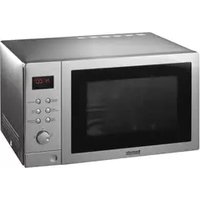
BTM25.5SS - Microwave BAUMATIC - Free user manual and instructions
Find the device manual for free BTM25.5SS BAUMATIC in PDF.


| Product Type | Convection Microwave Oven |
| Brand | Baumatic |
| Model | BTM25.5SS |
| Outside Dimensions (HxWxD) | 310 mm x 508 mm x 458 mm |
| Oven Cavity Dimensions (HxWxD) | 210 mm x 338 mm x 348 mm |
| Oven Capacity | 25 Litres |
| Net Weight | Approx. 22 kg |
| Power Supply | 230V, 50Hz |
| Power Consumption (Microwave) | 1400W |
| Power Consumption (Convection) | 1200W |
| Rated Microwave Power Output | 900W |
| Operation Frequency | 2450 MHz |
| Cooking Uniformity | Turntable System (Φ314 mm) |
| Control Panel | Digital display, dial, and touch buttons |
| Microwave Power Levels | 11 levels (100% down to 0%) |
| Convection Temperature Settings | 10 settings (95°C to 230°C) |
| Cooking Modes | Microwave, Grill, Convection, Microwave+Grill (2 combos), Microwave+Convection (4 combos), Speed Defrost, Auto-Menu (7 programs) |
| Clock and Timer | 24-hour clock, minute timer up to 95 min |
| Child Safety Lock | Yes |
| Quick Start | Yes, up to 10 minutes at 100% power |
| Interior Light | Yes, replaceable by service personnel |
| Cleaning | Wipe with damp cloth; avoid harsh cleaners; removable glass tray and roller ring |
| Built-in Installation | Possible with required ventilation and Baumatic building kit; not under induction hob |
Frequently Asked Questions - BTM25.5SS BAUMATIC
User questions about BTM25.5SS BAUMATIC
0 question about this device. Answer the ones you know or ask your own.
Ask a new question about this device
Download the instructions for your Microwave in PDF format for free! Find your manual BTM25.5SS - BAUMATIC and take your electronic device back in hand. On this page are published all the documents necessary for the use of your device. BTM25.5SS by BAUMATIC.
USER MANUAL BTM25.5SS BAUMATIC
BTM25.1SS Convection Microwave Oven

natural_image
Line drawing of a microwave oven with control panel and buttons (no text or symbols)Instruction Manual
A NOTE TO YOU
Thank you for buying a Baumatic appliance.
Baumatic appliances are easy to use, save time, and help you manage your home better.
This manual contains valuable information about how to operate and maintain your Microwave properly and safely.
Please read it carefully.

WARNING!
Precautions to avoid possible exposure to excessive
Microwave Energy:
1) Do not attempt to operate this oven with the door open since this can result in harmful exposure to microwave energy. It is important not to damage or tamper with the safety interlocks.
2) Do not place any object between the oven front face and the door or allow soil or cleaner residue to accumulate on sealing surfaces.
3) Do not operate the oven if it is damaged. It is particularly important that the oven door close properly and that there is no damage to the:
a. Door (bent),
b. Hinges and latches (broken or loosened),
c. Door seals and sealing surfaces.
4) The oven should not be adjusted or repaired by anyone except properly qualified service personnel.

PLEASE- ONLY HAVE A QUALIFIED PERSON INSTALL THIS APPLIANCE, ALL, REPAIRS MUST ONLY BE CARRIED OUT BY A BAUMATIC ENGINEER OR ITS AUTHORISED AGENTS OTHERWISE THIS WILL INVALIDATE YOUR WARRANTY.
TABLE OF CONTENTS
MICROWAVE SPECIFICATIONS....5
INSTALLING YOUR OVEN 5
GROUNDING INSTRUCTIONS....6
RADIO INTERFERENCE 6
IMPORTANT SAFETY INSTRUCTIONS....7
MICROWAVE COOKING PRINCIPLES 9
UTENSILS GUIDE 9
MICROWAVE PART NAMES....11
CONTROL PANEL 12
HOW TO SET THE OVEN CONTROLS 13
MICROWAVE COOKING 14
USING THE GRILL....15
CONVECTION 15
MICROWAVE + GRILL....16
MICROWAVE + CONVECTION 17
SPEED DEFROST (WEIGHT ADJUST)....17
AUTO-MENU SETTINGS 18
OTHER CONVENIENT FEATURES....19
CLEANING AND CARE 21
BEFORE YOU CALL FOR SERVICE 22
BUILT UNDER INSTALLATION FOR YOUR MICROWAVE....23
MICROWAVE SPECIFICATIONS
| Power Consumption: | 230V, 50Hz, 1400W (Microwave)850W (Convection)1200W |
| Rated Microwave Power Output: | 900W |
| Operation Frequency: | 2450MHz |
| Outside Dimensions: | 310mm(H)x508mm(W)x458mm(D) |
| Oven Cavity Dimensions: | 210mm(H)x338mm(W)x348mm(D) |
| Oven Capacity: | 25Litres |
| Cooking Uniformity: | Turntable System{Φ314mm} |
| Net weight: | Approx. 22Kg |
INSTALLING YOUR OVEN
1) Make sure that all the packing materials are removed from the inside of the door.
2) WARNING: Check the oven for any damage: such as misaligned or bent doors, damaged door seals or sealing surfaces, broken or loose door hinges and latches. Also dents inside the cavity or on the door. If there is any damage, do not operate the oven and contact qualified service personnel.
3) The microwave oven must be placed on a flat, stable surface to hold its weight and the heaviest food likely to be cooked in the oven.
4) Do not place the oven where heat, moisture, or high humidity are generated, or near combustible materials.
5) For correct operation, the oven must have sufficient airflow. Allow 20cm of space above the oven, 10 cm at back and 5cm at both sides. Do not cover or block any openings on the appliance. Do not remove the feet.
6) Do not operate the oven without the glass tray, roller support, and shaft in their proper positions.
7) Make sure that the power supply cord is undamaged and does not run under the oven or over any hot or sharp surface.
8) The socket must be readily accessible so that it can be easily unplugged in an emergency.
9) Do not use the oven outdoors.
GROUNDING INSTRUCTIONS
PLEASE NOTE: This appliance must be grounded. This oven is equipped with a cord with a grounding wire and a grounding plug. It must be plugged into a wall receptacle that is properly installed and grounded. In the event of an electrical short circuit, grounding reduces risk of electrical shock by providing an escape wire for the electric current. It is recommended that a separate circuit serving only the oven be provided. Using a high voltage is dangerous and may result in a fire or other accident causing oven damage.
WARNING: Improper use of the grounding plug can result in a risk of electric shock.
Note:
- If you have any questions about the grounding or electrical instructions, consult a qualified electrician or service person.
- Neither the manufacturer nor the dealer can accept any liability for damage to the oven or personal injury resulting from failure to observe the electrical connection procedures.
- The wires in this cable main are colored in accordance with the following code: Green & Yellow= EARTH Blue= NEUTRAL Brown= LIVE

RADIO INTERFERENCE
Operation of the microwave oven can cause interference to your radio, TV, or similar equipment.
When there is interference, it may be reduced or eliminated by taking the following measures:
- Clean door and sealing surface of the oven.
- Reorient the receiving antenna of your radio or television.
- Relocate the microwave oven with respect to the receiver.
- Move the microwave oven away from the receiver.
- Plug the microwave oven into a different outlet so that the oven and receiver are on different branch circuits.

When using the electrical appliance basic safety precautions should be followed, including the following.
To reduce the risk of burns, electric shock, fire, injury to persons or exposure to excessive microwave energy:
1) Read all instructions before using the appliance.
2) Use this appliance only for its intended use as described in this manual. Do not use corrosive chemical or vapours in this appliance. This type of oven is specifically designed to heat, cook or dry food. It is not designed for industrial or laboratory use.
3) Do not operate the oven when empty.
4) Do not operate this appliance if it has a damaged cord or plug, if it is not working properly of if it has been damaged or dropped. If the supply cord is damaged, it must be replaced by the manufacturer or its service agent or a similarly qualified person in order to avoid a hazard.
WARNING: only allow children to use the oven without supervision when adequate instructions have been given so that the child is able to use the oven in a safe way and understands the hazards of improper use.
5) To reduce the risk of fire in the oven cavity:
a. When heating food in plastic or paper containers, keep an eye on the oven due to the possibility of ignition;
b. Remove wire twist-ties from paper or plastic bags before placing bag in oven.
c. If smoke is observed, switch off or unplug the appliance and keep the door closed in order to stifle any flames.
d. Do not use the cavity for storage purposes. Do not leave paper products, cooking utensils or food in the cavity when not in use.
WARNING: Liquid or other food must not be heated in sealed containers since they are liable to explode.
6) Microwave heating of beverages can result in delayed eruptive boiling; therefore care has to be taken when handling the container.
7) Do not fry food in the oven. Hot oil can damage oven parts utensils and even result in skin burns.
BTM25.1SS
IMPORTANT SAFETY INSTRUCTIONS – CONT:
8) Eggs in their shell and whole hard boiled eggs should not be heated in microwave ovens as they may explode even after microwave heating has ended.
9) Pierce foods with heavy skins such as potatoes, whole squashes, apples and chestnuts before cooking.
10) The contents of feeding bottles and baby jars should be stirred and shaken and the temperature should be checked before serving in order to avoid burns.
11) Cooking utensils may become hot because of heat transferred from the heated food. Potholders may be needed to handle the utensil.
12) Utensils should be checked to ensure that they are suitable for use in a microwave oven.
WARNING: It is hazardous for anyone other than a trained person to carry out any service or repair operation which involves the removal of any cover which gives protection against exposure to microwave energy.
13) Group 2 ISM equipment: group2 contains all ISM equipment in which radio-frequency energy is intentionally generated and/or used in the form of electromagnetic radiation for the treatment of material, and spark erosion equipment, e.g. Domestic microwave ovens are mentioned inside this scope under Annex. Class B equipment is suitable for use in domestic establishments directly connected to a low voltage power supply network which supplies buildings used for domestic purposes.
BTM25.1SS
MICROWAVE COOKING PRINCIPLES
➢ Arrange food carefully. Place thickest areas towards outside of dish.
➢ Watch cooking time. Cook for the shortest amount of time indicated and add more as needed. Food severely overcooked can smoke or ignite.
➢ Cover foods while cooking. Covers prevent spattering and help foods to cook evenly.
➢ Turn foods over once during microwaving to speed cooking of such foods as chicken and hamburgers. Large items like roasts must be turned over at least once.
➢ Rearrange foods such as meatballs halfway through cooking both from top to bottom and from the centre of the dish to the outside.
UTENSILS GUIDE
The ideal material for a microwave utensil is transparent to microwaves, it allows energy to pass through the container and heat the food.
Microwave can not penetrate metal, so metal utensils or dishes with metallic trim should not be used.
Do not use recycled paper products when microwave cooking, as they may contain small metal fragments which may cause sparks and/or fires.
Round/oval dishes rather than square/oblong ones are recommended, as food in corners tends to overcook.
Narrow strips of aluminium foil may be used to prevent overcooking of exposed areas. But be careful to not use too much and keep a distance of 1 inch (2.54cm) between foil and cavity.
The list on the following page is a general guide to help you select the correct utensils.
BTM25.1SS
UTENSILS
| Cookware | Microwave | Grill | Convection | Combination* |
| Heat-resistant glass | Yes | Yes | Yes | Yes |
| Non heat – resistant glass | No | No | No | No |
| Heat – resistant Ceramics | Yes | Yes | Yes | Yes |
| Microwave –safe Plastic dish | Yes | No | No | No |
| Kitchen paper | Yes | No | No | No |
| Metal Tray | No | Yes | Yes | No |
| Metal Rack | No | Yes | Yes | No |
| Aluminium Foil and Foil container | No | Yes | Yes | No |
| Baking Plate | No | Yes | Yes | Yes |
* Combination: applicable for both "microwave +grill", and "microwave +convection" cooking.
BTM25.1SS
MICROWAVE PART NAMES
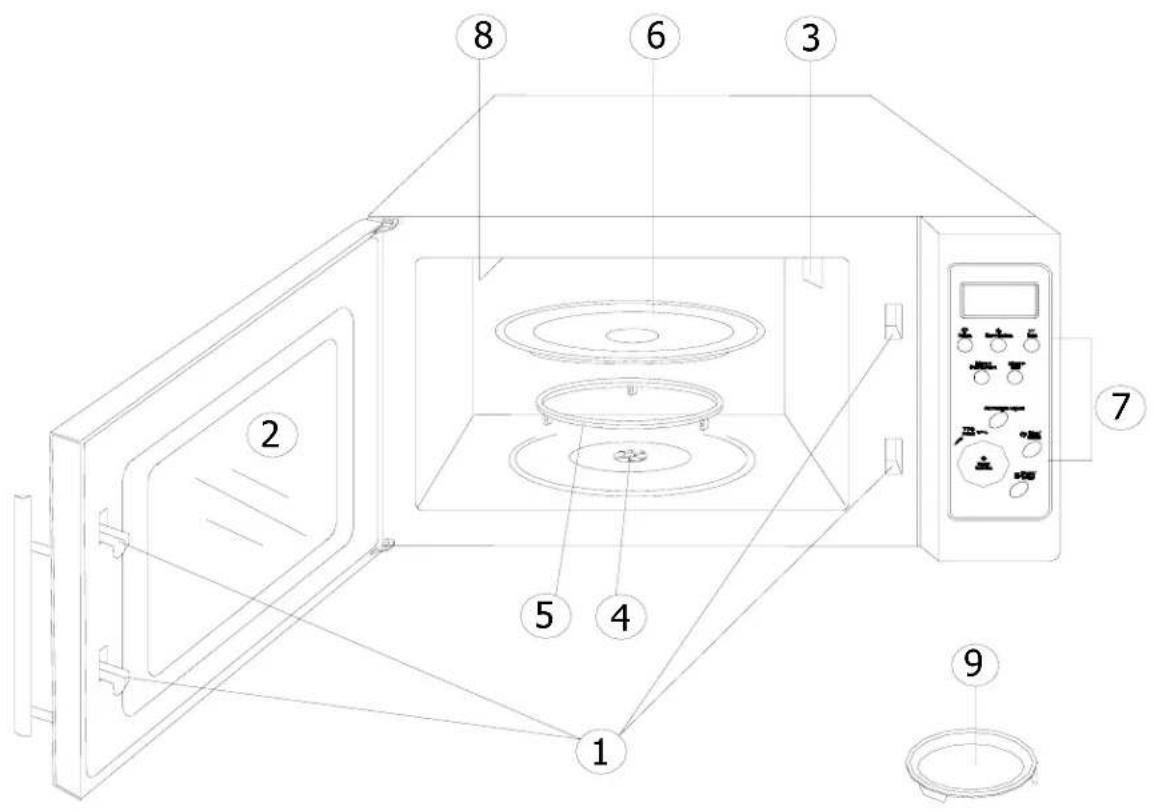
- Door safety lock system
- Oven Window
- Oven Air Vent
- Shaft
- Roller Ring
- Glass Tray
- Control Panel
- Grill Heater
- Baking Plate

CONTROL PANEL
DISPLAY SCREEN:
Cooking time, power, indicators and present time are shown
MICRO:
Press to select Microwave power level.
GRILL:
Press to set a grill cooking program.
CONVECTION:
Press to program convection temperature.
MICRO + GRILL:
Press to select one of two combination cooking settings.
MICRO + CONVECTION:
Press to select one of four combination cooking settings.
TIME/MENU (DIAL):
Rotate to set cooking time or select auto-menu.
START/QUICK START:
Press to start cooking program or set quick start cooking
WEIGHT ADJUST:
Press to select the amount of food or enter cooking time setting state.
STOP/RESET:
Touch to stop cooking program or clear all previous settings before cooking starts.
CLOCK/TIMER:
Press to set the clock or timer
(Please also see the following pages for more detail)
HOW TO SET THE OVEN CONTROLS:
- Beeps during Oven Settings:
- ONE BEEP: The oven accepts the entry
- TWO BEEPS: The oven does not accept the entry. Please check and try again.
- Setting the Clock:
- Press the CLOCK/TIMER button.
- Rotate the TIME/MENU dial until the correct hour is displayed.
- Press the CLOCK/TIMER button.
- Rotate the TIME/MENU dial until the correct minute is displayed.
- Press CLOCK/TIMER button to confirm.
NOTE:
- It automatically starts at a default setting of 1:00 when the oven is plugged in.
- To use the timer feature, holding down the CLOCK/TIMER button for at least 3 seconds and then turn the TIME/MENU dial to set a countdown time of up to 95 minutes.
MICROWAVE COOKING
Microwave cooking allows you to customise cooking power and time.
First, you select a power level by pressing the MICRO button a number of times (see the table below).
Then you set the cooking time by rotating the TIME/MENU dial, before pushing the START button.
| Press Microwave button to select cooking power | ||
| Press | Power | Description |
| once | 100% | (P-HI) |
| twice | 90% | (P-90) |
| 3 times 80% (P-80) | ||
| 4 times 70% (P-70) Medium High | ||
| 5 times 60% (P-60) | ||
| 6 times 50% (P-50) Medium | ||
| 7 times 40% (P-40) | ||
| 8 times 30% (P-30) Med. | Low/Defrost | |
| 9 times 20% (P-20) | ||
| 10 times 10% (P-10) Low | ||
| 11 times 0% (P-00) | ||
High
Suppose you want to cook for 5 minutes at 60% power level.
- Press the MICRO button 5 times
- Rotate the TIME/MENU dial until the correct cooking time :( 5:00) is displayed.
- Press the START button.
NOTE:
- If you want to temporarily stop a cooking session, press the STOP/RESET once and then you can start the cooking again by pressing START: or press the STOP/RESET twice to cancel the cooking program altogether.
- After the cooking time ends, the system will beep four times and END is displayed. Before starting another cooking session, you need to clear the display and reset the system by pressing the STOP/RESET button.
USING THE GRILL:
Grill cooking is particularly useful for thin slices of meat, steaks, chops, kebabs, sausages and pieces of chicken. It is also suitable for hot sandwiches and au gratin dishes.
Suppose you want to program grill cooking for 12 minutes:
- Make sure the system is reset, which means no current cooking program is running, and the system is waiting for instructions.
- Press the GRILL button.
- Turn the TIME/MENU to 12:00.
- Press the START button.
NOTE:
Grill cooking power is set at full power level by the system,
CONVECTION:
During convection cooking, hot air is circulated throughout the oven cavity to brown and make foods crisp quickly and evenly. This oven can be programmed for ten different cooking temperatures.
To Cook with Convection:
Press the CONVECTION button to set convection temperature.
| Press | Temperature (°C) |
| Once | 230 |
| Twice | 215 |
| 3 times 200 | |
| 4 times 185 | |
| 5 times 170 | |
| 6 times 155 | |
| 7 times 140 | |
| 8 times 125 | |
| 9 times 110 | |
| 10 times 95 |
Suppose you want to cook at 200^ C for 40 minutes.
- Press the CONVECTION button 3 times.
- Rotate the TIME/MENU dial until the correct cooking time is displayed.
- Press the START button.
NOTE:
- After time has elapsed four beeps sound and END appears in display. Press STOP/RESET button or open door to clear END before starting another cooking function.
- You can check the convection temperature while cooking is in progress by pressing the CONVECTION button.
BTM25.1SS
To Preheat and Cook with Convection
Your oven can be programmed to combine preheating and convection cooking operations.
Suppose you want to preheat to 140^ C and then cook 35 minutes:
- Press the CONVECTION button 4 times.
- Press the START button. One beep will sound and "PREH" will flicker in the display until the oven reaches the programmed temperature.
- Open the door and place container of food at the centre of the turntable.
-
Rotate the TIME/MENU dial to program cooking time.
-
Press the START button.
MICROWAVE + GRILL
This feature allows you to combine grill and microwave cooking on two different settings. First, press this button once or twice to choose an appropriate combination setting, then, at the screen prompt, enter the desired cooking time by turning the TIME/MENU dial. After you have pushed the start button, the system begins to count down.
COMBINATION 1
30 % time for microwave cooking, 70% for grill cooking. Use for fish, potatoes or au gratin.
Suppose you want to set combination 1 cooking for 25 minutes.
- Press the STOP/RESET button.
- Press the MICRO + GRILL button once.
- Turn the TIME/MENU to 25:00
- Press the START button.
COMBINATION 2
55% time for microwave cooking, 45% for grill cooking. Use for pudding, omelettes, baked potatoes and poultry.
Suppose you want to set combination 2 cooking for 12 minutes.
- Press the STOP/RESET button.
- Press the MICRO + GRILL button twice.
- Turn the TIME/MENU to 12:00
- Press the START button.
MICROWAVE + CONVECTION
This oven has four pre-programmed settings that make it easy to cook with both convection heat and microwave automatically.
Press MICRO + CONVECTION button to select convection temperature:
| Press Button | Oven Temperature (°C) | |
| COMB 1 | Once | 230 |
| COMB 2 | Twice | 200 |
| COMB 3 | 3 times | 170 |
| COMB 4 | 4 times | 140 |
Suppose you want to bake a cake for 24 minutes on COMB3:
- Press MICRO + CONVECTION button 3 times.
- Rotate the TIME/ MENU dial to program cooking time.
- Press START button to begin.
NOTE:
The maximum cooking time is 9 hours, 30 minutes. After the time has elapsed four beeps sound and END appears in display. Press the RESET button or open the door to clear the display before starting another cooking function. You can check the convection temperature while cooking is in progress by pressing the MICRO + CONVECTION button.
SPEED DEFROST (WEIGHT ADJUST)
Suppose you want to defrost frozen food for five minutes.
- Rotate the TIME/MENU dial until "08" is displayed.
- Press WEIGHT ADJUST button.
- Rotate the TIME/MENU dial to program defrosting time.
- Press START button to start.
NOTE:
- For either raw or previously cooked frozen food the rule of thumb is approximately 8 -12 minutes per pound.
- Always stop the oven periodically to remove or separate the portions that are defrosted. If food is not defrosted at the end of the estimated defrosting time, program the oven in 1-minute increments until totally defrosted.
- When using plastic containers from the freezer, defrost only long enough to remove from plastic in order to place in a microwave- safe dish.
- The maximum defrosting time is 45 minutes. After time has elapsed four beeps sound and END appears in display. Press RESET button or open door to clear END before staring another cooking function.
BTM25.1SS
AUTO-MENU SETTINGS
"AUTO MENU" allow you to cook or reheat food automatically without entering a power level or time.
BAKED POTATO
- Rotate the TIME/MENU dial until "01" and code are displayed.
- Press WEIGHT ADJUST to select needed weight:
- 150, 300, 450 or 600g.
- Press the START button.
NOTE:
After the cooking program has finished, let food stand in the oven for 5-10 minutes.
BEVERAGE
- Rotate the TIME/MENU dial until "02" is displayed.
- Press WEIGHT ADJUST to select needed amount (1\~4 cups).
- Press the START button.
POPCORN
- Rotate the TIME/MENU dial until "03" is displayed.
- Press the WEIGHT ADJUST button once, the cooking time will be displayed.
- Press the START button.
NOTE:
To reset POPCORN time: Rotate the TIME/MENU dial until "03" IS displayed, press WEIGHT ADJUST button twice, rotate the TIME/MENU dial to program the new popcorn time, and then press the START button to verify. The new popcorn time will remain whenever you use the POPCORN purpose until you reset it.
REHEAT
- Rotate the TIME/MENU dial until "04" is displayed.
- Press WEIGHT ADJUST to select needed weight:
- 100, 200, 400, 600, 800, 1000g.
- Press the START button.
PIZZA
- Rotate the TIME/MENU dial until "05" is displayed.
- Press WEIGHT ADJUST to select needed weight:
- 150 or 300g.
- Press the START button.
BTM25.1SS
AUTO-MENU SETTINGS CONT.
MEAT SKEWERS
- Rotate the TIME/MENU dial until "06" is displayed.
- Press WEIGHT ADJUST to select needed weight:
- 150,300,500 or 800g.
- Press the START button.
NOTE:
At the middle of cooking, beeps will remind you to open the door and rearrange the food, and then close the door to cook for the remaining time.
CAKE
- Rotate the TIME/MENU dial until "07" is displayed.
- Press the WEIGHT ADJUST button once, the cooking time will be displayed.
- Press the START button.
NOTE:
To reset cooking time: Rotate the TIME/ MENU dial until "07" is displayed, press WEIGHT ADJUST button twice, rotate the TIME/MENU dial to program the new cooking time, and then press START button to verify. The new cooking time will remain whenever you use the CAKE function until you reset it.
OTHER CONVENIENT FEATURES
MINUTE TIMER
- Holding down the CLOCK/TIMER button for 3 seconds.
- Rotate the TIME/MENU dial until the desired time is displayed.
- Press START button to start.
NOTE: Time countdown can be seen in display for 5 seconds before clock or cooking time is returned to display. When the countdown ends, a long beep will sound.
Touch TIMER and then touch RESET to cancel TIMER during timing process.
CHILD PROOF LOCK
The child proof lock prevents unsupervised operation by children. To set the child proof lock: -
- Press STOP/RESET button for 3 seconds, then a beep will sound and the indicator light will come on. In the lock state, all buttons are disabled.
To cancel the child proof lock: Press STOP/RESET button for three seconds, then a beep will sound and the indicator light will come off.
BTM25.1SS
QUICK START
Use this feature to program the oven to microwave food at 100% power conveniently. Press START/QUICK START button in quick succession to set the cooking time. The maximum cooking time is 10 minutes. The oven will auto-start two seconds later.
You can restart the oven by pressing the START pad. Touch STOP/RESET to erase all instructions.
- Open the door.
You can restart the oven by closing the door and pressing the START pad.
NOTE:
Oven stops operating when the door is opened.
CLEANING AND CARE:
➢ Turn off the oven and remove the power pug from the wall socket before cleaning.
Keep the inside of the oven clean. When food splatters or spilled liquids adhere to oven walls, wipe with a damp cloth. Mild detergent may be used if the oven gets very dirty. Avoid the use of spray and other harsh cleaners as they may stain, steak or dull the door surface.
The outside surfaces should be cleaned with a damp cloth. To prevent damage to the operating parts inside the oven, water should not be allowed to seep into the ventilation openings.
Wipe the door and window on both sides, the door seals and adjacent parts frequently with a damp cloth to remove any spills or splatters. Do not use abrasive cleaner.
Do not allow the control panel to become wet. Clean with a soft, damp cloth. When cleaning the control panel, leave the oven door open to prevent oven form accidentally turning on.
If steam accumulates inside or around the outside of the oven door, wipe with a soft cloth. This is normal and may occur when the microwave oven is operated under a high humidity condition.
It is occasionally necessary to remove the glass tray for cleaning. Wash the tray in warm sudsy water or in a dishwasher.
The roller ring and oven floor should be cleaned regularly to avoid excessive noise. Simply wipe the bottom surface of the oven with mild detergent. The roller ring may be washed in mild soapy water or dishwasher. When removing the roller ring from the cavity floor for cleaning, be sure to replace in the proper position.
Remove doors from your oven by combining a cup of water with the juice and skin of one lemon in a deep microwaveable bowl, microwave for 5 minutes. Wipe thoroughly and dry with a soft cloth.
When it becomes necessary to replace the oven light, please consult a dealer to have it replaced.
BEFORE YOU CALL FOR SERVICE:
If the oven fails to operate:
➢ Check to ensure that the oven is plugged is securely. If it is not, remove the plug from the outlet, wait 10 seconds, and plug it in again securely.
➢ Check for a blown circuit fuse or a tripped main circuit breaker. If these seem to be operating properly, test the outlet with another appliance.
➢ Check to ensure that the control panel is programmed correctly and the timer is set.
➢ Check to ensure that the control panel is programmed correctly and the timer is set.
➢ Check to ensure that the door is securely closed engaging the door safety lock system. Otherwise, the microwave energy will not flow into the oven.
IF NONE OF THE ABOVE RECTIFIES THE SITUATION, THEN CONTACT A QUALIFIED TECHNICIAN (SEE PAGE 23). DO NOT TRY TO ADJUST OR REPAIR THE OVEN YOURSELF.
Built under installation for your microwave.
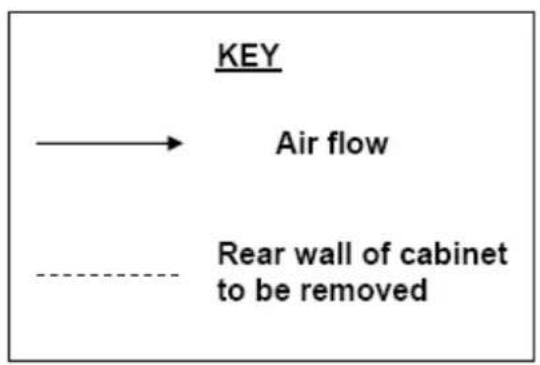
flowchart
graph TD
    A["KEY"] --> B["Air flow"]
    B --> C["Rear wall of cabinet to be removed"]

IMPORTANT: NO OTHER METHODS OF BUILDING UNDER THE MICROWAVE ARE SANCTIONED BY BAUMATIC.
Built under installation for your microwave.
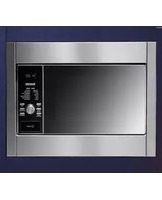
It is possible to build your microwave under a worktop; however the following installation MUST be followed:-
- The rear wall of the housing unit MUST be removed to allow there to be the correct amount of ventilation.
- The ventilation gaps below the support shelf and below the worktop MUST be adhered to.
- The appropriate Baumatic Microwave Building In Kit MUST be fitted.
- An induction hob MUST NOT be fitted above the microwave.
- It is not necessary for there to be a storage drawer fitted underneath the microwave; this is shown purely as an example in the drawing on the preceding page.
- WARNING: The microwave will get hot during operation; care should be taken not to accidentally come into contact with the outer surface.
- WARNING: Children should not be allowed near to the appliance unsupervised.
Baumatic Ltd. Conditions of guarantee
Dear Customer,
Your new Baumatic appliance comes complete with a free 12 month guarantee covering both parts and labour costs resulting from defective materials or workmanship.
Baumatic also gives you the opportunity to automatically extend the guarantee period for a further 12 months at no extra cost, giving an initial guarantee period of 24 months. The extended guarantee period applies to England, Scotland, Wales and Northern Ireland only.
To qualify for your full 24 months guarantee you must register your appliance within 28 days of purchase to be covered under this guarantee. This can be done online via: www.baumatic.co.uk or through returning the guarantee card which can be found in each new Baumatic appliance.
* In addition, your appliance is covered by a 5 year parts warranty. Baumatic Ltd will provide free of charge the parts required to repair the appliance, only if they are fitted by a Baumatic engineer, for any defect that arises due to faulty materials or workmanship within a period of 5 years from the original purchase date.
* An additional 1 to 3 year insurance scheme for labour is available should you wish to extend the warranty period.
Should any person other than an authorised representative of Baumatic Ltd interfere with the appliance, the policy is negated and Baumatic Ltd will be under no further liability.
The guarantee covers the appliance for normal domestic use only, unless otherwise stated.
Any claims made under the terms of the guarantee must be supported by the original invoice/bill of sale issued at the time of purchase.
This guarantee is transferable only with the written consent of Baumatic Ltd.
If the appliance fails and is considered either not repairable or uneconomical to repair between 12 months (2 years if registered) and five years, a free of charge replacement will not be offered.
The guarantee for any replacement will only be for the remainder of the guarantee on the original product purchased.
The guarantee does not cover:
- Sinks and taps
- Failure to comply with the manufacturers instructions for use.
- The replacement of cosmetic components of accessories
- Accidental damage or wilful abuse.
- Subsequent loss or damage owing to the failure of the appliance or electrical supply
- Incorrect installation
- Losses caused by Acts of God, civil war, failure to obtain spare parts, strikes or lockouts
- Filters, fuses, light bulbs, external hoses, damage to bodywork, paintwork, plastic items, covers, baskets, trays, shelves, burner bases, burner caps, decals, corrosion, rubber seals.
In the course of the work carried out it may be necessary to remove the appliance from it operating position. Whilst all reasonable care will be taken, Baumatic Ltd cannot accept responsibility for damage sustained to any property whatsoever in this process.
This guarantee is in addition to and does not diminish your statutory or legal rights.
Contacting Baumatic Ltd
| Sales | Service | Spares | Technical/Advice | |
| TEL: 0118 933 6900 | TEL: 0118 933 6911 | TEL: 0118 933 6922 | 0118 933 6933 | |
| FAX: 0118 931 0035 | FAX: 0118 986 9124 | FAX: 0118 933 6942 | 0118 933 6942 | |
For ROI (Republic of Ireland), please contact one of the numbers below:
TEL: 01-6266798 FAX: 01-6266634
Thanks you for buying Baumatic.
* Applies to UK, Scotland, Wales & Northern Ireland only (Republic of Ireland has 1 year labour & 1 year parts warranty only)
Baumatic®
You will be mine ...
Headquarters
Baumatic Ltd.
Baumatic Buildings,
6 Bennet Road,
Reading,
Berkshire
RG2 0QX, United Kingdom
Sales Telephone
+44 118 933 6900
Sales Fax
+44 118 931 0035
Service Telephone
+44 118 933 6911
Service Fax
+44 118 986 9124
Spares Telephone
+44 118 933 6922
Technical / Advice Telephone
+44 118 933 6933
E-mail:
sales@baumatic.co.uk
technical@baumatic.co.uk
Http (Internet site):
www.baumatic.com

www.baumatic.com
- BTM25.1SS Convection Microwave Oven
- A NOTE TO YOU
- WARNING!
- TABLE OF CONTENTS
- INSTALLING YOUR OVEN
- GROUNDING INSTRUCTIONS
- WARNING: Improper use of the grounding plug can result in a risk of electric shock.
- Note:
- RADIO INTERFERENCE
- BTM25.1SS
- IMPORTANT SAFETY INSTRUCTIONS – CONT:
- MICROWAVE COOKING PRINCIPLES
- UTENSILS GUIDE
- UTENSILS
- MICROWAVE PART NAMES
- CONTROL PANEL
- DISPLAY SCREEN:
- MICRO:
- GRILL:
- CONVECTION:
- MICRO + GRILL:
- MICRO + CONVECTION:
- TIME/MENU (DIAL):
- START/QUICK START:
- WEIGHT ADJUST:
- STOP/RESET:
- CLOCK/TIMER:
- HOW TO SET THE OVEN CONTROLS:
- - Beeps during Oven Settings:
- - Setting the Clock:
- MICROWAVE COOKING
- USING THE GRILL:
- To Cook with Convection:
- To Preheat and Cook with Convection
- MICROWAVE + GRILL
- COMBINATION 1
- COMBINATION 2
- MICROWAVE + CONVECTION
- SPEED DEFROST (WEIGHT ADJUST)
- AUTO-MENU SETTINGS
- BAKED POTATO
- BEVERAGE
- POPCORN
- REHEAT
- PIZZA
- AUTO-MENU SETTINGS CONT.
- MEAT SKEWERS
- CAKE
- OTHER CONVENIENT FEATURES
- MINUTE TIMER
- CHILD PROOF LOCK
- QUICK START
- CLEANING AND CARE:
- BEFORE YOU CALL FOR SERVICE:
- If the oven fails to operate:
- Built under installation for your microwave.
- It is possible to build your microwave under a worktop; however the following installation MUST be followed:-
- Baumatic Ltd. Conditions of guarantee
- Contacting Baumatic Ltd
- Baumatic®
- Headquarters
- E-mail:
Brand : BAUMATIC
Model : BTM25.5SS
Category : Microwave