BTM31SS - Microwave BAUMATIC - Free user manual and instructions
Find the device manual for free BTM31SS BAUMATIC in PDF.


| Product Type | Built-in Microwave with Grill |
| Brand | Baumatic |
| Model | BTM31SS |
| Color/Finish | Stainless Steel |
| Capacity | 25 Liters |
| Microwave Power | 900 W |
| Grill Power | 1000 W |
| Power Levels | 10 |
| Display | Digital LED with Clock |
| Controls | Touch Control Panel with Buttons |
| Door Opening | Drop-down Door with Pull Handle |
| Turntable | Glass Turntable, 31.5 cm Diameter |
| Functions | Microwave, Grill, Combination Cook, Defrost, Auto Cook Menus |
| Weight | Approximately 32 kg |
| Dimensions (W x H x D) | 595 x 455 x 480 mm |
| Inner Dimensions (W x H x D) | 329 x 220 x 339 mm |
| Power Supply | 230 V / 50 Hz, 13 A |
| Energy Consumption | Micro: 1.35 kWh, Grill: 1.50 kWh |
| Safety | Child Lock, Overheat Protection, Door Safety Switch |
| Maintenance & Cleaning | Wipe with damp cloth, avoid abrasive cleaners, clean turntable regularly |
| Reparability | Spare parts available from Baumatic service centers |
| Accessories Included | Glass Turntable, Turntable Ring, Grill Rack, User Manual |
Frequently Asked Questions - BTM31SS BAUMATIC
User questions about BTM31SS BAUMATIC
0 question about this device. Answer the ones you know or ask your own.
Ask a new question about this device
Download the instructions for your Microwave in PDF format for free! Find your manual BTM31SS - BAUMATIC and take your electronic device back in hand. On this page are published all the documents necessary for the use of your device. BTM31SS by BAUMATIC.
USER MANUAL BTM31SS BAUMATIC
BTM31SS 30 Litre combination microwave oven with grill
INSTRUCTION MANUAL

natural_image
Simple line drawing of a fish with fins and tail, no text or symbols presentUser Manual for your Baumatic
BTM31SS
30 Litre combination microwave oven with grill

natural_image
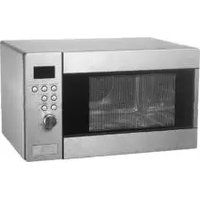
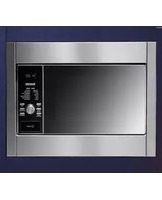
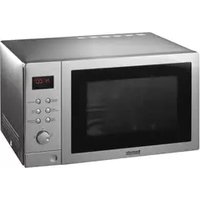
Exterior view of a stainless steel microwave oven with control panel and display (no visible text or symbols)Baumatic®
NOTE: This User Instruction Manual contains important information, including safety & installation points, which will enable you to get the most out of your appliance. Please keep it in a safe place so that it is easily available for future reference; for you or any person not familiar with the operation of the appliance.
GS 14/04/10
Contents
| E | n | v | i | r | o | n | m | e | n | t | a | l | ||
| Important | safety | information | 5-9 | |||||||||||
| S | p | e | c | i | f | i | c | a | t | i | o | n | s | |
| P | r | o | d | u | c | t | d | i | m | e | n | s | ||
| P | r | o | d | u | c | t | s | p | e | c | i | f | ||
| E | l | e | c | t | r | i | c | a | l | d | e | t | a | |
| Description | of | the | appliance | 11 | ||||||||||
| C | o | n | t | r | o | l | p | a | n | e | l | |||
| T | h | e | t | u | r | n | t | a | b | l | e | |||
| L | E | D | d | i | s | p | l | a | y | |||||
| U | s | i | n | g | y | o | u | r | m | i | c | |||
| T | h | e | a | d | j | u | s | t | m | e | n | t | ||
| S | e | t | t | i | n | g | t | h | e | c | l | i | ||
| B | e | f | o | r | e | f | i | r | s | t | u | s | ||
| M | i | c | r | o | w | a | v | e | c | o | o | k | ||
| M | i | c | r | o | w | a | v | e | p | o | w | e | ||
| T | i | m | e | s | e | t | t | i | n | g | c | |||
| G | r | i | l | l | c | o | o | k | i | n | g | |||
| C | o | m | b | i | n | a | t | i | o | n | c | o | ||
| Combination | cooking | chart | 18 | |||||||||||
| C | o | n | v | e | c | t | i | o | n | c | o | o | ||
| Convection cooking (with automatic pre-heating) | 19-20 | |||||||||||||
| Interrupting | a | cooking | cycle | 20 | ||||||||||
| Cancelling | a | cooking | cycle | 21 | ||||||||||
| E | n | q | u | i | r | y | m | o | d | e | ||||
| D | e | f | r | o | s | t | b | y | w | e | i | |||
| D | e | f | r | o | s | t | b | y | t | i | m | |||
| Setting multiple cooking phases | 22-23 | |||||||||||||
| S | e | t | t | i | n | g | a | c | o | o | k | |||
| A | u | t | o | m | e | n | u | f | u | n | c | |||
| A | u | t | o | m | e | n | u | c | h | a | r | |||
| A | u | t | o | r | e | h | e | a | t | f | u | |||
| A | u | t | o | r | e | h | e | a | t | c | h | |||
| S | a | f | e | t | y | l | o | c | k | |||||
| Microwave cooking guidelines | 27 | |||||||||||||
| Materials you can use in a microwave oven | 28 | |||||||||||||
| Materials not to be placed in a microwave oven | 29 | |||||||||||||
| U | t | e | n | s | i | l | s | t | a | b | l | e | ||
| Cleaning and maintenance | 29-31 | |||||||||||||
| The appliance exterior | 30 | |||||||||||||
| T h e | a | p | p | l | i | a | n | c | e | |||||
| Turntable and turntable support | 30 | |||||||||||||
| General cleaning advice | 3 | 0 | - | |||||||||||
| Installation | 3 | 1 | - | |||||||||||
| P o s i t i o n i n g 32-33 | ||||||||||||||
| Electrical connection | 32-33 | |||||||||||||
| My appliance isn't working correctly | 33-34 | |||||||||||||
| C o n t a c t d e t a i l | ||||||||||||||
Environmental note
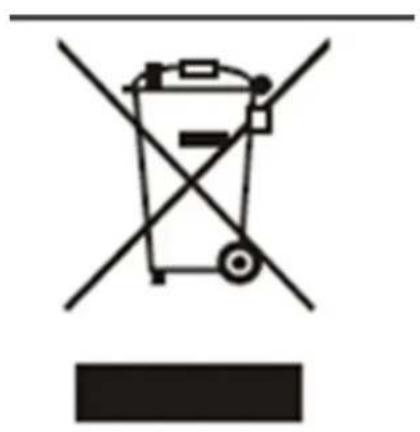
This appliance is marked according to the European directive 2002/96/EC on Waste electrical and Electronic Equipment (WEEE). By ensuring this product is disposed of correctly, you will help prevent potential negative consequences for the environment and human health, which could otherwise be caused by inappropriate waste handling of this product.
The symbol

on the product, or on the documents accompanying the product, indicates that this appliance may not be treated as household waste. Instead it shall be handed over to the applicable collection point for the recycling of electrical and electronic equipment.
Disposal must be carried out in accordance with local environmental regulations for waste disposal.
For more detailed information about treatment, recovery and recycling of this product, please contact your local city office, your household waste disposal service or the shop where you purchased the product.
- The packaging materials that Baumatic uses are environmentally friendly and can be recycled.
- Please discard all packaging material with due regard for the environment.
IMPORTANT SAFETY INFORMATION

Your safety is of the utmost importance to Bauma. Please make sure that you read this instruction booklet before attempting to install or use the appliance. If you are unsure of any of the information contained in this booklet, please contact the Baumatic Advice Line.
General Information
- This appliance is designed for domestic household use. It can NOT be used as a built-in microwave and must be used as a freestanding appliance.
- You should only operate the appliance when the turntable and turntable support are in position.
- You should only use ovenware that is suitable for being used in a microwave.
To prevent corrosion occurring due to moisture/condensation, the cavity and the door of the microwave should be wiped dry after each use of the appliance. - The appliance must not be left unattended if you are heating or cooking food in containers that are made of paper, plastic or other flammable materials. If left unattended, they could pose a fire hazard.
- If you notice smoke coming from the appliance, you should keep the door of the microwave closed and then disconnect it from your mains supply. DO NOT use your microwave oven, if you think it is not operating correctly.
Installation
○ IMPORTANT: Only the freestanding installation sanctioned by Baumatic and outlined in this manual should be followed.
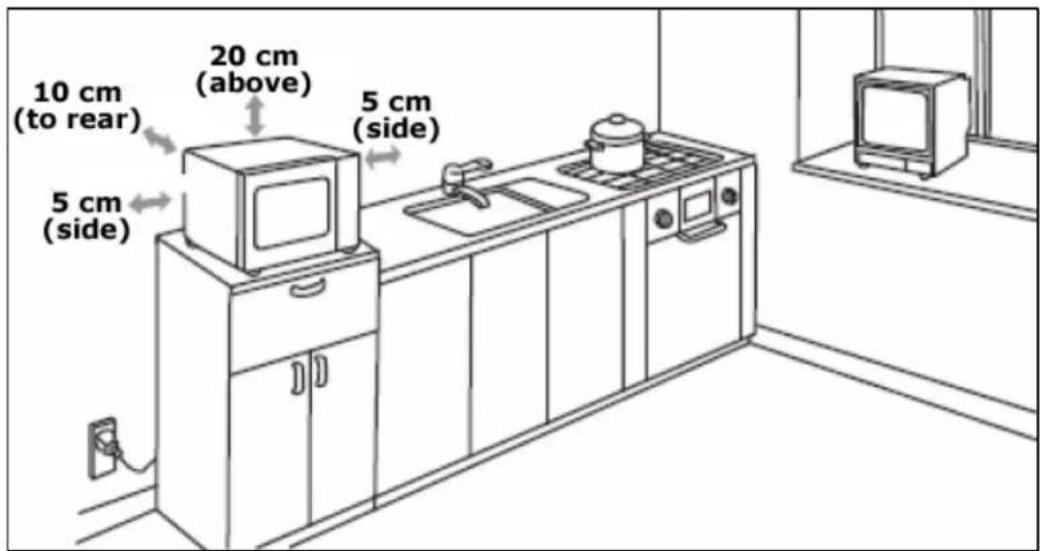
- Ventilation gaps MUST be left around the microwave; at least 10 cm to the rear, 5 cm to both sides and 20 cm above the appliance.
- The use of this appliance for any other purpose or in any other environment without the express agreement of Baumatic Ltd. will invalidate any warranty or liability claim.
- Your new appliance is guaranteed against electrical or mechanical defects, subject to certain exclusions that are noted in Baumatic's Conditions Of Guarantee. The foregoing does not affect your statutory rights.
Service
- Your microwave complies with all relevant safety standards. In order for it to continue to operate safely, only an engineer that is approved by the Baumatic Customer Care Department should work on the appliance.
○ IMPORTANT: It is dangerous for a non qualified person to work on the appliance, in particular if they remove the cover that provides protection against exposure to microwave energy.
- If you notice that the door seal, door surfaces, power cord and plug are damaged. You should stop using the appliance, disconnect it from the mains supply and contact the Baumatic Customer Care Department.
○ Only genuine Baumatic spare parts should be fitted to your appliance. These can be obtained from the Baumatic Spares Department.
Warning and safety instructions
- This appliance complies with all current European safety legislation. Baumatic do wish to emphasise that this compliance does not remove the fact that the appliance surfaces will become hot during use and retain heat after operation.
- DO NOT place anything between the door and the door frame.
- DO NOT store anything that is flammable inside of the microwave. When it is switched on, the items could catch fire.
- DO NOT switch the appliance on if there is no food or liquid inside of the microwave. If you run the microwave whilst it is empty, there is a chance that it will overload.
- The door seals and the door surfaces should ALWAYS be kept clean and free from debris.
Child Safety
- Baumatic strongly recommend that babies and young children are prevented from being near to the appliance and not allowed to touch the appliance at any time.
- If it is necessary for younger family members to be in the kitchen, please ensure that they are kept under close supervision at all times.
- IMPORTANT: This appliance should only be operated by adults. You SHOULD NOT allow young children to use the microwave without supervision. Older children should only operate the appliance if they have been thoroughly instructed on how to use the microwave and the consequences of improper usage.
General Safety
- Do not allow electrical fittings or cables to come into contact with areas on the appliance that get hot.
- Do not use the appliance to heat the room it is located in.
- Do not use the appliance to dry paper, textiles or animals.
- Do not install the appliance next to curtains or soft furnishings.
- Do not use the appliance to heat unopened bottles or cans etc.
Do not heat cooking oil or liquid containing alcohol, as there is the chance of spontaneous combustion.
Do not boil eggs or similar foods in their shells, otherwise they may burst. It is possible to poach eggs in your microwave, providing you prick the yolks first.
Do not attempt to lift or move cooking appliances by using the oven door, as this may cause damage to the appliance or result in injury to the person lifting the appliance.
Cleaning
- Cleaning of the oven should be carried out on a regular basis.
- Great care should be taken whilst using this appliance and when following the cleaning procedure.
- IMPORTANT: The appliance must be disconnected from the mains before following the cleaning procedure.
Installation

This appliance must be correctly installed by a suitably qualified person, strictly in accordance with the manufacturer's instructions.
○ Baumatic Ltd. declines any responsibility for injury or damage, to person or property, as a result of improper use or installation of this appliance.
- Heat, steam and moisture will be created during use of the appliance, take care to avoid injury and ensure that the room is adequately ventilated. If the appliance is going to be used for prolonged periods of time, then additional ventilation may be required.
- Please consult with your qualified installer if you are in any doubt about the amount of ventilation that you will require.
Declaration of conformity
- CE: Appliance conforming to the European directives 89/336/EEC, 93/68/EEC, 73/23/EEC and subsequent revisions and "RoHS" directive 2002/95/CE.*
- The manufacturer declares that the oven is built using certified materials and requires the appliance to be installed in accordance with the standards currently in force. This appliance must be used by a trained person for domestic purposes only.
* The RoHS directive stands for "the restriction of the use of certain hazardous substances in electrical and electronic equipment". This directive bans the placing on the EU market of new electrical and electronic equipment containing more than the agreed levels of lead, cadmium, mercury, hexavalent chromium, polybrominated biphenyl (PBB) and polybrominated diphenyl ether (PBDE) flame retardants.
pecifications S
Product dimensions
Height: 335 mm
Width: 518 mm
Depth: 520 mm
Product specifications
- 10 functions:
Auto-reheat
| V | e | g | e | t | a | b | l | e |
| F | i | s | h | |||||
| M | e | a | t | |||||
| P | a | s | t | a | ||||
| P | o | t | a | t | o | |||
| P | i | z | z | a | ||||
| S | o | u | p | |||||
| C | h | i | c | k | e | n | ||
| C | a | k | e |
- Quick start
- LED minute minder Pushbutton control operation
- Safety lock
- Stainless steel exterior and cavity
- Defrost by weight
○ Capacity: 30 litres - Microwave output: 900 W
- Grill output: 1100 W
○ Hot air output: 2500 W
Electrical details
230 Vac 50 Hz Rated Voltage:
Supply Connection: 13 A (double pole switched fused
outlet with 3mm contact gap)
Max Rated Inputs: 2.50 kW
Mains Supply Lead: 3 x 1.5 mm ^4
For future reference please record the following information which can be found on the rating plate and the date of purchase which can be found on your sales invoice. The rating plate for your oven can be located by opening the microwave oven door and looking on the right hand side of the chassis.
Model Number
Serial Number
Date of Purchase ....
Description of the appliance
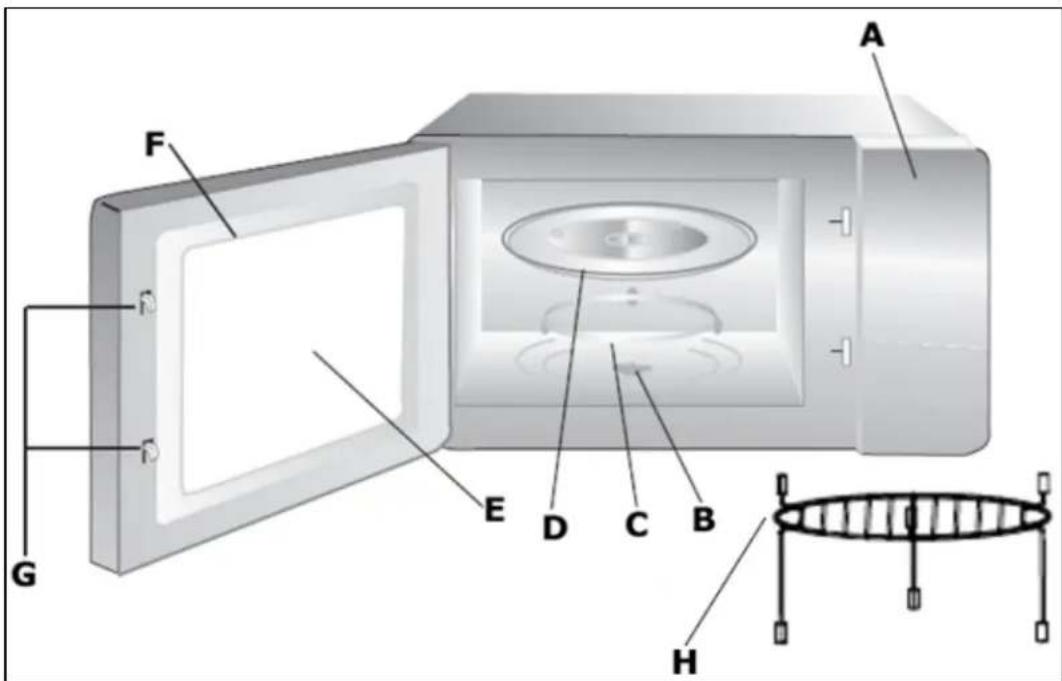
A) Control pain
B) Turntable shaft
C) Turntable ring assembly
D) Glass tray
E) Viewing wind
F) Door
G) Safety inter lock system
H) Grill rack
Control panel

A) LED display
B) Clock/Pre-Set button
C) Microwave button
D) Grill/Conv./Combi. button
E) Defrost button
F) Auto Reheat button
G) Stop/Clear button
H) Start/+30Sec/Confirm button
I) Adjustment dial
J) Door open button
The turntable
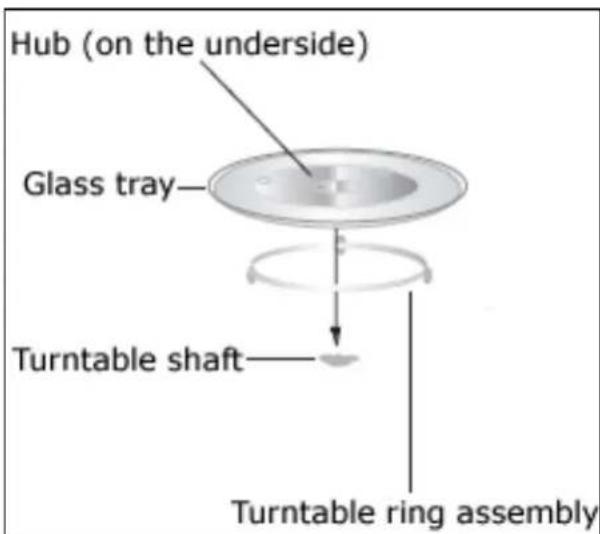
- Never place the glass tray upside down.
- The glass tray and turntable ring assembly MUST always be used during cooking.
○ All food and food containers must ALWAYS be placed on the glass tray during cooking.
- If the glass tray or turntable ring assembly cracks or breaks, it must be replaced immediately. Genuine Baumatic parts can be obtained from the Baumatic Spares Department.
LED display
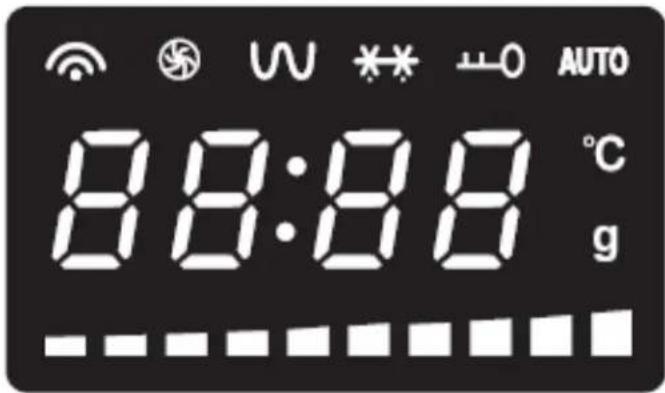
- The LED display will show the time of day, or if the microwave is in use, it will show the cooking time.

Indicates that microwave cooking is taking place.
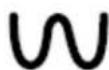
Indicates that grilling is taking place

Indicates that defrosting is taking place.
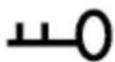
Indicates that the safety lock is engaged.

Indicates that the auto menu function has been selected.

Indicates that grams are shown on the LED display.

Indicates that the temperature (in centigrade) is shown on the LED display.
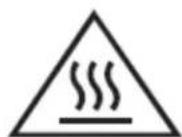
WARNING: The accessible surface may be hot during operation and for a period of time afterwards.
The adjustment dial
- The adjustment dial (I) should only be turned clockwise (towards the plus symbol) if you want to use the auto menu function.
- For all other purposes and settings, the adjustment dial (I) should be turned anti-clockwise (towards the minus symbol).
Setting the clock
- When your appliance is connected to the power supply for the first time, the LED display (A) will show "0.00" and an audible signal will sound once.
- Press the clock/pre-set time button (B) to choose a 12 hour or a 24 hour clock.
- Use the adjustment dial (I) to adjust the hour time. You can adjust the hour time between 1 – 12 in 12 hour clock mode and between 0 – 23 in 24 hour clock mode.
- Press the clock button (B) to confirm the hour time. The minute digits will flash.
- Turn the adjustment dial (I) to adjust the minute time.
- Press the clock button (B) to confirm the minute time. The ":" symbol will flash and the time of day will light on the LED display (A).
- If during the clock setting process the stop/clear button (G) is pressed, the microwave will return to the previous step.
Before first use
To remove any residue from the oven that may have been left from the manufacturing process, you should place a cup that is half filled with water in the microwave.
- Set the microwave on its highest power level for 2 minutes.
- The oven cavity and outside of the appliance should be cleaned with warm soapy water, using either a sponge or soft cloth. No abrasive cleaners should be used. The appliance should be thoroughly dried afterwards.
Microwave cooking
Once the clock has been set, your microwave is then ready to use.
- Use the door button (J) to open the door of the microwave.
- Check that the turntable shaft, turntable ring assembly and glass tray are correctly assembled in the cavity.
- Place whatever you are cooking in the centre of the microwave cavity and then close the microwave door. IMPORTANT: You should make sure that the door of the microwave is shut securely.
- Press the microwave button (C) once and the LED display (A) will show "P100", indicating that the appliance will cook at its highest power level.
To adjust the power level keep pressing the microwave button (C). "P100", "P80", "P50", "P30" or "P10" will appear on the LED display.
Once the power level that you require appears on the LED display (A), press the confirm button (H).
- Turn the adjustment dial (I) to set the cooking time that you require. The maximum cooking time that you can set is 95 minutes.
- Press the start button (H) and your microwave will start to heat.
- If you have set the incorrect power level or time, press the stop/clear button (G) and the LED display (A) will return to showing the time of day.
- At the end of the cooking time, your microwave will give an audible signal and the LED display (A) will return to showing the time of day.
- Use the door button (J) to open the door of the microwave.
- IMPORTANT: The inside of the microwave and the food that you have been cooking may be extremely hot. So care should be taken when removing items from the microwave. We would recommend that you use an oven glove.
- After the food has been removed from the microwave, you should make sure that the door is closed.
+ 30 second button (Quick start)
- If you want to cook on the highest power level setting for a period of time, then you can use the +30 second button (H).
- Press the +30 second button (H) once and your microwave will operate on full power for 30 seconds.
○ Each time you press the +30 second button (H) the cooking time will increase by 30 seconds. - If a microwave, grill or combination cooking program is in process, pressing the +30 second button (H) will extend the cooking time by 30 seconds.
- IMPORA NT: You cannot use the quick start feature in defrost and auto menu modes or if you have set multiple cooking phases.
Mierpovavelver I chart
| Power | High | Medium high | Medium | Medium low | |
| Display shows | P100 | P80 | P50 | P30 |
P10
Time setting chart
When you are setting a cooking time, the clock will count in the following time intervals.
| Time period being set Ti s | me interval |
| 0 – 1 minute 5 seconds | |
| 1 – 5 minutes | 10 seconds |
| 5 – 10 minutes | 30 seconds |
| 10 – 30 minutes | 1 minute |
| 30 – 95 minutes | 5 minutes |
Grill cooking
- Press the grill button (D) once and the LED display (A) will show "G-1".
Once "G-1" appears on the LED display (A), press the confirm button (H). - Turn the adjustment dial (I) to set the cooking time that you require. The maximum cooking time that you can set is 95 minutes.
- Press the start button (H) and your microwave will start to grill.
- If you have set the incorrect power level or time, press the stop/clear button (G) and the LED display (A) will return to showing the time of day.
- Halfway through the cooking time, an audible signal will sound. To achieve even grilling results, you should open the door of the microwave and turn the food over.
- After closing the door, you should press the start button (H) and the microwave will continue to grill.
- At the end of the cooking time, your microwave will give an audible signal and the LED display (A) will return to showing the time of day.
- Use the door button (J) to open the door of the microwave.
- IMPORTANT: The inside of the microwave and the food that you have been cooking may be extremely hot. So care should be taken when removing items from the microwave. We would recommend that you use an oven glove.
- After the food has been removed from the microwave, you should make sure that the door is closed.
Combination cooking
- Press the combination button (D) once and the LED display (A) will show "G-1".
Turn the adjustment dial (I) until "C-1", "C-2", "C-3" or "C-4" appears on the LED display (see the table below to see the various combination cooking modes that can be selected).
Once the combination mode that you require appears on the LED display (A), press the confirm button (H). - Turn the adjustment dial (I) to set the cooking time that you require. The maximum cooking time that you can set is 95 minutes.
- Press the start button (H) and your microwave will start to cook.
- If you have set the incorrect combination mode or time, press the stop/clear button (G) and the LED display (A) will return to showing the time of day.
Combination cooking chart
- The chart below shows the combination cooking modes that can be selected.
| LED display GrillMicrowave Convection | |||||
| C-1 |  |  | |||
| C-2 |  |  | |||
| C-3 |  | ||||
| C-4 |  |  |  | ||
Convection cooking
- Convection cooking allows you to operate your microwave like a traditional oven. The appliance does not use microwaves to cook the food and the cavity should be preheated before food is placed inside of it.
- Use the door button (J) to open the door of the microwave.
- Place whatever you are cooking in the centre of the microwave cavity and then close the microwave door. IMPORTANT: You should make sure that the door of the microwave is shut securely.
- Press the convection button (D) once and the LED display will show "G-1".
- Turn the adjustment dial (I) to set the temperature. The cooking temperature can be adjusted between 140°C and 230°C.
Once the temperature that you require appears on the LED display (A), press the confirm button (H). - Turn the adjustment dial (I) to set the cooking time that you require. The maximum cooking time that you can set is 95 minutes.
- Press the start button (H) and your microwave will start to cook.
- If you have set the incorrect cooking time or temperature, press the stop/clear button (G) and the LED display (A) will return to showing the time of day.
Convection cooking (with automatic pre-heating)
- The door of the microwave should be shut before the steps below are followed.
- Press the convection button (D) once and the LED display will show "G-1".
- Turn the adjustment dial (I) to set the temperature. The cooking temperature can be adjusted between 140°C and 230°C.
Once the temperature that you require appears on the LED display (A), press the confirm button (H). - Press the start button (H) and the microwave will start to preheat the oven cavity to the temperature that you have selected.
Once the required temperature inside the oven cavity has been reached, an audible signal will sound twice and the LED display will flash.
- You cannot set the cooking time until pre-heating has finished.
- Use the door button (J) to open the door of the microwave.
- Place whatever you are cooking in the centre of the microwave cavity and then close the microwave door. IMPORTANT: You should make sure that the door of the microwave is shut securely.
- You cannot set the cooking time until the door of the microwave has been opened and closed again.
- Turn the adjustment dial (I) to set the cooking time that you require. The maximum cooking time that you can set is 95 minutes.
- Press the start button (H) and your microwave will start to cook.
- If you have set the incorrect cooking time or temperature, press the stop/clear button (G) and the LED display (A) will return to showing the time of day.
- If the cooking time is not is not set within 5 minutes, the oven will stop pre-heating and the audible signal will sound 5 times.
Interrupting a cooking cycle
- If you wish to temporarily interrupt a cooking cycle when it is in progress (for example to stir what you are heating), you should press the door button (J).
- The door of the microwave will open and it will stop heating immediately.
To restart the cooking cycle, close the microwave door and then press the start button (H).
Cancelling a cooking cycle
- If you wish to cancel a cooking cycle when it is in progress, you should press the stop/clear button (G).
- The microwave will stop heating immediately, give an audible signal and the LED display (A) will return to showing the time of day.
- Use the door button (J) to open the door of the microwave.
- IMPORTANT: The inside of the microwave and the food that you have been cooking may be extremely hot. So care should be taken when removing items from the microwave.
- After the food has been removed from the microwave, you should make sure that the door is closed.
Enquiry mode
- If you have set a delay start, to check what time the microwave will start cooking at, press the pre-set button (B). The time of day that the microwave will start cooking at will appear on the LED display (A) for a few seconds.
- Whilst the microwave is in use, the LED display (A) will countdown the cooking time that you have set.
To check the power level that the appliance is cooking at during microwave mode, press the microwave button (C) and the power level will appear on the LED display (A) for a few seconds.
To check the power level that the appliance is cooking at during grill/conv./combi. mode, press the grill/conv./combi. button (D) and the power level will appear on the LED display (A) for a few seconds.
To check the time of day during cooking state, press the clock button (B) and the time of day will flash on the LED display (A) for a few seconds.
Defrost by weight
- Press the defrost button (E) until "d-2", "d-3" or "d-4" appears on the LED display (A).
- Turn the adjustment dial (I) to select the weight of the food that you want to defrost. The letter "g" will appear on the LED display (A) to indicate grams. The weight should be 100-2000g.
- The microwave will automatically calculate the defrost time, based on the weight that you have selected.
- Press the start button (H) and your microwave will start to defrost the food.
Defrost by time
- Press the defrost button (E) once and the LED display (A) will show "d-1".
- Turn the adjustment dial (I) to set the defrost time that you require. The maximum setting time is 95 minutes.
- Press the start button (H) and your microwave will start to defrost the food.
Setting multiple cooking phases
- It is possible to set the microwave to cook at different power levels within a single cooking time. A maximum number of 3 cooking phases can be set at once. Auto menu cannot be set as one of the multi-stage cooking functions.
- Press the microwave (C) or grill/combi. button (D) to set the power level/cooking mode for the first cooking phase.
- Turn the adjustment dial (I) to set the cooking time for the first cooking phase.
- Press the microwave (C) or grill/combi. (D) to follow the same procedure for the second cooking phase and third cooking phase (if required).
- Press the start button (H) and the microwave will proceed with the cooking phases that you have set.
- If you have set the incorrect power level or time, press the stop/clear button (G) and the LED display (A) will return to showing the time of day.
- At the end of the cooking time, your microwave will give an audible signal and the LED display (A) will return to showing the time of day.
Setting a cooking time in advance
- This function will allow you to set a time in the future that the microwave will switch on at. Defrosting should not be set here. Auto menu cannot be set in a multi-stage cooking function.
- IMPORTANT: You must make sure that the clock is set to the correct time before using this feature.
- Press the microwave (C) or grill/combi. button (D) to set the power level that you require.
- Use the adjustment dial (I) to set the cooking time that you require.
○ IMPORTANT: Do not press the start button (H) at this point, otherwise the microwave will start to heat straight away. - Press the clock/pre-set time button (B), the hour digits will flash.
- Use the adjustment dial (I) to set the hour time that you want the microwave to switch on at.
- Press the clock/pre-set time button (B) to confirm the hour time. The minute digits will flash.
- Use the adjustment dial (I) to set the minute time that you want the microwave to switch on at.
- Press the start button (H) to confirm all settings.
When the time of day that you have programmed is reached, the microwave will bleep twice and then the microwave will start cooking automatically.
○ IMPORTANT: If the microwave door is not shut when the time of day that you have programmed is reached, then cooking will not commence.

IMPORTANT: Although your microwave has a set in advance time feature, we do not recommend that the microwave is EVER programmed to switch on when it is unattended.
Auto menu function
- Your microwave has menus pre-programmed into it, where it will cook particular types of food on pre-set power levels and for pre-set periods of time.
- Turn the adjustment dial (I) clockwise to access the auto menu function, the LED display (A) will show "A-1".
Turn the adjustment dial (I) to select the food type that you want to cook from "A-1", "A-2" ... "A-9". - Press the confirm button (H) to confirm the food type.
- Turn the adjustment dial (I) to select the weight or portion of the food that you want to cook.
- Press the start button (H) and your microwave will start to heat.
Auto menu chart
| Menu | Weight (g) | |
| A1Vegetable | 150 | 150 |
| 350 | 350 | |
| 500 | 500 | |
| A2Fish | 150 | 150 |
| 250 | 250 | |
| 350 | 350 | |
| 450 | 450 | |
| 650 | 650 | |
| A3Meat | 150 | 150 |
| 300 | 300 | |
| 450 | 450 | |
| 600 | 600 | |
| A4Pasta | 50 (with cold water 450ml) 50 | |
| 100 (with cold water 800ml) 100 | ||
| 150 (with cold water 1200ml) | 150 | |
| A5Soup | 200ml | 200 |
| 400ml | 400 | |
| 600ml | 600 | |
| A6RoastChicken | 500 | 500 |
| 750 | 750 | |
| 1000 | 1000 | |
| 1200 | 1200 | |
| A7Bread | 50 | 50 |
| 100 | 100 | |
| 150 | 150 | |
| A8Cake | 475 | 475 |
| A9Pizza | 200 | 200 |
| 300 | 300 | |
| 400 | 400 | |
| A10Potato | 1 (about 230g) 1 | |
| 2 (about 460g) 2 | ||
| 3 (about 690g) 3 | ||
Display
Auto Reheat Function
- Your microwave can automatically reheat certain food types based on a pre-set weight or portion.
- Press the auto reheat button (F) and the LED display (A) will show "h-1".
- Turn the adjustment dial (I) to select the weight or portion of your food type.
- Press the start button (H) to confirm the weight of the food and to begin the reheating process.
Auto Reheat Chart
| Menu | Weight | (g) |
| h-1(Auto Reheat) | 150 | 150 |
| 250 | 250 | |
| 350 | 350 | |
| 450 | 450 | |
| 600 | 600 | |
| h-2(Dinner Plate) | 250 | 250 |
| 350 | 350 | |
| 450 | 450 | |
| h-3(Coffee) | 1 (approximately 240g) | 1 |
| 2 (approximately 480g) | 2 | |
| 3 (approximately 720g) | 3 | |
| h-4(Roll) | 1 (approximately 70g) | 1 |
| 2 (approximately 140g) | 2 | |
| 3 (approximately 210g) | 3 |
Display
Safety lock
- When the microwave is not heating, it is possible to switch on the safety lock.
- Press and hold down the stop/clear button (G) for 3 seconds.
- The microwave will emit a long audible signal to show the beginning of the safety-lock state and the LED display (A) will show "0:00" or the current time.
- Until the safety lock is switched off, all buttons on the microwave will be disabled.
To switch off the safety lock, press and hold down the stop/clear button (G) for 3 seconds. The microwave will emit a long audible signal to show the end of the safety-lock state.
Microwave cooking guidelines
- If you are heating liquid in the microwave, then you must also place a teaspoon in the container. This will ensure that the liquid does not boil suddenly after being removed from the microwave cavity.
- This phenomenon is called "delayed boiling", this means that a liquid can be close to boiling point, even if there is no steam coming off the liquid or the liquid is not bubbling. If the liquid container is even gently shaken, then the liquid can without warning boil over or even spurt. This could scald the end user.
- If the food you are cooking has a skin or peel (e.g. sausages, tomatoes, potatoes etc), then you should pierce the skin or peel with a fork. This will ensure that if steam is created during the heating process, it can escape and the food will not burst.
When heating baby food, the bottle or jar containing the food should NEVER have a top or lid on. After cooking, to ensure that the food has been heated uniformly, you should stir or shake the food. IMPORTANT: You must check the temperature of the food before feeding it to a child. - When heating food in a microwave, it will transmit the heat to the container that the food is in or on. You should ALWAYS use oven gloves when removing items from the microwave.
- You should make sure that you do not cook food for too long or at too high a power level. This could cause certain areas of the food to dry out or even ignite.
- You should not use ceramic or porcelain crockery, or porous earthenware inside of your microwave. These dishes could absorb moisture from the food whilst it is cooking, which could cause pressure to build up and shatter the dish.
- If you are heating certain foods and any liquid, moisture will evaporate and condensation may occur. This does not indicate that the appliance is faulty and it can be particularly noticeable if the ambient temperature of the room is high.
- IMPORTANT: Any condensation should be wiped up with a soft cloth as soon as you have finished using the microwave.
- After the cooking time has completed, you should let the food stand for a few minutes. This is called "standing time" and will allow the heat generated by the microwave to spread evenly throughout the food.
Materials you can use for microwave cooking
| Material | Remarks |
| Aluminium foil | To be used for shielding only. Small smooth pieces can be used to cover thin parts of meat or poultry to prevent overcooking. Arcing can occur if foil is too close to the cavity walls. The foil should be at least 2.5 cm away from the cavity walls. |
| Browning dish | Follow the manufacturer's instructions. The bottom of the browning dish must be at least 5 mm thick above the turntable. Incorrect usage may cause the turntable to break. |
| Dinnerware | Microwave-safe only. Follow the manufacturer's instructions. Do not use cracked or chipped dishes. |
| Glass jars | Always remove the lid. Use only to heat food until just warm. Most glass jars are not heat resistant and may break. |
| Glassware | Heat-resistant oven glassware only. Make sure there is no metallic trim. Do not use cracked or chipped dishes. |
| Oven cooking bags | Follow the manufacturer's instructions. Do not close with a metal tie. Make slits in the bag to allow steam to escape. |
| Paper plates and cups | Use for short-term cooking/warming only. Do not leave the oven unattended whilst cooking. |
| Paper towels | Use to cover food for reheating and absorbing fat. Use under supervision and for short-term cooking only. |
| Parchment paper | Use as a cover to prevent splattering or as a wrap for steaming |
| Plastic | Microwave-safe only. Follow the manufacturer's instructions. It should be labelled as "microwave safe". Some plastic containers soften as the food inside gets hot. "Boiling bags" and tightly closed plastic bags should be slit, pierced or vented, as described by the package. |
| Plastic wrap | Microwave-safe only. Use to cover food during cooking to retain moisture. Do not allow the plastic wrap to touch the food. |
| Thermometers | Microwave-safe only. Meat and candy thermometers. |
| Wax paper | Use as a cover to prevent splattering and to retain moisture. |
Materials you cannot use for microwave cooking
| Material | Remarks |
| Aluminium tray May | may cause arcing. Transfer food into a microwave-safe dish. |
| Food carton with metal handle | May cause arcing. Transfer food into a microwave-safe dish. |
| Metal or metal-trimmed utensils | Metal shields the food from microwave energy.The metal trim may cause arcing. |
| Metal twist ties May | may cause arcing and could cause a fire in the oven. |
| Paper bags May | cause a fire in the oven. |
| Plastic foam Plastic | stic foam may melt or contaminate the liquid inside when exposed to a high temperature. |
| Wood Wood will dry out when used in the microwave oven and may split or crack. | |
Utensils table
| Cookware | Microwave | Grill | Combination* |
| Heat-resistant glass | Yes | Yes | Yes |
| Non heat-resistant glass | No | No | No |
| Heat-resistant ceramics | Yes | Yes | Yes |
| Microwave-safe plastic dish | Yes | No | |
| Kitchen paper Yes No No | |||
| Metal | tray | No | Yes |
| Metal | rack | No | Yes |
| Aluminium foil and foil containers | No | Yes | No |
* Combination mode applies to microwave + grill and microwave + convection modes.
Cleaning and maintenance

Cleaning operations must only be carried out when the oven is cool.
The appliance should be disconnected from your mains supply before commencing any cleaning process.
The appliance exterior
- You should wipe over the front of the appliance with a soft cloth and warm water mixed with a little washing up liquid.
- DO NOT use abrasive cleaners or sharp objects to clean the front surface of the microwave.
The appliance interior
- You should wipe over the inside of the appliance with a soft cloth and warm water mixed with a little washing up liquid.
- You should pay particular attention to the door seal and the surrounding area.
- DO NOT use abrasive cleaners or sharp objects to clean the inside of the microwave.
Turntable and turntable support
- The glass tray and turntable ring assembly should be removed from the microwave for cleaning purposes after each use.
- Clean the glass tray and turntable ring assembly in warm water mixed with a little washing up liquid.
General cleaning advice
○ IMPORTANT: Any condensation should be wiped up with a soft cloth as soon as you have finished using the microwave.
To remove odours from inside of the microwave, you should boil one cup of water mixed with several tablespoons of lemon juice inside of the cavity.
- The microwave should be thoroughly cleaned before it is operated for the first time and after each use. This will avoid residual food stuffs becoming baked on the oven cavity. After residues have been baked on several times, they are far more difficult to remove.
- Never clean the oven surfaces by steam cleaning.
- If you use any form of oven cleaner on your appliance, then you must check with the manufacturer of the cleaner that it is suitable for use on your appliance.
- Any damage that is caused to the appliance by a cleaning product will not be fixed by Baumatic free of charge, even if the appliance is within the guarantee period.
○ WARNING: Children should not be allowed near to the appliance unsupervised.
Installation
IMPORTANT: THIS INSTALLATION MUST BE COMPLETED BY A SUITABLY QUALIFIED PERSON. BAUMATIC ONLY SANCTION THE INSTALLATION GIVEN IN THIS INSTRUCTION MANUAL.
Before beginning to install your appliance, check that there is no sign of damage (on the inside or the outside of the microwave), and that there are no packing materials or accessories inside the cavity. Remove any protective film on the microwave.
Positioning
Electrical connection

Before connecting the appliance, make sure that the supply voltage marked on the rating plate corresponds with your mains supply voltage.
- We recommend that the appliance is connected by a qualified electrician, who is a member of the N.I.C.E.I.C. and who will comply with the I.E.E. and local regulations.
○ WARNING: THIS APPLIANCE MUST BE EARTHED. - This appliance is supplied with a moulded plug, which must be connected to an earthed socket.
- If in future you need to change the fuse in this plug, then a 13 amp ASTA approved (BS 1362) fuse must be used.
- The socket must still be accessible even when your microwave is located on the worktop.
- The wiring in the mains lead is coloured as follows:
Brown
Live
Blue
Neutral
Green and yellow
Earth
- As the colours of the wires in the appliance's mains lead may not correspond with the coloured markings identifying the terminals in your spur box, please proceed as follows:
The brown wire must be connected to the terminal marked "L" (live), or coloured red.
The blue wire must be connected to the terminal marked "N" (neutral), or coloured black.
The green and yellow wire must be connected to the terminal marked "E" (earth), or by the earth symbol, or coloured green and yellow.
- When the connection is completed, no stray strands or cut wire should be present. The cord clamp must be secured over the outer sheath.
○ Broken or damaged power leads must only be replaced by a suitably qualified person. A power lead of a similar type must be used in replacement.
Troubleshooting
- The microwave will not switch on.
* Check that the appliance has been connected to the mains supply correctly.
* Check that the fuse in the moulded plug has not blown.
* Check that the fuses in your fuse box have not blown.
* If fuses blow on a regular basis, then we would recommend that you consult with a qualified electrician.
* Check that there has not been a power cut.
- The microwave will not start cooking.
* Check that the door is properly shut.
* Check that the door seal and surrounding area are clean.
- The turntable is not turning.
* Check that the rotating base is connected to the drive motor correctly.
* Check that the ovenware is not larger than the rotating plate.
* Check that the food you are cooking does not extend beyond the rotating plate.
* Check that there is nothing underneath the rotating base that is preventing it from turning.
- The microwave does not switch off.
* Isolate the microwave from your mains supply and then contact the Baumatic Customer Care Department.
- The interior light bulb is not working.
* Call the Baumatic Customer Care Department. The interior light bulb can only be replaced by a trained service technician.
○ My food is not cooking properly.
* Check that the power level and cooking time that you have set, is appropriate for the food that you are cooking.
* If you are cooking a double amount of food, then you will normally need to almost double the cooking time.
* If the food that you have placed in the cavity is colder than normal, then the power level and cooking time may need to be increased.
- I am getting condensation in my oven.
* Steam and condensation are a natural by product of cooking in a microwave.
* Do not leave food in the oven to cool after it has been cooked and the oven has been switched off.
* Use a covered container, where practical, when cooking to reduce the amount of condensation that forms.
* You should wipe over any condensation that has formed, as soon as the food has stopped cooking.

IMPORTANT: If your appliance appears not to be operating correctly, then you should disconnect it from your mains supply and then contact Baumatic Customer Care on telephone number (0118) 933 6911.
DO NOT ATTEMPT TO REPAIR THE APPLIANCE YOURSELF.
Please note that if an engineer is asked to attend whilst the product is under guarantee and finds that the problem is not the result of an appliance fault, then you may be liable for the cost of the call out charge.
The appliance must be accessible for the engineer to perform any necessary repair. If your appliance is installed in such a way that an engineer is concerned that damage will be caused to the appliance or your kitchen, then he will not complete a repair.
This includes situations where appliances have been tiled in, sealed in with sealant, have wooden obstructions placed in front of the appliance, like plinths. Or any installation other than the one specified by Baumatic Ltd. has been completed.
Please refer to the conditions of guarantee that appear on the warranty card that you receive with the appliance.
IMPORTANT: Baumatic Ltd. operates a policy of continuous improvement and reserves the right to adjust and modify its products without prior notification.
Baumatic®
United Kingdom
Baumatic Ltd., Baumatic Buildings, 6 Bennet Road, Reading, Berkshire RG2 0QX United Kingdom
Sales Telephone
(0118) 933 6900
Sales Fax
(0118) 931 0035
Customer Care Telephone
(0118) 933 6911
Customer Care Fax
(0118) 986 9124
Spares Telephone
(01235) 437244
Advice Line Telephone
(0118) 933 6933
E-mail:
sales@baumatic.co.uk customercare@baumatic.co.uk spares@baumatic.co.uk technical@baumatic.co.uk
Website:
www.baumatic.co.uk
Republic of Ireland
Service Telephone
1-890 812 724
Spares Telephone
091 756 771
Czech Republic
- BTM31SS 30 Litre combination microwave oven with grill
- INSTRUCTION MANUAL
- User Manual for your Baumatic
- BTM31SS
- Litre combination microwave oven with grill
- Baumatic®
- Environmental note
- The symbol
- IMPORTANT SAFETY INFORMATION
- General Information
- Installation
- Service
- Warning and safety instructions
- Child Safety
- General Safety
- Cleaning
- Declaration of conformity
- pecifications S
- Product dimensions
- Product specifications
- - 10 functions:
- Electrical details
- Model Number
- Serial Number
- Date of Purchase ....
- Description of the appliance
- Control panel
- The turntable
- LED display
- The adjustment dial
- Setting the clock
- Before first use
- Microwave cooking
- + 30 second button (Quick start)
- Mierpovavelver I chart
- Time setting chart
- Grill cooking
- Combination cooking
- Combination cooking chart
- Convection cooking
- Convection cooking (with automatic pre-heating)
- Interrupting a cooking cycle
- Cancelling a cooking cycle
- Enquiry mode
- Defrost by weight
- Defrost by time
- Setting multiple cooking phases
- Setting a cooking time in advance
- Auto menu function
- Auto Reheat Function
- Auto Reheat Chart
- Safety lock
- Microwave cooking guidelines
- Cleaning and maintenance
- The appliance exterior
- The appliance interior
- Turntable and turntable support
- General cleaning advice
- Positioning
- Electrical connection
- Troubleshooting
- United Kingdom
- Sales Telephone
- Sales Fax
- Customer Care Telephone
- Customer Care Fax
- Spares Telephone
- Advice Line Telephone
- E-mail:
- Website:
- Republic of Ireland
- Service Telephone
- Czech Republic
Brand : BAUMATIC
Model : BTM31SS
Category : Microwave