
ThermoScan IRT 4020 - Thermometers BRAUN - Free user manual and instructions
Find the device manual for free ThermoScan IRT 4020 BRAUN in PDF.
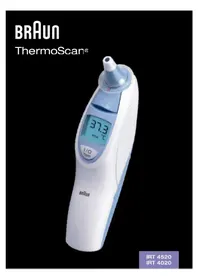


| Product Type | Ear Thermometer |
| Brand | Braun |
| Model | ThermoScan IRT 4020 |
| Measurement Method | Infrared (measures heat from eardrum and surrounding tissue) |
| Display Type | LCD |
| Display Resolution | 0.1 °C or °F |
| Displayed Temperature Range | 34 - 42.2 °C (93.2 - 108 °F) |
| Accuracy | ± 0.2 °C (35.5 - 42 °C), ± 0.3 °C outside that range |
| Clinical Repeatability | ± 0.14 °C (± 0.26 °F) |
| Operating Ambient Temperature | 10 - 40 °C (50 - 104 °F) |
| Storage Temperature | -20 °C to 50 °C (-4 °F to 122 °F) |
| Power Source | 2 x 1.5V AA (LR06) batteries |
| Battery Life | 2 years / approximately 1000 measurements |
| Auto-Off | After 60 seconds of inactivity |
| Memory | Stores last temperature reading (auto-displayed when turned on) |
| Lens Filter Required | Yes, must use genuine Braun ThermoScan Lens Filters (LF 40) |
| ExacTemp Light | Yes, indicates stable positioning during measurement |
| Over-Insertion Protection | Shape prevents insertion too far into ear canal |
| Cleaning | Wipe probe tip gently with alcohol; exterior with soft dry cloth; do not submerge |
| Intended Use | Household use only |
| Certifications | CE, Medical Device Directive 93/42/EEC, EN 12470-5, EN 60601-1 |
| Manufactured by | Kaz Europe SA under license from Braun GmbH |
| Country of Origin | Mexico |
Frequently Asked Questions - ThermoScan IRT 4020 BRAUN
User questions about ThermoScan IRT 4020 BRAUN
0 question about this device. Answer the ones you know or ask your own.
Ask a new question about this device
Download the instructions for your Thermometers in PDF format for free! Find your manual ThermoScan IRT 4020 - BRAUN and take your electronic device back in hand. On this page are published all the documents necessary for the use of your device. ThermoScan IRT 4020 by BRAUN.
USER MANUAL ThermoScan IRT 4020 BRAUN
This product is manufactured by
Kaz Europe SA under a license to the 'Braun' trade
mark. 'Braun' is a registered trademark of
Braun GmbH, Kronberg, Germany.
Kaz Europe SA
Place Chauderon 18
CH-1003 Lausanne
Switzerland
©2011. Kaz Europe SA
www.kaz-europe.com

Made in Mexico
U.S. Patent No.: 6,022,140; 6,149,298; 6,203,194; 6,626,835; 6,694,174; 7,014,358; D460,006
German Patent No.: 40101997; 50011321; 50015741; 59811385; 502004007077
France Patent No.: 0 966 660; 1 081 475; 1 166 067; 1 664 693
UK Patent No.: 0 966 660; 1 081 475; 1 166 067; 1 664 693; 2 104 340
Netherlands Patent No.: 1 166 067; 1 664 693
Spain Patent No.: 0 966 660; 1 664 693
Switzerland Patent No.: 0 966 660; 1 664 693
Turkey Patent No.: 1 664 693
IRT4520 / IRT4020 MNLA
P/N U.0035
25JAN11


The Braun ThermoScan thermometer has been carefully developed for accurate, safe and fast temperature measurements in the ear. The shape of the thermometer prevents it from being inserted too far into the ear canal to hurt the eardrum.
However, as with any thermometer, proper technique is critical to obtaining accurate temperatures. Therefore, read the use instructions carefully and thoroughly.
Important
- The operating ambient temperature range for this thermometer is 10 - 40 °C (50 - 104 °F).
- Do not expose the thermometer to temperature extremes (below -20 °C / -4 °F or over 50 °C / 122 °F) nor excessive humidity (> 95% RH).
- This thermometer must only be used with genuine Braun ThermoScan Lens Filters (LF 40). Never use this thermometer without a new, clean lens filter attached.
- Keep lens filters out of reach of children. • This thermometer is intended for household use only.
- Use of this thermometer is not intended as a substitute for consultation with your physician.
How does Braun ThermoScan work?
Braun ThermoScan measures the infrared heat generated by the eardrum and surrounding tissues. To avoid gross temperature differences, the sensor itself is brought to a temperature close to that of the human body. When the Braun ThermoScan is placed in the ear, it continuously monitors the infrared radiation. The measurement will be finished and the result is displayed, when an accurate reading can be assured.
Why measure in the ear?
The goal of thermometry is to measure core body temperature which is the temperature of the vital organs. Ear temperatures accurately reflect core body temperature, since the eardrum shares blood supply with the temperature control center in the brain, the hypothalamus. Therefore, changes in body temperature are reflected sooner and more accurately in the ear than at other sites.
- Axillary temperatures only measure skin temperature and therefore, are not a reliable indicator of core body temperature.
- Oral temperatures are influenced by drinking, eating and breathing.
- Rectal temperatures lag behind changes in core body temperature and there is a risk of cross-contamination.
Body temperature
Normal body temperature is a range. The following table shows that this normal range also varies by site. Therefore, readings from different sites should not be directly compared.
Normal ranges by site:
Axillary: 34.7 – 37.3 °C 94.5 – 99.1 °F Oral: 35.5 – 37.5 °C 95.9 – 99.5 °F Rectal: 36.6 - 38.0 °C 97.9 - 100.4 °F ThermoScan: 35.8 – 38.0 °C 96.4 – 100.4 °F
- As well, a person's normal temperature range tends to decrease with age. The following table shows normal ThermoScan ranges by age.
Normal ThermoScan ranges by age:
0 - 2 years 36.4 - 38.0 °C 97.5 - 100.4 °F 3 - 10 years 36.1 - 37.8 °C 97.0 - 100.0 °F 11 – 65 years 35.9 – 37.6 °C 96.6 – 99.7 °F
65 years 35.8 - 37.5 °C 96.4 - 99.5 °F
However, the range of normal also varies from person to person and fluctuates throughout the day. It is therefore important to determine your normal temperature range. This is easily done using Braun ThermoScan. Practice taking temperatures on yourself and healthy family members to determine their normal temperature ranges.
Note: When consulting your physician, communicate that the ThermoScan temperature is a temperature measured in the ear and if possible, note the individual's normal ThermoScan temperature range as additional reference.



Product description (see page 3)
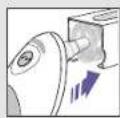
- Lens filter
- Probe
- Lens filter detector
- Lens filter ejector
- Display
- «I/O» button
(On/memory function - IRT 4520 only)
- "ExactTemp" light
- "start" button
- Battery door
- Protective cover (IRT 4520)
- Cap (IRT 4020)
How to use your Braun ThermoScan?
- To achieve accurate readings, make sure a new, clean lens filter (1) is in place before each measurement.
- IRT 4020: Push the "start" button (8). IRT 4520: Push the "I/O" button (6).
During an internal self-check, the display shows all segments. Then the last temperature taken will be displayed together with "MEM".
Wait for the ready signal beep and the ready symbol in the display.
- Fit the probe snugly into the ear canal, then press the "start" button (8).
If the probe has been fitted securely into the ear canal during the complete measuring process, a long beep will signal the end of the measuring process. You can be assured to have taken an accurate temperature reading. The result is shown on the display (5).
If you take the temperature of another person, the "ExacTemp" light (7) will be of help. It flashes during the measuring process as long as the probe is securely positioned, and lights up continuously when an accurate reading has been taken.
- If the probe has not been constantly placed in a stable position in the ear canal, a sequence of short beeps will sound, the "ExacTemp" light will go out and the display will show an error message ("POS" = position error).
- For the next measurement, eject the used lens filter (push ejector (4)) and put on a new, clean lens filter. IRT 4020: Clear the display by pressing the "start" button once.
IRT 4520: Clear the display by pressing the "I/O" button once.
Wait for the ready signal. Fit the probe snugly into the ear canal, then press the "start" button.
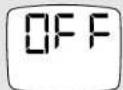
The Braun ThermoScan ear thermometer turns off automatically after 60 seconds of inactivity. The IRT 4520 can also be turned off by pressing the "I/O" button for at least three seconds. The display will shortly flash "OFF" and after releasing the button it will go blank.
Temperature taking hints
• Always replace disposable lens filters to maintain accuracy and hygiene. - The right ear reading may differ from the reading taken at the left ear. Therefore, always take the temperature in the same ear. - The ear must be free from obstructions or excess earwax build-up to take an accurate reading. - External factors may influence ear temperatures, including when an individual has: – been lying on one ear or the other - had their ears covered – been exposed to very hot or very cold temperatures, or – been recently swimming or bathing.





![graph TD A["OF"] --> B["SET"] B --> C["SET"] C --> D["OF"] D --> A](/content/2026/06/1240756/images/15b8f259b5ddad1b48005616ace791c96c593b69fbcd4150f4ede2308c2fec58.jpg)
In these cases, remove the individual from the situation and wait 20 minutes prior to taking a temperature.
Use the untreated ear if prescription ear drops or other ear medications have been placed in the ear canal.
Memory mode
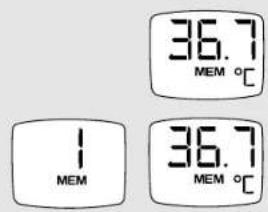
The last temperature taken is stored in its memory and will be automatically displayed when it is turned on again. The display will show «MEM».
IRT 4520;
This model stores the last 8 temperature readings. To display the stored readings, the thermometer must be turned on. Then press the «I/O» button for at least 1 second. The display shows the memory number (e.g. MEM 1), and when releasing the «I/O» button, the stored temperature for that memory number is displayed, together with «MEM». If «I/O» button is pressed too long, the thermometer will be switched off. Each further pressing of the «I/O» button displays the remaining memory numbers (up to MEM 8). MEM 1 is the latest reading, MEM 8 would be the oldest. The memory mode is left automatically after displaying the oldest reading, or after pressing the «I/O» button for at least 1 second.
Changing the temperature scale
Your Braun ThermoScan is shipped with the Celsius (°C) temperature scale activated. If you wish to switch to Fahrenheit (°F) and/or back from Fahrenheit to Celsius, proceed as follows:
(1) Make sure the thermometer is turned off.
(2) Press and hold down the «start» button (IRT 4020) or the «I/O» button (IRT 4520). After about 3 seconds the display will show this sequence: «°C» / «SET» / «°F» / «SET» ...
(3) Release the «start» button / «I/O» button when the desired temperature scale is shown. There will be a short beep to confirm the new setting, then the thermometer is turned off automatically.
Care and cleaning
The probe tip is the most delicate part of the thermometer. It has to be clean and intact to ensure accurate readings.
If the thermometer is ever accidentally used without a lens filter, clean the probe tip as follows: Very gently wipe the surface with a cotton swab or soft cloth moistened with alcohol. After the alcohol has completely dried out, you can put a new lens filter on and measure. If the probe tip is damaged, please contact your authorized local service centre.
Use a soft, dry cloth to clean the thermometer display and exterior. Do not use abrasive cleaners. Never submerge this thermometer in water or any other liquid.
Store thermometer and lens filters in a dry location free from dust and contamination and away from direct sunlight.
Additional lens filters (LF 40) are available at most stores carrying Braun ThermoScan.
For more information, please contact your authorized local Service Centre.

Trouble-shooting Error message Situation Solution
 | No lens filter is attached. Attach new, clean lens filter. | |
 | The thermometer cannot identify a secure position of the probe. An accurate measurement was not possible. | IRT 4020: Clear the display by pushing the «start» button once. IRT 4520: Clear the display by pushing the «I/O» button once. |
| POS = position error | Take care that the positioning of the probe is correct and remains stable. | |
 | Ambient temperature is not within the allowed operating range (10 - 40 °C or 50 - 104 °F). | Allow the thermometer to remain in a room for 30 minutes where the temperature is between 10 and 40 °C or 50 and 104 °F. |
 | Temperature taken is not within typical human temperature range (34 - 42.2 °C or 93.2 - 108 °F). | Make sure a new, clean lens filter is attached and thermometer is properly inserted. Then, take a new temperature. |
 | HI = too high | |
| LO = too low | ||
 | System error - self-check display flashes continuously and will not be followed by the ready beep and the ready symbol. | Wait 1 minute until the thermometer turns off automatically, then turn on again. |
| If error persists, | Reset the thermometer by re-moving the batteries and putting them back in. | |
| If error still persists, | Please contact your authorized Service Centre (See Guarantee Card). | |
Trouble-shooting Situation Solution Error message
| Battery is low, but thermometer will still operate correctly. | Insert new batteries. |  |
| Battery is too low to take correct temperature readings. | Insert new batteries. |  |
| Do you have any further questions? | Please contact your authorized Service Centre(See Guarantee Card). |
Replacing the batteries
The thermometer is supplied with two 1.5 V type AA (LR 06). For best performance, we recommend Duracell alkaline batteries. Insert new batteries when the battery symbol appears on the display.
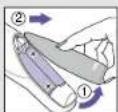
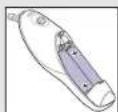
Open the battery compartment. Remove the batteries and replace with new batteries, making sure the poles are in the right direction. Slide battery door back until it snaps in place.

To protect the environment, dispose of empty batteries at your retail store or at appropriate collection sites according to national or local regulations.
Calibration
The thermometer is calibrated at the time of manufacture. If at any time you question the accuracy of the temperature measurement, please contact your authorized Service Center.
Product specifications (see page 3)
Model: IRT4520/4020
Displayed temperature range: 34 - 42.2 °C (93.2 - 108 °F)
Operating ambient temperature range: 10 – 40 °C (50 – 104 °F)
Display resolution: 0.1 °C or °F
Accuracy for displayed temperature range: ± 0.2 °C (35.5 - 42 °C) (95.9 - 107.6 °F)
± 0.3 °C (outside this temperature range)
Clinical repeatability: ± 0.14 °C (± 0.26 °F)
Battery life: 2 years / 1000 measurements

Type BF equipment

Operating temperature

See instruction of use
Subject to change without notice.
This appliance conforms to the following standards:
| Standard Reference Edition | Title: | |
| EN 12470-5 | 2000 | Clinical thermometers - Part 3: Performance of compact electrical thermometers (non-predictive and predictive) with maximum device |
| EN 60601-1 | 2006 | Medical electrical equipment – Part 1: General requirements for basic safety and essential performance. |
| EN ISO 14971 | 2007 | Medical devices – Application of risk management to medical devices. |
| EN ISO 10993-1 | 2003 | Biological evaluation of medical devices – Part 1: Evaluation and Testing. |
| EN 60601-1-2 | 2007 | Medical electrical equipment – part 1-2: General requirements for basic safety and essential performance – Collateral standard: electromagnetic compatibility – Requirements and tests |
| EN 980 | 2008 | Symbols for use in labeling of medical devices |
| EN 1041 | 2008 | Information supplied by the manufacturer of medical |
This product conforms to the provisions of the EC directive 93/42/EEC (Medical Device Directive).
MEDICAL ELECTRICAL EQUIPMENT needs special precautions regarding EMC. For detailed description of EMC requirements please contact your authorized local Service Centre (See guarantee card).
Portable and mobile RF communications equipment can affect MEDICAL ELECTRICAL EQUIPMENT.

Please do not dispose of the product in the household waste at the end of it useful life. To protect the environment, dispose of empty batteries at appropriate collection sites according to national or local regulations.
![graph TD A["OR"] --> B["SET"] B --> C["OF"] C --> D["SET"] D --> A](/content/2026/06/1240756/images/e53ce3a1b0dc6523a6d711181ec8028c000a2eb1ebe686d619889a65183074e9.jpg)


- HOWEVER, AS WITH ANY THERMOMETER, PROPER TECHNIQUE IS CRITICAL TO OBTAINING ACCURATE TEMPERATURES. THEREFORE, READ THE USE INSTRUCTIONS CAREFULLY AND THOROUGHLY
- IMPORTANT
- HOW DOES BRAUN THERMOSCAN WORK
- WHY MEASURE IN THE EAR
- BODY TEMPERATURE
- NORMAL RANGES BY SITE
- NORMAL THERMOSCAN RANGES BY AGE
- PRODUCT DESCRIPTION (SEE PAGE 3)
- HOW TO USE YOUR BRAUN THERMOSCAN
- TEMPERATURE TAKING HINTS
- MEMORY MODE
- IRT
- CHANGING THE TEMPERATURE SCALE
- CARE AND CLEANING
- REPLACING THE BATTERIES
- CALIBRATION
- PRODUCT SPECIFICATIONS (SEE PAGE 3)
Brand : BRAUN
Model : ThermoScan IRT 4020
Category : Thermometers