BCE27 - Baby monitor SWITEL - Free user manual and instructions
Find the device manual for free BCE27 SWITEL in PDF.


User questions about BCE27 SWITEL
0 question about this device. Answer the ones you know or ask your own.
Ask a new question about this device
Download the instructions for your Baby monitor in PDF format for free! Find your manual BCE27 - SWITEL and take your electronic device back in hand. On this page are published all the documents necessary for the use of your device. BCE27 by SWITEL.
USER MANUAL BCE27 SWITEL
COMMUNICATION PRODUCTS
Babyphone
Interphone bébé
Sorveglia-bebè
Babyphone
BCE27
natural_image
Two identical gray portable electronic devices with open handles and circular design, no visible text or symbols.Bedienungsanleitung
Mode d'emploi
Operating Instructions
D
F
|
GB
natural_image
Technical line drawing of a mechanical device with no visible text or symbols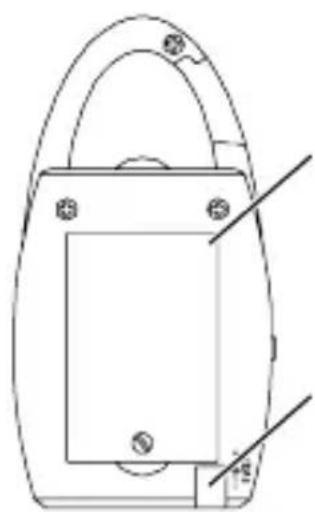
natural_image
Technical line drawing of a mechanical component with mounting holes and a handle (no text or symbols)
text_image
7 8natural_image
Line drawing of a mechanical part with a central button and side features (no text or symbols)6
text_image
7 8 1
natural_image
Line drawing of a bottle-like object with a pointed tip and side profile (no text or symbols)4 Sicherheitsinformation
natural_image
Two black-and-white symbols: a recycling symbol and a crossed-out trash bin (no text or labels)natural_image
Two black-and-white symbols: a recycling symbol and a crossed-out trash bin (no text or labels)Please read this operating manual thoroughly. Under no circumstances open the devices yourself and never carry out any repair work yourself. In the case of claims under the terms of guarantee, please contact your sales outlet. SWITEL reserves the right to make modifications to the technical specifications and design within the scope of product improvement.
1. Intended use
This babyphone has been developed purely for monitoring voice signals, e.g. from children.
2. Installation location
The receiver unit must be installed in the vicinity of a 230 V power socket. Set the babyphone units down on a flat, non-slip surface. Normally, these units do not leave marks on the surfaces where they are located. However, due to the number of paints and surfaces which come into question, it cannot be fully ruled out that the housing will leave marks on the surface where it is located.
3. Power supply
Only use the SWITEL power adapter plug contained in the material supplied since other power adapter plugs could damage the baby-phone. Never open the power adapter plug. If the power adapter plug is opened when connected to the power supply socket, there is a risk of fatal injury.
4. Disposing of the device
In order to dispose of your device, take it to a collection point provided by your local public waste authorities (e.g. recycling centre). According to laws on the disposal of electronic and electrical devices, owners are obliged to dispose of old electronic and electrical devices in a separate waste container.
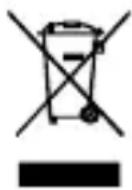
The adjacent symbol indicates that the device must not be disposed of in normal domestic waste!
Risks to health and the environment from batteries!
Never open, damage or swallow batteries or allow them to pollute the environment. They could contain toxic and ecologically harmful heavy metals.


You are legally obliged to dispose of batteries at the point-of-sale or authorised collection points where the corresponding containers are provided. Disposal is free of charge. The above symbols indicate that the batteries must not be disposed of in domestic waste and that they must be disposed of at an authorised collection point.
Packaging materials must be disposed of according to local regulations.
5. Important
- Check the sound reception before putting the remote babyphone units into operation. This also checks whether the units have been placed out of range of each other. The sound transmission should be checked at regular intervals as follows: Allow an adult to speak quietly in the “transmitter unit” (unit for the baby). It should be possible to hear the sound made in the baby’s room clearly on the “receiver unit” (unit for the adults) in another room.
- During operation, do not place the transmitter and receiver units too close to each other. The units could resonate or interference noise could be produced.
- If you use a power adapter plug, do not position it in the vicinity of the baby but on a window sill or another location where the baby cannot reach it.
- Under no circumstances should the power adapter plug be connected with other equipment. Adapters for other products are not suitable for this system.
- Battery power, walls, radio waves and local characteristics can affect the range of the devices. To achieve a better performance, switch to another channel or position the receiver unit nearer to the transmitter unit.
- Do not place the transmitter unit in the bathroom (near a bathtub, for example).
5 Functions
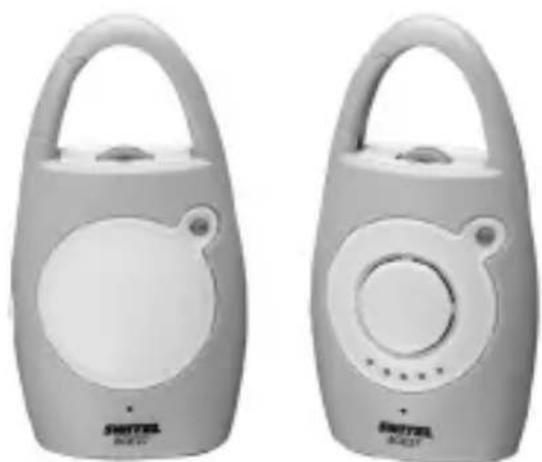
Congratulations on having purchased our wireless babyphone. It contains a transmitter unit, a receiver unit and two power adapter plugs as illustrated in Fig. I.
- Wireless HF transmission.
- 2-channel selection.
- Voice-activated transmission with sensitivity control.
- Transmitter unit operation with 9 V power adapter plug (contained in the material supplied) or with 3 AAA batteries.
- Receiver unit operation with 9 V power adapter plug (contained in the material supplied) or with 3 AAA batteries.
- Receiver unit with volume control.
- Low power consumption and low HF radiation.
6 Starting Up
1. Inserting the batteries
Only use batteries bearing the CE certificate.
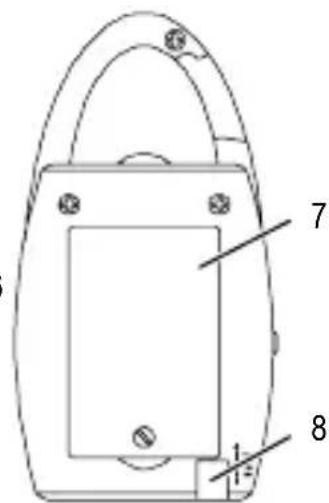
- Open the battery compartments as illustrated in Fig. V.
- Insert 3 AAA batteries each in the transmitter unit and in the receiver unit, paying attention to the correct polarity.
- Close the battery compartments.
The batteries need not be removed from the transmitter/receiver unit when they are operated using the power adapter plugs.
2. Operating using the power adapter plug
Only use adapters which bear a CE certificate.
- Connect the power adapter plug to the 9 VDC jack on the transmitter unit and to the power socket.
- Connect the power adapter plug to the 9 VDC jack on the receiver unit and to the power socket.
- Set the channel selector on the transmitter and receiver units to the same channel (A or B) (Fig. III).

- If you do not intend to use the units for a longer period of time, remove all the batteries. Otherwise, they could leak.
- It is recommended to use the 9 V power adapter plugs for both units.
- If both units are equipped with batteries and the adapter plugs are inserted in both, the units only operate via the batteries following a power failure when the adapter plugs are disconnected from the transmitter and receiver units.
7 Operation
1. Transmitter unit
- Ensure that the power adapter plug is connected correctly or the batteries have been inserted properly.
- Position the transmitter unit near the baby and ensure that the microphone is pointing towards the baby to enable optimum transmission (Fig. IV).

Ensure that the unit is out of reach of the baby. Never place the unit in the baby's bed or playpen!
- When the integrated microphone detects sounds (range 1 to 2m ), the transmitter unit starts transmitting signals to the receiver unit automatically. When no further noise is detected, transmission is stopped.
- To activate/deactivate the night light, slide the switch to position "AUTO", "OFF" or "ON". When set to "AUTO", the nightlight reacts to sounds (Fig. II).
2. Receiver unit
- Ensure that the power adapter plug is connected correctly or the batteries have been inserted properly.
- Position the receiver unit near the supervising adults (Fig. IV).
- Move the loudspeaker control to the required setting.
- If a sound signal is sent by the transmitter unit, the receiver is activated and transmits the sounds received.
- A few seconds after the device has no longer received acoustic signals, the receiver automatically switches back to energy-save mode.
3. Channel selection
• Each of the units is equipped with a channel selector switch (A or B) for the transmission of the radio signals. If reception is poor or interference occurs in the radio signals, select the other channel for optimum transmission.
Ensure that both units are set to the same channel.
4. Optimising the sensitivity of voice-activation
- Set the sensitivity control to a suitable setting on the transmitter unit.
8 Troubleshooting
1. No power
- The unit is switched off. Switch the unit on by moving the ON/OFF switch to "I".
- Ensure that the batteries have been inserted correctly.
- Check that the adapter plug is correctly connected to the device.
2. No acoustic signal
•Volume control on the receiver is set too low. Set a higher volume.
- Sensibility control on the transmitter is set too low. Set a higher sensibility.
- The devices are out of range. Reduce the distance between the transmitter and receiver units.
- Check that both devices are set to the same channel. (Fig. III)
3. Interference noise can be heard from the receiver
- Check that both devices are set to the same channel. (Fig. III)
- Reduce the distance between the transmitter and receiver units.
4. Other voices or noises are received
- Signal disturbances resulting from other babyphones transmitting on the same channel or through cordless phones. Change channel to reduce interference.
5. High tones (acoustic feedback)
- Receiver and transmitter are too close together. Increase the distance between the transmitter and receiver.
- The sensibility is too high. Reduce the transmitter sensibility setting.
9 Technical Specifications
1. Power supply
- Transmitter unit: 3 AAA batteries or power adapter plug AC 230 V / DC 9 V, 150 mA, 2.5 VA (socket, center positive (+))
- Receiver unit: 3 AAA batteries or power adapter plug AC 230 V / DC 9 V, 150 mA, 2.5 VA (socket, center positive (+))
2. Channel
- 2 channels
Channel A = 40.695 MHz, Channel B = 40.665 MHz
3. Operating range
- Up to 150 meters under ideal conditions.
4. Important information
- The device is equipped with an energy-save switching power supply (input voltage 230VAC , output voltage 9VDC , 150 mA).
- The power consumption of the adapter (receiver) with no load is approx. 0.34 W. The average level of efficiency is approx. 56.31 %. The current consumption is approx. 1.35 W.
- The power consumption of the adapter (transmitter) with no load is approx. 0.34 W. The average level of efficiency is approx. 56.31 %. The current consumption is approx. 1.35 W.
SWITEL
CE
Declaration of Conformity
This equipment complies with the European R&TTE directive. To view the complete Declaration of Conformity, please refer to the free download available at our web site: www.switel.com
Service Hotline
In the event of technical problems, you can contact our hotline service, Tel. 0900 00 1675 within Switzerland (cost via Swisscom at time of going to print: CHF 2.60/min).