
C40 - Elliptical bike TUNTURI - Free user manual and instructions
Find the device manual for free C40 TUNTURI in PDF.


| Product type | Elliptical bike |
| Brand | Tunturi |
| Model | C40 |
| Dimensions (L x W x H) | 163 x 163 x 61 cm |
| Weight | 60 kg |
| Max user weight | 135 kg |
| Power supply | 230 V / 115 V (depending on model) |
| Resistance | Electromagnetic brake, 1-42 Nm (manual) / 20-350 W (power control) |
| Training programs | Quick Start, Manual, Target heart rate, Constant power, Preset profiles (P1-P10), T-Ride, T-Trainer, Custom training, Fitness test |
| Display | Time, distance, calories, watts, heart rate, speed/rpm |
| Heart rate measurement | Pulse sensors on handles + Polar chest strap (uncoded) |
| MP3 player | Yes, MP3, A64, WAV formats |
| User profiles | Up to 5 users with personal data (name, age, weight, height, gender) |
| Console | LCD screen with selection wheel and 6 buttons (BACK/STOP, MP3, MAIN, USER, +, -) |
| Assembly | Required, recommended for two people |
| Maintenance | Check screws, wipe with a soft dry cloth, do not use detergent |
| Transport | Transport wheels, two adults required, do not transport on stairs |
| Safety | Auto shut-off after 5 minutes of inactivity, emergency stop via BACK/STOP button |
| Standards | CE, EN-957 class A (precision) |
| Warranty | See brochure supplied with the device |
| Spare parts | List at the end of the manual, available from the dealer |
Frequently Asked Questions - C40 TUNTURI
User questions about C40 TUNTURI
0 question about this device. Answer the ones you know or ask your own.
Ask a new question about this device
Download the instructions for your Elliptical bike in PDF format for free! Find your manual C40 - TUNTURI and take your electronic device back in hand. On this page are published all the documents necessary for the use of your device. C40 by TUNTURI.
USER MANUAL C40 TUNTURI
IMPORTANT SAFETY INSTRUCTIONS 2
ASSEMBLY 3
EXERCISING 3
CONSOLE 4
MAINTENANCE 9
TRANSPORT AND STORAGE 9
TECHNICAL SPECIFICATIONS 9
WELCOME TO THE WORLD OF TUNTURI EXERCISING!
Your choice shows that you really want to invest in your well being and condition; it also shows you really value high quality and style. With Tunturi Fitness Equipment, you've chosen a high quality, safe and motivating product as your training partner. Whatever your goal in training, we are certain this is the training equipment to get you there. You'll find information about using your exercise equipment and what makes for efficient training at Tunturi's website at WWW.TUNTURI.COM.
IMPORTANT SAFETY INSTRUCTIONS
Read this guide through carefully before assembling, using or servicing your fitness equipment. Please keep the guide somewhere safe; it will provide you now and in the future with the information you need to use and maintain your equipment. Always follow these instructions with care.
NOTE ABOUT YOUR HEALTH
- Before you start any training, consult a physician to check your state of health.
- If you experience nausea, dizziness or other abnormal symptoms while exercising, stop your workout at once and consult a physician.
- To avoid muscular pain and strain, begin each workout by warming up and end it by cooling down (slow pedaling at low resistance). Don't forget to stretch at the end of the workout.
NOTE ABOUT THE EXERCISE ENVIRONMENT
• The equipment is not to be used outdoors.
- Place the equipment on a firm, level surface. Place the equipment on a protective base to avoid any damages to the floor beneath the equipment.
• Make sure that the exercising environment has adequate ventilation. To avoid catching cold, do not exercise in a draughty place.
- In training, the equipment tolerates an environment measuring +10°C to +35°C. The equipment can be stored in temperatures ranging between -15°C and +40°C. Air humidity in the training or storage environment must never exceed 90%.
NOTE ABOUT USING THE EQUIPMENT
- If children are allowed to use the equipment, they should be supervised and taught to use the equipment properly, keeping in mind the child's physical and
mental development and their personality.
- Before you start using the equipment, make sure that it functions correctly in every way. Do not use faulty equipment.
- Press the keys with the tip of the finger; your nails may damage the key membrane.
- Never lean on the interface.
- Never remove the side covers. Do not step on the frame casing.
- Only one person may use the equipment at a time.
- Hold the stationary handlebar for support when getting on or off the equipment.
- Wear appropriate clothing and shoes when exercising.
- Protect the meter from sunlight and always dry the surface of the meter if there are any drops of sweat on it.
• Further information on warranty terms can be found in the warranty booklet included with the product. - Please note that the warranty does not cover damage due to shipping or negligence of adjustment or maintenance instructions described in this manual.
- The equipment must not be used by persons weighing over 135 kg.
- Make sure the equipment is unplugged before carrying out any assembly or maintenance procedures.
- Do not attempt any servicing or adjustments other than those described in this guide. Everything else must be left to someone familiar with the maintenance of electromechanical equipment and authorized under the laws of the country in question to carry out maintenance and repair work.
NOTE! Do not modify the plug provided with the product - if it will not fit the outlet, have a proper outlet installed by a qualified electrician.
NOTE ABOUT SAFETY FOR UNITS WITH ELECTRICAL POWER
Before connecting the equipment to a power source, make sure that the local voltage matches that indicated on the type plate: the equipment operates at either 230 Volt or 115 Volt (North American version).
NOTE! Do not use extension wires when connecting the equipment to the power source. Always switch off the power and unplug the equipment from the electrical outlet immediately after using!
To reduce the risk of burns, fire, electric shock or injury to persons:
- The equipment should never be left unattended when plugged in. Unplug the equipment from the outlet when not in use, before carrying out any maintenance or repair procedures, and before moving the unit.
- Do not operate the equipment under a blanket or other combustive material. Excessive heating can occur and cause fire, electric shock or injury to persons.
- Do not connect the equipment to a power source, or operate the equipment if there is any sort of damage to the power cord or the unit itself.
- Do not connect the equipment to a power source or operate the equipment outdoors or in damp locations.
- Keep the power cord away from hot objects.
- Do not route the power cord beneath a carpet or place any objects on the cord. Also make sure that the power cord does not run underneath the equipment.
- Do not alter (for example lengthen) the cord between the transformer and the unit.
ASSEMBLING THE EQUIPMENT
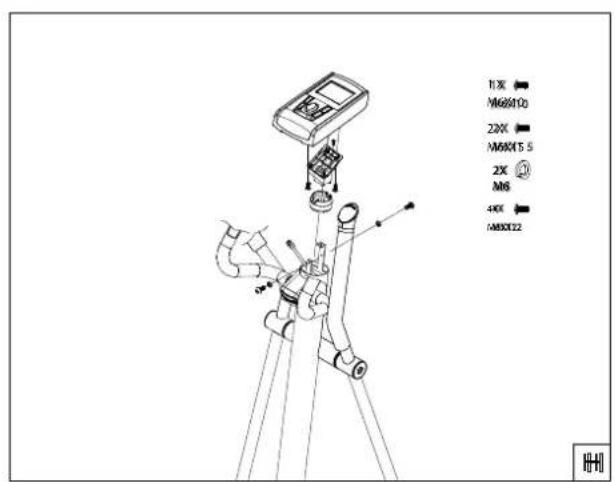
Start by unpacking the equipment. The detailed assembly instructions can be found at the back of this guide. Follow the instructions in given order.
Before assembly, check the contents of the package. If a part is missing, please contact your dealer with the model, equipment serial no. and spare part no. of the missing part. You'll find a spare part list at the back of this guide. The hardware kit contents are marked with * in the spare parts list. The directions left, right, front and back are defined as seen from the exercising position. Keep the assembly tools, as you may need them e.g. for adjusting the equipment. Note that two people are needed for the assembly.
The packaging includes a silicate bag for absorbing moisture during storage and transportation. Please dispose of the bag once you have unpacked the equipment. Allow at least 100 cm of clearance around the equipment. We also recommend opening the package and assembling the product on a protective base.
SAVE THIS INSTRUCTION MANUAL
EXERCISING
Working out using an elliptical trainer is excellent aerobic exercise, the principle being that the exercise should be suitably light, but of long duration. Aerobic exercise is based on improving the body's maximum oxygen uptake, which in turn improves endurance and fitness. The ability of the body to burn fat as a fuel is directly dependent on its oxygen-uptake capacity. Aerobic exercise should above all be pleasant. You should perspire, but you should not get out of breath during the workout. You must, for example, be able to speak and not just pant while pedaling.
You should exercise at least three times a week, 30 minutes at a time, to reach a basic fitness level. Maintaining this level requires a few exercise sessions each week. Once the basic condition has been reached, it is easily improved simply by increasing the number of exercise sessions. Exercise is always rewarding for weight loss, because it is the only way of increasing the energy spent by the body. This is why it is always worthwhile to combine regular exercise with a healthy diet. A dieter should exercise daily, at first 30 minutes or less at a time, gradually increasing the daily workout time to one hour.
You should start slowly at a low pedaling speed and low resistance, because for an overweight person strenuous exercise may subject the heart and circulatory system to excessive strain. As fitness improves, resistance and pedaling speed can be increased gradually. Exercise efficiency can be measured by monitoring the pulse. The pulse meter helps you monitor your pulse easily during exercise, and thus to ensure that the exercise is sufficiently effective but not over-strenuous. Start your workout with slow tempo and low resistance. Gradually increase tempo and resistance according to your own condition. Keep your head up and neck long in order to avoid stress on your neck, shoulders and back. Keep also your back straight. Make sure that your feet are centered on the foot pedals and that your hips, knees, ankles and toes are facing forward. Keep your body weight centered over your lower body regardless of whether you lean forward or stand upright. Stop your workout by gradually decreasing tempo and resistance.
Don't forget to stretch afterwards. To strengthen cardiovascular system, maintain low resistance but high tempo. Exercising with higher resistance and slow tempo strengthens correspondingly your back and hips.
HEART RATE
No matter what your goal, you'll get the best results by training at the right level of effort, and the best measure is your own heart rate. The C40 meter has a heart rate receiver compatible with Polar equipment, so you can also use Polar uncoded heart rate transmitter belts for heart rate measurement.
NOTE! If you are fitted with a pacemaker, please consult a physician before using a heart rate transmitter belt.
The most reliable heart rate measurement is achieved with a telemetric device, in which the electrodes of the transmitter fastened to the chest transmit the pulses from the heart to the console by means of an electromagnetic field. If you want to measure your heart rate this way during your workout, moisten the grooved electrodes on the transmitter belt with water. Fasten the transmitter just below the chest with the elastic belt, firmly enough so that the electrodes remain in contact with the skin while exercising, but not so tight that normal breathing is prevented. If you wear the transmitter and belt over a light shirt, moisten the shirt slightly at the points where the electrodes touch the shirt. The transmitter automatically transmits the heart rate reading to the console up to a distance of about 1 m. If the electrode surfaces are not moist, the heart-rate reading will not appear on the display. If the electrodes are dry, they must be moistened again. Allow the electrodes warm up properly to ensure accurate heart rate measurement. If there are several telemetric heart rate measurement devices next to each other, the distance between them should be at least 1.5 m. Similarly, if there is only one receiver and several transmitters in use, only one person with a transmitter should be within transmission range. The transmitter is switched to an active state only when it is being used for measurement. Sweat and other moisture can, however, keep the transmitter in an active state and waste battery energy. Therefore it is important to dry the electrodes carefully after use.
When selecting training attire, please note that some fibers used in clothes (e.g. polyester, polyamide) create static electricity, which may prevent reliable heart rate measurement. Please note that a mobile phone, television and other electrical appliances form an electromagnetic field around them, which will cause problems in heart rate measurement.
HAND GRIP PULSE MEASUREMENT
Pulse is measured by sensors in the handlebars. Pulse is measured when the user of C40 is touching both sensors simultaneously. Reliable pulse measurement requires that the skin is constantly touching the sensors and that the skin is slightly moist. Too dry or too moist skin weakens the reliability of hand pulse measurement.
HEART RATE IN TRAINING
First find your maximum heart rate i.e. where the rate doesn't increase with added effort. If you don't know your maximum heart rate, please use the following formula as a guide:
220 - AGE
The formula gives an average value; the maximum varies from person to person. The maximum heart-rate diminishes on average by one point per year. If you belong to a risk group, ask a doctor to measure your maximum heart rate for you.
We have defined three different heart-rate zones to help you with targeted training.
BEGINNER: 50-60 % of maximum heart-rate
Also suitable for weight-watchers, convalescents and those who haven't exercised for a long time. Three sessions a week of at least a half-hour each is recommended. Regular exercise considerably improves beginners' respiratory and circulatory performance and you will quickly feel your improvement.
TRAINER: 60-70 % of maximum heart-rate
Perfect for improving and maintaining fitness. Even reasonable effort develops the heart and lungs effectively, training for a minimum of 30 minutes at least three times a week. To improve your condition still further, increase either frequency or effort, but not both at the same time!
ACTIVE TRAINER: 70-80 % of maximum heart-rate
Exercise at this level suits only the fittest and presupposes long-endurance workouts.
CONSOLE
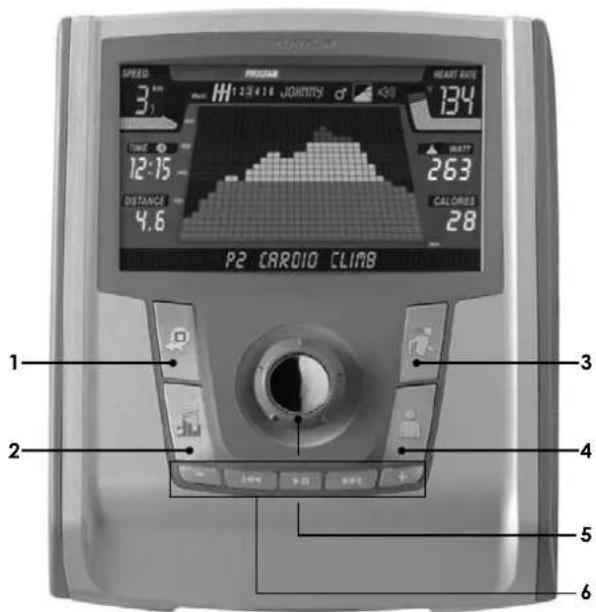
KEYS
1. BACK/STOP
Use the BACK/STOP button to navigate back towards the MAIN menu. During training, you can stop or pause your training session by pressing the BACK/STOP button.
2. MP3 MODE
Press this button to switch to MP3 mode (current training continues), or back to training.
• Music player automatically starts with the first track.
• Support MP3, A64 and WAV formats.
3. MAIN MENU
The MAIN menu includes the following training programmes: QUICK START, MANUAL, PROGRAMMES, TARGET HR, WATT CONTROL, FITNESS TEST, T-RIDETM, T-TRAINERTM.
4. USER/SETTINGS
Press the USER button to open the USER menu. The USER menu includes the following functions: CHANGE USER, EDIT USER, CREATE USER, DELETE USER AND SETTINGS.
5. SELECTION DIAL
The selection dial functions in two ways:
-
Rotating the dial. By rotating the dial clockwise, you can scroll down in the menus or scroll to the right, and you can increase values or resistance. By rotating the dial anti-clockwise, you can scroll up in the menus or scroll to the left, and you can decrease values or resistance.
-
Pressing the dial. By pressing the dial, you can accept the selection you made when rotating the dial. During training, you can switch y-axis.
6. SMALL MP3 PLAYER BUTTONS
To decrease the volume, use the - button.
Skip backward in the play list by using the ◀ button Start or pause playing the music by using the ▶II button Skip forward in the play list using the ▶ button. Increasing the volume, use the + button.

NOTE! MP3 or BIT RATE should be in the range 32
kbps to 320 kbps.
DISPLAY
During training, you will see the following training values on the display: time, distance, energy consumption (calories), effort (Watt), heart rate or % of max HR and speed or RPM.
- To activate the console, connect the device to a power source, and then press any key or start pedalling. The console will now display the MAIN menu. If you do not press a key, or pedal for more than 5 minutes, the console will automatically switch itself off.
- The values in a workout that was interrupted are saved in the user interface memory for 5 minutes, after which they are reset. You can restart the interrupted exercise by pedalling again within 5 minutes.
- On the display, you will see advice messages on the bottom of the display. You can remove the messages from the display by pressing the selection dial.
USER MENU
You can access the USER menu by pressing the USER button. We recommend that you choose a user code and save your personal details: these details are needed e.g. for a more accurate estimation of your energy consumption. Once you have created a username or started to use an existing username, you can see it at the top right corner of the display. You can also exercise without a username. If you do this, a username will not be shown on the top right of the display, and the default settings (40 years, 70 kg, male) will be used for your training session. You can save user data for up to 5 different users.
IMPORTANT! If you wish to view your personal training sessions saved, always remember to select your own username. You can also start using a username in the middle of your training session by pressing the USER button and then selecting your own username. Your training session will not be interrupted. After selecting your username, you can return to the training data by pressing the BACK/STOP button.
IMPORTANT! If you want to save your training session, you must select a username.
CREATE USER
To create a user:
- Press the USER button. The USER menu appears.
- Select CREATE USER by rotating the selection dial. Confirm your selection by pressing the selection dial.
- Enter your name. Move from one letter to another by rotating the selection dial. Confirm the selected letter by pressing the selection dial. Once you have entered your name, select OK and press the selection dial.
-
Select the units you wish to use Metric (kg, km, kcal) or the corresponding Imperial units (lbs, miles, kcal). Make your selection by rotating the selection dial, and confirm by pressing the dial. You will automatically be taken to the next setting.
-
Select the target display for the set values. COUNT DOWN shows the values as they decrease from your target toward zero. COUNT UP shows the values as they increase toward your target. Confirm your selection by pressing the selection dial. You will be taken to the next setting.
-
Set your gender by rotating the selection dial. Confirm your selection.
-
Set your age. Confirm your selection.
-
Set your height. Confirm your selection.
-
Set your weight. Confirm your selection.
-
Select the RPM or Speed. Normally, the display only shows Speed in km/h (or ml). Though as an option, the console is switchable between Speed and RPM if option on show RPM is selected, the standard view will alternate between Speed and RPM (6 sec/6 sec).
-
Select the HR or % of Max HR. When showing direct Heart Rate range 10-220 bpm (0 = off), when showing % of max HR, range 5-100 (0 = off).
-
Set your maximum heart rate. The meter calculates your estimated maximum heart rate using the formula 220 - age. If you know your exact maximum heart rate, you can adjust the estimated maximum heart rate given by the meter.
-
Set your anaerobic threshold. The equipment uses your maximum heart rate to calculate an estimate of your threshold heart rate (80% of your maximum heart rate). If you know your exact anaerobic threshold heart rate, you can adjust the estimate given by the meter.
-
Set the aerobic threshold. The equipment uses your maximum heart rate to calculate an estimate of your threshold heart rate (60% of your maximum heart rate). If you know your exact aerobic threshold heart rate, you can adjust the estimate given by the meter.
IMPORTANT! The meter can store up to 5
usernames at a time.
CHANGE USER
Once you have created a username for yourself, select it at the beginning of your training session by choosing CHANGE USER and confirm it using the selection dial.
EDIT USER
By selecting EDIT USER you can edit your user data.
DELETE USER
By selecting DELETE USER you can delete users. Activate the username you want to delete and then select DELETE USER. Confirm the selection by pressing the selection dial.
SETTINGS
By selecting SETTINGS you can update the meter firmware version, see the trainer's total values and turn the button sounds on or off.
MAIN MENU
You can access the MAIN menu by pressing the MAIN button. From the MAIN menu, you can select one of the following training sessions by pressing the selection dial:
QUICK START
This programme allows you to start the MANUAL programme without using user settings.
- Select QUICK START. Confirm the selection by pressing the selection dial and start your training session by pedalling.
- You can increase or decrease the resistance (1 - 42 Nm) using the selection dial.
- To stop the training session, press the BACK/STOP button. You can then stop the session by selecting EXIT, save the session to the memory by selecting SAVE AND EXIT or continue your training session by selecting CONTINUE.
MANUAL
Allows you to set your effort level with the selection dial during the workout.
- Select MANUAL.
- Using the selection dial, choose your target value for the session: time, distance or energy consumption. Confirm your selection by pressing the selection dial.
- Set the target value for the session using the selection dial: set time (10 - 180 minutes), distance (3-100 km) or energy consumption (50 - 1999 kcal). Confirm your selection by pressing the selection dial.
- Start your training session by pedalling. You can increase or decrease the resistance (1 - 42 Nm) using the selection dial. During training, you can display resistance or heart rate using the selection dial.
- Once the target value has been achieved, the meter gives an audio signal. You can continue with your exercise if you wish.
- To stop the training session, press the BACK/STOP button. You can then stop the session by selecting EXIT, save the session to the memory by selecting SAVE AND EXIT or continue your training session by selecting CONTINUE.
TARGET HR
This programme allows you to preset your pulse level, i.e. the resistance is regulated so that your pulse remains at the requested level. If the pulse tends to rise, resistance is reduced automatically and vice versa. The set value can be changed also during the workout. The programme requires measurement of heart rate.
- Select your TARGET HR.
- Set the heart rate level (80-220) for the training session using the selection dial. Confirm your selection by pressing the selection dial.
- Using the selection dial, choose your target duration for the session measured in time, distance or energy consumption. Confirm your selection by pressing the selection dial.
- Set the target value for the session using the selection
dial: set time (10-180 minutes), distance (3-100 km) or energy consumption (50 - 1999 kcal). Confirm your selection by pressing the selection dial.
- Start your training session by pedalling. Using the selection dial, you can change the heart rate level (80-220). During training, you can display resistance or heart rate using the selection dial.
- Once the target value has been achieved, the meter gives an audio signal. You can continue with your exercise if you wish.
- To stop the training session, press the BACK/STOP button. You can then stop the session by selecting EXIT, save the session to the memory by selecting SAVE AND EXIT or continue your training session by selecting CONTINUE.
WATT CONTROL
By selecting the WATT CONTROL programme, you can set the desired effort value in watts, i.e. pedalling effort will be independent of pedal rotations. The set effort value can also be changed during the workout.
- Select WATT CONTROL.
- Set the effort level (20 - 350 Watt) of your training session using the selection dial. Confirm your selection by pressing the selection dial.
- Using the selection dial, choose your target duration for the session measured in time, distance or energy consumption. Confirm your selection by pressing the selection dial.
- Set the target value for the session using the selection dial: set time (10-180 minutes), distance (3-100 km) or energy consumption (50 - 1999 kcal). Confirm your selection by pressing the selection dial.
- Start your training session by pedalling. You can increase or decrease the resistance (20 - 350 Watt) using the selection dial. During training, you can display effort or heart rate using the selection dial.
- Once the target value has been achieved, the meter gives an audio signal. You can continue with your exercise if you wish.
- To stop the training session, press the BACK/STOP button. You can then stop the session by selecting EXIT, save the session to the memory by selecting SAVE AND EXIT or continue your training session by selecting CONTINUE.
PROGRAMMES
This programme contains ready-made training profiles. The programme changes automatically the intensity level during your workout. The display shows the profile and the changes, and the intensity can be manually adjusted.
- Select PROGRAMMES.
- Select a programme (pre-set profile P1 to P10 & user profile P1 to P10) by using the selection dial. Profiles P1-P5 are Watt control programmes, P6-P10 are target heart rate programmes requiring heart rate measurement. Confirm your selection by pressing the selection dial.
- Using the selection dial, choose your target duration for the session measured in time or distance. Confirm your selection by pressing the selection dial.
-
Set the target value for the session using the selection dial: time (10-180 minutes) or distance (3-100 km). Confirm your selection by pressing the selection dial.
-
Start the programme by pedalling. You can increase or decrease the resistance using the selection dial. During training, you can display effort or heart rate using the selection dial. The heart rate display requires heart rate measurement.
-
Once the target value has been achieved, the meter gives an audio signal. You can continue with your exercise if you wish.
-
To stop the training session, press the BACK/STOP button. You can then stop the session by selecting EXIT, save the session to the memory by selecting SAVE AND EXIT or continue your training session by selecting CONTINUE.
PROFILES P1-P5: WATT CONTROL PROGRAMMES
PROFILE P1. 3-peak effort profile for the improvement of oxygen uptake capacity. With relatively low yet long lasting peaks, this profile is suitable for beginners. With default setting, max. Watt value is 125, average Watt value is 98.
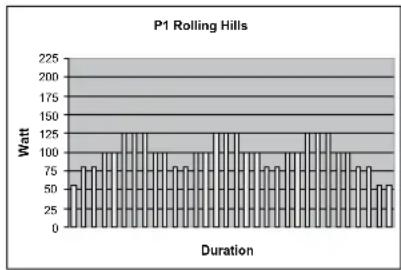
PROFILE P2. 3-peak effort profile for the improvement of oxygen uptake capacity. With peaks relatively short in duration, this profile is suitable for beginners. With default setting, max. Watt value is 150, average Watt value is 102.

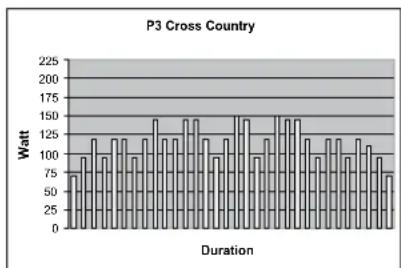
PROFILE P3. Multi-peak effort profile for the improvement of explosive strength. Peaks are relatively short in duration, and the level of effort varies irregularly. This profile is suitable for all fitness levels. With default setting, max. Watt value is 150, average Watt value is 117.
bar
P3 Cross Country | Duration | Power (Watt) | |---|---| | 1 | 75 | | 2 | 90 | | 3 | 120 | | 4 | 120 | | 5 | 120 | | 6 | 120 | | 7 | 150 | | 8 | 120 | | 9 | 120 | | 10 | 150 | | 11 | 120 | | 12 | 120 | | 13 | 150 | | 14 | 120 | | 15 | 120 | | 16 | 150 | | 17 | 120 | | 18 | 120 | | 19 | 150 | | 20 | 120 | | 21 | 120 | | 22 | 150 | | 23 | 120 | | 24 | 120 | | 25 | 150 | | 26 | 120 | | 27 | 120 | | 28 | 150 | | 29 | 120 | | 30 | 120 | | 31 | 150 | | 32 | 120 | | 33 | 120 | | 34 | 150 | | 35 | 120 | | 36 | 120 | | 37 | 150 | | 38 | 120 | | 39 | 120 | | 40 | 150 | | 41 | 120 | | 42 | 120 | | 43 | 150 | | 44 | 120 | | 45 | 120 | | 46 | 150 | | 47 | 120 | | 48 | 120 | | 49 | 150 | | 50 | 120 | | 51 | 120 | | 52 | 150 | | 53 | 120 | | 54 | 120 | | 55 | 150 | | 56 | 120 | | 57 | 120 | | 58 | 150 | | 59 | 120 | | 60 | 120 | | 61 | 150 | | 62 | 120 | | 63 | 120 | | 64 | 150 | | 65 | 120 | | 66 | 120 | | 67 | 150 | | 68 | 120 | | 69 | 120 | | 70 | 150 | | 71 | 120 | | 72 | 120 | | 73 | 150 | | 74 | 120 | | 75 | 120 | | 76 | 150 | | 77 | 120 | | 78 | 120 | | 79 | 150 | | 80 | 120 | | 81 | 120 | | 82 | 150 | | 83 | 120 | | 84 | 120 | | 85 | 150 | | 86 | 120 | | 87 | 120 | | 88 | 150 | | 89 | 120 | | 90 | 120 | | 91 | 150 | | 92 | 120 | | 93 | 120 | | 94 | 150 | | 95 | 120 | | 96 | 120 | | 97 | 150 | | 98 | 120 | | 99 | 120 | | P3 Cross Country Duration The chart displays the power consumption in Watts for each duration. The values are labeled on the bars. There is no additional data series or categories present in the image.PROFILE P4. Uphill effort profile for the improvement of endurance fitness. Peaks are relatively long-lasting, increasing in intensity until the closing phase of the profile. This profile is specifically suitable for the physically fit. With default setting, max. Watt value is 210, average Watt value is 133.

bar
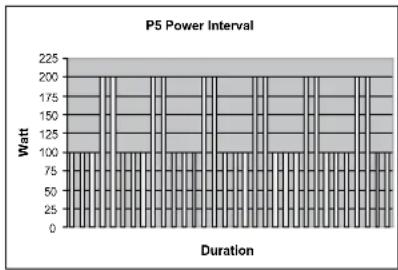
P4 Stamina | Duration | Watt | |---|---| | 1 | 75 | | 2 | 100 | | 3 | 125 | | 4 | 100 | | 5 | 125 | | 6 | 100 | | 7 | 100 | | 8 | 125 | | 9 | 150 | | 10 | 125 | | 11 | 125 | | 12 | 150 | | 13 | 175 | | 14 | 175 | | 15 | 150 | | 16 | 175 | | 17 | 175 | | 18 | 200 | | 19 | 200 | | 20 | 125 | | 21 | 100 | | 22 | 100 | | 23 | 125 | | 24 | 75 |PROFILE P5. Interval effort profile with regular changes and a clear difference between peaks and the basic level of effort. The default values are preset to an average effort of 138 W and a maximum effort of 200 W. Please note that this profile allows you to separately adjust the peaks and the basic level of effort.
bar
P5 Power Interval | Duration | Power (Watt) | | :--- | :--- | | 1 | 100 | | 2 | 100 | | 3 | 100 | | 4 | 100 | | 5 | 100 | | 6 | 100 | | 7 | 100 | | 8 | 100 | | 9 | 100 | | 10 | 100 | | 11 | 100 | | 12 | 100 | | 13 | 100 | | 14 | 100 | | 15 | 100 | | 16 | 100 | | 17 | 100 | | 18 | 100 | | 19 | 100 | | 20 | 100 | | 21 | 100 | | 22 | 100 | | 23 | 100 | | 24 | 100 | | 25 | 100 | | 26 | 100 | | 27 | 100 | | 28 | 100 | | 29 | 100 | | 30 | 100 | | 31 | 100 | | 32 | 100 | | 33 | 100 | | 34 | 100 | | 35 | 100 | | 36 | 100 | | 37 | 100 | | 38 | 100 | | 39 | 100 | | 40 | 100 | | 41 | 100 | | 42 | 100 | | 43 | 100 | | 44 | 100 | | 45 | 100 | | 46 | 100 | | 47 | 100 | | 48 | 100 | | 49 | 100 | | 50 | 100 | | 51 | 100 | | 52 | 100 | | 53 | 100 | | 54 | 100 | | 55 | 100 | | 56 | 100 | | 57 | 100 | | 58 | 100 | | 59 | 100 | | 60 | 100 | | 61 | 100 | | 62 | 100 | | 63 | 100 | | 64 | 100 | | 65 | 100 | | 66 | 100 | | 67 | 100 | | 68 | 100 | | 69 | 100 | | 70 | 100 | | 71 | 100 | | 72 | 100 | | 73 | 100 | | 74 | 100 | | 75 | 100 | | 76 | 100 | | 77 | 100 | | 78 | 100 | | 79 | 100 | | 80 | 100 | | 81 | 100 | | 82 | 100 | | 83 | 100 | | 84 | 100 | | 85 | 100 | | 86 | 100 | | 87 | 100 | | 88 | 100 | | 89 | 100 | | 90 | 100 | | 91 | 100 | | 92 | 100 | | 93 | 100 | | 94 | 100 | | 95 | 100 | | 96 | 100 | | 97 | 100 | | 98 | 100 | | 99 | 100 | | Note: The actual values for 'Power Interval' are not provided in the code. The 'Duration' label is not used in the chart.P6-P10: TARGET HEART RATE PROGRAMMES
PROFILE P6. 3-peak heart rate profile for the improvement of oxygen uptake capacity. With relatively long-lasting peaks, this profile is suitable for beginners. With default setting, max. HR value is 125, average HR is 112.
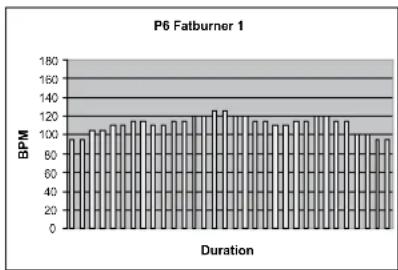
bar
| Duration | BPM | | -------- | --- | | 0 | 100 | | 1 | 105 | | 2 | 110 | | 3 | 115 | | 4 | 120 | | 5 | 125 | | 6 | 130 | | 7 | 135 | | 8 | 140 | | 9 | 145 | | 10 | 150 | | 11 | 155 | | 12 | 160 | | 13 | 165 | | 14 | 170 | | 15 | 175 | | 16 | 180 | | 17 | 175 | | 18 | 170 | | 19 | 165 | | 20 | 160 | | 21 | 155 | | 22 | 150 | | 23 | 145 | | 24 | 140 | | 25 | 135 | | 26 | 130 | | 27 | 125 | | 28 | 120 | | 29 | 115 | | 30 | 110 | | 31 | 105 | | 32 | 100 | | 33 | 95 | | 34 | 90 | | 35 | 85 | | 36 | 80 | | 37 | 75 | | 38 | 70 | | 39 | 65 | | 40 | 60 | | 41 | 55 | | 42 | 50 | | 43 | 45 | | 44 | 40 | | 45 | 35 | | 46 | 30 | | 47 | 25 | | 48 | 20 | | 49 | 15 | | 50 | 10 | | 51 | 5 |PROFILE P7. Uphill heart rate profile where the heart rate increases steadily until the midpoint of the profile, steadily decreasing thereafter. This profile is suitable for beginners. With default setting, max. HR value is 150, average HR is 121.

bar
| Duration | BPM | | -------- | --- | | 0 | 100 | | 1 | 100 | | 2 | 100 | | 3 | 100 | | 4 | 100 | | 5 | 100 | | 6 | 100 | | 7 | 100 | | 8 | 100 | | 9 | 100 | | 10 | 100 | | 11 | 100 | | 12 | 100 | | 13 | 100 | | 14 | 100 | | 15 | 100 | | 16 | 100 | | 17 | 100 | | 18 | 100 | | 19 | 100 | | 20 | 100 | | 21 | 100 | | 22 | 100 | | 23 | 100 | | 24 | 100 | | 25 | 100 | | 26 | 100 | | 27 | 100 | | 28 | 100 | | 29 | 100 | | 30 | 100 | | 31 | 100 | | 32 | 100 | | 33 | 100 | | 34 | 100 | | 35 | 100 | | 36 | 100 | | 37 | 100 | | 38 | 100 | | 39 | 100 | | 40 | 100 | | 41 | 100 | | 42 | 100 | | 43 | 100 | | 44 | 100 | | 45 | 100 | | 46 | 100 | | 47 | 100 | | 48 | 100 | | 49 | 100 | | 50 | 100 | | 51 | 100 | | 52 | 100 | | 53 | 100 | | 54 | 100 | | 55 | 100 | | 56 | 100 | | 57 | 100 | | 58 | 100 | | 59 | 100 | | 60 | 100 | | 61 | 100 | | 62 | 100 | | 63 | 100 | | 64 | 100 | | 65 | 100 | | 66 | 100 | | 67 | 100 | | 68 | 100 | | 69 | 100 | | 70 | 100 | | 71 | 100 | | 72 | 100 | | 73 | 100 | | 74 | 100 | | 75 | 100 | | 76 | 100 | | 77 | 100 | | 78 | 100 | | 79 | 100 | | 80 | 100 | | 81 | 100 | | 82 | 100 | | 83 | 100 | | 84 | 100 | | 85 | 100 | | 86 | 100 | | 87 | 100 | | 88 | 100 | | 89 | 100 | | 90 | 100 | | 91 | 100 | | 92 | 100 | | 93 | 100 | | 94 | 100 | | 95 | 100 | | 96 | 100 | | 97 | 100 | | 98 | 100 | | 99 | 100 | | ... | ... | | ... | ... | | ... | ... | | ... | ... | | ... | ... | | ... | ... | | ... | ... | | ... | ... | | ... | ... | | ... | ... | | ... | ... | | ... | ... | | ... | ... | | ... | ... | | ... | ... | | | ... | ... | | | ... | ... | | | ... | ... | | | ... | ... | | | ... | ... | | | ... | ... | | | ... | ... | | | ... | ... | | | ... | ... | | | ... | ... | | | ... | ... | | | | ... | ... | | | | ... | ... | | | | ... | ... | | | | ... | ... | | | | ... | ... | | | | ... | ... | | | | ... | ... | | | | ... | ... | | | | ... | ... | | | | ... | ... | | | | | ... | ... | | | | | ... | ... | | | | | ... | ... | | | | | ... | ... | | | | | ... | ... | | | | | ... | ... | | | | | ... | ... | | | | | ... | ... | | | | | ... | ... | | | | | ... | ... | | ... | ... | | | | ... | ... | | | | | ... | ... | | | | | ... | ... | | | | | ... | ... | | | | | ... | ... | | | | | ... | ... | | | | | ... | ... | | | | | ... | ... | | | | | ... | ... | | | | | | ... | ... | | | | | ... | ... | | | | | ... | ... | | | | | ... | ... | | | | | ... | ... | | | | | ... | ... | | | | | ... | ... | | | | | ... | ... | | | | | ... | ... | | | | | ... | ...PROFILE P8. 3-peak heart rate profile for the improvement of endurance fitness. Peaks are relatively long-lasting, but the heart rate level remains fairly constant throughout. This profile is suitable for all fitness levels. With default setting, max. HR value is 140, average HR is 120.
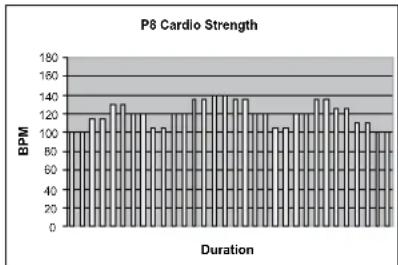
bar
| Duration | BPM | | -------- | --- | | 1 | 100 | | 2 | 110 | | 3 | 120 | | 4 | 130 | | 5 | 125 | | 6 | 120 | | 7 | 115 | | 8 | 110 | | 9 | 105 | | 10 | 100 | | 11 | 95 | | 12 | 90 | | 13 | 85 | | 14 | 80 | | 15 | 75 | | 16 | 70 | | 17 | 65 | | 18 | 60 | | 19 | 55 | | 20 | 50 | | 21 | 45 | | 22 | 40 | | 23 | 35 | | 24 | 30 | | 25 | 25 | | 26 | 20 | | 27 | 15 | | 28 | 10 | | 29 | 5 | | 30 | 0 |PROFILE P9. Uphill heart rate profile for the improvement of endurance fitness. Peaks are relatively long-lasting, increasing in intensity until the closing phase of the profile. This profile is specifically suitable for the physically fit. With default setting, max. HR value is 165, average HR is 131.

bar
P9 Cardio Climb | Duration | BPM | |---|---| | 1 | 105 | | 2 | 110 | | 3 | 115 | | 4 | 120 | | 5 | 125 | | 6 | 130 | | 7 | 135 | | 8 | 140 | | 9 | 145 | | 10 | 150 | | 11 | 155 | | 12 | 160 | | 13 | 165 | | 14 | 170 | | 15 | 175 | | 16 | 180 | | 17 | 175 | | 18 | 170 | | 19 | 165 | | 20 | 160 | | 21 | 155 | | 22 | 150 | | 23 | 145 | | 24 | 140 | | 25 | 135 | | 26 | 130 | | 27 | 125 | | 28 | 120 | | 29 | 115 | | 30 | 110 | | 31 | 105 | | 32 | 100 | The chart displays a bar chart with 'Duration' on the x-axis and 'BPM' on the y-axis. The bars represent BPM values at each duration interval. There is no legend categories, so only one data series is visible.PROFILE P10. 3-peak heart rate profile for the improvement of oxygen uptake capacity. Peaks are relatively long-lasting, with each followed by a steady recovery period. This profile is specifically suitable for the physically fit. With default setting, max. HR value is 160, average HR is 133.
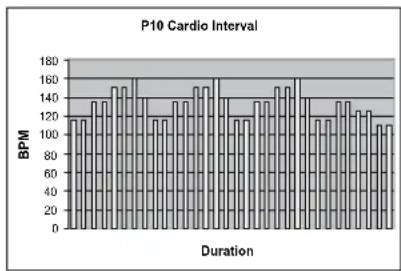
bar
P10 Cardio Interval | Duration | BPM | |---|---| | 1 | 120 | | 2 | 130 | | 3 | 140 | | 4 | 150 | | 5 | 160 | | 6 | 150 | | 7 | 140 | | 8 | 130 | | 9 | 120 | | 10 | 110 | | 11 | 100 | | 12 | 90 | | 13 | 80 | | 14 | 70 | | 15 | 60 | | 16 | 50 | | 17 | 40 | | 18 | 30 | | 19 | 20 | | 20 | 10 | | 21 | 0 | BPM values range from approximately 10 to 180 BPM. The chart displays a single vertical bar for each duration category. Error bars are present on the bars.T-TRAINER™
T-Trainer™ is a new training mode for ellipticals. There are 6 different movements, which enlarge the traditional cardiovascular training to muscle training areas.
T-Trainer™ has 6 preset training modules. Each training programme starts with the Arm Push module. After each training programme module there is always cooling down period (Free Ride). While in Free Ride mode the user cools down from the previous training module and prepares for the next. There are 6 different T-Trainer™ training modules. The default resistance for each training module has been preset, but can be scaled (adjusted) using the jog wheel. Scaling modifies the remainder of the training programme.
| Movement | RPM/speed alarm limits | Instruction text on display | Default resistance | The effect | |
| 0 | Free Ride <5 | 50 rpm<7,5 km/h4,5 < mph | Free Movement, Slow Speed | 5 Cool down | |
| 1 | Arm Push 45 | 55 rpm6,7-8.3 km/h4-5 mph | Pedal Forward50 rpm (7,5 km/h, 4,5 mph) Push Arms | 15 Triceps | |
| 2 | Arm Pull 45 | 55 rpm6,7-8.3 km/h4-5 mph | Pedal Forward50 rpm (7,5 km/h, 4,5 mph) Pull Arms | 15 Biceps | |
| 3 | Pedal Forward | 55-65 rpm8.3-9.8 km/h5-5.9 mph | Pedal Forward60 rpm (9km/h, 5,4 mph) Relax Upper Body | 10 Thighs, | hamstrings, abdominals, back |
| 4 | Pedal Backward | 55-65 rpm8.3-9.8 km/h5-5.9 mph | Pedal Backward60 rpm (9 km/h, 5,4 mph) Relax Upper Body | 10 Thighs, | hamstrings, abdominals, back |
| 5 | Lean Forward | 65-75 rpm8.3-11.3 km/h5.9-6.8 mph | Lean Forward70 rpm (10,5 km/h, 6,3 mph) Hands Fixed | 8 Hamstrings | |
| 6 | Squat, 4 squats at lime | 45-55 rpm6,7-8.3 km/h4-5 mph | Pedal Forward50 rpm (7,5 km/h, 4,5 mph) Squal | 8 Thighs, | buttocks |
The movements are always repeated in same order as follows: Arm Push, Arm Pull, Pedal Forward, Pedal Backward, Lean Forward and Squat. The first training module is referred to as 1/6, the second 2/6 etc. After every training module there is cooling down training, Free Ride.
Each training module will last for 2:00 minutes and the Free Ride for 1:00 minute. By pressing Enter (jog wheel) the user can skip the current training module and move on to the next module or Free Ride. When the new training module begins the new training instruction will be shown for 10 seconds. If the user does not pedal as fast as instructed (rpm or speed is outside the limits), an alarm will sound and the text "Speed Up" or "Slow Down" will be shown in addition to the rotating direction sign.
After 10 seconds the instruction will be switched off and the T-Trainer graph will be displayed. The instructions will still be shown at the bottom of the screen. The T-Trainer graph shows the resistance. If the user does not pedal as instructed (rpm or speed is outside the limits), an alarm will sound and the text "Speed Up" or "Slow Down" will be shown at the bottom of screen.
T-RIDE™
T-RIDETM TRAINING simulates riding a bike on a natural terrain. During training, you can change gears using the selection dial and watch the altitude profile.
- Select T-RIDETM.
- Select the terrain and confirm your selection.
- Set the starting point for the session using the selection dial.
- Set the ending point for the session using the selection dial.
- Start your training session by pedalling. You can change gears (1–6) using the selection dial. During training, you can display altitude profile or heart rate using the selection dial. The heart rate display requires heart rate measurement.
- Once you have completed the route, the meter beeps and the training session ends.
- To stop the training session, press the BACK/STOP button. You can then stop the session by selecting EXIT, save the session to the memory by selecting SAVE AND EXIT or continue your training session by selecting CONTINUE.
OWN TRAINING
You can create and save up to 10 training programmes into user programmes P1 to P10.
SAVING A PROGRAMME
- End your training session by pressing BACK/STOP.
- Select SAVE AND EXIT and confirm your selection.
- Enter a name for the training session and confirm it using the selection dial.

IMPORTANT! You can only save programmes that longer than 10 minutes.

IMPORTANT! To save a training session you will be used to select a username.
USING SAVED PROGRAMMES
- Select OWN TRAINING.
- Select a training session from the list. Edit = select the duration of the exercise with the selection dial (set the time to 10 - 180 minutes or distance 3 - 10 km). Start pedalling to begin the exercise.
You can adjust the effort level with the selection dial.
- To stop the training session, press the BACK/STOP button. You can then stop the session by selecting EXIT, save the session to the memory by selecting SAVE AND EXIT or continue your training session by selecting CONTINUE.
FITNESS TEST
The meter uses a multi-step fitness test. The test begins at a low level of effort, which increases steadily in accordance with the selected test type. A multi-step test is a safe and reliable, sub maximal means of measuring a person's physical fitness level. The test continues until the test subject has achieved his or her individual target heart rate (85% of maximum heart rate).
The test requires the use of a heart rate belt: the meter monitors changes in the heart rate throughout the test, using the data to calculate an estimate of the tested person's maximum oxygen uptake capacity. The maximum oxygen uptake capacity is the best measure of a person's physical fitness level. After the test, the meter gives versatile information on your fitness level: a description and a numerical value (ml/kg/min).
PREPARING FOR THE TEST
- Make sure that the data associated with your username is updated – the meter uses the user data as a basis for the fitness test.
- Select FITNESS TEST.
-
Using the selection dial, select the most suitable fitness category for you:
A) Inactive = no regular exercise, poor physical condition
B) Active = regular exercise, average or good physical condition
C) Athletic = active training, good or excellent physical condition -
The display shows the appropriate test type for each fitness category:
A) Step time = duration of different effort levels in the test
B) First step = initial effort level
C) Step power = effort level of steps (in Watts), the test features several steps
-
Confirm your selection by pressing the selection dial.
-
If necessary, you can adjust your target heart rate value using the selection dial. Confirm your settings using the selection dial. If Target HR is under 110 BPM it will not calculate any result.
-
The display informs you that you can stop the test once you reach the target heart rate for the test. Start the test by pressing the selection dial.
PERFORMING THE TEST
- The display shows the selected test step type. Start pedalling to begin the test.
- Once the target heart rate level has been achieved, the meter gives an audio signal and displays a message. We recommend that you end the test here, unless you are relatively fit. If you have set your target heart rate correctly (that is, if you have calculated your maximum heart rate accurately enough), continuing the test beyond this point will not increase the accuracy of the result. If you overestimate your maximum heart rate, your fitness level will be overestimated. Similarly, if you underestimate your maximum heart rate, your fitness level will be underestimated.
- To stop the test once you reach the target heart rate level, press the BACK/STOP button. The meter will now switch to the test result display:
| MEN / MAXIMAL OXYGEN UPTAKE (VO2MAX)1 = VERY POOR - 7 = EXCELLENT | ||||||||
| AGE | 1 | 2 | 3 | 4 | 5 | 6 | 7 | |
| 18-19 | <33 | 33- | 38 | 39-44 | 45-51 | 52-57 | 58-63 >63 | |
| 20-24 | <32 | 32- | 37 | 38-43 | 44-50 | 51-56 | 57-62 >62 | |
| 25-29 | <31 | 31- | 35 | 36-42 | 43-48 | 49-53 | 54-59 >59 | |
| 30-34 | <29 | 29- | 34 | 35-40 | 41-45 | 46-51 | 52-56 >56 | |
| 35-39 | <28 | 28- | 32 | 33-38 | 39-43 | 44-48 | 49-54 >54 | |
| 40-44 | <26 | 26- | 31 | 32-35 | 36-41 | 42-46 | 47-51 >51 | |
| 45-49 | <25 | 25- | 29 | 30-34 | 35-39 | 40-43 | 44-48 >48 | |
| 50-54 | <24 | 24- | 27 | 28-32 | 33-36 | 37-41 | 42-46 >46 | |
| 55-59 | <22 | 22- | 26 | 27-30 | 31-34 | 35-39 | 40-43 >43 | |
| 60-65 | <21 | 21- | 24 | 25-28 | 29-32 | 33-36 | 37-40 >40 | |
| WOMEN / MAXIMAL OXYGEN UPTAKE (VO2MAX)1 = VERY POOR - 7 = EXCELLENT | ||||||||
| AGE | 1 | 2 | 3 | 4 | 5 | 6 | 7 | |
| 18-19 | <28 | 28- | 32 | 33-37 | 38-42 | 43-47 | 48-52 >52 | |
| 20-24 | <27 | 27- | 31 | 32-36 | 37-41 | 42-46 | 47-51 >51 | |
| 25-29 | <26 | 26- | 30 | 31-35 | 36-40 | 41-44 | 45-49 >49 | |
| 30-34 | <25 | 25- | 29 | 30-33 | 34-37 | 38-42 | 43-46 >46 | |
| 35-39 | <24 | 24- | 27 | 28-31 | 32-35 | 36-40 | 41-44 >44 | |
| 40-44 | <22 | 22- | 25 | 26-29 | 30-33 | 34-37 | 38-41 >41 | |
| 45-49 | <21 | 21- | 23 | 24-27 | 28-31 | 32-35 | 36-38 >38 | |
| 50-54 | <19 | 19- | 22 | 23-25 | 26-29 | 30-32 | 38-36 >36 | |
| 55-59 | <18 | 18- | 20 | 21-23 | 24-27 | 28-30 | 31-33 >33 | |
| 60-65 | <16 | 16- | 18 | 19-21 | 22-24 | 25-27 | 28-30 >30 | |
MAINTENANCE
The equipment requires very little maintenance. Check, however, from time-to-time that all screws and nuts are tight.
• After exercising, clean the equipment with a soft, absorbent cloth. Do not use solvents.
- Never remove the equipment's protective casing.
- The electromagnetic brake is based on electromagnetic resistance; resistance level is electronically measured and shown as watt reading on the display. Due to the measurement system, your Tunturi crosstrainer need not be re-calibrated when assembled, serviced and used according to this Owner's Manual.
MALFUNCTIONS
Despite continuous quality control, defects and malfunctions caused by individual components may occur in the equipment. In most cases it's unnecessary to take the whole device in for repair, as it's usually sufficient to replace the defective part.
If the equipment does not function properly during use, contact your Tunturi dealer/distributor immediately. Always give the model and serial number of your equipment. Please state also the nature of the problem, conditions of use and purchase date.
If you require spare parts, always give the model, serial number of your equipment and the spare part number for the part you need. The spare part list is at the back of this manual. Use only spare parts mentioned in the spare part list.
TRANSPORT AND STORAGE
Please follow these instructions when carrying and moving the equipment about, because lifting it incorrectly may strain your back or risk other accidents:
- Always switch the power off and unplug the power cord before you start moving the equipment around!
- For transportation or moving of the device, two grown-ups are needed. Remain standing in front of the device on each side and take a sturdy grip at the handles. Lift the front of the device so as to lift the rear of the device on the wheels. Move the device and carefully put it down to its new place.
NOTE! Transport the equipment with caution over uneven surfaces, for example over a step. The equipment should never be transported upstairs using the wheels over the steps, instead it must be carried. We recommend that you use a protective base when transporting the equipment.
To prevent the equipment malfunctioning, store in a dry place with as little temperature variation as possible and protected from dust.
TECHNICAL SPECIFICATIONS
Length 163 cm
Width 61 cm
Height 163 cm
Weight 60 kg
The Tunturi C40 meets the requirements of the EU's EMC Directives on electromagnetic compatibility (89/336/EEC) and electrical equipment designed for use within certain voltage limits (73/23/EEC). This product therefore carries the CE label.
The Tunturi model C40 meets EN precision and safety standards (Class A, EN-957, parts 1 and 9) for fitness devices. The precision of the capacity measurement is secured during manufacturing by adjusting the brake with a dynamometer. Calculation of exercise capacity is based on rotation speed and moment.
Due to our continuous policy of product development, Tunturi reserves the right to change specifications without notice.
NOTE! The instructions must be followed carefully in the assembly, use and maintenance of your equipment. The warranty does not cover damage due to negligence of the assembly, adjustment and maintenance instructions described herein. Changes or modifications not expressly approved by Tunturi will void the user's authority to operate the equipment!
WE WISH YOU MANY ENJOYABLE TRAINING HOURS WITH YOUR NEW TUNTURI TRAINING PARTNER!
DEUTSCH
INHALT
bar
P9 Cardio Climb | Duration | BPM | |---|---| | 1 | 105 | | 2 | 110 | | 3 | 115 | | 4 | 120 | | 5 | 125 | | 6 | 130 | | 7 | 135 | | 8 | 140 | | 9 | 145 | | 10 | 150 | | 11 | 155 | | 12 | 160 | | 13 | 165 | | 14 | 170 | | 15 | 175 | | 16 | 180 | | 17 | 175 | | 18 | 170 | | 19 | 165 | | 20 | 160 | | 21 | 155 | | 22 | 150 | | 23 | 145 | | 24 | 140 | | 25 | 135 | | 26 | 130 | | 27 | 125 | | 28 | 120 | | 29 | 115 | | 30 | 110 | | 31 | 105 | | 32 | 100 | The chart displays BPM values at each duration of a period. The data is presented in a single column format with 'Duration' as the x-axis and 'BPM' as the y-axis. There are no labels or additional data series in this image.1 = SEHR SCHLECHT, 7 = SEHR GUT
| ALTER | 1 | 2 | 3 | 4 | 5 | 6 | 7 | |||||||
| 18-19 | < | 28 | 28- | 32 | 33-3 | 7 | 38-42 | 43-47 | 4 | 8-52 | >52 | |||
| 20-24 | < | 27 | 27- | 31 | 32-3 | 6 | 37-41 | 42-46 | 4 | 7-51 | >51 | |||
| 25-29 | < | 26 | 26- | 30 | 31-3 | 5 | 36-40 | 41-44 | 4 | 5-49 | >49 | |||
| 30-34 | < | 25 | 25- | 29 | 30-3 | 3 | 34-37 | 38-42 | 4 | 3-46 | >46 | |||
| 35-39 | < | 24 | 24- | 27 | 28-3 | 1 | 32-35 | 36-40 | 4 | 1-44 | >44 | |||
| 40-44 | < | 22 | 22- | 25 | 26-2 | 9 | 30-33 | 34-37 | 3 | 8-41 | >41 | |||
| 45-49 | < | 21 | 21- | 23 | 24-2 | 7 | 28-31 | 32-35 | 3 | 6-38 | >38 | |||
| 50-54 | < | 19 | 19- | 22 | 23-2 | 5 | 26-29 | 30-32 | 3 | 3-36 | >36 | |||
| 55-59 | < | 18 | 18- | 20 | 21-2 | 3 | 24-27 | 28-30 | 3 | 1-33 | >33 | |||
| 60-65 | < | 16 | 16- | 18 | 19-2 | 1 | 22-24 | 25-27 | 2 | 8-30 | >30 |
WARTUNG
MANUAL (MODE MANUEL)
EEN PROGRAMMA OPSLAAN
CONDITIETEST (Fitness test)
bar
P1 Rolling Hills | Duration | Power (Watt) | |---|---| | 0 | 50 | | 1 | 75 | | 2 | 80 | | 3 | 90 | | 4 | 100 | | 5 | 125 | | 6 | 125 | | 7 | 100 | | 8 | 100 | | 9 | 80 | | 10 | 90 | | 11 | 100 | | 12 | 125 | | 13 | 125 | | 14 | 100 | | 15 | 100 | | 16 | 80 | | 17 | 90 | | 18 | 100 | | 19 | 125 | | 20 | 125 | | 21 | 100 | | 22 | 100 | | 23 | 80 | | 24 | 90 | | 25 | 100 | | 26 | 125 | | 27 | 125 | | 28 | 100 | | 29 | 100 | | 30 | 80 | | 31 | 90 | | 32 | 100 | | 33 | 125 | | 34 | 125 | | 35 | 100 | | 36 | 100 | | 37 | 80 | | 38 | 90 | | 39 | 100 | | 40 | 125 | | 41 | 125 | | 42 | 100 | | 43 | 100 | | 44 | 80 | | 45 | 90 | | 46 | 100 | | 47 | 125 | | 48 | 125 | | 49 | 100 | | 50 | 100 | | 51 | 80 | | 52 | 90 | | 53 | 100 | | 54 | 125 | | 55 | 125 | | 56 | 100 | | 57 | 100 | | 58 | 80 | | 59 | 90 | | 60 | 100 | | 61 | 125 | | 62 | 125 | | 63 | 100 | | 64 | 100 | | 65 | 80 | | 66 | 90 | | 67 | 100 | | 68 | 125 | | 69 | 125 | | 70 | 100 | | 71 | 100 | | 72 | 80 | | 73 | 90 | | 74 | 100 | | 75 | 125 | | 76 | 125 | | 77 | 100 | | 78 | 100 | | 79 | 80 | | 80 | 90 | | 81 | 100 | | 82 | 125 | | 83 | 125 | | 84 | 100 | | 85 | 100 | | 86 | 80 | | 87 | 90 | | 88 | 100 | | 89 | 125 | | 90 | 125 | | 91 | 100 | | 92 | 100 | | 93 | 80 | | 94 | 90 | | 95 | 100 | | 96 | 125 | | 97 | 125 | | 98 | 100 | | 99 | 100 | | Total: Average (bar chart) — Power (Watt) vs. Duration (Hours). Values are labeled as 'Watt'. The 'Duration' values are not explicitly defined in the image but are inferred from the bar heights. The 'Power' values are estimated based on the bar height and the total value for each duration. There is no additional data series or categories present in the chart.TRANSPORT OCH FÖRVARING 64
TEKNISKA DATA 64
VÄLKOMMEN TILL TUNTURIS TRÄNINGSVÄRLD!
TRANSPORT OCH FÖRVARING
bar
P1 Rolling Hills | Duration | Power (Watt) | |---|---| | 1 | 50 | | 2 | 75 | | 3 | 100 | | 4 | 125 | | 5 | 125 | | 6 | 100 | | 7 | 80 | | 8 | 90 | | 9 | 125 | | 10 | 125 | | 11 | 100 | | 12 | 80 | | 13 | 90 | | 14 | 125 | | 15 | 125 | | 16 | 100 | | 17 | 80 | | 18 | 90 | | 19 | 125 | | 20 | 125 | | 21 | 100 | | 22 | 80 | | 23 | 90 | | 24 | 125 | | 25 | 125 | | 26 | 100 | | 27 | 80 | | 28 | 90 | | 29 | 125 | | 30 | 125 | | 31 | 100 | | 32 | 80 | | 33 | 90 | | 34 | 125 | | 35 | 125 | | 36 | 100 | | 37 | 80 | | 38 | 90 | | 39 | 125 | | 40 | 125 | | 41 | 100 | | 42 | 80 | | 43 | 90 | | 44 | 125 | | 45 | 125 | | 46 | 100 | | 47 | 80 | | 48 | 90 | | 49 | 125 | | 50 | 125 | | 51 | 100 | | 52 | 80 | | 53 | 90 | | 54 | 125 | | 55 | 125 | | 56 | 100 | | 57 | 80 | | 58 | 90 | | 59 | 125 | | 60 | 125 | | 61 | 100 | | 62 | 80 | | 63 | 90 | | 64 | 125 | | 65 | 125 | | 66 | 100 | | 67 | 80 | | 68 | 90 | | 69 | 125 | | 70 | 125 | | 71 | 100 | | 72 | 80 | | 73 | 90 | | 74 | 125 | | 75 | 125 | | 76 | 100 | | 77 | 80 | | 78 | 90 | | 79 | 125 | | 80 | 125 | | 81 | 100 | | 82 | 80 | | 83 | 90 | | 84 | 125 | | 85 | 125 | | 86 | 100 | | 87 | 80 | | 88 | 90 | | 89 | 125 | | 90 | 125 | | 91 | 100 | | 92 | 80 | | 93 | 90 | | 94 | 125 | | 95 | 125 | | 96 | 100 | | 97 | 80 | | 98 | 90 | | 99 | 125 | | P1 Rolling Hills (Duration) - Bar Chart showing Power (Watt) vs. Duration (Hours). The bars represent discrete values of power output at specific durations. Values range from approximately -6 to +6. The chart displays a single series representing the measured power output across sequential durations. The data is presented in a single column format with each row corresponding to a specific duration. The legend is implied by the label 'Duration' on the left side.


natural_image
Technical line drawing of a stationary exercise machine with attached lever and base components (no text or labels)
natural_image
Line drawing of a stationary exercise machine with rotating wheel and attached sensor (no text or symbols)C40 EXPLODED VIEW

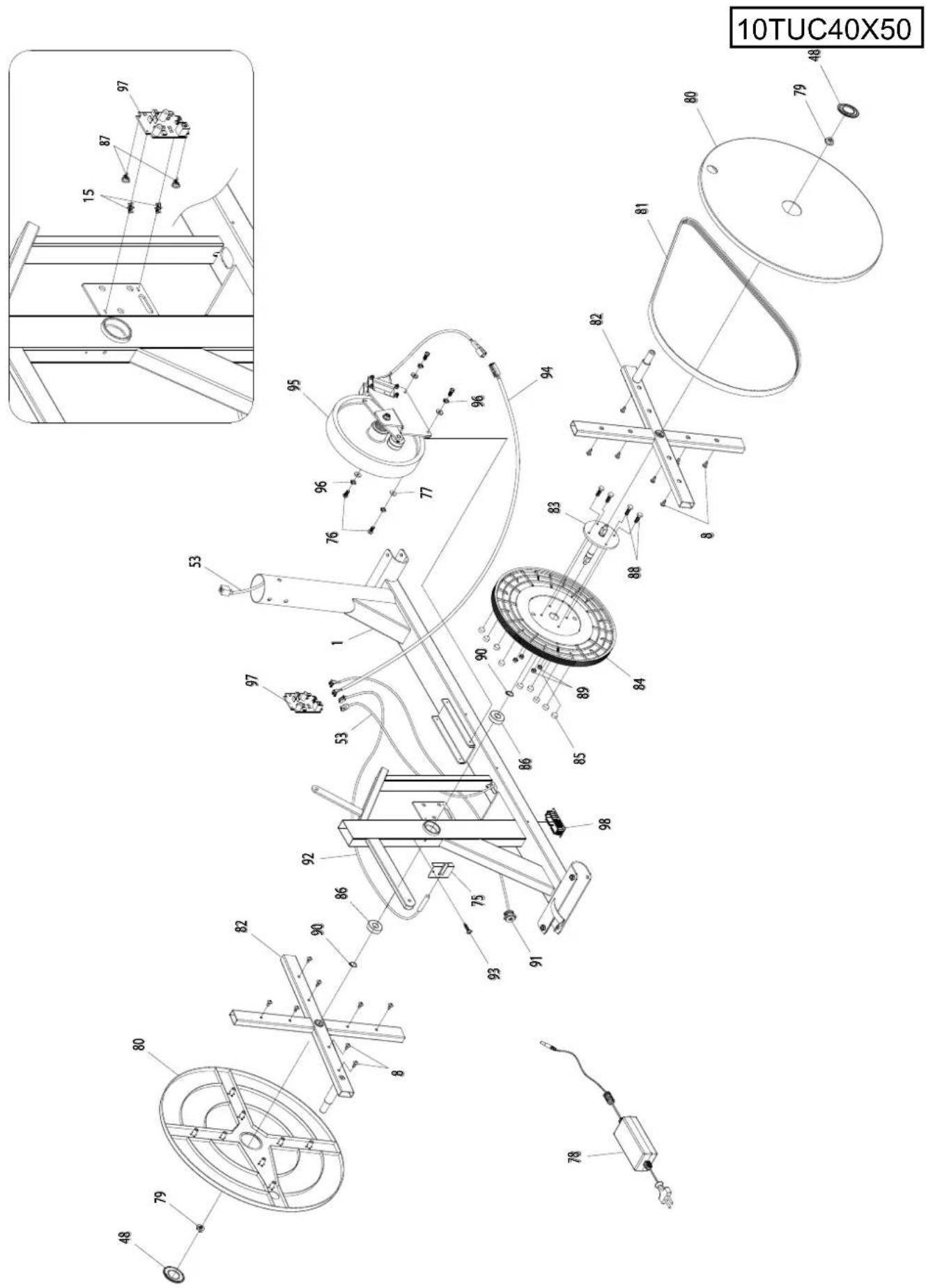
PARTS LIST
1 BASE FRAME 1
2 FRONT FOOT 1
3 REAR FOOT 1
4 REAR FOOT COVER 1
5 FRONT FOOT COVER 1
6 HEIGHT ADJUSTMENT SCREW 5
7 DIN 7985 A M5*12MM SCREW 2
8 DIN 7981 C M5*20MM G SCREW 20
9 ISO 7380 M8*58MM SCREW (*2 PCS) 2
10 127 B M8 SPRING WASHER 14
11 DIN 125 A M8 1.2 16MM WASHER (8PCS) 12
12 TRANSPORT WHEEL 2
13 TRANSPORT WHEEL BUSHING 4
14 ISO 7380 M8*63MM SCREW 2
15 PLASTIC SPACER FOR PCB 2
16 DIN 985 NYLOC NUT M8 2
17 UPRIGHT TUBE 1
18 UPPER U.I. CABLE 1
19 MOVING HANDLE BAR, RH 1
20 MOVING HANDLE BAR, LH 1
21 MOVING HANDLE BAR BUSHING 6
22 USER INTERFACE (U.I.) 1
23 ISO 7380 M8*15MM SCREW (*4 PCS) 4
24 M8*2*38MM WASHER (*2PCS) 2
25 AXLE FOR MOVING HANDLE BARS 1
26 6002ZZ BEARING 4
27 15,5*20*3T WASHER 2
28 PEDAL TUBE, RIGHT 1
29 PEDAL TUBE, LEFT 1
30 PEDAL, LEFT 1
31 PEDAL, RIGHT 1
32 DIN 912 M6*53MM SCREW 1
33 MOVING HANDLEBAR END CAP 2
34 MOVING HANDLEBAR FOAM 2
35 PEDAL SHAFT 2
36 PEDAL FRONT END CAP 2
37 ISO 7380 M8*25MM SCREW (*2 PCS) 2
38 PEDAL REAR END CAP 2
39 ISO 7380 M8*20MM SCREW (*4 PCS) 4
40 M8*1,5*22MMWASHER (*2 PCS) 2
41 DIN 471 RETAINING RING 40*1.75MM 2
42 PEDAL TUBE BUSHING 2
43 SELF-ALIGN-BALL-BEARING 2
44 MAIN COVER (R) 1
45 MAIN COVER(L) 1
46 SCREW COVER 2
47 DIN 7981 C M4*15MM SCREW 4
48 TURNING PLATE CAP 2
49 DIN 7991 M8*58MM SCREW (*2 PCS) 2
52 DIN 7985 A M6*15MM SCREW (*2 PCS) 2
53 LOWER U.I. CABLE 1
54 DIN 7985 A M5*10MM SCREW (*1 PC) 1
55 FRONT SLEEVE 1
56 HEAD TUBE ADAPTOR 1
57 BASE FOR USER INTERFACE 1
58 U.I. MOUNTING CLAMP 1
59 OVAL END CAP 1
60 ISO 7380 M8*42MM SCREW (*2 PCS) 2
61 DIN 137 A M8 CURVE WASHER (*2 PCS) 2
62 FIXED HANDLE BAR BRACKET 1
63 FIX HANDLEBAR 1
64 FIXED HANDLEBAR FOAM 2
65 DIN 7981 C M3*15MM SCREW 2
66 FIX HANDLEBAR END CAP 2
67 HAND PULSE (H.P.) SENSOR SET 2
68 HAND PULSE WIRE 2
69 DIN 7985 A M5*12MM SCREW 4
70 DIN 985 NYLOC NUT M6 1
71 DIN 7985 A M6*10MM SCREW 1
72 DIN 127 B M6*2T SPRING WASHER (2PCS) 2
73 DIN 127 B M5 SPRING WASHER (*6 PCS) 6
74 DIN 126 M6*1.2 WASHER 1
75 SENSOR BRACKET
76 ISO 7380 M6*14MM ALLEN SCREW 4
77 DIN 126 M6*1.2 WASHER 4
78 ADAPTOR 1
79 3/8" TURNING PLATE AXLE NUT 2
80 TURNING PLATE 2
81 BELT 1
82 CROSS FRAME 2
83 AXLE FOR PULLEY 1
84 PULLEY 1
85 MAGNET 9
86 6203 ZZ BEARING 2
87 PLASTIC SPACER 2
88 DIN 933 M6*18MM BOLT 4
89 DIN 985 NYLOC NUT M6 4
90 DIN 471 RETAINING RING 17*1MM 2
91 DC WIRE 1
92 SENSOR WIRE 1
93 DIN 7981 C M6*12 MM SCREW 1
94 EXTENSION WIRE 1
95 EMS SYSTEM 1
96 DIN 127 B M6 SPRING WASHER 4
97 CONTROL BOARD 1
98 SQUARE CAP FOR 30 X 70MM TUBE 1
99 DIN 125 A M5*1.5MM WASHER (*6 PCS) 6
100 DIN 85 A M5*42 MM SCREW (*4 PCS) 4
- HARDWARE KIT 1
- OWNER'S MANUAL 1
- WARRANTY BOOKLET 1
- LABEL SET 1
Benelux
Accell Fitness Benelux
Koningsbeltweg 51
1329 AE ALMERE
The Netherlands
Tel: +31 36 5460050
Fax: +31 36 5460055
Scandinavia
Accell Fitness Scandinavia
Varusmestarintie 26
20361 TURKU
Finland
Tel: +358 10 2733 200
Fax: +358 2513 313
Germany
Accell Fitness United Kingdom
Boland House
Nottingham South Industrial Estate
Ruddington Lane
Wilford
Nottingham NG11 7EP
United Kingdom
Tel: +44 115 9822844
Fax: +44 115 9817784
North America
Accell Fitness North America Inc.
130 Hayward Ave, Suite 2
N2C 2E4
Kitchener, ON Canada
Tel. 1-888-388-6887
Fax: 1-519-576-2521
www.accellfitness.com
www.tunturi.com

- WELCOME TO THE WORLD OF TUNTURI EXERCISING!
- IMPORTANT SAFETY INSTRUCTIONS
- NOTE ABOUT YOUR HEALTH
- NOTE ABOUT THE EXERCISE ENVIRONMENT
- NOTE ABOUT USING THE EQUIPMENT
- NOTE ABOUT SAFETY FOR UNITS WITH ELECTRICAL POWER
- ASSEMBLING THE EQUIPMENT
- EXERCISING
- HEART RATE
- HAND GRIP PULSE MEASUREMENT
- HEART RATE IN TRAINING
- - AGE
- BEGINNER: 50-60 % of maximum heart-rate
- TRAINER: 60-70 % of maximum heart-rate
- ACTIVE TRAINER: 70-80 % of maximum heart-rate
- CONSOLE
- KEYS
- BACK/STOP
- MP3 MODE
- MAIN MENU
- USER/SETTINGS
- SELECTION DIAL
- SMALL MP3 PLAYER BUTTONS
- DISPLAY
- USER MENU
- CREATE USER
- CHANGE USER
- EDIT USER
- DELETE USER
- SETTINGS
- MAIN MENU
- QUICK START
- MANUAL
- TARGET HR
- WATT CONTROL
- PROGRAMMES
- PROFILES P1-P5: WATT CONTROL PROGRAMMES
- P6-P10: TARGET HEART RATE PROGRAMMES
- T-TRAINER™
- T-RIDE™
- OWN TRAINING
- SAVING A PROGRAMME
- USING SAVED PROGRAMMES
- FITNESS TEST
- PREPARING FOR THE TEST
- PERFORMING THE TEST
- MAINTENANCE
- MALFUNCTIONS
- TRANSPORT AND STORAGE
- TECHNICAL SPECIFICATIONS
- DEUTSCH
- INHALT
- WARTUNG
- MANUAL (MODE MANUEL)
- EEN PROGRAMMA OPSLAAN
- CONDITIETEST (Fitness test)
- VÄLKOMMEN TILL TUNTURIS TRÄNINGSVÄRLD!
- TRANSPORT OCH FÖRVARING
- C40 EXPLODED VIEW
- PARTS LIST
- Benelux
- Scandinavia
- Germany
- North America
Brand : TUNTURI
Model : C40
Category : Elliptical bike