BTD134 - Drill MAKITA - Free user manual and instructions
Find the device manual for free BTD134 MAKITA in PDF.


User questions about BTD134 MAKITA
0 question about this device. Answer the ones you know or ask your own.
Ask a new question about this device
Download the instructions for your Drill in PDF format for free! Find your manual BTD134 - MAKITA and take your electronic device back in hand. On this page are published all the documents necessary for the use of your device. BTD134 by MAKITA.
USER MANUAL BTD134 MAKITA
GB Cordless Impact Driver Instruction Manual
natural_image
Line drawing of a Makita electric drill press with attached housing (no text or symbols)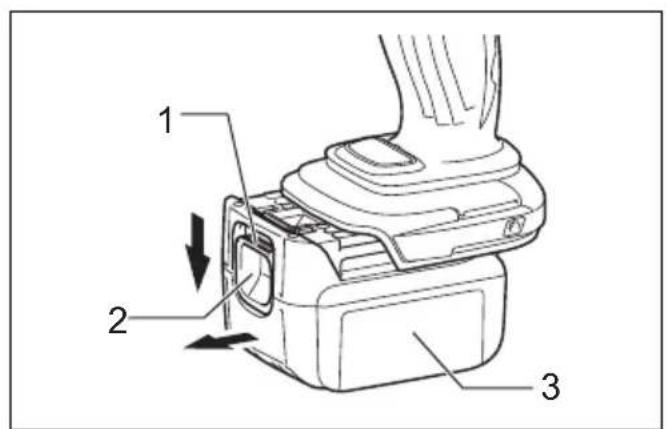
text_image
1 2 31

text_image
42

text_image
Makita 53
text_image
6 Daikita4
text_image
A 7 B5

text_image
Diagram of a device with labeled components, showing a button and numbered parts (2 and 8)6

text_image
A B7

text_image
9 108
text_image
9 119
012013
text_image
12 1310
012014

natural_image
Line drawing of a hand using a power drill on a battery (no text or symbols)11
012050

line
| Sample | 17 (S) | N·m (kgf·cm) | |--------|--------|--------------| | M14 | 3.0 | 1224 | | M12 | 3.0 | 816 | | M10 | 3.0 | 612 | | M8 | 3.0 | 408 |12 13
006255
line
| Sample | 17 (S) | N·m (kgf·cm) | |--------|--------|--------------| | M12 | 3.0 | 1224 | | M10 | 3.0 | 816 | | M8 | 3.0 | 612 | | (M8) | 3.0 | 204 |006257

text_image
1914 15

text_image
20 21006258
012018
text_image
22 23 2416 17

text_image
25012019
012020
text_image
26 2518

text_image
27 2519
006304
ENGLISH (Original instructions)
| Explanation of general view | ||
| 1 Red indicator | 10 Sleeve | 19 Limit mark |
| 2 Button | 11 Bit-piece | 20 Screws |
| 3 Battery cartridge | 12 Hook | 21 Rear cover |
| 4 Star mark | 13 Screw | 22 Spring |
| 5 Switch trigger | 14 Standard bolt | 23 Arm |
| 6 Lamp | 15 Fastening torque | 24 Recessed part |
| 7 Reversing switch lever | 16 Proper fastening torque | 25 Carbon brush cap |
| 8 L E D i n d i c | 17 Fastening time | 26 Lead wire |
| 9 Bit | 18 High tensile bolt | 27 Hole |
SPECIFICATIONS
| Model BTD134 BTD146 | |||
| Capacities | M a c h i n e s c r e w 4 m m - 8 m m | ||
| Standard bolt 5 mm - 14 mm | |||
| High tensile bolt | 5 mm - 12 mm | ||
| No load speed (min-1) | 0 - 2,400 | 0 - 2,300 | |
| Impacts per minute | 0 - 3,200 | ||
| Overall length | 138 mm | ||
| Net weight | 1.2 kg (with battery BL1415)1.4 kg (with battery BL1430) | 1.3 kg (with battery BL1815)1.5 kg (with battery BL1830) | |
| Rated voltage | D.C. 14.4 V | D.C. 18 V | |
- Due to our continuing programme of research and development, the specifications herein are subject to change without notice.
- Specifications and battery cartridge may differ from country to country.
- Weight, with battery cartridge, according to EPTA-Procedure 01/2003
ENE033-1
Intended use
The tool is intended for screw driving in wood, metal and plastic.
GEA010-1
General Power Tool Safety Warnings
⚠ WARNING Read all safety warnings and all instructions. Failure to follow the warnings and instructions may result in electric shock, fire and/or serious injury.
Save all warnings and instructions for future reference.
GEB054-1
CORDLESS IMPACT DRIVER SAFETY WARNINGS
-
Hold power tool by insulated gripping surfaces, when performing an operation where the fastener may contact hidden wiring. Fasteners contacting a "live" wire may make exposed metal parts of the power tool "live" and could give the operator an electric shock.
-
Always be sure you have a firm footing. Be sure no one is below when using the tool in high locations.
-
Hold the tool firmly.
-
Wear ear protectors.
SAVE THESE INSTRUCTIONS.
WARNING:
DO NOT let comfort or familiarity with product (gained from repeated use) replace strict adherence to safety rules for the subject product.
MISUSE or failure to follow the safety rules stated in this instruction manual may cause serious personal injury.
ENC007-7
IMPORTANT SAFETY INSTRUCTIONS
FOR BATTERY CARTRIDGE
-
Before using battery cartridge, read all instructions and cautionary markings on (1) battery charger, (2) battery, and (3) product using battery.
-
Do not disassemble battery cartridge.
-
If operating time has become excessively shorter, stop operating immediately. It may result in a risk of overheating, possible burns and even an explosion.
-
If electrolyte gets into your eyes, rinse them out with clear water and seek medical attention right away. It may result in loss of your eyesight.
-
Do not short the battery cartridge:
(1) Do not touch the terminals with any conductive material.
(2) Avoid storing battery cartridge in a container with other metal objects such as nails, coins, etc.
(3) Do not expose battery cartridge to water or rain.
A battery short can cause a large current flow, overheating, possible burns and even a breakdown.
- Do not store the tool and battery cartridge in locations where the temperature may reach or exceed 50°C (122°F).
- Do not incinerate the battery cartridge even if it is severely damaged or is completely worn out. The battery cartridge can explode in a fire.
- Be careful not to drop or strike battery.
- Do not use a damaged battery.
SAVE THESE INSTRUCTIONS.
Tips for maintaining maximum battery life
-
Charge the battery cartridge before completely discharged.
Always stop tool operation and charge the battery cartridge when you notice less tool power. -
Never recharge a fully charged battery cartridge. Overcharging shortens the battery service life.
-
Charge the battery cartridge with room temperature at 10^ C – 40^ C ( 50^ F – 104^ F). Let a hot battery cartridge cool down before charging it.
-
Charge the battery cartridge once in every six months if you do not use it for a long period of time.
FUNCTIONAL DESCRIPTION
CAUTION:
- Always be sure that the tool is switched off and the battery cartridge is removed before adjusting or checking function on the tool.
Installing or removing battery cartridge (Fig. 1)
- Always switch off the tool before installing or removing of the battery cartridge.
- To remove the battery cartridge, slide it from the tool while sliding the button on the front of the cartridge.
- To install the battery cartridge, align the tongue on the battery cartridge with the groove in the housing and slip it into place. Always insert it all the way until it locks in place with a little click. If you can see the red indicator on the upper side of the button, it is not locked completely. Install it fully until the red indicator cannot be seen. If not, it may accidentally fall out of the tool, causing injury to you or someone around you.
Do not use force when installing the battery cartridge. If the cartridge does not slide in easily, it is not being inserted correctly.
Battery protection system (Battery cartridge with a star mark) (Fig. 2)
The battery cartridge with a star mark is equipped with the protection system, which automatically cuts off the output power for its long service life.
The tool stops during operation when the tool and/or battery are placed under the following situation. This is caused by the activation of protection system and does not show the tool trouble.
- When the tool is overloaded:
At this time, release the switch trigger, remove the battery cartridge and remove causes of overload and then pull the switch trigger again to restart.
- When battery cells get hot:
If any operation of the switch trigger, the motor will remain stopped.
At this time, stop use of the tool and cool or charge the battery cartridge after removing it from the tool.
- When the remaining battery capacity gets low:
If any operation of the switch trigger, the motor will remain stopped.
At this time, remove the battery cartridge from the tool and charge it.
Switch action (Fig. 3)
CAUTION:
- Before installing the battery cartridge into the tool, always check to see that the switch trigger actuates properly and returns to the "OFF" position when released.
To start the tool, simply pull the switch trigger. Tool speed is increased by increasing pressure on the switch trigger. Release the switch trigger to stop.
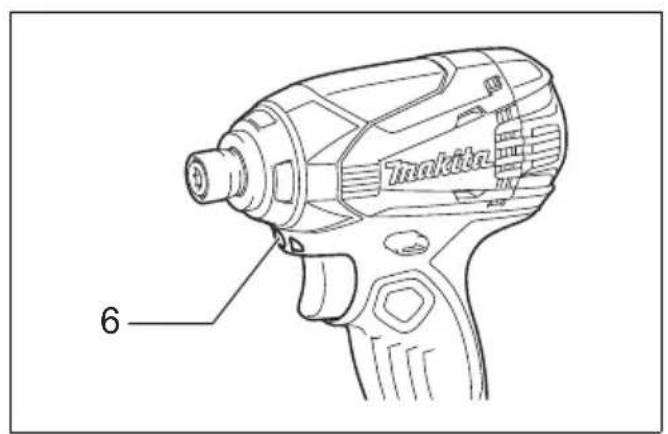
Lighting up the front lamp (Fig. 4)
CAUTION:
- Do not look in the light or see the source of light directly.
Pull the switch trigger to light up the lamp. The lamp keeps on lighting while the switch trigger is being pulled. The light automatically goes out 10 - 15 seconds after the switch trigger is released.
NOTE:
- Use a dry cloth to wipe the dirt off the lens of lamp. Be careful not to scratch the lens of lamp, or it may lower the illumination.
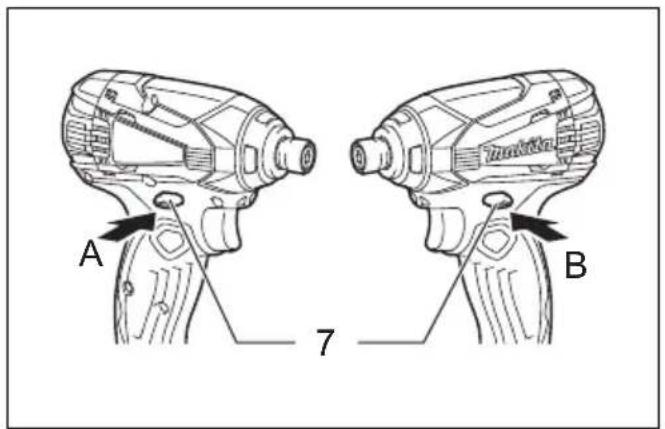
Reversing switch action (Fig. 5)
This tool has a reversing switch to change the direction of rotation. Depress the reversing switch lever from the A side for clockwise rotation or from the B side for counterclockwise rotation.
When the reversing switch lever is in the neutral position, the switch trigger cannot be pulled.
CAUTION:
- Always check the direction of rotation before operation.
- Use the reversing switch only after the tool comes to a complete stop. Changing the direction of rotation before the tool stops may damage the tool.
- When not operating the tool, always set the reversing switch lever to the neutral position.
Empty signal for remaining battery capacity (Fig. 6)
Stop the tool and with the tool stopped press the button on the switch panel and the remaining battery capacity will be signaled on the panel.
The status displayed on the switch panel and the remaining battery capacity is shown in the following table.
| LED indicator status Remaining battery capacity | |
 | About 50% or more |
 | About 20% - 50% |
 | About less than 20% |
NOTE:
- Before checking the remaining battery capacity, be sure to stop the tool.
ASSEMBLY

CAUTION:
- Always be sure that the tool is switched off and the battery cartridge is removed before carrying out any work on the tool.
Installing or removing driver bit or socket bit
Use only bits that has inserting portion shown in the figure. (Fig. 7)
For tool with shallow bit hole
| A = 12 mmB = 9 mm | Use only these type of bit. Follow the procedure (1).(Note) Bit-piece is not necessary. |
For tool with deep bit hole
| A = 17 mmB = 14 mm | To install these types of bits, follow the procedure (1). |
| A = 12 mmB = 9 mm | To install these types of bits, follow the procedure (2).(Note) Bit-piece is necessary for installing the bit. |
-
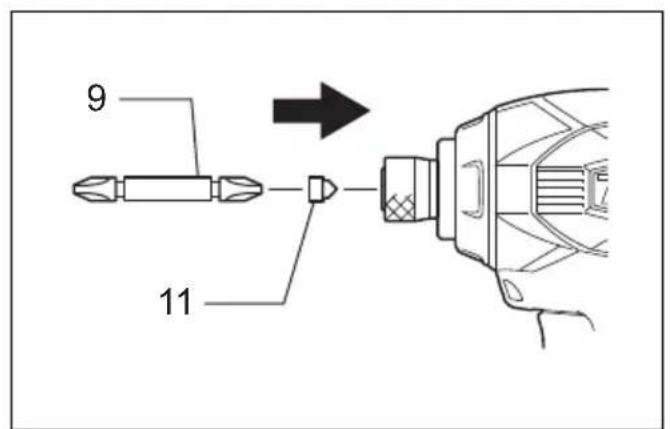
To install the bit, pull the sleeve and insert the bit into the sleeve as far as it will go. (Fig. 8)
-
To install the bit, insert the bit-piece and bit into the sleeve as far as it will go. The bit-piece should be inserted into the sleeve with its pointed end facing in. Then release the sleeve to secure the bit. (Fig. 9)
To remove the bit, pull the sleeve and pull the bit out.
NOTE:
- For all countries other than Europe, it's not necessary to pull the sleeve when installing the bit.
- If the bit is not inserted deep enough into the sleeve, the sleeve will not return to its original position and the bit will not be secured. In this case, try re-inserting the bit according to the instructions above.
- When it is difficult to insert the bit, pull the sleeve and insert it into the sleeve as far as it will go.
- After inserting the bit, make sure that it is firmly secured. If it comes out, do not use it.
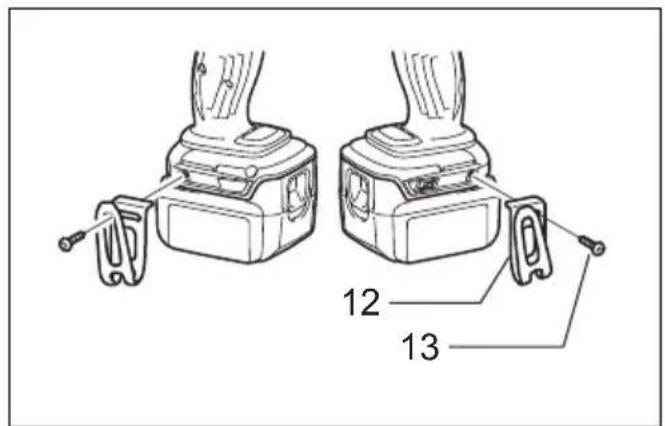
Hook (Fig. 10)
The hook is convenient for temporarily hanging the tool. This can be installed on either side of the tool.
To install the hook, insert it into a groove in the tool housing on either side and then secure it with a screw. To remove, loosen the screw and then take it out.
OPERATION
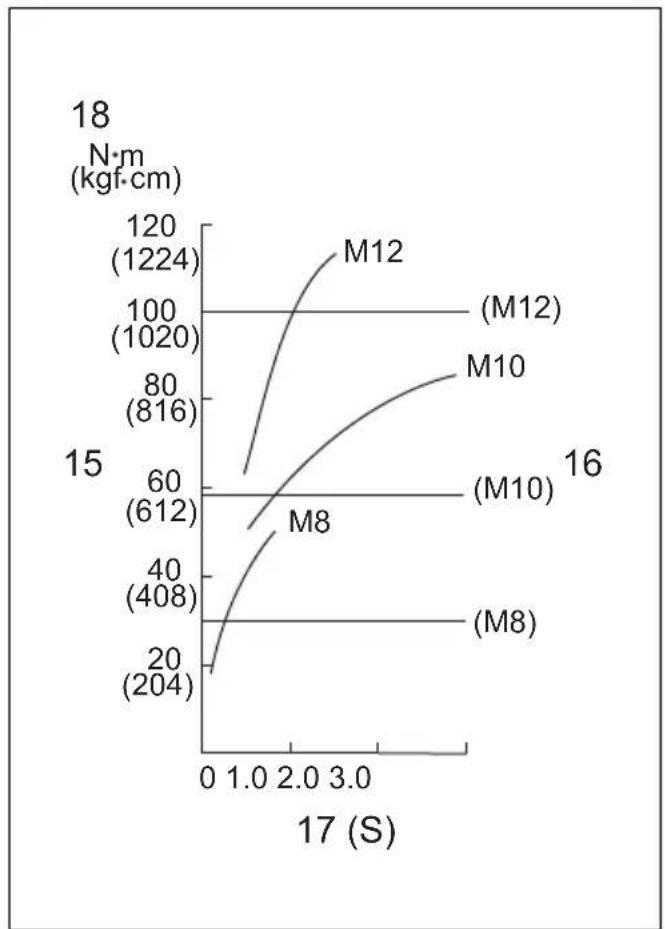
The proper fastening torque may differ depending upon the kind or size of the screw/bolt, the material of the workpiece to be fastened, etc. The relation between fastening torque and fastening time is shown in the figures.
(Fig. 11, 12 & 13)
Hold the tool firmly and place the point of the driver bit in the screw head. Apply forward pressure to the tool to the extent that the bit will not slip off the screw and turn the tool on to start operation.
NOTE:
- Use the proper bit for the head of the screw/bolt that you wish to use.
- When fastening screw M8 or smaller, carefully adjust pressure on the switch trigger so that the screw is not damaged.
- Hold the tool pointed straight at the screw.
- If you tighten the screw for a time longer than shown in the figures, the screw or the point of the driver bit may be overstressed, stripped, damaged, etc. Before starting your job, always perform a test operation to determine the proper fastening time for your screw.
- If you use a spare battery to continue the operation, rest the tool at least 15 min.
The fastening torque is affected by a wide variety of factors including the following. After fastening, always check the torque with a torque wrench.
- When the battery cartridge is discharged almost completely, voltage will drop and the fastening torque will be reduced.
- Driver bit or socket bit
Failure to use the correct size driver bit or socket bit will cause a reduction in the fastening torque.
3. Bolt
- Even though the torque coefficient and the class of bolt are the same, the proper fastening torque will differ according to the diameter of bolt.
-
Even though the diameters of bolts are the same, the proper fastening torque will differ according to the torque coefficient, the class of bolt and the bolt length.
-
The manner of holding the tool or the material of driving position to be fastened will affect the torque.
-
Operating the tool at low speed will cause a reduction in the fastening torque.
MAINTENANCE
CAUTION:
- Always be sure that the tool is switched off and the battery cartridge is removed before attempting to perform inspection or maintenance.
- Never use gasoline, benzine, thinner, alcohol or the like. Discoloration, deformation or cracks may result.
Replacing carbon brushes
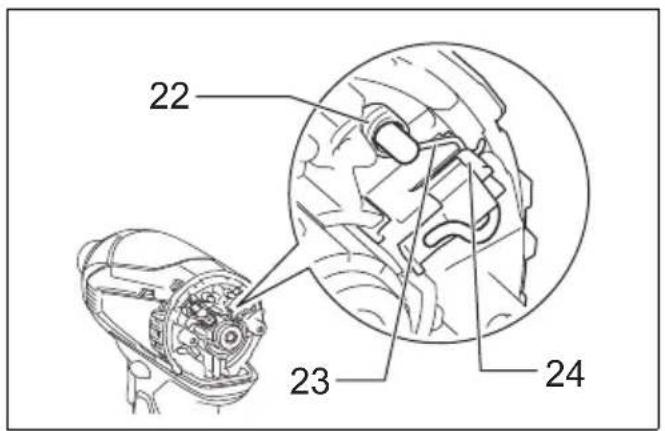
Replace when they wear down to the limit mark. Keep the carbon brushes clean and free to slip in the holders. Both carbon brushes should be replaced at the same time. Use only identical carbon brushes. (Fig. 14)
Use a screwdriver to remove two screws then remove the rear cover. (Fig. 15)
Raise the arm part of the spring and then place it in the recessed part of the housing with a slotted bit screw-driver of slender shaft or the like. (Fig. 16)
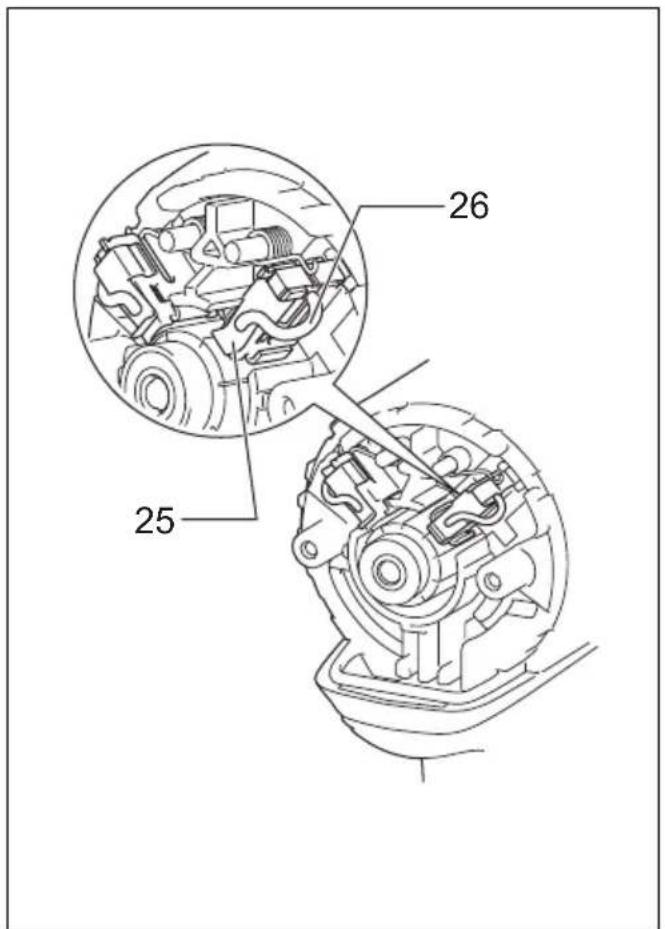
Use pliers to remove the carbon brush caps of the carbon brushes. Take out the worn carbon brushes, insert the new ones and replace the carbon brush cap in reverse. (Fig. 17)
Make sure to place the lead wire in opposite side of the arm. (Fig. 18)
Make sure that the carbon brush caps fit into the holes in brush holders securely. (Fig. 19)
Reinstall the rear cover and tighten two screws securely.
To maintain product SAFETY and RELIABILITY, repairs, any other maintenance or adjustment should be performed by Makita Authorized Service Centers, always using Makita replacement parts.
OPTIONAL ACCESSORIES
CAUTION:
- These accessories or attachments are recommended for use with your Makita tool specified in this manual. The use of any other accessories or attachments might present a risk of injury to persons. Only use accessory or attachment for its stated purpose.
If you need any assistance for more details regarding these accessories, ask your local Makita Service Center.
- Screw bits
- Hook
- Plastic carrying case
- Various type of Makita genuine batteries and chargers
- Battery protector
NOTE:
- Some items in the list may be included in the tool package as standard accessories. They may differ from country to country.
ENG905-1
Noise
The typical A-weighted noise level determined according to EN60745:
Model BTD134
Sound pressure level ( L_pA ): 92 dB (A)
Sound power level ( L_WA ): 103 dB (A)
Uncertainty (K): 3 dB (A)
Model BTD146
Sound pressure level ( L_pA ): 93 dB (A)
Sound power level ( L_WA ): 104 dB (A)
Uncertainty (K): 3 dB (A)
Wear ear protection
Vibration
The vibration total value (tri-axial vector sum) determined according to EN60745:
Model BTD134
Work mode: impact tightening of fasteners of the maximum capacity of the tool
Vibration emission ( a_h ): 12.0 m/s ^2
Uncertainty (K): 1.5 m/s ^4
Model BTD146
Work mode: impact tightening of fasteners of the maximum capacity of the tool
Vibration emission ( a_h ): 15.5 m/s ^2
Uncertainty (K): 2.0 m/s ^4
ENG901-1
- The declared vibration emission value has been measured in accordance with the standard test method and may be used for comparing one tool with another.
- The declared vibration emission value may also be used in a preliminary assessment of exposure.
WARNING:
- The vibration emission during actual use of the power tool can differ from the declared emission value depending on the ways in which the tool is used.
- Be sure to identify safety measures to protect the operator that are based on an estimation of exposure in the actual conditions of use (taking account of all parts of the operating cycle such as the times when the tool is switched off and when it is running idle in addition to the trigger time).
ENH101-15
For European countries only
EC Declaration of Conformity
We Makita Corporation as the responsible manufacturer declare that the following Makita machine(s):
Designation of Machine: Cordless Impact Driver
Model No./ Type: BTD134, BTD146
are of series production and
Conforms to the following European Directives:
2006/42/EC
And are manufactured in accordance with the following standards or standardised documents:
EN60745
The technical documentation is kept by our authorized representative in Europe who is:
Makita International Europe Ltd.
Michigan Drive, Tongwell,
Milton Keynes, Bucks MK15 8JD, England
24.1.2011
Tomoyasu Kato
Director
Makita Corporation
3-11-8, Sumiyoshi-cho,
Anjo, Aichi, 446-8502, JAPAN
Descriptif
Michigan Drive, Tongwell,
Milton Keynes, Bucks MK15 8JD, Angleterre
24.1.2011

Tomoyasu Kato
Directeur
Makita Corporation
3-11-8, Sumiyoshi-cho,
Anjo, Aichi, 446-8502, JAPAN
Übersicht
Vibrationsemission (a _b ): 12,0 m/s ^2
Michigan Drive, Tongwell,
Milton Keynes, Bucks MK15 8JD, England
24.1.2011

Tomoyasu Kato
Direktor
Makita Corporation
3-11-8, Sumiyoshi-cho,
Anjo, Aichi, 446-8502, JAPAN
Visione generale
Incertezza (K): 2,0 m/s²
ENG901-1
Michigan Drive, Tongwell,
Milton Keynes, Bucks MK15 8JD, England
24.1.2011

Tomoyasu Kato
Amministratore
Makita Corporation
3-11-8, Sumiyoshi-cho,
Anjo, Aichi, 446-8502, JAPAN
[Non-Text]
[Non-Text]
[Non-Text]
[Non-Text]
[Non-Text]
[Non-Text]
[Non-Text]
[Non-Text]
[Non-Text]
[Non-Text]
[Non-Text]
[Non-Text]
ONDERHOUD
LET OP:
OPTIONELE ACCESSOIRES
LET OP:
Trillingsemissie (a _h ): 12,0 m/s ^2
Onnauwkeurigheid (K): 1,5 m/s²
Model BTD146
Michigan Drive, Tongwell,
Milton Keynes, Bucks MK15 8JD, Engeland
24.1.2011
Tomoyasu Kato
Directeur
Makita Corporation
3-11-8, Sumiyoshi-cho,
Anjo, Aichi, 446-8502, JAPAN
Michigan Drive, Tongwell,
Milton Keynes, Bucks MK15 8JD, Inglaterra
24.1.2011
Tomoyasu Kato
Director
Makita Corporation
3-11-8, Sumiyoshi-cho,
Anjo, Aichi, 446-8502, JAPAN
Explicação geral
Michigan Drive, Tongwell,
Milton Keynes, Bucks MK15 8JD, Inglaterra
24.1.2011
Tomoyasu Kato
Director
Makita Corporation
3-11-8, Sumiyoshi-cho,
Anjo, Aichi, 446-8502, JAPAN
Michigan Drive, Tongwell,
Milton Keynes, Bucks MK15 8JD, England
24.1.2011
Tomoyasu Kato
Direktør
Makita Corporation
3-11-8, Sumiyoshi-cho,
Anjo, Aichi, 446-8502, JAPAN
Michigan Drive, Tongwell,
Milton Keynes, Bucks MK15 8JD, England (Aγγλία)
24.1.2011

Tomoyasu Kato
Διευθυντής
Makita Corporation
3-11-8, Sumiyoshi-cho,
Anjo, Aichi, 446-8502, JAPAN
Makita Corporation
Anjo, Aichi, Japan