TS112 TrueSonic - Speaker ALTO - Free user manual and instructions
Find the device manual for free TS112 TrueSonic ALTO in PDF.


User questions about TS112 TrueSonic ALTO
0 question about this device. Answer the ones you know or ask your own.
Ask a new question about this device
Download the instructions for your Speaker in PDF format for free! Find your manual TS112 TrueSonic - ALTO and take your electronic device back in hand. On this page are published all the documents necessary for the use of your device. TS112 TrueSonic by ALTO.
USER MANUAL TS112 TrueSonic ALTO
text_image
ALTO PROFESSIONALTS112C
1200-WATT 12" PORTABLE COLUMNAR ARRAY LOUDSPEAKER
User Guide
(1.0) INTRODUCTION....3
(1.1) Box Contents....3
(1.2) Support....3
(2.0) SETUP 4
(2.1) Important Safety Precautions....4
(2.1.1) Installation....4
(2.1.2) Sound Level....4
(2.2) Assembly 5
(2.3) System Power Sequencing ....6
(2.3) Connection Diagrams ......7
(3.0) FEATURES....9
(4.0) OPERATION....11
(4.1) Pairing a Bluetooth ^® Device 11
(4.2) Stereo-Link™: Connecting Two Speakers 11
(4.3) Using the Alto Pro App....12
(5.0) TROUBLESHOOTING....13
(6.0) APPENDIX....14
(6.1) Technical Specifications....14
(6.2) Trademarks & Licenses .... 15
Thank you for purchasing the TS112C columnar loudspeaker array system. At Alto Professional, performance and reliability mean as much to us as they do to you. We design our equipment with only one thing in mind—to make your performance the best it can be.
(1.1) Box Contents
TS112C
- Base Subwoofer
• 2x Columnar Array Attachments
Carrying Bag
Power Cable (4.9 ft. / 149 cm)
Quickstart Guide
Safety & Warranty Manual
(1.2) Support
For the latest information about this product (technical specifications, compatibility information, etc.) and product registration, visit altoprofessional.com.
For additional product support, visit altoprofessional.com/support.
(2.1) Important Safety Precautions
Please note: Alto Professional and inMusic are not responsible for the use of its products or the misuse of this information for any purpose. Alto Professional and inMusic are not responsible for the misuse of its products caused by avoiding compliance with inspection and maintenance procedures. Please also refer to the included safety and warranty manual for more information.
(2.1.1) Installation
Important: TS112C is not designed for suspended or stand-mounted installation.
• Always install loudspeakers in accordance with applicable electrical and building codes.
• Always verify that the loudspeaker is on a flat, level, and stable surface.
- Always be cautious in windy, outdoor conditions. Do not attach anything to the loudspeaker other than cables or equipment necessary for standard operation.
- Unless you are confident that you can handle the loudspeaker's weight, ask another person to help you lift it if necessary.
- Make sure your cables are out of the way of performers, production crew, and audience.
(2.1.2) Sound Level
Permanent hearing loss may be caused by exposure to extremely high noise levels. The U.S. Occupational Safety and Health Administration (OSHA) has specified permissible exposures to certain noise levels. According to OSHA, exposure to high sound pressure levels (SPL) in excess of these limits may result in hearing loss. When using equipment capable of generating high SPL, use hearing protection while such equipment is under operation.
| Hours per day | SPL (dB) | Example | |
| 8 | 90 | Small | gig |
| 6 | 92 | Train | |
| 4 | 95 | Subway | train |
| 3 | 97 | High-level | desl |
| 2 | 100 | Classical | mus |
| 1.5 | 102 | Riveting | machin |
| 1 | 105 | Machine | fact |
| 0.5 | 110 | Airport | |
| 0.25 or less | 115 | Rock concert |
(2.2) Assembly
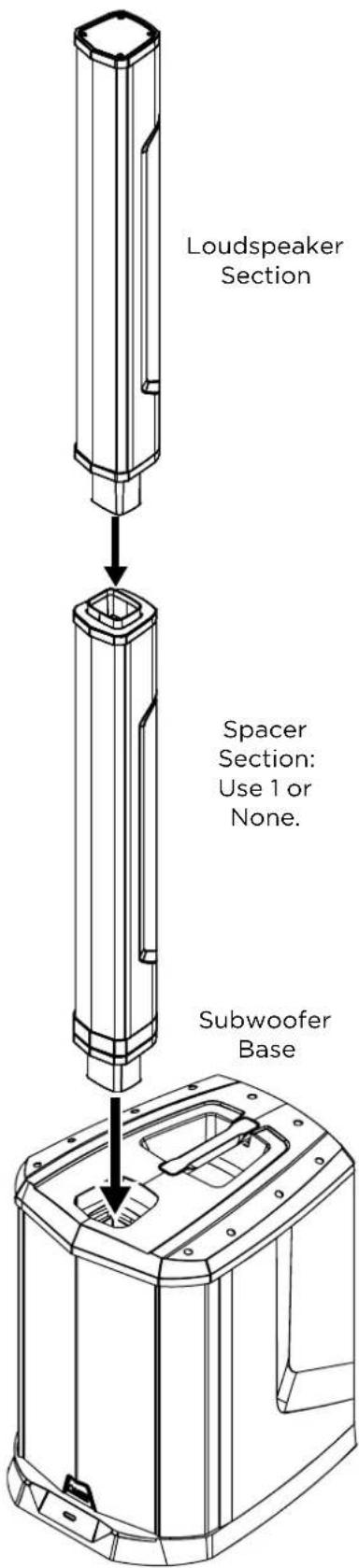
- Place the subwoofer base on a level surface.
- Attach the additional columns according to your needs.
There are two columnar sections, one of which (the top-most section) is loaded with the loudspeakers. The other section can be used as a spacer to determine the height of the loudspeakers.
The loudspeakers should be placed so that they are relative to your audience's ears for best results. For instance, if you are playing at the same level as the audience, you may wish to add the middle spacer section so the loudspeakers are at ear-height. Or, if you are on a raised stage, you may wish to remove the spacer section so the loudspeakers are closer to the audience on the floor.
To attach a section, simply insert the protruding end into the cavity, aligning the internal connectors, and gently push until it snaps into place.
- Connect your input and output devices, and then connect the subwoofer base to power.
- Power on the unit using the Power Switch on the subwoofer base and start playing!
To disassemble, first power off the unit, and then gently pull apart the sections. Store the columnar sections in the included carrying bag when not in use.
text_image
Loudspeaker Section Spacer Section: Use 1 or None. Subwoofer Base(2.3) System Power Sequencing
Proper power sequencing will help prevent audible thumps, clicks, and other noises in the system.
Note: Read the Safety & Warranty Manual before using the TS112C loudspeaker.
- Turn down the output level controls on your audio sources and processors (CD players, mixers, etc.) and power them on.
- Set the Gain knobs to the zero position on the TS112C subwoofer base.
- Turn on the TS112C subwoofer base.
- Bring up the faders or level controls on your mixer and start playing your audio source.
- Raise the Gain knobs on the TS112C subwoofer base to a comfortable level.
When powering off:
- Set the TS112C subwoofer base Gain knobs to the zero position.
- Power off the subwoofer.
- Turn off all audio source devices and processors.
(2.3) Connection Diagrams
Items not listed under Introduction > Box Contents are sold separately.
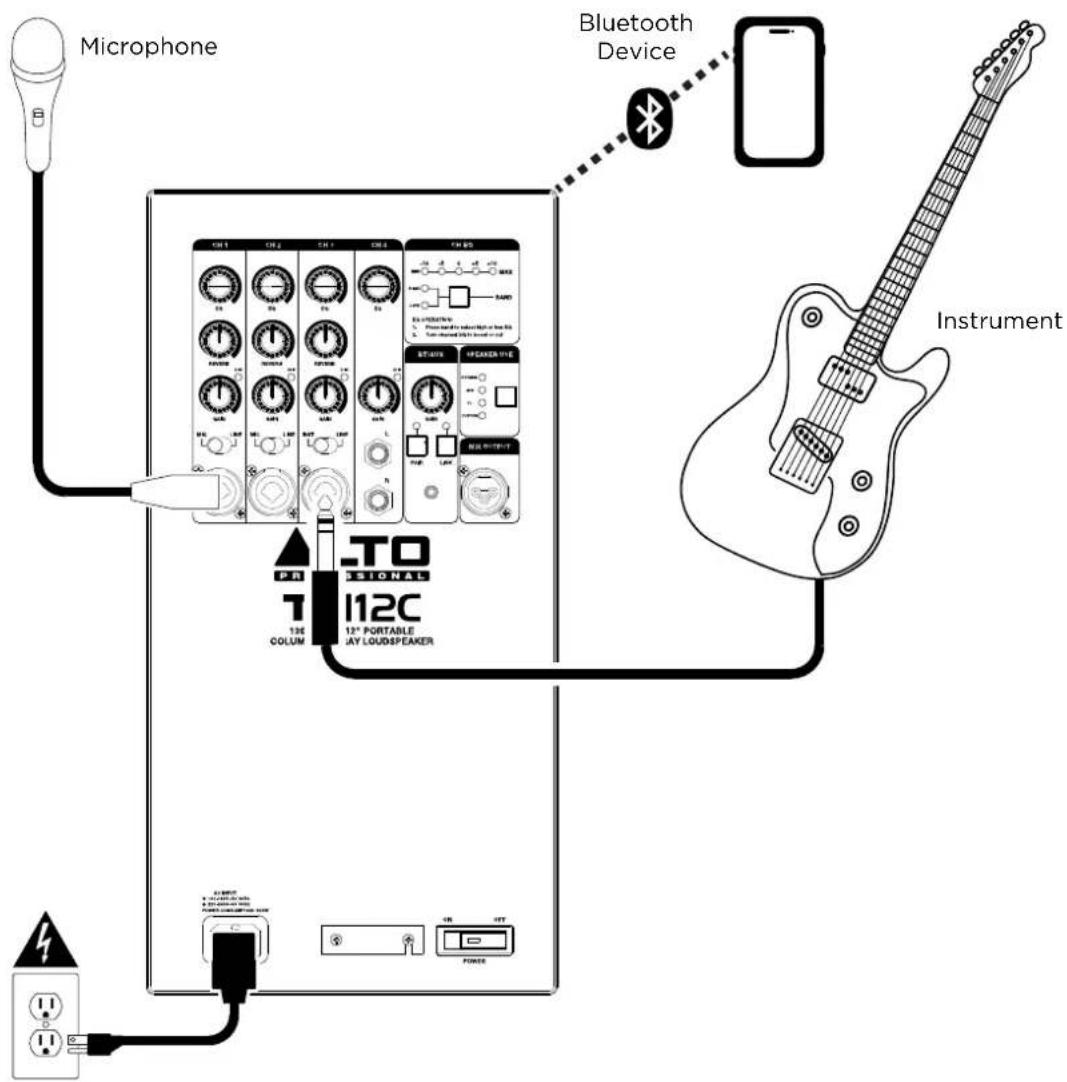
Example A: One Loudspeaker - Small Gig
Connect a microphone to CH1 and set the Input Selector to MIC.
Connect an instrument to CH3 and set the Input Selector to INST.
Pair a Bluetooth device for auxiliary playback.
text_image
Microphone Bluetooth Device Instrument CN 1 CN 2 CN 3 CN 4 CN 5 T0 T1 T2 T3 T4 T5 T6 T7 T8 T9 T10 T11 T12 T13 T14 T15 T16 T17 T18 T19 T20 T21 T22 T23 T24 T25 T26 T27 T28 T29 T30 T31 T32 T33 T34 T35 T36 T37 T38 T39 T40 T41 T42 T43 T44 T45 T46 T47 T48 T49 T50 T51 T52 T53 T54 T55 T56 T57 T58 T59 T60 T61 T62 T63 T64 T65 T66 T67 T68 T69 T70 TO SIONAL 12C 13C COLUM 12" PORTABLE JAY LOU/SEAKERPower
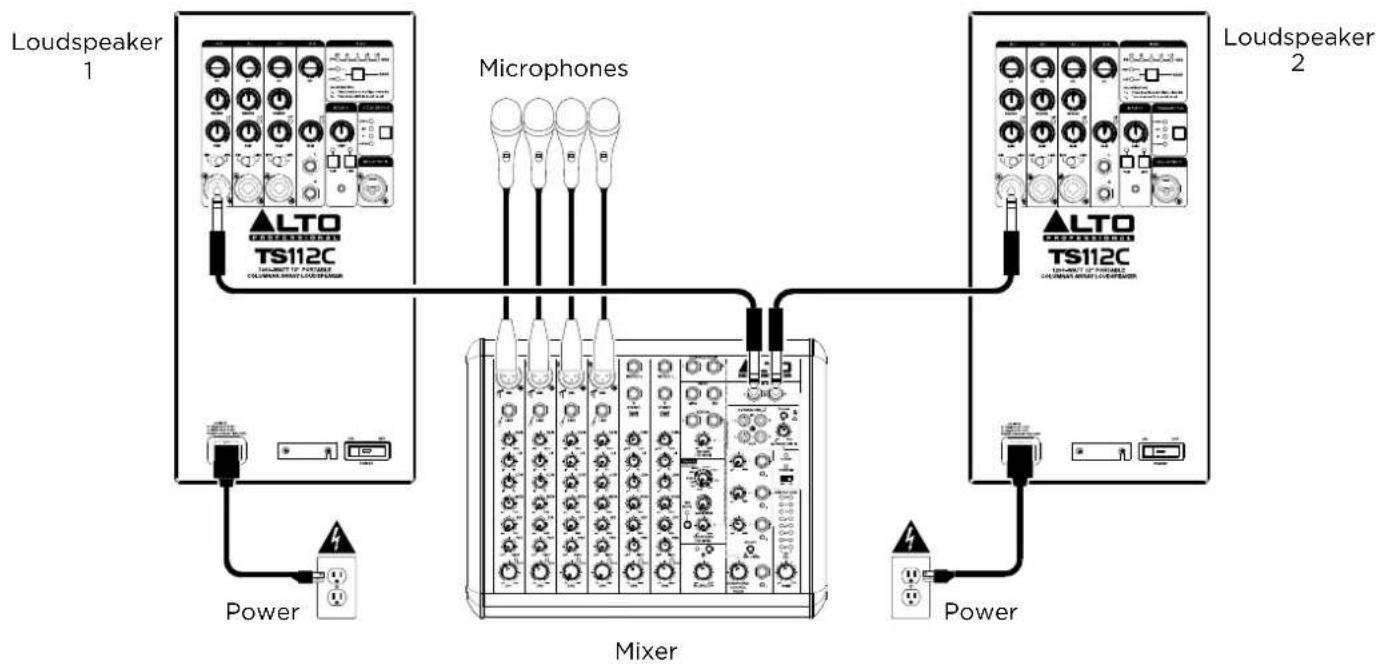
Example B: Two Loudspeakers - Wired
Connect two TS112C loudspeakers to a single audio source, such as a mixer. Set each loudspeaker's Input Selector to LINE on the connected channel.
flowchart
graph TD
    subgraph_Loudspeaker_1[" Loudspeaker 1 "]
        A["ALTO TS112C"] --> B["Microphones"]
        C["Power"] --> D["Mixer"]
    end
    subgraph_Microphones[" Microphones "]
        E["ALTO TS112C"] --> F["Microphones"]
        G["Power"] --> H["Mixer"]
    end
    subgraph_Loudspeaker_2[" Loudspeaker 2 "]
        I["ALTO TS112C"] --> J["Microphones"]
        K["Power"] --> L["Mixer"]
        M["Power"] --> N["Mixer"]
    end
    A --> B
    B --> F
    F --> H
    H --> N
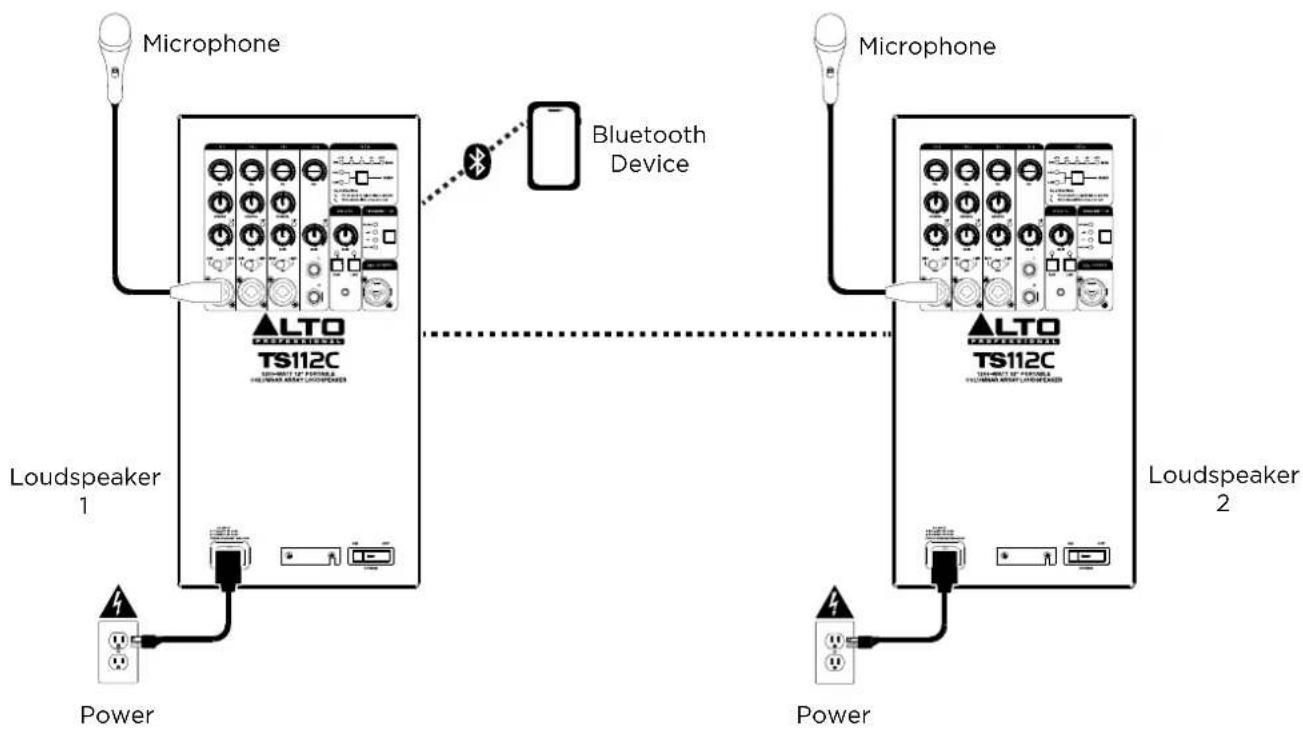
Example C: Two Loudspeakers - Stereo-Linked
Two TS112C loudspeakers can be wirelessly linked for stereo sound when using Bluetooth.
flowchart
graph TD
    A["Power"] --> B["Loudspeaker 1"]
    B --> C["Microphone"]
    C --> D["Bluetooth Device"]
    D --> E["Microphone"]
    E --> F["Loudspeaker 2"]
    F --> G["Power"]
    style A fill:#f9f,stroke:#333
    style B fill:#ccf,stroke:#333
    style C fill:#cfc,stroke:#333
    style D fill:#fcc,stroke:#333
    style E fill:#cff,stroke:#333
    style F fill:#ffc,stroke:#333
    style G fill:#fcc,stroke:#333
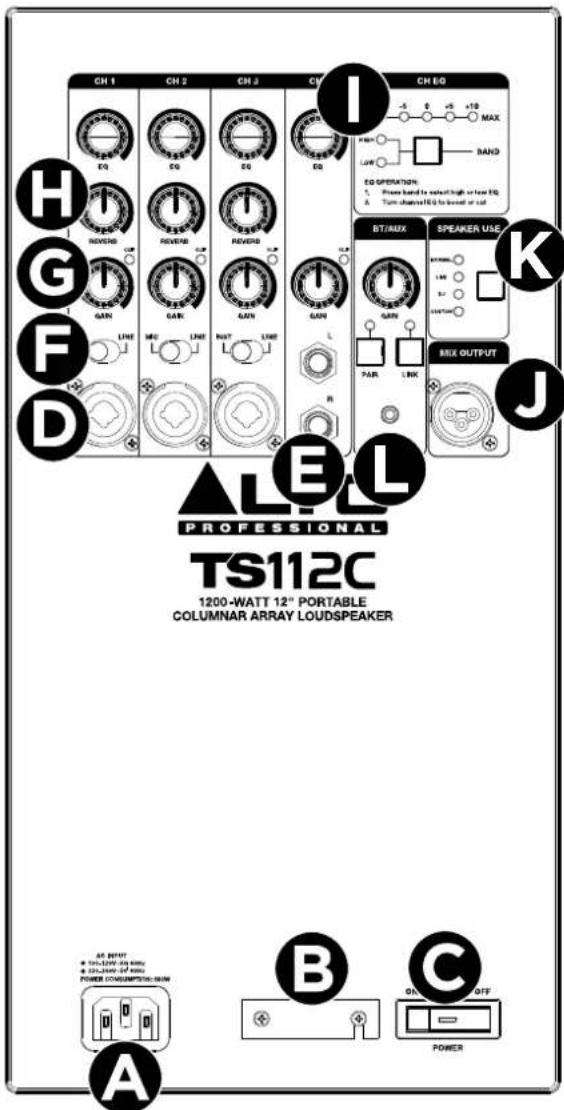
A. POWER INPUT
Connect the included power cable to this input and connect the other end of the cable to a power source.
Make sure the Power Switch is set to OFF when plugging and unplugging the cable.
B. VOLTAGE SELECTOR
The voltage selector setting should only be changed when necessary (e.g., when traveling to a country or region with a different voltage). Selecting an improper voltage setting can damage the unit.
To change the voltage setting, unscrew the top screw to loosen the cover, and then slide it aside to expose the selector. Move the switch to adjust the setting, and then replace and reattach the cover.
C. POWER SWITCH
Use this switch to turn the speaker on and off. Make sure the volume is set to zero before turning it on.
D. CHANNEL INPUTS 1-3 (1/4" [6.35 mm] / XLR)
Use a standard XLR, TS, or TRS cable (not included) to connect your sound source to these inputs.
E. CHANNEL INPUT 4 (Stereo 1/4" [6.35 mm])
Use standard TS or TRS cables (not included) to connect a stereo sound source to this input.
F. INPUT SELECTOR
Adjust this switch depending on the type of device connected to each input—MIC or LINE for CH1-2, and INST or LINE for CH3.
G. GAIN
Turn this knob to adjust the channel input level. If the CLIP LED is lit continuously, reduce the volume of your audio source, then reduce the GAIN level.
H. REVERB
Turn this knob to adjust the amount of reverb effect applied to the channel.
I. EQ
Press the EQ BAND button to select HIGH or LOW, then use the CH EQ knob to adjust the amount of boost or cut applied to the band on the selected channel, as shown on the EQ LEDs.
text_image
CH 1 CH 2 CH 3 CH 4 CH 5 E0 E0 E0 REVERSE REVERSE REVERSE GAIN GAIN GAIN LINE LINE RUT LINE L R I -5 0 +5 +10 MAX Pain LAW EQ OPERATION: S. Power based for select high or low EQ. A. Turn channels EQ to be set out or set BT/AUX SPEAKER USE SPARKING LAW RV COATING BILK OUTPUT J ▲LEL PROFESSIONAL TS112C 1200-WATT 12" PORTABLE COLUMNAR ARRAY LOUDSPEAKER A B C ON OFF POWERJ. MIX OUTPUT
Use a standard XLR cable (not included) to connect this output to the input of another loudspeaker. This output will send the combined signals of CH1-4 as a mono output.
K. SPEAKER USE
Press this button to adjust the speaker voicing according to the intended use.
• Normal: A flat response, good for basic use.
- Live: Suited for live solo performance, with a slight low frequency roll-off and accentuated vocal range.
- DJ: Suited for music playback with enhanced bass and high-frequency sparkle.
- Custom: Select this to use the ALTO PRO APP to load a customized tuning. See the section Using the Alto Pro App for more details.
L. BT/AUX
These controls are used to connect to an external Bluetooth device for audio streaming or use with the Alto Pro App, link to a second Alto TS112C speaker, and connect an auxiliary device.
- GAIN: Turn this knob to adjust the BT/AUX level. Set your BT/AUX device volume all the way up, then adjust this knob for best results.
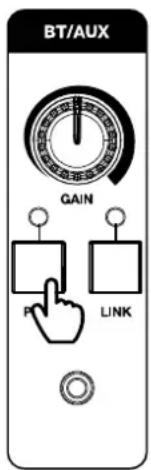
- PAIR: Press this button to enter Bluetooth pairing mode. See the section Pairing a Bluetooth® Device for more details.
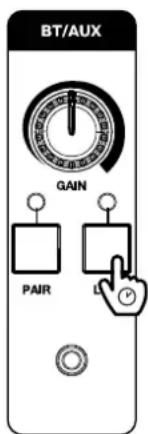
- LINK: Press and hold this button to enter Stereo Link mode to wirelessly connect to another Alto TS112C speaker for stereo playback. See Stereo-Link™: Connecting Two Speakers for more details.
- AUX INPUT: Connect an auxiliary device to this 1/8" (3.5 mm) input.
(4.1) Pairing a Bluetooth® Device
- Make sure your device is powered on and within range (no more than 100 ft. [30.5 m]) of your speaker.
- Press the Bluetooth PAIR button on the TS112C speaker. It will enter pairing mode, and the PAIR LED will blink to indicate it is ready for pairing.
- Navigate to your device's Bluetooth setup screen, and then find and select your speaker from the list of devices (for example, "Alto TS112C"). If your Bluetooth device prompts for a pairing code, enter 0000. If there is no connection after 90 seconds, the speaker will exit pairing mode.
- When paired successfully, the PAIR LED will be solidly lit. Once you have previously connected a Bluetooth device, the speaker will reconnect to it automatically in pairing mode if it is within range and available for pairing.
To disconnect a paired device, double-press the PAIR button, or return to your device's Bluetooth setup screen and select Disconnect.
text_image
BT/AUX GAIN P LINK
(4.2) Stereo-Link™: Connecting Two Speakers
To wirelessly link two TS112C TWS-compatible speakers for stereo Bluetooth playback:
- Make sure both speakers are powered on and within range (75 ft. [23 m]) of one another, and that you have already paired your Bluetooth device to one speaker using the directions above.
- Press and hold the LINK button on one speaker until the LINK LED starts to flash, indicating it is in Stereo Link™ mode.
- Repeat this on a second speaker, and the two will begin searching for a link. It may take up to one minute for the speakers to link.
- Once a connection is made, both speakers' LINK LEDs will be solidly lit. On the speaker that is connected to your Bluetooth device, the LED will turn green after five seconds. You can now stream Bluetooth audio wirelessly between the two speakers.
To unlink, double-press the LINK button on either speaker.
text_image
BT/AUX GAIN PAIRSpeaker 1 then Speaker 2
(4.3) Using the Alto Pro App
IMPORTANT: To ensure the best possible experience with the app, use the most current Android OS or iOS on your device.
Follow these steps to download the free app on your device:
- Open the Apple App Store or Google Play on your device. Then, search for the ALTO Pro App.
- Follow the on-screen instructions to download and install the app. Once downloaded, the ALTO Pro App will appear on your device's home screen.
- Connect your device to TS112C via Bluetooth. See the section Pairing a Bluetooth ^® Device to learn how to do this.
- Open the ALTO Pro App. If prompted, allow the app to access your device's Bluetooth and Location Services.
- Follow directions in the app to connect TS112C and begin using the app, where you can control various functions of the speaker such as:
- Speaker Use: Change the Speaker Use setting.
- Custom EQ: Create a customized EQ setting for the speaker, which can be accessed by selecting the Custom option of the Speaker Use control.
- Channel Volume: Adjust the volume settings for each channel.
- Channel EQ: Adjust the EQ settings for each channel.
Note: All digital mixer controls in the app are applied post-gain control to the input channels. For best results, set your input Gain just below the clipping point before using the digital mixer controls. Changes on the physical speaker will also be shown in the App in real-time.
If the sound is distorted: Try lowering the volume control of your sound source, musical instrument, or microphone. Also, try to reduce the channel volume on the speaker using the channel's Gain knob.
I hear a hum when cables are connected:
- Disconnect cables from the input jacks to see if it's a faulty cable.
- Use balanced cabling connections whenever possible.
- Make sure the signal cables are not placed near power cables.
- Connect all audio equipment power cables to outlets which share a common ground.
If there is a high-pitched whistling noise when using microphones: This is probably feedback. Try setting up the speakers in front of where your microphones are being used. If this is not possible, make sure to point the microphone away from the speaker.
If you can't hear the microphone over the music volume: Turn down the music volume from your source.
If you can't hear your instrument: Use Channel 3 and check that the INST/LINE switch is set to INST.
If you cannot connect your audio device to your TS112C loudspeaker via Bluetooth:
- Have your audio device (e.g., smartphone or tablet) and the TS112C loudspeaker as close together as possible while trying to connect. Make sure both the audio device and the speaker are unobstructed by walls, furniture, etc.
- Reset the Bluetooth connection on your audio device by turning Bluetooth off and back on. You can find this under the Bluetooth menu in the Settings for your phone or other audio device.
If this does not work, and you have connected to the speaker before, find it in the list of available or previously connected devices in your audio device's Bluetooth menu, tap the "gear" or "i" icon located next to it and then select Unpair or Forget. Turn the TS112C loudspeaker off and back on and try pairing again once it reappears in your available devices list.
Note: If the TS112C loudspeaker has been paired to another audio device recently that is still within range, you may need to repeat this process with that audio device to fully disconnect.
If you are having issues connecting two speakers using Stereo-Link™:
- Double press the LINK button to unlink the speakers, and restart the Stereo-Link™ process.
(6.1) Technical Specifications
Specifications are subject to change without notice.
| CH1-2 Inputs | |
| Connector | XLR/TRS 1/4" [6.35 mm] combo input connector (mic is XLR only) |
| Maximum Input Level | +18 dBu |
| Gain Range | 50 dB |
| Frequency Response 20 Hz - 20 kHz (+/- 3 dB) | |
| Input Impedance | 22k Ω (Line), 1k Ω (Mic) |
| CH3 Input | |
| Connector | XLR/TRS 1/4" [6.35 mm] combo input connector (line is TRS only) |
| Maximum Input Level +18 dBu | |
| Gain Range 24 dB | |
| Frequency Response | 20 Hz - 20 kHz (+/- 3 dB) |
| Input Impedance | 22k Ω (Line), 1k Ω (Mic), 1 MΩ (Hi-Z [Instrument]) |
| CH4 Input | |
| Connector Stereo 1/4" [6.35 mm] TRS | |
| Maximum Input Level +18 dBu | |
| Gain Range 24 dB | |
| Frequency Response 20 Hz - 20 kHz (+/- 3 dB) | |
| Input Impedance | 22k Ω (Line) |
| Mix Out | |
| Connector XLR output connector | |
| Output Level (for 0.5% THD) Fixed +4 dBu | |
| Input Impedance (unbalanced) | 100 Ω |
| General | |
| Speakers | Low-Frequency: 12.0" (305 mm) 4 Ω wooferHigh-Frequency: 8 x 2.75" (70 mm) 8 Ω drivers |
| Peak System / RMS Power 1200 | W Peak / 600 W RMS (400 W LF + 200 W HF) |
| Max SPL 127 dB @ 1 m | |
| Sensitivity 94 dB (1 W/1 m) | |
| Array Impedance | 4 Ω |
| Coverage 120° horizontal x 30° v | vertical (nominal) |
| Frequency Response 50 Hz - 15 | kHz (-3 dB)30 Hz - 20 kHz (-10 dB) |
| Wireless Technology Bluetooth® | - Classic Audio |
| Wireless Range * Bluetooth® Range | Range: Up to 100 feet (30.5 m)Stereo-LinkTM Range: Up to 50 ft. (15 m) between speakers |
| Power | Connection: IECVoltage: 100-120 V~, 50/60 Hz ; 220-240V~, 50/60 HzConsumption: 600W |
| Enclosure Injection-molded ABS | metal grille, rubber feet |
| Handles 1 sub top handle | |
| Dimensions (height x width x depth) | Sub: 23.1" x 15.8" x 19.1" (58.7 x 40.1 x 48.5 cm)Column: 29.1" x 4.1" x 4.2" (73.9 x 10.4 x 10.7 cm) (per piece, x2)Assembled Height: 79.0" (200.7 cm) |
| Weight 53.1 lb | 24.1 kg |
* Bluetooth and wireless reception and range are affected by walls, obstructions, and movement. For optimal performance, place the product in the center of the room so it is unobstructed by walls, furniture, etc.
(6.2) Trademarks & Licenses
Alto Professional is a trademark of inMusic Brands, Inc., registered in the U.S. and other countries.
The Bluetooth word mark and logos are owned by the Bluetooth SIG, Inc. and any use of such marks by Alto Professional is under license.
App Store is a trademark of Apple Inc., registered in the U.S. and other countries.
Android and Google Play are registered trademarks of Google Inc.
All other product names, company names, trademarks, or trade names are those of their respective owners.
altoprofessional.com