
K38056 - Phone charger KENSINGTON - Free user manual and instructions
Find the device manual for free K38056 KENSINGTON in PDF.


| Product Type | Portable Battery Charger (Pocket Battery for Smartphones) |
| Model | K38056 |
| Brand | Kensington |
| Battery Type | Lithium-polymer |
| Input | Micro USB (USB power adapter sold separately) |
| Output | USB (for charging smartphones) |
| Battery Level Indicator | LED indicator: green when charge > 30% |
| Automatic Shutdown | Yes, when phone is fully charged or disconnected |
| Safety Features | Overheating protection, short circuit prevention |
| Operating Temperature | 50-80°F (10-27°C) |
| Storage Recommendation | Store with at least 30% charge; avoid full discharge or full charge |
| Warranty | Two-year limited warranty |
| Compatibility | iPod and iPhone (certified); works with most smartphones via USB |
| Disposal | Recycle via RBRC (USA/Canada); do not dispose as household waste |
| Dimensions | Not specified in manual |
| Weight | Not specified in manual |
Frequently Asked Questions - K38056 KENSINGTON
User questions about K38056 KENSINGTON
0 question about this device. Answer the ones you know or ask your own.
Ask a new question about this device
Download the instructions for your Phone charger in PDF format for free! Find your manual K38056 - KENSINGTON and take your electronic device back in hand. On this page are published all the documents necessary for the use of your device. K38056 by KENSINGTON.
USER MANUAL K38056 KENSINGTON
Pocket Battery for Smartphones
QUICK START GUIDE
GUIDE DE DEMARRAGE RAPIDE
KURZANLEITUNG
SNELSTARTGIDS
GUIDA RAPIDA
GUÍA RÁPIDA
GYORSKALAUZ
PŘÍRUČKA ZAČÍNÁME
SZYBKI START
КРАТКОЕ РУКОВОДСТВО
ПОЛЬЗОВАТЕЛЯ
MANUAL DE INÍCIO RÁPIDO


TWO YEAR LIMITED WARRANTY GARANTIE LIMITÉS DE DEUX ANS
For technical support visit
Kensington Computer Products Group
A Division of ACCO Brands
333 Twin Dolphin Drive, Sixth floor
Redwood Shores, CA 94065
ACCO Brands Europe
Oxford Road
Aylesbury
Bucks, HP21 8SZ
United Kingdom
Designed in California, U.S.A.
by Kensington
Made in China
Patents Pending
www.kensington.com
901-2362-01
KL
Contents / Contenu / Inhalt / Inhoud / Contenuto / Contenido / Tartalomjegyzék / Obsah / Zawartość opakowania / Содержание / Conteúdo
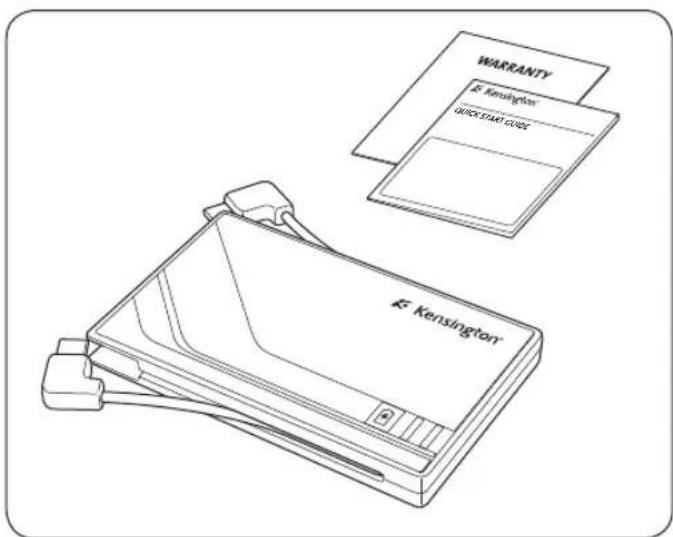
1
Charging your Pocket Battery for Smartphones / Chargement de la Pocket Battery pour smartphones / Aufladen Ihrer Pocket Battery für Smartphones / Uw Pocket Battery voor Smartphones opladen / Ricarica di Pocket Battery per smartphone / Carga de la Pocket Battery para Smartphones / A zsebakku feltöltése intelligens telefonról / Nabíjení vaší baterie Pocket Battery pro přístroje Smartphone / Ładowanie podręcznego akumulatora dla urządzeń smartphone / Зарядка устройства Pocket Battery для смартфонов / Carregar a Bateria de bolso para Smartphones /
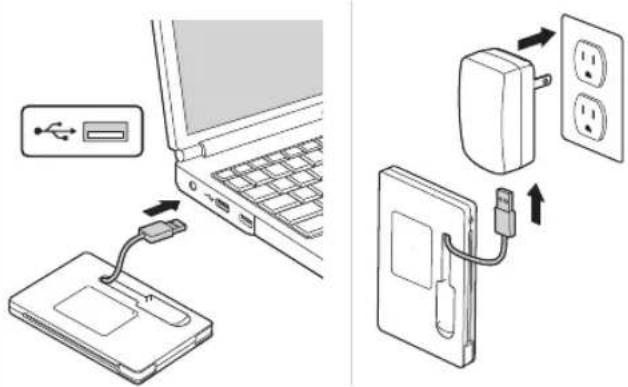
* USB power adapter sold separately / * Adaptateur d'alimentation USB vendu séparément / * USB-Netzteil (separat erhältlich) /
* USB-voedingsadapter afzonderlijk verkrijgbaar /
* Alimentatore di corrente USB venduto separatamente /
* Adaptador de alimentación USB vendido por separado /
* Az USB-tápegység nem tartozék / * Adaptér USB se prodává samostatně / * Adaptér USB se prodává samostatně /
* Блок питания с USB-портом поставляется отдельно. /
* Adaptador de alimentação USB vendido em separado
Battery level indicator / Indicateur du niveau de la batterie / Akkuladezustandsanzeige / Batterijniveau-indicatie / Indicatore di stato della batteria / Indicador del nivel de batería / Akkumulátortöltöttség-jelző / Indikátor stavu baterie / Wskaźnik naładowania akumulatora / Индикатор батареи / Indicador de nivel de carga da bateria
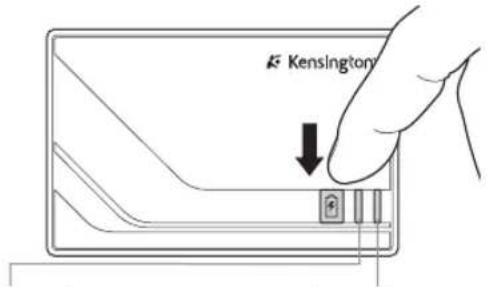
Green > 30% /
Product shuts down automatically when cell phone is charged and/or disconnected
Le produit s'éteint
Powering your Smartphone /
WARNING! IMPORTANT SAFETY INSTRUCTIONS Failure to read and follow these safety instructions could result in fire, explosion, electrical shock or other hazard, causing serious and/or fatal injury and/or property damage.
- Do not modify, disassemble, open, drop, crush, puncture, or shred the Kensington Pocket Battery for Smartphones (which will be known as the Pocket Battery for the remainder of this instruction guide).
- The Pocket Battery contains a lithium-polymer battery, which is flammable. Keep away from open flame.
- To prevent short circuit or other potential hazards, prevent metal objects such as coins or keys from coming into contact with the Pocket Battery, and do not insert foreign objects into the Pocket Battery or its ports.
- Keep your Pocket Battery dry, and do not use with wet hands. Moisture in or on the Pocket Battery may lead to electrical shock. If exposed to moisture during use, unplug the Pocket Battery immediately. If your Pocket Battery gets wet, have a qualified technician evaluate the product's safety before resuming use.
- Your Pocket Battery may become warm during operation. This is normal. However, to prevent overheating, keep area around Pocket Battery ventilated and do not place anything on or around Pocket Battery during operation. Do not operate your Pocket Battery near a heat source, heat vent, or in direct sunlight. Your Pocket Battery should be used in temperatures between 50–80°F (10–27°C).
- If the Pocket Battery begins to swell or expand, emits a strong odor, or becomes hot to the touch, discontinue use of the Pocket Battery, and have the product examined by a qualified electronic technician.
- Inspect your Pocket Battery and cables for damage before use. Have any damaged part repaired or replaced before use.
-
Your Pocket Battery is not user serviceable. Do not attempt to open, modify, or repair.
-
If the battery inside the Pocket Battery leaks for any reason, discontinue use, and do not allow the Pocket Battery's contents to contact your skin or eyes. In the event of accidental contact wash the affected area with large amounts of water and seek medical attention immediately.
- Your Pocket Battery is not a toy. Keep them away from children. Insure that all persons who use this product read and follow these warnings and instructions.
- Do not leave the Pocket Battery on prolonged charge when not in use.
Enhancing Performance by Proper Care and Storage of your Pocket Battery
- Do not store your Pocket Battery either fully charged or discharged. It is best to store your Pocket Battery with at least 30 % charge remaining. To check the charge level of your Pocket Battery connect it to a power source with a USB cable. Check that the battery status indicator LED is green.
- Avoid frequent full discharges because this puts additional strain on the battery in the Pocket Battery. Charge your Pocket Battery between uses even if it is not fully discharged. The lithium-polymer battery used in this product has no “memory effect.” Therefore, several partial discharges with frequent recharges are better than one full discharge, and will help prolong the life of your Pocket Battery. Short battery life in laptops is mainly caused by heat, rather than charge/discharge patterns.
- Do not store your Pocket Battery at elevated temperatures (such as in your car) or in high humidity.
Disposing of your Pocket Battery
- Do not incinerate or dispose of your Pocket Battery in a fire or microwave.
- Do not dispose of your Pocket Battery as ordinary refuse, as it contains a lithium-polymer battery. Consult your local municipal or civil authority for instructions on correctly disposing of a lithium-polymer battery.
- In the USA and Canada: This mark 📋 indicates your Pocket Battery can be recycled by the Rechargeable Battery Recovery Corporation (“RBRC”). When you are ready to dispose of the Pocket Battery, please contact the RBRC at 1-800-8-BATTERY or www.rbrc.org.
Common Troubleshooting Steps
- Un-plug and re-plug all connections.
- Charge the Pocket battery.
- The power that is available from USB ports differs depending on their design. For the fastest recharge time, use a USB port from a AC-USB adapter. Alternately connect the battery pack to a USB port which is located on your PC or laptop. Do not recharge using an auxiliary USB port on a keyboard or extension cable.
Registering Your Kensington Product
Register your Kensington product online at www.kensington.com.
Technical Support
Technical support is available to all registered users of Kensington products. Technical Support contact information can be found on the back page of this manual.
Web Support
You may find the answer to your problem in the Frequently Asked Questions (FAQ) section of the Support area on the Kensington Website: www.support.kensington.com.
Telephone Support
There is no charge for technical support except long-distance charges where applicable. Please visit www.kensington.com for telephone support hours. In Europe, technical support is available by telephone Monday to Friday 09:00 to 21:00 (Central European time).
Please note the following when calling support:
- Call from a phone where you have access to your device.
- Be prepared to provide the following information:
– Name, address, and telephone number
– Name of the Kensington product
- Make and model of your computer
– System software and version
– Symptoms of the problem and what led to them
FEDERAL COMMUNICATIONS COMMISSION RADIO FREQUENCY INTERFERENCE
STATEMENT
This device has been tested and found to comply with the limits for a Class B digital device, pursuant to Part 15 of the FCC Rules. These limits are designed to provide reasonable protection against harmful interference in a residential installation. This equipment generates, uses, and can radiate radio frequency energy and, if not installed and used in accordance with the instructions, may cause harmful interference to radio communications.
However, there is no guarantee that interference will not occur in a particular installation. If this equipment causes harmful interference to radio or television reception, which can be determined by turning the equipment off and on, the user is encouraged to try to correct the interference by one or more of the following measures:
• Reorient or relocate the receiving antenna.
- Increase the separation between the equipment and receiver.
- Connect the equipment into an outlet on a circuit different from that to which the receiver is connected.
- Consult the dealer or an experienced radio/TV technician for help.
MODIFICATIONS: Modifications not expressly approved by Kensington may void the user's authority to operate the device under FCC regulations and must not be made. SHIELDED CABLES: In order to meet FCC requirements, all connections to equipment using a Kensington input device should be made using only the shielded cables.
FCC DECLARATION OF CONFORMITY COMPLIANCE STATEMENT
This product complies with Part 15 of the FCC rules. Operation is subject to the following two conditions: (1) This device may not cause harmful interference, and (2) This device must accept any interference received, including interference that may cause undesired operation. As defined in Section 2.909 of the FCC Rules, the responsible party for this device is Kensington Computer Product Group, 333 Twin Dolphin Drive, Redwood Shores, CA 94065, USA.
INDUSTRY CANADA CONFORMITY STATEMENT
Operation is subject to the following two conditions: (1) This device may not cause interference, and (2) This device must accept any interference, including interference that may cause undesired operation of the device.
This Class [B] digital apparatus complies with Canadian ICES-003.
CE DECLARATION OF CONFORMITY
Kensington declares that this product is in compliance with the essential requirements and other relevant provisions of applicable EC directives. For Europe, a copy of the Declaration of Conformity for this product may be obtained by clicking on the Compliance Documentation link at www.support.kensington.com.
INFORMATION FOR EU MEMBER-STATES ONLY

The use of the symbol indicates that this product may not be treated as household waste. By ensuring this product is disposed of correctly, you will help prevent potential negative consequences for the environment and human health, which could otherwise be caused by inappropriate waste
handling of this product. For more detailed information about recycling of this product, please contact your local city office, your household waste disposal service, or the shop where you purchased the product.
Kensington and the ACCO name and design are registered trademarks of ACCO Brands. The Kensington Promise is a service mark of ACCO Brands. iPod is a trademark of Apple Inc., registered in the U.S. and other countries. iPhone is a trademark of Apple Inc. "Made for iPod" means that an electronic accessory has been designed to connect specifically to iPod and has been certified by the developer to meet Apple performance standards. "Works with iPhone" means that an electronic accessory has been designed to connect specifically to iPhone and has been certified by the developer to meet Apple performance standards. Apple is not responsible for the operation of this device or its compliance with safety and regulatory standards. All other registered and unregistered trademarks are the property of their respective owners.
© 2010 Kensington Computer Products Group, a division of ACCO Brands USA LLC. Any unauthorized copying, duplicating, or other reproduction of the contents hereof is prohibited without written consent from Kensington Computer Products Group. All rights reserved. 2/10
Français

AVERTISSEMENT ! CONSIGNES DE SÉCURITÉ IMPORTANTES
Assistance technique
DÉCLARATION DE CONFORMITÉ FCC
DÉCLARATION DE CONFORMITÉ CE
INDUSTRY CANADA CONFORMITY STATEMENT
WAARSCHUWING! BELANGRIJKE VEILIGHEIDSVOORSCHRIFTEN
www.support.kensington.com.
Telefonische ondersteuning
DEKLARACJA ZGODNOŚCI WE


- POCKET BATTERY FOR SMARTPHONES
- 1
- ENHANCING PERFORMANCE BY PROPER CARE AND STORAGE OF YOUR POCKET BATTERY
- DISPOSING OF YOUR POCKET BATTERY
- COMMON TROUBLESHOOTING STEPS
- REGISTERING YOUR KENSINGTON PRODUCT
- TECHNICAL SUPPORT
- WEB SUPPORT
- TELEPHONE SUPPORT
- FEDERAL COMMUNICATIONS COMMISSION RADIO FREQUENCY INTERFERENCE
- STATEMENT
- FCC DECLARATION OF CONFORMITY COMPLIANCE STATEMENT
- INDUSTRY CANADA CONFORMITY STATEMENT
- CE DECLARATION OF CONFORMITY
- INFORMATION FOR EU MEMBER-STATES ONLY
- FRANÇAIS
- AVERTISSEMENT ! CONSIGNES DE SÉCURITÉ IMPORTANTES
- ASSISTANCE TECHNIQUE
- DÉCLARATION DE CONFORMITÉ FCC
- DÉCLARATION DE CONFORMITÉ CE
- WAARSCHUWING! BELANGRIJKE VEILIGHEIDSVOORSCHRIFTEN
- TELEFONISCHE ONDERSTEUNING
- DEKLARACJA ZGODNOŚCI WE
Brand : KENSINGTON
Model : K38056
Category : Phone charger