
RR950 - Juke box Ricatech - Free user manual and instructions
Find the device manual for free RR950 Ricatech in PDF.


| Product type | Jukebox |
| Brand | Ricatech |
| Model | RR950 |
| Dimensions (approx.) | 68 x 44 x 28 cm |
| Weight (approx.) | 8-10 kg |
| Power supply | 220-240 V ~ 50 Hz |
| Main functions | CD player, AM/FM radio, decorative lighting, auxiliary input, line output |
| CD player | Play, pause, stop, next/previous track, fast forward/rewind, programming, repeat (1 track/all), random play |
| Radio | Analog tuning with knob, mode selection (AM/FM) |
| Lighting | Neon, bulb or LED modes depending on version; mode and color selection |
| Connectivity | AUX input (3.5mm jack), RCA line output, terminals for external speakers |
| Audio power (approx.) | 20 W RMS |
| Maintenance and cleaning | Clean with a soft, dry cloth; do not use abrasive products |
| Safety | Do not expose to water or moisture; do not open the device (Class 1 laser); unplug if any problem occurs |
| Spare parts and repairability | No user-serviceable parts; contact a qualified professional |
| General information | Manual available in multiple languages; customer support via email (support@ricatech.com) and phone (+32 3 3265694) |
Frequently Asked Questions - RR950 Ricatech
User questions about RR950 Ricatech
0 question about this device. Answer the ones you know or ask your own.
Ask a new question about this device
Download the instructions for your Juke box in PDF format for free! Find your manual RR950 - Ricatech and take your electronic device back in hand. On this page are published all the documents necessary for the use of your device. RR950 by Ricatech.
USER MANUAL RR950 Ricatech
The Lighting flash with an arrowhead symbol, within the equilateral triangle, is intended to alert the user to the presence of uninsulated "dangerous voltage" within the product's enclosure that may be of sufficient magnitude to cause an electric shock.

The exclamation point within the equilateral triangle is intended to alert the user to the presence of important operating and maintenance(servicing) instructions in this owner manual.
WARNING: TO REDUCE THE RISK OF ELECTRIC SHOCK, DO NOT REMOVE COVER (OR BACK). NO USER-SERVICEABLE PARTS INSIDE. REFER SERVICING TO QUALIFIED SERVICE PERSONNEL.
WARNING: TO PREVENT FIRE OR SHOCK HAZARD, DO NOT EXPOSE THIS APPLIANCE TO RAIN OR MOISTURE.
Should any trouble occur, disconnect the AC power cord and refer servicing to a qualified technician.
Do not place anything directly on the top of the unit. Damage to the unit can result.
In case of malfunction due to electrostatic discharge the apparatus has to be reset by disconnecting it from mains supply.
On Placement
- Do not use the unit in places which are extremely hot, cold, dusty, or humid.
- Place the unit on a flat and even surface.
• Do not restrict the air flow of the unit by placing it in a place with poor air flow, by covering it with a cloth. - Do not place naked flame sources, such as lighted candles on the apparatus.
- Do not place objects filled with liquids, such as vases, on the apparatus.
On AC Voltage
- Before use, check that the rated voltage of your unit matches your local voltage.
On Safety
- When connecting or disconnecting the AC cord, grip the plug and not the cord itself. Pulling the cord may damage it and create a hazard.
- When you are not going to use the unit for a long period of time, disconnect the AC power cord.
On Condensation
- When left in a heated room where it is warm and damp, water droplets or condensation may form inside the unit. When there is condensation inside the unit, the unit may not function normally. Let the unit stand for 1 to 2 hours before turning the power on, or gradually heat the room up and dry the unit before use.
ATTENTION SHOULD BE DRAWN TO THE EVIRONMENTAL ASPECTS OF BATTERY DISPOSAL.
LASER SAFETY
THIS UNIT EMPLOYS A LASER.
ONLY A QUALIFIED SERVICE PERSONNEL SHOULD OPEN COVER IN ATTEMPT TO SERVICE THIS DEVICE DUE TO POSSIBLE EYE INJURY.
CAUTION: USE OF ANY CONTROLS, ADJUSTMENTS, OR PROCEDURES OTHER THAN THOSE SPECIFIED HEREIN MAY RESULT IN HAZARDOUS RADIATION EXPOSURE.
CLASS 1 LASER PRODUCT APPAREIL A LASER DE CLASSE 1 PRODUCTO LASER DE CLASE 1
CAUTION INVISIBLE LASER RADIATION WHEN OPEN AND INTERLOCKS DEFECTED. AVOID EXPOSURE TO BEAM

USER MANUAL
Location of control (main Unit)
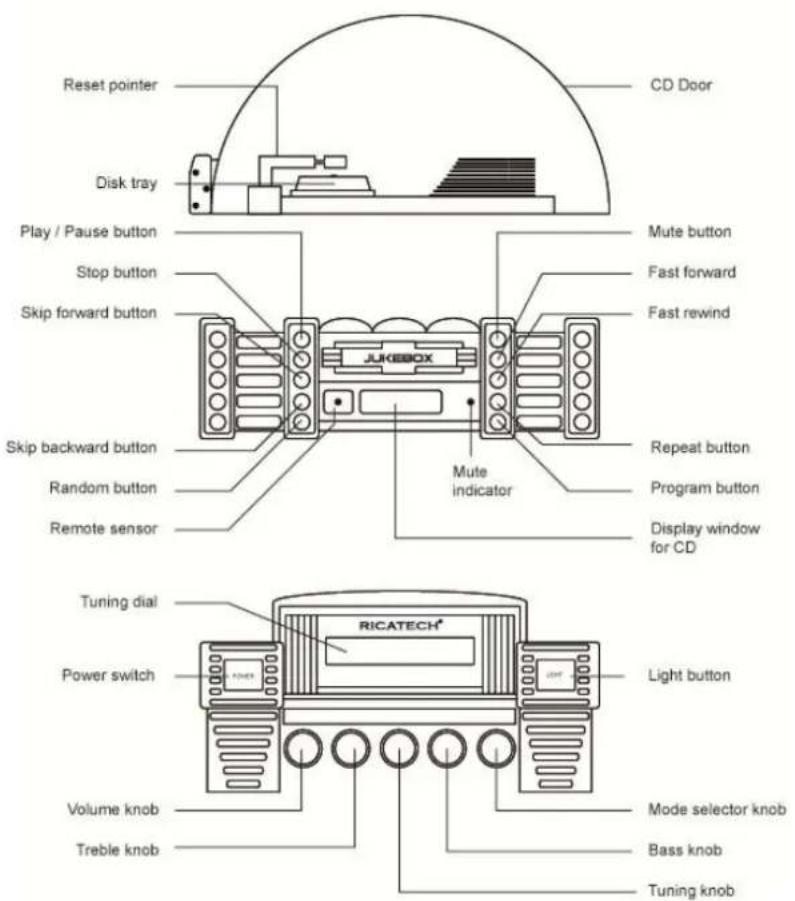
| REMOTE CONTROL FUNCTION (FOR CD PLAYER ONLY) | |
| PLAY/PAUSE | II< |
| STOP | ■ |
| SKIP FORWARD | ▶▶ |
| SKIP BACKWARD | |◀ |
| FAST FORWARD | ▶▶ |
| FAST REWIND | ◀◀ |
| RANDOM | RAN |
| REPEAT | REP |
| PROGRAM | PRG |
TO PLAY A CD
- Press the POWER switch and select MODE SELECTOR to CD.
- Flip open the semi circle "CD DOOR".
- Turn the "RESET" pointer to "OFF" position and insert a disc onto the disc tray. **(Make sure the "RESET" pointer in "ON" position after disc loaded.)
- Press the PLAY/PAUSE button to play the CD, press once again to temporarily stop disc play.
- Press STOP to stop playing the CD.
- Adjust listening level and sound effect with Volume, Treble and Bass knob
- Press SKIP FORWARD to skip ahead to next track. Press SKIP BACKWARD to skip back to previous track. The track number will be displayed in readout.
- During disc play mode, press the FAST FORWARD or FAST REWIND to search a particular point quickly.
NOTE:
If the disc is seriously scratched, or too dirty, disc play may not start.
If an improperly centered disc is played, noise can be heard in the mechanism. The use of such discs should be avoided.
PROGRAMMED DISC PLAY
It is not possible to enter programs during disc play. Press the STOP button first, then enter a program.
- Press the STOP button.
- Press the PROGRAM button. Select a track number using SKIP FORWARD or SKIP BACKWARD button, press PROGRAM button again
- Repeat step 2 until all the desired tracks are programmed in memory
NOTE:
To modify the program, press the STOP button and restart from step 2.
-To clear the program, press the STOP or power is switched off
REPEAT DISC PLAY
- Press REPEAT button once to repeat disc play of one track.
- Press REPEAT button twice to repeat all the track on the disc.
- Select the desired track for disc play using SKIP FORWARD or SKIP BACKWARD button.
- Press the PLAY/PAUSE button to play
- Press STOP button to cancel repeat mode.
RANDOM DISC PLAY
- Press the RANDOM button to play CD in random order.
- To cancel RANDOM, press STOP button
MUTE DISC PLAY
- Press MUTE button to muting the sound while playing disc. *The MUTE indicator on the CD control panel will be lighted up.
- To resume press MUTE again and the MUTE indicator will goes off
RADIO OPERATION
- Set the MODE selector to your desired band.
- Adjust the sound with the VOLUME knob.
- Tune to the desired radio station by using the TUNING knob.
- To turn off the radio, press the POWER button.
LIGHT OPERATION
- Press the LIGHT button to turn on all the light.
- To Turn off the light, press the LIGHT button again.
NOTE:
1. (FOR "NEON LIGHTS" VERSION ONLY)
Please note that Neon lights will not work while in AM / MW radio mode. This is due to interference caused by neon lighting and is a usual occurrence.
2. LIGHT MODE (IF EQUIPPED "BULB LIGHTS" VERSION ONLY)
Switch the MODE selector at back cover to change light mode.
3. LIGHT MODE (IF EQUIPPED AT BACK COVER "LED LIGHTS" VERSION ONLY)
The colors of the lights change overtime, switch to HOLD position to remain static to your favourite color. Switch to PLAY position to resume
*IMPORTANT NOTE: (LED LIGHTS VERSION ONLY)
The changing colors sequences of lights are controlled by IC, the lights maybe turned off when the light mode in HOLD position is normal.
EXTERNAL SPEAKER CONNECTION (IF EQUIPPED)
Connect each speaker wire to the speaker terminal at the back cover, switch the speaker switch to external.
AUXILIARY CONNECTION "AUX IN" (IF EQUIPPED)
- Connect your own device (i.e. MP3 player or IPOD) to the "AUX IN connection" (located at the back of cabinet) with stereo plug and detachable rack (packed separately).
- Adjust the ON / OFF switch next to the jack to the 'ON' position.
- Rotate the mode selector to "CD-AUX".
- Adjust the sound with the VOLUME knob or the volume control of the device.
- When change to another mode, the device will continue to play with no sound until the ON / OFF switch is adjusted to 'OFF' position and switch off the device.
IMPORTANT NOTE:
- Adjust the ON / OFF switch to the 'OFF' position when not in use.
- The CD function will resume to normal only after the ON / OFF switch is adjusted to 'OFF' position.
LINE OUT CONNECTOR (IF EQUIPPED)
1) Connect your own amplifier to the line out connector (located at the back of cabinet) with RCA cable (packed separately), the two ends of the cord should be connected to the holes of jack in accordance with the colors.
2) Adjust ON/OFF switch next to the jack to the "ON" position. (*The built-in amplifier of Jukebox will cut off immediately)
3) Adjust the sound with the VOLUME / TREBLE / BASS knob of Jukebox and/or the volume control of your own amplifier.
NOTE:
No sound could be heard when the LINE OUT switch in "ON" position, if without connecting to your own amplifier, make sure the ON/OFF switch to "OFF" position when not in use.
Warranty:
Ricatech BV covers all products (Excl. accessories) with a 2 year warranty applying to all faults caused by a factory-error. External physical damage will not be covered by our warranty
| Warranty: | All hardware errors occurring within 2 years after purchase unless caused by points mentioned below. |
| No Warranty : | Faults caused by:*Dismountal by any other service center then ours.*Water and moisture damage*Drop and bump damage*Usage with non approved Ricatech accessories.*Short-circuit or over-voltage*Physical damage, loss or damage to accessories |
| Out of warranty repairs | Please be so kind to contact us for out-of-warranty repairs. We will provide you with a quotation with the expected costs.Goods out of warranty cannot be returned to your reseller. |
CUSTOMER SUPPORT
You can contact the Ricatech customer service when you have a question or a problem with your Ricatech product. You can contact us by telephone and email.
For customer support by email, please sent a email to support@ricatech.com Please make sure that you mention the model number and serial number of the product, mention your name & address and describe your question or problem clearly.
Telephone
For customer support by telephone, please dial +32 3 3265694. One of our service staff will be ready to serve you.
For full procedure please visit the website of Ricatech at: www.ricatech.com
WAARSCHUWING: OM DE KANS OP EEN ELEKTRISCHE SCHOK TE VERKLEINEN VERWIJDER NIET DE HOES (OF ACHTERKANT). GEEN GEBRUIKERS BENODIGDE ONDERDELEN BEVINDEN ZICH HIERBINNEN. VOOR SERVICE NEEM CONTACT OP MET SERVICE PERSONEEL. WAARSCHUWING: OM BRAND OF SCHOK GEVAAR TE VOORKOMEN MAG U HET APPARAAT NIET BLOOD STELLEN AAN REGEN OF VOCHT.
Contrôle de l'unité

Ricatech BV covers all products (Excl. accessories) with a 2 year warranty applying to all faults caused by a factory-error. External physical damage will not be covered by our warranty
| Warranty: | All hardware errors occurring within 2 years after purchase unless caused by points mentioned below. |
| No Warranty : | Faults caused by:*Dismountal by any other service center then ours.*Water and moisture damage*Drop and bump damage*Usage with non approved Ricatech accessories.*Short-circuit or over-voltage*Physical damage, loss or damage to accessories |
| Out of warranty repairs | Please be so kind to contact us for out-of-warranty repairs. We will provide you with a quotation with the expected costs.Goods out of warranty cannot be returned to your reseller. |
SUPPORT CLIENTÈLE
Ricatech BV covers all products (Excl. accessories) with a 2 year warranty applying to all faults caused by a factory-error. External physical damage will not be covered by our warranty
| Warranty: | All hardware errors occurring within 2 years after purchase unless caused by points mentioned below. |
| No Warranty : | Faults caused by:*Dismountal by any other service center then ours.*Water and moisture damage*Drop and bump damage*Usage with non approved Ricatech accessories.*Short-circuit or over-voltage*Physical damage, loss or damage to accessories |
| Out of warranty repairs | Please be so kind to contact us for out-of-warranty repairs. We will provide you with a quotation with the expected costs.Goods out of warranty cannot be returned to your reseller. |
KUNDENDIENST



- ON PLACEMENT
- ON AC VOLTAGE
- ON SAFETY
- ON CONDENSATION
- LASER SAFETY
- USER MANUAL
- TO PLAY A CD
- NOTE
- PROGRAMMED DISC PLAY
- REPEAT DISC PLAY
- RANDOM DISC PLAY
- MUTE DISC PLAY
- RADIO OPERATION
- LIGHT OPERATION
- (FOR "NEON LIGHTS" VERSION ONLY)
- LIGHT MODE (IF EQUIPPED "BULB LIGHTS" VERSION ONLY)
- LIGHT MODE (IF EQUIPPED AT BACK COVER "LED LIGHTS" VERSION ONLY)
- IMPORTANT NOTE: (LED LIGHTS VERSION ONLY)
- EXTERNAL SPEAKER CONNECTION (IF EQUIPPED)
- AUXILIARY CONNECTION "AUX IN" (IF EQUIPPED)
- IMPORTANT NOTE
- LINE OUT CONNECTOR (IF EQUIPPED)
- WARRANTY
- CUSTOMER SUPPORT
- TELEPHONE
- CONTRÔLE DE L'UNITÉ
- SUPPORT CLIENTÈLE
- KUNDENDIENST
Brand : Ricatech
Model : RR950
Category : Juke box