
Connection Module Cat.5e - Computer Cable Equip - Free user manual and instructions
Find the device manual for free Connection Module Cat.5e Equip in PDF.


| Product type | RJ45 Cat.5e connection module |
| Category | Computer cable / Connectors |
| Connector | RJ45 female 8P8C |
| Standard | Category 5e, TIA/EIA-568 |
| Version | Compatible with T568A and T568B |
| Housing material | High-strength ABS plastic |
| Contacts | Gold-plated contacts 50 μm |
| Dimensions (L x W x H) | 2.0 x 1.5 x 1.0 cm |
| Weight | 10 g |
| Power supply | None (passive device) |
| Main functions | Ethernet network connection, data transmission |
| Installation | Tool-free, snap into wall plate or patch panel |
| Compatibility | Standard wall socket, 19" patch panels |
| Bandwidth | Up to 100 MHz |
| Maintenance and cleaning | Clean with a dry cloth, no abrasive products |
| Safety | Indoor use, comply with applicable electrical standards |
| Spare parts and repairability | Not repairable, replace defective module |
| General information | Brand Equip, model Connection Module Cat.5e |
Frequently Asked Questions - Connection Module Cat.5e Equip
User questions about Connection Module Cat.5e Equip
0 question about this device. Answer the ones you know or ask your own.
Ask a new question about this device
Download the instructions for your Computer Cable in PDF format for free! Find your manual Connection Module Cat.5e - Equip and take your electronic device back in hand. On this page are published all the documents necessary for the use of your device. Connection Module Cat.5e by Equip.
USER MANUAL Connection Module Cat.5e Equip
Always here to help you
Register your product and get support at
www.philips.com/welcome

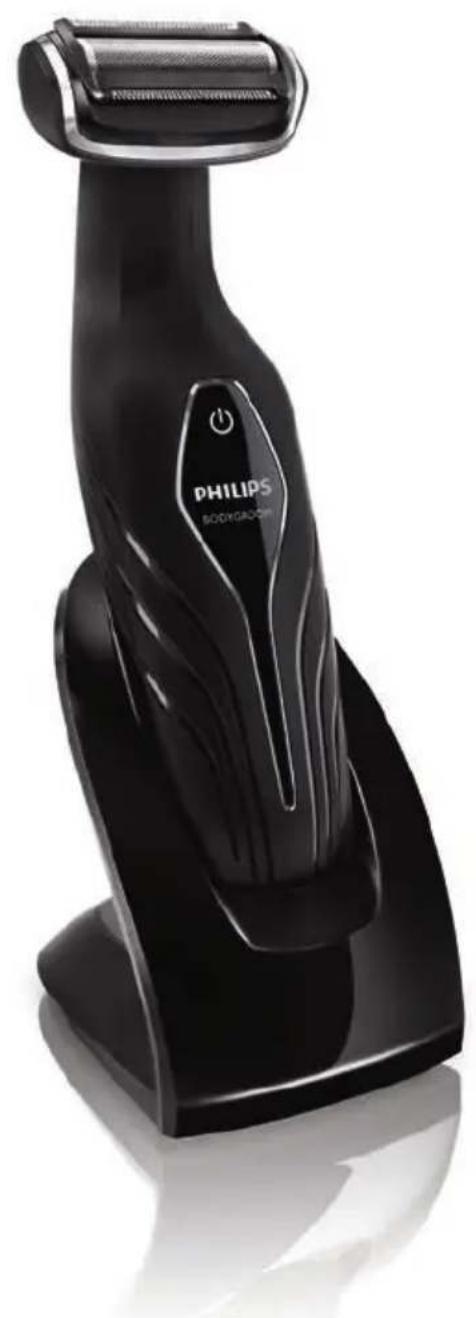
natural_image
Black Philips Bodygadon electric shaver with roller blade and power button (no text or symbols on body)BG2038
BG2036
BG2028
BG2026
BG2025
BG2024
User manual
PHILIPS

natural_image
Simple line drawing of an open book with a grid on the left and a closed page on the right (no text or symbols)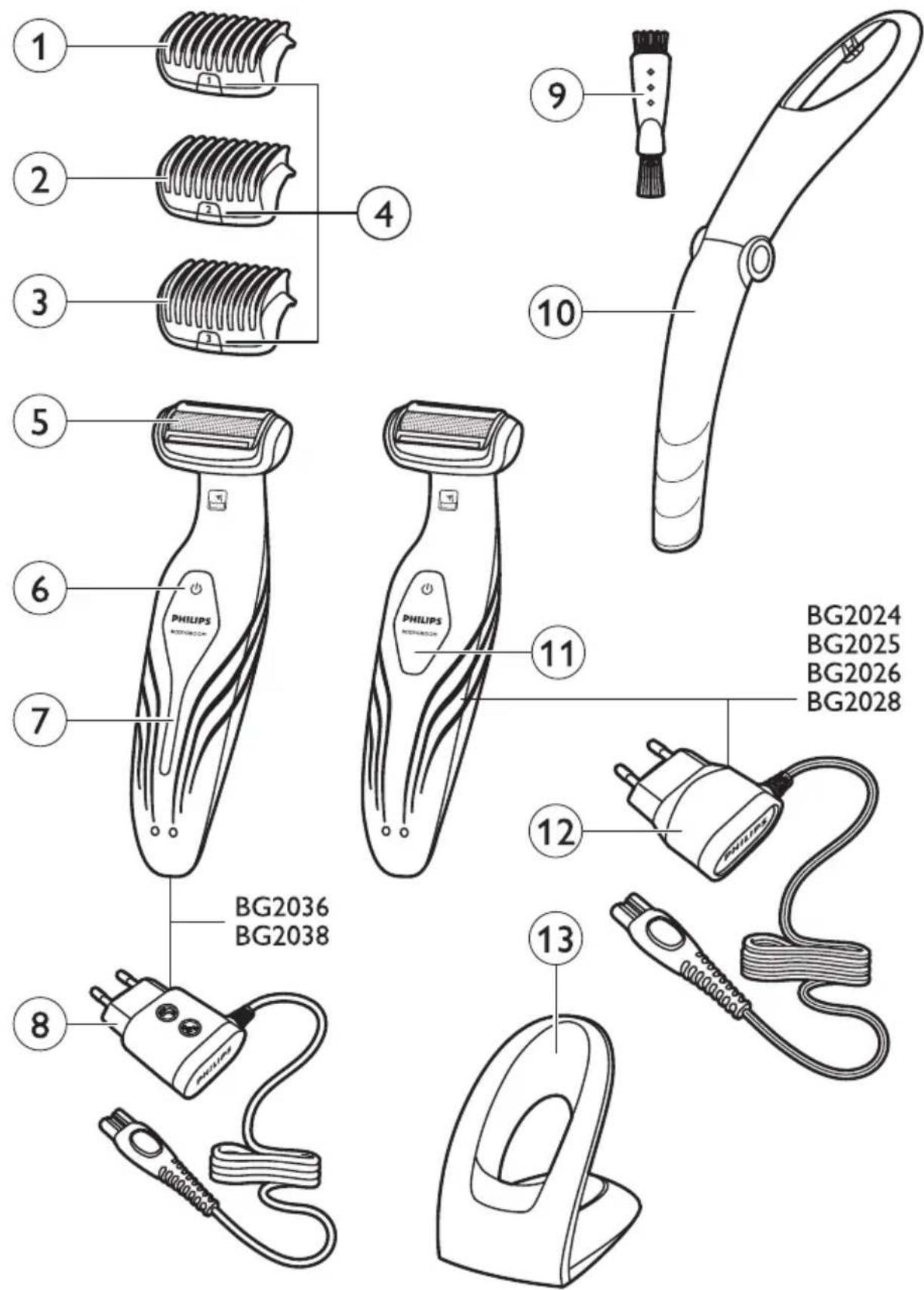
ENGLISH 6
ESPAÑOL 16
FRANÇAIS 26
INDONESIA 36
한국어 46
BAHASA MELAYU 56
PORTUGUÊS 66
ภาษาไทย 76
TIÊNG VIÊT 85
繁體中文 95
简体中文 104
Introduction
Congratulations on your purchase and welcome to Philips! To fully benefit from the support that Philips offers, register your product at www.philips.com/welcome.
The Philips Bodygroom offers you a safe, gentle, quick and smooth shave and trim for every body part below the neckline. With this new rechargeable shaver and trimmer in one you can easily shorten and remove body hair wherever you like, wet or dry!
General description (Fig. 1)
1 Trimming comb 1 (3mm/0.11 inch)
2 Trimming comb 2 (5mm/0.19 inch) (BG2038/BG2036/BG2028/BG2026 only)
3 Trimming comb 3 (7mm/0.27 inch) (BG2038/BG2036/BG2028/BG2026 only)
4 Comb size indication (1, 2 or 3)
5 Shaving unit
6 On/off button
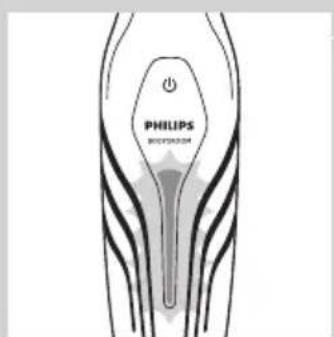
7 Battery status indicator
8 Adapter
9 Cleaning brush (BG2038/BG2036/BG2028/BG2026 only)
10 Back shaving attachment (BG2038/BG2036 only)
11 Battery status indicator
12 Adapter
13 Charging stand
Important
Read this user manual carefully before you use the appliance and save it for future reference.
Danger
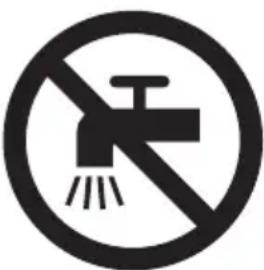
- Keep the adapter dry.
Warning
- Check if the voltage indicated on the adapter corresponds to the local mains voltage before you connect the appliance.
- The adapter contains a transformer. Do not cut off the adapter to replace it with another plug, as this causes a hazardous situation.
- This appliance is not intended for use by persons (including children) with reduced physical, sensory or mental capabilities, or lack of experience and knowledge, unless they have been given supervision or instruction concerning use of the shaver by a person responsible for their safety.
- Children should be supervised to ensure they do not play with the appliance.
- Always check the appliance before you use it. Do not use the appliance if it is damaged, as this may cause injury.
natural_image
Prohibition sign showing a faucet without raindrops, enclosed in a circle (no text)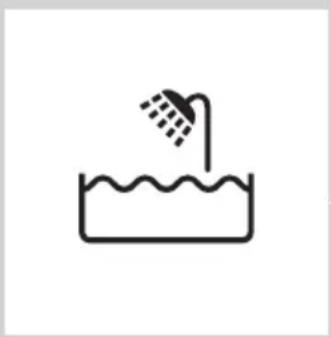
natural_image
Simple line drawing of a showerhead spraying over a water-filled basin (no text or symbols)Caution
- Use, charge and store the appliance at a temperature between 5^ C and 35^ C.
- Only use the adapter and the charging stand supplied to charge the appliance.
- Never immerse the charging stand in water nor rinse it under the tap.
- If the appliance is subjected to a major change in temperature, pressure or humidity, let the appliance acclimatise for 30 minutes before you use it.
- If the adapter or charging stand is damaged, always have it replaced with one of the original type in order to avoid a hazard.
- Do not use the appliance if any of its parts is damaged or broken, as this may cause injury.
- This appliance is only intended for shaving and trimming body parts below the neckline. Do not use it to shave or trim facial or scalp hair.
Compliance with standards
- The appliance complies with the internationally approved IEC safety regulations and can be safely used in the bath or shower.
- This Philips appliance complies with all applicable standards and regulations regarding exposure to electromagnetic fields.
Charging
natural_image
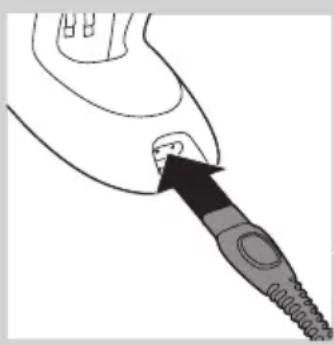
Line drawing of a medical or surgical instrument with a pointed tip and arrow indicating direction (no text or symbols)Charging takes 1 hour (BG2038/BG2036) or 8 hours (BG2028/BG2026/BG2025/BG2024) depending on the model. When the appliance is fully charged, it has an operating time of up to 50 minutes.
When the battery status indicator flashes red, the battery is running low (approx. 10 minutes of operating time left) and you need to recharge the appliance.
1 Insert the small plug into the charging stand.
natural_image
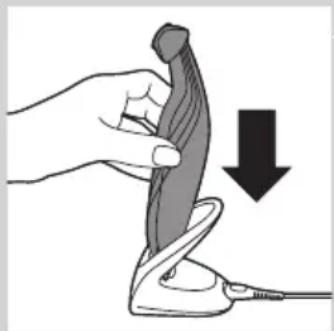
Illustration of a hand holding a pen-like object with a downward arrow indicating compression or disassembly (no text or symbols present)2 Put the appliance in the charging stand.
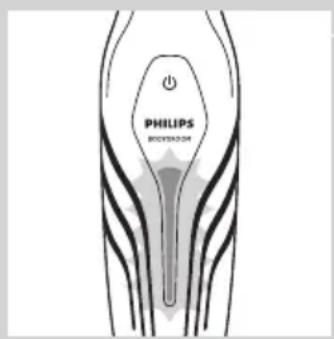
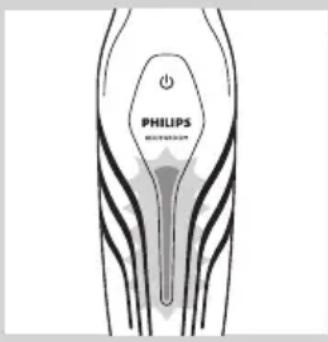
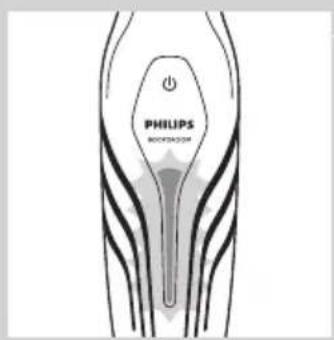
The battery status indicator flashes green to indicate that the appliance is charging.
Note: The battery status indicator of BG2028, BG2026, BG2025 and BG2024 looks different, but works in the same way.
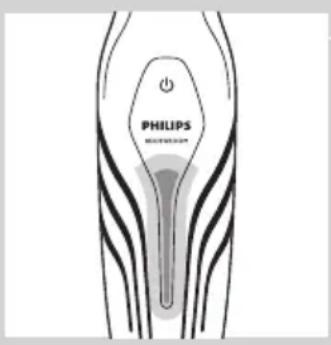
When the appliance is fully charged, the battery status indicator lights up green continuously.
Note: If the fully charged appliance is still in the plugged-in charging stand after 30 minutes, the battery status indicator goes out to save energy.
Using the appliance
Take your time when you first start to shave sensitive areas. You have to acquire practice with the appliance. Your skin also needs some time to adjust to the procedure.
You can use the appliance wet or dry to shave or trim hair on all parts of the body below the neckline. Do not use this appliance to shave or trim facial hair or scalp hair.
Trimming
BG2025 and BG2024 come with trimming comb 1. BG2038, BG2036, BG2028 and BG2026 come with trimming combs 1, 2 and 3. The back of each comb has been numbered 1, 2 and 3 (see the table below for the corresponding hair lengths after trimming). A trimming comb allows you to cut hair to a specific length (see the table below). If your appliance comes with 3 combs, start trimming with trimming comb 3 to acquire practice with this appliance.
Comb size indication Hair length after trimming
1 3mm/0.11 inch
2 5mm/0.19 inch
3 7mm/0.27 inch
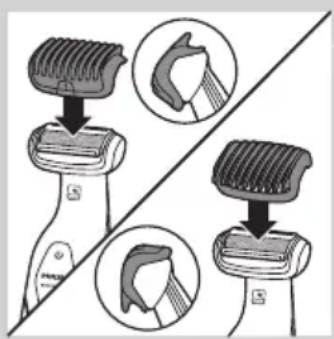
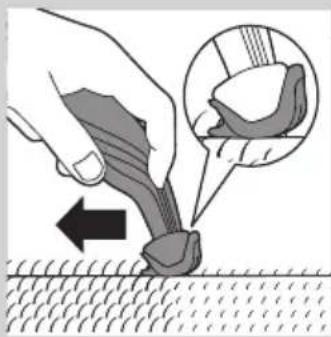
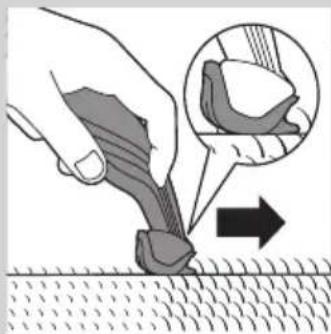
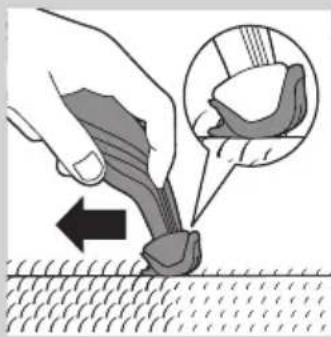
1 Snap the appropriate trimming comb onto the appliance. Make sure the teeth of the comb point in the direction in which you are going to move the appliance.
natural_image
Illustration of a hand using a tool to apply a mechanical component, with an inset showing a close-up of the component (no text or symbols present)- When you move the appliance towards you, the teeth have to point towards you.
natural_image
Illustration of a hand using a tool to apply material to a surface, with an inset showing a magnified view of the tool (no text or symbols present)- When you move the appliance away from you, the teeth have to point away from you.
natural_image
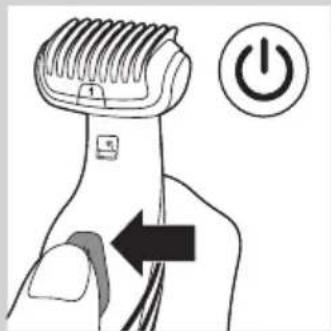
Illustration of a hand using a power shaver with an arrow indicating left-hand rule (no text or symbols)2 Press the on/off button to switch on the appliance.
3 Move the appliance against the direction of hair growth.
Note: Make sure that the flat part of the trimming comb is always fully in contact with the skin.
Shaving
natural_image
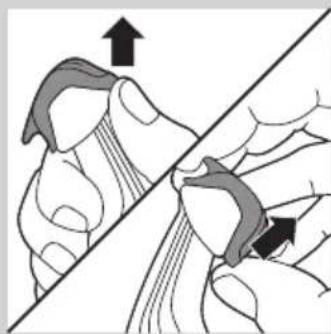
Illustration of a hand holding a tool with an arrow indicating direction (no text or symbols)1 If a trimming comb is still attached, remove it.
Note: You can either push the trimming comb off the appliance or pull it off, depending on how the comb is placed on the appliance.
natural_image
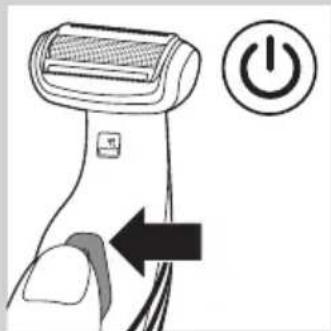
Illustration of a hairdryer with a power button icon (no text or symbols)2 Press the on/off button once to switch on the appliance.
3 Place the shaving unit on the skin.
4 Move the appliance against the direction of hair growth with one hand, while you stretch the skin with the other hand.
Note: Make sure that the shaving unit is always fully in contact with the skin.
Trimming and shaving tips
- If the hairs are longer than 10mm, you can trim them first with trimming comb 1 to a length of 3mm to make shaving easier.
- You get the best trimming results when the skin and hair are dry.
- You can use the appliance to shave in the shower or bath. To ensure easier gliding, apply some shaving foam or shower gel to your skin.
Shaving with the back shaving attachment (BG2036/BG2038 only)
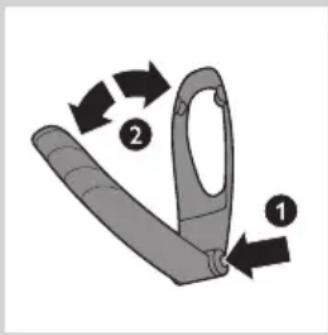
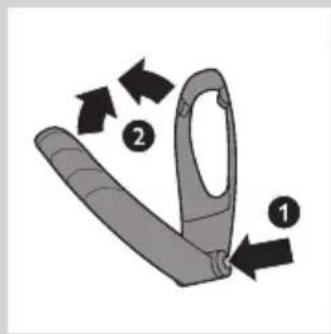
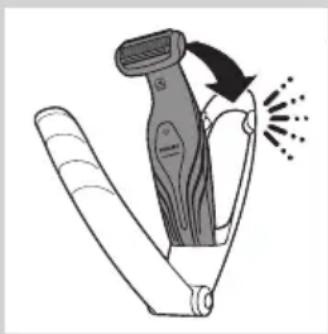
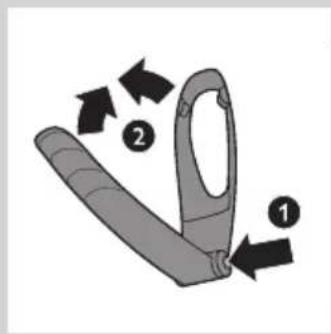
1 Press and hold the release button (1) and open the back shaving attachment (2).
natural_image
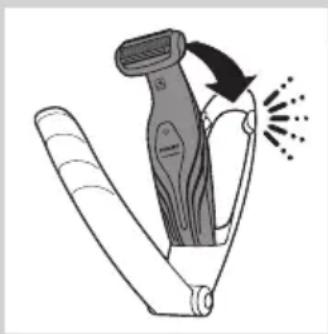
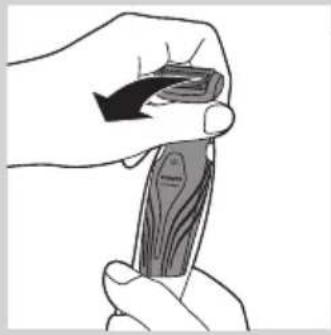
Illustration of a hairdryer with motion arrows indicating hair movement (no text or symbols)2 Place the bottom of the appliance in the lower part of the holder of the back shaving attachment. Then press the top against the top part of the holder until it locks into position with a click.
natural_image
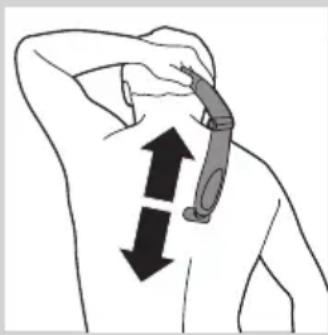
Illustration of a person's neck with two arrows indicating downward motion (no text or symbols)3 Shave your back by moving the back shaving attachment with the appliance up and down by its handle.

natural_image
Illustration of a curved blade with five blades, no text or symbols presentNote: For your convenience, the back shaving attachment can be folded to different angles.
natural_image
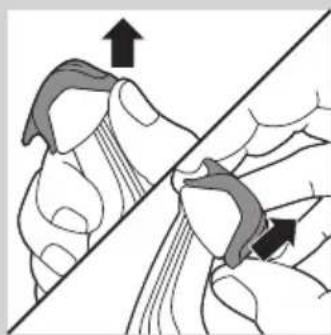
Illustration of a hand holding a piece of wood or wood grain, no text or symbols present4 To remove the appliance from the back shaving attachment, pull the top of the appliance towards you until it unlocks from the holder.
5 To close the back shaving attachment, press and hold the release button (1) and push the handle against the holder (2).
Cleaning
Clean the appliance after every use.
Never use compressed air, scouring pads, abrasive cleaning agents or aggressive liquids such as petrol or acetone to clean the appliance.
natural_image
Illustration of two hands performing a knot or knotting operation, with arrows indicating direction (no text or symbols present)1 Switch off the appliance.
2 If a trimming comb is still attached, remove it.
Note: You can either push the trimming comb off the appliance or pull it off, depending on how the comb is placed on the appliance.
natural_image
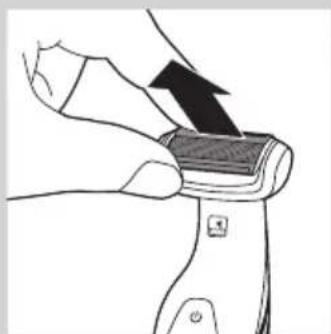
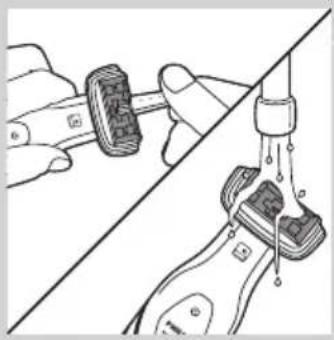
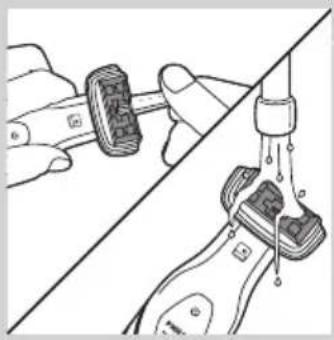
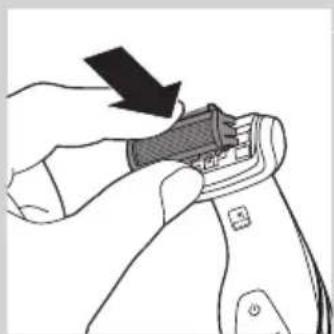
Illustration of a hand holding a small object with an arrow indicating motion (no text or symbols)3 Pull the shaving unit out of the appliance.

natural_image
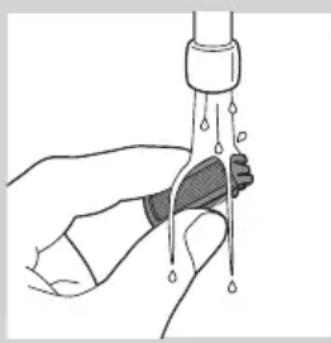
Illustration of hands performing a manual valve operation on a tool (no text or symbols visible)4 Use the cleaning brush supplied to clean the inside of the shaving head or rinse the inside under the tap.
natural_image
Illustration of a hand holding a water droplet over a bottle (no text or symbols)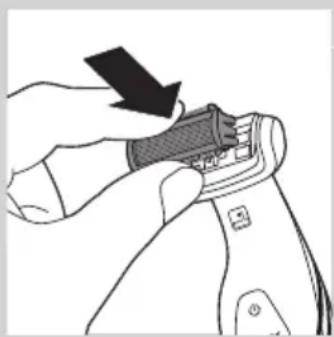
natural_image
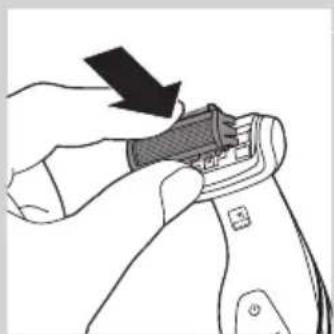
Illustration of a hand adjusting a zipper on a device (no text or symbols visible)5 Rinse the shaving unit under the tap.
6 Shake off excess water and place the shaving unit back into the appliance.
7 Clean the back shaving attachment (BG2038/BG2036 only) with a moist cloth. Rinse it under the tap if you used it to shave your back with shower gel or shaving foam.
8 Clean the charging stand with a moist cloth.
Ordering accessories
To purchase accessories for this appliance, please visit our online shop at www.shop.philips.com/service. If the online shop is not available in your country, go to your Philips dealer or a Philips service centre. If you have any difficulties obtaining accessories for your appliance, please contact the Philips Consumer Care Centre in your country. You find its contact details in the worldwide guarantee leaflet.
Shaving unit
If you use the appliance very frequently, replace the shaving unit (type number BG2000) every year. Replace a damaged shaving unit immediately.
Environment
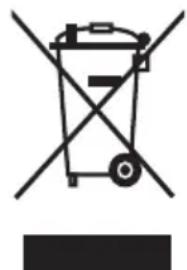
- Do not throw away the appliance with the normal household waste at the end of its life, but hand it in at an official collection point for recycling. By doing this, you help to preserve the environment.
natural_image
Symbol of a recycling bin with crossed lines indicating no waste or restriction (no text or numbers present)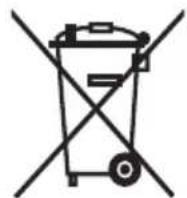
- The built-in rechargeable battery contains substances that may pollute the environment. Always remove the battery before you discard and hand in the appliance at an official collection point. Dispose of the battery at an official collection point for batteries. If you have trouble removing the battery, you can also take the appliance to a Philips service centre. The staff of this centre will remove the battery for you and will dispose of it in an environmentally safe way.
Removing the rechargeable battery
natural_image
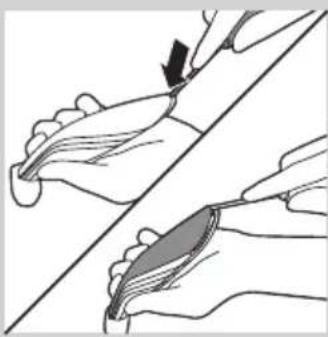
Illustration of two hands performing a manual manipulation or procedure on a curved surface (no text or symbols present)1 Take the appliance out of the charging stand and let the motor run until the battery is completely empty.
2 Insert a flathead screwdriver into the slot at the bottom of the handle and turn it to unlock the rear panel of the housing.
natural_image
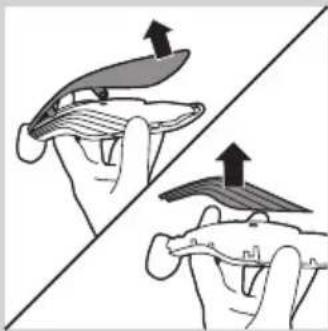
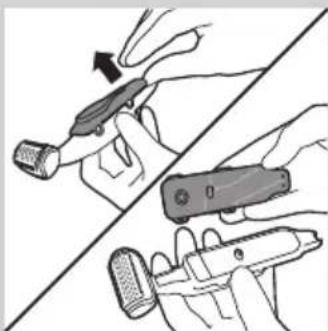
Illustration of two hands holding a flat object with upward arrows indicating motion or force (no text or symbols)3 Remove the rear panel of the housing and then remove the side panels.
natural_image
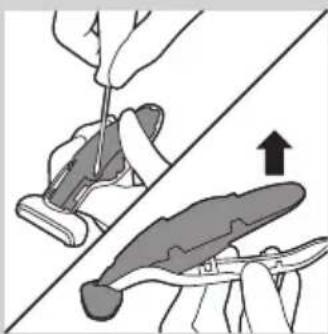
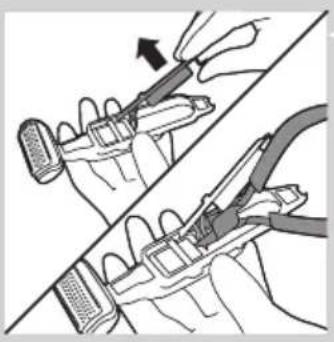
Illustration of a hand using a tool to cut a piece of material, with an upward arrow indicating the process (no text or symbols present)4 Undo the screws that connect the inner body of the appliance to the front panel of the housing and separate the inner body from the front panel.
natural_image
Illustration of hands holding a tool with a device, showing a hand holding a pen and a close-up view of the tool (no text or symbols present)5 Turn over the inner body. Then detach the cover of the inner body with the control panel from the inner body.
natural_image
Illustration of two hands using pliers to adjust a mechanical component (no text or symbols present)6 Lift the printed-circuit board out of the inner body, turn it over and cut the wires that connect the battery to the power unit.
Guarantee and service
If you need service or information or if you have a problem, please visit the Philips website at www.philips.com/support or contact the Philips Consumer Care Centre in your country. You find its phone number in the worldwide guarantee leaflet. If there is no Consumer Care Centre in your country, go to your local Philips dealer.
Guarantee restrictions
The shaving unit is not covered by the terms of the international guarantee because it is subject to wear.
Troubleshooting
This chapter summarises the most common problems you could encounter with the appliance. If you are unable to solve the problem with the information below, visit www.philips.com/support for a list of frequently asked questions or contact the Consumer Care Centre in your country.
Problem Possible cause Solution
| The appliance does not work. | The battery is empty and/or the appliance does not charge. | Recharge the battery (see chapter ‘Charging’) and check if you have followed all instructions in chapters ‘Important’ and ‘Charging’. |
| The appliance makes more noise and/or vibrates more strongly than usual. | One or more parts are broken, perhaps because you dropped the appliance. | Take the appliance to your dealer or to an authorised Philips service centre for examination or repair. |
| If this appliance is used professionally, it will reach the end of its life earlier | Do not use the appliance professionally. | |
| The shaving unit is dirty. Clean the shaving unit (see chapter ‘Cleaning’). | ||
| The shaving unit is worn. Replace the shaving unit. | ||
| The operating time on a full charge decreases. | The shaving unit is dirty. Clean the shaving unit (see chapter ‘Cleaning’). | |
Problem Possible cause Solution
| Reduced trimming and/or shaving performance | You use the appliance in the wrong way. | Follow the instructions in chapter 'Using the appliance'. |
| The shaving unit is dirty. Clean the shaving unit (see chapter ‘Cleaning'). | ||
| The battery is running low. Recharge the battery (see chapter ‘Charging'). | ||
| You have not attached the trimming comb properly. | Remove the trimming comb and reattach it. | |
| If you are trimming very curly hair, the trimming comb may not be able to straighten the hair properly. | Try straightening the hair with your hands during trimming. | |
Introducción
natural_image
Prohibition sign showing a faucet crossed out by a diagonal line, indicating no leakage or anti-poaching (no text present)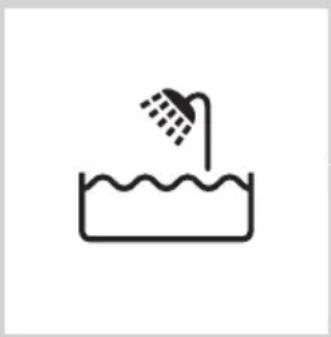
natural_image
Simple line drawing of a showerhead spraying over a water-filled basin (no text or symbols)Precaución
natural_image
Line drawing of a hairdryer with a screwdriver inserted (no text or symbols)natural_image
Illustration of a hand holding a pen-like object with a downward arrow indicating compression or disassembly (no text or symbols present)natural_image
Illustration of a hand using a tool to apply material to a surface, with an inset showing a close-up of the tool (no text or symbols present)natural_image
Illustration of a hand using a tool to apply material to a surface, with an inset showing a magnified view of the tool (no text or symbols present)natural_image
Illustration of a hairdryer with a power button icon (no text or symbols)natural_image
Illustration of a hand holding a tool with an arrow indicating direction (no text or symbols present)natural_image
Illustration of a hairdryer with a power button icon (no text or symbols)natural_image
Illustration of a hairdryer with motion arrows indicating hair movement (no text or symbols)natural_image
Illustration of a person's neck with two arrows indicating upward and downward motion (no text or symbols)natural_image
Illustration of a folding knife blade with multiple blades (no text or symbols)natural_image
Illustration of a hand holding a piece of wood or wood grain, no text or symbols presentnatural_image
Illustration of two hands performing a knot or knotting operation, with arrows indicating direction (no text or symbols present)natural_image
Illustration of a hand holding a small object with an arrow indicating motion (no text or symbols)natural_image
Illustration of a hand holding a wristband connected to a water tap, with no visible text or symbolsnatural_image
Illustration of a hand holding a water droplet over a bottle, with no text or symbols present.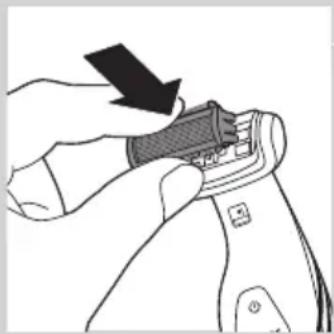
natural_image
Illustration of a hand using a tool to adjust or install a device component (no text or symbols visible)natural_image
Symbol of a waste bin with crossed lines indicating no waste, and a solid black rectangle below (no text or labels)natural_image
Illustration of two hands performing a manual manipulation or procedure on a curved surface (no text or symbols present)natural_image
Illustration of two hands holding a flat object with upward arrows indicating motion or force (no text or symbols)natural_image
Illustration of a hand using a tool to cut a piece of material, with an upward arrow indicating the process (no text or symbols present)natural_image
Illustration of hands holding a tool with a device, showing a hand holding a pen and a close-up view of the device (no text or symbols present)natural_image
Illustration of two hands using pliers to adjust a mechanical component (no text or symbols visible)natural_image
No sign depicting a faucet crossed out by a diagonal line, indicating no pollution or leakage (no text present)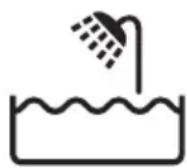
natural_image
Line drawing of a medical or surgical instrument with a pointed tip and threaded end (no text or symbols)natural_image
Illustration of a hand holding a pen-like object with a downward arrow indicating compression or disassembly (no text or symbols present)natural_image
Illustration of a hand using a tool to apply a mechanical component, with an inset showing a close-up of the component (no text or symbols present)natural_image
Illustration of a hand using a tool to apply material to a surface, with an inset showing a magnified view of the tool (no text or symbols present)natural_image
Illustration of a hairdryer with a power button icon (no text or symbols)natural_image
Illustration of a hand holding a tool with an arrow indicating direction (no text or symbols present)natural_image
Illustration of a hairdryer with a power button icon (no text or symbols on the diagram itself)natural_image
Illustration of a hairdryer with motion arrows indicating hair direction (no text or symbols)natural_image
Illustration of a person's neck with two arrows indicating downward motion (no text or symbols)natural_image
Illustration of a folding knife with multiple blades (no text or symbols)natural_image
Illustration of a hand holding a piece of wood or wood grain, no text or symbols presentnatural_image
Illustration of a hand holding a tool with an arrow indicating direction (no text or symbols present)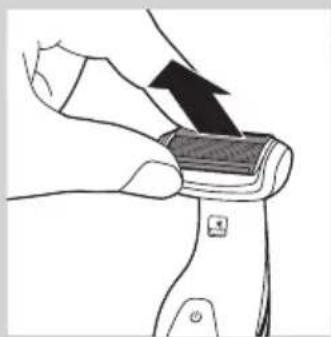
natural_image
Illustration of a hand holding a small object with an arrow indicating motion (no text or symbols)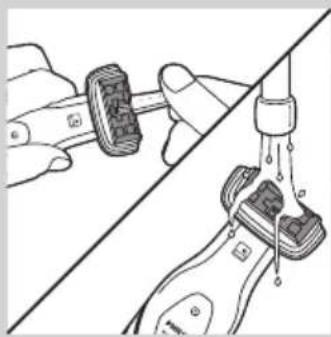
natural_image
Diagram showing two hands performing a manual valve operation, with no visible text or symbolsnatural_image
Illustration of a hand holding a syringe with liquid dripping (no text or symbols)
natural_image
Illustration of a hand using a tool to adjust or install a device component (no text or symbols visible)natural_image
Symbol of a waste bin with no text or labels, including a crossed-out box and a solid black rectangle below (no readable text or symbols)natural_image
Illustration of two hands performing a manual manipulation or procedure on a curved surface (no text or symbols)natural_image
Illustration of two hands holding a tray with an upward arrow, no text or symbols presentnatural_image
Illustration of a hand using a tool to cut a piece of material, with an arrow indicating the process (no text or symbols present)natural_image
Illustration of two hands holding a tool, one pointing at the tip and the other holding a device (no text or symbols present)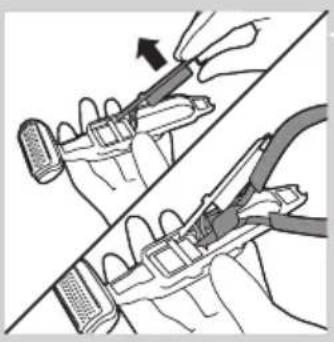
natural_image
Illustration of two hands using pliers to adjust a mechanical component (no text or symbols present)natural_image
Prohibition sign showing a faucet crossed out by a diagonal line, indicating no leakage or anti-poaching (no text present)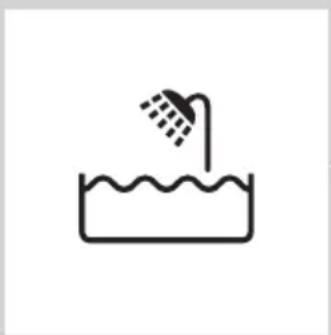
natural_image
Simple line drawing of a showerhead spraying over a water-filled basin (no text or symbols)Perhatian
natural_image
Line drawing of a hairdryer tool with a black clip inserted (no text or symbols)natural_image
Illustration of a hand holding a pen-like object with a downward arrow indicating compression or disassembly (no text or symbols present)1 Pasang sisir pemangkas yang sesuai ke alat. Pastikan gigi sisir searah Anda menggerakkan alat.
natural_image
Illustration of a hand using a tool to apply material to a surface, with an inset showing a close-up of the tool (no text or symbols present)natural_image
Illustration of a hand using a tool to apply material to a surface, with an inset showing a magnified view of the tool (no text or symbols present)natural_image
Illustration of a hairdryer with a power button icon (no text or symbols)natural_image
Illustration of a hand holding a tool with an arrow indicating direction (no text or symbols present)natural_image
Illustration of a hairdryer with a power button icon (no text or symbols)1 Tekan dan tahan tombol pelepas (1) dan buka perlengkapan cukur punggung (2).
natural_image
Illustration of a hairdryer with motion arrows indicating hair direction (no text or symbols)natural_image
Illustration of a person's neck with two arrows indicating downward motion (no text or symbols)natural_image
Illustration of a folding knife with multiple blades (no text or symbols)natural_image
Illustration of a hand holding a piece of wood or wood with a label (no text or symbols present)natural_image
Illustration of a hand holding a tool with an arrow indicating direction (no text or symbols present)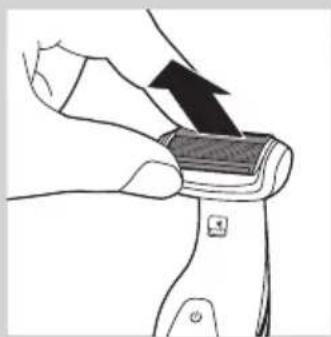
natural_image
Illustration of a hand holding a small object with an arrow indicating direction (no text or symbols)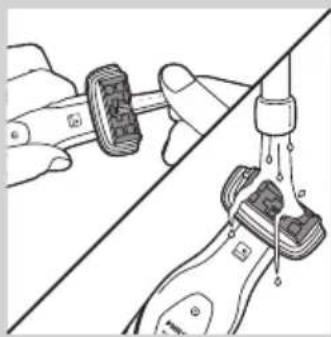
natural_image
Diagram showing two hands adjusting a mechanical component with a connecting rod (no text or symbols present)natural_image
Illustration of a hand holding a water droplet over a pipe, with no text or symbols present.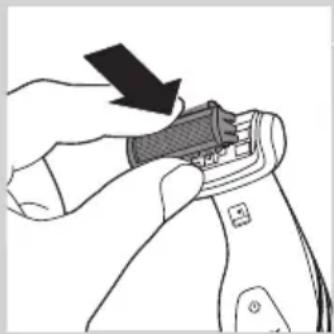
natural_image
Illustration of a hand using a tool to adjust or install a component, with no visible text or symbols.natural_image
Symbol of a waste bin with crossed lines indicating no waste, and a solid black rectangle below (no text or labels)natural_image
Illustration of two hands performing a manual manipulation or repair procedure (no text or symbols present)natural_image
Illustration of two hands holding a curved object with arrows indicating upward motion (no text or symbols)natural_image
Illustration showing a hand using a tool to cut a piece of material, with an arrow indicating upward motion (no text or symbols present)natural_image
Illustration of two hands holding a tool, one with a black arrow indicating direction (no text or symbols)natural_image
Illustration of two hands using pliers to adjust a mechanical component (no text or symbols visible)natural_image
Prohibition sign showing a faucet crossed out by a diagonal line, indicating no fire or water discharge (no text present)
natural_image
Simple line drawing of a showerhead spraying over a water-filled basin (no text or symbols)주의
natural_image
Line drawing of a hairdryer tool with a black clip inserted (no text or symbols)natural_image
Illustration of a hand holding a pen-like object with a downward arrow indicating compression or disassembly (no text or symbols present)2 제품을 충전대에 올려놓으십시오.
natural_image
Illustration of a hand using a tool to apply material to a surface, with an inset showing a close-up of the tool (no text or symbols present)natural_image
Illustration of a hand using a tool to apply material to a surface, with an inset showing a magnified view of the tool (no text or symbols present)natural_image
Illustration of a hairdryer with a power button icon (no text or symbols)natural_image
Illustration of a hand holding a tool with an arrow indicating direction (no text or symbols present)natural_image
Illustration of a hairdryer with a power button icon (no text or symbols on the diagram itself)natural_image
Illustration of a hairdryer with motion arrows indicating hair movement (no text or symbols)natural_image
Illustration of a person's neck with two arrows indicating movement or pressure, no text or symbols presentnatural_image
Illustration of a curved saw blade with five blades, no text or symbols presentnatural_image
Illustration of a hand holding a piece of wood or wood grain, no text or symbols presentnatural_image
Illustration of a hand holding a tool with an arrow indicating direction (no text or symbols present)natural_image
Illustration of a hand holding a small object with an arrow indicating direction (no text or symbols)natural_image
Illustration of a hand holding a small object connected to a vertical pipe with liquid, showing mechanical components (no text or symbols)natural_image
Illustration of a hand holding a water droplet over a pipe, with no text or symbols present.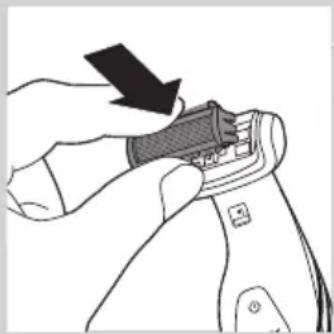
natural_image
Illustration of a hand using a tool to adjust or install a component, with no visible text or symbols.natural_image
Symbol of a waste bin with crossed lines indicating no waste, and a solid black rectangle below (no text or labels)natural_image
Illustration of two hands performing a manual manipulation or repair procedure (no text or symbols present)natural_image
Illustration of two hands holding a curved object with arrows indicating upward motion (no text or symbols)natural_image
Illustration of a hand using a tool to adjust or install a piece of material, with an upward arrow indicating motion (no text or symbols present)natural_image
Illustration of two hands holding a handheld device, one pointing at the screen (no text or symbols present)
natural_image
Illustration of two hands using pliers to adjust a tool, showing mechanical components and a directional arrow (no text or symbols)natural_image
Prohibition sign showing a faucet crossed out by a diagonal line, indicating no leakage or anti-poaching (no text present)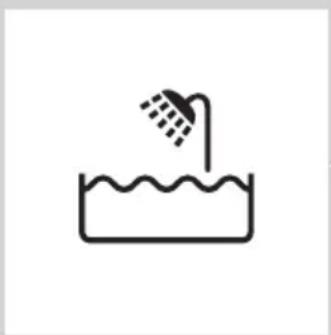
natural_image
Simple line drawing of a showerhead spraying over a water-filled basin (no text or symbols)Awas
natural_image
Line drawing of a hairdryer tool with a black clip inserted (no text or symbols)natural_image
Illustration of a hand holding a pen-like object with a downward arrow indicating compression or disassembly (no text or symbols present)natural_image
Illustration of a hand using a tool to apply material to a surface, with an inset showing a magnified view of the tool (no text or symbols present)natural_image
Illustration of a hand using a tool to apply material to a surface, with an inset showing a close-up of a small object (no text or symbols present)natural_image
Illustration of a hairdryer with a power button icon (no text or symbols)natural_image
Illustration of two hands performing a knotting or knotting operation, with arrows indicating direction (no text or symbols present)natural_image
Illustration of a hand holding a power shaver with an arrow indicating left-hand rule (no text or symbols present)natural_image
Illustration of a hairdryer with motion arrows indicating hair movement (no text or symbols)natural_image
Illustration of a person's neck with two arrows indicating upward and downward motion (no text or symbols)natural_image
Illustration of a curved blade with five blades, no text or symbols presentnatural_image
Illustration of a hand holding a wooden object with a black arrow indicating direction (no text or symbols)natural_image
Illustration of a hand holding a tool with an arrow indicating direction (no text or symbols present)natural_image
Illustration of a hand holding a small object with an arrow indicating direction (no text or symbols)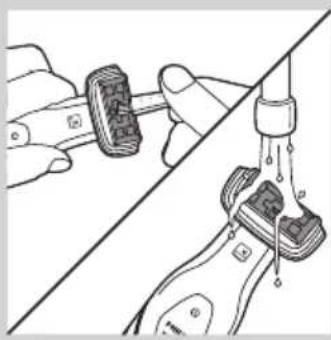
natural_image
Diagram showing hands connecting a mechanical component to a surface with a drain, no text or symbols presentnatural_image
Illustration of a hand holding a syringe with liquid dripping (no text or symbols)5 Bilas unit pencukur di bawah paip.

natural_image
Illustration of a hand using a tool to adjust or install a shoe component (no text or symbols visible)natural_image
Symbol of a trash bin crossed with no text or numbers, representing waste sorting or disposal (no text present)natural_image
Symbol of a trash bin crossed out by two crossed lines, representing no waste or discharge (no text or labels)natural_image
Illustration of two hands performing a manual manipulation or repair operation, with no visible text or symbols.natural_image
Illustration of two hands holding a flat object with upward arrows indicating motion or change (no text or symbols)natural_image
Illustration of a hand using a tool to cut a small object, with an upward arrow indicating motion (no text or symbols present)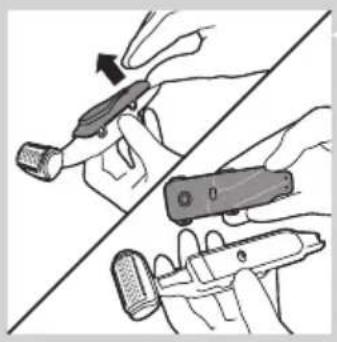
natural_image
Illustration of two hands holding a handheld device, one pointing at the screen (no text or symbols present)natural_image
Illustration of two hands using a tool to adjust or install a component, showing a magnified view (no text or symbols present)natural_image
Prohibition sign showing a faucet without a shower, enclosed in a circle (no text or symbols)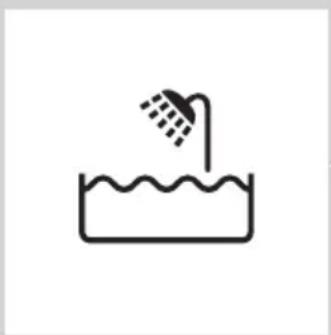
natural_image
Simple line drawing of a showerhead spraying over a water-filled basin (no text or symbols)Cuidado
natural_image
Line drawing of a hairdryer tool with a black clip inserted (no text or symbols)natural_image
Illustration of a hand holding a pen-like object with a downward arrow indicating compression or disassembly (no text or symbols)1 Introduza a ficha pequena na base de carga.
2 Coloque o aparelho na base de carga.
natural_image
Illustration of a hand using a tool to apply material, with an inset showing a close-up of a mechanical component (no text or symbols present)natural_image
Illustration of a hand using a tool to cut a textured surface, with an inset showing a magnified view of the tool's edge detail (no text or symbols present)natural_image
Illustration of a hand using a hairdryer with a power button (no text or symbols)natural_image
Illustration of a hand holding a tool with an arrow indicating direction (no text or symbols present)natural_image
Illustration of a hand holding a power shaver with an arrow indicating left-hand rule (no text or symbols present)natural_image
Illustration of a hairdryer with motion arrows indicating hair movement (no text or symbols)natural_image
Illustration of a person's neck with two arrows indicating movement or pressure direction (no text or symbols)natural_image
Illustration of a curved blade with five blades, no text or symbols presentnatural_image
Illustration of a hand holding a wooden object with a black arrow indicating direction (no text or symbols)natural_image
Illustration of a hand holding a tool with an arrow indicating direction (no text or symbols present)natural_image
Illustration of a hand holding a device with an arrow indicating motion (no text or symbols)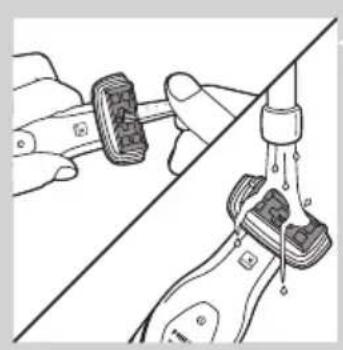
natural_image
Diagram showing a hand connecting two mechanical components to a vertical line, with no visible text or symbols.natural_image
Illustration of a hand holding a syringe with liquid dripping (no text or symbols)natural_image
Illustration of a hand using a tool to adjust or install a component, with no visible text or symbols.Encomendar acessórios
natural_image
Symbol of a trash bin crossed with no text or labelsnatural_image
Illustration of two hands performing a manual manipulation or tooling task, with no visible text or symbols.natural_image
Illustration of two hands holding a flat object with arrows indicating upward motion (no text or symbols)natural_image
Illustration of a hand using a tool to cut a piece of material, with an upward arrow indicating the process (no text or symbols present)natural_image
Illustration of two hands holding a device with a tool, showing a change in the action (no text or symbols present)natural_image
Illustration of two hands using pliers to adjust a tool, showing mechanical components and a directional arrow (no text or symbols)natural_image
Prohibition sign showing a faucet crossed out by a diagonal line, indicating no leakage or disinfection (no text present)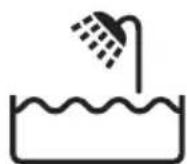
natural_image
Line drawing of a hairdryer with a black arrow pointing to the tip (no text or symbols)natural_image
Illustration of a hand holding a pen-like object with a downward arrow indicating compression or disassembly (no text or symbols present)natural_image
Illustration of a hand holding a tool with an arrow indicating direction, alongside a magnified inset showing a close-up of the tool's tip (no text or symbols present)natural_image
Illustration of a hand using a tool to apply material to a surface, with an inset showing a close-up of the tool (no text or symbols present)natural_image
Illustration of a hairdryer with a power button, showing brush and force arrow (no text or symbols)natural_image
Illustration of hands performing a manual tool on a piece of material, with an upward arrow indicating motion (no text or symbols present)natural_image
Illustration of a hairdryer with a power button icon (no text or symbols on the device itself)natural_image
Illustration of a hairdryer with motion arrows indicating force or motion (no text or symbols)natural_image
Illustration of a person holding a medical device with bidirectional arrows indicating movement (no text or symbols)natural_image
Illustration of a folding knife blade with multiple blades (no text or symbols)natural_image
Illustration of a hand holding a wooden object with a curved arrow indicating motion (no text or symbols)natural_image
Illustration of hands performing a finger manipulation or tooling operation (no text or symbols present)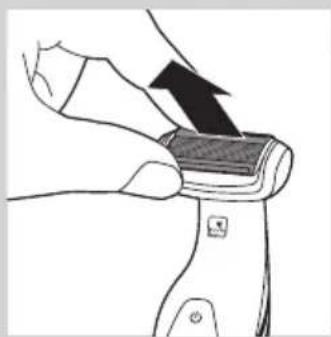
natural_image
Illustration of a hand using a pliers to lift a rectangular object with a black arrow indicating force (no text or symbols)
natural_image
Illustration of hands using a tool to connect two mechanical components (no text or symbols visible)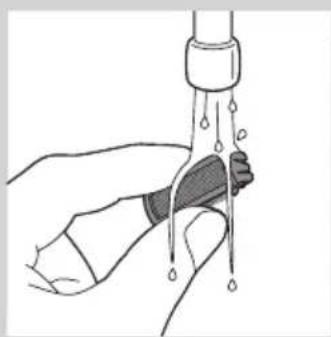
natural_image
Illustration of a hand holding a syringe with liquid dripping (no text or symbols)
natural_image
Illustration of a hand using a tool to adjust or install a small object, with no visible text or symbols.natural_image
Symbol of a waste bin with crossed lines indicating no waste, and a solid black rectangle below (no text or labels)natural_image
Illustration of two hands holding a piece of material, one with an arrow indicating direction (no text or symbols)natural_image
Illustration of two hands holding a curved object with arrows indicating upward motion (no text or symbols)natural_image
Illustration of a hand using a tool to cut a small object, with an upward arrow indicating motion (no text or symbols present)natural_image
Illustration of two hands holding a tool, one with a curved arrow indicating motion (no text or symbols)natural_image
Illustration of a hand using a tool to adjust or install a component, showing a black arrow indicating the process (no text or symbols present)natural_image
Prohibition sign showing a faucet without a shower, enclosed in a circle (no text or symbols)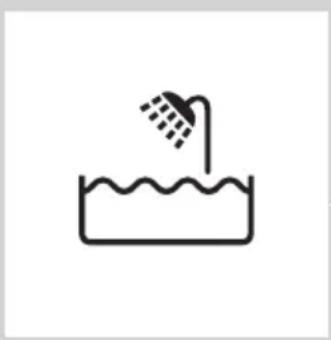
natural_image
Simple line drawing of a showerhead spraying over a water-filled basin (no text or symbols)Chú y
natural_image
Line drawing of a hairdryer tool with a black clip inserted into the tip (no text or symbols)natural_image
Illustration of a hand holding a pen-like object with a downward arrow indicating compression or disassembly (no text or symbols present)natural_image
Illustration of a hand using a tool to apply a mechanical component, with an inset showing a close-up of the part (no text or symbols present)natural_image
Illustration of a hand using a tool to apply material to a surface, with an inset showing a magnified view of the tool (no text or symbols present)natural_image
Illustration of a hand using a power shaver with an arrow indicating left-hand rule (no text or symbols)natural_image
Illustration of a hand holding a tool with an arrow indicating direction (no text or symbols present)natural_image
Illustration of a hairdryer with a power button icon (no text or symbols)natural_image
Illustration of a hairdryer with motion arrows indicating hair movement (no text or symbols)natural_image
Illustration of a person's neck with two arrows indicating downward motion, no text or symbols presentnatural_image
Illustration of a curved saw blade with five blades, no text or symbols presentnatural_image
Illustration of a hand holding a piece of wood or wood grain, no text or symbols present4 public sector public sector public sector public sector public sector public sector public sector public sector public sector public sector public sector public sector public sector public sector public sector public sector public sector public sector public sector public sector public sector public sector public sector public sector public sector public sector public sector public sector public sector public sector public sector public sector public sector public sector public sector public sector public sector public sector public sector public sector public sector public sector public sector public sector public sector public sector public sector public sector public sector public sector public Sector Public Sector Public Sector Public Sector Public Sector Public Sector Public Sector Public Sector Public Sector Public Sector Public Sector Public Sector Public Sector Public Sector Public Sector Public Sector Public Sector Public Sector Public Sector Public Sector Public Sector Public Sector Public Sector Public Sector Public Sector Public Sector Public Sector Public Sector Public Sector Public Sector Public Sector Public Sector Public Sector Public Sector Public Sector Public Sector Public Sector Public Sector Public Sector Public Sector Public Sector Public Sector Public Sector Public Sector Public Sector Public Sector Public Sector Public Sector Public Sector Public Sector Public Sector Private Sector Public Sector Public Sector Public Sector Public Sector Public Sector Public Sector Public Sector Public Sector Public Sector Public Sector Public Sector Public Sector Public Sector Public Sector Public Sector Public Sector Public Sector Public Sector Public Sector Public Sector Public Sector Public Sector Public Sector Public Sector Public Sector Public Sector Public Sector Public Sector Public Sector Public Sector Public Sector Public Sector Public Sector Public Sector Public Sector Public Sector Public Sector Public Sector Public Sector Public Sector Public Sector Public Sector Public Sector Public Sector Public Sector Public Sector Public Sector Public Sector Public Sector Primary Sector Primary Sector Primary Market Primary Market Primary Market Primary Market Primary Market Primary Market Primary Market Primary Market Primary Market Primary Market Primary Market Primary Market Primary Market Primary Market Primary Market Primary Market Primary Market Primary Market Primary Market Primary Market Primary Market Primary Market Primary Market Primary Market Primary Market Primary Market Primary Market Primary Market Primary Market Primary Market Primary Market Primary Market Primary Market Primary Market Primary Market Primary Market Primary Market Primary Market Primary Market Primary Market Primary Market Primary Market Primary Market Primary Market Primary Market Primary Market Primary Market Primary Market Primary Market Primary Market PrimaryMarket Primary Market Primary Market Primary Market Primary Market Primary Market Primary Market Primary Market Primary Market Primary Market Primary Market Primary Market Primary Market Primary Market Primary Market Primary Market Primary Market Primary Market Primary Market Primary Market Primary Market Primary Market Primary Market Primary Market Primary Market Primary Market Primary Market Primary Market Primary Market Primary Market Primary Market Primary Market Primary Market Primary Market Primary Market Primary Market Primary Market Primary Market Primary Market Primary Market Primary Market Primary Market Primary Market Primary Market Primary Market Primary Market Primary Market Primary Market Primary Market Primary Market Primary market primary market primary market primary market primary market primary market primary market primary market primary market primary market primary market primary market primary market primary market primary market primary market primary market primary market primary market primary market primary market primary market primary market primary market primary market primary market primary market primary market primary market primary market primary market primary market primary market primary market primary market primary market primary market primary market primary market primary market primary market primary market primary market primary market primary market primary market primary market primary market primary market primary market primary marketPrimarymarketPrimarymarketPrimarymarketPrimarymarketPrimarymarketPrimarymarketPrimarymarketPrimarymarketPrimarymarketPrimarymarketPrimarymarketPrimarymarketPrimarymarketPrimarymarketPrimarymarketPrimarymarketPrimarymarketPrimarymarketPrimarymarketPrimarymarketPrimarymarketPrimarymarketPrimarymarketPrimarymarketPrimarymarketPrimarymarketPrimarymarketPrimarymarketPrimarymarketPrimarymarketPrimarymarketPrimarymarketPrimarymarketPrimarymarketPrimarymarketPrimarymarketPrimarymarketPrimarymarketPrimarymarketPrimarymarketPrimarymarketPrimarymarketPrimarymarketPrimarymarketPrimarymarketPrimarymarketPrimarymarketPrimarymarketPrimarymarketPrimarymarketPrimaryMarketPrimarymarketPrimarymarketPrimarymarketPrimarymarketPrimarymarketPrimarymarketPrimarymarketPrimarymarketPrimarymarketPrimarymarketPrimarymarketPrimarymarketPrimarymarketPrimarymarketPrimarymarketPrimarymarketPrimarymarketPrimarymarketPrimarymarketPrimarymarketPrimarymarketPrimarymarketPrimarymarketPrimarymarketPrimarymarketPrimarymarketPrimarymarketPrimarymarketPrimarymarketPrimarymarketPrimarymarketPrimarymarketPrimarymarketPrimarymarketPrimarymarketPrimarymarketPrimarymarketPrimarymarketPrimarymarketPrimarymarketPrimarymarketPrimarymarketPrimarymarketPrimarymarketPrimarymarketPrimarymarketPrimarymarketPrimarymarketPrimarymarketPrimaryarketPrimaryMarketPrimaryMarketPrimaryMarketPrimaryMarketPrimaryMarketPrimaryMarketPrimaryMarketPrimaryMarketPrimaryMarketPrimaryMarketPrimaryMarketPrimaryMarketPrimaryMarketPrimaryMarketPrimaryMarketPrimaryMarketPrimaryMarketPrimaryMarketPrimaryMarketPrimaryMarketPrimaryMarketPrimaryMarketPrimaryMarketPrimaryMarketPrimaryMarketPrimaryMarketPrimaryMarketPrimaryMarketPrimaryMarketPrimaryMarketPrimaryMarketPrimaryMarketPrimaryMarketPrimaryMarketPrimaryMarketPrimaryMarketPrimaryMarketPrimaryMarketPrimaryMarketPrimaryMarketPrimaryMarketPrimaryMarketPrimaryMarketPrimaryMarketPrimaryMarketPrimaryMarketPrimaryMarketPrimaryMarketPrimaryMarketPrimaryMarketPrimary市场二级市场二级市场二级市场二级市场二级市场二级市场二级市场二级市场二级市场二级市场二级市场二级市场二级市场二级市场二级市场二级市场二级市场二级市场二级市场二级市场二级市场二级市场二级市场二级市场二级市场二级市场二级市场二级市场二级市场二级市场二级市场二级市场二级市场二级市场二级市场二级市场二级市场二级市场二级市场二级市场二级市场二级市场二级市场二级市场二级市场二级市场二级市场二级市场二级市场二级市场一级市场一级市场一级市场一级市场一级市场一级市场一级市场一级市场一级市场一级市场一级市场一级市场一级市场一级市场一级市场一级市场一级市场一级市场一级市场一级市场一级市场一级市场一级市场一级市场一级市场一级市场一级市场一级市场一级市场一级市场一级市场一级市场一级市场一级市场一级市场一级市场一级市场一级市场一级市场一级市场一级市场一级市场一级市场一级市场一级市场一级市场一级市场一级市场一级市场一级市场一級市場一级市場一级市場一级市場一级市場一级市場一级市場一级市場一级市場一级市場一级市場一级市場一级市場一级市場一级市場一级市場一级市場一级市場一级市場一级市場一级市場一级市場一级市場一级市場一级市場一级市場一级市場一级市場一级市場一级市場一级市場一级市場一级市場一级市場一级市場一级市場一级市場一级市場一级市場一级市場一级市場一级市場一级市場一级市場一级市場一级市場一级市場一级市場一级市場一级市場一级市場一級市場一級市場一級市場一級市場一級市場一級市場一級市場一級市場一級市場一級市場一級市場一級市場一級市場一級市場一級市場一級市場一級市場一級市場一級市場一級市場一級市場一級市場一級市場一級市場一級市場一級市場一級市場一級市場一級市場一級市場一級市場一級市場一級市場一級市二級市二級市二級市二級市二級市二級市二級市二級市二級市二級市二級市二級市二級市二級市二級市二級市二級市二級市二級市二級市二級市二級市二級市二級市二級市二級市二級市二級市二級市二級市二級市二級市二級市二發出的公允价值(1)本公允价值(2)本公允价值(3)本公允价值(4)本公允价值(5)本公允价值(6)本公允价值(7)本公允价值(8)本公允价值(9)本公允价值(10)本公允价值(11)本公允价值(12)本公允价值(13)本公允价值(14)本公允价值(15)本公允价值(16)本公允价值(17)本公允价值(18)本公允价值(19)本公允价值(20)本公允价值(21)本公允价值(22)本公允价值(23)本公允价值(24)本公允价值(25)本公允价值(26)本公允价值(27)本公允价值(28)本公允价值(29)本公允价值(30)本公允价值(31)本公允价值(32)本公允价值(33)本公允价值(34)本公允价值(35)本公允价值(36)本公允价值(37)本公允价值(38)本公允价值(39)本公允价值(40)本公允价值(41)本公允价值(42)本公允价值(43)本公允价值(44)本公允价值(45)本公允价值(46)本公允价值(47)本公允价值(48)本公允价值(49)本公允价值(50)本公允价值(51)本公允价值(52)本公允价值(53)本公允价值(54)本公允价值(55)本公允价值(56)本公允价值(57)本公允价值(58)本公允价值(59)本公允价值(60)本公允价值(61)本公允价值(62)本公允价值(63)本公允价值(64)本公允价值(65)本公允价值(66)本公允价值(67)本公允价值(68)本公允价值(69)本公允价值(70)本公允价值(71)本公允价值(72)本公允价值(73)本公允价值(74)本公允价值(75)本公允价值(76)本公允价值(77)本公允价值(78)本公允价值(79)本公允价值(80)本公允价值(81)本公允价值(82)本公允价值(83)本公允价值(84)本公允价值(85)本公允价值(86)本公允价值(87)本公允价值(88)本公允价值(89)本公允价值(90)本公允价值(91)本公允价值(92)本公允价值(93)本公允价值(94)本公允价值(95)本公允价值(96)本公允价值(97)本公允价值(98)本公允价值(99)本公允价值
5 public sector public sector public sector public sector public sector public sector public sector public sector public sector public sector public sector public sector public sector public sector public sector public sector public sector public sector public sector public sector public sector public sector public sector public sector public sector public sector public sector public sector public sector public sector public sector public sector public sector public sector public sector public sector public sector public sector public sector public sector public sector public sector public sector public sector public sector public sector public sector public sector public sector public sector public Sector Public Sector Public Sector Public Sector Public Sector Public Sector Public Sector Public Sector Public Sector Public Sector Public Sector Public Sector Public Sector Public Sector Public Sector Public Sector Public Sector Public Sector Public Sector Public Sector Public Sector Public Sector Public Sector Public Sector Public Sector Public Sector Public Sector Public Sector Public Sector Public Sector Public Sector Public Sector Public Sector Public Sector Public Sector Public Sector Public Sector Public Sector Public Sector Public Sector Public Sector Public Sector Public Sector Public Sector Public Sector Public Sector Public Sector Public Sector Public Sector Public Sector Public Sector Private Sector Public Sector Private Sector Private Sector Private Sector Private Sector Private Sector Private Sector Private Sector Private Sector Private Sector Private Sector Private Sector Private Sector Private Sector Private Sector Private Sector Private Sector Private Sector Private Sector Private Sector Private Sector Private Sector Private Sector Private Sector Private Sector Private Sector Private Sector Private Sector Private Sector Private Sector Private Sector Private Sector Private Sector Private Sector Private Sector Private Sector Private Sector Private Sector Private Sector Private Sector Private Sector Private Sector Private Sector Private Sector Private Sector Private Sector Private Sector Private Sector Private Sector Private Sector Private Sector private sector private sector private sector private sector private sector private sector private sector private sector private sector private sector private sector private sector private sector private sector private sector private sector private sector private sector private sector private sector private sector private sector private sector private sector private sector private sector private sector private sector private sector private sector private sector private sector private sector private sector private sector private sector private sector private sector private sector private sector private sector private sector private sector private sector private sector private sector private sector private sector private sector private sector private-sector private sector private-sector private-sector private-sector private-sector private-sector private-sector private-sector private-sector private-sector private-sector private-sector private-sector private-sector private-sector private-sector private-sector private-sector private-sector private-sector private-sector private-sector private-sector private-sector private-sector private-sector private-sector private-sector private-sector private-sector private-sector private-sector private-sector private-sector private-sector private-sector private-sector private-sector private-sector private-sector private-sector private-sector private-sector private-sector private-sector private-sector private-sector private-sector private-sector private-sector private-sector private-
Vê sinh
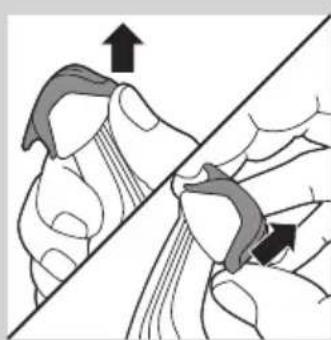
natural_image
Illustration of a hand holding a tool with an arrow indicating direction (no text or symbols present)natural_image
Illustration of a hand holding a small object with an arrow indicating direction (no text or symbols)natural_image
Diagram showing two hands adjusting a mechanical component with a water level indicator (no text or symbols present)natural_image
Illustration of a hand holding a water droplet over a pipe, with no text or symbols present.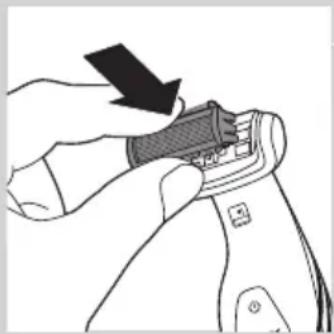
natural_image
Illustration of a hand using a tool to adjust or install a component, with no visible text or symbols.natural_image
Symbol of a waste bin with crossed lines indicating no waste, and a solid black rectangle below (no text or labels)natural_image
Symbol of a trash bin crossed out by two crossed lines, representing no waste or discharge (no text or labels)natural_image
Illustration of two hands holding a spoon, one with a black arrow pointing to the tip (no text or symbols)natural_image
Illustration of two hands holding a flat object with arrows indicating upward motion (no text or symbols)natural_image
Illustration of a hand using a tool to cut a piece of material, with an upward arrow indicating the process (no text or symbols present)natural_image
Illustration of hands holding a pen and a device, showing mechanical components (no text or symbols)natural_image
Illustration of two hands using pliers to adjust a mechanical component (no text or symbols visible)natural_image
Prohibition sign showing a faucet without raindrops, enclosed in a circle (no text)繁體中文96
natural_image
Simple line drawing of a showerhead spraying over a water-filled basin (no text or symbols)natural_image
Line drawing of a hairdryer with a black clip inserted into the tip (no text or symbols)natural_image
Illustration of a hand holding a pen-like object with a downward arrow indicating compression or disassembly (no text or symbols present)2 將產品置於充電座中。
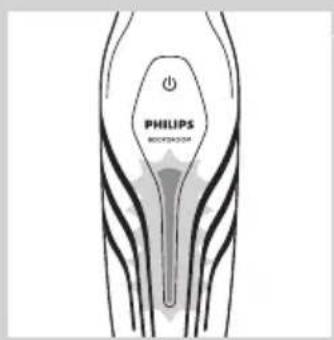
natural_image
Illustration of a hand using a tool to apply material to a surface, with an inset showing a close-up of the tool (no text or symbols present)natural_image
Illustration of a hand using a tool to apply material to a surface, with an inset showing a magnified view of the tool (no text or symbols present)- 當您將產品朝外時,梳齒必須朝外。

natural_image
Illustration of a hand using a hairdryer with a power button (no text or symbols)natural_image
Illustration of hands performing a manual tool on a piece of material, with an upward arrow indicating motion (no text or symbols present)1 修剪梳如果仍然裝著,請取下修剪梳。
natural_image
Illustration of a hairdryer with a power button icon (no text or symbols on the device itself)natural_image
Illustration of a hairdryer with motion arrows indicating force or motion (no text or symbols)natural_image
Illustration of a person holding a medical device with two opposing arrows indicating movement (no text or symbols)natural_image
Illustration of a folding knife blade with multiple blades (no text or symbols)natural_image
Illustration of a hand holding a wooden object with a curved arrow indicating motion (no text or symbols)natural_image
Illustration of a hand holding a tool with an arrow indicating direction (no text or symbols present)natural_image
Illustration of a hand holding a tool with an arrow indicating force or movement (no text or symbols present)3 從本產品機身取出除毛刀頭組。
natural_image
Illustration of hands using a tool to lift a mechanical component (no text or symbols visible)natural_image
Illustration of a hand holding a water tap with droplets, no text or symbols present5 在水龍頭下沖洗除毛刀頭組。
natural_image
Illustration of a hand using a tool to adjust or install a small object, with no visible text or symbols.natural_image
Symbol of a waste bin with crossed lines indicating no waste, and a solid black rectangle below (no text or labels)natural_image
Illustration of two hands performing a manual manipulation or repair operation, showing hand positioning and tool path (no text or symbols)natural_image
Illustration of two hands holding a tray with an upward arrow, no text or symbols presentnatural_image
Illustration of a hand using a tool to cut a small object, with an upward arrow indicating motion (no text or symbols present)natural_image
Illustration of two hands holding a tool, one with a curved arrow indicating motion (no text or symbols)natural_image
Illustration of a hand holding a tool with an arrow indicating direction, alongside another hand holding a tool with a cable (no text or symbols present)natural_image
Prohibition sign showing a faucet without a shower, enclosed in a circle (no text or symbols)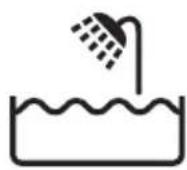
natural_image
Line drawing of a hairdryer with a black clip inserted, showing no text or symbolsnatural_image
Illustration of a hand holding a pen-like object with a downward arrow indicating compression or disassembly (no text or symbols present)2 将产品置于充电座中。
natural_image
Illustration of a hand using a tool to apply material to a surface, with an inset showing a close-up of the tool (no text or symbols present)natural_image
Illustration of a hand using a tool to apply material to a surface, with an inset showing a magnified view of the tool (no text or symbols present)natural_image
Illustration of a hairdryer with a power button icon (no text or symbols)natural_image
Illustration of a hand holding a tool with an arrow indicating direction (no text or symbols present)natural_image
Illustration of a hairdryer with a power button and directional arrow (no text or symbols)natural_image
Illustration of a hairdryer with a brush and motion arrow indicating hair spraying (no text or symbols)natural_image
Illustration of a person receiving neck pain with a medical device attached (no text or symbols)natural_image
Illustration of a curved blade with five blades, no text or symbols presentnatural_image
Illustration of a hand holding a wooden object with a curved arrow indicating motion (no text or symbols)natural_image
Illustration of a hand holding a tool with an arrow indicating direction (no text or symbols present)natural_image
Illustration of a hand holding a small object with an arrow indicating direction (no text or symbols)3 将剃须刀头部件从产品中拉出。
natural_image
Illustration of hands connecting a mechanical component to a vertical rod, showing structural details (no text or symbols)natural_image
Illustration of a hand holding a water tap with droplets, no text or symbols present5 在水龙头下冲洗剃须刀头部件。
natural_image
Illustration of a hand using a tool to adjust or install a small object, with no visible text or symbols.natural_image
Symbol of a trash bin crossed with a diagonal line, representing waste or disposal (no text or numbers present)natural_image
Illustration of two hands performing a manual manipulation or repair procedure (no text or symbols present)natural_image
Illustration of two hands holding a flat object with upward arrows indicating motion or transformation (no text or symbols)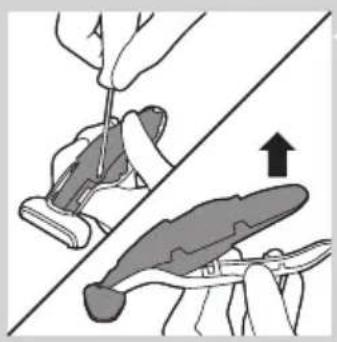
natural_image
Illustration of a hand using a tool to adjust or install a piece of material, with an upward arrow indicating motion (no text or symbols present)natural_image
Illustration of two hands holding a tool, one pointing at the tip and the other holding a pen (no text or symbols present)natural_image
Illustration of two hands using a tool to adjust or install a component, showing a magnified view (no text or symbols present)


- Always here to help you
- User manual
- PHILIPS
- Introduction
- General description (Fig. 1)
- Important
- Danger
- Warning
- Caution
- Compliance with standards
- Charging
- Using the appliance
- Trimming
- Comb size indication Hair length after trimming
- Shaving
- Trimming and shaving tips
- Shaving with the back shaving attachment (BG2036/BG2038 only)
- Cleaning
- Ordering accessories
- Shaving unit
- Environment
- Removing the rechargeable battery
- Guarantee and service
- Guarantee restrictions
- Troubleshooting
- Introducción
- Precaución
- Perhatian
- 주의
- Awas
- Cuidado
- Encomendar acessórios
- Chú y
- Vê sinh
- 繁體中文96
Brand : Equip
Model : Connection Module Cat.5e
Category : Computer Cable