smc DA 300mm f/4 ED (IF) SDM - Lens PENTAX - Free user manual and instructions
Find the device manual for free smc DA 300mm f/4 ED (IF) SDM PENTAX in PDF.


User questions about smc DA 300mm f/4 ED (IF) SDM PENTAX
0 question about this device. Answer the ones you know or ask your own.
Ask a new question about this device
Download the instructions for your Lens in PDF format for free! Find your manual smc DA 300mm f/4 ED (IF) SDM - PENTAX and take your electronic device back in hand. On this page are published all the documents necessary for the use of your device. smc DA 300mm f/4 ED (IF) SDM by PENTAX.
USER MANUAL smc DA 300mm f/4 ED (IF) SDM PENTAX
natural_image
Technical line drawing of a Pentax 40 camera lens with no visible text or symbols on the body itselfFOREWORD
Thank you for purchasing the smc PENTAX-DA lens.
Please read this operating manual carefully before using the lens to ensure that it is used properly. In addition, also refer to your camera operating manual.
The smc PENTAX-DA lens can be used exclusively with PENTAX digital SLR cameras. This lens is not compatible with film SLR cameras.
- In this operating manual, “smc PENTAX-DA lens” is shortened to “DA lens.”
- Illustrations shown herein may differ from the actual appearance.
- PENTAX and smc PENTAX are trademarks of HOYA CORPORATION.
- SDM is a trademark of HOYA CORPORATION.
USING YOUR LENS SAFELY
Although we have carefully designed these lenses for safe operation, please pay special attention to items marked with the following symbols when using this product.

WARNING This symbol indicates precautions that if not followed, could result in serious injuries to the user.

CAUTION This symbol indicates precautions that if not followed, could result in minor or medium injuries to the user or damage to the equipment.

WARNING
- Never look at the sun through the lens or camera for a long time. Serious damage to the retina or total loss of eyesight may occur, particularly when looking directly through the lens.

CAUTION
- Do not leave the lens in direct sunlight without the lens cap. Direct sunlight passing through the lens will be intensified, and should it focus on flammable materials, fire may occur.
PRECAUTIONS AND LENS MAINTENANCE
- Storage and mildew prevention
• Take the lens out of the protective case or camera bag, and store it in a dry, well-ventilated place. - Avoid storing the lens in a poorly ventilated location such as a closet, wardrobe, drawer, vehicle, or where insect repellent or medicine is kept.
- Avoid storing the lens in areas of high temperature and humidity, where there is a risk of mildew growth. Store the lens with a desiccant in a dry cabinet, airtight container, or plastic bag. (Leaving a saturated desiccant in the storage container can cause damage to the lens. Be sure to read the instructions that come with the desiccant before use.)
- Be careful when handling lenses that are not dust-proof, water-resistant, or do not have simplified weather-resistant construction in the rain, fog or environments in which sand or dust is in the air.
- When the lens is not attached to the camera body, attach both the supplied lens cap and lens mount cap to protect it from dust, etc.
- Never use any organic solvent such as thinner, alcohol, or benzine, etc. to remove dust on the lens.
- The lens is a precise optical instrument. Be careful not to let it fall, or subject it to strong shocks or pressure. Use a cushion or similar pad to protect the lens from the vibrations of motorcycles or other vehicles, boats, etc.
- Avoid subjecting the lens to rapid changes in temperature, otherwise condensation can occur on both the inside and the outside of the lens. Put the lens in a plastic bag or camera bag, and take it out after the lens has reached ambient temperature.
- Do not leave the camera with the lens cap off attached to a tripod or other rigid camera support. The inner parts of the camera can be damaged by direct sunlight.
- Have the lens inspected by a dealer every one or two years to maintain its high performance.
CONTENTS
FOREWORD
USING YOUR LENS SAFELY 1
PRECAUTIONS AND LENS MAINTENANCE 2
FEATURES OF THE smc PENTAX-DA LENS 6
About dustproof, water resistance, and simplified weather resistance .... 7
smc PENTAX-DA LENS 8
About the DA lens mount 9
About lenses with a supersonic motor 10
Precautions for using lenses equipped with a supersonic motor the K10D
MOUNTING AND REMOVING THE LENS 12
LENS CAP 13
Attaching the dedicated lens cap to DA 15mm f/4ED AL Limited 14
Attaching the dedicated lens cap to DA 40mm f/2.8 Limited 14
FOCUSING 15
Changing the Focus Mode 15
For the DA ^* lens 15
Using Autofocus 16
Focusing with the OK Button 16
Using Manual Focus 18
Using the Quick-Shift Focus System 18
How to use the Quick-Shift Focus System 19
DA ^ 200mm f/2.8ED [IF] SDM, DA ^ 300mm f/4ED [IF] SDM focusing ..... 21
Precautions on close-distance scale 22
ZOOM LENS 23
About the zoom ring 24
MACRO LENS 25
Magnification Scale 25
ATTACHING THE LENS HOOD 26
Screw-on Type (DA 70mm f/2.4 Limited dedicated lens hood) 26
Screw-on Type (DA 40mm f/2.8 Limited dedicated lens hood) 27
Bayonet Type 27
Bayonet Type (DA 21mm f/3.2 AL Limited dedicated lens hood) 28
About the PL filter window 29
Built-in lens hood 31
FILTERS 32
Precaution on filters 32
Attaching the 30.5mm filter to the DA 40mm f/2.8 Limited lens 32
Attaching a filter and the dedicated lens hood to the DA 21mm f/3.2
AL Limited lens 33
Attaching a filter and the dedicated lens hood to the DA 70mm f/2.4
Limited lens 34
Circular polarizing filters and vignetting 35
Compatibility table for PENTAX circular polarizing filters 36
PRECAUTIONS WHEN USING THE LENS WITH A FLASH 40
Built-in Flash 40
External Flash 40
Compatibility of DA Lenses with the Built-in Flash 42
TRIPOD MOUNT 45
Removing the Tripod Mount 46
MAIN SPECIFICATIONS 47
FEATURES OF THE smc PENTAX-DA LENS
- The smc PENTAX-DA lens is an interchangeable lens specifically designed for digital cameras. Its image circle is specialized for image sensors in PENTAX digital SLR cameras and its optical system is optimized for the characteristics of digital images.
- When autofocusing is finished, it is possible to make fine adjustments by hand using the "Quick-Shift Focus System" (see page 19 for details).
- Lenses that have “SDM” in their name are equipped with a supersonic motor. When mounted on a camera that supports supersonic motors, the autofocus is quiet and smooth.
- The DA 55mm f/1.4 SDM uses a circular aperture. Using it when stopping down from full aperture to about f/2.8 keeps light sources and other fuzzy points perfectly round.
About dustproof, water resistance, and simplified weather resistance
- Dust-proof and water-resistant lenses
DA ^ 55mm f/1.4 SDM, DA ^ 300mm f/4ED [IF] SDM, DA ^ 200mm f/2.8ED [IF] SDM, DA ^ 16-50mm f/2.8ED AL [IF] SDM, DA ^ 50-135mm f/2.8ED [IF] SDM, DA ^ 60-250mm f/4ED [IF]SDM
These DA ^* lenses are dust-proof and water-resistant because each part is individually sealed. This makes it difficult for dust and water to enter the lens.
- Lenses with simplified weather-resistant construction
DA 18-55mm f/3.5-5.6 AL WR, DA 50-200mm f/4-5.6ED WR
These lenses are made with a simplified weather-resistant construction by using DA ^ lens sealing technology which makes it difficult for water to enter the lens.

text_image
Focusing ring Lens hood attaching index Distance scale window Distance scale ∞ 3 2 1.5 1 H 1 0.6 0.4 0 m 22 16 8 8 16 22 Depth-of-field scale PENTAX 14 Depth-of-field scale Mounting index Distance indexNote:
- The DA lens does not have an aperture ring. Aperture settings are controlled automatically as if set to the auto “A” position, so accessories without an auto “A” setting cannot be used with this lens.
- The DA lens is not compatible with film SLR cameras.
About the DA lens mount
The DA lens is an interchangeable lens specifically designed for PENTAX digital SLR cameras. There are three mounts for the DA lens, the K_AF , K_AF2 and K_AF3 .
KAF-mount
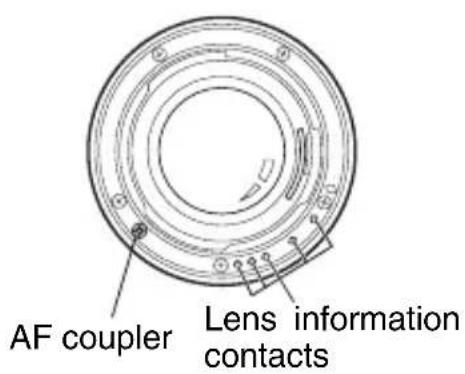
text_image
AF coupler Lens information contactsKAF2-mount
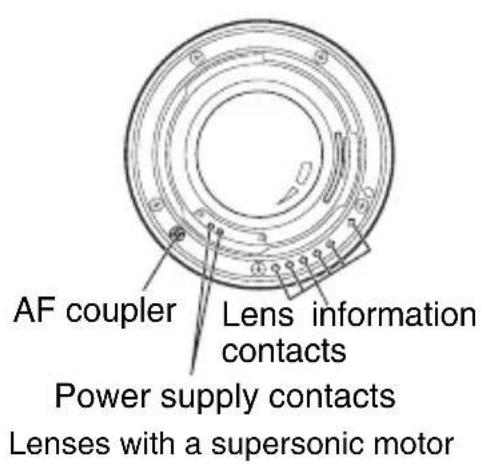
text_image
AF coupler Lens information contacts Power supply contacts Lenses with a supersonic motorKAF3-mount
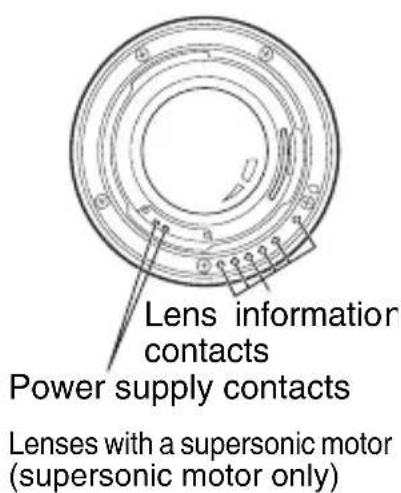
text_image
Lens information contacts Power supply contacts Lenses with a supersonic motor (supersonic motor only)Refer to the next page for more information on lenses with supersonic motors.
CAUTION
Be careful not to damage or dirty the lens mount surfaces as this can result in failure or malfunction.
About lenses with a supersonic motor
The lenses in the table below are equipped with internal supersonic motors. When mounted on a camera body that supports supersonic motors, the autofocus (AF) is quiet and smooth.
- Supersonic motor compatible camera body
K-m / K2000 K20D K200D K10D K100D Super
* If the firmware is version 1.30 or later, refer to page 11.
| Lens | Precautions |
| DA* 55mm f/1.4 SDMDA17-70mm f/4 AL [IF] SDM | The lens uses a supersonic motor. When the lens is mounted on a camera body that does not support supersonic motors (including the K10D with firmware older than version 1.30), the autofocus cannot be operated by either the AF motor in the camera body or the supersonic motor.If using the lens with the following cameras, and the power is turned on, MF appears in the monitor, but it does not interfere with AF operations.K10D, K100D Super, K20D K200D |
| DA* 60-250mm f/4ED [IF] SDMDA* 16-50mm f/2.8ED AL [IF] SDMDA* 50-135mm f/2.8ED [IF] SDMDA* 200mm f/2.8ED [IF] SDMDA* 300mm f/4ED [IF] SDM | When the lens is mounted on a camera body that does not support supersonic motors (including the K10D with firmware older than version 1.30), the autofocus is operated by the AF motor in the camera body. |
* In both cases focusing can be done manually.
Precautions for using lenses equipped with a supersonic motor on the K10D
When using lenses equipped with a supersonic motor on the Kuse camera firmware version 1.30 or later.
• How to Check and Update the Firmware
Holding-down the MENU button while turning ON the will display the firmware version in the center of the display.
Download and install the firmware update for the using the link below.
- Firmware Download Page:
http://www.pentax.jp/english/support/download_digital.html
MOUNTING AND REMOVING THE LENS
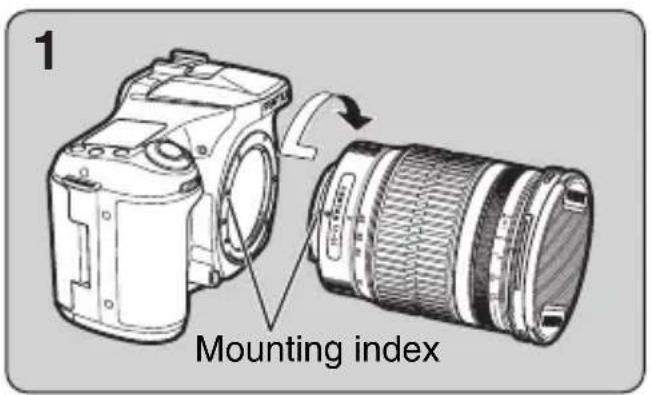
text_image
1 Mounting index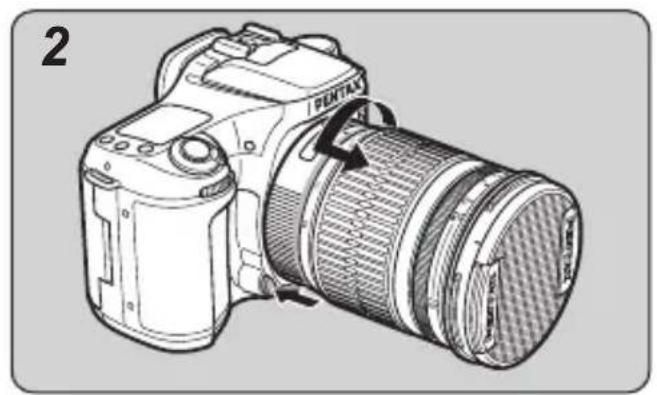
natural_image
Line drawing of a Pentax DSLR camera with lens and frame (no text or symbols)1. To mount the lens on the camera body
Attach the lens while aligning the red dots on the lens and body, then turn the lens clockwise until it clicks in place.

Memo:
- Do not hold down the lens unlock button while mounting the lens, otherwise the lens will not be properly mounted.
• After mounting the lens, gently turn the lens counterclockwise to make sure it is locked in place.
2. To remove the lens
Hold down the lens unlock button on the camera body and turn the lens counterclockwise.
LENS CAP
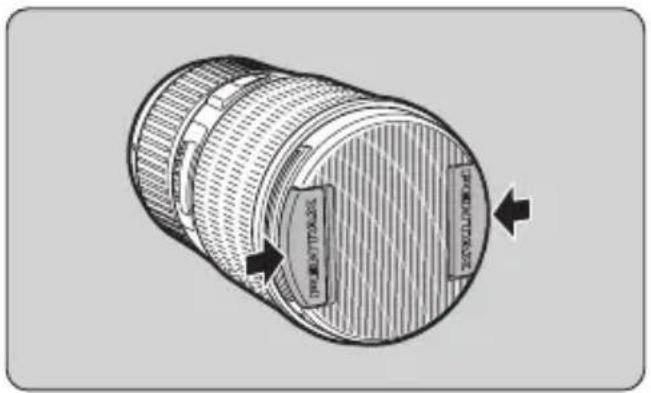
Take off the lens cap by pressing the two tabs inward.
natural_image
Technical line drawing of a cylindrical mechanical component with internal features and directional arrows indicating movement (no text or symbols)
text_image
PENTAXMemo:
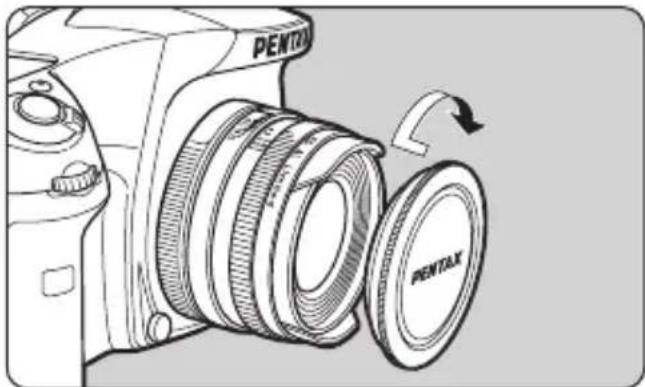
- When not using the lens, be sure to attach the lens cap.
- Attach the dedicated lens cap over the lens hood on the DA 21mm f/3.2 AL Limited, DA 35mm f/2.8 Macro Limited, DA FISH-EYE 10-17mm f/3.5-4.5ED [IF], and DA 70mm f/2.4 Limited. Also, with the DA 21mm f/3.2 AL Limited, DA 40mm f/2.8 Limited, and DA 70mm f/2.4 Limited, it is possible to mount the F49mm lens cap (option) by removing the lens hood.
natural_image
Line drawing of a Pentax DSLR camera with a circular lens and scroll wheel (no text or symbols)Attaching the dedicated lens cap to DA 15mm f/4ED AL Limited Screw the lens cap to the front of the lens.

natural_image
Diagram of a Pentax camera showing three lens components with rotation arrows (no text or symbols)Attaching the dedicated lens cap to DA 40mm f/2.8 Limited First screw the dedicated hood onto the front of the lens, then screw the lens cap onto the lens hood.
FOCUSING
Changing the Focus Mode
Use the camera's focus mode switch to change between autofocus mode and manual focus mode. For details, refer to your camera operating manual.
For the DA ^* lens
The focus mode switch on the DA ^* lens is used to change between the autofocus and manual focus modes (the focus mode switch on the camera is always set to autofocus).
To use the autofocus, set the switch to the AF position. To use the manual focus, set the switch to the MF position.

text_image
Focus mode switch AF MF 35 28 50 smc PENTAX DA*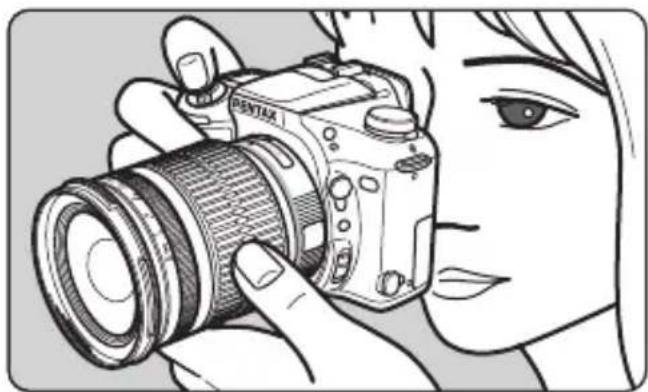
natural_image
Illustration of a person holding a DSLR camera, no text or symbols presentUsing Autofocus
Set the focus mode to autofocus. Press the shutter release button halfway to autofocus.
With the K200 /Kcameras,you can also press the AF
button to autofocus.
See page 15 for information about changing the focus mode.
Focusing with the OK Button
With K2theD K100D Super K110D, K100D, *istDL2 *istDS2, *istDL, and *isYOS can configure the camera's custom settings to disable autofocusing when pressing the shutter release button halfway and enable focusing by pressing the OK button.
Memo:
- For details on the setting procedure, refer to the camera operating manual.
CAUTION
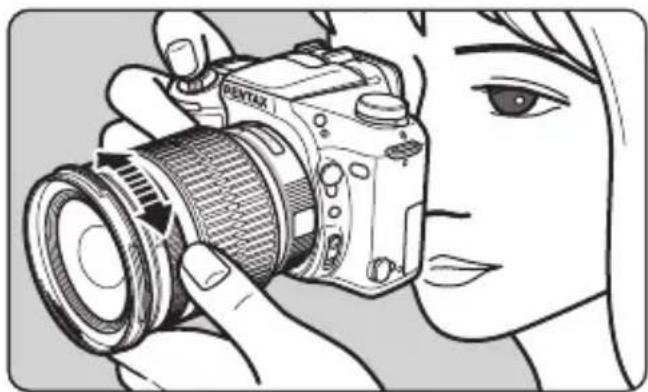
During autofocusing, the focusing ring of the following lenses will rotate.
- To prevent malfunction, do not touch the focusing ring during autofocusing. Particularly be careful when the Focus Mode is set to AF.C (AF-continuous). The camera continues adjusting the focus while the AF button is pressed or the shutter release button is pressed halfway.
- DA FISH-EYE 10-17mm f/3.5-4.5ED [IF] - DA 12-24mm f/4ED AL [IF]
- DA 16-45mm f/4ED AL - DA 17-70mm f/4 AL [IF] SDM
- DA 18-55mm f/3.5-5.6 AL WR - DA L 18-55mm f/3.5-5.6 AL
- DA 50-200mm f/4-5.6ED WR - DA L 50-200mm f/4-5.6ED
- DA 55-300mm f/4-5.8ED - DA 15mm f/4ED AL Limited
- DA 21mm f/3.2 AL Limited - DA 35mm f/2.8 Macro Limited
- DA 40mm f/2.8 Limited - DA 70mm f/2.4 Limited
natural_image
Illustration of a person using a DSLR camera to adjust lens (no text or symbols visible)Using Manual Focus
Set the focus mode to MF, and turn the focusing ring to focus manually. See page 15 for information about changing the focus mode.
Using the Quick-Shift Focus System
If the focus mode is set to autofocus, you can focus manually after autofocus is achieved. Manually turn the focusing ring to finely adjust the focus. You can do this without changing the focus mode to MF.
The Quick Shift Focus System is not available with the following lenses.
- DA L 18-55mm f/3.5-5.6 AL - DA L 50-200mm f/4-5.6ED
How to use the Quick-Shift Focus System
1. Using Autofocus
Set the focus mode switch to autofocus, then press the shutter release button halfway to autofocus.
With the K200 /Ko cameras, you can also press the
AF button to focus.
With the K200D K100D Super K110D , K100D , *istDL2 , *istDS2 , *istDL or *cameras set as explained in "Focusing with the OK Button" on page 16, you can focus by pressing the OK button.
- Hold down the shutter release button halfway (or hold down the AF button or OK button), then turn the focusing ring to finely adjust focus.
- Finally, press the shutter release button fully to take a picture.
The focusing ring on some lenses may rotate during autofocus.
- Do not touch the focusing ring while autofocus is operating as it may cause a malfunction. For more information see the “CAUTION” on page 17.
CAUTION
- When using the Quick-Shift Focus System, keep pressing the shutter release button (or AF button) after you achieve focus and before taking a picture. If you let go of the shutter release button before taking the picture, autofocus will operate again when you press the shutter release button again.
However, by configuring the camera's custom settings, you can take pictures without autofocusing after letting go of the shutter release button. See the camera operating manual for details about the setting procedure.
- When focusing with manual focus or the Quick-Shift Focus System, the mechanism allows the focusing ring to rotate freely after it is set to the (infinity) or the minimum focus distance ends. However do not attempt to rotate it any farther than these ends as this will result in decreased performance.
- DA 14mm f/2.8ED [IF] - DA
* 55mm f/1.4 SDM - DA ^* 200mm f/2.8ED [IF] SDM - DA
★ 300mm f/4ED [IF] SDM - DA ^ 16-50mm f/2.8ED AL [IF] SDM - DA
★ 50-135mm f/2.8ED [IF] SDM - DA ^* 60-250mm f/4ED [IF] SDM
DA ^* 200mm f/2.8ED [IF] SDM, DA ^* 300mm f/4ED [IF] SDM focusing
- The mechanism does not allow the angle of rotation of the focusing ring and the distance scale to align while focusing. Always check the focus using the view finder before taking a picture. This is especially true with manual focus and the Quick-Shift Focus System.
Precautions on close-distance scale
(For DA 16-45mm f/4ED AL, DA 18-55mm f/3.5-5.6 AL WR, DA L 18-55mm f/3.5-5.6 AL)
In the close-distance scale range (minimum focus distance range), when shooting at the maximum aperture, image quality in the corners of the picture may deteriorate because of the optical characteristics of the lens.
When taking a picture in this range, we recommend that you use a smaller aperture, stopping down from full aperture.
ZOOM LENS
text_image
Focusing index Focusing ring Distance scale Zoom index Mounting index Lens hood attaching index Zoom ring Focal length scale PENTAX 16-45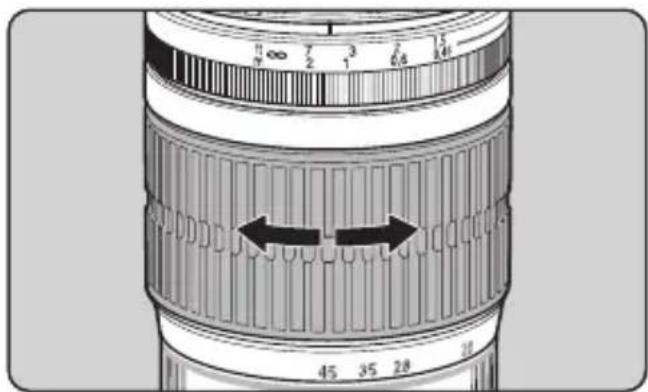
text_image
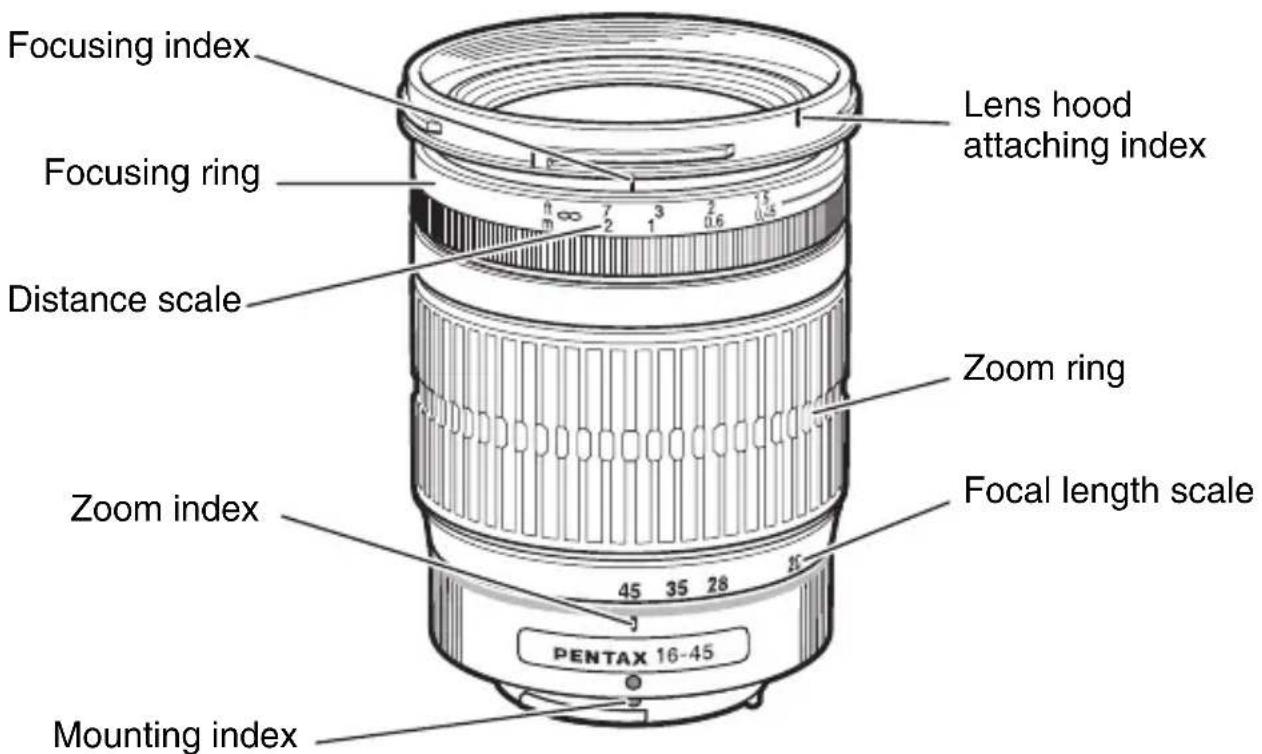
1 2 3 4 5 6 7 8 9 10 11 12 13 14 15 16 17 18 19 20 21 22 23 24 25 26 27 28 29 30 45 35 28 30The zoom lens has a focusing ring on the front side and a zoom ring on the rear side. Turn the zoom ring to set the desired angle of view (lens focal length).

Memo:
- The focusing point may shift slightly by changing the focal length. First adjust the zoom and then adjust the focus.
- The focusing index on the zoom lens is set to match the focus point when the focal length is at telephoto. The focusing index may not match the focus point for other focal lengths.
About the zoom ring
Turn the zoom ring clockwise for telephoto and counterclockwise for wide-angle.
MACRO LENS
DA 35mm f/2.8 Macro Limited lens adjust focus from infinity to life-size [1x].

text_image
DA 1:2.8 35mm Macro Limited 1/x ft m ∞ 2 0.5 1 0.3 -5 0.7 0.2 3 0.6 22 11 11 22Magnification Scale
The magnification is indicated by denominators on the distance scale. "5" indicates "1/5x". When determining the magnification first, set the magnification in the manual focus mode and adjust focus by moving the camera closer or further from the subject.
ATTACHING THE LENS HOOD
In order to avoid deterioration in image quality from internal reflection, use of a lens hood is recommended.
natural_image
Diagram of a mechanical component with arrows indicating motion or force direction (no text or symbols)a. Screw-on Type (DA 70mm f/2.4 Limited dedicated lens hood)
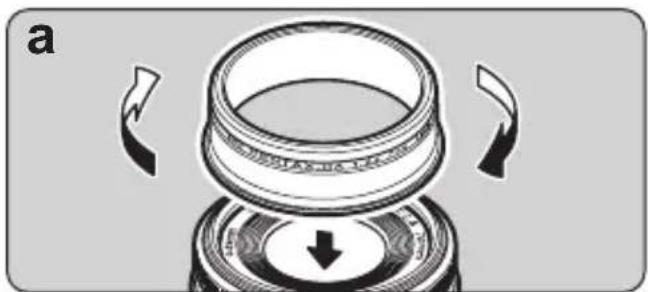
Screw the hood on to the front of the lens to attach it. The hood is telescopic. Extend it fully to use it.
Memo:
The lens hood cannot be mounted on some circular polarizing filters that are not produced by PENTAX.
natural_image
Technical illustration of a mechanical component with arrows indicating motion or assembly (no text or symbols)
text_image
C PENTAX Lens hood attaching indexb. Screw-on Type (DA 40mm f/2.8 Limited dedicated lens hood)
Screw the hood on to the front of the lens to attach it.
C. Bayonet Type
When attaching the lens hood, align the index on the lens hood with the attaching index on the lens, and push both parts straight toward each other. Attach the lens hood on the lens by turning the hood in the clockwise direction, as viewed from the front of the lens, to lock it until it clicks into position.
Memo:
- When attaching the lens hood, hold the focusing ring and zoom ring securely to prevent them from turning.
- When the lens hood is not in use, it can also be turned around and attached in the reversed position.

text_image
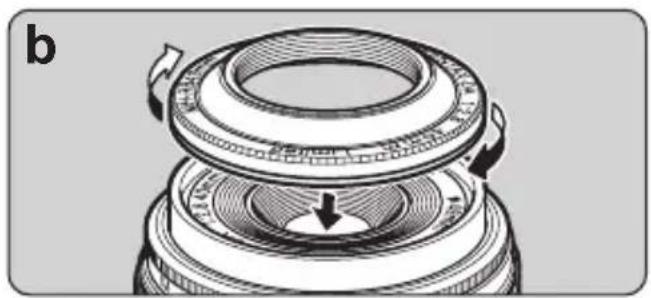
d PENTAX-DA 1:32 21mm Lens hood attaching indexd. Bayonet Type (DA 21mm f/3.2 AL Limited dedicated lens hood)
When attaching the lens hood, align the index on the lens hood with the attaching index on the lens, and push both parts straight toward each other. Attach the lens hood on the lens by turning the hood in a clockwise direction, as seen from the front of the lens, until it stops.
Memo:
- Vignetting occurs if the camera is used while the hood is not completely attached.
- The dedicated lens hood cannot be attached if a filter is attached to the front of the lens. To use a filter and the dedicated lens hood together, attach a 43mm diameter filter to the back of the hood. (Refer to page 33)
text_image
PH-RDL 67nm OPEN
text_image
2 PH-RBL 67mmAbout the PL filter window
A PL filter window is attached to the bayonet-type hood included with the lenses below to make manipulating the polarizing filter easier.
- DA ^* 55mm f/1.4 SDM - DA 16-45mm f/4ED AL
- DA ^* 16-50mm f/2.8ED AL [IF] SDM - DA 17-70mm f/4AL [IF] SDM
- DA 18-55mm f/3.5-5.6 AL WR - DA 50-135mm f/2.8ED [IF] SDM
- DA ^* 60-250mm f/4ED [IF] SDM - DA 50-200mm f/4-5.6ED WR
- DA 55-300mm f/4-5.8ED - DA ^* 200mm f/2.8ED [IF] SDM
- DA ^* 300mm f/4ED [IF] SDM
CAUTION
The PL filter window cap of the DA ^* 55mm f/1.4 SDM cannot be attached or removed with the hood attached to the lens. Remove the hood from the lens to attach or remove the window cap.
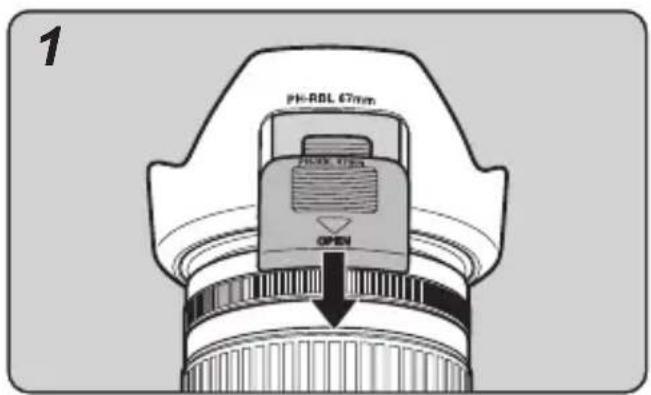
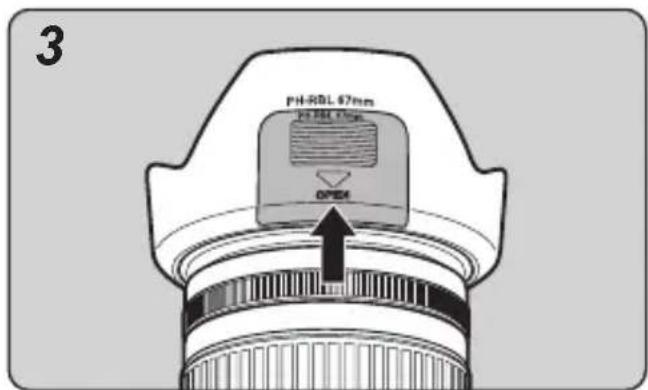
How to use the lens hood with polarizing filter window
- Remove the PL filter window cap by sliding it in the direction as shown above.
- Turn the outer rim of the circular polarizing filter from the PL filter window as shown above.
text_image
PH-RBL 67nm OPEN3. Attach the PL filter window cap.
Memo:
- When shooting, be sure the PL filter window cap is in place to use the lens hood to maximum effect.
Built-in lens hood
The following lenses have a lens hood built into the lens body. The hood cannot be removed from the lens.
• DA FISH-EYE 10-17mm f/3.5-4.5ED [IF]
- DA 35mm f/2.8 Macro Limited (*), DA 15mm f/4ED AL Limited (*)
Lenses marked with an * have a built-in sliding hood which should be extended.
FILTERS
Make sure the filter size matches the lens, then screw the filter onto the front of the lens.

Memo:
- The compatible filter size for each lens is listed on pages 47-53.
- Filters cannot be mounted on the DA FISH-EYE 10-17mm f/3.5-4.5ED [IF].
Precaution on filters
- Since a filter becomes a part of the optical system when attached to the lens, handle it in the same way you handle the lens with care to dust, dirt and scratches. Normally, attaching two or more filters on a lens does more harm than good. However, attaching a circular polarizing filter and another filter is not a problem.
- Use a circular polarizing filter with an autofocus camera for proper exposure and autofocusing.

natural_image
Diagram of two bearing rings with a rotating arrow indicating rotation (no text or symbols)Attaching the 30.5mm filter to the DA 40mm f/2.8 Limited lens
Normally, you attach the 49mm filter to the front of the lens. But you can also screw a 30.5mm filter to the back of the dedicated hood.

natural_image
Diagram of a mechanical assembly showing two rotating rings with a curved arrow indicating rotation (no text or symbols)Attaching a filter and the dedicated lens hood to the DA 21mm f/3.2 AL Limited lens
It is possible to attach a 49mm diameter filter to the front of the DA 21mm f/3.2 AL Limited lens, but not when the dedicated lens hood is attached. To use a filter with the dedicated lens hood, screw a 43mm diameter filter to the back of the filter.
natural_image
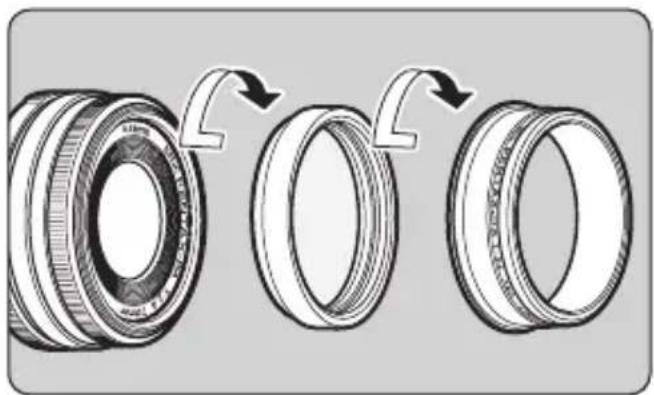
Diagram showing three stages of a mechanical bearing assembly with arrows indicating rotation (no text or symbols present)Attaching a filter and the dedicated lens hood to the DA 70mm f/2.4 Limited lens
With the DA 70mm f/2.4 Limited lens, attach the 49mm diameter filter to the front of the lens. To use it together with the dedicated lens hood, screw it on over the filter that is attached.

Memo:
- The lens hood cannot be mounted on some circular polarizing filters that are not produced by PENTAX.
Circular polarizing filters and vignetting
Circular polarizing filters are thicker than regular filters. Depending on the lens that is mounted and the shooting conditions, vignetting may occur in the four corners of the image. Refer to the “Compatibility table for PENTAX circular polarizing filters” on the following page for information on compatibility of PENTAX circular polarizing filters (currently not in production) with various lenses. There are two types of PENTAX circular polarizing filters. The A type (on the left in the diagram below) and the B type (on the right in the diagram below). The B type filter is thinner than the A type filter.

natural_image
Line drawing of a circular mechanical component with textured surface and side lines (no text or symbols)A type B type

natural_image
Simple line drawing of a circular object with internal markings, no text or symbols present.Compatibility table for PENTAX circular polarizing filters
* PENTAX circular polarizing filters are currently not produced.
YES: Compatible *YES: Compatible in some conditions NO: Incompatible
| Lens | Circular polarizing filter (A type) | Circular polarizing filter (B type) | ||
| Compatibility | Notes | Compatibility | Notes | |
| DA 14mm f/2.8ED [IF] NO Vignetting occurs. YES | ||||
| DA 15mm f/4ED AL Limited NO Vignetting occurs. YES | ||||
| DA 21mm f/3.2 AL Limited*3 | YES | Use a filter with a diameter of 49mm. | YES | Use a filter with a diameter of 49mm. |
| DA 35mm f/2.8 Macro Limited *YES | *Can be mounted and used. However, the built-in lens hood cannot be withdrawn while the A type circular polarizing filter is attached. | YES | ||
| DA 40mm f/2.8 Limited*1 | YES | Use a filter with a diameter of 49mm. | YES | Use a filter with a diameter of 49mm. |
| DA * 55mm f/1.4 SDM*1 | YES YES | |||
| DA 70mm f/2.4 Limited*1 | YES YES | |||
| DA* 200mm f/2.8ED [IF] SDM | *YES | *Can be mounted and used. However, the dedicated bayonet hood cannot be mounted on top of the A type circular polarizing filter. | YES | |
| DA* 300mm f/4ED [IF] SDM | ||||
| DA 12-24mm f/4ED AL [IF]* ^2 | *YES | *Vignetting occurs at focal lengths below 15mm. | *YES | *Vignetting occurs at focal lengths below 15mm. |
| DA* 16-50mm f/2.8ED AL [IF] SDM | NO Vignetting occurs. YES | |||
| DA* 50-135mm f/2.8ED [IF] SDM | YES YES | |||
| DA 16-45mm f/4ED AL *YES | *Can be mounted and used. However, the dedicated bayonet hood cannot be mounted on top of the A type circular polarizing filter. | YES | ||
| DA 17-70mm f/4 AL [IF] SDM NO *YES | Vignetting occurs when the focal length is 17mm. | |||
| DA L 18-55mm f/3.5-5.6 AL | *YES | *Can be mounted and used. However, the dedicated bayonet hood cannot be mounted on top of the A type circular polarizing filter. | YES | |
| DA 18-55mm f/3.5-5.6 AL WR | ||||
| DA L 50-200mm f/4-5.6ED | ||||
| DA 50-200mm f/4-5.6ED WR | ||||
| DA 55-300mm f/4-5.8ED | ||||
| DA* 60-250mm f/4ED [IF] SDM | YES YES | |||
*1 The lens hood cannot be mounted on some circular polarizing filters that are not produced by PENTAX.
*2 Vignetting occurs at focal lengths below 15mm with other PENTAX filters (such as the Skylight) besides circular polarizing filters.
*3 The dedicated hood cannot be mounted if a filter including a circular polarizing filter is mounted on the front of the lens.
Memo:
- Filters, including circular polarizing filters, cannot be mounted on the DA FISH-EYE 10-17mm f/3.5-4.5ED [IF] lens.
PRECAUTIONS WHEN USING THE LENS WITH A FLASH
Built-in Flash
The built-in flash can not be used when the distance is less than 0.7m. When the flash is used within 0.7m, it causes incorrect exposure control and vignetting in the picture corners.
- Refer to the “Compatibility of DA Lenses with the Built-in Flash” chart on page 42 for information on the compatibility of the built-in flash with the lens being used.
External Flash
The external flash can be used while the lens hood is attached. However, the following conditions apply to some types of lenses.
●DA 14mm f/2.8ED [IF]
●DA 15mm f/4ED AL Limited
The AF540FGZ and AF360FGZ external flash units can only be used when the wide-angle panel is used (it is also possible to use the lens hood). Other external flash units are not recommended because their coverage angle is not compatible with the angle of view of the lens.
●DA 21mm f/3.2 AL Limited
External flash units can be used while the lens hood is mounted without problems if it is possible to set their zoom [coverage angle] up to 28mm.
●DA FISH-EYE 10-17mm f/3.5-4.5ED [IF]
External flash units cannot be used because their coverage angle is not compatible with the angle of view of the lens.
●DA 12-24mm f/4ED AL [IF]
PENTAX external flash units which cover a 24mm lens on a 35mm SLR, or 16mm lens on a digital SLR, can be used when the lens is set from 16mm to 24mm.
AF540FGZ and AF360FGZ can be used from 13mm to 24mm with the wide angle panel (in both cases, it is possible to use the lens hood). Please note that at focal lengths less than 13mm the corners of the picture will not be fully illuminated.
Other external flash units are not recommended, because their coverage angle is not wide enough to cover the angle of view of the lens.
●DA ^* 16-50mm f/2.8ED AL [IF] SDM
●DA 16-45mm f/4ED AL
PENTAX external flash units which cover a 24mm lens on a 35mm SLR, or 16mm lens on a digital SLR, can be used with the lens hood without problems.
* For more information, refer to the manual for the external flash unit.
Compatibility of DA Lenses with the Built-in Flash
| Lens | Compatibility | |||
| *istD | *istDS, *istDS2*istDL, *istDL2 | K-m / K2000K200D,K100D Super,K110D, K100D | K20D,K10D | |
| DA 14mm f/2.8ED [IF] NO NO NO | NO | |||
| DA 15mm f/4ED AL Limited NO NO | NO NO | |||
| DA 21mm f/3.2 AL Limited YES YES YES YES | ||||
| DA 35mm f/2.8 Macro Limited YES YES YES YES YES YES YES YES YES YES YES YES YES YES YES YES YES YES YES YES YES YES YES YES YES YES YES YES YES YES YES YES YES YES YES YES YES YES YES YES YES YES YES YES YES YES YES YES YES YES YES YES YES YES YES YES YES YES YES YES YES YES YES YES YES YES YES YES YES YES YES YES YES YES YES YES YES YES YES YES YES YES YES YES YES YES YES YES YES YES YES YES YES YES YES YES YES YES YES YES Yes YES YES YES YES YES YES YES YES YES YES YES YES YES YES YES YES YES YES YES YES YES YES YES YES YES YES YES YES YES YES YES YES YES YES YES YES YES YES YES YES YES YES YES YES YES YES YES YES YES YES YES YES YES YES YES YES YES YES YES YES YES YES YES YES YES YES YES YES YES YES YES YES YES YES YES YES YES YES YES YES YES YES YES YES YES YES YES YES YES YES YES YES YES YES YES YES YES YES YESYES YES YES YES YES YES YES YES YES YES YES YES YES YES YES YES YES YES YES YES YES YES YES YES YES YES YES YES YES YES YES YES YES YES YES YES YES YES YES YES YES YES YES YES YES YES YES YES YES YES YES YES YES YES YES YES YES YES YES YES YES YES YES YES YES YES YES YES YES YES YES YES YES YES YES YES YES YES YES YES YES YES YES YES YES YES YES YES YES YES YES YES YES YES YES YES YES YES YES YES YES YES YES YES YES YES YES YES YES YES YES YES YES YES YES YES YES YES YES YES YES YES YES YES YES YES YES YES YES YES YES YES YES YES YES YES YES YES YES YES YES YES YES YES YES YES YES YES YES YES YES YES YES YES YES YES YES YES YES YES YES YES YES YES YES YES YES YES YES YES YES YES YES YES YES YES YES YES YES YES YES YES YES YES YES YES YES YES YES YES YES YES YES YES YES YES YES YES YES YES | NO NO NO NO NO NO NO NO NO NO NO NO NO NO NO NO NO NO NO NO NO NO NO NO NO NO NO NO NO NO NO NO NO NO NO NO NO NO NO NO NO NO NO NO NO NO NO NO NO NO NO NO NO NO NO NO NO NO NO NO NO NO NO NO NO NO NO NO NO NO NO NO NO NO NO NO NO NO NO NO NO NO NO NO NO NO NO NO NO NO NO NO NO NO NO NO NO NO NO NO NO No NO NO NO NO NO NO NO NO NO NO NO NO NO NO NO NO NO NO NO NO NO NO NO NO NO NO NO NO NO NO NO NO NO NO NO NO NO NO NO NO NO NO NO NO NO NO NO NO NO NO NO NO NO NO NO NO NO NO NO NO NO NO NO NO NO NO NO NO NO NO NO NO NO NO NO NO NO NO NO NO NO NO NO NO NO NO NO NO NO NO NO NO NO NO NO NO NO NO NONO NO NO NO NO NO NO NO NO NO NO NO NO NO NO NO NO NO NO NO NO NO NO NO NO NO NO NO NO NO NO NO NO NO NO NO NO NO NO NO NO NO NO NO NO NO NO NO NO NO NO NO NO NO NO NO NO NO NO NO NO NO NO NO NO NO NO NO NO NO NO NO NO NO NO NO NO NO NO NO NO NO NO NO NO NO NO NO NO NO NO NO NO NO NO NO NO NO NO No No No No No No No No No No No No No No No No No No No No No No No No No No No No No No No No No No No No No No No No No No No No No No No No No No No No No No No No No No No No No No No No No No No No No No No No No No No No No No No No No No No No No No No No No No No No No No No No No No No No Yes No Yes Yes Yes Yes Yes Yes Yes Yes Yes Yes Yes Yes Yes Yes Yes Yes Yes Yes Yes Yes Yes Yes Yes Yes Yes Yes Yes Yes Yes Yes Yes Yes Yes Yes Yes Yes Yes Yes Yes Yes Yes Yes Yes Yes Yes Yes Yes Yes Yes Yes Yes Yes Yes Yes Yes Yes Yes Yes Yes Yes Yes Yes Yes Yes Yes Yes Yes Yes Yes Yes Yes Yes Yes Yes Yes Yes Yes Yes Yes Yes Yes Yes Yes Yes Yes Yes Yes Yes Yes Yes Yes Yes Yes Yes Yes Yes Yes Yes Yes YesYes Yes Yes Yes Yes Yes Yes Yes Yes Yes Yes Yes Yes Yes Yes Yes Yes Yes Yes Yes Yes Yes Yes Yes Yes Yes Yes Yes Yes Yes Yes Yes Yes Yes Yes Yes Yes Yes Yes Yes Yes Yes Yes Yes Yes Yes Yes Yes Yes Yes Yes Yes Yes Yes Yes Yes Yes Yes Yes Yes Yes Yes Yes Yes Yes Yes Yes Yes Yes Yes Yes Yes Yes Yes Yes Yes Yes Yes Yes Yes Yes Yes Yes Yes Yes Yes Yes Yes Yes Yes Yes Yes Yes Yes Yes Yes Yes Yes Yes Yes | NO NO NO NO NO NO NO NO NO NO NO NO NO NO NO NO NO NO NO NO NO NO NO NO NO NO NO NO NO NO NO NO NO NO NO NO NO NO NO NO NO NO NO NO NO NO NO NO NO NO NO NO NO NO NO NO NO NO NO NO NO NO NO NO NO NO NO NO NO NO NO NO NO NO NO NO NO NO NO NO NO NO NO NO NO NO NO NO NO NO NO NO NO NO NO NO NO NO No No NO No No No No No No No No No No No No No No No No No No No No No No No No No No No No No No No No No No No No No No No No No No No No No No No No No No No No No No No No No No No No No No No No No No No No No No No No No No No No No No No No No No No No No No No No No No No No No No No No No NoNo No No No No No No No No No No No No No No No No No No No No No No No No No No No No No No No No No No No No No No No No No No No No No No No No No No No No No No No No No No No No No No No No No No No No No No No No No No No No No No No No No No No No No No No No No No No No No No No No No No NoNoNoNoNoNoNoNoNoNoNoNoNoNoNoNoNoNoNoNoNoNoNoNoNoNoNoNoNoNoNoNoNoNoNoNoNoNoNoNoNoNoNoNoNoNoNoNoNoNoNoNoNoNoNoNoNoNoNoNoNoNoNoNoNoNoNoNoNoNoNoNoNoNoNoNoNoNoNoNoNoNoNoNoNoNoNoNoNoNoNoNoNoNoNoNoNoNoNoNoNoNonNoNoNoNoNoNoNoNoNoNoNoNoNoNoNoNoNoNoNoNoNoNoNoNoNoNoNoNoNoNoNoNoNoNoNoNoNoNoNoNoNoNoNoNoNoNoNoNoNoNoNoNoNoNoNoNoNoNoNoNoNoNoNoNoNoNoNoNoNoNoNoNoNoNoNoNoNoNoNoNoNoNoNoNoNoNoNoNoNoNoNoNoNoNoNoNoNoNoNoYes Yes Yes Yes Yes Yes Yes Yes Yes Yes Yes Yes Yes Yes Yes Yes Yes Yes Yes Yes Yes Yes Yes Yes Yes Yes Yes Yes Yes Yes Yes Yes Yes Yes Yes Yes Yes Yes Yes Yes Yes Yes Yes Yes Yes Yes Yes Yes Yes Yes Yes Yes Yes Yes Yes Yes Yes Yes Yes Yes Yes Yes Yes Yes Yes Yes Yes Yes Yes Yes Yes Yes Yes Yes Yes Yes Yes Yes Yes Yes Yes Yes Yes Yes Yes Yes Yes Yes Yes Yes Yes Yes Yes Yes Yes Yes Yes Yes YesYesYesYesYesYesYesYesYesYesYesYesYesYesYesYesYesYesYesYesYesYesYesYesYesYesYesYesYesYesYesYesYesYesYesYesYesYesYesYesYesYesYesYesYesYesYesYesYesYesYesYesYesYesYesYesYesYesYesYesYesYesYesYesYesYesYesYesYesYesYesYesYesYesYesYesYesYesYesYesYesYesYesYesYesYesYesYesYesYesYesYesYesYesYesYesYesYesYesYesYes YesYes YesYes YesYes YesYes YesYes YesYes YesYes YesYes YesYes YesYes YesYes YesYes YesYes YesYes YesYes YesYes YesYes YesYes YesYes YesYes YesYes YesYes YesYes YesYes YesYes YesYes YesYes YesYes YesYes YesYes YesYes YesYes YesYes YesYes YesYes YesYes YesYes YesYes YesYes YesYes YesYes YesYes YesYes YesYes YesYes YesYes YesYes YesYes YesYes YesYesYes YesYes YesYes YesYes YesYes YesYes YesYes YesYes YesYes YesYes YesYes YesYes YesYes YesYes YesYes YesYes YesYes YesYes YesYes YesYes YesYes YesYes YesYes YesYes YesYes YesYes YesYes YesYes YesYes YesYes YesYes YesYes YesYes YesYes YesYes YesYes YesYes YesYes YesYes YesYes YesYes YesYes YesYes YesYes YesYes YesYes YesYes YesYes YesYes Yes YesYes YesYes YesYes YesYes YesYes YesYes YesYes YesYes YesYes YesYes YesYes YesYes YesYes YesYes YesYes YesYes YesYes YesYes YesYes YesYes YesYes YesYes YesYes YesYes YesYes YesYes YesYes YesYes YesYes YesYes YesYes YesYes YesYes YesYes YesYes YesYes YesYes YesYes YesYes YesYes YesYes YesYes YesYes YesYes YesYes YesYes YesYes YesYes YesYes Yes Yes Yes Yes Yes Yes Yes Yes Yes Yes Yes Yes Yes Yes Yes Yes Yes Yes Yes Yes Yes Yes Yes Yes Yes Yes Yes Yes Yes Yes Yes Yes Yes Yes Yes Yes Yes Yes Yes Yes Yes Yes Yes Yes Yes Yes Yes Yes Yes Yes Yes Yes Yes Yes Yes Yes Yes Yes Yes Yes Yes Yes Yes Yes Yes Yes Yes Yes Yes Yes Yes Yes Yes Yes Yes Yes Yes Yes Yes Yes Yes Yes Yes Yes Yes Yes Yes Yes Yes Yes Yes Yes Yes Yes Yes Yes YesYesYes YesYes YesYes Yes YesYes Yes YesYes Yes YesYes Yes YesYes Yes YesYes Yes YesYes Yes YesYes Yes YesYes Yes YesYes Yes YesYes Yes YesYes Yes YesYes Yes YesYes Yes YesYes Yes YesYes Yes YesYes Yes YesYes Yes YesYes Yes YesYes Yes YesYes Yes YesYes Yes YesYes Yes YesYes Yes YesYes Yes YesYes Yes YesYes Yes YesYes Yes YesYes Yes YesYes Yes YesYes Yes YesYes Yes YesYes Yes YesYes YesYes Yes YesYes Yes YesYes Yes YesYes Yes YesYes Yes YesYes Yes YesYes Yes YesYes Yes YesYes Yes YesYes Yes YesYes Yes YesYes Yes YesYes Yes YesYes Yes YesYes Yes YesYes Yes YesYes Yes YesYes Yes YesYes Yes YesYes Yes YesYes Yes YesYes Yes YesYes Yes YesYes Yes YesYes Yes YesYes Yes YesYes Yes YesYes Yes YesYes Yes YesYes Yes YesYes Yes YesYes Yes Yes YesYes Yes YesYes Yes YesYes Yes YesYes Yes YesYes Yes YesYes Yes YesYes Yes YesYes Yes YesYes Yes YesYes Yes YesYes Yes YesYes Yes YesYes Yes YesYes Yes YesYes Yes YesYes Yes YesYes Yes YesYes Yes YesYes Yes YesYes Yes YesYes Yes YesYes Yes YesYes Yes YesYes Yes YesYes Yes YesYes Yes YesYes Yes YesYes Yes YesYes Yes YesYes Yes YesYes Yes YesYes Yes YesYes | NO NO NO NO NO NO NO NO NO NO NO NO NO NO NO NO NO NO NO NO NO NO NO NO NO NO NO NO NO NO NO NO NO NO NO NO NO NO NO NO NO NO NO NO NO NO NO NO NO NO NO NO NO NO NO NO NO NO NO NO NO NO NO NO NO NO NO NO NO NO NO NO NO NO NO NO NO NO NO NO NO NO NO NO NO NO NO NO NO NO NO NO NO NO NO NO NO NONO No No No No No No No No No No No No No No No No No No No No No No No No No No No No No No No No No No No No No No No No No No No No No No No No No No No No No No No No No No No No No No No No No No No No No No No No No No No No No No No No No No No No No No No No No No No No No No No No No No No no no no no no no no no no no no no no no no no no no no no no no no no no no no no no no no no no no no no no no no no no no no no no no no no no no no no no no no no no no no no no no no no no no no no no no no no no no no no no no no no no no no no no no no no no no no no no no no no no no no nono no no no no no no no no no no no no no no no no no no no no no no no no no no no no no no no no no no no no no no no no no no no no no no no no no no no no no no no no no no no no no no no no no no no no no no no no no no no no no no no no no no no no no no no no no no no no no no no no no no no nol l o r a l o r a l o r a l o r a l o r a l o r a l o r a l o r a l o r a l o r a l o r a l o r a l o r a l o r a l o r a l o r a l o r a l o r a l o r a l o r a l o r a l o r a l o r a l o r a l o r a l o ra l o r a l o r a l o r a l o r a l o r a l o r a l o r a l o r a l o r a l o r a l o r a l o r a l o r a l o r a l o r a l o r a l o r a l o r a l o r a l o r a l o r a l o r a l o r a l o r a l o r: A B C D E F I N F O N O N O N O N O N O N O N O N O N O N O N O N O N O N O N O N O N O N O N O N O N O N O N O N O N O N O N O N O N O N O N O N O N O N O N O N O N O N O N O N O N O N O N O N O N O N O N O N O N O N ON O N O N O N O N O N O N O N O N O N O N O N O N O N O N O N O N O N O N O N O N O N O N O N O N O N O N O N O N O N O N O N O N O N O N O N O N O N O N O N O N O N O N O N O N O N O N O N O N O N O nO N O N O N O N O N O N O N O N O N O N O N O N O N O N O N O N O N O N O N O N O N O N O N O N O N O N O N O N O N O N O N O N O N O N O N O N O N O N O N O N O N O N O N O N O N O N O N O N O N O N N O N O N O N O N O N O N O N O N O N O N O N O N O N O N O N O N O N O N O N O N O N O N O N O N O N O N O N O N O N O N O N O N O N O N O N O N O N O N O N O N O N O N O N O N O N O N O N O N O N OFN O N O N O N O N O N O N O N O N O N O N O N O N O N O N O N O N O N O N O N O N O N O N O N O N O N O N O N O N O N O N O N O N O N O N O N O N O N O N O N O N O N O N O N O N O N O N O N O N O N NOKO No No No No No No No No No No No No No No No No No No No No No No No No No No No No No No No No No No No No No No No No No No No No No No No No No No No No No No No No No No No No No No No No No No No No No No No No No No No No No No No No No No No No No No No No No No No No No No No No No No No Nono no no no no no no no no no no no no no no no no no no no no no no no no no no no no no no no no no no no no no no no no no no no no no no no no no no no no no no no no no no no no no no no no no no no no no no no no no no no no no no no no no no no no no no no no no no no no no no no no no no no nono no no no no no no no no no no no no no no no no no no no no no no no no no no no no no no no no no no no no no no no no no no no no no no no no no no no no no no no no no no no no no no no no no no no no no no no no no no no no no no no no no no no no no no no no no no no no no no no no no no nocce#no no no no no no no no no no no no no no no no no no no no no no no no no no no no no no no no no no no no no no no no no no no no no no no no no no no no no no no no no no no no no no no no no no no no no no no no no no no no no no no no no no no no no no no no no no no no no no no no no no no noca#no no no no no no no no no no no no no no no no no no no no no no no no no no no no no no no no no no no no no no no no no no no no no no no no no no no no no no no no no no no no no no no no no no no no no no no no no no no no no no no no no no no no no no no no no no no no no no no no no no noca##no no no no no no no no no no no no no no no no no no no no no no no no no no no no no no no no no no no no no no no no no no no no no no no no no no no no no no no no no no no no no no no no no no no no no no no no no no no no no no no no no no no no no no no no no no no no no no no no no no nono one or more than 100 mm f/2.8ED (If) NO NO NO NO NO NO NO NO NO NO NO NO NO NO NO NO NO NO NO NO NO NO NO NO NO NO NO NO NO NO NO NO NO NO NO NO NO NO NO NO NO NO NO NO NO NO NO NO NO NO NO NO NO NO NO NO NO NO NO NO NO NO NO NO NO NO NO NO NO NO NO NO NO NO NO NO NO NO NO NO NO NO NO NO NO NO NO NO NO NO NO NO NO NO NO NO NO NO NO NHONO O N O N O N O N O N O N O N O N O N O N O N O N O N O N O N O N O N O N O N O N O N O N O N O N O N O N O N O N O N O N O N O N O N O N O N O N O N O N O N O N O N O N O N O N O N O N O N O N O N O M O N O N O N O N O N O N O N O N O N O N O N O N O N O N O N O N O N O N O N O N O N O N O N O N O N O N O N O N O N O N O N O N O N O N O N O N O N O N O N O N O N O N O N O N O N O N O N O N O N O S O S S S S S S S S S S S S S S S S S S S S S S S S S S S S S S S S S S S S S S S S S S S S S S S S S S S S S S S S S S S S S S S S S S S S S S S S S S S S S S S S S S S S S S S S S S S S S S S S S S S S/S S S S S S S S S S S S S S S S S S S S S S S S S S S S S S S S S S S S S S S S S S S S S S S S S S S S S S S S S S S S S S S S S S S S S S S S S S S S S S S S S S S S S S S S S S S S S S S S S S S S | NO NO NO NO NO NO NO NO NO NO NO NO NO NO NO NO NO NO NO NO NO NO NO NO NO NO NO NO NO NO NO NO NO NO NO NO NO NO NO NO NO NO NO NO NO NO NO NO NO NO NO NO NO NO NO NO NO NO NO NO NO NO NO NO NO NO NO NO NO NO NO NO NO NO NO NO NO NO NO NO NO NO NO NO NO NO NO NO NO NO NO NO NO NO NO NO NO NO DO SO TO DO DO DO DO DO DO DO DO DO DO DO DO DO DO DO DO DO DO DO DO DO DO DO DO DO DO DO DO DO DO DO DO DO DO DO DO DO DO DO DO DO DO DO DO DO DO DO DO DO DO DO DO DO DO DO DO DO DO DO DO DO DO DO DO DO DO DO DO DO DO DO DO DO DO DO DO DO DO DO DO DO DO DO DO DO DO DO DO DO DO DO DO DO DO DO DO DO DO DO DODO DO DO DO DO DO DO DO DO DO DO DO DO DO DO DO DO DO DO DO DO DO DO DO DO DO DO DO DO DO DO DO DO DO DO DO DO DO DO DO DO DO DO DO DO DO DO DO DO DO DO DO DO DO DO DO DO DO DO DO DO DO DO DO DO DO DO DO DO DO DO DO DO DO DO DO DO DO DO DO DO DO DO DO DO DO DO DO DO DO DO DO DO DO DO DO DO DO DO DO D U R L 100 mm f/2.8ED (If) NO NO NO NO NO NO NO NO NO NO NO NO NO NO NO NO NO NO NO NO NO NO NO NO NO NO NO NO NO NO NO NO NO NO NO NO NO NO NO NO NO NO NO NO NO NO NO NO NO NO NO NO NO NO NO NO NO NO NO NO NO NO NO NO NO NO NO NO NO NO NO NO NO NO NO NO NO NO NO NO NO NO NO NO NONO No no no no no no no no no no no no no no no no no no no no no no no no no no no no no no no no no no no no no no no no no no no no no no no no no no no no no no no no no no no no no no no no no no no no no no no no no no no no no no no no no no no no no no no no no no no no no no no no no no no noco#no no no no no no no no no no no no no no no no no no no no no no no no no no no no no no no no no no no no no no no no no no no no no no no no no no no no no no no no no no no no no no no no no no no no no no no no no no no no no no no no no no no no no no no no no no no no no no no no no no noto ono ono ono ono ono ono ono ono ono ono ono ono ono ono ono ono ono ono ono ono ono ono ono ono ono ono ono ono ono ono ono ono ono ono ono ono ono ono ono ono ono ono ono ono ono ono ono ono ono ono Ono ono ono ono ono ono ono ono ono ono ono ono ono ono ono ono ono ono ono ono ono ono ono ono ono ono ono ono ono ono ono ono ono ono ono ono ono ono ono ono ono ono ono ono ono ono ono ono ono ono ONO ONO ONO ONO ONO ONO ONO ONO ONO ONO ONO ONO ONO ONO ONO ONO ONO ONO ONO ONO ONO ONO ONO ONO ONO ONO ONO ONO ONO ONO ONO ONO ONO ONO ONO ONO ONO ONO ONO ONO ONO ONO ONO ONO ONO ONO ONO ONO ONO ONO ON O N O N O N O N O N O N O N O N O N O N O N O N O N O N O N O N O N O N O N O N O N O N O N O N O N O N O N O N O N O N O N O N O N O N O N O N O N O N O N O N O N O N O N O N O N O N O N O N O N O.NO 100 mm f/2.8ED (If)NO NO NO NO NO NO NO NO NO NO NO NO NO NO NO NO NO NO NO NO NO NO NO NO NO NO NO NO NO NO NO NO NO NO NO NO NO NO NO NO NO NO NO NO NO NO NO NO NO NO NO NO NO NO NO NO NO NO NO NO NO NO NO NO NO NO NO NO NO NO NO NO NO NO NO NO NO NO NO NO NO NO NO NO NO NO NO NO NO NO NO NO NO NO NO NO NO NO NONOO ono ono ono ono ono ono ono ono ono ono ono ono ono ono ono ono ono ono ono ono ono ono ono ono ono ono ono ono ono ono ono ono ono ono ono ono ono ono ono ono ono ono ono ono ono ono ono ono ono one ono ono ono ono ono ono ono ono ono ono ono ono ono ono ono ono ono ono ono ono ono ono ono ono ono ono ono ono ono ono ono ono ono ono ono ono ono ono ono ono ono ono ono ono ono ono ono ono ono oni ono ono ono ono ono ono ono ono ono ono ono ono ono ono ono ono ono ono ono ono ono ono ono ono ono ono ono ono ono ono ono ono ono ono ono ono ono ono ono ono ono ono ono ono ono ono ono ono ono onu ono ono ono ono ono ono ono ono ono ono ono ono ono ono ono ono ono ono ono ono ono ono ono ono ono ono ono ono ono ono ono ono ono ono ono ono ono ono ono ono ono ono ono ono ono ono ono ono ono on o n o n o n o n o n o n o n o n o n o n o n o n o n o n o n o n o n o n o n o n o n o n o n o n o n o n o n o n o n o n o n o n o n o n o n o n o n o n o n o n o n o n o n o n o n o n o n o n o n o n o m o n o n o n o n o n o n o n o n o n o n o n o n o n o n o n o n o n o n o n o n o n o n o n o n o n o n o n o n o n o n o n o n o n o n o n o n o n o n o n o n o n o n o n o n o n o n o n o n o n o t o n o n o n o n o n o n o n o n o n o n o n o n o n o n o n o n o n o n o n o n o n o n o n o n o n o n o n o n o n o n o n o n o n o n o n o n o n o |
| DA 18-55mm f/3.5-5.6 AL WR YES | YES YES | YES | ||
| DA★ 50-135mm f/2.8ED [IF] SDM | YES YES | YES YES | ||
| DA L 50-200mm f/4-5.6ED YES YES | YES YES | YES | ||
| DA 50-200mm f/4-5.6ED WR YES | YES YES | YES | ||
| DA 55-300mm f/4-5.8ED YES YES | YES YES | |||
| DA★ 60-250mm f/4ED [IF] SDM YES YES | YES YES | YES YES | ||
Except for the DA 35mm f/2.8 Macro Limited, DA 70mm f/2.4 Limited, DA 40mm f/2.8 Limited and DA 21mm f/3.2 AL Limited lenses, do not use the lens hood when using the built-in flash. This is to prevent the lens hood from obstructing the flash.
*1 Vignetting occurs when the focal length is 35mm or less, or when the focal length is 16 to 50mm and the shooting distance is below 1.5 m.
*2 Vignetting occurs when the focal length is 28mm or less, or when the focal length is 16 to 50mm and the shooting distance is below 1.5 m.
*3 Vignetting occurs when the focal length is 20mm or less, or when the focal length is 35mm and the shooting distance is below 1.5 m.
*4 Vignetting occurs when the focal length is below 28mm, or when the focal length is 28mm and the shooting distance is 1 m or less.
*5 Vignetting occurs when the focal length is below 35mm, or when the focal length is 35mm and the shooting distance is 1 m or less.
*6 Vignetting occurs when the focal length is below 35mm.
*7 Vignetting occurs when the focal length is below 24mm, or when the focal length is 24mm and the shooting distance is 1 m or less.
TRIPOD MOUNT
DA ^ 60-250mm f/4ED [IF] SDM and DA ^ 300mm f/4ED [IF] SDM are equipped with the tripod mount. To position the camera vertically or horizontally, loosen the camera position shift lock screw, turn the camera 90° to the right or left as desired, and tighten the lock screw firmly.
The tripod mount is detachable.

text_image
Camera position shift lock screw PENTAX Tripod Mount- Attach only to a stable tripod.
- We recommend using a fast shutter speed as large lenses may contribute to camera shake.
Removing the Tripod Mount
To remove the mount, use a coin to loosen the screw by turning it to the left. Be careful not to loosen the screw too much or else it may fall out.

text_image
PENTAXInsert a coin into the slot on the screw and turn to the left.
MAIN SPECIFICATIONS
* For use with any PENTAX digital SLR camera.
* AL = Uses an aspheric lens, ED = Lens made with extra-low dispersion glass, IF = Inner focus-type lens, SDM = Lens with a supersonic motor
| Lens DA 14mm f/ | 2.8ED [IF] | DA 15mm f/4ED AL Limited | DA 21mm f/3.2 AL Limited |
| Focal length | 14mm (equivalent to approx. 21.5mm in 35mm format) | 15mm (equivalent to approx. 23mm in 35mm format) | 21mm (equivalent to approx. 32mm in 35mm format) |
| Elements in groups | 12-11 8-6 8-5 | ||
| Angle of view 90° | 86° 68° | ||
| Aperture f/2.8 f/4 | f/3.2 | ||
| Minimum aperture | f/22 f/22 f/22 | ||
| Mount type | K_AF -mount | K_AF -mount | K_AF -mount |
| Minimum focus distance | 0.17m (0.56ft) 0.18m (0.59ft) | 0.2m (0.66ft) | |
| Maximum magnification | Approx. 0.19× Approx. 0.15× Approx. 0.17× | ||
| Filter size 77mm | 49mm | 49mm | or 43mm |
| Lens hood | PH-RBH 77mm | Built-in | MH-RBA 43mm |
| Max. diameter × length | 83.5mm × 69mm(3.3in × 2.7in) | 63mm × 39.5mm(2.5in × 1.6in) | 63mm × 25mm(2.5in × 1.0in) |
| Weight | Approx. 420g/14.8oz(with hood approx. 455g/16.0oz) | Approx. 190g/6.7oz | Approx. 140g/4.9oz(with hood approx. 155g/5.5oz) |
| Soft case | S100-120 | Soft case DA70 | Dedicated case |
| Lens DA 35mm f/ | 2.8 Macro LimitedDA 40mm | f/2.8 Limited DA | * 55mm f/1.4 SDM |
| Focal length | 35mm (equivalent to approx. 53.5mm in 35mm format) | 40mm (equivalent to approx. 61mm in 35mm format) | 55mm (equivalent to approx. 84.5mm in 35mm format) |
| Elements in groups | 9-8 5-4 9-8 | ||
| Angle of view 44° | 39° 29° | ||
| Aperture f/2.8 f/2.8 f/1.4 | |||
| Minimum aperture | f/22 f/22 f/22 | ||
| Mount type | K_AF -mount | K_AF -mount | K_AF3 -mount |
| Minimum focus distance | 0.139m (0.46ft) 0.4m (1.3ft) | 0.45m (1.48ft) | |
| Maximum magnification | Approx. 1.00× Approx. 0.13× Approx. 0.17× | ||
| Filter size | 49mm | 49mm or 30.5mm | 58mm |
| Lens hood | Built-in | MH-RC 49mm | PH-RBH 58mm |
| Max. diameter × length | 63mm × 46.5mm(2.5in × 1.8in) | 63mm × 15mm(2.5in × 0.6in) | 70.5mm × 66mm(2.8in × 2.6in) |
| Weight | Approx. 215g/7.6oz | Approx. 90g/3.2oz(with hood approx. 100g/3.5oz) | Approx. 375g/13.2oz(with hood approx. 420g/14.8oz) |
| Soft case | Soft case DA70 | Dedicated case | S90-100 |
| Lens DA 70mm f/ | 2.4 Limited DA | * 200mm f/2.8ED [IF] SDM | DA * 300mm f/4ED [IF] SDM |
| Focal length | 70mm (equivalent to approx. 107mm in 35mm format) | 200mm (equivalent to approx. 307mm in 35mm format) | 300mm (equivalent to approx. 460mm in 35mm format) |
| Elements in groups | 6-5 9-8 8-6 | ||
| Angle of view 23° | 8.1° 5.4° | ||
| Aperture f/2.4 f/2.8 f/4 | |||
| Minimum aperture | f/22 f/22 f/32 | ||
| Mount type | KAF-mount | KAF2-mount | KAF2-mount |
| Minimum focus distance | 0.7m (2.3ft) | 1.2m (4ft) | 1.4m (4.67ft) |
| Maximum magnification | Approx. 0.12× | Approx. 0.20× | Approx. 0.24× |
| Filter size | 49mm | 77mm | 77mm |
| Lens hood | MH-RD 49mm | PH-RBK 77mm | PH-RBK 77mm |
| Max. diameter × length | 63mm × 26mm(2.5in × 1.0in) | 83mm × 134mm(3.3in × 5.3in) | 83mm × 184mm(3.3in × 7.2in) |
| Weight | Approx. 130g/4.6oz(with hood approx. 150g/5.3oz) | Approx. 825g/29.1oz(with hood approx. 915g/32.3oz) | Approx. 1070g/37.7oz(with hood approx. 1160g/40.9oz)(with hood + tripod attachment approx. 1240g/43.7oz) |
| Soft case | Soft case DA70 | S120-160 | S120-210 |
| Lens | DA FISH-EYE 10-17mm f/3.5-4.5ED [IF] | DA 12-24mm f/4ED AL [IF] | DA 16-45mm f/4ED AL |
| Focal length | 10-17mm (35mm conversion not possible) | 12-24mm (equivalent to approx. 18.5-37mm in 35mm format) | 16-45mm (equivalent to approx. 24.5-69mm in 35mm format) |
| Elements in groups | 10-8 13-11 13-10 | ||
| Angle of view 180°-100° 99°-61° 83°-35° | |||
| Aperture f/3.5-f/4.5 f/4 f/4 | |||
| Minimum aperture | f/22-f/32 f/22 f/22 | ||
| Mount type | K_AF -mount | K_AF -mount | K_AF -mount |
| Minimum focus distance | 0.14m (0.46ft)(Approximately 2.5cm from front of lens) | 0.3m (0.98ft) 0.28m (0.92ft) | |
| Maximum magnification | Approx. 0.39× | Approx. 0.12× | Approx. 0.26× |
| Filter size | Cannot be mounted | 77mm | 67mm |
| Lens hood | Built-in | PH-RBI 77mm | PH-RBL 67mm |
| Max. diameter × length | 68mm × 71.5mm(2.7in × 2.8in) | 84mm × 87.5mm(3.3in × 3.4in) | 72mm × 92mm(2.8in × 3.6in) |
| Weight | Approx. 320g/11.3oz | Approx. 430g/15.2oz(with hood approx. 457g/16.1oz) | Approx. 365g/12.9oz(with hood approx. 390g/13.8oz) |
| Soft case | S80-80 | S100-120 | S90-140 |
| Lens | DA* 16-50mm f/2.8ED AL [IF] SDM | DA 17-70mm f/4 AL [IF] SDM | DA L 18-55mm f/3.5-5.6 AL |
| Focal length | 16-50mm (equivalent to approx. 24.5-76.5mm in 35mm format) | 17-70mm (equivalent to approx. 26-107mm in 35mm format) | 18-55mm (equivalent to approx. 27.5-84.5mm in 35mm format) |
| Elements in groups | 15-12 17-12 11-8 | ||
| Angle of view 83° | -31.5° 79°-23° 76°-29° | ||
| Aperture f/2.8 f/4 | f/3.5-5.6 | ||
| Minimum aperture | f/22 f/22 f/22-38 | ||
| Mount type | KAF2-mount | KAF3-mount | KAF-mount |
| Minimum focus distance | 0.3m (0.98ft) 0.28m (0.92ft) | 0.25m (0.82ft) | |
| Maximum magnification | Approx. 0.21× Approx. 0.3 | 1× Approx. 0.34× | |
| Filter size 77mm | 67mm | 52mm | |
| Lens hood | PH-RBJ 77mm | PH-RBM 67mm | PH-RBA 52mm (sold separately) |
| Max. diameter × length | 84mm × 98.5mm(3.3in × 3.9in) | 75mm × 93.5mm(3.0in × 3.7in) | 68mm × 67.5mm(2.7in × 2.7in) |
| Weight | Approx. 565g/19.9oz(with hood approx. 600g/21.2oz) | Approx. 485g/17.1oz(with hood approx. 515g/18.2oz) | Approx. 200g/7.1oz(with hood approx. 225g/7.9oz) |
| Soft case | S100-140 | S90-140 | S80-120 |
| Lens | DA 18-55mm f/3.5-5.6 AL WR | DA* 50-135mm f/2.8ED [IF] SDM | DA L 50-200mm f/4-5.6ED |
| Focal length | 18-55mm (equivalent to approx. 27.5-84.5mm in 35mm format) | 50-135mm (equivalent to approx. 76.5-207mm in 35mm format) | 50-200mm (equivalent to approx. 76.5-307mm in 35mm format) |
| Elements in groups | 11-8 18-14 11-10 | ||
| Angle of view 76° | -29° 31.5°-11.9° 31.5°-8.1° | ||
| Aperture f/3.5-f/5 | .6 f/2.8 f/4-5.6 | ||
| Minimum aperture | f/22-f/38 f/22 f/22-32 | ||
| Mount type | KAF-mount | KAF2-mount | KAF-mount |
| Minimum focus distance | 0.25m (0.82ft) 1.0m (3.3ft) | 1.1m (3.6ft) | |
| Maximum magnification | Approx. 0.34x | Approx. 0.17x | Approx. 0.24x |
| Filter size | 52mm | 67mm | 52mm |
| Lens hood | PH-RBC 52mm | PH-RBK 67mm | PH-RBB 52mm (sold separately) |
| Max. diameter × length | 68.5mm × 67.5mm (2.7in × 2.7in) | 76.5mm × 136mm (3.0in × 5.4in) | 66.5mm × 78.5mm (2.6in × 3.1in) |
| Weight | Approx. 235g/8.3oz (with hood approx. 260g/9.2oz) | Approx. 685g/24.2oz (with hood approx. 765g/27.0oz) | Approx. 235g/8.3oz (with hood approx. 265g/9.3oz) |
| Soft case | S80-120 | S90-160 | S80-120 |
| Lens | DA 50-200mm f/4-5.6ED WR | DA 55-300mm f/4-5.8ED | DA* 60-250mm f/4ED [IF] SDM |
| Focal length | 50-200mm (equivalent to approx. 76.5-307mm in 35mm format) | 55-300mm (equivalent to approx. 84.5-460mm in 35mm format) | 60-250mm (equivalent to approx. 92-383mm in 35mm format) |
| Elements in groups | 11-10 12-8 15-13 | ||
| Angle of view 31. | 5°-8.1° 29°-5.4° 26.5°-6.5° | ||
| Aperture f/4-f/5.6 | f/4-f/5.8 f/4 | ||
| Minimum aperture | f/22-f/32 f/22-f/32 f/32 | ||
| Mount type | KAF-mount | KAF-mount | KAF2-mount |
| Minimum focus distance | 1.1m (3.6ft) 1.4m (4.67ft) | 1.1m (3.6ft) | |
| Maximum magnification | Approx. 0.24× Approx. 0.2 | 8× Approx. 0.15× | |
| Filter size | 49mm | 58mm | 67mm |
| Lens hood | PH-RBD 49mm | PH-RBG 58mm | PH-RBK 67mm |
| Max. diameter × length | 69mm × 79.5mm(2.7in × 3.1in) | 71mm × 111.5mm(2.8in × 4.4in) | 82mm × 167.5mm(3.2in × 6.6in) |
| Weight | Approx. 285g/10.1oz(with hood approx. 320g/11.3oz) | Approx. 440g/15.5oz(with hood approx. 470g/16.6oz) | Approx. 1,050g/37.0oz(with hood approx. 1,130g/39.9oz)(with hood + tripod attachment approx. 1,240g/43.7oz) |
| Soft case | S80-120 | S80-160 | S100-200 |
For customers in USA
STATEMENT OF FCC COMPLIANCE
This device complies with Part 15 of the FCC Rules. Operation is subject to the following two conditions (1) This device may not cause harmful interference, and (2) this device must accept any interference received, including interference that may cause undesired operation.
Changes or modifications not approved by the party responsible for compliance could void the user's authority to operate the equipment.
This equipment has been tested and found to comply with the limits for a Class B digital device, pursuant to part 15 of the FCC Rules. These limits are designed to provide reasonable protection against harmful interference in a residential installation. This equipment generates, uses and can radiate radio frequency energy and, if not installed and used in accordance with the instructions, may cause harmful interference to radio communications. However, there is no guarantee that interference will not occur in a particular installation. If this equipment does cause harmful interference to radio or television reception, which can be determined by turning the equipment off and on, the user is encouraged to try to correct the interference by one or more of the following measures:
- Reorient or relocate the receiving antenna.
Increase the separation between the equipment and receiver.
Connect the equipment into an outlet on a circuit different from that to which the receiver is connected.
*Consult the dealer or an experienced radio/TV technician for help.
For customers in Canada
This Class B digital apparatus complies with Canadian ICES-003.
PENTAX Imaging Systems Division
2-36-9, Maeno-cho, Itabashi-ku, Tokyo 174-8639, JAPAN (http://www.pentax.jp)
PENTAX Europe GmbH Julius-Vosseler-Strasse 104, 22527 Hamburg, GERMANY
(European Headquarters) (HQ - http://www.pentaxeurope.com) (Germany - http://www.pentax.de)
PENTAX U.K. Limited PENTAX House, Heron Drive, Langley, Slough, Berks SL3 8PN, U.K. (http://www.pentax.co.uk)
PENTAX France S.A.S. 112 Quai de Bezons, B.P. 204, 95106 Argenteuil Cedex, FRANCE (http://www.pentax.fr)
PENTAX Imaging Company
A Division of PENTAX of America, Inc.
(Headquarters)
600 12th Street, Suite 300 Golden, Colorado 80401, U.S.A.
(PENTAX Service Department)
12061 Tejon St. STE 600 Westminster, Colorado 80234, U.S.A.
(http://www.pentaximaging.com)
PENTAX Canada Inc. 1770 Argentina Road Mississauga, Ontario L5N 3S7, CANADA (http://www.pentax.ca)
PENTAX Trading 23D, Jun Yao International Plaza, 789 Zhaojiabang Road, Xu Hui District, Shanghai, 200032
(SHANGHAI) Limited CHINA (http://www.pentax.com.cn)

The CE Mark is a Directive conformity mark of the European Union.
☆Specifications and external dimensions are subject to change without notice.
Copyright © HOYA CORPORATION 2009
57298ENG H20-200905 Printed in Vietnam