
55mm f/1.4 - Lens PENTAX - Free user manual and instructions
Find the device manual for free 55mm f/1.4 PENTAX in PDF.


| Product Type | Interchangeable Lens |
| Brand | Pentax |
| Model | DA* 55mm f/1.4 SDM |
| Focal Length | 55mm (equivalent to approx. 84.5mm in 35mm format) |
| Lens Construction | 9 elements in 8 groups |
| Angle of View | 29° |
| Maximum Aperture | f/1.4 |
| Minimum Aperture | f/22 |
| Mount Type | KAF3-mount |
| Minimum Focus Distance | 0.45m (1.48ft) |
| Maximum Magnification | Approx. 0.17x |
| Filter Size | 58mm |
| Lens Hood | Bayonet type PH-RBH 58mm |
| Dimensions (Diameter x Length) | 70.5mm x 66mm (2.8in x 2.6in) |
| Weight | Approx. 375g (13.2oz) without hood; approx. 420g (14.8oz) with hood |
| Autofocus Motor | Supersonic Direct-drive Motor (SDM) for quiet AF |
| Focus System | Quick-Shift Focus System for manual fine-tuning after AF |
| Aperture Blades | Circular aperture for smooth bokeh |
| Weather Resistance | Dust-proof and water-resistant construction |
| Compatibility | PENTAX digital SLR cameras only; not for film SLRs |
| Safety Warning | Never look at the sun through the lens; risk of eye damage |
| Storage and Maintenance | Store in dry, well-ventilated place; use desiccant; avoid organic solvents for cleaning |
| Included Accessories | Lens cap (front), lens mount cap |
Frequently Asked Questions - 55mm f/1.4 PENTAX
User questions about 55mm f/1.4 PENTAX
0 question about this device. Answer the ones you know or ask your own.
Ask a new question about this device
Download the instructions for your Lens in PDF format for free! Find your manual 55mm f/1.4 - PENTAX and take your electronic device back in hand. On this page are published all the documents necessary for the use of your device. 55mm f/1.4 by PENTAX.
USER MANUAL 55mm f/1.4 PENTAX
DA Lens ENG.book Page -1 Monday, January 3, 2011 11:45 AM
PENTAX
smc PENTAX-DA INTERCHANGEABLE LENS
OPERATING MANUAL
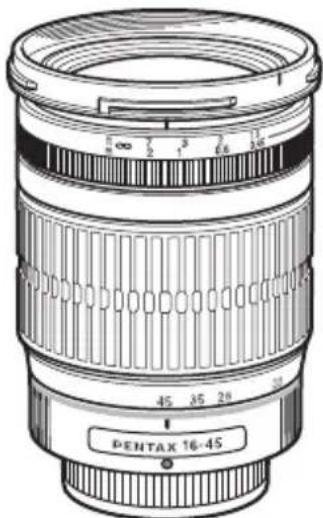
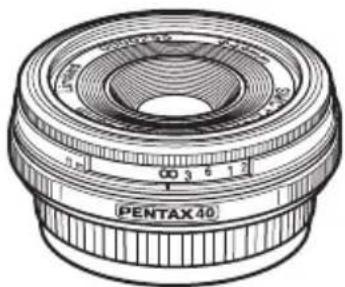
natural_image
Technical line drawing of a Pentax 40° lens with no text or symbols on the component itself




DA Lens ENG.book Page 0 Monday, January 3, 2011 11:45 AM

FOREWORD
Thank you for purchasing the smc PENTAX-DA lens.
Please read this operating manual carefully before using the lens to ensure that it is used properly. In addition, also refer to your camera operating manual.
The smc PENTAX-DA lens can be used exclusively with PENTAX digital SLR cameras. This lens is not compatible with film SLR cameras.
- In this operating manual, "smc PENTAX-DA lens" is shortened to "DA lens."
- Illustrations shown herein may differ from the actual appearance.
- PENTAX and smc PENTAX are trademarks of HOYA CORPORATION.
• SDM is a trademark of HOYA CORPORATION.
natural_image
Pure geometric lines and shapes without any text, numbers, or symbols
natural_image
Pure geometric lines and shapes without any text, numbers, or symbols

DA Lens ENG.book Page 1 Monday, January 3, 2011 11:45 AM

USING YOUR LENS SAFELY
1
Although we have carefully designed these lenses for safe operation, please pay special attention to items marked with the following symbols when using this product.

WARNING This symbol indicates precautions that if not followed, could result in serious injuries to the user.

CAUTION This symbol indicates precautions that if not followed, could result in minor or medium injuries to the user or damage to the equipment.

WARNING
- Never look at the sun through the lens mounted on the camera for a long time. Serious damage to your eyes or total loss of eyesight may occur, particularly when looking directly through the lens.

CAUTION
- Do not leave the lens in direct sunlight without the lens cap. Direct sunlight passing through the lens will be intensified, and should it focus on flammable materials, fire may occur.
natural_image
Pure geometric lines and shapes without any text, numbers, or symbols

DA Lens ENG.book Page 2 Monday, January 3, 2011 11:45 AM

2 PRECAUTIONS AND LENS MAINTENANCE
- Storage and mildew prevention
• Take the lens out of the protective case or camera bag, and store it in a dry, well-ventilated place. - Avoid storing the lens in a poorly ventilated location such as a closet, wardrobe, drawer, vehicle, or where insect repellent or medicine is kept.
- Avoid storing the lens in areas of high temperature and humidity, where there is a risk of mildew growth. Store the lens with a desiccant in a dry cabinet, airtight container, or plastic bag. (Leaving a saturated desiccant in the storage container can cause damage to the lens. Be sure to read the instructions that come with the desiccant before use.)
- Be careful when handling lenses that are not dust-proof, water-resistant, or do not have simplified weather-resistant construction in the rain, fog or environments in which sand or dust is in the air.
- When the lens is not attached to the camera body, attach both the supplied lens cap and lens mount cap to protect it from dust, etc.
- Never use any organic solvent such as thinner, alcohol, or benzine, etc. to remove dust on the lens.
- The lens is a precise optical instrument. Be careful not to let it fall, or subject it to strong shocks or pressure. Use a cushion or similar pad to protect the lens from the vibrations of motorcycles, automobiles, boats, etc.
- Avoid subjecting the lens to rapid changes in temperature, otherwise condensation can occur on both the inside and the outside of the lens. Put the lens in a plastic bag or camera bag, and take it out after the lens has reached ambient temperature.
- Do not leave the camera with the lens cap off attached to a tripod or other rigid camera support. The inner parts of the camera can be damaged by direct sunlight.
- Have the lens inspected by a dealer every one or two years to maintain its high performance.
natural_image
Pure geometric lines and shapes without any text, numbers, or symbols

DA Lens ENG.book Page 3 Monday, January 3, 2011 11:45 AM

CONTENTS
3
FOREWORD
USING YOUR LENS SAFELY 1
PRECAUTIONS AND LENS MAINTENANCE 2
FEATURES OF THE smc PENTAX-DA LENS 6
About dustproof, water resistance, and simplified weather resistance 7
smc PENTAX-DA LENS 8
About the DA lens mount 9
About lenses with a supersonic motor 10
Precautions for using lenses equipped with a supersonic motor on the K10D.... 11
MOUNTING AND REMOVING THE LENS 12
LENS CAP 13
Attaching the dedicated lens cap to DA 15mm f/4ED AL Limited 14
Attaching the dedicated lens cap to DA 40mm f/2.8 Limited 14
FOCUSING 15
Changing the Focus Mode 15
For the DA★ lens 15
Using Autofocus 16
Using Manual Focus 18
Using the Quick-Shift Focus System 18
How to use the Quick-Shift Focus System 19



DA Lens ENG.book Page 4 Monday, January 3, 2011 11:45 AM

4
DA★ 200mm f/2.8ED [IF] SDM, DA★ 300mm f/4ED [IF] SDM focusing ..... 21
Precautions on close-distance scale 22
ZOOM LENS 23
About the zoom ring 24
MACRO LENS 25
Magnification Scale 25
ATTACHING THE LENS HOOD 26
Screw-on Type (DA 70mm f/2.4 Limited dedicated lens hood) 26
Screw-on Type (DA 40mm f/2.8 Limited dedicated lens hood) 27
Bayonet Type 27
Bayonet Type (DA 21mm f/3.2 AL Limited dedicated lens hood) 28
About the PL filter window 29
Built-in lens hood 31
FILTERS 32
Precaution on filters 32
Attaching the 30.5mm filter to the DA 40mm f/2.8 Limited lens 32
Attaching a filter and the dedicated lens hood to the DA 21mm f/3.2
AL Limited lens 33
Attaching a filter and the dedicated lens hood to the DA 70mm f/2.4
Limited lens 34
Circular polarizing filters and vignetting 35



DA Lens ENG.book Page 5 Monday, January 3, 2011 11:45 AM

5
Compatibility table for PENTAX circular polarizing filters 36
PRECAUTIONS WHEN USING THE LENS WITH A FLASH 40
Built-in Flash 40
External Flash 40
Compatibility of DA Lenses with the Built-in Flash 42
TRIPOD MOUNT 44
Removing the Tripod Mount 45
MAIN SPECIFICATIONS 46
natural_image
Pure geometric lines and shapes without any text, numbers, or symbols
6 FEATURES OF THE smc PENTAX-DA LENS
- The smc PENTAX-DA lens is an interchangeable lens specifically designed for digital cameras. Its image circle is specialized for image sensors in PENTAX digital SLR cameras and its optical system is optimized for the characteristics of digital images.
- When autofocusing is finished, it is possible to make fine adjustment by hand using the "Quick-Shift Focus System" (see page 19 for details).
- Lenses that have "SDM" in their name are equipped with a supersonic motor. When mounted on a camera that supports supersonic motors, the autofocus is quiet and smooth.
- The DA ^* 55mm f/1.4 SDM uses a circular aperture. Using it when stopping down from full aperture to about f/2.8 keeps light sources and other fuzzy points perfectly round.







DA Lens ENG.book Page 7 Monday, January 3, 2011 11:45 AM

7
About dustproof, water resistance, and simplified weather resistance
• Dust-proof and water-resistant lenses
DA ^ 55mm f/1.4 SDM, DA ^ 300mm f/4ED [IF] SDM, DA ^ 200mm f/2.8ED [IF] SDM, DA ^ 16-50mm f/2.8ED AL [IF] SDM, DA ^ 50-135mm f/2.8ED [IF] SDM, DA ^ 60-250mm f/4ED [IF]SDM
These DA ^* lenses are dust-proof and water-resistant because each part is individually sealed. This makes it difficult for dust and water to enter the lens.
- Lenses with simplified weather-resistant construction
DA 18-55mm f/3.5-5.6 AL WR, DA 50-200mm f/4-5.6ED WR
These lenses are made with a simplified weather-resistant construction by using DA ^ lens sealing technology which makes it difficult for water to enter the lens.
natural_image
Pure geometric lines and crosshair symbols without any text or labels
natural_image
Pure geometric lines and shapes without any text, numbers, or symbols

DA Lens ENG.book Page 8 Monday, January 3, 2011 11:45 AM

8
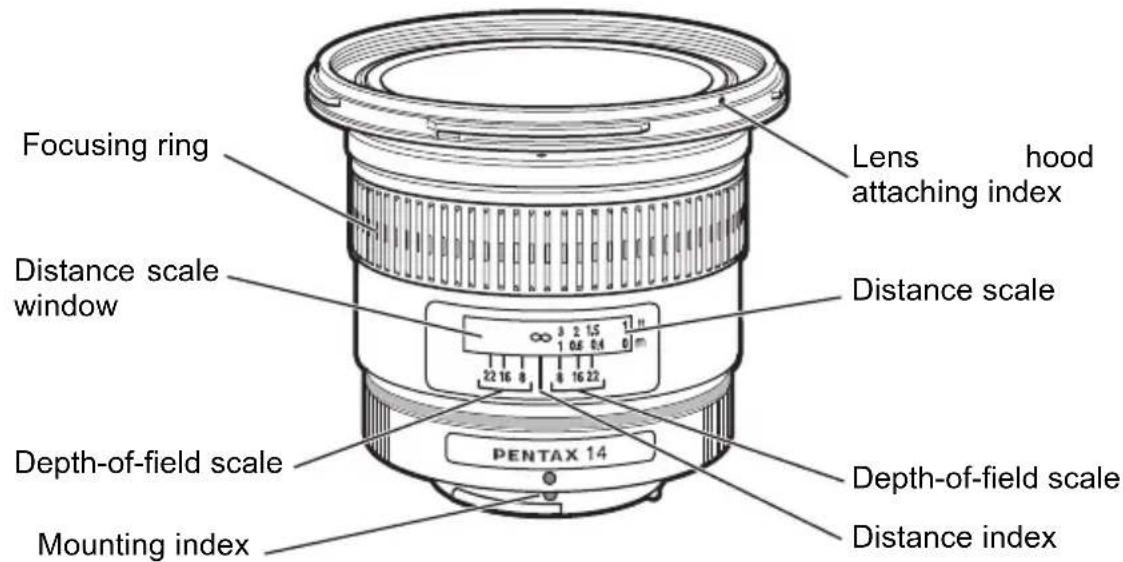
smc PENTAX-DA LENS
Note:
- The DA lens does not have an aperture ring. Aperture settings are controlled automatically as if set to the auto “A” position, so accessories without an auto “A” setting cannot be used with this lens.
- The DA lens is not compatible with film SLR cameras.



DA Lens ENG.book Page 9 Monday, January 3, 2011 11:45 AM

9
About the DA lens mount
The DA lens is an interchangeable lens specifically designed for PENTAX digital SLR cameras. There are three mounts for the DA lens, the K_AF , K_AF2 and K_AF3 .
KAF-mount KAF2-mount KAF3-mount
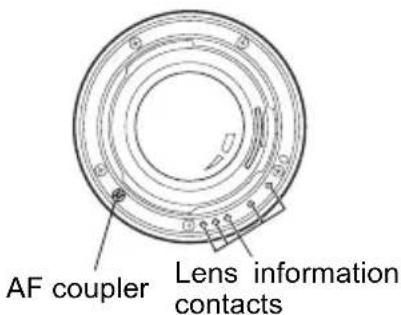
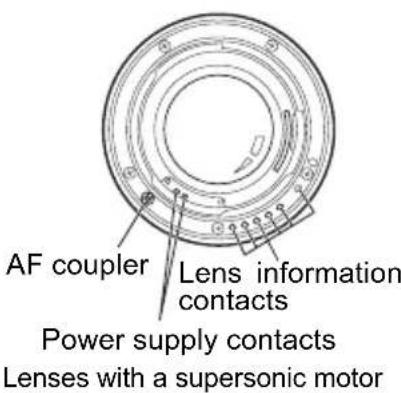
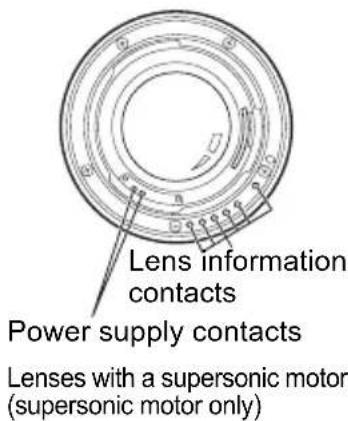
Refer to the next page for more information on lenses with a supersonic motor.
CAUTION
Be careful not to damage or dirty the lens mount surfaces as this can result in failure or malfunction.
About lenses with a supersonic motor
The lenses in the table below are equipped with an internal supersonic motor. When mounted on a camera body that supports supersonic motors, the autofocus (AF) works quietly and smoothly.
- Supersonic motor compatible camera body
K-series (excluding K and D K10D
If the firmware is version 1.30 or later, it supports supersonic motor. (Refer to page 11)
| Lens Precautions | |
| DA★ 55mm f/1.4 SDMDA17-70mm f/4 AL [IF] SDM | The lens uses a supersonic motor. When the lens is mounted on a camera body that does not support supersonic motors (including the K10D with firmware older than version 1.30), the autofocus cannot be operated by either the AF motor in the camera body or the supersonic motor.If using the lens with the following cameras, and the power is turned on, MF appears in the monitor, but it does not interfere with AF operations.K10D, K100D Super, K20D K200D |
| DA★ 60-250mm f/4ED [IF] SDMDA★ 16-50mm f/2.8ED AL [IF] SDMDA★ 50-135mm f/2.8ED [IF] SDMDA★ 200mm f/2.8ED [IF] SDMDA★ 300mm f/4ED [IF] SDM | When the lens is mounted on a camera body that does not support supersonic motors (including the K10D with firmware older than version 1.30), the autofocus is operated by the AF motor in the camera body. |
* In both cases focusing can be done manually.






DA Lens ENG.book Page 11 Monday, January 3, 2011 11:45 AM

11
Precautions for using lenses equipped with a supersonic motor on the K10D
When using lenses equipped with a supersonic motor on the Kuse camera firmware version 1.30 or later.
• How to Check and Update the Firmware
Turn on the K while holding down the MENU button to display the firmware version in the center of the display.
Download and install the updated firmware for the Using the link below.
- Firmware Download Page:
http://www.pentax.jp/english/support/download_digital.html
natural_image
Pure geometric lines and shapes without any text, numbers, or symbols
natural_image
Pure geometric lines and shapes without any text, numbers, or symbols12
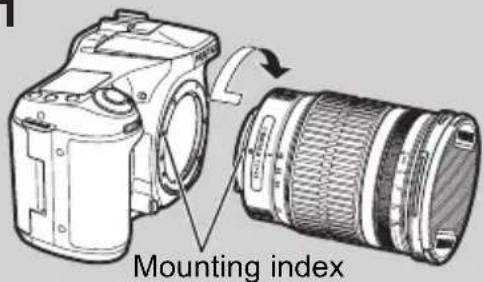
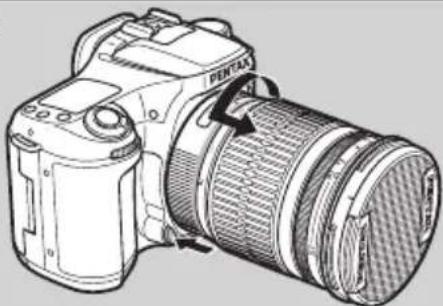
MOUNTING AND REMOVING THE LENS
1
2
natural_image
Line drawing of a DSLR camera with lens and control panel (no text or symbols)1. To mount the lens on the camera body
Attach the lens while aligning the red dots on the lens and body, then turn the lens clockwise until it clicks in place.

Memo:
- Do not hold down the lens unlock button while mounting the lens, otherwise the lens will not be properly mounted.
- After mounting the lens, gently turn the lens counterclockwise to make sure it is locked in place.
2. To remove the lens
Hold down the lens unlock button on the camera body and turn the lens counterclockwise.






DA Lens ENG.book Page 13 Monday, January 3, 2011 11:45 AM

LENS CAP
13
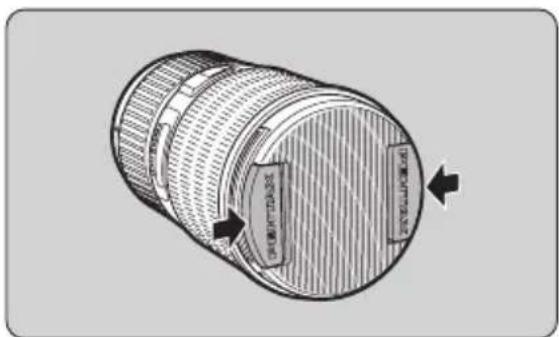
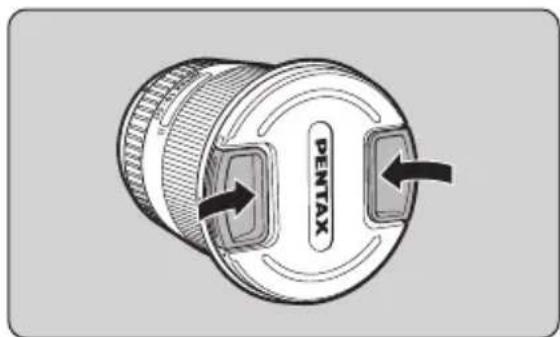
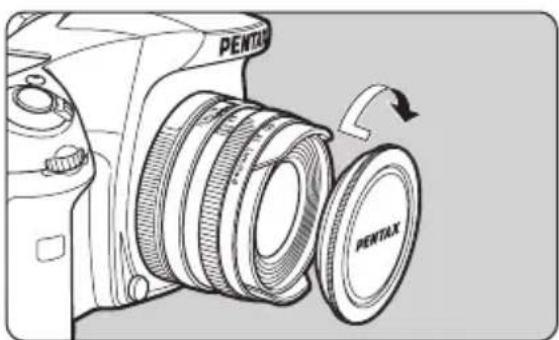
Take off the lens cap by pressing the two tabs inward.
Memo:
- When not using the lens, be sure to attach the lens cap.
- Attach the dedicated lens cap over the lens hood on the DA 21mm f/3.2 AL Limited, DA 35mm f/2.8 Macro Limited, DA FISH-EYE 10-17mm f/3.5-4.5ED [IF], and DA 70mm f/2.4 Limited. Also, with the DA 21mm f/3.2 AL Limited, DA 40mm f/2.8 Limited, and DA 70mm f/2.4 Limited, it is possible to mount the F49mm lens cap (option) by removing the lens hood.




DA Lens ENG.book Page 14 Monday, January 3, 2011 11:45 AM

14
natural_image
Line drawing of a Pentax DSLR camera with a circular inset showing the lens and scroll (no text or symbols)Attaching the dedicated lens cap to DA 15mm f/4ED AL Limited Screw the lens cap to the front of the lens.
natural_image
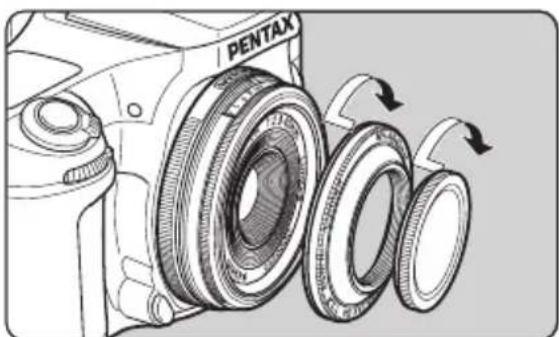
Technical illustration of a Pentax camera showing the lens assembly with three blades and rotation arrows (no text or symbols)Attaching the dedicated lens cap to DA 40mm f/2.8 Limited First screw the dedicated hood onto the front of the lens, then screw the lens cap onto the lens hood.


DA Lens ENG.book Page 15 Monday, January 3, 2011 11:45 AM

FOCUSING
15
Changing the Focus Mode
Use the camera's focus mode switch to change between autofocus mode and manual focus mode. For details, refer to your camera operating manual.
For the DA ^* lens
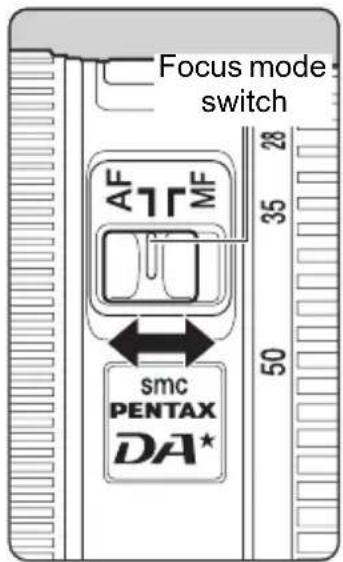
The focus mode switch on the DA ^* lens is used to change between the autofocus and manual focus modes (the focus mode switch on the camera is always set to autofocus).
To use the autofocus, set the switch to the AF position.
To use the manual focus, set the switch to the MF position.


DA Lens ENG.book Page 16 Monday, January 3, 2011 11:45 AM

16
natural_image
Illustration of a person holding a DSLR camera, no text or symbols presentUsing Autofocus
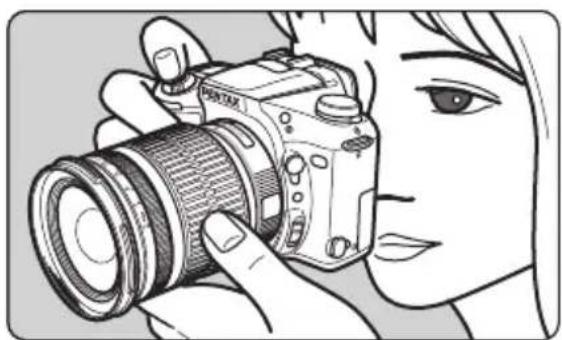
Set the focus mode to autofocus. Press the shutter release button halfway to autofocus. See page 15 for information about changing the focus mode.
Memo:
- Depending on your camera model, you can focus by operating buttons on the camera body. For details on how to set and use available functions of the buttons, refer to your camera operating manual.
natural_image
Pure geometric lines and shapes without any text, numbers, or symbols

DA Lens ENG.book Page 17 Monday, January 3, 2011 11:45 AM

17
CAUTION
During autofocusing, the focusing ring of the following lenses will rotate.
- To prevent malfunction, do not touch the focusing ring during autofocusing. Particularly be careful when the Focus Mode is set to AF.C (Continuous mode). The camera continues adjusting the focus while the AF button is pressed or the shutter release button is pressed halfway.
- DA FISH-EYE 10-17mm f/3.5-4.5ED [IF] - DA 12-24mm f/4ED AL [IF]
- DA 16-45mm f/4ED AL - DA 17-70mm f/4 AL [IF] SDM
- DA 18-55mm f/3.5-5.6 AL WR - DA L 18-55mm f/3.5-5.6 AL
- DA 50-200mm f/4-5.6ED WR - DA L 50-200mm f/4-5.6ED
- DA 55-300mm f/4-5.8ED - DA 15mm f/4ED AL Limited
- DA 21mm f/3.2 AL Limited - DA 35mm f/2.8 Macro Limited
- DA 40mm f/2.8 Limited - DA 70mm f/2.4 Limited
natural_image
Pure geometric lines and shapes without any text, numbers, or symbols

DA Lens ENG.book Page 18 Monday, January 3, 2011 11:45 AM

18
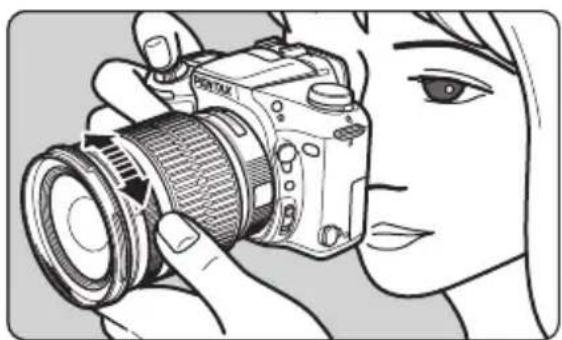
natural_image
Illustration of a person using a DSLR camera to adjust the lens (no text or symbols visible)Using Manual Focus
Set the focus mode to MF, and turn the focusing ring to focus manually. See page 15 for information about changing the focus mode.
Using the Quick-Shift Focus System
If the focus mode is set to autofocus, you can focus manually after autofocus is achieved. Manually turn the focusing ring to finely adjust the focus. You can do this without changing the focus mode to MF.
The Quick Shift Focus System is not available with the following lenses.
- DA L 18-55mm f/3.5-5.6 AL - DA L 50-200mm f/4-5.6ED
natural_image
Pure geometric lines and shapes without any text, numbers, or symbols

DA Lens ENG.book Page 19 Monday, January 3, 2011 11:45 AM

19
How to use the Quick-Shift Focus System
1. Using Autofocus
Set the focus mode switch to autofocus, then press the shutter release button halfway to autofocus.
* Depending on your camera model, you can focus by operating buttons on the camera body. For details on how to set and use available functions of the buttons, refer to your camera operating manual.
2.Hold down the shutter release button halfway, then turn the focusing ring to finely adjust focus.
3. Finally, press the shutter release button fully to take a picture.
The focusing ring on some lenses may rotate during autofocus.
- Do not touch the focusing ring while autofocus is operating as it may cause a malfunction. For more information see the "CAUTION" on page 17.
natural_image
Pure geometric lines and shapes without any text, numbers, or symbols
natural_image
Pure geometric lines and shapes without any text, numbers, or symbols

DA Lens ENG.book Page 20 Monday, January 3, 2011 11:45 AM

20
CAUTION
- When using the Quick-Shift Focus System, keep pressing the shutter release button after you achieve focus and before taking a picture. If you let go of the shutter release button before taking a picture, autofocus will operate again when you press the shutter release button again.
However, by configuring the camera's custom settings, you can take pictures without autofocusing after letting go of the shutter release button. See the camera operating manual for details about the setting procedure. -
When focusing with manual focus or the Quick-Shift Focus System, the mechanism allows the focusing ring to rotate freely after it is set to the (infinity) or the minimum focus distance ends. However do not attempt to rotate it any farther than these ends as this will result in decreased performance.
-
DA 14mm f/2.8ED [IF] - DA★ 55mm f/1.4 SDM
- DA★ 200mm f/2.8ED [IF] SDM - DA★ 300mm f/4ED [IF] SDM
- DA★ 16-50mm f/2.8ED AL [IF] SDM - DA★ 50-135mm f/2.8ED [IF] SDM
- DA★ 60-250mm f/4ED [IF] SDM
natural_image
Pure geometric lines and shapes without any text, numbers, or symbols

DA Lens ENG.book Page 21 Monday, January 3, 2011 11:45 AM

21
DA ^* 200mm f/2.8ED [IF] SDM, DA ^* 300mm f/4ED [IF] SDM focusing
- The mechanism does not allow the angle of rotation of the focusing ring to have the same angle of the distance scale while focusing. Always check the focus using the view finder before taking a picture. This is especially true with manual focus and the Quick-Shift Focus System.
![PENTAX 55mm f/1.4 - DA ^* 200mm f/2.8ED [IF] SDM, DA ^* 300mm f/4ED [IF] SDM focusing - 1](/content/2026/05/804798/images/c6d15e5eee90caf46e65faa6cdb74cc4e6314e00f3ad6c0ca352b0bb40a6eba7.jpg)
![PENTAX 55mm f/1.4 - DA ^* 200mm f/2.8ED [IF] SDM, DA ^* 300mm f/4ED [IF] SDM focusing - 2](/content/2026/05/804798/images/9699cb60f953db8ffdd2292ee5d79db1ba4b692a9d5b2670b1395ade92d4ca0d.jpg)
![PENTAX 55mm f/1.4 - DA ^* 200mm f/2.8ED [IF] SDM, DA ^* 300mm f/4ED [IF] SDM focusing - 3](/content/2026/05/804798/images/2a07f96a7f41771bd367e973fb35c1021c2f6bfed907bfe99a591ba3aa898bb0.jpg)
natural_image
Pure geometric lines and circles without any text, numbers, or symbols![PENTAX 55mm f/1.4 - DA ^* 200mm f/2.8ED [IF] SDM, DA ^* 300mm f/4ED [IF] SDM focusing - 4](/content/2026/05/804798/images/091ba4b6679467906ee8ded594a974c98a40804bf64e62b0bfeaa87b9d7d0e19.jpg)
![PENTAX 55mm f/1.4 - DA ^* 200mm f/2.8ED [IF] SDM, DA ^* 300mm f/4ED [IF] SDM focusing - 5](/content/2026/05/804798/images/f10093bcd328729852a8003e7adb074676a422dc2876404f1a9ea0ae94ba87b0.jpg)
natural_image
Pure geometric lines and shapes without any text, numbers, or symbols![PENTAX 55mm f/1.4 - DA ^* 200mm f/2.8ED [IF] SDM, DA ^* 300mm f/4ED [IF] SDM focusing - 6](/content/2026/05/804798/images/7b00726ea5183f1c2ce10053ec5378b6c405b7d8d0d6fcc08c501be9727b415f.jpg)
![PENTAX 55mm f/1.4 - DA ^* 200mm f/2.8ED [IF] SDM, DA ^* 300mm f/4ED [IF] SDM focusing - 7](/content/2026/05/804798/images/68fdca4ca3d4f410c3cb384fcaad1b4d3a10cc94bb02d6c5997b167c6373b1f1.jpg)
DA Lens ENG.book Page 22 Monday, January 3, 2011 11:45 AM
![PENTAX 55mm f/1.4 - DA ^* 200mm f/2.8ED [IF] SDM, DA ^* 300mm f/4ED [IF] SDM focusing - 8](/content/2026/05/804798/images/99a08c97954247b1008d137da6f5ea39e78f8559b293b75a56b981f79ccc2fcd.jpg)
![PENTAX 55mm f/1.4 - DA ^* 200mm f/2.8ED [IF] SDM, DA ^* 300mm f/4ED [IF] SDM focusing - 9](/content/2026/05/804798/images/f3c6ddf9d72325638164e3402335a76b111888905aebd078ff8cd44e349c1b5a.jpg)
22
Precautions on close-distance scale
(For DA 16-45mm f/4ED AL, DA 18-55mm f/3.5-5.6 AL WR, DA L 18-55mm f/3.5-5.6 AL)
In the close-distance scale range (minimum focus distance range), when shooting at the maximum aperture, image quality in the corners of the picture may deteriorate because of the optical characteristics of the lens.
When taking a picture in this range, we recommend that you use a smaller aperture, stopping down from full aperture.
natural_image
Pure geometric lines and shapes without any text, numbers, or symbols
natural_image
Pure geometric lines and shapes without any text, numbers, or symbols

DA Lens ENG.book Page 23 Monday, January 3, 2011 11:45 AM

ZOOM LENS
23

natural_image
Pure geometric lines and shapes without any text, numbers, or symbols


DA Lens ENG.book Page 24 Monday, January 3, 2011 11:45 AM

24
natural_image
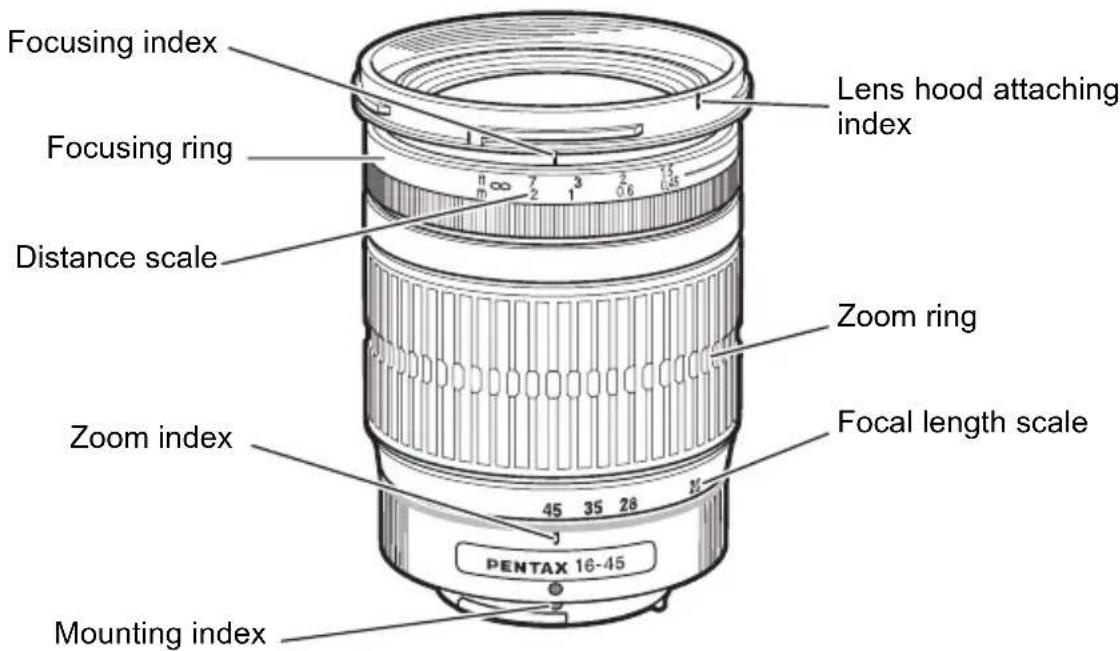
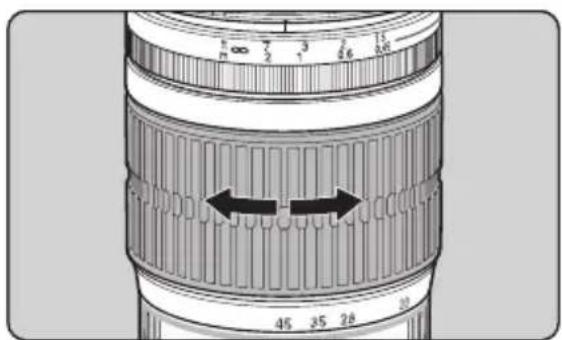
Close-up of a camera lens with measurement markings (no text or symbols visible)The zoom lens has a focusing ring on the front side and a zoom ring on the rear side. Turn the zoom ring to set the desired angle of view (lens focal length).
Memo:
- The focusing point may shift slightly by changing the focal length. First adjust the zoom and then adjust the focus.
- The focusing index on the zoom lens is set to match the focus point when the focal length is at telephoto. The focusing index may not match the focus point for other focal lengths.
About the zoom ring
Turn the zoom ring clockwise for telephoto and counterclockwise for wide-angle.
natural_image
Pure geometric lines and shapes without any text, numbers, or symbolsDA Lens ENG.book Page 25 Monday, January 3, 2011 11:45 AM
MACRO LENS
25
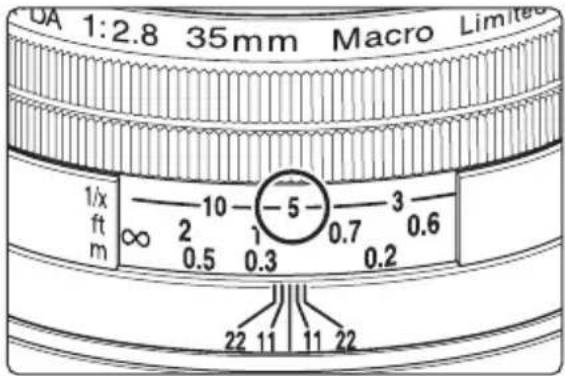
With a DA 35mm f/2.8 Macro Limited lens, you can adjust focus from infinity to life-size [1x].
Magnification Scale
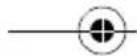
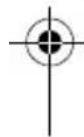
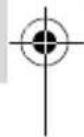
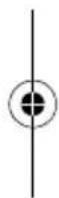
The magnification is indicated by denominators on the distance scale. "5" indicates "1/5x". When determining the magnification first, set the magnification in the manual focus mode and adjust focus by moving the camera closer or further from the subject.



natural_image
Pure geometric lines and shapes without any text, numbers, or symbols
DA Lens ENG.book Page 26 Monday, January 3, 2011 11:45 AM
26
ATTACHING THE LENS HOOD
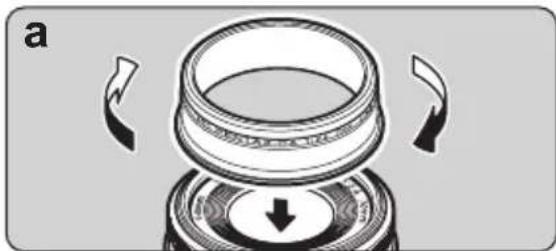
In order to avoid deterioration in image quality from internal reflection of light, use of a lens hood is recommended.
natural_image
Diagram of a mechanical component with arrows indicating motion or force direction (no text or symbols)a. Screw-on Type (DA 70mm f/2.4 Limited dedicated lens hood)
Screw the hood on to the front of the lens to attach it.
The hood is telescopic. Extend it fully to use it.
Memo:
The lens hood cannot be mounted on some circular polarizing filters that are not produced by PENTAX.



natural_image
Pure geometric lines and circles without any text, numbers, or symbols
natural_image
Pure geometric lines and shapes without any text, numbers, or symbolsDA Lens ENG.book Page 27 Monday, January 3, 2011 11:45 AM
natural_image
Technical illustration of a mechanical component with layered structure and directional arrows (no text or symbols)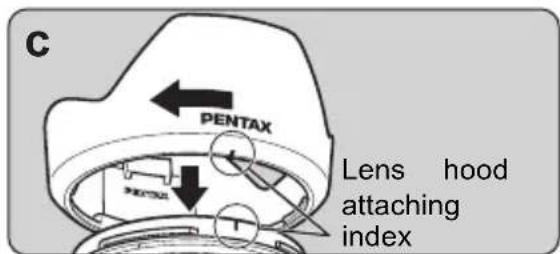
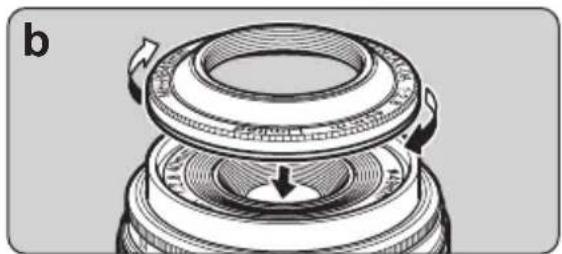
b.Screw-on Type (DA 40mm f/2.8 Limited dedicated lens hood)
Screw the hood on to the front of the lens to attach it.
C.Bayonet Type
When attaching the lens hood, align the index on the lens hood with the attaching index on the lens, and push both parts straight toward each other. Attach the lens hood on the lens by turning the hood in the clockwise direction, as viewed from the front of the lens, to lock it until it clicks into position.
Memo:
- When attaching the lens hood, hold the focusing ring and zoom ring securely to prevent them from turning.
- When the lens hood is not in use, it can also be turned around and attached in the reversed position.








DA Lens ENG.book Page 28 Monday, January 3, 2011 11:45 AM

28
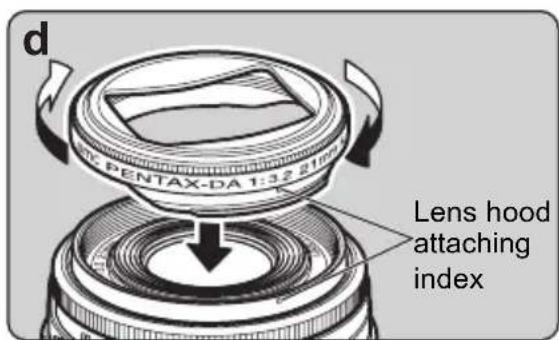
d.Bayonet Type (DA 21mm f/3.2 AL Limited dedicated lens hood)
When attaching the lens hood, align the index on the lens hood with the attaching index on the lens, and push both parts straight toward each other. Attach the lens hood on the lens by turning the hood in a clockwise direction, as seen from the front of the lens, until it stops.
Memo:
- Vignetting occurs if the camera is used while the hood is not completely attached.
- The dedicated lens hood cannot be attached if a filter is attached to the front of the lens. To use a filter and the dedicated lens hood together, attach a 43mm diameter filter to the back of the hood. (Refer to page 33)
natural_image
Pure geometric lines and shapes without any text, numbers, or symbols

DA Lens ENG.book Page 29 Monday, January 3, 2011 11:45 AM

29
About the PL filter window
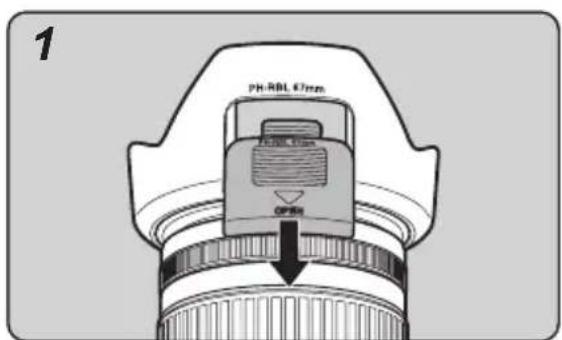
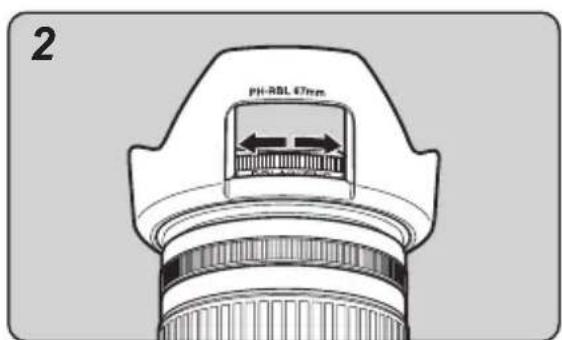
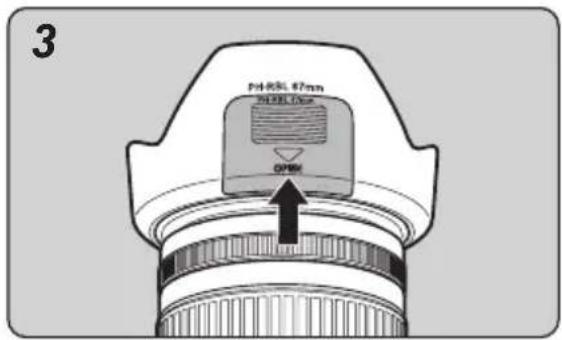
The bayonet-type hood included with the lenses below has a PL filter window which facilitates the manipulation of the circular polarizing filter.
- DA★ 55mm f/1.4 SDM - DA 16-45mm f/4ED AL
- DA★ 16-50mm f/2.8ED AL [IF] SDM - DA 17-70mm f/4AL [IF] SDM
- DA 18-55mm f/3.5-5.6 AL WR - DA★ 50-135mm f/2.8ED [IF] SDM
- DA★ 60-250mm f/4ED [IF] SDM - DA 50-200mm f/4-5.6ED WR
- DA 55-300mm f/4-5.8ED - DA★ 200mm f/2.8ED [IF] SDM
- DA★ 300mm f/4ED [IF] SDM
CAUTION
The PL filter window cap of the DA ^ 55mm f/1.4 SDM cannot be attached or removed with the hood attached to the lens. Remove the hood from the lens to attach first, and then remove the window cap.


DA Lens ENG.book Page 30 Monday, January 3, 2011 11:45 AM

30
How to use the lens hood with polarizing filter window
- Remove the PL filter window cap by sliding it in the direction as shown in the illustration 1.
- Turn the outer rim of the circular polarizing filter from the PL filter window as shown in the illustration 2.
- Attach the PL filter window cap.
Memo:
- When shooting, be sure the PL filter window cap is in place to achieve maximum effect of the lens hood.
natural_image
Pure geometric lines and shapes without any text, numbers, or symbols

DA Lens ENG.book Page 31 Monday, January 3, 2011 11:45 AM

31
Built-in lens hood
The following lenses have a lens hood built into the lens body. The hood cannot be removed from the lens.
• DA FISH-EYE 10-17mm f/3.5-4.5ED [IF]
• DA 35mm f/2.8 Macro Limited (*), DA 15mm f/4ED AL Limited (*)
Lenses marked with an * have a built-in sliding hood which should be extended.
natural_image
Pure geometric lines and shapes without any text, numbers, or symbols

DA Lens ENG.book Page 32 Monday, January 3, 2011 11:45 AM

32
FILTERS
Make sure the filter size matches the lens, then screw the filter onto the front of the lens.
Memo:
- The compatible filter size for each lens is listed on pages 46-52.
- Filters cannot be mounted on the DA FISH-EYE 10-17mm f/3.5-4.5ED [IF].
Precaution on filters
- Since a filter becomes a part of the optical system when attached to the lens, handle it with due care to protect it from dust, dirt and scratches. Normally, attaching two or more filters on a lens does more harm than good. However, attaching a circular polarizing filter and another filter is not a problem.
- When using a polarizing filter with a camera, use a circular polarizing filter for proper exposure and autofocus.
natural_image
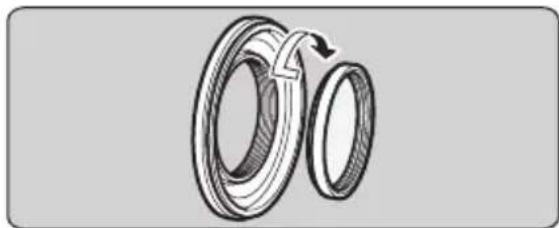
Technical illustration of two mechanical bearing rings with a rotation arrow indicating clockwise motion (no text or symbols)Attaching the 30.5mm filter to the DA 40mm f/2.8 Limited lens
Normally, you attach the 49mm filter to the front of the lens. But you can also screw a 30.5mm filter to the back of the dedicated hood.


DA Lens ENG.book Page 33 Monday, January 3, 2011 11:45 AM

33
natural_image
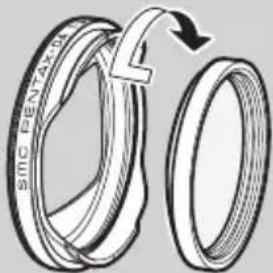
Diagram of two interlocking rings with a curved arrow indicating rotation (no text or symbols)Attaching a filter and the dedicated lens hood to the DA 21mm f/3.2 AL Limited lens
It is possible to attach a 49mm diameter filter to the front of the DA 21mm f/3.2 AL Limited lens, but not when the dedicated lens hood is attached. To use a filter with the dedicated lens hood, screw a 43mm diameter filter to the back of the filter.
natural_image
Pure geometric lines and shapes without any text, numbers, or symbols

DA Lens ENG.book Page 34 Monday, January 3, 2011 11:45 AM

34
natural_image
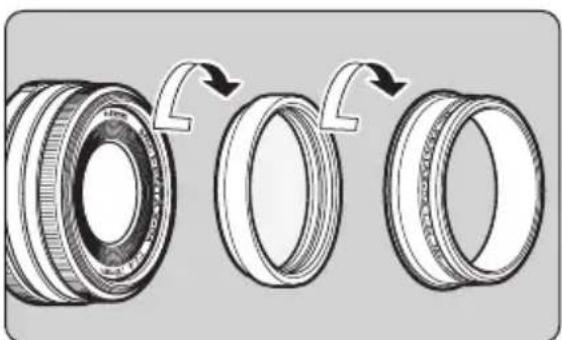
Diagram showing three stages of a mechanical bearing assembly with arrows indicating rotation (no text or symbols present)Attaching a filter and the dedicated lens hood to the DA 70mm f/2.4 Limited lens
With the DA 70mm f/2.4 Limited lens, attach the 49mm diameter filter to the front of the lens. To use it together with the dedicated lens hood, screw it on over the filter that is attached.
Memo:
- The lens hood cannot be mounted on some circular polarizing filters that are not produced by PENTAX.
natural_image
Pure geometric lines and shapes without any text, numbers, or symbols

DA Lens ENG.book Page 35 Monday, January 3, 2011 11:45 AM

35
Circular polarizing filters and vignetting
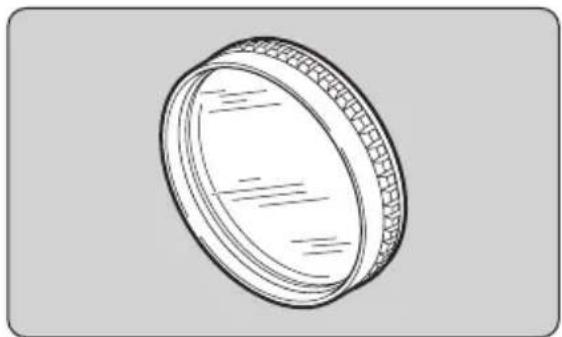
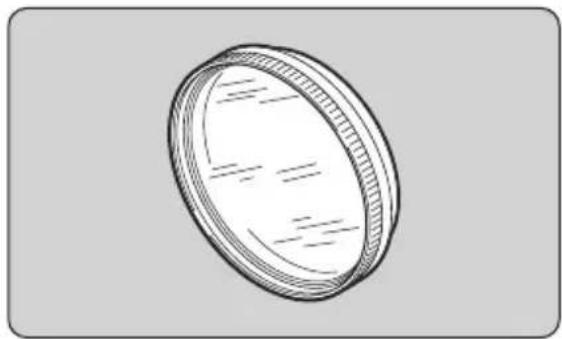
Circular polarizing filters are thicker than regular filters. Depending on the lens that is mounted and the shooting conditions, vignetting may occur in the four corners of the image. Refer to the "Compatibility table for PENTAX circular polarizing filters" on the following page for information on compatibility of PENTAX circular polarizing filters (currently not in production) with various lenses. There are two types of PENTAX circular polarizing filters. The A type (on the left in the diagram below) and the B type (on the right in the diagram below). The B type filter is thinner than the A type filter.
natural_image
Line drawing of a circular mechanical component with textured surface and internal lines (no text or symbols)A type B type
natural_image
Simple line drawing of a circular object with internal hatching and dashed lines, no text or symbols present.
natural_image
Pure geometric lines and shapes without any text, numbers, or symbols
natural_image
Pure geometric lines and shapes without any text, numbers, or symbols

DA Lens ENG.book Page 36 Monday, January 3, 2011 11:45 AM

36
Compatibility table for PENTAX circular polarizing filters
* PENTAX circular polarizing filters are currently not produced.
YES: Compatible *YES: Compatible in some conditions NO: Incompatible
| Lens | Circular polarizing filter (A type) | Circular polarizing filter (B type) | ||
| Compatibility | Notes | Compatibility | Notes | |
| DA 14mm f/2.8ED [IF] NO Vignetting occurs. YES | ||||
| DA 15mm f/4ED AL Limited NO Vignetting occurs. YES | ||||
| DA 21mm f/3.2 AL Limited*3 | YES | Use a filter with a diameter of 49mm. | YES | Use a filter with a diameter of 49mm. |
| DA 35mm f/2.8 Macro Limited *YES | *Can be mounted and used. However, the built-in lens hood cannot be withdrawn while the A type circular polarizing filter is attached. | YES | ||
| DA 40mm f/2.8 Limited*1 | YES | Use a filter with a diameter of 49mm. | YES | Use a filter with a diameter of 49mm. |
| DA* 55mm f/1.4 SDM*1 | YES YES | |||
| DA 70mm f/2.4 Limited*1 | YES YES | |||


DA Lens ENG.book Page 37 Monday, January 3, 2011 11:45 AM

| Lens | Circular polarizing filter (A type) | Circular polarizing filter (B type) | ||
| Compatibility | Notes | Compatibility | Notes | |
| DA* 200mm f/2.8ED [IF] SDM | *YES | *Can be mounted and used. However, the dedicated bayonet hood cannot be mounted on top of the A type circular polarizing filter. | YES | |
| DA* 300mm f/4ED [IF] SDM | ||||
| DA 12-24mm f/4ED AL [IF]* ^2 | *YES | *Vignetting occurs at focal lengths below 15mm. | *YES | *Vignetting occurs at focal lengths below 15mm. |
| DA* 16-50mm f/2.8ED AL [IF] SDM | NO Vignetting occurs. YES | |||
| DA* 50-135mm f/2.8ED [IF] SDM | YES YES | |||
| DA 16-45mm f/4ED AL *YES | *Can be mounted and used. However, the dedicated bayonet hood cannot be mounted on top of the A type circular polarizing filter. | YES | ||
| DA 17-70mm f/4 AL [IF] SDM NO *YES | Vignetting occurs when the focal length is 17mm. | |||


DA Lens ENG.book Page 38 Monday, January 3, 2011 11:45 AM

38
| Lens | Circular polarizing filter (A type) | Circular polarizing filter (B type) | ||
| Compatibility | Notes | Compatibility | Notes | |
| DA L 18-55mm f/3.5-5.6 AL | *YES | *Can be mounted and used. However, the dedicated bayonet hood cannot be mounted on top of the A type circular polarizing filter. | YES | |
| DA 18-55mm f/3.5-5.6 AL WR | ||||
| DA L 50-200mm f/4-5.6ED | ||||
| DA 50-200mm f/4-5.6ED WR | ||||
| DA 55-300mm f/4-5.8ED | ||||
| DA★ 60-250mm f/4ED [IF] SDM | YES YES | |||
natural_image
Pure geometric lines and shapes without any text, numbers, or symbols


DA Lens ENG.book Page 39 Monday, January 3, 2011 11:45 AM

39
*1 The lens hood cannot be mounted on some circular polarizing filters that are not produced by PENTAX.
*2 Vignetting occurs at focal lengths below 15mm with other PENTAX filters (such as the Skylight) besides circular polarizing filters.
*3 The dedicated hood cannot be mounted if a filter including a circular polarizing filter is mounted on the front of the lens.
Memo:
- Filters, including circular polarizing filters, cannot be mounted on the DA FISH-EYE 10-17mm f/3.5-4.5ED [IF] lens.
natural_image
Pure geometric lines and crosshair symbols without any text or labels
natural_image
Pure geometric lines and shapes without any text, numbers, or symbols40 PRECAUTIONS WHEN USING THE LENS WITH A FLASH
Built-in Flash
The built-in flash can not be used when the distance is less than 0.7m. When the flash is used within 0.7m, it causes incorrect exposure control and vignetting in the picture corners.
- Refer to the "Compatibility of DA Lenses with the Built-in Flash" chart on page 42 for information on the compatibility of the built-in flash with the lens being used.
External Flash
The external flash can be used while the lens hood is attached. However, the following conditions apply to some types of lenses.
●DA 14mm f/2.8ED [IF]
●DA 15mm f/4ED AL Limited
The AF540FGZ and AF360FGZ external flash units can only be used when the wide-angle panel is used (it is also possible to use the lens hood). Other external flash units are not recommended because their coverage angle is not compatible with the angle of view of the lens.
●DA 21mm f/3.2 AL Limited
External flash units can be used while the lens hood is mounted without problems if it is possible to set their zoom [coverage angle] up to 28mm.
●DA FISH-EYE 10-17mm f/3.5-4.5ED [IF]
External flash units cannot be used because their coverage angle is not compatible with the angle of view of the lens.


natural_image
Pure geometric lines and shapes without any text, numbers, or symbols

DA Lens ENG.book Page 41 Monday, January 3, 2011 11:45 AM

41
●DA 12-24mm f/4ED AL [IF]
PENTAX external flash units which cover a 24mm lens on a 35mm SLR, or 16mm lens on a digital SLR, can be used when the lens is set from 16mm to 24mm.
AF540FGZ and AF360FGZ can be used from 13mm to 24mm with the wide angle panel (in both cases, it is possible to use the lens hood). Please note that at focal lengths less than 13mm the corners of the picture will not be fully illuminated.
Other external flash units are not recommended, because their coverage angle is not wide enough to cover the angle of view of the lens.
●DA ^* 16-50mm f/2.8ED AL [IF] SDM
●DA 16-45mm f/4ED AL
PENTAX external flash units which cover a 24mm lens on a 35mm SLR, or 16mm lens on a digital SLR, can be used with the lens hood without problems.
* For more information, refer to the manual for the external flash unit.
natural_image
Pure geometric lines and circles without any text, numbers, or symbols
natural_image
Pure geometric lines and shapes without any text, numbers, or symbols

DA Lens ENG.book Page 42 Monday, January 3, 2011 11:45 AM

42
Compatibility of DA Lenses with the Built-in Flash
| Lens | Compatibility | ||
| *istD | *istDS, *istDS2*istDL, *istDL2 | K-series | |
| DA 14mm f/2.8ED [IF] NO NO NO | |||
| DA 15mm f/4ED AL Limited NO NO NO | |||
| DA 21mm f/3.2 AL Limited YES YES YES | |||
| DA 35mm f/2.8 Macro Limited YES YES YES | |||
| DA 40mm f/2.8 Limited YES YES YES | |||
| DA* 55mm f/1.4 SDM YES YES YES | |||
| DA 70mm f/2.4 Limited YES YES YES | |||
| DA* 200mm f/2.8ED [IF] SDM YES YES YES | |||
| DA* 300mm f/4ED [IF] SDM YES YES YES | |||
| DA FISH-EYE 10-17mm f/3.5-4.5ED [IF] NO NO NO | |||
| DA 12-24mm f/4ED AL [IF] NO NO NO | |||
| DA* 16-50mm f/2.8ED AL [IF] SDM YES*1 YES*2 YES*3 | |||
| DA 16-45mm f/4ED AL YES*4 YES*4 YES*4 | |||
| DA 17-70mm f/4 AL [IF] SDM | YES*5 YES*6 YES*7 | ||
| DA L 18-55mm f/3.5-5.6 AL | YES YES YES | ||
| DA 18-55mm f/3.5-5.6 AL WR | YES YES YES | ||
| DA* 50-135mm f/2.8ED [IF] SDM | YES YES YES | ||
| DA L 50-200mm f/4-5.6ED | YES YES YES | ||



DA Lens ENG.book Page 43 Monday, January 3, 2011 11:45 AM

| Lens | Compatibility | ||
| *istD | *istDS, *istDS2*istDL, *istDL2 | K-series | |
| DA 50-200mm f/4-5.6ED WR YES YES YES | |||
| DA 55-300mm f/4-5.8ED YES YES YES | |||
| DA ^* 60-250mm f/4ED [IF] SDM YES YES YES | |||
Except for the DA 35mm f/2.8 Macro Limited, DA 70mm f/2.4 Limited, DA 40mm f/2.8 Limited and DA 21mm f/3.2 AL Limited lenses, do not use the lens hood when using the built-in flash. This is to prevent the lens hood from obstructing the flash.
*1 Vignetting occurs when the focal length is 35mm or less, or when the focal length is 16 to 50mm and the shooting distance is below 1.5 m.
*2 Vignetting occurs when the focal length is 28mm or less, or when the focal length is 16 to 50mm and the shooting distance is below 1.5 m.
*3 Vignetting occurs when the focal length is 20mm or less, or when the focal length is 35mm and the shooting distance is below 1.5 m.
*4 Vignetting occurs when the focal length is below 28mm, or when the focal length is 28mm and the shooting distance is 1 m or less.
*5 Vignetting occurs when the focal length is below 35mm, or when the focal length is 35mm and the shooting distance is 1 m or less.
*6 Vignetting occurs when the focal length is below 35mm.
*7 Vignetting occurs when the focal length is below 24mm, or when the focal length is 24mm and the shooting distance is 1 m or less.

DA Lens ENG.book Page 44 Monday, January 3, 2011 11:45 AM
44
TRIPOD MOUNT
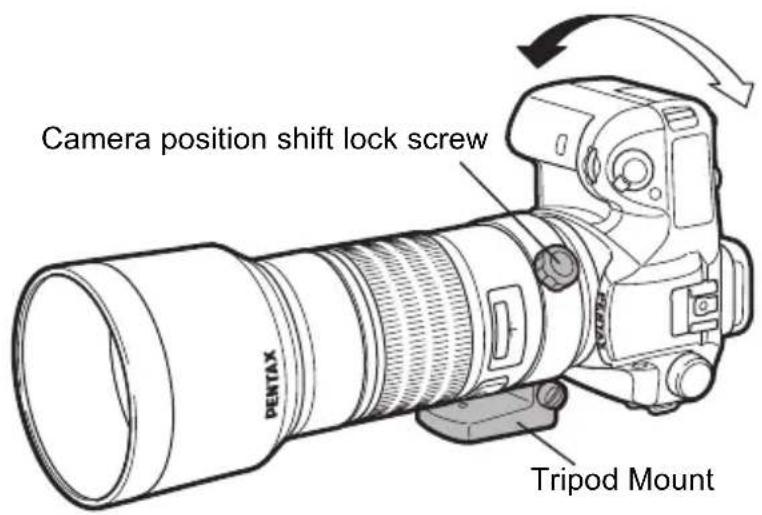
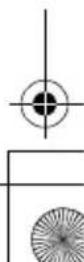
DA ^ 60-250mm f/4ED [IF] SDM and DA ^ 300mm f/4ED [IF] SDM are equipped with the tripod mount. To position the camera vertically or horizontally, loosen the camera position shift lock screw, turn the camera 90° to the right or left as desired, and tighten the lock screw firmly.
The tripod mount is detachable.
- Attach only to a stable tripod.
- We recommend using a fast shutter speed as large lenses may contribute to camera shake.





DA Lens ENG.book Page 45 Monday, January 3, 2011 11:45 AM

45
Removing the Tripod Mount
To remove the mount, use a coin to loosen the screw by turning it to the left. Be careful not to loosen the screw too much or else it may fall out.
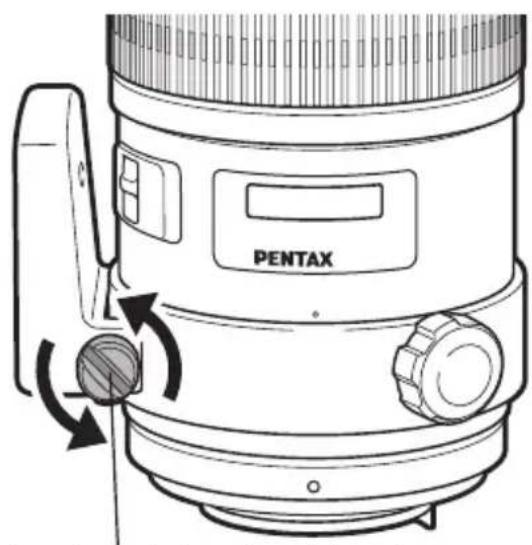
Insert a coin into the slot on the screw and turn to the left.
natural_image
Pure geometric lines and shapes without any text, numbers, or symbols
MAIN SPECIFICATIONS
* For use with any PENTAX digital SLR camera.
* AL = Uses an aspheric lens, ED = Lens made with extra-low dispersion glass, IF = Inner focus-type lens, SDM = Lens with a supersonic motor
| Lens DA 14mm f | 2.8ED [IF] | DA 15mm f/4ED AL Limited | DA 21mm f/3.2 AL Limited |
| Focal length | 14mm (equivalent to approx. 21.5mm in 35mm format) | 15mm (equivalent to approx. 23mm in 35mm format) | 21mm (equivalent to approx. 32mm in 35mm format) |
| Elements in groups | 12-11 8-6 8-5 | ||
| Angle of view 90° | 86° 68° | ||
| Aperture f/2.8 f/4 | f/3.2 | ||
| Minimum aperture | f/22 f/22 f/22 | ||
| Mount type | K_AF -mount | K_AF -mount | K_AF -mount |
| Minimum focus distance | 0.17m (0.56ft) 0.18m (0.59ft) | 0.2m (0.66ft) | |
| Maximum magnification | Approx. 0.19× Approx. 0.15× Approx. 0.17× | ||
| Filter size | 77mm | 49mm | 49mm or 43mm |
| Lens hood | PH-RBH 77mm | Built-in | MH-RBA 43mm |
| Max. diameter × length | 83.5mm × 69mm (3.3in × 2.7in) | 63mm × 39.5mm (2.5in × 1.6in) | 63mm × 25mm (2.5in × 1.0in) |
| Weight | Approx. 420g/14.8oz(with hood approx. 455g/16.0oz) | Approx. 190g/6.7oz | Approx. 140g/4.9oz (with hood approx. 155g/5.5oz) |
| Soft case | S100-120 | Soft case DA70 | Dedicated case |







DA Lens ENG.book Page 47 Monday, January 3, 2011 11:45 AM

| Lens | DA 35mm f/2.8 Macro Limited | DA 40mm f/2.8 Limited DA | * 55mm f/1.4 SDM |
| Focal length | 35mm (equivalent to approx. 53.5mm in 35mm format) | 40mm (equivalent to approx. 61mm in 35mm format) | 55mm (equivalent to approx. 84.5mm in 35mm format) |
| Elements in groups | 9-8 5-4 9-8 | ||
| Angle of view 44° | 39° 29° | ||
| Aperture f/2.8 f/2.8 f/1.4 | |||
| Minimum aperture | f/22 f/22 f/22 | ||
| Mount type | K_AF -mount | K_AF -mount | K_AF3 -mount |
| Minimum focus distance | 0.139m (0.46ft) 0.4m (1.31ft) | 0.45m (1.48ft) | |
| Maximum magnification | Approx. 1.00× Approx. 0.13× Approx. 0.17× | ||
| Filter size 49mm | 49mm or 30.5mm 58mm | ||
| Lens hood | Built-in | MH-RC 49mm | PH-RBH 58mm |
| Max. diameter × length | 63mm × 46.5mm (2.5in × 1.8in) | 63mm × 15mm (2.5in × 0.6in) | 70.5mm × 66mm (2.8in × 2.6in) |
| Weight | Approx. 215g/7.6oz | Approx. 90g/3.2oz (with hood approx. 100g/3.5oz) | Approx. 375g/13.2oz(with hood approx. 420g/14.8oz) |
| Soft case | Soft case DA70 | Dedicated case | S90-100 |


DA Lens ENG.book Page 48 Monday, January 3, 2011 11:45 AM

| Lens DA 70mm f/2.4 Limited DA | * 200mm f/2.8ED [IF] SDM | DA * 300mm f/4ED [IF] SDM | |
| Focal length | 70mm (equivalent to approx. 107mm in 35mm format) | 200mm (equivalent to approx. 307mm in 35mm format) | 300mm (equivalent to approx. 460mm in 35mm format) |
| Elements in groups | 6-5 9-8 8-6 | ||
| Angle of view 23° | 8.1° 5.4° | ||
| Aperture f/2.4 f/2.8 f/4 | |||
| Minimum aperture | f/22 f/22 f/32 | ||
| Mount type | KAF-mount | KAF2-mount | KAF2-mount |
| Minimum focus distance | 0.7m (2.3ft) 1.2m (4ft) | 1.4m (4.67ft) | |
| Maximum magnification | Approx. 0.12× | Approx. 0.20× | Approx. 0.24× |
| Filter size | 49mm | 77mm | 77mm |
| Lens hood | MH-RD 49mm PH-RBK 77mm PH-RBK 77mm | ||
| Max. diameter × length | 63mm × 26mm (2.5in × 1.0in) | 83mm × 134mm (3.3in × 5.3in) | 83mm × 184mm (3.3in × 7.2in) |
| Weight | Approx. 130g/4.6oz (with hood approx. 150g/5.3oz) | Approx. 825g/29.1oz (with hood approx. 915g/32.3oz) | Approx. 1070g/37.7oz (with hood approx. 1160g/40.9oz) (with hood + tripod attachment approx. 1240g/43.7oz) |
| Soft case | Soft case DA70 | S120-160 | S120-210 |



DA Lens ENG.book Page 49 Monday, January 3, 2011 11:45 AM

| Lens | DA FISH-EYE 10-17mm f/3.5-4.5ED [IF] | DA 12-24mm f/4ED AL [IF] | DA 16-45mm f/4ED AL |
| Focal length | 10-17mm (35mm conversion not possible) | 12-24mm (equivalent to approx. 18.5-37mm in 35mm format) | 16-45mm (equivalent to approx. 24.5-69mm in 35mm format) |
| Elements in groups | 10-8 13-11 13-10 | ||
| Angle of view 180°-100° 99°-61° 83°-35° | |||
| Aperture f/3.5-f/4.5 f/4 f/4 | |||
| Minimum aperture | f/22-f/32 f/22 f/22 | ||
| Mount type | K_AF -mount | K_AF -mount | K_AF -mount |
| Minimum focus distance | 0.14m (0.46ft)(Approximately 2.5cm from front of lens) | 0.3m (0.98ft) | 0.28m (0.92ft) |
| Maximum magnification | Approx. 0.39× | Approx. 0.12× | Approx. 0.26× |
| Filter size | Cannot be mounted | 77mm | 67mm |
| Lens hood | Built-in | PH-RBI 77mm | PH-RBL 67mm |
| Max. diameter × length | 68mm × 71.5mm (2.7in × 2.8in) | 84mm × 87.5mm (3.3in × 3.4in) | 72mm × 92mm (2.8in × 3.6in) |
| Weight | Approx. 320g/11.3oz | Approx. 430g/15.2oz(with hood approx. 457g/16.1oz) | Approx. 365g/12.9oz(with hood approx. 390g/13.8oz) |
| Soft case | S80-80 | S100-120 | S90-140 |


DA Lens ENG.book Page 50 Monday, January 3, 2011 11:45 AM

| Lens | DA* 16-50mm f/2.8ED AL [IF] SDM | DA 17-70mm f/4 AL [IF] SDM | DA L 18-55mm f/3.5-5.6 AL |
| Focal length | 16-50mm (equivalent to approx. 24.5-76.5mm in 35mm format) | 17-70mm (equivalent to approx. 26-107mm in 35mm format) | 18-55mm (equivalent to approx. 27.5-84.5mm in 35mm format) |
| Elements in groups | 15-12 17-12 11-8 | ||
| Angle of view 83° | -31.5° 79°-23° 76°-29° | ||
| Aperture f/2.8 f/4 | f/3.5-5.6 | ||
| Minimum aperture | f/22 f/22 f/22-38 | ||
| Mount type | KAF2-mount | KAF3-mount | KAF-mount |
| Minimum focus distance | 0.3m (0.98ft) 0.28m (0.92ft) | 0.25m (0.82ft) | |
| Maximum magnification | Approx. 0.21× Approx. 0.3 | 1× Approx. 0.34× | |
| Filter size 77mm | 67mm | 52mm | |
| Lens hood | PH-RBJ 77mm | PH-RBM 67mm | PH-RBA 52mm (sold separately) |
| Max. diameter × length | 84mm × 98.5mm (3.3in × 3.9in) | 75mm × 93.5mm (3.0in × 3.7in) | 68mm × 67.5mm (2.7in × 2.7in) |
| Weight | Approx. 565g/19.9oz (with hood approx. 600g/21.2oz) | Approx. 485g/17.1oz (with hood approx. 515g/18.2oz) | Approx. 200g/7.1oz (with hood approx. 225g/7.9oz) |
| Soft case | S100-140 | S90-140 | S80-120 |


DA Lens ENG.book Page 51 Monday, January 3, 2011 11:45 AM

| Lens | DA 18-55mm f/3.5-5.6 AL WR | DA* 50-135mm f/2.8ED [IF] SDM | DA L 50-200mm f/4-5.6ED |
| Focal length | 18-55mm (equivalent to approx. 27.5-84.5mm in 35mm format) | 50-135mm (equivalent to approx. 76.5-207mm in 35mm format) | 50-200mm (equivalent to approx. 76.5-307mm in 35mm format) |
| Elements in groups | 11-8 18-14 11-10 | ||
| Angle of view 76° | -29° 31.5°-11.9° 31.5°-8.1° | ||
| Aperture f/3.5-f/5 | .6 f/2.8 f/4-5.6 | ||
| Minimum aperture | f/22-f/38 f/22 f/22-32 | ||
| Mount type | KAF-mount | KAF2-mount | KAF-mount |
| Minimum focus distance | 0.25m (0.82ft) 1.0m (3.3ft) | 1.1m (3.6ft) | |
| Maximum magnification | Approx. 0.34× | Approx. 0.17× | Approx. 0.24× |
| Filter size | 52mm | 67mm | 52mm |
| Lens hood | PH-RBC 52mm | PH-RBK 67mm | PH-RBB 52mm (sold separately) |
| Max. diameter × length | 68.5mm × 67.5mm (2.7in × 2.7in) | 76.5mm × 136mm (3.0in × 5.4in) | 66.5mm × 78.5mm (2.6in × 3.1in) |
| Weight | Approx. 235g/8.3oz (with hood approx. 260g/9.2oz) | Approx. 685g/24.2oz (with hood approx. 765g/27.0oz) | Approx. 235g/8.3oz (with hood approx. 265g/9.3oz) |
| Soft case | S80-120 | S90-160 | S80-120 |


DA Lens ENG.book Page 52 Monday, January 3, 2011 11:45 AM

| Lens | DA 50-200mm f/4-5.6ED WR | DA 55-300mm f/4-5.8ED | DA* 60-250mm f/4ED [IF] SDM |
| Focal length | 50-200mm (equivalent to approx. 76.5-307mm in 35mm format) | 55-300mm (equivalent to approx. 84.5-460mm in 35mm format) | 60-250mm (equivalent to approx. 92-383mm in 35mm format) |
| Elements in groups | 11-10 12-8 15-13 | ||
| Angle of view 31 | 5°-8.1° 29°-5.4° 26.5°-6.5° | ||
| Aperture f/4-f/5.6 | f/4-f/5.8 f/4 | ||
| Minimum aperture | f/22-f/32 f/22-f/32 f/32 | ||
| Mount type | KAF-mount | KAF-mount | KAF2-mount |
| Minimum focus distance | 1.1m (3.6ft) 1.4m (4.67ft) | 1.1m (3.6ft) | |
| Maximum magnification | Approx. 0.24× Approx. 0.28× Approx. 0.15× | ||
| Filter size 49mm | 58mm 67mm | ||
| Lens hood | PH-RBD 49mm | PH-RBG 58mm | PH-RBK 67mm |
| Max. diameter × length | 69mm × 79.5mm (2.7in × 3.1in) | 71mm × 111.5mm (2.8in × 4.4in) | 82mm × 167.5mm (3.2in × 6.6in) |
| Weight | Approx. 285g/10.1oz(with hood approx. 320g/11.3oz) | Approx. 440g/15.5oz(with hood approx. 470g/16.6oz) | Approx. 1,050g/37.0oz(with hood approx. 1,130g/39.9oz) (with hood + tripod attachment approx. 1,240g/43.7oz) |
| Soft case | S80-120 | S80-160 | S100-200 |



DA Lens ENG.book Page 53 Monday, January 3, 2011 11:45 AM

53
For customers in USA
STATEMENT OF FCC COMPLIANCE
This device complies with Part 15 of the FCC Rules. Operation is subject to the following two conditions: (1) This device may not cause harmful interference, and (2) this device must accept any interference received, including interference that may cause undesired operation.
Changes or modifications not approved by the party responsible for compliance could void the user's authority to operate the equipment.
This equipment has been tested and found to comply with the limits for a Class B digital device, pursuant to part 15 of the FCC Rules. These limits are designed to provide reasonable protection against harmful interference in a residential installation. This equipment generates, uses and can radiate radio frequency energy and, if not installed and used in accordance with the instructions, may cause harmful interference to radio communications. However, there is no guarantee that interference will not occur in a particular installation. If this equipment does cause harmful interference to radio or television reception, which can be determined by turning the equipment off and on, the user is encouraged to try to correct the interference by one or more of the following measures:
- Reorient or relocate the receiving antenna.
Increase the separation between the equipment and receiver.
Connect the equipment into an outlet on a circuit different from that to which the receiver is connected.
*Consult the dealer or an experienced radio/TV technician for help.
For customers in Canada
This Class B digital apparatus complies with Canadian ICES-003.
DA Lens ENG.book Page 54 Monday, January 3, 2011 11:45 AM

HOYA CORPORATION
PENTAX Imaging Systems Division
2-36-9, Maeno-cho, Itabashi-ku, Tokyo 174-8639, JAPAN) (http://www.pentax.jp)
PENTAX Imaging Systems GmbH
Julius-Vosseler-Strasse, 104, 22527 Hamburg, GERMANY (http://www.pentax.de)
(European Headquarters) (Germany - http://www.pentax.de) Hotline: 0180 5 736829 / 0180 5 PENTAX
Austria Hotline: 0820 820 255 (http://www.pentax.at)
PENTAX Imaging Systems Limited
PENTAX House, Heron Drive, Langley, Slough, Berks SL3 8PN, U.K. (http://www.pentax.co.uk)
PENTAX Europe Imaging Systems S.A.S.
112 Quai de Bezons - BP 204, 95106 Argenteuil Cedex, FRANCE
(HQ - http://www.pentaxeurope.com) (France - http://www.pentax.fr)
PENTAX Imaging Company
A Division of PENTAX of America, Inc.
(Headquarters)
600 12th Street, Suite 300 Golden, Colorado 80401, U.S.A.
(PENTAX Service Department)
250 North 54th Street Chandler, AZ 85226, U.S.A.
(http://www.pentaximaging.com)
PENTAX Canada Inc. 1770 Argentina Road Mississauga, Ontario L5N 3S7, CANADA (http://www.pentax.ca)
PENTAX Trading (SHANGHAI) Limited
23D, Jun Yao International Plaza, 789 Zhaojiabang Road, Xu Hui District, Shanghai, 200032 CHINA
(http://www.pentax.com.cn)

The CE Mark is a Directive conformity mark of the European Union.
☆Specifications and external dimensions are subject to change without notice.
Copyright © HOYA CORPORATION 2010
AP070101/ENG FOM 01.12.2010 Printed in Europe



- PENTAX
- smc PENTAX-DA INTERCHANGEABLE LENS
- OPERATING MANUAL
- FOREWORD
- USING YOUR LENS SAFELY
- WARNING
- CAUTION
- PRECAUTIONS AND LENS MAINTENANCE
- CONTENTS
- 4
- ZOOM LENS 23
- MACRO LENS 25
- ATTACHING THE LENS HOOD 26
- FILTERS 32
- PRECAUTIONS WHEN USING THE LENS WITH A FLASH 40
- TRIPOD MOUNT 44
- MAIN SPECIFICATIONS 46
- FEATURES OF THE smc PENTAX-DA LENS
- About dustproof, water resistance, and simplified weather resistance
- • Dust-proof and water-resistant lenses
- - Lenses with simplified weather-resistant construction
- 8
- smc PENTAX-DA LENS
- Note:
- About the DA lens mount
- KAF-mount KAF2-mount KAF3-mount
- About lenses with a supersonic motor
- - Supersonic motor compatible camera body
- Precautions for using lenses equipped with a supersonic motor on the K10D
- • How to Check and Update the Firmware
- - Firmware Download Page:
- 12
- MOUNTING AND REMOVING THE LENS
- To mount the lens on the camera body
- Memo:
- To remove the lens
- LENS CAP
- FOCUSING
- Changing the Focus Mode
- For the DA * lens
- Using Autofocus
- Using Manual Focus
- Using the Quick-Shift Focus System
- How to use the Quick-Shift Focus System
- Using Autofocus
- 2.Hold down the shutter release button halfway, then turn the focusing ring to finely adjust focus.
- Finally, press the shutter release button fully to take a picture.
- 20
- DA * 200mm f/2.8ED [IF] SDM, DA * 300mm f/4ED [IF] SDM focusing
- 22
- Precautions on close-distance scale
- ZOOM LENS
- About the zoom ring
- MACRO LENS
- Magnification Scale
- 26
- ATTACHING THE LENS HOOD
- a. Screw-on Type (DA 70mm f/2.4 Limited dedicated lens hood)
- b.Screw-on Type (DA 40mm f/2.8 Limited dedicated lens hood)
- C.Bayonet Type
- d.Bayonet Type (DA 21mm f/3.2 AL Limited dedicated lens hood)
- About the PL filter window
- 30
- How to use the lens hood with polarizing filter window
- Built-in lens hood
- 32
- FILTERS
- Precaution on filters
- Attaching the 30.5mm filter to the DA 40mm f/2.8 Limited lens
- Attaching a filter and the dedicated lens hood to the DA 70mm f/2.4 Limited lens
- Circular polarizing filters and vignetting
- Compatibility table for PENTAX circular polarizing filters
- 39
- PRECAUTIONS WHEN USING THE LENS WITH A FLASH
- Built-in Flash
- External Flash
- ●DA 12-24mm f/4ED AL [IF]
- ●DA * 16-50mm f/2.8ED AL [IF] SDM
- ●DA 16-45mm f/4ED AL
- 44
- TRIPOD MOUNT
- Removing the Tripod Mount
- MAIN SPECIFICATIONS
- For customers in USA
- STATEMENT OF FCC COMPLIANCE
- For customers in Canada
- HOYA CORPORATION
Brand : PENTAX
Model : 55mm f/1.4
Category : Lens