
XL-PM400S - CD Player JVC - Free user manual and instructions
Find the device manual for free XL-PM400S JVC in PDF.


| Product Type | Portable CD Player |
| Brand | JVC |
| Model | XL-PM400S |
| Dimensions (W × H × D) | 133.2 mm × 30.8 mm × 146.8 mm (excluding buttons and controls) |
| Weight | 250 g (with wrist strap, without batteries) |
| Power supply | 3 V DC (2 R6/LR6 batteries) or 4.5 V DC AC adapter (not included) |
| Battery life | Approximately 30 hours with alkaline batteries and anti-shock protection off |
| Playable formats | Audio CD, MP3 (ISO 9660 format) |
| Headphone output | 3.5 mm stereo jack, 9 mW/channel into 16 Ω |
| Frequency response | 20 Hz – 20 kHz |
| Anti-shock protection | Anti-Shock Protection EX: up to 175 s (Audio CD) / 426 s (MP3 128 kbps) |
| Playback functions | Normal, random, programmed (up to 64 tracks), repeat, intro play |
| Sound effects | Hyper-Bass Sound (bass boost) |
| Hold function (lock) | Prevents accidental operations |
| Auto power off | After 30 seconds in stop mode |
| Care and cleaning | Soft, dry or slightly damp cloth; do not use alcohol or solvents |
| Safety | Class 1 Laser Product; do not open the cover; avoid exposure to laser beam |
| Supplied accessories | Stereo headphones, wrist strap |
| AC adapter (ref.) | AA-R4514 (input 230 V AC, output 4.5 V DC / 600 mA) |
Frequently Asked Questions - XL-PM400S JVC
User questions about XL-PM400S JVC
0 question about this device. Answer the ones you know or ask your own.
Ask a new question about this device
Download the instructions for your CD Player in PDF format for free! Find your manual XL-PM400S - JVC and take your electronic device back in hand. On this page are published all the documents necessary for the use of your device. XL-PM400S by JVC.
USER MANUAL XL-PM400S JVC
Warnings, Cautions and Others
THIS PRODUCT UTILIZES A LASER. USE OF CONTROLS OR ADJUSTMENTS OR PERFORMANCE OF PROCEDURES OTHER THAN THOSE SPECIFIED HEREIN MAY RESULT IN HAZARDOUS RADIATION EXPOSURE. DO NOT OPEN COVERS AND DO NOT REPAIR YOURSELF. REFER SERVICING TO QUALIFIED PERSONNEL.
WARNING:
TO REDUCE THE RISK OF FIRE OR ELECTRIC SHOCK,DO NOT EXPOSE THIS APPLIANCE TO RAIN OR MOISTURE.
JADVERTENCIA!
ESTE APARATO UTILIZA UN LÁSER.
EL USAR LOS CONTROLES, HACER LOS REGLAJES O LOS PASOS REQUIRIDs EN FORMA DIVERSA DE LA AQUI EXPUESTA PUEDE REDUNDAR EN EXPOSICION PELIGROSAA LA RADIACION.
NO ABRA LAS TAPAS NI HAGA REPARACIONES USTED MISO. EN CASO DE PRODUCIRSE ANOMALIAS SOLICITE AYUDA DE PERSONAL CUALIFICADO.
AVISO:
PARA REDUCIR EL RIESGO DE INCENDIOS O SACUDIDAS ELECTRICAS, NO LO EXPONGA A LA LLUVIA O HUMEDAD.
WAARSCHUWING!
IN DIT APPARAAT WORDT EEN LASER GEBRUikt. HET GEBRUIKVAN REGELAARS EN HET MAKEN VAN AFSTELLINGEN OF BEDIENGINDE NIET IN DEZE GEBRUIKSAANWIJZING STAAN BESCHREVEN, KAN LEIDENTOT BLOOSTELLING AAN GEVAARLIJKE STRALING. MAAK HET APPARAAT NIET OPEN EN GA NIET ZELF REPAREREN. LAAT HET ONDERHOUD AAN ERKENDE VAKMENSEN OVER.
WAARSCHUWING:
TENEINDE HET GEVAAR VOOR BRAND OF ELEKTRISCHE SCHOKKENTE VERKLEINEN, MAG DIT APPARAAT NIET WORDEN BLOOT-GESTELD AAN REGEN OF VOCHT.
CAUTION:
- Do not block the ventilation opening or holes. (If the ventilation openings of holes are blocked by a newspaper or cloth, etc., the heat may not be able to get out.)
- Do not place any naked flame sources, such as lighted candles, on the apparatus.
- When discarding batteries, environmental problems must be considered and local rules or laws governing the disposal of these batteries must be followed strictly.
- Do not expose this apparatus to rain, moisture, dripping or splashing and that no objects filled with liquids, such as vases, shall be placed on the apparatus.
PRECAUCION:
- CLASS 1 LASER PRODUCT
- CAUTION: Do not open the top cover. There are no user serviceable parts inside the unit; leave all servicing to qualified service personnel.
- CAUTION: Visible and invisible laser radiation when open and interlock failed or defeated. Avoid direct exposure to beam.
- REPRODUCTION OF LABEL: CAUTION LABEL, PLACED OUTSIDE THE UNIT.
BELANGRIJK VOOR LASERPRODUKTEN
CAUTION:Visible and invisible laser radiation when open and interlock failed or defeated. AVOID DIRECT EXPOSURE TO BEAM. (e)
Thank you for purchasing this JVC product. Please read these instructions carefully before starting operation to be sure to obtain optimum performance and a longer service life from the unit.
Table of Contents
Put the grip band on your hand 1
Power Supply Preparations 2
About MP3 files 4
Basic Play 5
Other Play Methods 8
Concerning Compact Discs 12
Cautions 13
Troubleshooting 15
Specifications 16
Maintenance 16
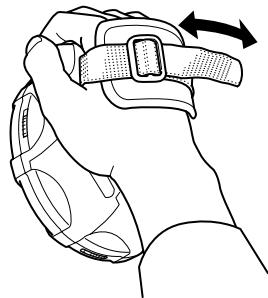
Put the grip band on your hand
Adjust the grip band to your hand size.
Supplied Accessories
Stereo headphone 1 pc.
Power Supply Preparations
The illustration of the grip band is omitted.
Using dry-cell batteries (not supplied)
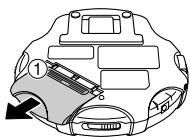
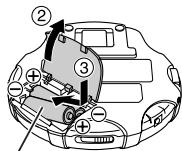
Two "R6" (LR6) alkaline batteries.
Caution:
Do not forcibly open the battery lid too wide.
Battery indicator
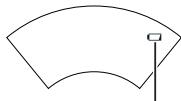
Battery indicator
This indicator appears when the batteries are almost out of power. Power will be cut off a short while later.
Note:
Turning off the Anti-Shock Protection EX will save the battery power more or less. For details, see "Anti-shock Protection EX" on page 11. (Available for an Audio CD only)
Using the AC adaptor (not supplied)
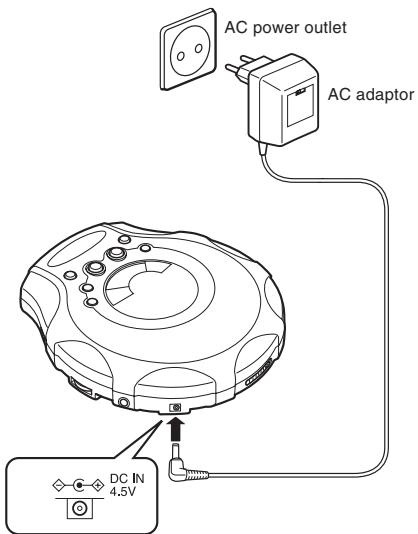
Notes:
- Even if the unit is turned off, small power is consumed as long as the AC adaptor is connected to the AC power outlet.
- When you want to purchase the AC adaptor, see page 14.
Preventing Accidental Operation (Hold mode)
This function causes the unit to ignore, accidental button presses.
Hold mode prevents the following:
- Powering on the unit accidentally (which can cause the batteries to go dead).
- Play being cut off unexpectedly.
To use the Hold mode
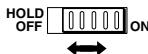
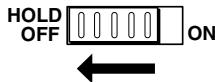
- To prevent the unit from powering on accidentally, set the HOLD switch to the ON position while the unit is turned off.
- To prevent the unit from unexpected operation during play, set the HOLD switch to the ON position after you starts playing the disc.
- When the unit is in Hold mode, "HOLd" and "C-w" lights as follows.
Power on : " w " stays lit.
Power off : “HOLd” and “- ” lights up for a few seconds when /II is pressed.
Note:
If the HOLD switch is set to the ON position, you cannot turn on the unit.
About MP3 files
MP3 File Compatibility
- This player can read MP3 files that are recorded in the format that is compliant with ISO 9660.
- The player can read or play an MP3 file with the extension code -mp3".
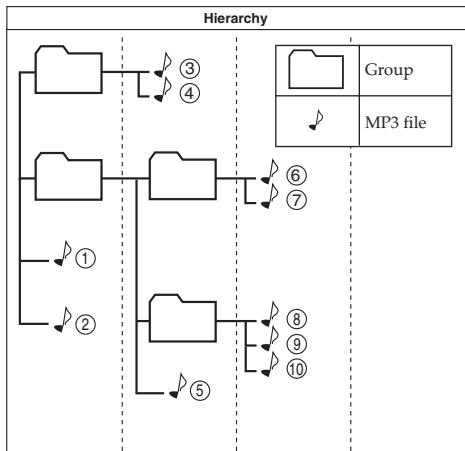
Playing order of MP3 files
The illustration below shows the normal playing order of the MP3 files. You will see that the MP3 files are played back in the order from the higher hierarchy to the lower one.
Basic Play
The illustration of the grip band is omitted.
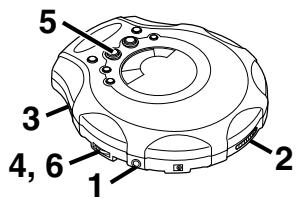
3
4

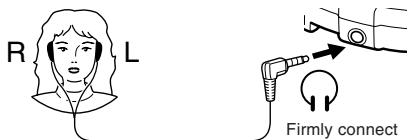
VOLUME
1
(To be continued on the next page)
2
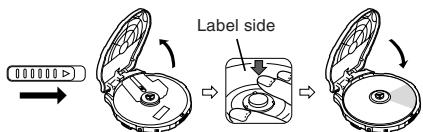
5 For Audio CD
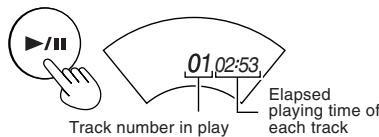
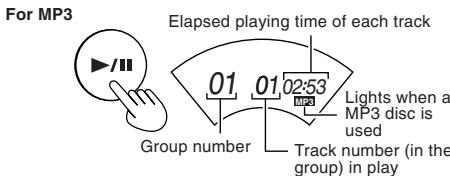
Play stops automatically when all the track have been played.
6
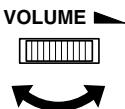
For your reference:
"DISC"
This indication appears if / is pressed when no disc is loaded or if the disc is not properly seated.

Preparation period before playing the track Flashes for several seconds after pressing to play.
"OPEN"
This indication appears when the lid is open.
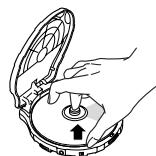
Removing discs
Turn off the unit and, after the disc has stopped rotating, remove the disc as shown below:
Auto power off
If the unit is left in stop mode for 30 seconds, the unit turns itself off automatically to prevent the batteries from running down.
Disc rotation noise
The portable CD player uses a power-saving operation method so that disc rotation noise will intermittently be emitted. But, it is not a failure.
To pause
During play,

For Audio CD
$$ 0 7 \dot {0} 0: 1 8 - $$

For MP3
$$ 0 1 0 4 \dot {0} 0: 0 7 - $$
Press again to restart play.
To stop
During play,

For Audio CD
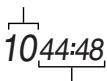
Total number of tracks
Total playing time

For MP3
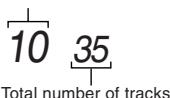
Total number of groups
To turn off the unit
While stopped,

No indication
Fast forward/reverse
Skip function
During play,
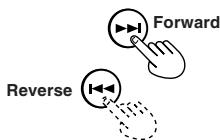
Search function
Keep depressed during play.
To skip back to the previous track, quickly press twice.
- During Program play, the button is used to fast forward or back through the programmed sequence of tracks.
- During Random play, the skip button cannot be used to skip back to tracks that were played previously in the random sequence.
Group skip (MP3 only)
During play or while stopped,

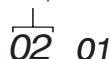
Group number
Other Play Methods
Intro play
You can successively play the first 10 seconds of every track.
1 While stopped,

(Repeatedly)
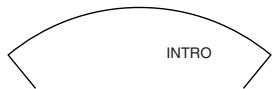
2

To cancel
Press MODE repeatedly until "INTRO" goes out.
Notes:
- You can also select Intro play during playback.
In this case, Intro play will start from the next track after the current track has finished. - You can also select Intro play during Program play mode.
Random play
During playback,
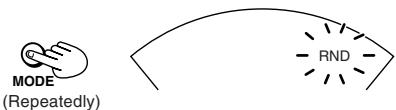
After playing all tracks, the unit stops.
To cancel
Press MODE until "RND" goes out, or press to stop the disc.
Notes:
- You can also select Random play in stop mode.
- During Program play, you can not select Random play.
Program play
You can program up to 64 tracks in any desired order including the same tracks.
For Audio CD, go to step 3.
Though the display differs a little, operation is the same.
1 (MP3 only) While stopped,

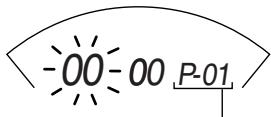
Program sequence number
2 (MP3 only) Select the desired group number. (e.g.02)
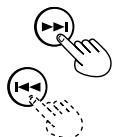
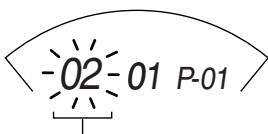
Group number
3
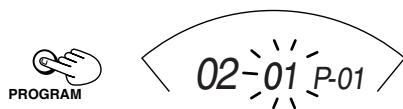
4 Select the desired track.
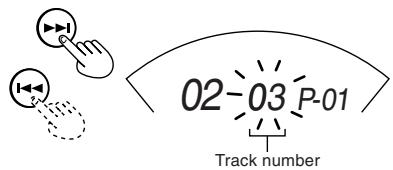
5
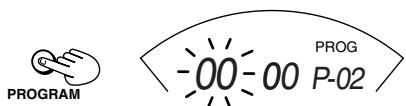
The track is registered.
(To be continued on the next page)
6 For MP3, repeat steps 2-5 to select other tracks. For Audio CD, repeat steps 4 and 5.
When you program exceeding 64 tracks, the program sequence number returns to "01" and will overwrite the previous setting.
7

To confirm the program
While stopped, press PROGRAM repeatedly. At this time, you can add and change the program, if required.
To delete the entire program
While stopped, press STOP. Or turn off the unit.
Repeat play
During playback,
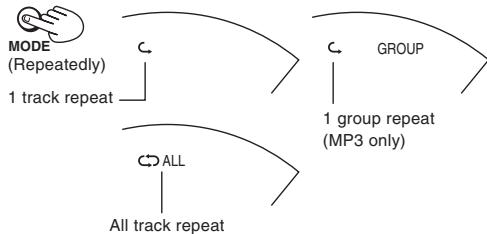
To cancel
Press MODE repeatedly until the repeat indicator goes out.
Notes:
- You can also select Repeat play during Program play.
- You can also select Repeat play while stopped.
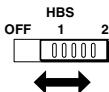
Hyper-Bass Sound effect
You can enjoy powerful bass sound.
Anti-Shock Protection EX
This function achieves excellent performance against sound interruption caused by vibrations. You will be able to enjoy listening to music during (not vigorous) jogging. By utilizing the high-performance servo circuit, audio data will be stored in the memory ahead of time.
For Audio CD: Up to 175 seconds worth (Anti-Shock Protection on/off selectable)
For MP3: Up to 426 seconds worth at 128 kbps (Anti-Shock Protection is fixed to on.)
Normally, this function is in effect.
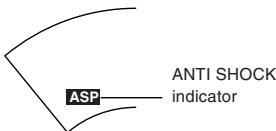
As the audio data is gradually stored, the indicator changes as follows:

(Audio CD only) To cancel

GROUP UP
The "ANTI SHOCK" indicator goes out.
(Audio CD only) To activate again
Press A.S.P./GROUP UP.
Notes:
- During this operation, the disc rotates at a higher rate than usual in order to collect extra audio data. This may cause the batteries to run out faster and could result in a slight increase in disc rotation noise.
- This function can be switched ON and OFF during playback. However, this may cause a slight interruption in the sound because the disc's rotational speed changes.
Concerning Compact Discs

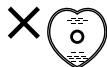
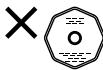
Only compact discs bearing this mark can be used with this unit. However, continued use of irregular shape CDs (heart-shape, octagonal, etc.) can damage the unit.
CD-R and CD-RW discs recorded with the audio CD format can be played back, though some may not be played back because of the disc characteristics or recording condition.
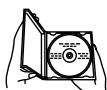
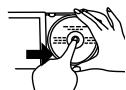
How to remove a disc from its case
How to store the disc in its case
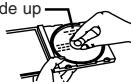
Label side up
How to hold a disc

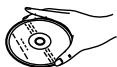
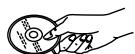
X
If the disc surface is dirty
Wipe it with a damp cloth and then wipe dry.
Wipe from the center toward the outer edge.

Play surface (shiny surface)
If moisture has formed on a disc
When moisture has formed because the disc was brought suddenly into a warm room from a cold environment, wipe off the moisture using a soft dry cloth.
When storing discs
Avoid locations which are
- Exposed to direct sunlight.
- Susceptible to high levels of humidity or dust.
- Directly exposed to heat from a heating appliance.
- On top of a car dashboard or near the rear window.
Handling precautions
- On the label side (the side with writing)
Do not write anything using a pencil, ball-point pen, etc. Do not use adhesive paper or labels. - On the disc (shiny) side
Handle this side carefully to keep it free from fingerprints or scratches. Do not use record cleaners, solvents, etc. - Do not attach labels or stickers to CDs.
Do not use CDs with exposed adhesive from tape or left over peeled off stickers. - Do not use scratch-proof protectors or covers other than those specified for use with this unit.
Cautions
Listening Precautions
- Do not play your headphones at a high volume. Hearing experts advise against continuous extended play.
- If you experience a ringing in your ears, reduce volume or discontinue use.
- Do not use while operating a motorized vehicle. It may create a traffic hazard and is illegal in many areas.
- You should use extreme caution or temporarily discontinue use in potentially hazardous situations.
- Even if your headphones is an open-air type designed to let you hear outside sounds, don't turn up the volume so high that you can't hear what's around you.
Rechargeable batteries
- Rechargeable batteries (not supplied) can be used.
- To use the rechargeable batteries, follow the instruction manual attached to the rechargeable batteries and charger (not supplied).
Dry cell batteries
To prevent damage to the batteries and electrolyte leakage, heed the following points.
- Align the and polarities properly when inserting the batteries.
- Do not mix different types or makers of batteries or old and new batteries.
- Remove the batteries if you do not plan to use the unit for a long period of time.
- Do not throw batteries into a fire, and do not short-circuit, disassemble or subject them to excessive heat.
- Do not attempt to recharge dry cell batteries.
Carrying dry cell batteries around
When putting dry cell batteries in a pocket or bag, ensure that no other metal objects such as a necklace are placed together with them. Contact with metal may cause short-circuiting which, in turn, may cause a fire.
AC adaptor
- Handle the AC adaptor carefully. Improper handling is dangerous.
- Do not touch it with wet hands.
- Do not place heavy objects on top of it.
- Do not forcibly bend it.
- Be sure to connect only the specified AC adaptor with the unit.
- Disconnect the AC adaptor from the power outlet if the unit is not going to be used for a long time.
Unit
No altering or remodeling
This can cause malfunctioning.
No dropping or strong impacts
This may damage the unit.
Locations to be avoided
Avoid using the unit in the following locations since they can cause malfunctioning.
- Bathrooms and other moisture-prone places.
2.Warehouses and other dusty places - Very hot places near heating appliances, etc.
Do not leave the unit exposed to direct sunlight for long periods of time
This may deform or discolor the cabinet and may also cause malfunctioning.
When purchasing AC adaptor
Be absolutely sure to purchase the AC adaptor designed espe cially for this unit.
AC adaptor: AA-R4514
For details, check with your dealer.
Troubleshooting
| Problem | Check this |
| Does not turn on. | • Is the AC adaptor securely connected? • Is the HOLD switch set to OFF position? |
| Cannot close the lid. | Is the disc properly secured in place? |
| Cannot play discs. | • Is the disc properly secured in place? • Is there moisture condensation on the lens? (Wait for about an hour and then try again.) • Are MP3 files recorded on the disc? • Do MP3 files have the extension code—.mp3? • Are MP3 files recorded in the format compliant with ISO 9660? |
| Cannot hear music—too noisy. | • Is the headphone plug inserted all the way? • Is the plug dirty? (Wipe away dirt on the plug.) • Are you playing a compatible disc? While playing a non-MP3 file, you will hear a noise. (Note it may not be an MP3 file although it has the extension code—.mp3.) |
| TV picture is distorted. Radio reception is noisy. | Are you using the unit too near a TV or tuner? (If the TV or tuner is connected to a simple indoor antenna, connect it to an outdoor antenna.) |
| “dISC” or “Er” is displayed when a disc is in the player. | • Is the disc damaged? • Is the disc playable on this player? • Has the disc been inserted upside down? |
If the remedies indicated in the chart do not solve the problem, refer to the directory of Authorized Service Centers (enclosed with this unit) to locate a convenient service center, or consult your dealer for instructions.
Specifications
Portable CD player
Type : Compact disc player
Signal detection system : Non-contact optical pickup (semiconductor laser)
Pickupsystem :3beamlaser
Number of channels : 2 channels (stereo)
Frequency response : 20 Hz to 20 kHz
Wow & flutter : Unmeasurable
Output : Headphones (3.5 mm dia. stereo × 1 ) 9 mW/ch at 10% THD/16Ω matching impedance (16 Ω to 1 kΩ)
Duration of battery : Approx. 30 hours when using two (with Anti-Shock) alkaline batteries (LR6)
Protection EX OFF)
Power requirements
Dimensions (W× H× D) : 133.2mm× 30.8mm× 146.8mm (Excluding buttons and controls)
Mass : 250 g (with grip band, without batteries)
AC adaptor (not supplied)
Input power source : AC 230 V, 50 Hz
Output voltage : DC 4.5 V, 600 mA
- Design and specifications are subject to change without notice.
Maintenance
Unit
Wipe the unit with a soft cloth. Remove stubborn dirt using a cloth which has been dipped in water or soapy water and wrung out, and then wipe dry.
- If you intend to use a chemically treated cleaning cloth, read its directions first.
- Do not use alcohol or paint thinners.
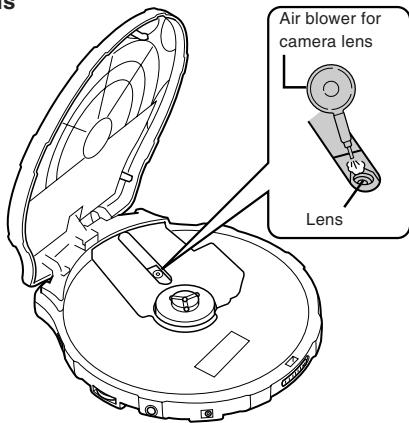
Lens
- Internacionalmente, se possible seccionar la reproduccion de repetition durante la reproduccion del programa.
-forky: A way to select a particular type of food. - Alternatively, the choice of foods is not always the best one.
- Alternatively, the choice of foods is not always the best one.
Anti-schok-beveiling EX
- Warnings, Cautions and Others
- WARNING:
- JADVERTENCIA!
- AVISO:
- WAARSCHUWING!
- WAARSCHUWING:
- CAUTION:
- PRECAUCION:
- BELANGRIJK VOOR LASERPRODUKTEN
- Table of Contents
- Put the grip band on your hand
- Supplied Accessories
- Power Supply Preparations
- Using dry-cell batteries (not supplied)
- Battery indicator
- Note:
- Using the AC adaptor (not supplied)
- Notes:
- Preventing Accidental Operation (Hold mode)
- Hold mode prevents the following:
- To use the Hold mode
- About MP3 files
- MP3 File Compatibility
- Playing order of MP3 files
- Basic Play
- For Audio CD
- 6
- For your reference:
- "DISC"
- "OPEN"
- Removing discs
- Auto power off
- Disc rotation noise
- To pause
- To stop
- To turn off the unit
- Fast forward/reverse
- Skip function
- Search function
- Group skip (MP3 only)
- Other Play Methods
- Intro play
- While stopped,
- 2
- To cancel
- Random play
- During playback,
- Program play
- 3
- 5
- Repeat play
- Hyper-Bass Sound effect
- Anti-Shock Protection EX
- (Audio CD only) To cancel
- (Audio CD only) To activate again
- Concerning Compact Discs
- How to remove a disc from its case
- How to store the disc in its case
- How to hold a disc
- If the disc surface is dirty
- If moisture has formed on a disc
- When storing discs
- Handling precautions
- Cautions
- Listening Precautions
- Rechargeable batteries
- Dry cell batteries
- Carrying dry cell batteries around
- AC adaptor
- Unit
- When purchasing AC adaptor
- Troubleshooting
- Specifications
- Portable CD player
- AC adaptor (not supplied)
- Maintenance
- Anti-schok-beveiling EX
Brand : JVC
Model : XL-PM400S
Category : CD Player